Page 48 of 828
To Unlock From The Passenger Side:
With a valid RKE key fob within 3 ft (1 m) of the
passenger door handle, grab the front passenger door
handle to unlock all four doors and the liftgate automati-
cally. The interior door panel lock knob will raise when
the door is unlocked.
NOTE:All doors will unlock when the front passenger
door handle is grabbed regardless of the driver ’s door
unlock preference setting (“Unlock Driver Door 1st
Press” or “Unlock All Doors 1st Press”).
Preventing Inadvertent Locking Of RKE key fob In
Vehicle (FOBIK-Safe)
To minimize the possibility of unintentionally locking a
RKE key fob inside your vehicle, the Passive Entry
system is equipped with an automatic door unlock
feature which will function if the ignition switch is in the
OFF position. FOBIK-Safe only executes in vehicles with Passive Entry.
There are three situations that trigger a FOBIK-Safe
search in any Passive Entry vehicle:
•
A lock request is made by a valid RKE key fob while a
door is open.
• A lock request is made by the Passive Entry door
handle while a door is open.
• A lock request is made by the door panel switch while
the door is open.
When any of these situations occur, after all open doors
are shut, the FOBIK-Safe search will be executed. If it
finds a RKE key fob inside the car, and it does not find
any RKE key fob outside the car, then the car will unlock
and alert the customer.
46 GETTING TO KNOW YOUR VEHICLE
Page 49 of 828

NOTE:The vehicle will only unlock the doors when a
valid RKE key fob is detected inside the vehicle, and no
valid RKE key fob is detected outside the vehicle. The
vehicle will not unlock the doors when any of the
following conditions are met:
• The doors are manually locked using the door lock
knobs.
• There is a valid RKE key fob outside the vehicle and
within 3 ft (1 m) of either Passive Entry door handle.
• Three attempts are made to lock the doors using the
door panel switch and then close the doors.
NOTE: On the third attempt ALL doors will lock and
the RKE key fob can be locked in the vehicle. To Enter The Liftgate
With a valid RKE key fob within 3 ft (1 m) of the liftgate,
cycle the handle to open the liftgate and pull the liftgate
open with one fluid motion.
NOTE:
If “Unlock Driver Door 1st Press” is pro-
grammed, only the liftgate will unlock when the liftgate
release handle is pushed. If “Unlock All Doors 1st Press”
is programmed, all doors and the liftgate will unlock
when the liftgate release handle is pushed. To select
between “Unlock Driver Door 1st Press” and “Unlock All
Doors 1st Press,” refer to “Uconnect Settings” in “Multi-
media” for further information.
3
GETTING TO KNOW YOUR VEHICLE 47
Page 50 of 828
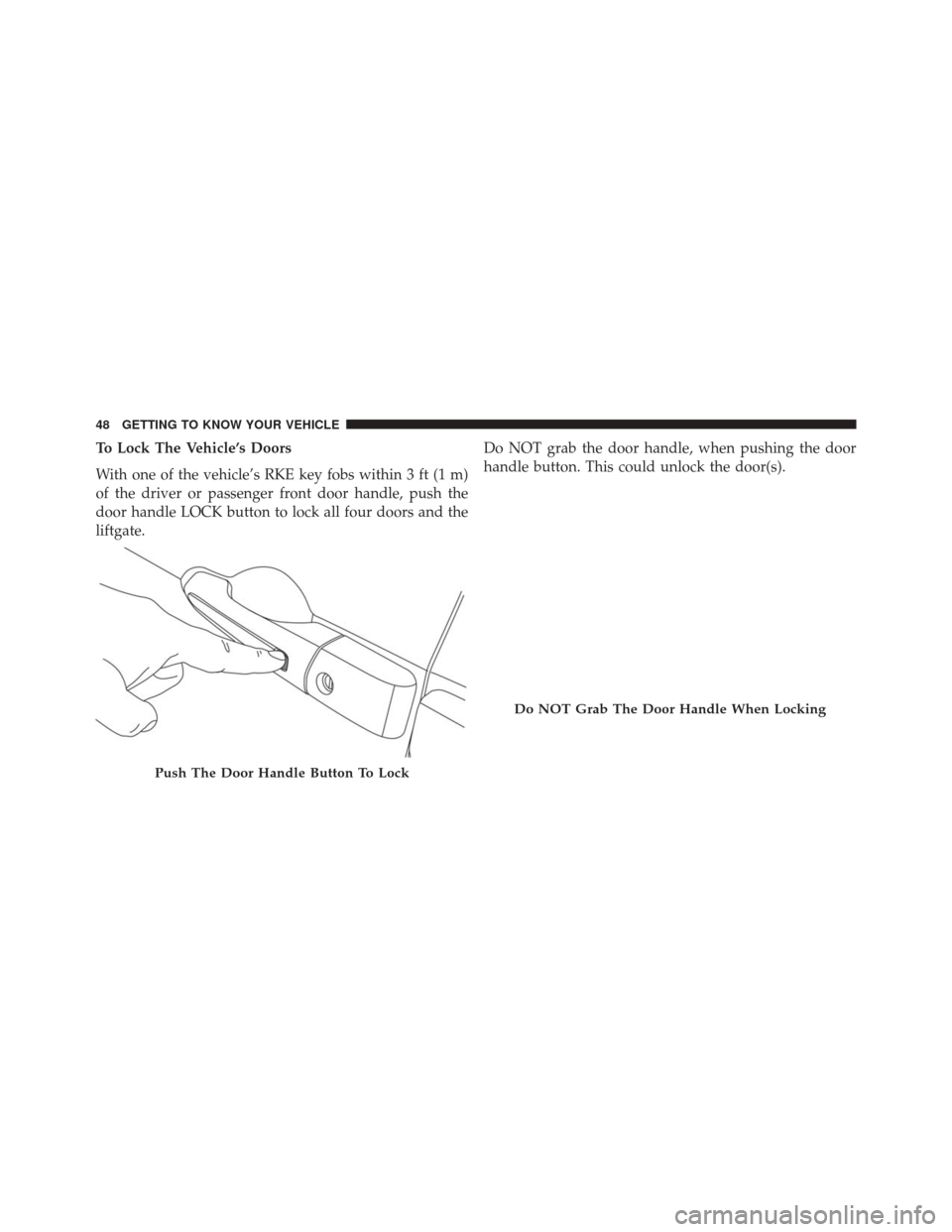
To Lock The Vehicle’s Doors
With one of the vehicle’s RKE key fobs within 3 ft (1 m)
of the driver or passenger front door handle, push the
door handle LOCK button to lock all four doors and the
liftgate.Do NOT grab the door handle, when pushing the door
handle button. This could unlock the door(s).
Push The Door Handle Button To Lock
Do NOT Grab The Door Handle When Locking
48 GETTING TO KNOW YOUR VEHICLE
Page 53 of 828

The power sliding door may be power opened or closed
in several ways:
•RKE key fob
• inside or outside handles
• the following buttons located
• in the overhead console
• just inside the sliding door
• on the outside handle
• Hands-Free Sliding Doors — If Equipped
Using any of the above ways:
• when the door is fully closed, the door will open.
• when the door is fully open, the door will close.
• when the door is moving, the door will reverse.
Push the button on the RKE key fob twice within five
seconds to open, close, or reverse a power sliding door. The RKE Key Fob and the overhead console button will
operate the door when the door is locked. All other ways
require the sliding door to be unlocked. If the vehicle is
equipped with Passive Entry, pressing the button on the
outside handle or Hands-Free feature (if equipped) will
unlock and open the sliding door, with a valid Passive
Entry RKE Key Fob within 3ft (1m) of the door handle.
NOTE:
Opening or closing the hands free sliding door (if
equipped) requires a valid RKE key fob within 3 ft (1 m)
of the door handle. If Passive Entry is turned off in the
Uconnect Settings this feature will not be functional.
To operate the sliding door manually with the handles or
to avoid unintentional operation of the power sliding
doors from the rear seats, push the power sliding door
power Off button, located in the overhead console, to
remove power to the handles and buttons just inside the
sliding doors. The power OFF LED, in the overhead
console, will be lit when the handles are manual. When
3
GETTING TO KNOW YOUR VEHICLE 51
Page 57 of 828

vehicle in the general location below the door handle(s).
Do not move your foot sideways or in a sweeping motion
or the sensors may not detect the motion.
NOTE:To open or close the Hands-Free Sliding Doors
requires a valid Passive Entry RKE Key Fob within 3 ft
(1 m) of the door handle. If a valid Passive Entry RKE
Key Fob is not within 3 ft (1 m), the door will not respond
to any kicks.
NOTE: The Hands-Free Sliding Doors feature may be
turned off through Uconnect Settings. Refer to “Uconnect
Settings” in “Multimedia” for further information. The
Hands-Free Sliding Doors feature should be turned off
during Jacking, Tire Changing, and Service.
NOTE:
• The sliding doors will not power open or close if the
gear selector is in gear or the vehicle speed is above
0 mph (0 km/h). •
If anything obstructs the power sliding doors while it
is closing or opening, the sliding doors will automati-
cally reverse to the closed or open position, provided it
meets sufficient resistance.
• If the power sliding doors encounters multiple ob-
structions within the same cycle, the system will
automatically stop. If this occurs, the liftgate must be
opened or closed manually.
Safe Lock Device — If Equipped
To provide a safer environment for small children riding
in the rear seats, the second row sliding door switches
may be overridden by pushing the OFF side of the Power
Switch located in the front overhead console.
When the power sliding door power switch is in the OFF
position, the power sliding side door may not be opened
or closed by pushing the switch located on the B-Pillar
trim panel, just in front of the sliding door or activating
the inside power sliding door handle.
3
GETTING TO KNOW YOUR VEHICLE 55
Page 92 of 828

To move the selected seat(s) to the Normal (seated)
position, push and release the Normal button. The seat
will automatically stop when the Normal position is
reached.
To move the selected seat(s) to the stow position, push
and release the Stow button. The seat will automatically
stop when the Stow position is reached.
To move the selected seat(s) back in the forward or
reverse direction, push and hold the Fold forward or
rearward button. Release the button when the desired
position is reached.
NOTE:
•Disconnect the center shoulder belt from the small
buckle before attempting to fold/stow the power third
row seats. •
To abort seat operation while seat is in motion, push a
different seat position selector switch to stop the seat.
Once the seat stops moving, then the desired position
can be selected.
• The third row power seat system includes obstacle
detection. When the system detects an obstacle, the
motors will stop and reverse direction. Should this
occur, remove the obstacle before pushing the button
again.
Driver Memory Seat — If Equipped
The Memory Buttons 1 and 2 on the driver’s door panel
can be programmed to recall the driver’s seat, outside
mirrors, and radio station preset settings. Your Remote
Keyless Entry (RKE) Key Fobs can also be programmed
to recall the same positions when the UNLOCK button is
pushed.
90 GETTING TO KNOW YOUR VEHICLE
Page 93 of 828
Your vehicle may have been delivered with two RKE key
fobs, one RKE key fob can be linked to each of the
memory positions.
Programming The Memory Feature
To create a new memory profile, perform the following:
1. Cycle the vehicles ignition to the ON/RUN position(do not start the engine).
2. Adjust all memory profile settings to desired prefer- ences (i.e., driver ’s seat, outside mirrors and radio
station presets).
3. Push and release the S (Set) button on the memory switch.
4. Within five seconds, push and release either of the memory buttons (1) or (2). The Electronic Vehicle
Driver Memory Switch
1 — Memory Button 1
2 — Set Button
3 — Memory Button 2
3
GETTING TO KNOW YOUR VEHICLE 91
Page 94 of 828

Information Center (EVIC) or Driver Information Dis-
play (DID) will display which memory position has
been set.
NOTE:
• Memory profiles can be set without the vehicle in
PARK, but the vehicle must be in PARK to recall a
memory profile.
• To set a memory profile to your RKE Key Fob, refer to
“Linking And Unlinking The Remote Keyless Entry
Key Fob To Memory” in this section.
Linking And Unlinking The Remote Keyless Entry
Key Fob To Memory
Your RKE Key Fob can be programmed to recall one of
two pre-programmed memory profiles by pushing the
UNLOCK button on the RKE Key Fob. NOTE:
Before programming your RKE Key Fob you
must select the “Personal Settings Linked to Key Fob”
feature through the Uconnect Settings. Refer to
“Uconnect Settings” in “Multimedia” for further infor-
mation.
To program your RKE Key Fob, perform the following:
1. Cycle the vehicle’s ignition to the OFF position.
2. Select a desired memory profile (1) or (2).
NOTE: If a memory profile has not already been set, refer
to �Programming The Memory Feature� in this section for
instructions on how to set a memory profile.
3. Once the profile has been recalled, push and release the SET (S) button on the memory switch.
4. Push and release button (1) or (2) accordingly. “Memory Profile Set” (1 or 2) will display in the
instrument cluster.
92 GETTING TO KNOW YOUR VEHICLE