Page 92 of 828

To move the selected seat(s) to the Normal (seated)
position, push and release the Normal button. The seat
will automatically stop when the Normal position is
reached.
To move the selected seat(s) to the stow position, push
and release the Stow button. The seat will automatically
stop when the Stow position is reached.
To move the selected seat(s) back in the forward or
reverse direction, push and hold the Fold forward or
rearward button. Release the button when the desired
position is reached.
NOTE:
•Disconnect the center shoulder belt from the small
buckle before attempting to fold/stow the power third
row seats. •
To abort seat operation while seat is in motion, push a
different seat position selector switch to stop the seat.
Once the seat stops moving, then the desired position
can be selected.
• The third row power seat system includes obstacle
detection. When the system detects an obstacle, the
motors will stop and reverse direction. Should this
occur, remove the obstacle before pushing the button
again.
Driver Memory Seat — If Equipped
The Memory Buttons 1 and 2 on the driver’s door panel
can be programmed to recall the driver’s seat, outside
mirrors, and radio station preset settings. Your Remote
Keyless Entry (RKE) Key Fobs can also be programmed
to recall the same positions when the UNLOCK button is
pushed.
90 GETTING TO KNOW YOUR VEHICLE
Page 94 of 828

Information Center (EVIC) or Driver Information Dis-
play (DID) will display which memory position has
been set.
NOTE:
• Memory profiles can be set without the vehicle in
PARK, but the vehicle must be in PARK to recall a
memory profile.
• To set a memory profile to your RKE Key Fob, refer to
“Linking And Unlinking The Remote Keyless Entry
Key Fob To Memory” in this section.
Linking And Unlinking The Remote Keyless Entry
Key Fob To Memory
Your RKE Key Fob can be programmed to recall one of
two pre-programmed memory profiles by pushing the
UNLOCK button on the RKE Key Fob. NOTE:
Before programming your RKE Key Fob you
must select the “Personal Settings Linked to Key Fob”
feature through the Uconnect Settings. Refer to
“Uconnect Settings” in “Multimedia” for further infor-
mation.
To program your RKE Key Fob, perform the following:
1. Cycle the vehicle’s ignition to the OFF position.
2. Select a desired memory profile (1) or (2).
NOTE: If a memory profile has not already been set, refer
to �Programming The Memory Feature� in this section for
instructions on how to set a memory profile.
3. Once the profile has been recalled, push and release the SET (S) button on the memory switch.
4. Push and release button (1) or (2) accordingly. “Memory Profile Set” (1 or 2) will display in the
instrument cluster.
92 GETTING TO KNOW YOUR VEHICLE
Page 119 of 828
INTERIOR LIGHTS
Courtesy/Interior Lighting
The courtesy light switches are used to turn the courtesy
lights On/Off.To operate the courtesy lights, push either the driver ’s or
passenger light switch.
NOTE:
•
Before exiting the vehicle, make sure that the interior
lights are turned off. This will prevent the battery from
discharging once the doors are closed.
• If a light is left on, it will automatically be turned off
approximately 10 minutes after the ignition is in the
STOP/OFF position.
Rear Courtesy/Reading Lights — If Equipped
Located above the rear passengers are courtesy/reading
lights. The lights turn on when a front door, a sliding
door or the liftgate is opened. If your vehicle is equipped
with Remote Keyless Entry (RKE) the lights will also turn
on when the UNLOCK button ON the RKE Key Fob is
pushed.
Courtesy Light Switches
3
GETTING TO KNOW YOUR VEHICLE 117
Page 156 of 828

WARNING!
•Never leave children unattended in a vehicle, or
with access to an unlocked vehicle. Never leave the
Key Fob in or near the vehicle, or in a location
accessible to children. Do not leave the ignition of
a vehicle equipped with Keyless Enter-N-Go in the
ACC or ON/RUN mode. Occupants, particularly
unattended children, can become entrapped by the
power sunroof while operating the power sunroof
switch. Such entrapment may result in serious
injury or death.
• In a collision, there is a greater risk of being thrown
from a vehicle with an open sunroof. You could
also be seriously injured or killed. Always fasten
your seat belt properly and make sure all passen-
gers are also properly secured.
(Continued)
WARNING! (Continued)
•Do not allow small children to operate the sunroof.
Never allow your fingers, other body parts, or any
object, to project through the sunroof opening.
Injury may result.
Opening Sunroof
Express Mode
Push the switch rearward and release it within one
second. The sunroof and sunshade will open automati-
cally from any position. The sunroof and sunshade will
open fully and stop automatically. This is called “Express
Open.” During Express Open operation, any other actua-
tion of the sunroof switch will stop the sunroof.
NOTE: If the sunshade is in the closed position when the
vent switch is pushed, the sunshade will automatically
cycle to the halfway open position prior to the sunroof
opening to the Vent position.
154 GETTING TO KNOW YOUR VEHICLE
Page 220 of 828
•To reset the oil change indicator after performing the
scheduled maintenance, refer to the following proce-
dure.
Keyless Enter-N-Go — Ignition 1. Without pushing the brake pedal, push the ENGINE
START/STOP button and cycle the ignition to the
ON/RUN position (Do not start the engine.)
2. Fully push the accelerator pedal, slowly, three times within 10 seconds.
3. Cycle the ignition to the OFF/LOCK position.
NOTE: If the indicator message illuminates when you
start the vehicle, the oil change indicator system did not
reset. If necessary, repeat this procedure.
KeySense Cluster Messages — If Equipped
When the KeySense key is in use there will be:
•Continuous, dedicated telltale
• Unique Display Splash Screen
Push Button Ignition
218 GETTING TO KNOW YOUR INSTRUMENT PANEL
Page 385 of 828

STARTING PROCEDURES
Before starting your vehicle, adjust your seat, adjust both
inside and outside mirrors, and fasten your seat belts.
WARNING!
•When leaving the vehicle, always remove the Key
Fob from the vehicle and lock your vehicle.
• Never leave children alone in a vehicle, or with
access to an unlocked vehicle.
• Allowing children to be in a vehicle unattended is
dangerous for a number of reasons. A child or
others could be seriously or fatally injured. Chil-
dren should be warned not to touch the parking
brake, brake pedal or the transmission gear selec-
tor.
• Do not leave the Key Fob in or near the vehicle, or
in a location accessible to children, and do not
(Continued)
WARNING! (Continued)
leave the ignition of a vehicle equipped with
Keyless Enter-N-Go in the ACC or ON/RUN mode.
A child could operate power windows, other con-
trols, or move the vehicle.
Start the engine with the gear selector in the NEUTRAL
or PARK position. Apply the brake before shifting to any
driving range.
Normal Starting
NOTE: Normal starting of either a cold or a warm engine
is obtained without pumping or pressing the accelerator
pedal.
To Turn On The Engine Using ENGINE START/STOP
Button
1. The transmission must be in PARK or NEUTRAL.
6
STARTING AND OPERATING 383
Page 554 of 828
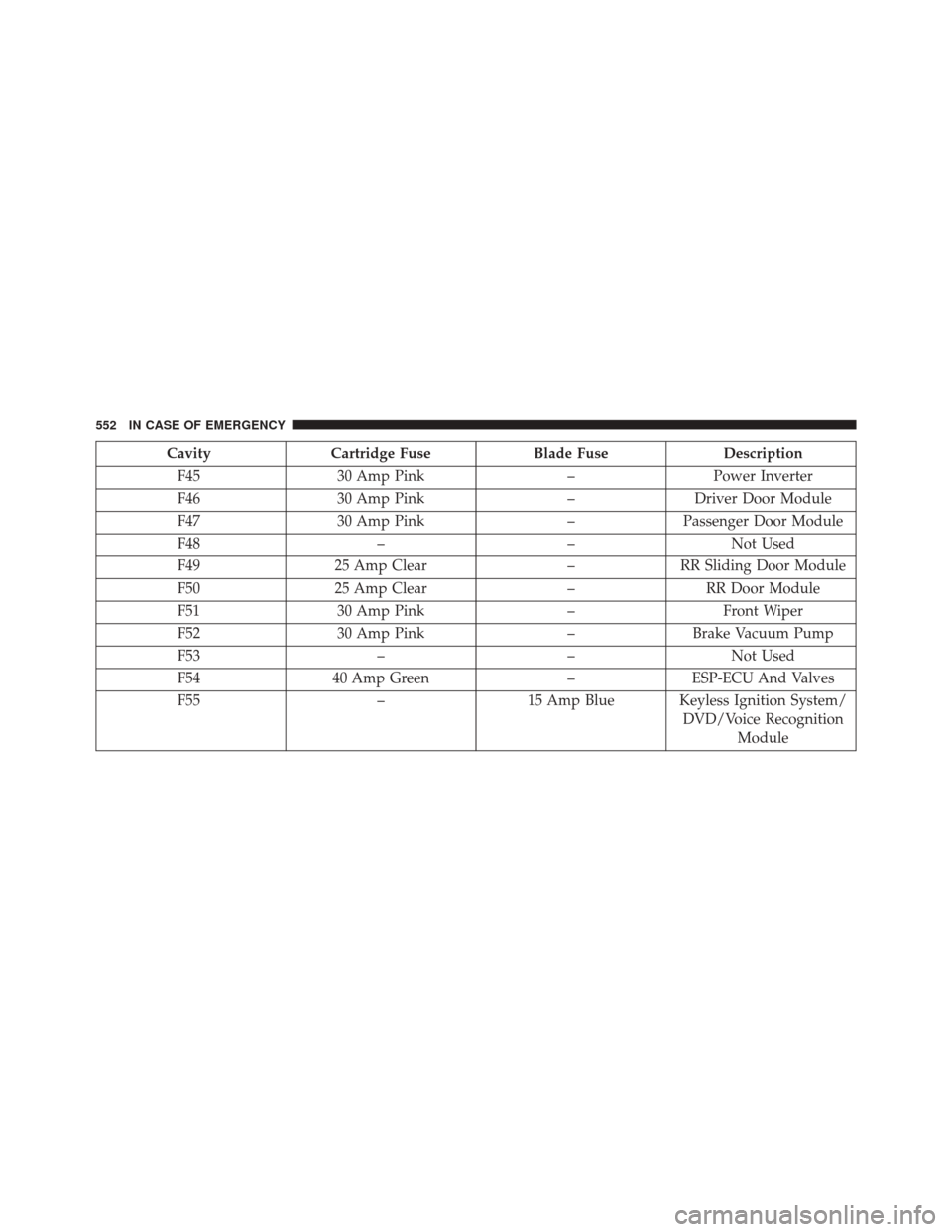
CavityCartridge Fuse Blade FuseDescription
F45 30 Amp Pink –Power Inverter
F46 30 Amp Pink –Driver Door Module
F47 30 Amp Pink –Passenger Door Module
F48 ––Not Used
F49 25 Amp Clear –RR Sliding Door Module
F50 25 Amp Clear –RR Door Module
F51 30 Amp Pink –Front Wiper
F52 30 Amp Pink –Brake Vacuum Pump
F53 ––Not Used
F54 40 Amp Green –ESP-ECU And Valves
F55 –15 Amp Blue Keyless Ignition System/
DVD/Voice RecognitionModule
552 IN CASE OF EMERGENCY
Page 710 of 828

setting, press the Headlights Off Delay button on the
touchscreen, and choose either 0 sec, 30 sec, 60 sec or 90
seconds. The selected button will highlight indicating
that the setting has been selected.
•Flash Lights With Sliding Door
When this feature is selected, the hazard lights will flash
when the sliding doors are opened or closed with the
Remote Keyless Entry (RKE) transmitter, or when using
the passive entry feature. To make your selection, press
the “Flash Lights With Sliding Door” button on the
touchscreen, then select from “On” or “Off.”
• Headlights With Wipers — If Equipped
When this feature is selected, and the headlight switch is
in the AUTO position, the headlights will turn on ap-
proximately 10 seconds after the wipers are turned on.
The headlights will also turn off when the wipers are turned off if they were turned on by this feature. To make
your selection, press the “Lights w/Wipers” button on
the touchscreen and make your selection.
•
Illuminated Approach
When this feature is selected, it allows the adjustment of
the amount of time the headlights remain on after the
doors are unlocked with the Remote Keyless Entry (RKE)
transmitter. To change the Illuminated Approach status,
press the “Illuminated Approach” button and choose
either 0 sec, 30 sec, 60 sec or 90 seconds.
• Automatic High Beam Headlamps — If Equipped
When this feature is selected, the high beam headlights
will activate/deactivate automatically under certain con-
ditions. To make your selection, press the “Auto High
Beams” button on the touchscreen, then select from “On”
or “Off.”
708 MULTIMEDIA