Page 417 of 828

Remove your foot from the accelerator pedal. If you do
not, the vehicle may continue to accelerate beyond the set
speed. If this occurs:
•The message “ACC DRIVER OVERRIDE” will display
in the EVIC/DID.
• The system will not be controlling the distance be-
tween your vehicle and the vehicle ahead. The vehicle
speed will only be determined by the position of the
accelerator pedal.
To Cancel
The following conditions cancel the system:
• The brake pedal is applied.
• The CANCEL button is pushed.
• An Anti-Lock Brake System (ABS) event occurs.
• The gear selector is removed from the DRIVE position. •
The Electronic Stability Control/Traction Control Sys-
tem (ESC/TCS) activates.
• The vehicle parking brake is applied.
• Driver seatbelt is unbuckled at low speeds.
• Driver door is opened at low speeds.
To Turn Off
The system will turn off and clear the set speed in
memory if:
•The Adaptive Cruise Control (ACC) ON/OFF button
is pushed.
• The Normal (Fixed Speed) Electronic Speed Control
ON/OFF button is pushed.
• The ignition is turned OFF.6
STARTING AND OPERATING 415
Page 425 of 828

Overtake Aid
When driving with ACC engaged and following a ve-
hicle, the system will provide an additional acceleration
up to the ACC set speed to assist in passing the vehicle.
This additional acceleration is triggered when the driver
utilizes the left turn signal and will only be active when
passing on the left hand side.
ACC Operation At Stop
In the event that the ACC system brings your vehicle to
a standstill while following a target vehicle, if the target
vehicle starts moving within two seconds of your vehicle
coming to a standstill, your vehicle will resume motion
without the need for any driver action.
If the target vehicle does not start moving within two
seconds of your vehicle coming to a standstill, the driver
will either have to push the RES (resume) button, or
apply the accelerator pedal to reengage the ACC to the
existing Set Speed.NOTE:
After the ACC system holds your vehicle at a
standstill for approximately 3 consecutive minutes, the
parking brake will be activated, and the ACC system will
be cancelled.
While ACC is holding your vehicle at a standstill, if the
driver seatbelt is unbuckled or the driver door is opened,
the parking brake will be activated, and the ACC system
will be cancelled.WARNING!
When the ACC system is resumed, the driver must
ensure that there are no pedestrians, vehicles or
objects in the path of the vehicle. Failure to follow
these warnings can result in a collision and death or
serious personal injury.
6
STARTING AND OPERATING 423
Page 513 of 828
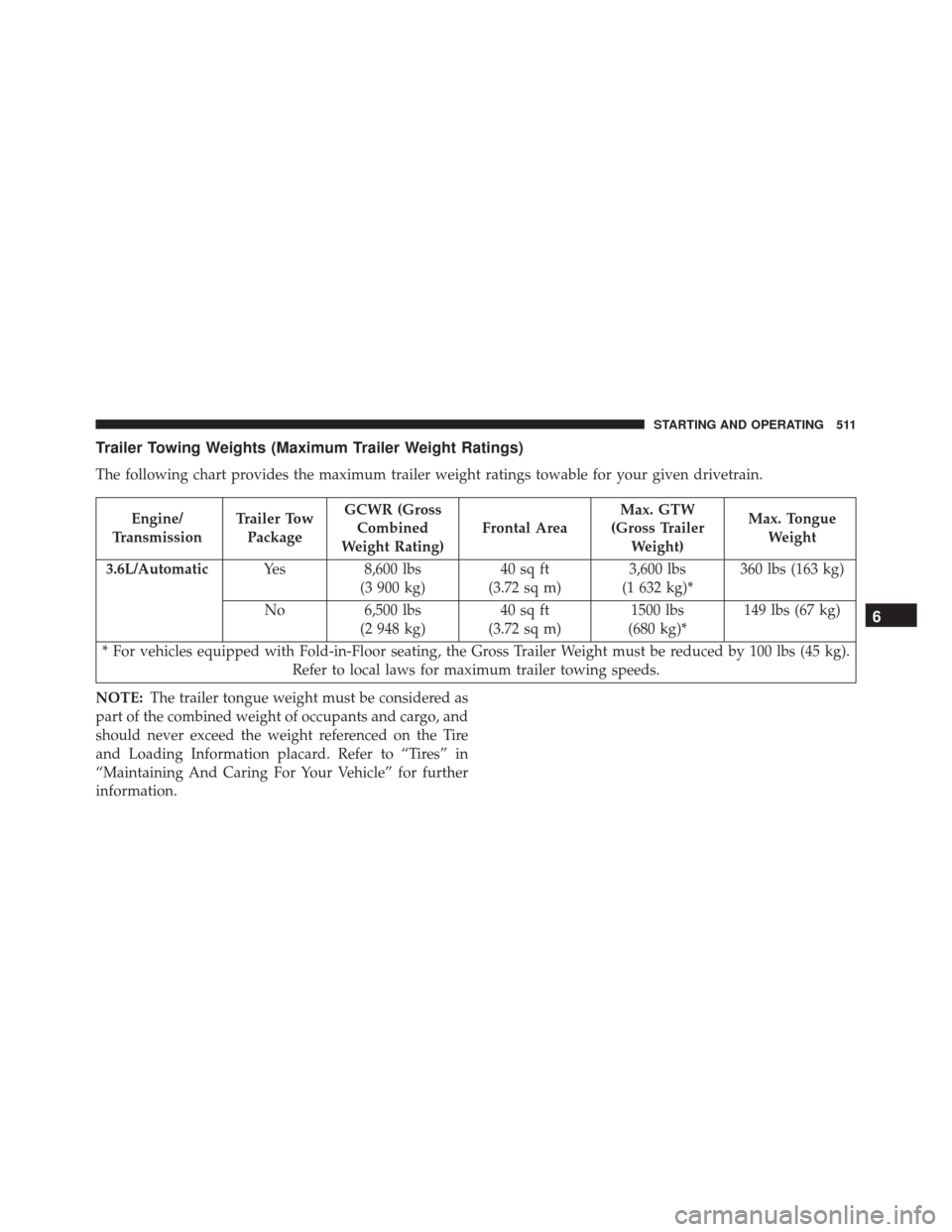
Trailer Towing Weights (Maximum Trailer Weight Ratings)
The following chart provides the maximum trailer weight ratings towable for your given drivetrain.
Engine/
Transmission Trailer Tow
Package GCWR (Gross
Combined
Weight Rating) Frontal AreaMax. GTW
(Gross Trailer Weight) Max. Tongue
Weight
3.6L/Automatic Yes 8,600 lbs
(3 900 kg) 40 sq ft
(3.72 sq m) 3,600 lbs
(1 632 kg)* 360 lbs (163 kg)
No 6,500 lbs
(2 948 kg) 40 sq ft
(3.72 sq m) 1500 lbs
(680 kg)* 149 lbs (67 kg)
* For vehicles equipped with Fold-in-Floor seating, the Gross Trailer Weight must be reduced by 100 lbs (45 kg). Refer to local laws for maximum trailer towing speeds.
NOTE: The trailer tongue weight must be considered as
part of the combined weight of occupants and cargo, and
should never exceed the weight referenced on the Tire
and Loading Information placard. Refer to “Tires” in
“Maintaining And Caring For Your Vehicle” for further
information.
6
STARTING AND OPERATING 511
Page 551 of 828
CavityCartridge Fuse Blade FuseDescription
F10 ––Not Used
F11 ––Not Used
F12 –5 Amp Tan Battery Sensor (IBS)
F13 ––Not Used
F14 –10 Amp Red ECM
F15 40 Amp Green –Power Locks
F16 –20 Amp Yellow ECM
F17 30 Amp Pink –Starter
F18 40 Amp Green –CBC Feed #4 (Exterior
Lights #1)
F19 25 Amp Clear –2nd Row Folding Seats
Solenoid LT
F20 –10 Amp Red A/C Compressor Clutch
F21 25 Amp Clear –2nd Row Folding Seat
Solenoid RT
7
IN CASE OF EMERGENCY 549
Page 553 of 828
CavityCartridge Fuse Blade FuseDescription
F32 20 Amp Blue –ECM
F33 30 Amp Pink –Power Liftgate Module
F34 25 Amp Clear –RR Door Node
F35 25 Amp Clear –Sunroof Control Module
F36 ––Not Used
F37 40 Amp Green –CBC Feed #4 (Exterior
Lighting #2)
F38 60 Amp Yellow –Vacuum Cleaner
F39 25 Amp Clear –HVAC Blower Motor
F40 ––Not Used
F41 ––Not Used
F42 30 Amp Pink –Folding Seat Module
F43 –20 Amp Yellow Fuel Pump Motor
F44 30 Amp Pink –CBC Feed #1 (Interior
Lights)
7
IN CASE OF EMERGENCY 551
Page 558 of 828
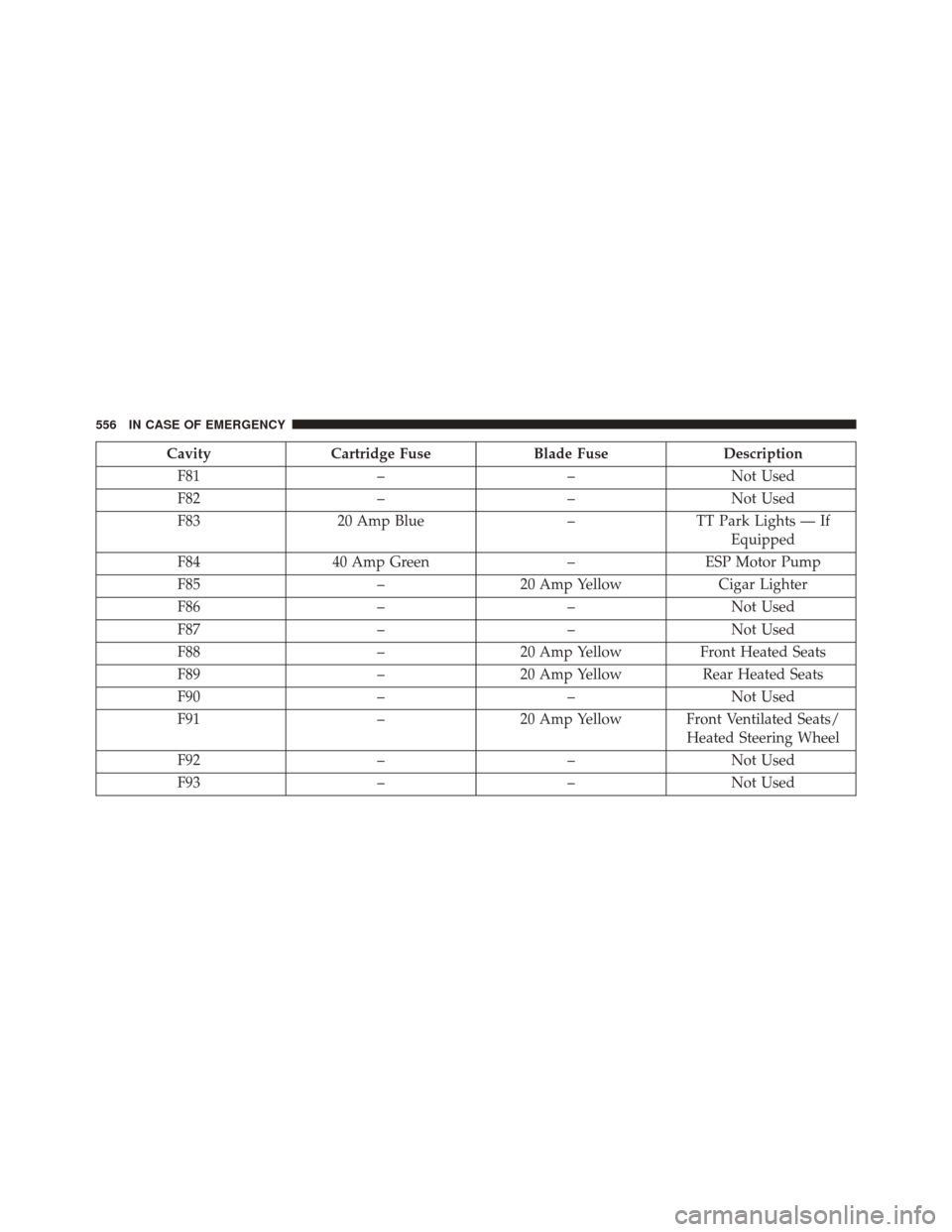
CavityCartridge Fuse Blade FuseDescription
F81 ––Not Used
F82 ––Not Used
F83 20 Amp Blue –TT Park Lights — If
Equipped
F84 40 Amp Green –ESP Motor Pump
F85 –20 Amp Yellow Cigar Lighter
F86 ––Not Used
F87 ––Not Used
F88 –20 Amp Yellow Front Heated Seats
F89 –20 Amp Yellow Rear Heated Seats
F90 ––Not Used
F91 –20 Amp Yellow Front Ventilated Seats/
Heated Steering Wheel
F92 ––Not Used
F93 ––Not Used
556 IN CASE OF EMERGENCY
Page 583 of 828

leverage. Tighten the lug nuts in a star pattern until
each nut has been tightened twice. Refer to “Torque
Specifications” in the “Technical Data” section for
proper wheel lug nut torque. If in doubt about the
correct tightness, have them checked with a torque
wrench by your authorized dealer or at a service
station.
7. After 25 miles (40 km) check the lug nut torque with a torque wrench to ensure that all lug nuts are properly
seated against the wheel.
Vehicles Without Wheel Covers
1. Mount the road tire on the axle.
2. Install the remaining lug nuts with the cone shapedend of the nut toward the wheel. Lightly tighten the
lug nuts.
WARNING!
To avoid the risk of forcing the vehicle off the jack,
do not tighten the wheel nuts fully until the vehicle
has been lowered. Failure to follow this warning may
result in serious injury.
3. Lower the vehicle to the ground by turning the jack handle counterclockwise.
4. Finish tightening the lug nuts. Push down on the wrench while at the end of the handle for increased
leverage. Tighten the lug nuts in a star pattern until
each nut has been tightened twice. Refer to “Torque
Specifications” in the “Technical Data” section for
proper wheel lug nut torque. If in doubt about the
correct tightness, have them checked with a torque
wrench by your authorized dealer or at a service
station.
7
IN CASE OF EMERGENCY 581
Page 584 of 828

5. After 25 miles (40 km) check the lug nut torque with atorque wrench to ensure that all lug nuts are properly
seated against the wheel.
Return Inflatable Spare Tire
To return Inflatable Spare Tire to its storage location.
1. Return the Jack.
2. Deflate the spare tire. Use the Tire Inflator Kit orPortable Air Compressor and push the deflation but-
ton to do this step. Refer to “Tire Inflator Kit” or
“Portable Air Compressor” if equipped in this section
for additional information. The inflatable spare tire
will return to its original shape.
3. Install the inflatable spare tire back into its original stowage location and position facing outward.
4. Install the foam tray with wrench and funnel installed.
5. Install and tighten the wing nut by hand. 6. Install the Tire Service Kit or Portable Air Compressor
if equipped and tighten the strap.
7. Install access panel door.TIRE SERVICE KIT — IF EQUIPPED
Your vehicle may be equipped with a Tire Service Kit.
Small punctures up to 1/4 inch (6 mm) in the tire tread
can be sealed with Tire Service Kit. Foreign objects (e.g.,
screws or nails) should not be removed from the tire. Tire
Service Kit can be used in outside temperatures down to
approximately -4°F (-20°C). This kit will provide a tem-
porary tire seal, allowing you to drive your vehicle up to
100 miles (160 km) with a maximum speed of 50 mph
(90 km/h).
Tire Service Kit Storage
The Tire Service Kit is secured with a strap and is stored
in the storage bin located behind the rear cargo trim
panel.
582 IN CASE OF EMERGENCY