Page 560 of 828
Interior Fuses
The interior fuse panel is located in the passenger compartment on the left side dash panel under the instrument
panel.
CavityBlade Fuse Description
F13 15 Amp Blue Low Beam Left
F32 10 Amp Red Interior Lighting
F36 10 Amp Red Intrusion Module / Siren
F37 7.5 Amp Brown Aux. Switch Bank Module (ASBM)
F38 20 Amp Yellow All Doors Lock/Unlock
F43 20 Amp Yellow Washer Pump Front
F48 20 Amp Yellow Horns
F49 7.5 Amp Brown Lumbar Support
F51 10 Amp Red Driver Window Switch / Power Mirrors – If
Equipped
F53 7.5 Amp Brown UCI Port (USB & AUX)
F89 5 Amp Tan Trunk Lamp
558 IN CASE OF EMERGENCY
Page 693 of 828
MULTIMEDIA
CONTENTS
�UCONNECT RADIOS ...................694
� PERSONALIZED MENU BAR ..............694
� CYBERSECURITY ...................... .695
� UCONNECT SETTINGS ..................696
▫ Customer Programmable Features — Uconnect 5.0
Settings ........................... .697
▫ Customer Programmable Features — Uconnect 8.4
Settings ............................ .718
� STEERING WHEEL AUDIO CONTROLS ......742
▫ Radio Operation ..................... .743�
AUX/USB/MP3 CONTROL ...............743
� UCONNECT THEATER — IF EQUIPPED .....745
▫ Getting Started ...................... .746
▫ Accessing The System From The Uconnect
Radio ............................. .747
▫ Uconnect Theater Controls ...............748
▫ Accessing The System From The Uconnect Theater
Rear Screens ........................ .749
▫ Pairing The Remote ....................750
▫ Unpairing The Remote ..................751
10
Page 694 of 828

▫Media Sources ....................... .752
▫ Uconnect Theater Remote Control ..........753
▫ Uconnect Theater Home Screen And
Controls ........................... .755
▫ Play A DVD/Blu-ray Or USB Media File From
Uconnect Radio ...................... .756
▫ Blu-ray Controls – Disc Specific Functions . . . .759
▫ Uconnect Theater Apps .................760
▫ Using The Rear Video USB Port ...........763
▫ Play Video Games .....................764
▫ Headphones Operation .................765
▫ Disc Menu ......................... .768
▫ Listening To Audio With The Screen Closed . . .769
▫ Rear Climate Controls ..................769 ▫
General Information ....................770
� RADIO OPERATION AND MOBILE PHONES . .770
▫ Regulatory And Safety Information .........770
� UCONNECT VOICE RECOGNITION QUICK
TIPS ............................... .772
▫ Introducing Uconnect ...................772
▫ Get Started ......................... .773
▫ Basic Voice Commands ..................775
▫ Radio ............................. .776
▫ Media ............................. .778
▫ Phone ............................. .779
▫ Voice Text Reply ..................... .781
▫ Climate ............................ .783
692 MULTIMEDIA
Page 697 of 828
CYBERSECURITY
Your vehicle may be a connected vehicle and may be
equipped with both wired and wireless networks. These
networks allow your vehicle to send and receive infor-
mation. This information allows systems and features in
your vehicle to function properly.
Your vehicle may be equipped with certain security
features to reduce the risk of unauthorized and unlawful
access to vehicle systems and wireless communications.
Vehicle software technology continues to evolve over
time and FCA US LLC, working with its suppliers,
evaluates and takes appropriate steps as needed. Similar
to a computer or other devices, your vehicle may require
software updates to improve the usability and perfor-
mance of your systems or to reduce the potential risk of
unauthorized and unlawful access to your vehicle sys-
tems.The risk of unauthorized and unlawful access to your
vehicle systems may still exist, even if the most recent
version of vehicle software (such as Uconnect software) is
installed.
WARNING!
•
It is not possible to know or to predict all of the
possible outcomes if your vehicle’s systems are
breached. It may be possible that vehicle systems,
including safety related systems, could be im-
paired or a loss of vehicle control could occur that
may result in an accident involving serious injury
or death.
• ONLY insert media (e.g., USB, SD card, or CD) into
your vehicle if it came from a trusted source. Media
of unknown origin could possibly contain mali-
cious software, and if installed in your vehicle, it
(Continued)
10
MULTIMEDIA 695
Page 698 of 828

WARNING!(Continued)
may increase the possibility for vehicle systems to
be breached.
• As always, if you experience unusual vehicle be-
havior, take your vehicle to your nearest authorized
dealer immediately.
NOTE:
• FCA or your dealer may contact you directly regarding
software updates.
• To help further improve vehicle security and minimize
the potential risk of a security breach, vehicle owners
should:
• Routinely check www.driveuconnect.com/software-
update to learn about available Uconnect software
updates.
• Only connect and use trusted media devices (e.g.
personal mobile phones, USBs, CDs). Privacy of any wireless and wired communications can-
not be assured. Third parties may unlawfully intercept
information and private communications without your
consent. For further information, refer to “Privacy Prac-
tices - If Equipped with Uconnect 8.4 Radio” in “Multi-
media” in your Owner ’s Manual Radio Supplement and
“Onboard Diagnostic System (OBD II) Cybersecurity” in
“Getting To Know Your Instrument Panel” in your Own-
er ’s Manual on the DVD.
UCONNECT SETTINGS
The Uconnect system uses a combination of buttons on
the touchscreen and/or buttons on the faceplate located
on the center of the instrument panel that allow you to
access and change the customer programmable features.
Many features can vary by vehicle.
Buttons on the touchscreen are accessible on the
Uconnect touchscreen.
696 MULTIMEDIA
Page 745 of 828
Pushing the center button will make the radio switch
between the various modes available (AM/FM/SXM/
AUX, etc.).
The left-hand control is a rocker-type switch with a
push-button in the center. The function of the left-hand
control is different depending on which mode you are in.
The following describes the left-hand control operation in
each mode.
Radio Operation
Pushing the top of the switch will “Seek” up for the next
listenable station and pushing the bottom of the switch
will “Seek” down for the next listenable station.
The button located in the center of the left-hand control
will tune to the next preset station that you have pro-
grammed in the radio preset button.
AUX/USB/MP3 CONTROL
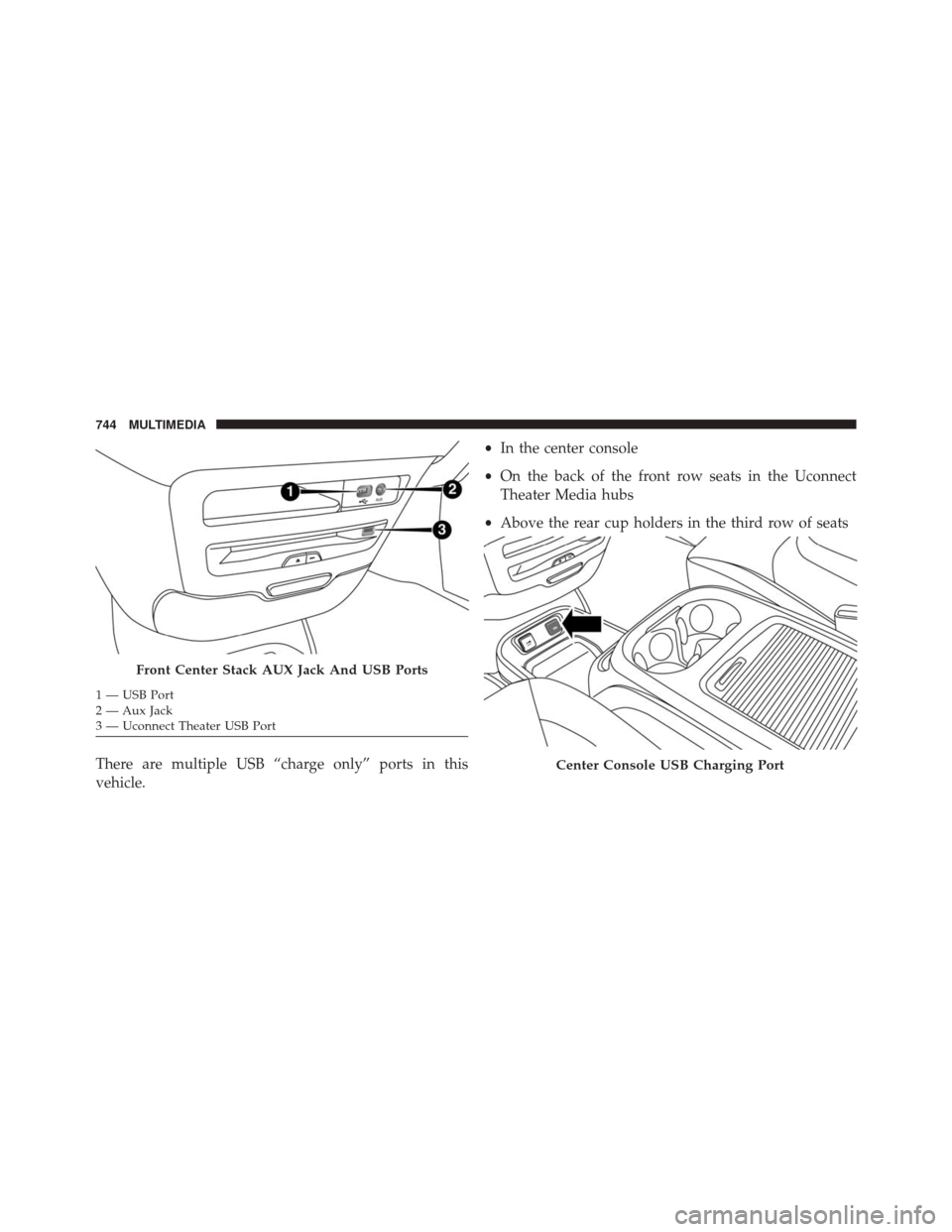
There are numerous USB ports located throughout the
vehicle. This feature allows an external USB device to be
plugged into the USB port.
For further information, refer to the Uconnect Supple-
ment Manual.
10
MULTIMEDIA 743
Page 746 of 828
There are multiple USB “charge only” ports in this
vehicle.•
In the center console
• On the back of the front row seats in the Uconnect
Theater Media hubs
• Above the rear cup holders in the third row of seats
Front Center Stack AUX Jack And USB Ports
1 — USB Port
2 — Aux Jack
3 — Uconnect Theater USB Port
Center Console USB Charging Port
744 MULTIMEDIA
Page 747 of 828
NOTE:The USB “Charge Only” ports will recharge
battery operated USB devices when connected.
UCONNECT THEATER — IF EQUIPPED
Your Uconnect Theater is designed to give your family
years of enjoyment.
There are multiple ways to interact with your Uconnect
Theater system.
• Play your favorite CDs, DVDs or Blu-ray Discs
• Plug and play a variety of standard video games or
devices into the HDMI port
• Listen to audio over the wireless headphones
• Plug and play a variety of devices into the Video USB
port
• Plug in standard headphones to listen to audio
Please review this Owner’s Manual to become familiar
with its features and operation.
Rear USB Charging Ports
10
MULTIMEDIA 745