Page 520 of 828

WARNING!
•Do not connect trailer brakes to your vehicle’s
hydraulic brake lines. It can overload your brake
system and cause it to fail. You might not have
brakes when you need them and could have a
collision.
• Towing any trailer will increase your stopping
distance. When towing you should allow for addi-
tional space between your vehicle and the vehicle
in front of you. Failure to do so could result in a
collision.
CAUTION!
If the trailer weighs more than 1,000 lbs (453 kg)
loaded, it should have its own brakes and they
should be of adequate capacity. Failure to do this
(Continued)
CAUTION! (Continued)
could lead to accelerated brake lining wear, higher
brake pedal effort, and longer stopping distances.
Towing Requirements — Trailer Lights And Wiring
Whenever you pull a trailer, regardless of the trailer size,
stoplights and turn signals on the trailer are required for
motoring safety.
The Trailer Tow Package may include a four- and seven-
pin wiring harness. Use a factory approved trailer har-
ness and connector.
NOTE:Do not cut or splice wiring into the vehicles
wiring harness.
The electrical connections are all complete to the vehicle
but you must mate the harness to a trailer connector.
Refer to the following illustrations.
518 STARTING AND OPERATING
Page 522 of 828

Towing Tips
Before setting out on a trip, practice turning, stopping,
and backing up the trailer in an area located away from
heavy traffic.
Automatic Transmission
Select the DRIVE range when towing. The transmission
controls include a drive strategy to avoid frequent shift-
ing when towing. For increased engine braking on steep
downhill grades, select the LOW range.
Electronic Speed Control — If Equipped
•Do not use in hilly terrain or with heavy loads.
• When using the speed control, if you experience speed
drops greater than 10 mph (16 km/h), disengage until
you can get back to cruising speed.
• Use speed control in flat terrain and with light loads to
maximize fuel efficiency.
Cooling System
To reduce potential for engine and transmission over-
heating, take the following actions:
City Driving
When stopped for short periods, shift the transmission
into NEUTRAL and increase engine idle speed.
Highway Driving
Reduce speed.
Air Conditioning
Turn off temporarily.
520 STARTING AND OPERATING
Page 523 of 828
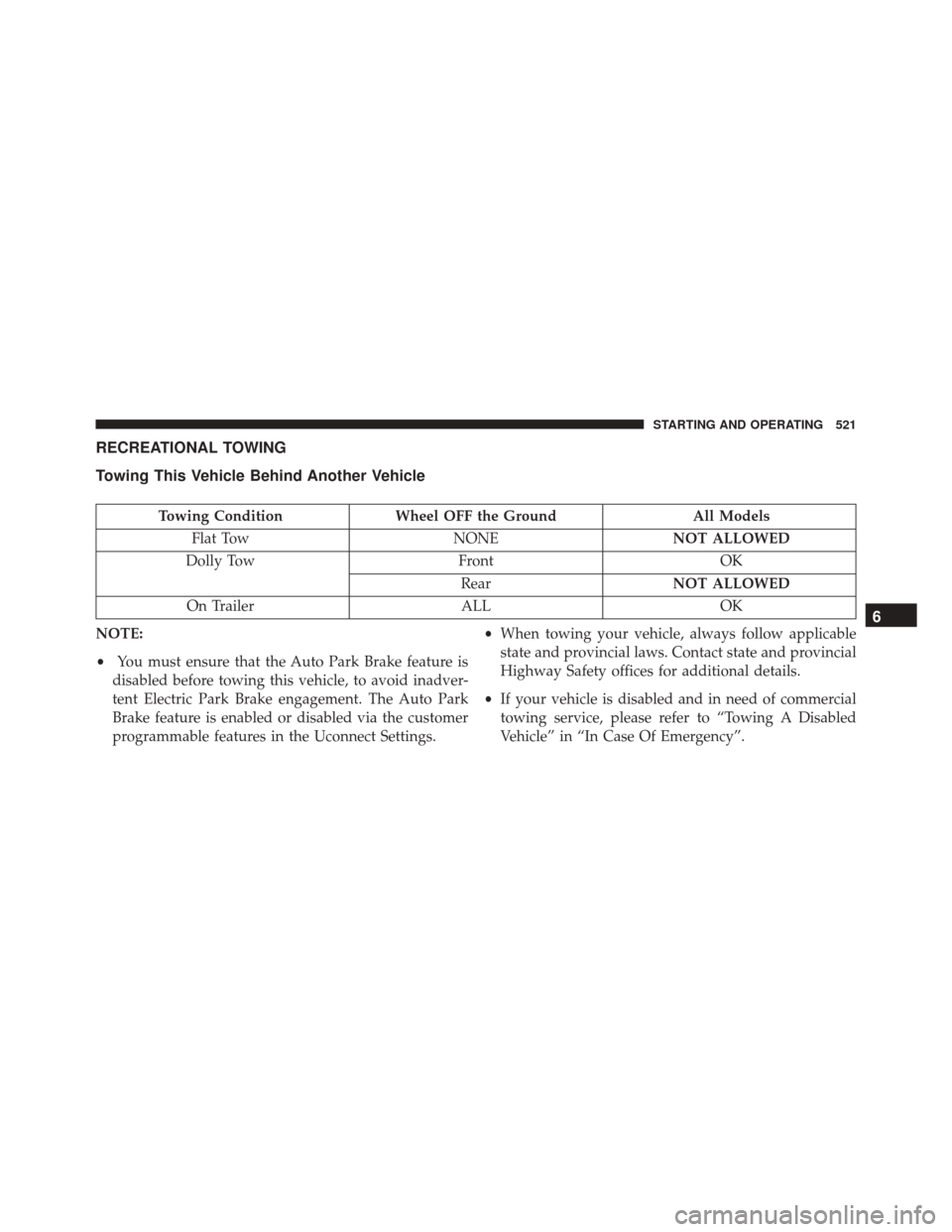
RECREATIONAL TOWING
Towing This Vehicle Behind Another Vehicle
Towing ConditionWheel OFF the Ground All Models
Flat Tow NONENOT ALLOWED
Dolly Tow FrontOK
Rear NOT ALLOWED
On Trailer ALLOK
NOTE:
• You must ensure that the Auto Park Brake feature is
disabled before towing this vehicle, to avoid inadver-
tent Electric Park Brake engagement. The Auto Park
Brake feature is enabled or disabled via the customer
programmable features in the Uconnect Settings. •
When towing your vehicle, always follow applicable
state and provincial laws. Contact state and provincial
Highway Safety offices for additional details.
• If your vehicle is disabled and in need of commercial
towing service, please refer to “Towing A Disabled
Vehicle” in “In Case Of Emergency”.
6
STARTING AND OPERATING 521
Page 524 of 828

Recreational Towing — All Models
DO NOTflat tow this vehicle. Damage to the drivetrain
will result.
Recreational towing is allowed ONLY if the front wheels
are OFF the ground. This may be accomplished using a
tow dolly (front wheels off the ground) or vehicle trailer
(all four wheels off the ground). If using a tow dolly,
follow this procedure:
1. Properly secure the dolly to the tow vehicle, following the dolly manufacturer’s instructions.
2. Drive the front wheels onto the tow dolly.
3. Apply the parking brake.
4. Place the transmission in PARK.
5. Turn the engine OFF.
6. Properly secure the front wheels to the dolly, following the dolly manufacturer’s instructions. 7. Turn the ignition to the ON/RUN position, but do not
start the engine.
8. Press and hold the brake pedal.
9. Release the parking brake.
10. Turn the ignition OFF.
11. Release the brake pedal.
CAUTION!
• DO NOT flat tow this vehicle. Damage to the
drivetrain will result. If this vehicle requires tow-
ing, make sure the drive wheels are OFF the
ground.
• Ensure that the Electric Park Brake is released, and
remains released, while being towed.
(Continued)
522 STARTING AND OPERATING
Page 525 of 828

CAUTION!(Continued)
•Towing this vehicle in violation of the above re-
quirements can cause severe transmission damage.
Damage from improper towing is not covered un-
der the New Vehicle Limited Warranty.
DRIVING TIPS
Driving On Slippery Surfaces
Information in this section will aid in safe controlled
launches in adverse conditions.
Acceleration
Rapid acceleration on snow covered, wet, or other slip-
pery surfaces may cause the driving wheels to pull
erratically to the right or left. This phenomenon occurs
when there is a difference in the surface traction under
the front (driving) wheels.
WARNING!
Rapid acceleration on slippery surfaces is dangerous.
Unequal traction can cause sudden pulling of the
front wheels. You could lose control of the vehicle
and possibly have a collision. Accelerate slowly and
carefully whenever there is likely to be poor traction
(ice, snow, wet, mud, loose sand, etc.).
Traction
When driving on wet or slushy roads, it is possible for a
wedge of water to build up between the tire and road
surface. This is hydroplaning and may cause partial or
complete loss of vehicle control and stopping ability. To
reduce this possibility, the following precautions should
be observed:
1. Slow down during rainstorms or when the roads are slushy.
6
STARTING AND OPERATING 523
Page 530 of 828
▫Road Tire Installation ...................579
▫ Return Inflatable Spare Tire ..............582
� TIRE SERVICE KIT — IF EQUIPPED .........582
� JUMP-STARTING ..................... .595
▫ Preparations For Jump-Start ..............596
▫ Jump-Starting Procedure ................597
� REFUELLING IN EMERGENCY ............599
� IF YOUR ENGINE OVERHEATS ............600�
MANUAL PARK RELEASE ................601
� FREEING A STUCK VEHICLE .............603
� TOWING A DISABLED VEHICLE ...........605
� ENHANCED ACCIDENT RESPONSE SYSTEM
(EARS) ............................. .608
� EVENT DATA RECORDER (EDR) ...........609
528 IN CASE OF EMERGENCY
Page 533 of 828

ASSIST Call
The ASSIST Button is used to automatically connect you
to any one of the following support centers:
•Roadside Assistance – If you get a flat tire, or need a
tow, just push the ASSIST button and you’ll be con-
nected to someone who can help. Roadside Assistance
will know what vehicle you’re driving and its location.
Additional fees may apply for roadside Assistance.
• Uconnect Access Customer Care – In-vehicle support
for Uconnect Access and Uconnect Access Via Mobile
features.
• Vehicle Customer Care – Total support for all other
vehicle issues. 9-1-1 Call
1. Push the 9-1-1 Call button on the Rearview Mirror.
NOTE:
In case the 9-1-1 Call button is pushed in error,
there will be a 10 second delay before the 9-1-1 Call
system initiates a call to a 9-1-1 operator. To cancel the
9-1-1 Call connection, push the 9-1-1 Call button on the
Rearview Mirror or press the cancellation button on the
Device Screen. Termination of the 9-1-1 Call will turn the
green LED light on the Rearview Mirror off.
2. The LED light located between the Power and 9-1-1 buttons on the Rearview Mirror will turn green once a
connection to a 9-1-1 operator has been made.
7
IN CASE OF EMERGENCY 531
Page 555 of 828
CavityCartridge Fuse Blade FuseDescription
F56 –10 Amp Red Front and Rear HVAC
Control Module/ESP/ ESC
F57 ––Not Used
F58 ––Not Used
F59 30 Amp Pink –7 Way Connector Recep-
tacle — If Equipped
F60 –20 Amp Yellow Rear Cargo APO
F61 –20 Amp Yellow Trailer Tow Right Stop/
Turn — If Equipped
F62 ––Not Used
F63 –20 Amp Yellow Trailer Tow Left Stop/
Turn — If Equipped
F64 –15 Amp Blue RT HID Headlamp
F65 ––Not Used
7
IN CASE OF EMERGENCY 553