Page 727 of 828

Voice
After pressing the “Voice” button on the touchscreen the
following settings will be available:
•Voice Response Length
When in this display, you may change the Voice Re-
sponse Length settings. To change the Voice Response
Length, press the “Brief” or “Detailed” button on the
touchscreen until a check-mark appears next to the
setting, showing that setting has been selected.
• Show Command List
When in this display, you may change the Show Com-
mand List settings. To change the Show Command List
settings, press the “Always,” “With Help” or “Never”
button on the touchscreen until a check-mark appears
next to the setting, showing that setting has been se-
lected.
Clock
After pressing the “Clock” button on the touchscreen the
following settings will be available:
• Sync Time With GPS — If Equipped
This feature will allow you to automatically have the
radio set the time. To change the Sync Time setting, press
the “Sync time with GPS” button on the touchscreen until
a check-mark appears next to the setting, showing that
setting has been selected.
• Set Time Hours
This feature will allow you to adjust the hours. The “Sync
time with GPS” button on the touchscreen must be
unchecked. To make your selection, press the “+” or “–”
buttons on the touchscreen to adjust the hours up or
down.
10
MULTIMEDIA 725
Page 783 of 828
Voice Text Reply
Uconnect will announceincomingtext messages. Push
the Phone button
and say Listen.(Must have com-
patible mobile phone paired to Uconnect system.)
1. Once an incoming text message is read to you, push the Phone button
and say . After the beep, say:
“Reply.”
2. Listen to the Uconnect prompts. After the beep, repeat one of the pre-defined messages and follow the system
prompts.
PRE-DEFINED VOICE TEXT REPLY RESPONSES
Yes. Stuck in traffic. See you later.
No. Start without
me. I’ll be late.
Okay. Where are you? I will be minuteslate.
Call me. Are you there
yet?
I’ll call you later. I need
directions. See you in
of minutes.
I’m on my way. Can’t talk right
now.
I’m lost. Thanks.
TIP: Your mobile phone must have the full implementa-
tion of the Message Access Profile (MAP) to take advan-
tage of this feature. For details about MAP, visit
UconnectPhone.com.
10
MULTIMEDIA 781
Page 794 of 828
Siri Eyes Free — If Equipped
Siri lets you use your voice to send text messages, select
media, place phone calls and much more. Siri uses your
natural language to understand what you mean and will
respond back to confirm your requests. The system is
designed to keep your eyes on the road and your hands
on the wheel by letting Siri help you perform useful
tasks.
To enable Siri push and hold, then release the Uconnect
Voice Recognition (VR) button on the steering wheel.
After you hear a double beep you can ask Siri to play
podcasts and music, get directions, read text messages
and many other useful requests.
Do Not Disturb
With Do Not Disturb, you can disable notifications from
incoming calls and texts, allowing you to keep your eyes
Siri Eyes Free Available
792 MULTIMEDIA
Page 796 of 828

General Information
This device complies with FCC rules Part 15 and Industry
Canada RSS-210. Operation is subject to the following
two conditions:
1. This device may not cause harmful interference.
2. This device must accept any interference that may bereceived including interference that may cause unde-
sired operation.
NOTE:
• The transmitter has been tested and it complies with
FCC and IC rules. Changes or modifications not ex-
pressly approved by the party responsible for compli-
ance could void the user ’s authority to operate the
device. •
The term IC before the certification/registration num-
ber only signifies that Industry Canada technical speci-
fications were met.
Additional Information
© 2015 FCA US LLC. All rights reserved. Mopar and
Uconnect are registered trademarks and Mopar Owner
Connect is a trademark of FCA US LLC. Android is a
trademark of Google Inc. SiriusXM and all related marks
and logos are trademarks of SiriusXM Radio Inc. Yelp,
Yelp logo, Yelp burst and related marks are registered
trademarks of Yelp.
794 MULTIMEDIA
Page 803 of 828

Warranty expires. The manufacturer stands behind only
the manufacturer’s service contracts. If you purchased a
manufacturer’s service contract, you will receive Plan
Provisions and an Owner Identification Card in the mail
within three weeks of the vehicle delivery date. If you
have any questions about the service contract, call the
manufacturer’s Service Contract National Customer
Hotline at 1-800-521-9922 (Canadian residents, call (800)
465-2001 English / (800) 387-9983 French).
The manufacturer will not stand behind any service
contract that is not the manufacturer’s service contract. It
is not responsible for any service contract other than the
manufacturer’s service contract. If you purchased a ser-
vice contract that is not a manufacturer’s service contract,
and you require service after the manufacturer’s New
Vehicle Limited Warranty expires, please refer to the
contract documents, and contact the person listed in
those documents.We appreciate that you have made a major investment
when you purchased the vehicle. An authorized dealer
has also made a major investment in facilities, tools, and
training to assure that you are absolutely delighted with
the ownership experience. You will be pleased with their
sincere efforts to resolve any warranty issues or related
concerns.
WARNING!
Engine exhaust (internal combustion engines only),
some of its constituents, and certain vehicle compo-
nents contain, or emit, chemicals known to the State
of California to cause cancer and birth defects, or
other reproductive harm. In addition, certain fluids
contained in vehicles and certain products of compo-
nent wear contain, or emit, chemicals known to the
State of California to cause cancer and birth defects,
or other reproductive harm.
11
CUSTOMER ASSISTANCE 801
Page 808 of 828
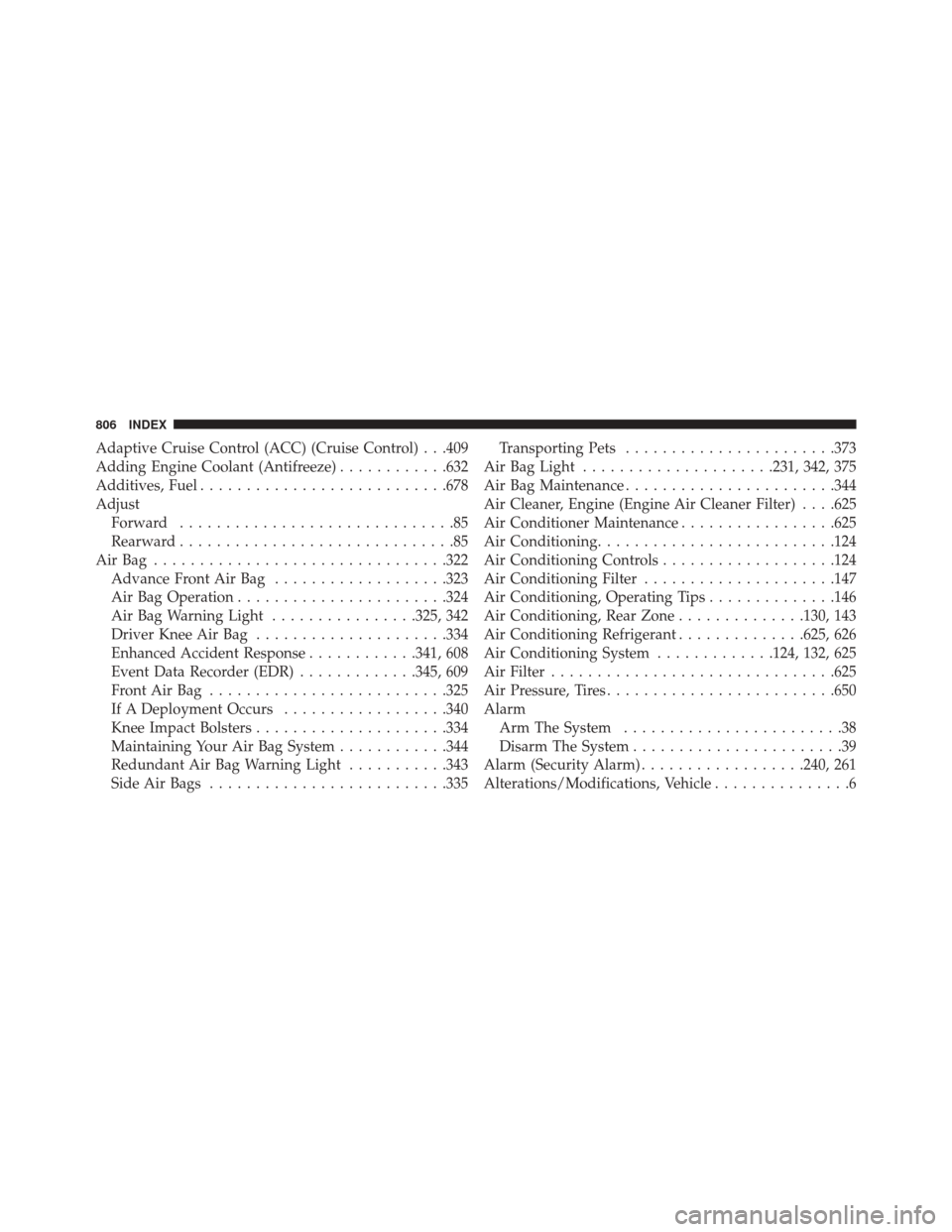
Adaptive Cruise Control (ACC) (Cruise Control) . . .409
Adding Engine Coolant (Antifreeze)............632
Additives, Fuel .......................... .678
Adjust Forward ..............................85
Rearward ..............................85
AirBag ............................... .322
Advance Front Air Bag ...................323
Air Bag Operation ...................... .324
Air Bag Warning Light ................325, 342
Driver Knee Air Bag .....................334
Enhanced Accident Response ............341, 608
Event Data Recorder (EDR) .............345, 609
FrontAirBag ......................... .325
If A Deployment Occurs ..................340
Knee Impact Bolsters .....................334
Maintaining Your Air Bag System ............344
Redundant Air Bag Warning Light ...........343
Side Air Bags ......................... .335Transporting Pets
...................... .373
Air Bag Light .....................231, 342, 375
Air Bag Maintenance ...................... .344
Air Cleaner, Engine (Engine Air Cleaner Filter) . . . .625
Air Conditioner Maintenance .................625
Air Conditioning ......................... .124
Air Conditioning Controls ...................124
Air Conditioning Filter .....................147
Air Conditioning, Operating Tips ..............146
Air Conditioning, Rear Zone ..............130, 143
Air Conditioning Refrigerant ..............625, 626
Air Conditioning System .............124, 132, 625
Air Filter .............................. .625
Air Pressure, Tires ........................ .650
Alarm Arm The System ........................38
Disarm The System .......................39
Alarm (Security Alarm) ..................240, 261
Alterations/Modifications, Vehicle ...............6
806 INDEX
Page 813 of 828

Overheating.......................... .600
Towing ............................. .605
Engine Air Cleaner .......................... .625
Block Heater ......................... .386
Break-In Recommendations ................388
Checking Oil Level ..................... .619
Compartment ......................... .618
Compartment Identification ................618
Coolant (Antifreeze) .....................687
Cooling ............................. .630
Exhaust Gas Caution .................374, 681
Fails To Start ......................... .385
Flooded, Starting ...................... .385
Fuel Requirements ..................... .677
Oil .......................... .622, 686, 687
Oil Filter ............................ .624
Oil Selection ...................... .622, 686
Oil Synthetic ......................... .624Overheating
.......................... .600
Starting ............................. .383
Engine Oil Viscosity ...................... .623
Engine Oil Viscosity Chart ...................623
Enhanced Accident Response Feature ........341, 608
Ethanol ............................ .679, 682
Event Data Recorder ...................... .345
Exhaust Gas Caution ...................374, 681
Exhaust System ...................... .374, 628
Exterior Lighting ......................... .543
Exterior Lights .................110, 377, 537, 543
Filters Air Cleaner .......................... .625
Air Conditioning ...................... .147
Engine Oil ........................ .624, 687
Engine Oil Disposal .....................624
Flashers Hazard Warning ....................... .529
12
INDEX 811

