2017 CHRYSLER PACIFICA HYBRID brakes
[x] Cancel search: brakesPage 370 of 592
Changing LaneSense Status
The LaneSense system has settings to adjust the intensity of
the torque warning and the warning zone sensitivity
(Early/Medium/Late) that you can configure through the
Uconnect system screen. Refer to “Uconnect Settings” in
“Multimedia” for further information.
NOTE:
•When enabled the system operates above 37 mph
(60 km/h) and below 112 mph (180 km/h).
• Use of the turn signal suppresses the warnings.
• The system will not apply torque to the steering wheel
whenever a safety system engages. (anti-lock brakes,
traction control system, electronic stability control, for-
ward collision warning, etc.).
PARKVIEW REAR BACK UP CAMERA — IF
EQUIPPED
Your vehicle may be equipped with the ParkView Rear
Back Up Camera that allows you to see an on-screen image
of the rear surroundings of your vehicle whenever the gear
selector is put into REVERSE. The image will be displayed
on the touchscreen display along with a caution note
“Check Entire Surroundings” across the top of the screen. After five seconds this note will disappear. The ParkView
Rear Back Up Camera is located on the rear of the vehicle
above the rear license plate.
NOTE:
The ParkView Rear Back Up Camera has program-
mable modes of operation that may be selected through the
Uconnect System. Refer to “Uconnect Settings” in “Multi-
media” for further information.
ParkView Camera Location
368 STARTING AND OPERATING
Page 381 of 592

Loading
The actual total weight and the weight of the front and rear
of your vehicle at the ground can best be determined by
weighing it when it is loaded and ready for operation.
The entire vehicle should first be weighed on a commercial
scale to insure that the GVWR has not been exceeded. The
weight on the front and rear of the vehicle should then be
determined separately to be sure that the load is properly
distributed over the front and rear axle. Weighing the
vehicle may show that the GAWR of either the front or rear
axles has been exceeded but the total load is within the
specified GVWR. If so, weight must be shifted from front to
rear or rear to front as appropriate until the specified
weight limitations are met. Store the heavier items down
low and be sure that the weight is distributed equally. Stow
all loose items securely before driving.
Improper weight distributions can have an adverse effect
on the way your vehicle steers and handles and the way
the brakes operate.
CAUTION!
Do not load your vehicle any heavier than the GVWR
or the maximum front and rear GAWR. If you do, parts
on your vehicle can break, or it can change the way
your vehicle handles. This could cause you to lose
control. Also overloading can shorten the life of your
vehicle.
TRAILER TOWING
Trailer towing is not permitted with this vehicle.
6
STARTING AND OPERATING 379
Page 385 of 592

WARNING!
•Driving through standing water limits your vehicle’s
traction capabilities. Do not exceed 5 mph (8 km/h)
when driving through standing water.
• Driving through standing water limits your vehicle’s
braking capabilities, which increases stopping dis-
tances. Therefore, after driving through standing
water, drive slowly and lightly press on the brake
pedal several times to dry the brakes.
• Failure to follow these warnings may result in inju-
ries that are serious or fatal to you, your passengers,
and others around you.
CAUTION!
• Always check the depth of the standing water before
driving through it. Never drive through standing
water that is deeper than the bottom of the tire rims
mounted on the vehicle.
• Determine the condition of the road or the path that
is under water and if there are any obstacles in the
way before driving through the standing water.
(Continued)
CAUTION! (Continued)
•Do not exceed 5 mph (8 km/h) when driving through
standing water. This will minimize wave effects.
• Driving through standing water may cause damage
to your vehicle’s drivetrain components. Always in-
spect your vehicle’s fluids (i.e., engine oil, transmis-
sion, axle, etc.) for signs of contamination (i.e., fluid
that is milky or foamy in appearance) after driving
through standing water. Do not continue to operate
the vehicle if any fluid appears contaminated, as this
may result in further damage. Such damage is not
covered by the New Vehicle Limited Warranty.
• Getting water inside your vehicle’s engine can cause
it to lock up and stall out, and cause serious internal
damage to the engine. Such damage is not covered by
the New Vehicle Limited Warranty.
6
STARTING AND OPERATING 383
Page 455 of 592

purity water such as deionized, or distilled water when
mixing the water and coolant (antifreeze) solution. The
use of lower quality water will reduce the amount of
corrosion protection in the cooling systems.
Brake System
In order to assure brake system performance, all brake
system components should be inspected periodically. Refer
to the “Maintenance Plan” in this section for the proper
maintenance intervals.
WARNING!
Riding the brakes can lead to brake failure and possi-
bly a collision. Driving with your foot resting or riding
on the brake pedal can result in abnormally high brake
temperatures, excessive lining wear, and possible
brake damage. You would not have your full braking
capacity in an emergency.
Brake Master Cylinder
The fluid in the master cylinder should be checked when
performing under hood services or immediately if the
“Brake Warning Light” is illuminated.Be sure to clean the top of the master cylinder area before
removing the cap. If necessary, add fluid to bring the fluid
level up to the requirements described on the brake fluid
reservoir. With disc brakes, fluid level can be expected to
fall as the brake pads wear. Brake fluid level should be
checked when pads are replaced. However, low fluid level
may be caused by a leak and a checkup may be needed.
Use only manufacturer’s recommended brake fluid. Refer
to “Fluids And Lubricants” in “Technical Specifications”
for further information.
WARNING!
•
Use only manufacturer’s recommended brake fluid.
Refer to “Fluids And Lubricants” in “Technical
Specifications” for further information. Using the
wrong type of brake fluid can severely damage your
brake system and/or impair its performance. The
proper type of brake fluid for your vehicle is also
identified on the original factory installed hydraulic
master cylinder reservoir.
• To avoid contamination from foreign matter or mois-
ture, use only new brake fluid or fluid that has been
(Continued)
8
SERVICING AND MAINTENANCE 453
Page 475 of 592

and to prevent corrosion. Wash wheels with the same soap
solution recommended for the body of the vehicle.
Your wheels are susceptible to deterioration caused by salt,
sodium chloride, magnesium chloride, calcium chloride,
etc., and other road chemicals used to melt ice or control
dust on dirt roads. Use a soft cloth or sponge and mild soap
to wipe away promptly. Do not use harsh chemicals or a
stiff brush. They can damage the wheel’s protective coating
that helps keep them from corroding and tarnishing.
NOTE:Many aftermarket wheel cleaners contain strong
acids or strong alkaline additives that can harm the wheel
surface.
CAUTION!
Avoid products or automatic car washes that use acidic
solutions or strong alkaline additives or harsh brushes.
These products and automatic car washes may damage
the wheel’s protective finish. Such damage is not
covered by the New Vehicle Limited Warranty. Only
car wash soap, MOPAR Wheel Cleaner or equivalent is
recommended. When cleaning extremely dirty wheels including excessive
brake dust, care must be taken in the selection of tire and
wheel cleaning chemicals and equipment to prevent dam-
age to the wheels. Mopar Wheel Treatment or Mopar
Chrome Cleaner or their equivalent is recommended or
select a non-abrasive, non-acidic cleaner for aluminum or
chrome wheels. Do not use any products on Dark Vapor or
Black Satin Chrome Wheels. They will permanently dam-
age this finish and such damage is not covered by the New
Vehicle Limited Warranty.
CAUTION!
Do not use scouring pads, steel wool, a bristle brush,
metal polishes or oven cleaner. These products may
damage the wheel’s protective finish. Such damage is
not covered by the New Vehicle Limited Warranty.
Only car wash soap, MOPAR Wheel Cleaner or equiva-
lent is recommended.
NOTE: If you intend parking or storing your vehicle for an
extended period after cleaning the wheels with wheel
cleaner, drive your vehicle for a few minutes before doing
so. Driving the vehicle and applying the brakes when
stopping will reduce the risk of brake rotor corrosion.8
SERVICING AND MAINTENANCE 473
Page 511 of 592
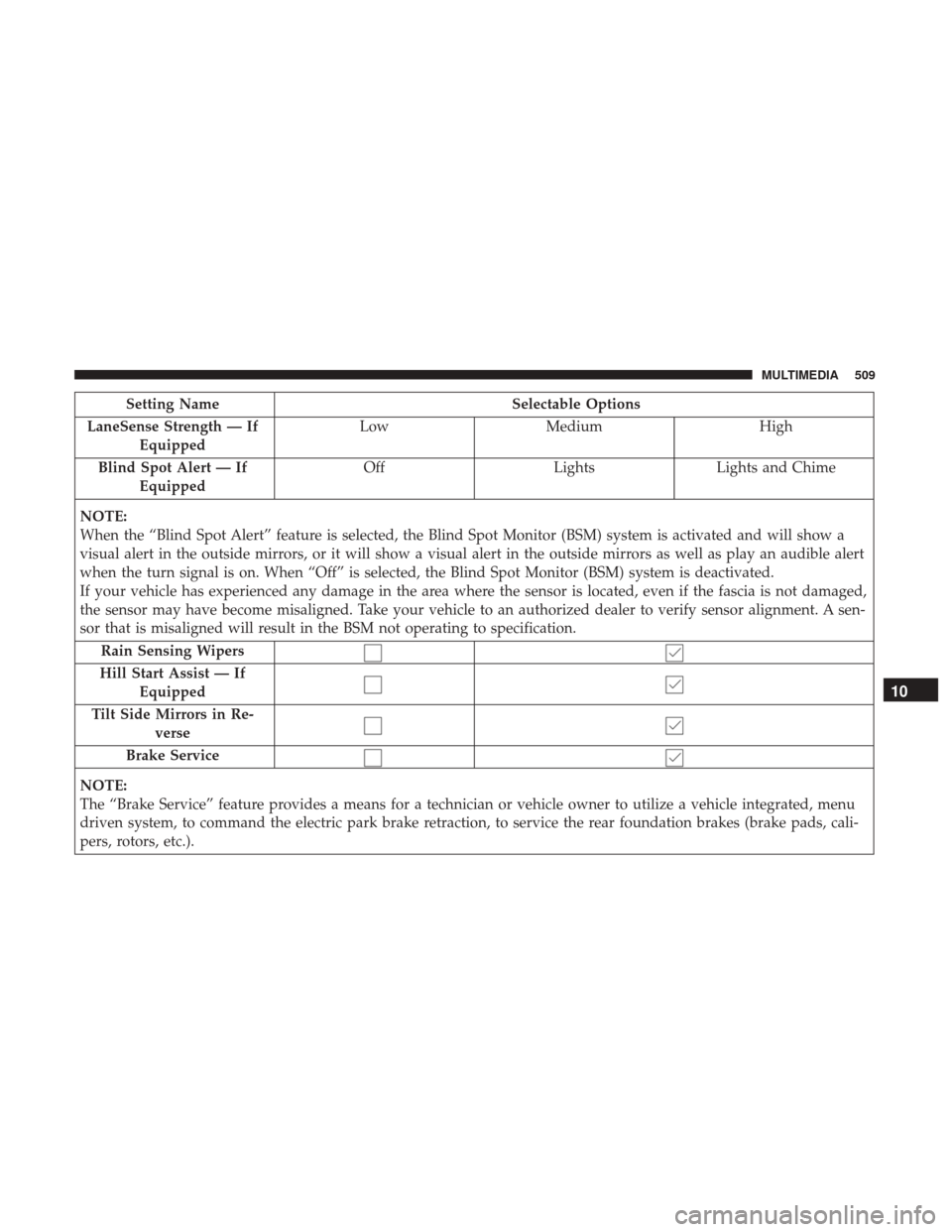
Setting NameSelectable Options
LaneSense Strength — If Equipped Low
Medium High
Blind Spot Alert — If Equipped Off
LightsLights and Chime
NOTE:
When the “Blind Spot Alert” feature is selected, the Blind Spot Monitor (BSM) system is activated and will show a
visual alert in the outside mirrors, or it will show a visual alert in the outside mirrors as well as play an audible alert
when the turn signal is on. When “Off” is selected, the Blind Spot Monitor (BSM) system is deactivated.
If your vehicle has experienced any damage in the area where the sensor is located, even if the fascia is not damaged,
the sensor may have become misaligned. Take your vehicle to an authorized dealer to verify sensor alignment. A sen-
sor that is misaligned will result in the BSM not operating to specification. Rain Sensing Wipers
Hill Start Assist — If Equipped
Tilt Side Mirrors in Re- verse
Brake Service
NOTE:
The “Brake Service” feature provides a means for a technician or vehicle owner to utilize a vehicle integrated, menu
driven system, to command the electric park brake retraction, to service the rear foundation brakes (brake pads, cali-
pers, rotors, etc.).
10
MULTIMEDIA 509
Page 584 of 592

Exterior........................... .278, 396
Fog............................... .96, 396
Front Replacement ....................... .396
Hazard Warning Flasher ...................386
Headlights ............................ .394
Headlights On Reminder ....................95
High Beam/Low Beam Select .................97
Intensity Control ........................ .100
Interior ................................98
Lights On Reminder .......................95
Low Fuel ............................. .180
Malfunction Indicator (Check Engine) ..........182
Parade Mode (Daytime Brightness) ............100
Park ................................. .187
Passing ................................97
Reading ................................98
Seat Belt Reminder ...................... .168
Security Alarm ......................... .175
Service ............................... .392
Side Marker ........................ .395, 396
SmartBeams .............................97
Tire Pressure Monitoring (TPMS) ..........183, 213
Traction Control ........................ .200
Turn Signal ..................... .185, 278, 395
Warning (Instrument Cluster Description) .......185Loading Vehicle
....................... .134, 377
Tires................................. .458
Load Shed Battery Saver Mode ...................... .165
Battery Saver On ........................ .165
Electrical Load Reduction ...................165
Intelligent Battery Sensor ...................165
Low Tire Pressure System .....................213
Lubrication, Body ......................... .441
Luggage Rack (Roof Rack) ....................144
Lug Nuts ............................... .484
Maintenance Free Battery .....................435
Maintenance Schedule ...................... .429
Malfunction
Indicator Light (Check Engine) ........182
Manual, Service ........................... .573
Map/Reading Lights .........................98
Marker Lights, Side ........................ .395
Master Cylinder (Brakes) .....................453
Methanol ............................... .487
Mirrors ..................................89
Automatic Dimming .......................89
Electric Remote ...........................90
Exterior Folding ..........................90
Heated .................................91
582 INDEX