2017 CHEVROLET TRAVERSE reset
[x] Cancel search: resetPage 180 of 394

Chevrolet Traverse Owner Manual (GMNA-Localizing-U.S./Canada/Mexico-
9955676) - 2017 - crc - 4/4/16
Infotainment System 179
FAV (Favorites) :A maximum of
36 stations can be programmed as
favorites using the six softkeys
below the radio station frequency
tabs and by using the radio favorites
page button (FAV button). Press to
go through up to six pages of
favorites, each having six favorite
stations available per page. Each
page of favorites can contain any
combination of AM, FM, or SiriusXM
stations.
The balance/fade and tone settings
that were previously adjusted are
stored with the favorite stations.
To store a station as a favorite:
1. Tune to the desired radio station.
2. Press FAV to display the page to store the station.
3. Press and hold one of the six softkeys until a beep
sounds. When that softkey is
pressed and released, the
station that was set returns.
4. Repeat the steps for each radio station to be stored as a
favorite. To set up the number of favorites
pages:
1. Press MENU to display the radio setup menu.
2. Press the softkey below the FAV 1-6 tab.
3. Select the desired number of favorites pages by pressing the
softkey below the displayed
page numbers.
4. Press FAV, or let the menu time out, to return to the original
main radio screen showing the
radio station frequency tabs
and to begin the process of
programming favorites for the
chosen number of favorites
pages.
SiriusXM Radio Messages
XL : These channels, or any others,
can be blocked at a customer's
request, by calling 1-866-635-2349
(U.S) and 1-877-209-0079
(Canada). SXM Updating :
The encryption
code in the receiver is being
updated, and no action is required.
This process should take no longer
than 30 seconds.
No SXM Signal : The system is
functioning correctly, but the vehicle
is in a location that is blocking the
SiriusXM signal. When the vehicle is
moved into an open area, the signal
should return.
Loading SXM : The audio system is
acquiring and processing audio and
text data. No action is needed. This
message should disappear shortly.
Channel Off Air : This channel is
not currently in service. Tune in to
another channel.
Channel Unauth : This channel is
blocked or cannot be received with
your SiriusXM subscription package.
Channel Unavail : This previously
assigned channel is no longer
assigned. Tune to another station.
If this station was one of the
presets, choose another station for
that preset button.
Page 196 of 394

Chevrolet Traverse Owner Manual (GMNA-Localizing-U.S./Canada/Mexico-
9955676) - 2017 - crc - 4/4/16
Infotainment System 195
The RSA functions operate even
when the main radio is off. The front
audio system displays
Xwhen the
RSA is on, and disappears from the
display when it is off.
Audio can be heard through wired
headphones (not included) plugged
into the jacks on the RSA. If the
vehicle has this feature, audio can
also be heard on Channel 2 of the
wireless headphones.
The audio system mutes the rear
speakers when the RSA audio is
active through the headphones.
To listen to an iPod or portable
audio device through the RSA,
attach the iPod or portable audio
device to the front auxiliary input (if
available), located on the front audio
system. Turn the iPod on, then
choose the front auxiliary input with
the RSA SRCE button.
P(Power) : Press to turn the RSA
on or off.
Volume : Turn to increase or to
decrease the volume of the wired
headphones. The left knob controls
the left headphones and the right
knob controls the right headphones.
SRCE (Source) : Press to select
between the radio, CD, and if the
vehicle has these features, DVD,
front auxiliary, and rear auxiliary.
©or¨(Seek) : Press to go to the
previous or to the next station and
stay there. This function is inactive,
with some radios, if the front seat
passengers are listening to the
radio. Press and hold
©or¨until the
display flashes to tune to an
individual station. The display stops
flashing after the buttons have not
been pressed for more than
two seconds. This function is
inactive, with some radios, if the
front seat passengers are listening
to the radio.
While listening to a disc, press
¨to
go to the next track or chapter on
the disc. Press
©to go back to the
start of the current track or chapter
(if more than 10 seconds have
played). This function is inactive,
with some radios, if the front seat
passengers are listening to the disc.
When a DVD video menu is being
displayed, press
©or¨to perform a
cursor up or down on the menu.
Hold
©or¨to perform a cursor left
or right on the menu.
PROG (Program) : Press to go to
the next preset radio station or
channel set on the main radio. This
function is inactive, with some
radios, if the front seat passengers
are listening to the radio.
Page 211 of 394

Chevrolet Traverse Owner Manual (GMNA-Localizing-U.S./Canada/Mexico-
9955676) - 2017 - crc - 3/29/16
210 Climate Controls
Changing the air delivery mode
while in automatic control places the
system into manual control. The air
delivery mode button indicator
displays, and the AUTO button
indicator light turns off.
H:Air is directed to the instrument
panel outlets.
): Air is divided between the
instrument panel and floor outlets.
Some air is directed towards the
windshield and side window outlets.
Cooler air is directed to the upper
outlets and warmer air to the floor
outlets.
6: Air is directed to the floor
outlets, with some of the air directed
to the windshield, side window, and
second row floor outlets. In this
mode, the system uses outside air.
-: This mode clears the windows
of fog or moisture. Air is directed to
the windshield, floor outlets, and
side window vents. When this mode
is selected, the system turns off
recirculation and runs the air
conditioning compressor unless the outside temperature is less than 4 °
C (40 °F). Do not drive the vehicle
until all the windows are clear.
0:
Press to turn the defrost on or
off. This mode quickly clears the
windshield of fog or frost. Air is
directed to the windshield, side
window, and floor vents. In this
mode, outside air is pulled inside
the vehicle. The air conditioning
system runs automatically in this
setting, unless the outside
temperature is less than 4 °C (40
°F).
Do not drive the vehicle until all the
windows are clear.
Air Conditioning
A/C : Press to turn the air
conditioning on and off. An indicator
light comes on when A/C is on.
The A/C does not work when the
outside temperature is below 4 °C
(40 °F). If A/C is pressed the
indicator flashes three times and
turns off to show that the A/C mode
is not available. If the A/C is on and
the outside temperature drops
below a temperature which is too cool for air conditioning to be
effective, the A/C indicator turns off
to show that the A/C mode has
been canceled.
On hot days, open the windows
briefly to let hot inside air escape.
This helps reduce the time it takes
for the interior of the vehicle to
cool down.
The air conditioning system
removes moisture from the air, so
water might drip under the vehicle
while idling or after turning off the
engine. This is normal.
@:
Press to alternate between
recirculating air inside the vehicle or
pulling in outside air. An indicator
light comes on when recirculation
mode is active. With each ignition
cycle, the recirculation mode is
reset to automatic. When the engine
is turned on, outside air or
recirculation is automatically
selected for better performance.
When recirculation is activated, the
air conditioning compressor comes
on and helps to quickly cool the air
Page 248 of 394

Chevrolet Traverse Owner Manual (GMNA-Localizing-U.S./Canada/Mexico-
9955676) - 2017 - crc - 4/1/16
Driving and Operating 247
.Ice, snow, mud, or anything else
builds up on the camera lens.
Clean the lens, rinse it with
water, and wipe it with a soft
cloth.
. The back of the vehicle is in an
accident. The position and
mounting angle of the camera
can change or the camera can
be affected. Be sure to have the
camera and its position and
mounting angle checked at your
dealer.
. There are extreme temperature
changes.
The RVC system display in the
rearview mirror may turn off or not
appear as expected due to one of
the following conditions. If this
occurs the left indicator light on the
mirror will flash.
. A slow flash may indicate a loss
of video signal, or no video
signal present during the reverse
cycle.
. A fast flash may indicate that the
display has been on for the
maximum allowable time during a reverse cycle, or the display
has reached an Over
Temperature limit.
The fast flash conditions are
used to protect the video device
from high temperature
conditions. Once conditions
return to normal the device will
reset and the green indicator will
stop flashing.
During any of these fault conditions,
the display will be blank and the
indicator will continue to flash as
long as the vehicle is in R (Reverse)
or until the conditions return to
normal.
Pressing and holding
zwhen the
left indicator light is flashing will turn
off the video display along with the
left indicator light.
Parking Assist
If available, the Rear Parking Assist
(RPA) system assists the driver with
parking and avoiding objects while
in R (Reverse). RPA operates at
speeds less than 8 km/h (5 mph).
The sensors on the rear bumper are used to detect objects up to
2.5 m (8 ft) behind the vehicle, and
at least 25 cm (10 in) off the ground
and below liftgate level. Detection
distances may be less during
warmer or humid weather.
{Warning
The parking assist system does
not detect children, pedestrians,
bicyclists, animals, or objects
below the bumper or that are too
close or too far from the vehicle.
It is not available at speeds
greater than 8 km/h (5 mph). To
prevent injury, death, or vehicle
damage, even with parking assist,
always check the area around the
vehicle and check all mirrors
before backing.
How the System Works
RPA comes on automatically when
the shift lever is moved into
R (Reverse). A single beep sounds
to indicate the system is working.
Page 274 of 394

Chevrolet Traverse Owner Manual (GMNA-Localizing-U.S./Canada/Mexico-
9955676) - 2017 - crc - 3/29/16
Vehicle Care 273
trash or pouring it on the ground,
into sewers, or into streams or
bodies of water. Recycle it by taking
it to a place that collects used oil.
Engine Oil Life System
When to Change Engine Oil
This vehicle has a computer system
that indicates when to change the
engine oil and filter. This is based
on a combination of factors which
include engine revolutions, engine
temperature, and miles driven.
Based on driving conditions, the
mileage at which an oil change is
indicated can vary considerably. For
the oil life system to work properly,
the system must be reset every time
the oil is changed.
When the system has calculated
that oil life has been diminished, it
indicates that an oil change is
necessary. A CHANGE ENGINE
OIL SOON message comes on.
Change the oil as soon as possible
within the next 1 000 km (600 mi).
It is possible that, if driving under
the best conditions, the oil life
system might indicate that an oilchange is not necessary for up to a
year. The engine oil and filter must
be changed at least once a year
and, at this time, the system must
be reset. Your dealer has trained
service people who will perform this
work and reset the system. It is also
important to check the oil regularly
over the course of an oil drain
interval and keep it at the proper
level.
If the system is ever reset
accidentally, the oil must be
changed at 5 000 km (3,000 mi)
since the last oil change.
Remember to reset the oil life
system whenever the oil is changed.
How to Reset the Engine Oil
Life System
Reset the system whenever the
engine oil is changed so that the
system can calculate the next
engine oil change. To reset the
system:
If the vehicle does not have Driver
Information Center (DIC) buttons:
1. Turn the ignition to ON/RUN,
with the engine off. The vehicle
must be in P (Park) to access
this display. Press the trip
odometer reset stem until OIL
LIFE REMAINING displays.
2. Press and hold the trip odometer reset stem until OIL
LIFE REMAINING shows
“100%.” Three chimes sound
and the CHANGE ENGINE OIL
SOON message goes off.
3. Turn the key to LOCK/OFF.
If the CHANGE ENGINE OIL
SOON message comes back
on when the vehicle is started,
the engine oil life system has
not been reset. Repeat the
procedure.
If the vehicle has Driver Information
Center (DIC) buttons:
1. Turn the ignition to ON/RUN, with the engine off.
2. Press the vehicle information button until OIL LIFE
REMAINING displays.
Page 275 of 394

Chevrolet Traverse Owner Manual (GMNA-Localizing-U.S./Canada/Mexico-
9955676) - 2017 - crc - 3/29/16
274 Vehicle Care
3. Press and hold the set/resetbutton until “100%”is
displayed. Three chimes sound
and the CHANGE ENGINE OIL
SOON message goes off.
4. Turn the key to LOCK/OFF.
If the CHANGE ENGINE OIL SOON
message comes back on when the
vehicle is started, the engine oil life
system has not been reset. Repeat
the procedure.
Automatic Transmission
Fluid
It is not necessary to check the
transmission fluid level.
A transmission fluid leak is the only
reason for fluid loss. If a leak
occurs, take the vehicle to the
dealer and have it repaired as soon
as possible.
Change the fluid at the intervals
listed in Maintenance Schedule
0 344, and be sure to use the
transmission fluid listed in
Recommended Fluids and
Lubricants 0353.
Caution
Use of the incorrect automatic
transmission fluid may damage
the vehicle, and the damage may
not be covered by the vehicle
warranty. Always use the
automatic transmission fluid listed
in Recommended Fluids and
Lubricants 0353.
The transmission fluid will not reach
the end of the dipstick unless the
transmission is at operating
temperature. If you need to check
the transmission fluid level, please
take the vehicle to your dealer.
Engine Air Cleaner/Filter
See Engine Compartment Overview
0 269 for the location of the engine
air cleaner/filter.
When to Inspect the Engine Air
Cleaner/Filter
For intervals on changing and
inspecting the engine air cleaner/
filter, see Maintenance
Schedule 0344.
How to Inspect the Engine Air
Cleaner/Filter
Do not start the engine or have the
engine running with the engine air
cleaner/filter housing open. Before
removing the engine air cleaner/
filter, make sure that the engine air
cleaner/filter housing and nearby
components are free of dirt and
debris. Remove the engine air
cleaner/filter. Lightly tap and shake
the engine air cleaner/filter (away
from the vehicle), to release loose
dust and dirt. Inspect the engine air
cleaner/filter for damage, and
replace if damaged. Do not clean
the engine air cleaner/filter or
components with water or
compressed air.
Page 282 of 394

Chevrolet Traverse Owner Manual (GMNA-Localizing-U.S./Canada/Mexico-
9955676) - 2017 - crc - 3/29/16
Vehicle Care 281
If the warning continues, pull over,
stop, and park the vehicle
right away.
If there is no sign of steam, idle the
engine for three minutes while
parked. If the warning is still
displayed, turn off the engine until it
cools down. Also, see“Overheated
Engine Protection Operating Mode”
next in this section.
Overheated Engine
Protection
Operating Mode
This emergency operating mode lets
the vehicle be driven to a safe place
in an emergency situation. If an
overheated engine condition exists,
an overheat protection mode which
alternates firing groups of cylinders
helps prevent engine damage. In
this mode, there is a significant loss
in power and engine performance.
The temperature gauge indicates an
overheat condition exists. Driving
extended distances and/or towing a
trailer in the overheat protection
mode should be avoided.
Caution
After driving in the overheated
engine protection operating
mode, the engine oil will be
severely degraded. Any repairs
performed before the engine is
cool may cause engine damage.
Allow the engine to cool before
attempting any repair. Repair the
cause of coolant loss, change the
oil, and reset the oil life system.
See Engine Oil 0270.
Power Steering Fluid
The power steering fluid reservoir is
under the engine cover on the
passenger side of the vehicle. See
Engine Compartment Overview
0269 for reservoir location.
When to Check Power Steering
Fluid
It is not necessary to regularly
check power steering fluid unless
you suspect there is a leak in the
system or you hear an unusual
noise. A fluid loss in this system
could indicate a problem. Have the
system inspected and repaired.
How to Check Power Steering
Fluid
To check the power steering fluid:
1. Turn the key off and let the engine compartment
cool down.
2. Remove the engine cover. See Engine Cover 0270.
3. Wipe the cap and the top of the reservoir clean.
4. Unscrew the cap and wipe the dipstick with a clean rag.
5. Replace the cap and completely tighten it.
6. Remove the cap again and look at the fluid level on the
dipstick.
Page 289 of 394
Chevrolet Traverse Owner Manual (GMNA-Localizing-U.S./Canada/Mexico-
9955676) - 2017 - crc - 3/29/16
288 Vehicle Care
Headlamp Aiming
Headlamp aim has been preset and
should need no further adjustment.
If the vehicle is damaged in a crash,
the headlamp aim may be affected.
If adjustment to the headlamps is
necessary, see your dealer.
Bulb Replacement
For the proper type of replacement
bulbs, seeReplacement
Bulbs 0289.
For any bulb-changing procedure
not listed in this section, contact
your dealer.
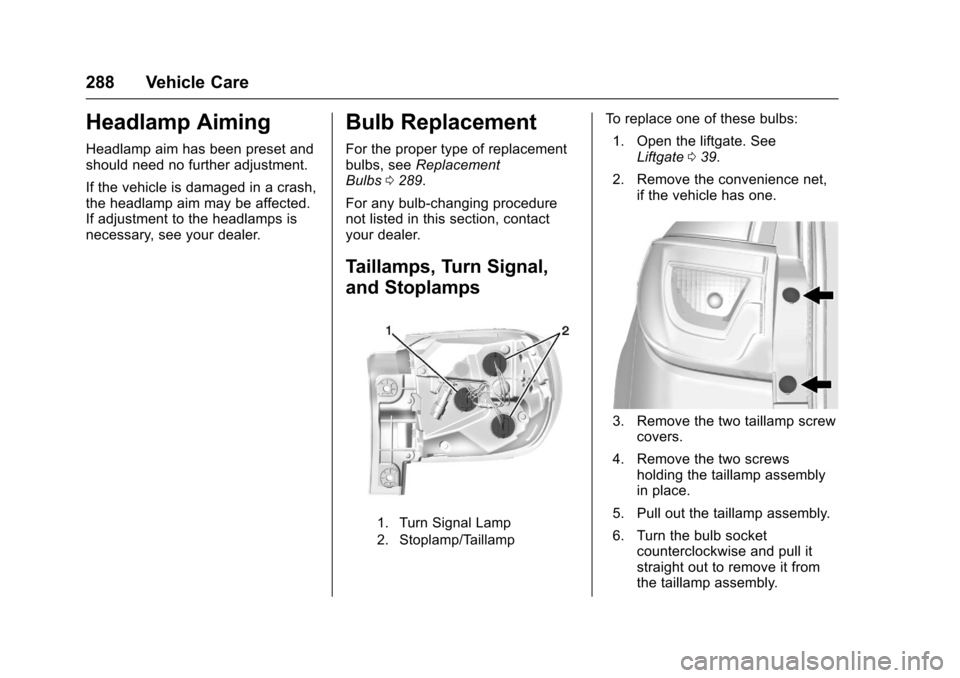
Taillamps, Turn Signal,
and Stoplamps
1. Turn Signal Lamp
2. Stoplamp/Taillamp
To replace one of these bulbs: 1. Open the liftgate. See Liftgate 039.
2. Remove the convenience net, if the vehicle has one.
3. Remove the two taillamp screwcovers.
4. Remove the two screws holding the taillamp assembly
in place.
5. Pull out the taillamp assembly.
6. Turn the bulb socket counterclockwise and pull it
straight out to remove it from
the taillamp assembly.