2017 CHEVROLET SUBURBAN instrument
[x] Cancel search: instrumentPage 2 of 465
Chevrolet Tahoe/Suburban Owner Manual (GMNA-Localizing-U.S./Canada/
Mexico-9955986) - 2017 - crc - 7/5/16
ContentsIntroduction . . . . . . . . . . . . . . . . . . . . . . 2
In Brief . . . . . . . . . . . . . . . . . . . . . . . . . . . 5
Keys, Doors, and Windows . . . . . 31
Seats and Restraints . . . . . . . . . . . 65
Storage . . . . . . . . . . . . . . . . . . . . . . . 125
Instruments and Controls . . . . . . 129
Lighting . . . . . . . . . . . . . . . . . . . . . . . 189
Infotainment System . . . . . . . . . . 198
Climate Controls . . . . . . . . . . . . . . 226
Driving and Operating . . . . . . . . . 234
Vehicle Care . . . . . . . . . . . . . . . . . . 319
Service and Maintenance . . . . . 411
Technical Data . . . . . . . . . . . . . . . . 425
Customer Information . . . . . . . . . 429
Reporting Safety Defects . . . . . . 439
OnStar . . . . . . . . . . . . . . . . . . . . . . . . 443
Index . . . . . . . . . . . . . . . . . . . . 453
Page 6 of 465

Chevrolet Tahoe/Suburban Owner Manual (GMNA-Localizing-U.S./Canada/
Mexico-9955986) - 2017 - crc - 7/5/16
In Brief 5
In Brief
Instrument Panel
Instrument Panel Overview . . . . . . 6
Initial Drive Information
Initial Drive Information . . . . . . . . . . 8
Remote Keyless Entry (RKE)System . . . . . . . . . . . . . . . . . . . . . . . . 8
Remote Vehicle Start . . . . . . . . . . . 9
Door Locks . . . . . . . . . . . . . . . . . . . . . 9
Liftgate . . . . . . . . . . . . . . . . . . . . . . . . 10
Windows . . . . . . . . . . . . . . . . . . . . . . . 11
Seat Adjustment . . . . . . . . . . . . . . . 11
Memory Features . . . . . . . . . . . . . . 13
Second Row Seats . . . . . . . . . . . . 13
Third Row Seats . . . . . . . . . . . . . . . 13
Heated and Ventilated Seats . . . 14
Head Restraint Adjustment . . . . 14
Safety Belts . . . . . . . . . . . . . . . . . . . . 15
Passenger Sensing System . . . 15
Mirror Adjustment . . . . . . . . . . . . . . 15
Steering Wheel Adjustment . . . . 16
Throttle and Brake Pedal Adjustment . . . . . . . . . . . . . . . . . . . 17
Interior Lighting . . . . . . . . . . . . . . . . 18
Exterior Lighting . . . . . . . . . . . . . . . 18
Windshield Wiper/Washer . . . . . . 19
Climate Controls . . . . . . . . . . . . . . . 20
Transmission . . . . . . . . . . . . . . . . . . 20 Four-Wheel Drive . . . . . . . . . . . . . . 21
Vehicle Features
Infotainment System . . . . . . . . . . . 22
Radio(s) . . . . . . . . . . . . . . . . . . . . . . . 22
Satellite Radio . . . . . . . . . . . . . . . . . 22
Portable Audio Devices . . . . . . . . 23
Bluetooth
®. . . . . . . . . . . . . . . . . . . . . 23
Steering Wheel Controls . . . . . . . 23
Cruise Control . . . . . . . . . . . . . . . . . 24
Driver Information Center (DIC) . . . . . . . . . . . . . . . . . 24
Forward Collision Alert (FCA) System . . . . . . . . . . . . . . . . . . . . . . . 25
Forward Automatic Braking (FAB) . . . . . . . . . . . . . . . . 25
Lane Keep Assist (LKA) (1500
series) . . . . . . . . . . . . . . . . . . . . . . . . 25
Lane Change Alert (LCA) . . . . . . 25
Rear Vision Camera (RVC) . . . . 26
Rear Cross Traffic Alert (RCTA) System . . . . . . . . . . . . . . . . . . . . . . . 26
Parking Assist . . . . . . . . . . . . . . . . . 26
Power Outlets . . . . . . . . . . . . . . . . . 26
Universal Remote System . . . . . 27
Sunroof . . . . . . . . . . . . . . . . . . . . . . . . 27
Performance and Maintenance
Traction Control/Electronic Stability Control . . . . . . . . . . . . . . 28
Tire Pressure Monitor . . . . . . . . . . 28 Fuel . . . . . . . . . . . . . . . . . . . . . . . . . . . 29
E85 or FlexFuel . . . . . . . . . . . . . . . . 29
Engine Oil Life System . . . . . . . . 29
Driving for Better Fuel
Economy . . . . . . . . . . . . . . . . . . . . . 30
Roadside Assistance Program . . . . . . . . . . . . . . . . . . . . . . 30
Page 7 of 465
Chevrolet Tahoe/Suburban Owner Manual (GMNA-Localizing-U.S./Canada/
Mexico-9955986) - 2017 - crc - 7/5/16
6 In Brief
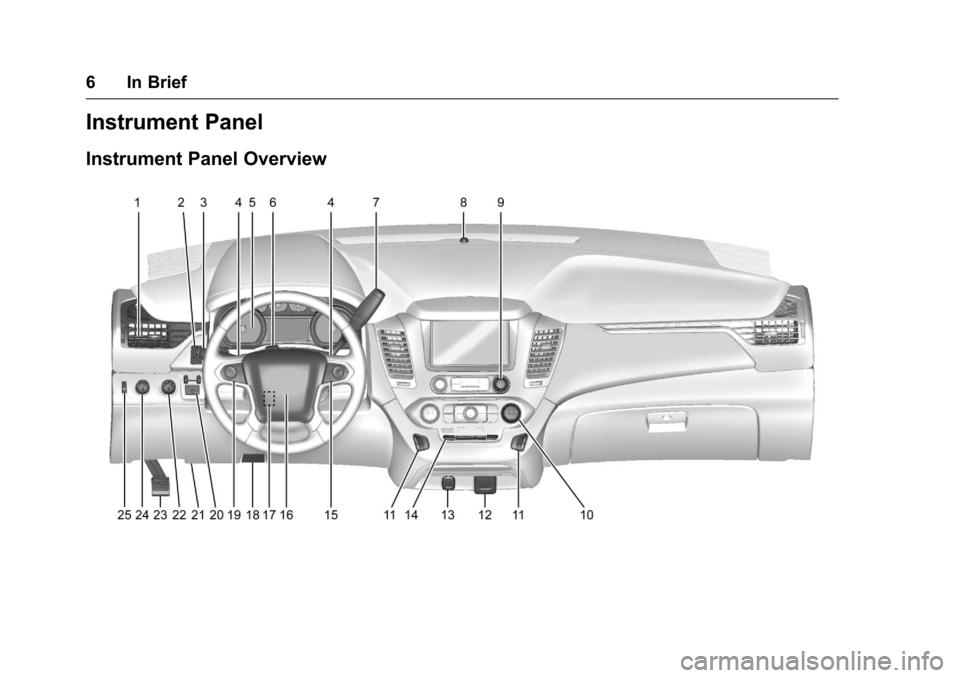
Instrument Panel
Instrument Panel Overview
Page 8 of 465

Chevrolet Tahoe/Suburban Owner Manual (GMNA-Localizing-U.S./Canada/
Mexico-9955986) - 2017 - crc - 7/5/16
In Brief 7
1.Air Vents 0231.
2.
gTraction Control/Electronic
Stability Control 0274.
jPower Assist Steps 052 (If
Equipped).
XParking Assist Button (If
Equipped). See Assistance
Systems for Parking or
Backing 0288.
ALane Keep Assist (LKA)
(1500 Series) 0297 (If
Equipped).
0Pedal Adjust Switch (If
Equipped). See Adjustable
Throttle and Brake
Pedal 0251.
3. Turn Signal Lever. See Turn
and Lane-Change
Signals 0193.
Windshield Wiper/
Washer 0132.
4. Favorite Switches (Out of View). See Steering Wheel
Controls 0131. Volume Switches (Out of View).
See
Steering Wheel
Controls 0131.
5. Instrument Cluster 0141.
6. Hazard Warning
Flashers 0193.
7. Shift Lever. See Automatic
Transmission 0262.
Tow/Haul Selector Button. See
Tow/Haul Mode 0266.
Range Selection Mode (If
Equipped). See Manual
Mode 0265.
8. Light Sensor. See Automatic
Headlamp System 0192.
9. Infotainment 0198.
10. Dual Automatic Climate Control
System 0226.
11. Heated and Ventilated Front
Seats 072 (If Equipped).
12. 110 Volt Power Outlet (If Equipped). See Power
Outlets 0136.
13. Power Outlets 0136 (If
Equipped). 14. Rear Climate Control Buttons.
SeeDual Automatic Climate
Control System 0226.
15. Steering Wheel Controls 0131.
16. Horn 0132.
17. Steering Wheel
Adjustment 0130.
18. Hood Release. See Hood 0322.
19. Cruise Control 0278.
Adaptive Cruise Control 0280
(If Equipped).
Forward Collision Alert (FCA)
System 0291 (If Equipped).
Heated Steering Wheel 0132
(If Equipped).
20. Trailer Brake Control Panel (If Equipped). See Towing
Equipment 0310.
21. Data Link Connector (DLC) (Out of View). See Malfunction
Indicator Lamp (Check Engine
Light) 0151.
22. Four-Wheel Drive 0267 (If
Equipped).
Page 9 of 465

Chevrolet Tahoe/Suburban Owner Manual (GMNA-Localizing-U.S./Canada/
Mexico-9955986) - 2017 - crc - 7/5/16
8 In Brief
23.Parking Brake 0273.
24. Exterior Lamp Controls 0189.
Fog Lamps 0194 (If
Equipped).
25. Instrument Panel Illumination
Control 0194.Initial Drive
Information
This section provides a brief
overview about some of the
important features that may or may
not be on your specific vehicle.
For more detailed information, refer
to each of the features which can be
found later in this owner ’s manual.
Remote Keyless Entry
(RKE) System
The Remote Keyless Entry (RKE)
transmitter is used to remotely lock
and unlock the doors and it may
work up to 60 m (197 ft) away from
the vehicle.
Key Access RKE Transmitter with
Remote Start
Page 19 of 465
Chevrolet Tahoe/Suburban Owner Manual (GMNA-Localizing-U.S./Canada/
Mexico-9955986) - 2017 - crc - 7/5/16
18 In Brief
The vehicle may have a memory
function, which lets pedal settings
be saved and recalled. SeeMemory
Seats 070.
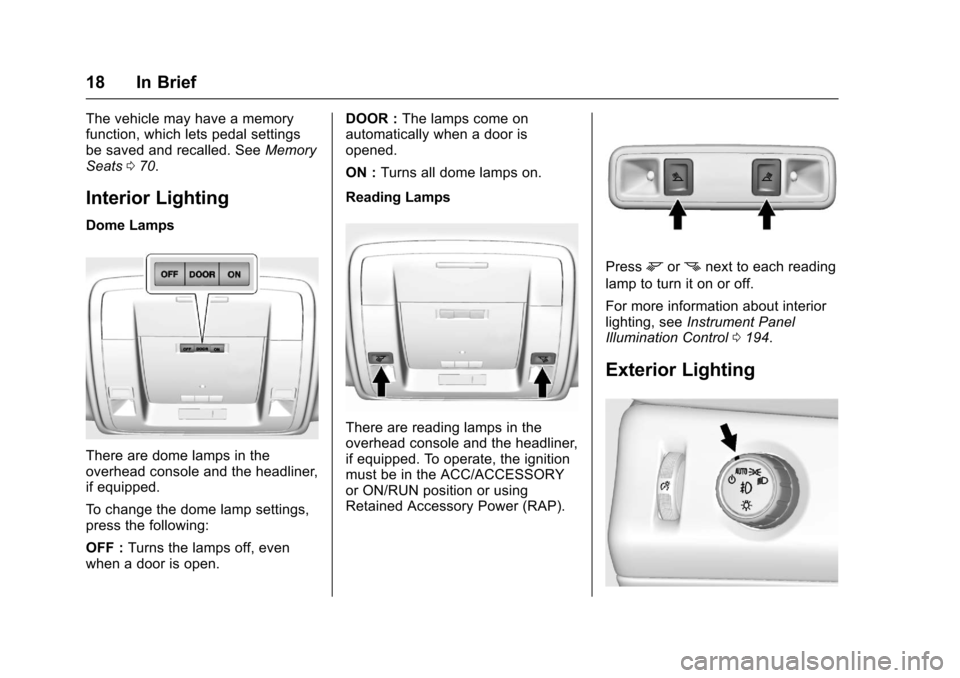
Interior Lighting
Dome Lamps
There are dome lamps in the
overhead console and the headliner,
if equipped.
To change the dome lamp settings,
press the following:
OFF : Turns the lamps off, even
when a door is open. DOOR :
The lamps come on
automatically when a door is
opened.
ON : Turns all dome lamps on.
Reading Lamps
There are reading lamps in the
overhead console and the headliner,
if equipped. To operate, the ignition
must be in the ACC/ACCESSORY
or ON/RUN position or using
Retained Accessory Power (RAP).
Pressmornnext to each reading
lamp to turn it on or off.
For more information about interior
lighting, see Instrument Panel
Illumination Control 0194.
Exterior Lighting
Page 20 of 465
Chevrolet Tahoe/Suburban Owner Manual (GMNA-Localizing-U.S./Canada/
Mexico-9955986) - 2017 - crc - 7/5/16
In Brief 19
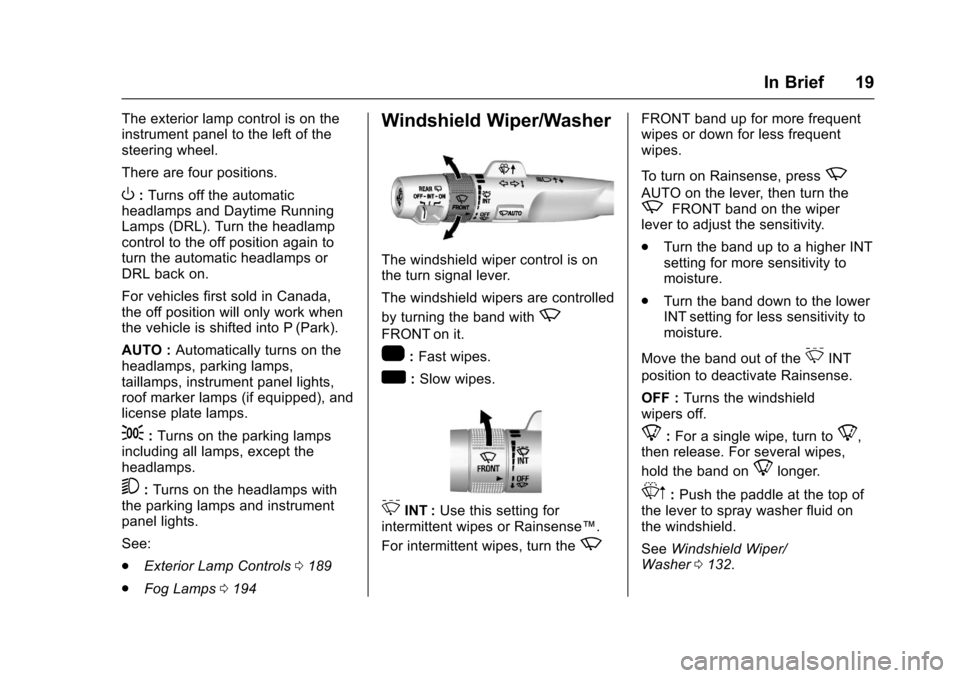
The exterior lamp control is on the
instrument panel to the left of the
steering wheel.
There are four positions.
O:Turns off the automatic
headlamps and Daytime Running
Lamps (DRL). Turn the headlamp
control to the off position again to
turn the automatic headlamps or
DRL back on.
For vehicles first sold in Canada,
the off position will only work when
the vehicle is shifted into P (Park).
AUTO : Automatically turns on the
headlamps, parking lamps,
taillamps, instrument panel lights,
roof marker lamps (if equipped), and
license plate lamps.
;: Turns on the parking lamps
including all lamps, except the
headlamps.
5: Turns on the headlamps with
the parking lamps and instrument
panel lights.
See:
. Exterior Lamp Controls 0189
. Fog Lamps 0194
Windshield Wiper/Washer
The windshield wiper control is on
the turn signal lever.
The windshield wipers are controlled
by turning the band with
z
FRONT on it.
1:Fast wipes.
w:Slow wipes.
3INT : Use this setting for
intermittent wipes or Rainsense™.
For intermittent wipes, turn the
z
FRONT band up for more frequent
wipes or down for less frequent
wipes.
To turn on Rainsense, press
z
AUTO on the lever, then turn thezFRONT band on the wiper
lever to adjust the sensitivity.
. Turn the band up to a higher INT
setting for more sensitivity to
moisture.
. Turn the band down to the lower
INT setting for less sensitivity to
moisture.
Move the band out of the
3INT
position to deactivate Rainsense.
OFF : Turns the windshield
wipers off.
8: For a single wipe, turn to8,
then release. For several wipes,
hold the band on
8longer.
Lm: Push the paddle at the top of
the lever to spray washer fluid on
the windshield.
See Windshield Wiper/
Washer 0132.
Page 25 of 465
Chevrolet Tahoe/Suburban Owner Manual (GMNA-Localizing-U.S./Canada/
Mexico-9955986) - 2017 - crc - 7/5/16
24 In Brief
The favorite and volume switches
are on the back of the steering
wheel.1. Favorite: When on a radio source, press to select the next
or previous favorite. When on a
media source, press to select
the next or previous track.
2. Volume: Press to increase or decrease the volume.
See Steering Wheel Controls 0131.
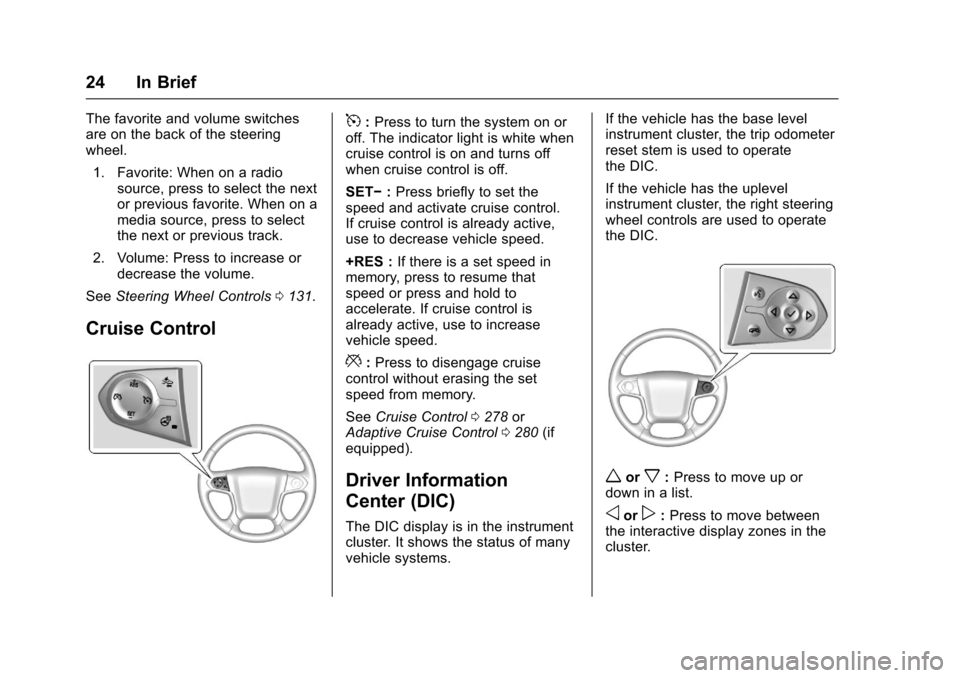
Cruise Control
5:Press to turn the system on or
off. The indicator light is white when
cruise control is on and turns off
when cruise control is off.
SET− :Press briefly to set the
speed and activate cruise control.
If cruise control is already active,
use to decrease vehicle speed.
+RES : If there is a set speed in
memory, press to resume that
speed or press and hold to
accelerate. If cruise control is
already active, use to increase
vehicle speed.
*: Press to disengage cruise
control without erasing the set
speed from memory.
See Cruise Control 0278 or
Adaptive Cruise Control 0280 (if
equipped).
Driver Information
Center (DIC)
The DIC display is in the instrument
cluster. It shows the status of many
vehicle systems. If the vehicle has the base level
instrument cluster, the trip odometer
reset stem is used to operate
the DIC.
If the vehicle has the uplevel
instrument cluster, the right steering
wheel controls are used to operate
the DIC.
worx:
Press to move up or
down in a list.
oorp: Press to move between
the interactive display zones in the
cluster.