2017 CHEVROLET SS infotainment
[x] Cancel search: infotainmentPage 206 of 400

Chevrolet SS Sedan Owner Manual (GMNA-Localizing-U.S.-10122752) -2017 - crc - 8/31/16
Infotainment System 205
Trademarks and
License Agreements
FCC Information
SeeRadio Frequency Statement0374.
“Made for iPod”and“Made foriPhone”mean that an electronicaccessory has been designed toconnect specifically to iPod oriPhone and has been certified bythe developer to meet Appleperformance standards.
iPod and iPhone are trademarks ofApple Computer, Inc., registered inthe U.S. and other countries.
Fees and Taxes : Subscription fee,taxes, one time activation fee, andother fees may apply. Subscriptionfee is consumer only. All fees andprogramming subject to change.Subscriptions subject to CustomerAgreement available atwww.siriusxm.com. SiriusXM®
service only available in the48 contiguous United States andCanada.
Explicit Language Notice: Channelswith frequent explicit language areindicated with an“XL”preceding thechannel name. Channel blocking isavailable for SiriusXM SatelliteRadio receivers by notifyingSiriusXM:
.USA Customers—Seewww.siriusxm.com or call1-888-601-6296.
It is prohibited to copy, decompile,disassemble, reverse engineer,hack, manipulate, or otherwisemake available any technology orsoftware incorporated in receiverscompatible with the SiriusXM®
Satellite Radio System or thatsupport the SiriusXM website, theOnline Service or any of its content.Furthermore, the AMBER voicecompression software included inthis product is protected byintellectual property rights includingpatent rights, copyrights, and tradesecrets of Digital VoiceSystems, Inc.
General Requirements:
.ALicenseAgreementfromSiriusXM®is required for anyproduct that incorporatesSiriusXM Technology and/or foruse of any of the SiriusXMmarks to be manufactured,distributed, or marketed in theSiriusXM Service Area.
Gracenote
Gracenote®,Gracenotelogoandlogotype, and the "Powered byGracenote" logo are either a
Page 207 of 400

Chevrolet SS Sedan Owner Manual (GMNA-Localizing-U.S.-10122752) -2017 - crc - 8/31/16
206 Infotainment System
registered trademark or a trademarkof Gracenote, Inc. in the UnitedStates and/or other countries.
Bluetooth
The Bluetooth®word mark andlogos are owned by the Bluetooth®
SIG, Inc. and any use of such marksby General Motors is under license.Other trademarks and trade namesare those of their respective owners.
Pandora (If Equipped)
Pandora is a registered trademarkof Pandora Media, Inc., used underlicense.
Manufactured under license fromDolby Laboratories. Dolby and thedouble-D symbol are trademarks ofDolby Laboratories.
Map End User License
Agreement (Optional
Equipment Applies Where
Equipped)
END USER TERMS
The data (“Data”)isprovidedforyour personal, internal use only andnot for resale. It is protected bycopyright, and is subject to thefollowing terms and conditionswhich are agreed to by you, on theone hand, and PanasonicAutomotive Systems Company ofAmerica (“PA N A S O N I C”)anditslicensors (including their licensorsand suppliers) on the other hand.
©2014HERENorthAmerica,LLC.All rights reserved.
In addition, the Lonely Planet TravelGuide content is subject to thefollowing supplier notices (ifequipped):
©2014LonelyPlanetPublicationsPty Ltd. All rights reserved.
PA N A S O N I C a n d i t s c o n t e n tproviders have tried to make thisinformation as accurate as possible,
but it is provided“as is”andPA N A S O N I C a n d i t s c o n t e n tproviders accept no responsibilityfor any loss, injury or inconvenienceresulting from this information. Youshould verify critical information (likevisas, health and safety) before youtravel.
TERMS AND CONDITIONS
Personal Use Only. You agree touse this Data together with theGeneral Motors MyLink or IntelliLinkConnected Navigation RadioPlatform for the solely personal,non-commercial purposes for whichyou were licensed, and not forservice bureau, time-sharing orother similar purposes. Accordingly,but subject to the restrictions setforth in the following paragraphs,you agree not to otherwisereproduce, copy, modify, decompile,disassemble, create any derivativeworks of, or reverse engineer anyportion of this Data, and may nottransfer or distribute it in any form,for any purpose, except to theextent permitted by mandatory laws.
Page 208 of 400

Chevrolet SS Sedan Owner Manual (GMNA-Localizing-U.S.-10122752) -2017 - crc - 8/31/16
Infotainment System 207
Restrictions
Except where you have beenspecifically licensed to do so byPA N A S O N I C , a n d w i t h o u t l i m i t i n gthe preceding paragraph, you maynot (a) use this Data with anyproducts, systems, or applicationsinstalled or otherwise connected toor in communication with vehicles,capable of vehicle navigation,positioning, dispatch, real time routeguidance, fleet management orsimilar applications; or (b) with or incommunication with any positioningdevices or any mobile orwireless-connected electronic orcomputer devices, including withoutlimitation cellular phones, palmtopand handheld computers, pagers,and personal digital assistantsor PDAs
Warning
The Data may contain inaccurate orincomplete information due to thepassage of time, changingcircumstances, sources used andthe nature of collecting
comprehensive geographic data,any of which may lead to incorrectresults.
No Warranty
This Data is provided to you“as is,”and you agree to use it at your ownrisk. PANASONIC and its licensors(and their licensors and suppliers)make no guarantees,representations or warranties of anykind, express or implied, arising bylaw or otherwise, including but notlimited to, content, quality, accuracy,completeness, effectiveness,reliability, fitness for a particularpurpose, usefulness, use or resultsto be obtained from this Data,or that the Data or server will beuninterrupted or error-free.
Disclaimer of Warranty
PA N A S O N I C A N D I T S L I C E N S O R S(INCLUDING THEIR LICENSORSAND SUPPLIERS) DISCLAIM ANYWARRANTIES, EXPRESS ORIMPLIED, OF QUALITY,PERFORMANCE,MERCHANTABILITY, FITNESSFOR A PARTICULAR PURPOSEOR NON-INFRINGEMENT. Some
States, Territories and Countries donot allow certain warrantyexclusions, so to that extent theabove exclusion may not applyto you.
Disclaimer of Liability
PA N A S O N I C A N D I T S L I C E N S O R S(INCLUDING THEIR LICENSORSAND SUPPLIERS) SHALL NOT BELIABLE TO YOU: IN RESPECT OFANY CLAIM, DEMAND ORACTION, IRRESPECTIVE OF THENATURE OF THE CAUSE OF THECLAIM, DEMAND OR ACTIONALLEGING ANY LOSS, INJURYOR DAMAGES, DIRECT ORINDIRECT, WHICH MAY RESULTFROM THE USE OR POSSESSIONOF THE INFORMATION; OR FORANY LOSS OF PROFIT, REVENUE,CONTRACTS OR SAVINGS, ORANY OTHER DIRECT, INDIRECT,INCIDENTAL, SPECIAL ORCONSEQUENTIAL DAMAGESARISING OUT OF YOUR USE OFOR INABILITY TO USE THISINFORMATION, ANY DEFECT INTHE INFORMATION, OR THEBREACH OF THESE TERMS ORCONDITIONS, WHETHER IN AN
Page 209 of 400

Chevrolet SS Sedan Owner Manual (GMNA-Localizing-U.S.-10122752) -2017 - crc - 8/31/16
208 Infotainment System
ACTION IN CONTRACT OR TORTOR BASED ON A WARRANTY,EVEN IF PANASONIC OR ITSLICENSORS HAVE BEENADVISED OF THE POSSIBILITYOF SUCH DAMAGES. SomeStates, Territories and Countries donot allow certain liability exclusionsor damages limitations, so to thatextent the above may not applyto you.
Export Control
PA N A S O N I C s h a l l n o t e x p o r t f r o manywhere any part of the Data orany direct product thereof except incompliance with, and with alllicenses and approvals requiredunder, applicable export laws, rulesand regulations, including but notlimited to the laws, rules andregulations administered by theOffice of Foreign Assets Control ofthe U.S. Department of Commerceand the Bureau of Industry andSecurity of the U.S. Department ofCommerce. To the extent that anysuch export laws, rules orregulations prohibit HERE fromcomplying with any of its obligationshereunder to deliver or distribute
Data, such failure shall be excusedand shall not constitute a breach ofthis Agreement.
Entire Agreement
These terms and conditionsconstitute the entire agreementbetween PANASONIC (and itslicensors, including their licensorsand suppliers) and you pertaining tothe subject matter hereof, andsupersedes in their entirety any andall written or oral agreementspreviously existing between us withrespect to such subject matter.
Governing Law
The above terms and conditionsshall be governed by the laws of theState of Illinois (with respect to useof Data for the Americas and/or theAsia Pacific territories), and the lawsof The Netherlands (with respect toData for the Middle East, Africa,Russia and Europe territories),without giving effect to (i) its conflictof laws provisions, or (ii) the UnitedNations Convention for Contracts forthe International Sale of Goods,which is explicitly excluded. Youagree to submit to the jurisdiction of
the State of Illinois for any and alldisputes, claims and actions arisingfrom or in connection with the Dataprovided to you hereunder.
Government End Users
If the Data is being acquired by oron behalf of the United Statesgovernment or any other entityseeking or applying rights similar tothose customarily claimed by theUnited States government, this Datais a“commercial item”as that termis defined at 48 C.F.R. (“FAR”)2.101, is licensed in accordancewith these End-User Terms, andeach copy of Data delivered orotherwise furnished shall be markedand embedded as appropriate withthe following“Notice of Use,”andshall be treated in accordance withsuch Notice:
Page 210 of 400

Chevrolet SS Sedan Owner Manual (GMNA-Localizing-U.S.-10122752) -2017 - crc - 8/31/16
Infotainment System 209
NOTICE OF USE
CONTRACTOR (MANUFACTURER/SUPPLIER)
NAME:
HERE North America, LLC
CONTRACTOR (MANUFACTURER/SUPPLIER)
ADDRESS:
425 West Randolph Street,Chicago, IL 60606.
This Data is a commercial item asdefined in FAR 2.101 and is subjectto these End-User Terms underwhich this Data was provided.
©2014HERENorthAmerica,LLC.All rights reserved.
If the Contracting Officer, federalgovernment agency, or any federalofficial refuses to use the legendprovided herein, the ContractingOfficer, federal government agency,or any federal official must notifyHERE North America, LLC prior toseeking additional or alternativerights in the Data.
Page 212 of 400
Chevrolet SS Sedan Owner Manual (GMNA-Localizing-U.S.-10122752) -2017 - crc - 8/31/16
Climate Controls 211
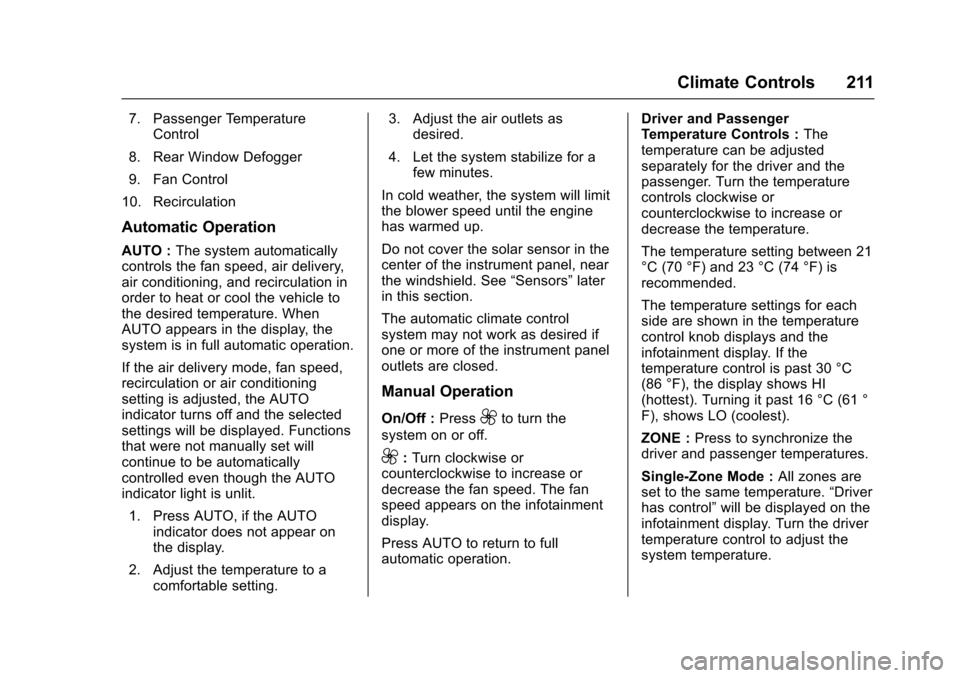
7. Passenger TemperatureControl
8. Rear Window Defogger
9. Fan Control
10. Recirculation
Automatic Operation
AUTO :The system automaticallycontrols the fan speed, air delivery,air conditioning, and recirculation inorder to heat or cool the vehicle tothe desired temperature. WhenAUTO appears in the display, thesystem is in full automatic operation.
If the air delivery mode, fan speed,recirculation or air conditioningsetting is adjusted, the AUTOindicator turns off and the selectedsettings will be displayed. Functionsthat were not manually set willcontinue to be automaticallycontrolled even though the AUTOindicator light is unlit.
1. Press AUTO, if the AUTOindicator does not appear onthe display.
2. Adjust the temperature to acomfortable setting.
3. Adjust the air outlets asdesired.
4. Let the system stabilize for afew minutes.
In cold weather, the system will limitthe blower speed until the enginehas warmed up.
Do not cover the solar sensor in thecenter of the instrument panel, nearthe windshield. See“Sensors”laterin this section.
The automatic climate controlsystem may not work as desired ifone or more of the instrument paneloutlets are closed.
Manual Operation
On/Off :Press9to turn the
system on or off.
9:Turn clockwise orcounterclockwise to increase ordecrease the fan speed. The fanspeed appears on the infotainmentdisplay.
Press AUTO to return to fullautomatic operation.
Driver and PassengerTe m p e r a t u r e C o n t r o l s :Thetemperature can be adjustedseparately for the driver and thepassenger. Turn the temperaturecontrols clockwise orcounterclockwise to increase ordecrease the temperature.
The temperature setting between 21°C (70 °F) and 23 °C (74 °F) isrecommended.
The temperature settings for eachside are shown in the temperaturecontrol knob displays and theinfotainment display. If thetemperature control is past 30 °C(86 °F), the display shows HI(hottest). Turning it past 16 °C (61 °F), shows LO (coolest).
ZONE :Press to synchronize thedriver and passenger temperatures.
Single-Zone Mode :All zones areset to the same temperature.“Driverhas control”will be displayed on theinfotainment display. Turn the drivertemperature control to adjust thesystem temperature.
Page 213 of 400

Chevrolet SS Sedan Owner Manual (GMNA-Localizing-U.S.-10122752) -2017 - crc - 8/31/16
212 Climate Controls
Dual-Zone Mode :Allows differenttemperatures to be set for the driverand passenger sides.
Enter Dual-Zone mode by adjustingthe passenger side temperaturewhen in Single-Zone mode.
Air Delivery Mode Controls :
PressY,),-,or[to change
the current airflow mode. Thecurrent mode selection appears inthe infotainment display. Changingthe mode cancels the automaticoperation and the system goes intosemi-automatic operation. PressAUTO to return to full automaticoperation.
Select from the following:
Y:Air is directed to the instrumentpanel outlets and console outlet.
):Air is divided between theinstrument panel outlets, consoleoutlet and the floor outlets. Coolerair is directed to the upper outletsand warmer air to the floor outlets.
[:Air is directed to the flooroutlets with some air directed to theouter instrument panel, windshield,and side window outlets.
-:Air is directed to the windshield,floor and side window outlets. Usethis mode to clear the windows offog or moisture and warm thepassengers.
5FRONT :Press to turn the
defrost on or off. The5FRONT
indicator appears in the display.Aportionoftheairisdirectedtothewindshield and side window outlets,with some air directed to the outerinstrument panel outlets.
For best results, clear all snow andice from the windshield beforedefrosting.
Air Conditioning
#:Press to turn the airconditioning system on or off. The#appears on the infotainmentdisplay when the air conditioning ison. When the air conditioning is
turned off,#OFF appears on the
infotainment display.
The air conditioning systemremoves moisture and heat fromthe air.
The air conditioning mightautomatically turn off during heavyacceleration, abnormal systempressure or very cold outsidetemperatures.
When-,h,or5FRONTis
selected, the air conditioning isautomatically switched on toimprove defogging performance andremove moisture from the air.
Recirculation
h:Press to change the air intakebetween recirculated air and outside
air.happears on the
infotainment display whenrecirculation is activated.
The recirculation mode recyclesinterior air and is not recommendedfor extended use. If it is used for along period of time, the systemautomatically lets some outside airinto the vehicle for ventilation.
Do not use the recirculation mode ifoccupants are smoking.
The recirculation mode cannot beturned on in defrost mode.
Page 218 of 400

Chevrolet SS Sedan Owner Manual (GMNA-Localizing-U.S.-10122752) -2017 - crc - 8/31/16
Driving and Operating 217
Driving Information
Distracted Driving
Distraction comes in many formsand can take your focus from thetask of driving. Exercise goodjudgment and do not let otheractivities divert your attention awayfrom the road. Many localgovernments have enacted lawsregarding driver distraction. Becomefamiliar with the local laws inyour area.
To a v o i d d i s t r a c t e d d r i v i n g , k e e pyour eyes on the road, keep yourhands on the steering wheel, andfocus your attention on driving.
.Do not use a phone indemanding driving situations.Use a hands-free method toplace or receive necessaryphone calls.
.Watch the road. Do not read,take notes, or look upinformation on phones or otherelectronic devices.
.Designate a front seatpassenger to handle potentialdistractions.
.Become familiar with vehiclefeatures before driving, such asprogramming favorite radiostations and adjusting climatecontrol and seat settings.Program all trip information intoany navigation device prior todriving.
.Wait until the vehicle is parkedto retrieve items that have fallento the floor.
.Stop or park the vehicle to tendto children.
.Keep pets in an appropriatecarrier or restraint.
.Avoid stressful conversationswhile driving, whether with apassenger or on a cell phone.
{Warning
Ta k i n g y o u r e y e s o f f t h e r o a d t o o
long or too often could cause a
crash resulting in injury or death.
Focus your attention on driving.
Refer to the infotainment section formore information on using thatsystem and the navigation system,if equipped, including pairing andusing a cell phone.
Defensive Driving
Defensive driving means“alwaysexpect the unexpected.”The firststep in driving defensively is to wearthe safety belt. SeeSafety Belts051.
.Assume that other road users(pedestrians, bicyclists, andother drivers) are going to becareless and make mistakes.Anticipate what they might doand be ready.
.Allow enough following distancebetween you and the driver infront of you.
.Focus on the task of driving.