2017 CHEVROLET SONIC M on drive
[x] Cancel search: M on drivePage 122 of 342
Chevrolet Sonic Owner Manual (GMNA-Localizing-U.S./Canada-10122660) -2017 - crc - 5/13/16
Instruments and Controls 121
Door Ajar Light
This light comes on when a door isopen or not securely latched. Beforedriving, check that all doors areproperly closed.
Trunk Ajar Light
This light comes on when the trunkis ajar.
Information Displays
Driver Information
Center (DIC)
The DIC displays information aboutthe vehicle. It also displays warningmessages if a system problem isdetected. SeeVehicle Messages0126.AllmessagesappearintheDIC display in the instrument panelcluster.
DIC Operation and Displays
On some models, the trip odometerreset stem is used to operate theDIC. On other models, the controlsfor the DIC are on the turn signallever.
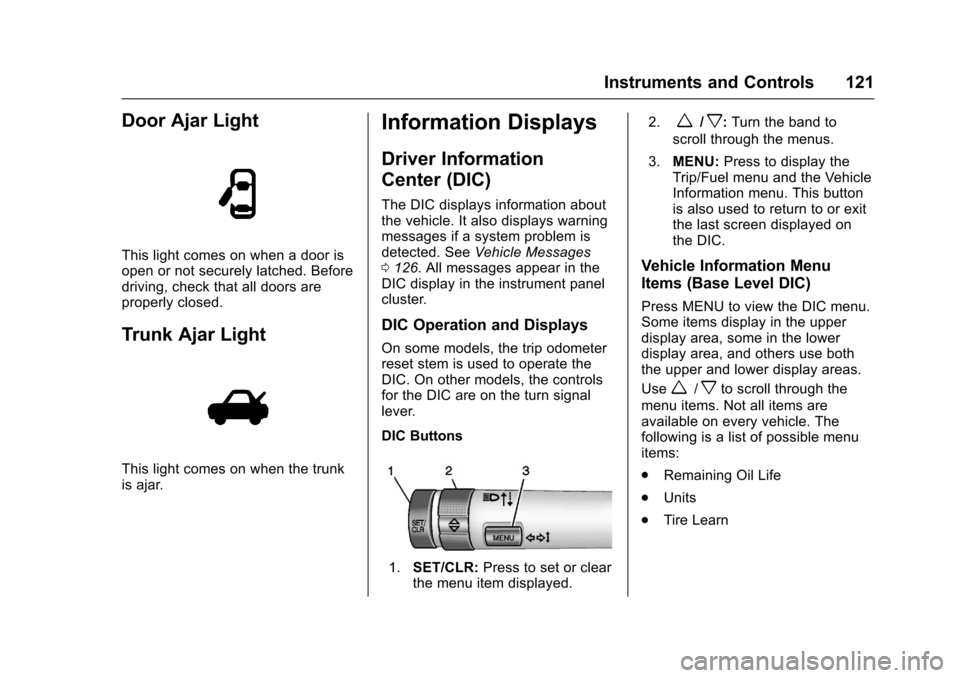
DIC Buttons
1.SET/CLR:Press to set or clearthe menu item displayed.
2.w/x:Turn the band to
scroll through the menus.
3.MENU:Press to display theTrip/Fuel menu and the VehicleInformation menu. This buttonis also used to return to or exitthe last screen displayed onthe DIC.
Vehicle Information Menu
Items (Base Level DIC)
Press MENU to view the DIC menu.Some items display in the upperdisplay area, some in the lowerdisplay area, and others use boththe upper and lower display areas.
Usew/xto scroll through the
menu items. Not all items areavailable on every vehicle. Thefollowing is a list of possible menuitems:
.Remaining Oil Life
.Units
.Tire Learn
Page 123 of 342

Chevrolet Sonic Owner Manual (GMNA-Localizing-U.S./Canada-10122660) -2017 - crc - 5/13/16
122 Instruments and Controls
Remaining Oil Life
This menu is not available while thevehicle is moving. This displayshows an estimate of the oil's
remaining useful life. If 99:%is
displayed, that means 99% of thecurrent oil life remains.
When the remaining oil life is low,
the:%CHANGEmessagewill
appear on the display. The oilshould changed as soon aspossible. SeeEngine Oil0220.Inaddition to the engine oil life systemmonitoring the oil life, additionalmaintenance is recommended in theMaintenance Schedule. SeeMaintenance Schedule0290.
Remember, the Oil Life display mustbe reset after each oil change. It willnot reset itself. Also, be careful notto reset the Oil Life displayaccidentally at any time other thanwhen the oil has just been changed.It cannot be reset accurately untilthe next oil change. To reset theengine oil life system, press SET/CLR while the Oil Life display isactive. SeeEngine Oil LifeSystem0222.
Units
This menu is not available while thevehicle is moving. Press SET/CLRwhile the unit display is active and
movew/xto change units when
UNIT SET is displayed. Press SET/CLR to confirm the setting. Select 1,2, or 3 for the unit display. 1 ismetric units, 2 is Imperial units, and3isUSunits.Thiswillchangethedisplays on the cluster and DIC tothe type of measurements selected.
Tire Learn
This display allows for matching ofthe TPMS sensors. The display willshow a vehicle with the approximatepressures of all four tires. Tirepressure is displayed in eitherkilopascal (kPa) or pounds persquare inch (psi). SeeTire PressureMonitor System0257andTirePressure Monitor Operation0258.
Trip/Fuel Menu Items (Base
Level DIC)
Press MENU until the Trip/Fuel
menu is displayed. Usew/xto
scroll through the menu items. On
some models, use the trip odometerreset stem to scroll through themenu. Not all items are available onevery vehicle. The following is a listof possible menu items:
.Trip Odometer
.Fuel Range
.Average Vehicle Speed
.Instantaneous Fuel Economy
.Average Fuel Economy
.Timer
Trip Odometer
This display shows the currentdistance traveled, in eitherkilometers (km) or miles (mi), sincethe last reset for the trip odometer.The trip odometer can be reset tozero by pressing SET/CLR orpressing and holding the tripodometer reset stem while the tripodometer display is showing.
Fuel Range
This display shows the approximatedistance the vehicle can be drivenwithout refueling. The fuel rangeestimate is based on an average of
Page 125 of 342
Chevrolet Sonic Owner Manual (GMNA-Localizing-U.S./Canada-10122660) -2017 - crc - 5/13/16
124 Instruments and Controls
Digital Speedometer
The digital speedometer, availableon some vehicles, shows how fastthe vehicle is moving in eitherkilometers per hour (km/h) or milesper hour (mph). The speedometercannot be reset.
Trip 1 and Trip 2
This display shows the currentdistance traveled, in eitherkilometers (km) or miles (mi), sincethe last reset for the trip odometer.The trip odometer can be reset tozero by pressing SET/CLR while thetrip odometer display is showing.
Fuel Range
This display shows the approximatedistance the vehicle can be drivenwithout refueling. The fuel rangeestimate is based on an average ofthe vehicle's fuel economy overrecent driving history and theamount of fuel remaining in the fueltank. Fuel range cannot be reset.
Instantaneous Fuel Economy
The instantaneous fuel economydisplay shows the current fueleconomy in liters per 100 kilometers(L/100 km) or miles pergallon (mpg). This number reflectsonly the approximate fuel economythat the vehicle has right now andchanges frequently as drivingconditions change. Unlike averageeconomy, this display cannot bereset.
Average Fuel Economy
This display shows the approximateaverage liters per 100 kilometers (L/100 km) or miles per gallon (mpg).This number is calculated based onthe number of L/100 km (mpg)recorded since the last time thismenu item was reset. This numberreflects only the approximateaverage fuel economy that thevehicle has right now, and willchange as driving conditionschange. The fuel economy can bereset by pressing SET/CLR whilethe Average Fuel Economy displayis showing.
Average Vehicle Speed
This display shows the averagespeed of the vehicle in kilometersper hour (km/h) or miles perhour (mph). This average iscalculated based on the variousvehicle speeds recorded since thelast reset of this value. The averagespeed can be reset by pressingSET/CLR while the Average VehicleSpeed display is showing.
Timer
Available on some vehicles, thisdisplay can be used as a timer. Tostart the timer, press SET/CLR whileTimer is displayed. The display willshow the amount of time that haspassed since the timer was lastreset, not including time the ignitionis off. Time will continue to becounted as long as the ignition ison, even if another display is beingshown on the DIC. The timer willrecord up to 99 hours, 59 minutes,and 59 seconds (99:59:59) afterwhich the display will return to zero.To s t o p t h e t i m e r, p r e s s S E T / C L R
Page 127 of 342
Chevrolet Sonic Owner Manual (GMNA-Localizing-U.S./Canada-10122660) -2017 - crc - 5/13/16
126 Instruments and Controls
Vehicle Messages
Messages displayed on the DICindicate the status of the vehicle orsome action that may be needed tocorrect a condition. Multiplemessages appear one after another.All messages should be takenseriously.
Base Level Cluster
On the base level cluster, vehiclemessages appear as code numbers.Some of these codes may appearwith the Service Vehicle Soon lightin the DIC display.
2:No Remote Detected. PressClutch to Restart
4:A/C Off Due to HighEngine Temp
5:Steering Column Is Locked
7:Turn Steering Wheel, Turn KeyOff, Then On
9:Turn Steering Wheel, StartVehicle Again
10 :Brakes Overheated
15 :Check High MountedBrake Lamp
16 :Check Brake Lamps
18 :Left Low Beam Failure
20 :Right Low Beam Failure
21 :Check Left Position Lamp
22 :Check Right Position Lamp
23 :Reversing Lamp Failure
24 :License Plate Lamp Failure
25 :Left Front Turn Indicator Failure
26 :Left Rear Turn Indicator Failure
27 :Right Front Turn IndicatorFailure
28 :Right Rear Turn Signal Failure
35 :Replace Battery In Remote Key
49 :Lane Departure WarningUnavailable
52 :Change Timing Belt
53 :Tighten Gas Cap
59 :Open, Then Close DriverWindow
65 :Theft Attempted
66 :Service Theft Alarm
67 :Service Steering Column Lock
68 :Service Power Steering, Drivewith Care
77 :Service Front Camera System
79 :Engine Oil Low–Add Oil
81 :Service Transmission
84 :Engine Power Is Reduced
88 :Use Transmitter Pocket to Start
89 :Service Vehicle Soon
91 :No Remote Detected
92 :No Remote Detected, PressBrake To Restart
93 :Press Button Again To TurnEngine Off
94 :Shift to Park
95 :Service Airbag
174 :Low Battery
258 :Park Assist Off
Uplevel Cluster
Messages that do not requireimmediate action can beacknowledged and cleared bypressing SET/CLR.
Page 131 of 342
Chevrolet Sonic Owner Manual (GMNA-Localizing-U.S./Canada-10122660) -2017 - crc - 5/13/16
130 Instruments and Controls
Vehicle Locator Lights
This feature will flash the exteriorlamps and allows some of theexterior lamps and most of theinterior lamps to turn on briefly whenKon the Remote Keyless Entry(RKE) transmitter is pressed tolocate the vehicle.
Select Off or On.
Exit Lighting
This allows the selection of howlong the exterior lamps stay onwhen leaving the vehicle when it isdark outside.
Select Off, 30 Seconds, 60Seconds, or 120 Seconds.
Power Door Locks
Select and the following maydisplay:
.Unlocked Door Anti Lock Out
.Auto Door Unlock
.Delayed Door Lock
Unlocked Door Anti Lock Out
When on, this feature will keep thedriver door from locking until thedoor is closed. If this feature isturned on, the Delayed Door Lockmenu will not be available.
Select Off or On.
Auto Door Unlock
This allows selection of which of thedoors will automatically unlock whenthe vehicle is shifted into P with anautomatic transmission or when thevehicle is turned off with a manualtransmission.
Select Off, All Doors, or Driver Door.
Delayed Door Lock
When on, this feature will delay thelocking of the doors. To override thedelay, press the power door lockswitch on the door.
Select Off or On.
Remote Lock, Unlock, Start
Select and the following maydisplay:
.Remote Unlock Light Feedback
.Remote Lock Feedback
.Remote Door Unlock
.Remote Start Auto Heat Seats
.Passive Door Unlock
.Passive Door Lock
.Remote Left in Vehicle Alert
Remote Unlock Light Feedback
When on, the exterior lamps willflash when unlocking the vehiclewith the RKE transmitter.
Select Off or Flash Lights.
Remote Lock Feedback
This allows selection of what type offeedback is given when locking thevehicle with the RKE transmitter.
Select Off, Lights and Horn, LightsOnly, or Horn Only.
Remote Door Unlock
This allows selection of which doors
will unlock when pressingKon the
RKE transmitter.
Select All Doors or Driver Door.
Page 132 of 342

Chevrolet Sonic Owner Manual (GMNA-Localizing-U.S./Canada-10122660) -2017 - crc - 5/13/16
Instruments and Controls 131
Remote Start Auto Heat Seats
If equipped and turned on, thisfeature will turn the heated seats onwhen using remote start oncold days.
Select Off or On.
Passive Door Unlock
This allows the selection of whatdoors will unlock when using thebutton on the driver door to unlockthe vehicle.
Select All Doors or Driver Door.
Passive Door Lock
This feature can be turned on, off,or on with feedback. SeeRemoteKeyless Entry (RKE) SystemOperation (Keyless Access)031orRemote Keyless Entry (RKE)System Operation (KeyAccess)029.
Select Off, On with HornChirp, or On.
Remote Left in Vehicle Alert
This feature sounds an alert whenthe RKE transmitter is left in thevehicle.
Select Off or On.
Bluetooth
Select and the following maydisplay:
.Device Information
.Discoverable
.Device Management
.Change Pairing PIN
.Ringtones
.Sort Order
.Voice Mail Numbers
.Te x t M e s s a g e A l e r t s
Device Information
See information about the devicename, address, and PIN code.
Discoverable
This allows the system to find adevice.
Select Off or On.
Device Management
Select to connect to a differentphone source, disconnect a phone,or delete a phone.
Change Pairing PIN
Select to change the PIN of adevice.
Ringtones
Press to change the ring tone forthe specific phone. The phone doesnot need to be connected to changethe ring tones.
Sort Order
Select to change the order of thecontacts list.
Select First/Last or Last/First.
Voice Mail Numbers
This feature displays the voice mailnumber for all connected phones.To c h a n g e t h e v o i c e m a i l n u m b e r ,select EDIT. Type a new number,then select SAVE.
Text Message Alerts
This allows the feature to be turnedon or off.
Select Off or On.
Page 135 of 342
Chevrolet Sonic Owner Manual (GMNA-Localizing-U.S./Canada-10122660) -2017 - crc - 5/13/16
134 Lighting
Lighting
Exterior Lighting
Exterior Lamp Controls . . . . . . . 134Headlamp High/Low-BeamChanger . . . . . . . . . . . . . . . . . . . . 134Flash-to-Pass . . . . . . . . . . . . . . . . 135Daytime RunningLamps (DRL) . . . . . . . . . . . . . . . 135Automatic HeadlampSystem . . . . . . . . . . . . . . . . . . . . . . 135Hazard Warning Flashers . . . . . 136Turn and Lane-ChangeSignals . . . . . . . . . . . . . . . . . . . . . . 136Fog Lamps . . . . . . . . . . . . . . . . . . . 137
Interior Lighting
Instrument Panel IlluminationControl . . . . . . . . . . . . . . . . . . . . . . 137Courtesy Lamps . . . . . . . . . . . . . . 138Dome Lamps . . . . . . . . . . . . . . . . . 138Reading Lamps . . . . . . . . . . . . . . 138
Lighting Features
Entry Lighting . . . . . . . . . . . . . . . . 138Exit Lighting . . . . . . . . . . . . . . . . . . 138Battery Load Management . . . 139Battery Power Protection . . . . . 139Exterior Lighting BatterySaver . . . . . . . . . . . . . . . . . . . . . . . 139
Exterior Lighting
Exterior Lamp Controls
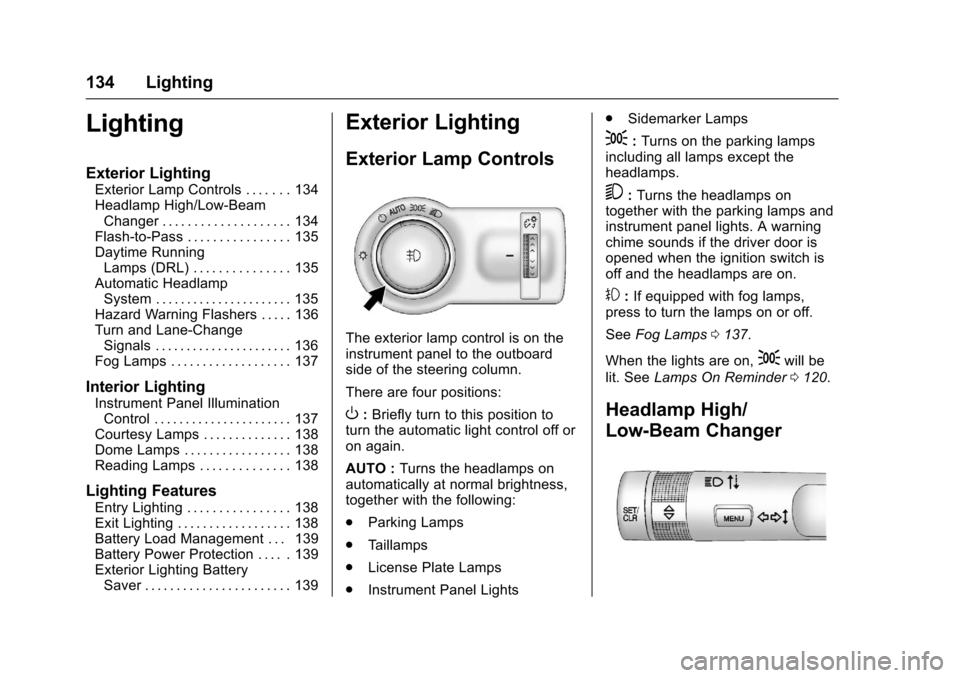
The exterior lamp control is on theinstrument panel to the outboardside of the steering column.
There are four positions:
O:Briefly turn to this position toturn the automatic light control off oron again.
AUTO :Turns the headlamps onautomatically at normal brightness,together with the following:
.Parking Lamps
.Ta i l l a m p s
.License Plate Lamps
.Instrument Panel Lights
.Sidemarker Lamps
;:Turns on the parking lampsincluding all lamps except theheadlamps.
5:Turns the headlamps ontogether with the parking lamps andinstrument panel lights. A warningchime sounds if the driver door isopened when the ignition switch isoff and the headlamps are on.
#:If equipped with fog lamps,press to turn the lamps on or off.
SeeFog Lamps0137.
When the lights are on,;will be
lit. SeeLamps On Reminder0120.
Headlamp High/
Low-Beam Changer
Page 140 of 342
Chevrolet Sonic Owner Manual (GMNA-Localizing-U.S./Canada-10122660) -2017 - crc - 5/13/16
Lighting 139
If equipped with Keyless Access,the exterior lamps automatically turnon when a door is opened after theignition is changed to the OFFposition. The dome lamps alsocome on after the ignition ischanged to the OFF position. SeeIgnition Positions (Key Access)0182orIgnition Positions (KeylessAccess)0183.
The exterior lamps turn offimmediately by turning the exteriorlamps control off.
This feature can be changed. SeeVehicle Personalization0127.
Battery Load
Management
The vehicle has Electric PowerManagement (EPM) that estimatesthe battery's temperature and stateof charge. It then adjusts the voltagefor best performance and extendedlife of the battery.
When the battery's state of chargeis low, the voltage is raised slightlyto quickly bring the charge back up.When the state of charge is high,
the voltage is lowered slightly toprevent overcharging. If the vehiclehas a voltmeter gauge or a voltagedisplay on the Driver InformationCenter (DIC), you may see thevoltage move up or down. This isnormal. If there is a problem, analert will be displayed.
The battery can be discharged atidle if the electrical loads are veryhigh. This is true for all vehicles.This is because the generator(alternator) may not be spinning fastenough at idle to produce all thepower needed for very highelectrical loads.
Ahighelectricalloadoccurswhenseveral of the following are on, suchas: headlamps, high beams, foglamps, rear window defogger,climate control fan at high speed,heated seats, engine cooling fans,trailer loads, and loads plugged intoaccessory power outlets.
EPM works to prevent excessivedischarge of the battery. It does thisby balancing the generator's outputand the vehicle's electrical needs.It can increase engine idle speed to
generate more power, wheneverneeded. It can temporarily reducethe power demands of someaccessories.
Normally, these actions occur insteps or levels, without beingnoticeable. In rare cases at thehighest levels of corrective action,this action may be noticeable to thedriver.
Battery Power Protection
The battery saver feature isdesigned to protect the vehicle'sbattery.
If some interior lamps are left onand the ignition is turned off, thebattery rundown protection systemautomatically turns the lamp off aftersome time.
Exterior Lighting Battery
Saver
The exterior lamps turn off about10 minutes after the ignition isturned off, if the parking lamps orheadlamps have been manually lefton. This protects against draining