2017 CHEVROLET SONIC key
[x] Cancel search: keyPage 150 of 342
Chevrolet Sonic Owner Manual (GMNA-Localizing-U.S./Canada-10122660) -2017 - crc - 5/13/16
Infotainment System 149
Audio Players
Avoiding Untrusted Media
Devices
When using media devices such asCDs, DVDs, Blu-ray Discs®,SDcards, USB drives, and mobiledevices, consider the source.Untrusted media devices couldcontain files that affect systemoperation or performance. Avoid useif the content or origin cannot betrusted.
USB Port
Using the USB Port
The infotainment system can playmusic by connecting an auxiliarydevice to the USB port.
USB Support
The vehicle is equipped with eitherasingleUSBportordualUSBportslocated in the center stack for dataand charging, and uses theUSB 2.1A standard.
USB Supported Devices
.USB Flash Drives
.iPods/iPhones
.Portable USB Hard Drives
Not all iPods and USB drives arecompatible with the USB port.
Make sure the iPod has the latestfirmware from Apple®for properoperation. iPod firmware can beupdated using the latest iTunes®
application. See www.apple.com/itunes.
For help with identifying your iPod,go to www.apple.com/support.
The USB port can play both lowerand upper case .mp3, .wma, .ogg,and .wav files stored on a USBstorage device.
Supported Apple®Devices
To v i e w s u p p o r t e d d e v i c e s i n t h eU.S., see www.my.chevrolet.com\learned.
To v i e w s u p p o r t e d d e v i c e s i nCanada, seewww.chevroletowner.ca.
To v i e w s u p p o r t e d d e v i c e s i nMexico, see your dealer.
USB Supported File and FolderStructure
The infotainment system supports:
.FAT 1 6 .
.FAT 3 2 .
.exFAT.
Connecting a USB Storage
Device or iPod/iPhone
To c o n n e c t a U S B s t o r a g e d e v i c e ,connect the device to the USB port.
To c o n n e c t a n i P o d / i P h o n e , c o n n e c tone end of the device’scabletotheiPod/iPhone and the other end tothe USB port.
The iPod/iPhone charges while it isconnected to the vehicle if thevehicle is in ACC/ACCESSORY orON/RUN. SeeIgnition Positions(Key Access)0182orIgnitionPositions (Keyless Access)0183.When the vehicle is turned off, theiPod/iPhone automatically powersoff and will not charge or drawpower from the vehicle's battery.
Page 164 of 342
Chevrolet Sonic Owner Manual (GMNA-Localizing-U.S./Canada-10122660) -2017 - crc - 5/13/16
Infotainment System 163
Searching for Contacts Entries
1. Touch contacts on the phonescreen.
2. Touch9on the contacts
screen.
3. Use the keypad to input thename to search. For details,see“Searching for a Name”following.
4. Touch the phone book entryto call.
5. If there is more than onenumber associated with thename, touch the numberto dial.
When the Bluetooth device andinfotainment system aresuccessfully paired, the phone bookwill download. Some phones maynot download automatically. If thishappens, connect it again orproceed with the phone bookdownload on the phone.
Searching for a Name
Select characters by using thekeypad on the phone book screen.As characters are selected, the
names that include those characterswill display on the phone bookscreen. As more characters of thename are entered, the list ofpossible names is shortened.
To s e a r c h f o r t h e n a m e A l e x :
1. Touch (abc) to select the firstcharacter.
2. Touch (jkl) three times to selectthe second character.
3. Touch (def) two times to selectthe third character.
4. Touch (wxy) two times to selectthe fourth character.
Making a Call from Call History
1. Touch Call History on thephone screen.
2. Touch one of the following for:
.WAll calls history.
.[Dialed calls.
.YMissed calls.
.XReceived calls.
3. Select the contact entry to call.
Making a Call with Speed DialNumbers
To u c h a n d h o l d t h e s p e e d d i a lnumber using the keypad on thephone screen.
Only speed dial numbers alreadystored on the cell phone can beused for speed dial calls. Up totwo-digit speed dial numbers aresupported.
For two-digit speed dial numbers,touch and hold the second digit tomake a call to the speed dialnumber.
Page 172 of 342

Chevrolet Sonic Owner Manual (GMNA-Localizing-U.S./Canada-10122660) -2017 - crc - 5/13/16
Driving and Operating 171
Driving and
Operating
Driving Information
Distracted Driving . . . . . . . . . . . . 172Defensive Driving . . . . . . . . . . . . . 172Drunk Driving . . . . . . . . . . . . . . . . . 172Control of a Vehicle . . . . . . . . . . . 173Braking . . . . . . . . . . . . . . . . . . . . . . . 173Steering . . . . . . . . . . . . . . . . . . . . . . 173Off-Road Recovery . . . . . . . . . . . 174Loss of Control . . . . . . . . . . . . . . . 174Driving on Wet Roads . . . . . . . . 175Hill and Mountain Roads . . . . . 176Winter Driving . . . . . . . . . . . . . . . . 176If the Vehicle Is Stuck . . . . . . . . 178Vehicle Load Limits . . . . . . . . . . . 178
Starting and Operating
New Vehicle Break-In . . . . . . . . . 181Ignition Positions (KeyAccess) . . . . . . . . . . . . . . . . . . . . . 182Ignition Positions (KeylessAccess) . . . . . . . . . . . . . . . . . . . . . 183Starting the Engine . . . . . . . . . . . 185Engine Heater . . . . . . . . . . . . . . . . 186Retained AccessoryPower (RAP) . . . . . . . . . . . . . . . . 187
Shifting Into Park (AutomaticTransmission) . . . . . . . . . . . . . . . 187Shifting out of Park (AutomaticTransmission) . . . . . . . . . . . . . . . 188Parking . . . . . . . . . . . . . . . . . . . . . . . 189Parking over ThingsThat Burn . . . . . . . . . . . . . . . . . . . 189Extended Parking . . . . . . . . . . . . 189
Engine Exhaust
Engine Exhaust . . . . . . . . . . . . . . 190Running the Vehicle WhileParked . . . . . . . . . . . . . . . . . . . . . . 190
Automatic Transmission
Automatic Transmission . . . . . . 191Manual Mode . . . . . . . . . . . . . . . . . 192
Manual Transmission
Manual Transmission . . . . . . . . . 193
Brakes
Antilock BrakeSystem (ABS) . . . . . . . . . . . . . . . 195Parking Brake . . . . . . . . . . . . . . . . 196Brake Assist . . . . . . . . . . . . . . . . . . 196Hill Start Assist (HSA) . . . . . . . . 197
Ride Control Systems
Traction Control/ElectronicStability Control . . . . . . . . . . . . . 197
Cruise Control
Cruise Control . . . . . . . . . . . . . . . . 199
Driver Assistance Systems
Rear Vision Camera (RVC) . . . 201Parking Assist . . . . . . . . . . . . . . . . 203Forward Collision Alert (FCA)System . . . . . . . . . . . . . . . . . . . . . . 204Lane DepartureWarning (LDW) . . . . . . . . . . . . . 206
Fuel
Fuel . . . . . . . . . . . . . . . . . . . . . . . . . . 207California FuelRequirements . . . . . . . . . . . . . . . 208Fuels in Foreign Countries . . . 208Fuel Additives . . . . . . . . . . . . . . . . 208Filling the Tank . . . . . . . . . . . . . . . 209Filling a Portable FuelContainer . . . . . . . . . . . . . . . . . . . 210
Trailer Towing
General Towing Information . . . 211
Conversions and Add-Ons
Add-On ElectricalEquipment . . . . . . . . . . . . . . . . . . 211
Page 183 of 342
Chevrolet Sonic Owner Manual (GMNA-Localizing-U.S./Canada-10122660) -2017 - crc - 5/13/16
182 Driving and Operating
Caution (Continued)
breaking-in guideline everytime you get new brakelinings.
Following break-in, engine speed
and load can be gradually
increased.
Ignition Positions (Key
Access)
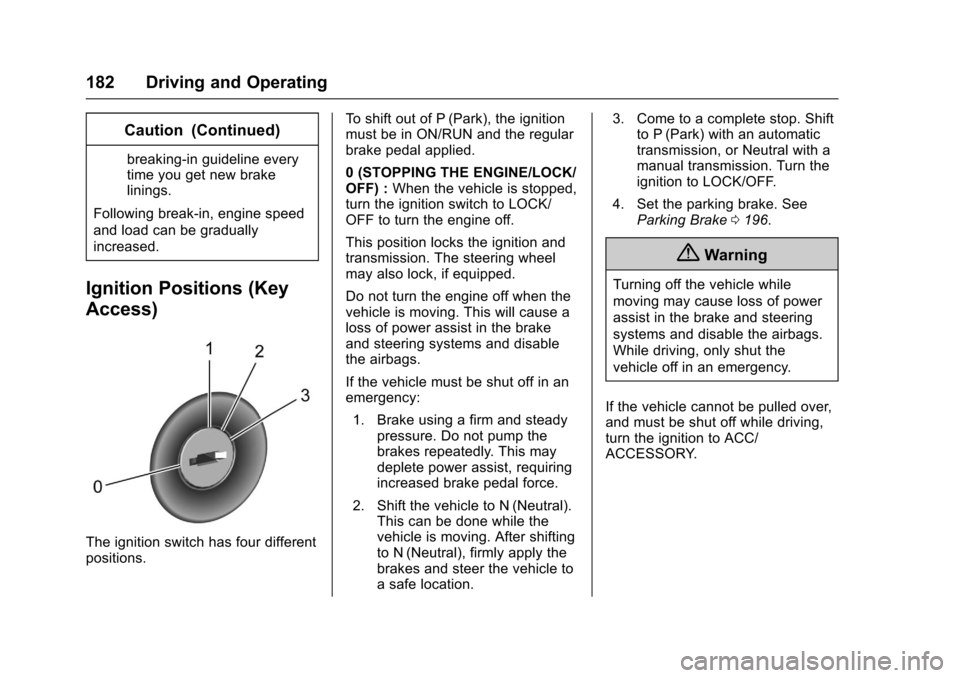
The ignition switch has four differentpositions.
To s h i f t o u t o f P ( P a r k ) , t h e i g n i t i o nmust be in ON/RUN and the regularbrake pedal applied.
0(STOPPINGTHEENGINE/LOCK/OFF) :When the vehicle is stopped,turn the ignition switch to LOCK/OFF to turn the engine off.
This position locks the ignition andtransmission. The steering wheelmay also lock, if equipped.
Do not turn the engine off when thevehicle is moving. This will cause aloss of power assist in the brakeand steering systems and disablethe airbags.
If the vehicle must be shut off in anemergency:
1. Brake using a firm and steadypressure. Do not pump thebrakes repeatedly. This maydeplete power assist, requiringincreased brake pedal force.
2. Shift the vehicle to N (Neutral).This can be done while thevehicle is moving. After shiftingto N (Neutral), firmly apply thebrakes and steer the vehicle toasafelocation.
3. Come to a complete stop. Shiftto P (Park) with an automatictransmission, or Neutral with amanual transmission. Turn theignition to LOCK/OFF.
4. Set the parking brake. SeeParking Brake0196.
{Warning
Turning off the vehicle while
moving may cause loss of power
assist in the brake and steering
systems and disable the airbags.
While driving, only shut the
vehicle off in an emergency.
If the vehicle cannot be pulled over,and must be shut off while driving,turn the ignition to ACC/ACCESSORY.
Page 184 of 342
Chevrolet Sonic Owner Manual (GMNA-Localizing-U.S./Canada-10122660) -2017 - crc - 5/13/16
Driving and Operating 183
Caution
Using a tool to force the key to
turn in the ignition could cause
damage to the switch or break the
key. Use the correct key, make
sure it is all the way in, and turn it
only with your hand. If the key
cannot be turned by hand, see
your dealer.
1(ACC/ACCESSORY):This is theposition in which things like theradio and the windshield wipers canbe operated when the engine is off.
2(ON/RUN):This position can beused to operate the electricalaccessories and to display someinstrument cluster warning andindicator lights. This position canalso be used for service anddiagnostics, and to verify the properoperation of the malfunctionindicator lamp as may be requiredfor emission inspection purposes.The switch stays in this positionwhen the engine is running.
If you leave the key in the ACC/ACCESSORY or ON/RUN positionwith the engine off, the battery couldbe drained. You may not be able tostart the vehicle if the battery isallowed to drain for an extendedperiod of time.
3(START):This is the position thatstarts the engine. When the enginestarts, release the key. The ignitionswitch returns to ON/RUN fordriving.
Awarningtonewillsoundwhenthedriver door is opened, the ignition isin ACC/ACCESSORY or LOCK/OFF, and the key is in the ignition.If the ignition becomes difficult toturn, seeKeys026.
Ignition Positions
(Keyless Access)
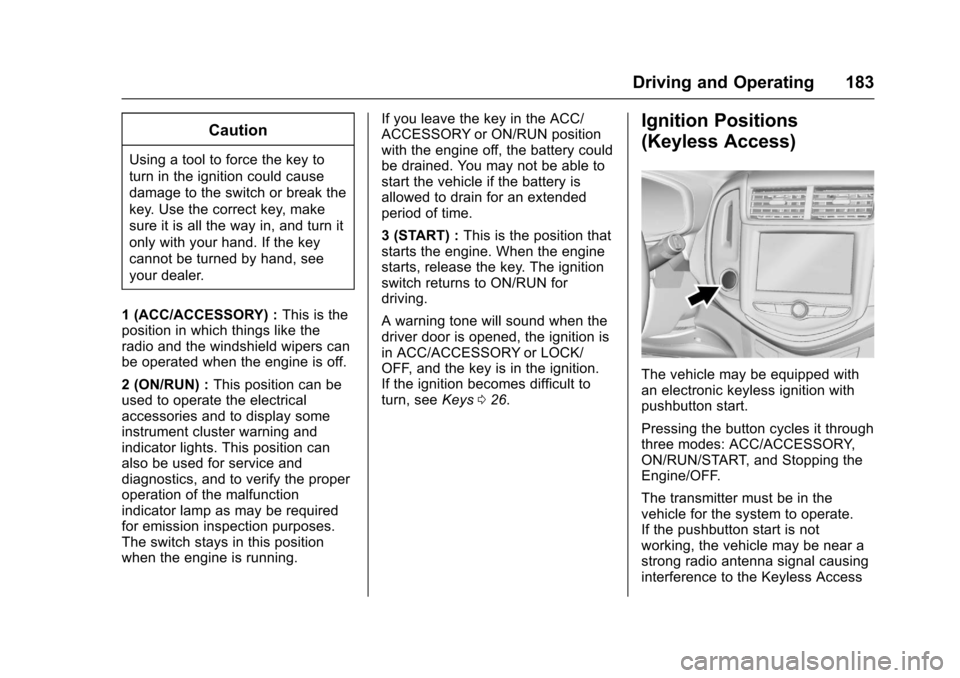
The vehicle may be equipped withan electronic keyless ignition withpushbutton start.
Pressing the button cycles it throughthree modes: ACC/ACCESSORY,ON/RUN/START, and Stopping theEngine/OFF.
The transmitter must be in thevehicle for the system to operate.If the pushbutton start is notworking, the vehicle may be near astrong radio antenna signal causinginterference to the Keyless Access
Page 185 of 342
Chevrolet Sonic Owner Manual (GMNA-Localizing-U.S./Canada-10122660) -2017 - crc - 5/13/16
184 Driving and Operating
system. SeeRemote Keyless Entry(RKE) System Operation (KeylessAccess)031orRemote KeylessEntry (RKE) System Operation (KeyAccess)029.
To s h i f t o u t o f P ( P a r k ) , t h e v e h i c l emust be in ACC/ACCESSORY orON/RUN and the brake pedal mustbe applied.
Stopping the Engine/OFF (NoIndicator Lights) :When thevehicle is stopped, press ENGINESTART/STOP once to turn theengine off.
If the vehicle is in P (Park), theignition will turn off, and RetainedAccessory Power (RAP) will remainactive. SeeRetained AccessoryPower (RAP)0187.
If the vehicle is not in P (Park), theignition will return to ACC/ACCESSORY and the DriverInformation Center (DIC) will displaythe message SHIFT TO PARK. SeeVehicle Messages0126.Whenthevehicle is shifted into P (Park), theignition system will switch to OFF.
Do not turn the engine off when thevehicle is moving. This will cause aloss of power assist in the brakeand steering systems and disablethe airbags.
If the vehicle must be shut off in anemergency:
1. Brake using a firm and steadypressure. Do not pump thebrakes repeatedly. This maydeplete power assist, requiringincreased brake pedal force.
2. Shift the vehicle to N (Neutral).This can be done while thevehicle is moving. After shiftingto N (Neutral), firmly apply thebrakes and steer the vehicle toasafelocation.
3. Come to a complete stop. Shiftto P (Park) with an automatictransmission, or Neutral with amanual transmission. Turn theignition to LOCK/OFF.
4. Set the parking brake. SeeParking Brake0196.
{Warning
Turning off the vehicle while
moving may cause loss of power
assist in the brake and steering
systems and disable the airbags.
While driving, only shut the
vehicle off in an emergency.
If the vehicle cannot be pulled over,and must be shut off while driving,press and hold ENGINE START/STOP for longer than two seconds,or press twice in five seconds.
ACC/ACCESSORY (AmberIndicator Light) :This mode allowsyou to use some electricalaccessories when the engine is off.
With the ignition off, pressing thebutton one time without the brakepedal applied will place the ignitionsystem in ACC/ACCESSORY.
The ignition will switch from ACC/ACCESSORY to OFF afterfive minutes to prevent batteryrundown.
Page 186 of 342
Chevrolet Sonic Owner Manual (GMNA-Localizing-U.S./Canada-10122660) -2017 - crc - 5/13/16
Driving and Operating 185
ON/RUN/START (Green IndicatorLight) :This mode is for driving andstarting. With the ignition off and thebrake pedal applied, pressingENGINE START/STOP once willplace the ignition system in ON/RUN/START. Once engine crankingbegins, release the button. Enginecranking will continue until theengine starts. SeeStarting theEngine0185.Theignitionwillthenremain in ON/RUN.
Service Only Mode
This power mode is available forservice and diagnostics, and toverify the proper operation of themalfunction indicator lamp as maybe required for emission inspectionpurposes. With the vehicle off, andthe brake pedal not applied,pressing and holding ENGINESTART/STOP for more thanfive seconds will place the vehicle inService Only Mode. The instrumentsand audio systems will operate asthey do in ON/RUN, but the vehiclewill not be able to be driven. Theengine will not start in Service OnlyMode. Press ENGINE START/STOPagain to turn the vehicle off.
Starting the Engine
Automatic Transmission
Move the shift lever to P (Park) orN(Neutral). To restart the enginewhen the vehicle is already moving,use N (Neutral) only.
Caution
Do not try to shift to P (Park) if the
vehicle is moving. If you do, you
could damage the transmission.
Shift to P (Park) only when the
vehicle is stopped.
Caution
If you add electrical parts or
accessories, you could change
the way the engine operates. Any
resulting damage would not be
covered by the vehicle warranty.
SeeAdd-On Electrical
Equipment0211.
Manual Transmission
The shift lever should be in Neutraland the parking brake engaged.Hold the clutch pedal to the floorand start the engine.
Starting Procedure
1. With your foot off theaccelerator pedal, turn theignition to START. When theengine cranks, let go of thekey. The idle speed will godown as the engine gets warm.
Caution
Holding the key in START for
longer than 15 seconds at a time
will cause the battery to be
drained much sooner. And the
excessive heat can damage the
starter motor. Wait about
15 seconds between each try to
help avoid draining the battery or
damaging the starter.
Page 187 of 342
Chevrolet Sonic Owner Manual (GMNA-Localizing-U.S./Canada-10122660) -2017 - crc - 5/13/16
186 Driving and Operating
2. If the engine does not start,wait about 15 seconds and tryagain. Wait about 15 secondsbetween each try.
When the engine has run about10 seconds to warm up, thevehicle is ready to be driven.Do not run the engine at highspeed when it is cold.
If the weather is below freezing(0 °C or 32 °F), let the enginerun for a few minutes towarm up.
3. If the engine still will not start,or starts but then stops, it couldbe flooded with too muchgasoline. Try pushing theaccelerator pedal all the way tothe floor and holding it there asyou hold the key in START forabout three seconds. If thevehicle starts briefly but thenstops again, do the same thing,but this time keep the pedaldown for five or six seconds.This clears the extra gasolinefrom the engine.
Engine Heater
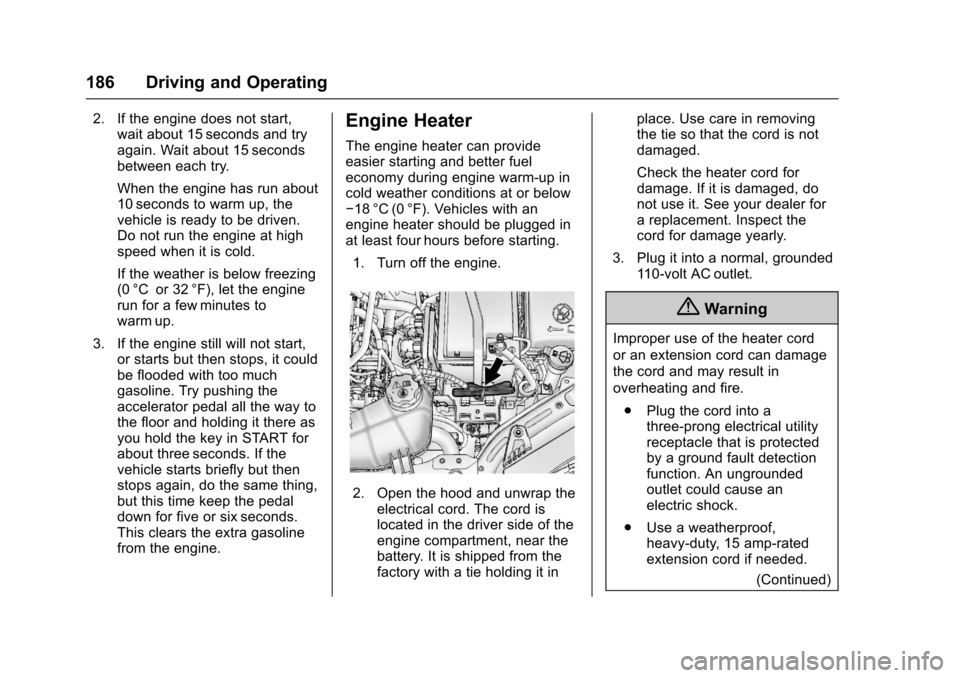
The engine heater can provideeasier starting and better fueleconomy during engine warm-up incold weather conditions at or below✓18 °C (0 °F). Vehicles with anengine heater should be plugged inat least four hours before starting.
1. Turn off the engine.
2. Open the hood and unwrap theelectrical cord. The cord islocated in the driver side of theengine compartment, near thebattery. It is shipped from thefactory with a tie holding it in
place. Use care in removingthe tie so that the cord is notdamaged.
Check the heater cord fordamage. If it is damaged, donot use it. See your dealer forareplacement.Inspectthecord for damage yearly.
3. Plug it into a normal, grounded11 0 - v o l t A C o u t l e t .
{Warning
Improper use of the heater cord
or an extension cord can damage
the cord and may result in
overheating and fire.
.Plug the cord into athree-prong electrical utilityreceptacle that is protectedby a ground fault detectionfunction. An ungroundedoutlet could cause anelectric shock.
.Use a weatherproof,heavy-duty, 15 amp-ratedextension cord if needed.
(Continued)