2017 CHEVROLET SONIC tow
[x] Cancel search: towPage 202 of 342
Chevrolet Sonic Owner Manual (GMNA-Localizing-U.S./Canada-10122660) -2017 - crc - 5/13/16
Driving and Operating 201
The speedometer reading can bedisplayed in either English or metricunits. SeeDriver Information Center(DIC)0121.Theincrementvalueused depends on the unitsdisplayed.
Passing Another Vehicle WhileUsing Cruise Control
Use the accelerator pedal toincrease the vehicle speed. Whenyou take your foot off the pedal, thevehicle slows down to the previousset cruise control speed. Whilepressing the accelerator pedal orshortly following the release tooverride cruise control, brieflymoving the thumbwheel towardSET/- will result in cruise control setto the current vehicle speed.
Using Cruise Control on Hills
How well cruise control works onhills depends on the vehicle speed,load, and the steepness of the hills.When going up steep hills, youmight have to step on theaccelerator pedal to maintain thevehicle speed. When goingdownhill, you might have to brake orshift to a lower gear to keep your
speed down. If the brake pedal isapplied, cruise control willdisengage.
Ending Cruise Control
There are four ways to end cruisecontrol:
.To d i s e n g a g e c r u i s e c o n t r o l ,step lightly on the brake pedal orclutch for manual transmission.
.Press*.
.Shift the transmission toN(Neutral).
.To t u r n o f f c r u i s e c o n t r o l ,
press5.
Erasing Speed Memory
The cruise control set speed is
erased from memory if5is pressed
or if the ignition is turned off.
Driver Assistance
Systems
Rear Vision
Camera (RVC)
This vehicle may have the RVCsystem. Read this entire sectionbefore using it.
The RVC system can assist thedriver when backing up bydisplaying a view of the area behindthe vehicle.
{Warning
The camera(s) do not display
children, pedestrians, bicyclists,
crossing traffic, animals, or any
other object outside of the
cameras’field of view, below the
bumper, or under the vehicle.
Shown distances may be different
from actual distances. Do not
drive or park the vehicle using
only these camera(s). Always
check behind and around the
(Continued)
Page 205 of 342

Chevrolet Sonic Owner Manual (GMNA-Localizing-U.S./Canada-10122660) -2017 - crc - 5/13/16
204 Driving and Operating
Turning the System On and Off
The RPA system can be turned onand off using the infotainmentsystem controls. SeeVehiclePersonalization0127.
When the system is off, PARKASSIST OFF displays on the DriverInformation Center (DIC). Themessage disappears after a shortperiod of time.
RPA defaults to the on setting eachtime the vehicle is started.
Turn off RPA when towing a trailer.
When the System Does Not
Seem to Work Properly
The following messages may bedisplayed on the DIC:
SERVICE PARKING ASSIST :Ifthis message occurs, check thefollowing conditions:
.The sensors are not clean. Keepthe vehicle's rear bumper free ofmud, dirt, snow, ice, and slush.For cleaning instructions, seeExterior Care0280.
.The park assist sensors arecovered by frost or ice. Frost orice can form around and behindthe sensors and may not alwaysbe seen; this can occur afterwashing the vehicle in coldweather. The message may notclear until the frost or ice hasmelted.
If the above conditions do not exist,take the vehicle to your dealer torepair the system.
PA R K A S S I S T O F F :If the RPAsystem does not activate due to atemporary condition, the messagedisplays on the DIC. This can occurunder the following conditions:
.The driver has disabled thesystem.
.An object was hanging out of thetrunk during the last drive cycle.Once the object is removed,RPA will return to normaloperation.
.The bumper is damaged. Takethe vehicle to your dealer torepair the system.
.Other conditions, such asvibrations from a jackhammer orthe compression of air brakes onaverylargetruck,areaffectingsystem performance.
Forward Collision Alert
(FCA) System
If equipped, the FCA system mayhelp to avoid or reduce the harmcaused by front-end crashes. Whenapproaching a vehicle ahead tooquickly, FCA provides a red flashingalert on the windshield and rapidlybeeps.
FCA detects vehicles within adistance of approximately 60 m(197 ft) and operates at speedsabove 40 km/h (25 mph).
{Warning
FCA is a warning system and
does not apply the brakes. When
approaching a slower-moving or
stopped vehicle ahead too rapidly,
or when following a vehicle too
(Continued)
Page 212 of 342
Chevrolet Sonic Owner Manual (GMNA-Localizing-U.S./Canada-10122660) -2017 - crc - 5/13/16
Driving and Operating 211
Trailer Towing
General Towing
Information
The vehicle is neither designed norintended to tow a trailer.
Conversions and
Add-Ons
Add-On Electrical
Equipment
{Warning
The Data Link Connector (DLC) is
used for vehicle service and
Emission Inspection/Maintenance
testing. SeeMalfunction Indicator
Lamp (Check Engine Light)011 2.
AdeviceconnectedtotheDLC—
such as an aftermarket fleet or
driver-behavior tracking device—
may interfere with vehicle
systems. This could affect vehicle
operation and cause a crash.
Such devices may also access
information stored in the vehicle’s
systems.
Caution
Some electrical equipment can
damage the vehicle or cause
components to not work and
would not be covered by the
vehicle warranty. Always check
with your dealer before adding
electrical equipment.
Add-on equipment can drain thevehicle's 12-volt battery, even if thevehicle is not operating.
The vehicle has an airbag system.Before attempting to add anythingelectrical to the vehicle, seeServicing the Airbag-EquippedVehicle075andAdding Equipmentto the Airbag-EquippedVehicle075.
Page 214 of 342
Chevrolet Sonic Owner Manual (GMNA-Localizing-U.S./Canada-10122660) -2017 - crc - 5/13/16
Vehicle Care 213
Tire Changing . . . . . . . . . . . . . . . . 269Compact Spare Tire . . . . . . . . . . 274
Jump Starting
Jump Starting - NorthAmerica . . . . . . . . . . . . . . . . . . . . . 275
Towing the Vehicle
To w i n g t h e V e h i c l e . . . . . . . . . . . 2 7 7Recreational VehicleTo w i n g . . . . . . . . . . . . . . . . . . . . . . 2 7 7
Appearance Care
Exterior Care . . . . . . . . . . . . . . . . . 280Interior Care . . . . . . . . . . . . . . . . . . 285Floor Mats . . . . . . . . . . . . . . . . . . . . 288
General Information
For service and parts needs, visityour dealer. You will receivegenuine GM parts and GM-trainedand supported service people.
Genuine GM parts have one ofthese marks:
California Proposition
65 Warning
WARNING:Most motor vehicles,including this one, as well as manyof its service parts and fluids,contain and/or emit chemicalsknown to the State of California to
cause cancer and birth defects orother reproductive harm. Engineexhaust, many parts and systems,many fluids, and some componentwear by-products contain and/oremit these chemicals.
SeeBattery - North America0234andJump Starting - NorthAmerica0275.
California Perchlorate
Materials Requirements
Certain types of automotiveapplications, such as airbaginitiators, safety belt pretensioners,and lithium batteries contained inRemote Keyless Entry transmitters,may contain perchlorate materials.Special handling may be necessary.For additional information, seewww.dtsc.ca.gov/hazardouswaste/perchlorate.
Page 216 of 342
Chevrolet Sonic Owner Manual (GMNA-Localizing-U.S./Canada-10122660) -2017 - crc - 5/13/16
Vehicle Care 215
Keep a record with all parts receiptsand list the mileage and the date ofany service work performed. SeeMaintenance Records0302.
Caution
Even small amounts of
contamination can cause damage
to vehicle systems. Do not allow
contaminants to contact the fluids,
reservoir caps, or dipsticks.
Hood
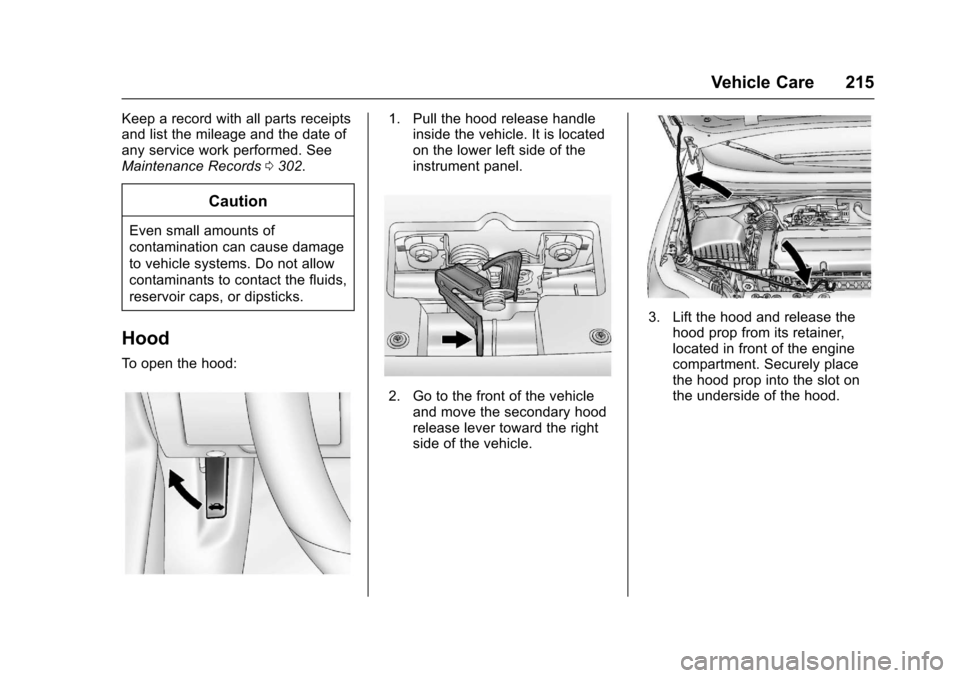
To o p e n t h e h o o d :
1. Pull the hood release handleinside the vehicle. It is locatedon the lower left side of theinstrument panel.
2. Go to the front of the vehicleand move the secondary hoodrelease lever toward the rightside of the vehicle.
3. Lift the hood and release thehood prop from its retainer,located in front of the enginecompartment. Securely placethe hood prop into the slot onthe underside of the hood.
Page 221 of 342
Chevrolet Sonic Owner Manual (GMNA-Localizing-U.S./Canada-10122660) -2017 - crc - 5/13/16
220 Vehicle Care
1.Engine Air Cleaner/Filter0224.
2. Engine Oil Dipstick. SeeEngine Oil0220.
3. Engine Cooling Fan (Out ofView). SeeCoolingSystem0226.
4. Engine Oil Fill Cap. SeeEngine Oil0220.
5. Engine Coolant Surge Tankand Pressure Cap. SeeCooling System0226.
6. Brake/Clutch Fluid Reservoir.SeeBrake Fluid0233andHydraulic Clutch0224.
7.Battery - North America0234.
8.Engine Compartment FuseBlock0243.
9. Windshield Washer FluidReservoir. SeeWasherFluid0231.
Engine Oil
To e n s u r e p r o p e r e n g i n eperformance and long life, carefulattention must be paid to engine oil.
Following these simple, butimportant steps will help protectyour investment:
.Use engine oil approved to theproper specification and of theproper viscosity grade. See“Selecting the Right Engine Oil”in this section.
.Check the engine oil levelregularly and maintain theproper oil level. See“CheckingEngine Oil”and“When to AddEngine Oil”in this section.
.Change the engine oil at theappropriate time. SeeEngine OilLife System0222.
.Always dispose of engine oilproperly. See“What to Do withUsed Oil”in this section.
If the engine oil pressure lightcomes on, check the engine oil levelright away. The oil pressure light ison the instrument cluster. SeeEngine Oil Pressure Light011 8.Check the engine oil level regularly;this is an added reminder.
Checking Engine Oil
Check the engine oil level regularly(every 650 km (400 mi), especiallyprior to a long trip. The engine oildipstick handle is a loop. SeeEngine Compartment Overview0217for the location.
{Warning
The engine oil dipstick handle
may be hot; it could burn you.
Use a towel or glove to touch the
dipstick handle.
If a low oil Driver Information Center(DIC) message displays, check theoil level.
Page 222 of 342
Chevrolet Sonic Owner Manual (GMNA-Localizing-U.S./Canada-10122660) -2017 - crc - 5/13/16
Vehicle Care 221
Follow these guidelines:
.To g e t a n a c c u r a t e r e a d i n g , p a r kthe vehicle on level ground.Check the engine oil level afterthe engine has been off for atleast two hours. Checking theengine oil level on steep gradesor too soon after engine shutoffcan result in incorrect readings.Accuracy improves whenchecking a cold engine prior tostarting. Remove the dipstickand check the level.
.If unable to wait two hours, theengine must be off for at least15 minutes if the engine iswarm, or at least 30 minutes ifthe engine is not warm. Pull outthe dipstick, wipe it with a cleanpaper towel or cloth, then push itback in all the way. Remove itagain, keeping the tip down, andcheck the level.
When to Add Engine Oil
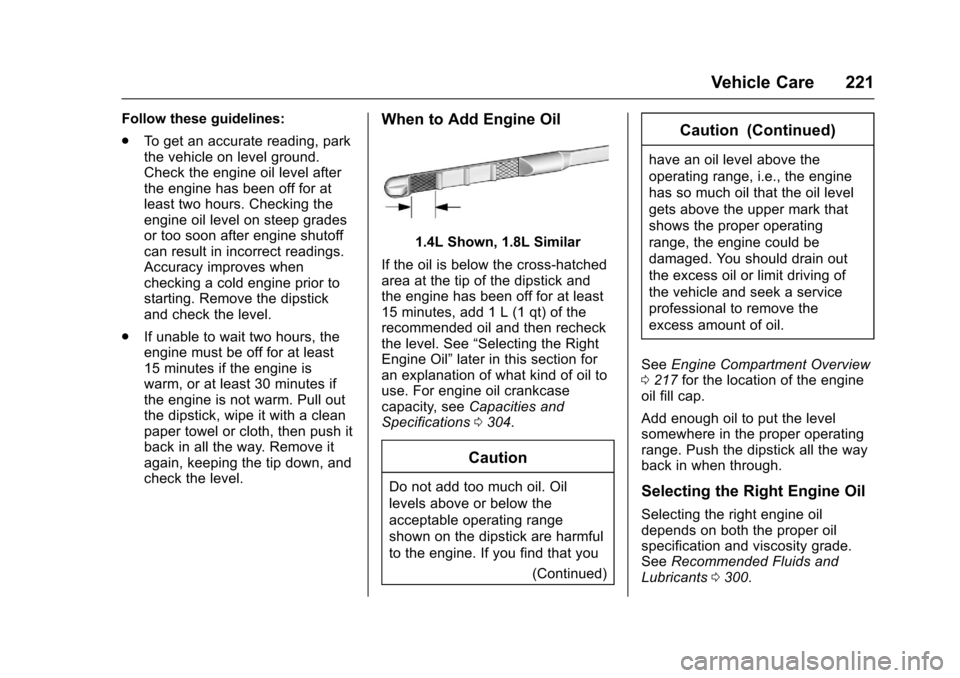
1.4L Shown, 1.8L Similar
If the oil is below the cross-hatchedarea at the tip of the dipstick andthe engine has been off for at least15 minutes, add 1 L (1 qt) of therecommended oil and then recheckthe level. See“Selecting the RightEngine Oil”later in this section foran explanation of what kind of oil touse. For engine oil crankcasecapacity, seeCapacities andSpecifications0304.
Caution
Do not add too much oil. Oil
levels above or below the
acceptable operating range
shown on the dipstick are harmful
to the engine. If you find that you
(Continued)
Caution (Continued)
have an oil level above the
operating range, i.e., the engine
has so much oil that the oil level
gets above the upper mark that
shows the proper operating
range, the engine could be
damaged. You should drain out
the excess oil or limit driving of
the vehicle and seek a service
professional to remove the
excess amount of oil.
SeeEngine Compartment Overview0217for the location of the engineoil fill cap.
Add enough oil to put the levelsomewhere in the proper operatingrange. Push the dipstick all the wayback in when through.
Selecting the Right Engine Oil
Selecting the right engine oildepends on both the proper oilspecification and viscosity grade.SeeRecommended Fluids andLubricants0300.
Page 242 of 342
Chevrolet Sonic Owner Manual (GMNA-Localizing-U.S./Canada-10122660) -2017 - crc - 5/13/16
Vehicle Care 241
License Plate Lamp
Lamp Assembly
Bulb Assembly
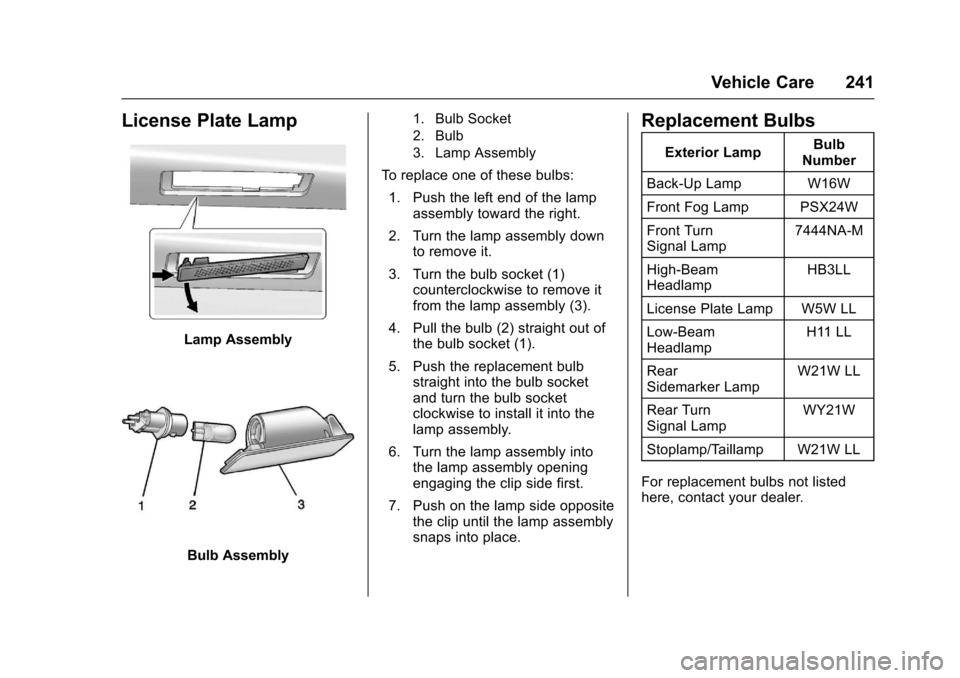
1. Bulb Socket
2. Bulb
3. Lamp Assembly
To r e p l a c e o n e o f t h e s e b u l b s :
1. Push the left end of the lampassembly toward the right.
2. Turn the lamp assembly downto remove it.
3. Turn the bulb socket (1)counterclockwise to remove itfrom the lamp assembly (3).
4. Pull the bulb (2) straight out ofthe bulb socket (1).
5. Push the replacement bulbstraight into the bulb socketand turn the bulb socketclockwise to install it into thelamp assembly.
6. Turn the lamp assembly intothe lamp assembly openingengaging the clip side first.
7. Push on the lamp side oppositethe clip until the lamp assemblysnaps into place.
Replacement Bulbs
Exterior LampBulbNumber
Back-Up Lamp W16W
Front Fog Lamp PSX24W
Front TurnSignal Lamp7444NA-M
High-BeamHeadlampHB3LL
License Plate Lamp W5W LL
Low-BeamHeadlampH11 LL
RearSidemarker LampW21W LL
Rear TurnSignal LampWY21W
Stoplamp/Taillamp W21W LL
For replacement bulbs not listedhere, contact your dealer.