2017 CHEVROLET SONIC display
[x] Cancel search: displayPage 103 of 342
Chevrolet Sonic Owner Manual (GMNA-Localizing-U.S./Canada-10122660) -2017 - crc - 5/13/16
102 Instruments and Controls
Heated Steering Wheel
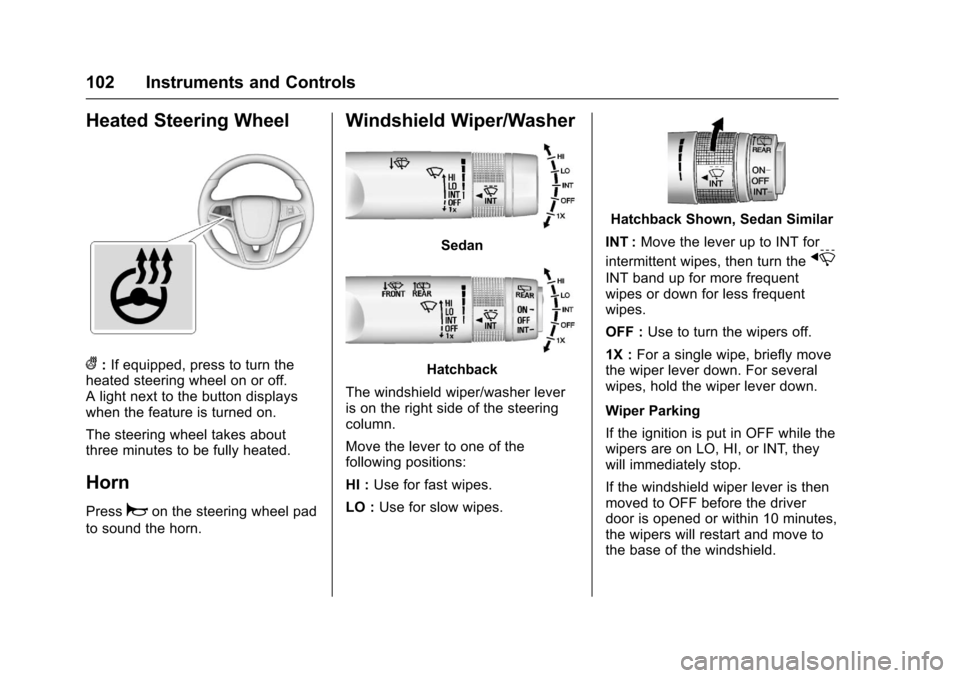
(:If equipped, press to turn theheated steering wheel on or off.Alightnexttothebuttondisplayswhen the feature is turned on.
The steering wheel takes aboutthree minutes to be fully heated.
Horn
Pressaon the steering wheel pad
to sound the horn.
Windshield Wiper/Washer
Sedan
Hatchback
The windshield wiper/washer leveris on the right side of the steeringcolumn.
Move the lever to one of thefollowing positions:
HI :Use for fast wipes.
LO :Use for slow wipes.
Hatchback Shown, Sedan Similar
INT :Move the lever up to INT for
intermittent wipes, then turn thex
INT band up for more frequentwipes or down for less frequentwipes.
OFF :Use to turn the wipers off.
1X :For a single wipe, briefly movethe wiper lever down. For severalwipes, hold the wiper lever down.
Wiper Parking
If the ignition is put in OFF while thewipers are on LO, HI, or INT, theywill immediately stop.
If the windshield wiper lever is thenmoved to OFF before the driverdoor is opened or within 10 minutes,the wipers will restart and move tothe base of the windshield.
Page 105 of 342

Chevrolet Sonic Owner Manual (GMNA-Localizing-U.S./Canada-10122660) -2017 - crc - 5/13/16
104 Instruments and Controls
in R (Reverse), and the frontwindshield wiper is performing lowor high speed wipes. If the rearwiper control is off, the shift lever isin R (Reverse), and the frontwindshield wiper is performinginterval wipes, then the rear wiperautomatically performs intervalwipes.
This feature can be changed. SeeVehicle Personalization0127.
The windshield washer reservoir isused for the windshield and the rearwindow. Check the fluid level in thereservoir if either washer is notworking. SeeWasher Fluid0231.
Compass
The vehicle may have a compassdisplay in the Driver InformationCenter (DIC). The compass receivesits heading and other informationfrom the Global PositioningSystem (GPS) antenna, StabiliTrak,and vehicle speed information.
Avoid covering the GPS antenna,located on the roof, for long periodsof time with objects that mayinterfere with the antenna's ability to
receive a satellite signal. Thecompass system is designed tooperate for a certain number ofmiles or degrees of turn beforeneeding a signal from the GPSsatellites. When the compassdisplay shows CAL, drive thevehicle for a short distance in anopen area where it can receive aGPS signal. The compass systemwill automatically determine whenthe GPS signal is restored andprovide a heading again.
Clock
The infotainment system controlsare used to access the time anddate settings through the menusystem. SeeOperation0144onhow to use the menu system.
Setting the Time and Date
When Auto Set is enabled the timecannot be manually set.
1. Press{,thentouch
SETTINGS.
2. Touch Time and Date, then SetTime or Set Date.
3. Touch + or✓to adjust thevalue.
4. TouchRorQto adjust AM or
PM for 12 hour format.
5. Touch0.
Using Auto Set
Auto Set requires an OnStarsubscription.
1. Press{,thentouch
SETTINGS.
2. Touch Time and Date, thenAuto Set.
3. Select from the availableselections.
4. Touch0.
Setting the 12/24 Hour Format
1. Press{,thentouch
SETTINGS.
2. Touch Time and Date, then SetTime Format.
3. Select 12h or 24h format.
4. Touch0.
Page 110 of 342
Chevrolet Sonic Owner Manual (GMNA-Localizing-U.S./Canada-10122660) -2017 - crc - 5/13/16
Instruments and Controls 109
Speedometer
The speedometer shows thevehicle's speed in either kilometersper hour (km/h) or miles perhour (mph).
Odometer
The odometer shows how far thevehicle has been driven, in eitherkilometers or miles.
Trip Odometer
The trip odometer shows how farthe vehicle has been driven sincethe trip odometer was last reset.
The trip odometer is accessed andreset through the Driver InformationCenter (DIC). SeeDriverInformation Center (DIC)0121.
Tachometer
The tachometer displays the enginespeed in revolutions perminute (rpm).
Caution
If the engine is operated with the
rpm’sinthewarningareaatthe
high end of the tachometer, the
vehicle could be damaged, and
the damage would not be covered
by the vehicle warranty. Do not
operate the engine with the rpm’s
in the warning area.
Fuel Gauge
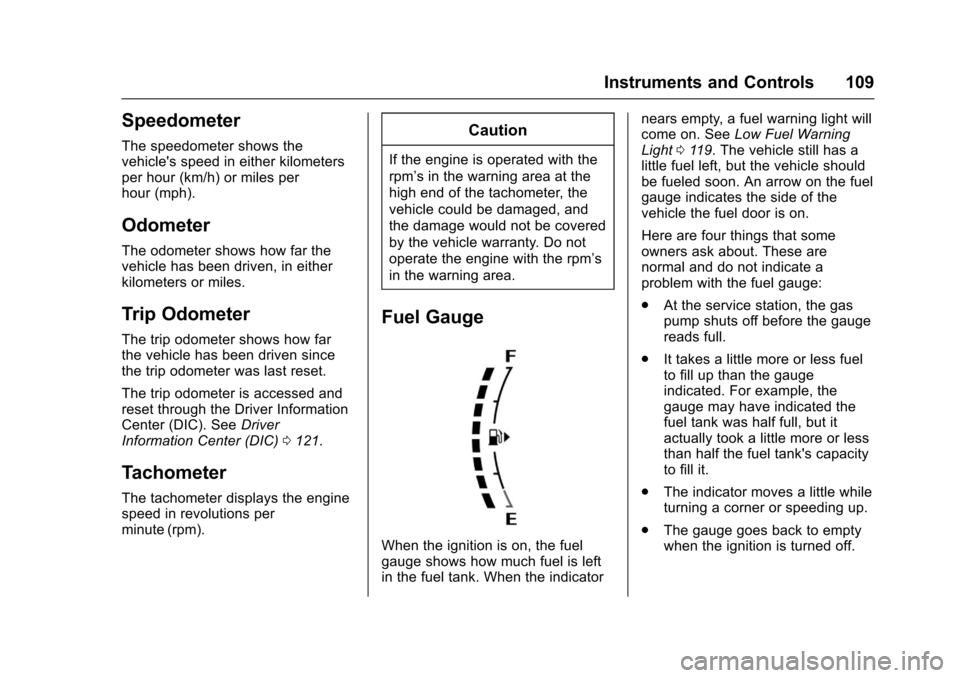
When the ignition is on, the fuelgauge shows how much fuel is leftin the fuel tank. When the indicator
nears empty, a fuel warning light willcome on. SeeLow Fuel WarningLight011 9.Thevehiclestillhasalittle fuel left, but the vehicle shouldbe fueled soon. An arrow on the fuelgauge indicates the side of thevehicle the fuel door is on.
Here are four things that someowners ask about. These arenormal and do not indicate aproblem with the fuel gauge:
.At the service station, the gaspump shuts off before the gaugereads full.
.It takes a little more or less fuelto fill up than the gaugeindicated. For example, thegauge may have indicated thefuel tank was half full, but itactually took a little more or lessthan half the fuel tank's capacityto fill it.
.The indicator moves a little whileturning a corner or speeding up.
.The gauge goes back to emptywhen the ignition is turned off.
Page 117 of 342

Chevrolet Sonic Owner Manual (GMNA-Localizing-U.S./Canada-10122660) -2017 - crc - 5/13/16
116 Instruments and Controls
Lane Departure Warning
(LDW) Light
If equipped, this light, located in thecenter of the instrument panel,comes on briefly while starting thevehicle.
If it does not come on, have thevehicle serviced.
This light is green if LDW is on andready to operate.
This light changes to amber andflashes to indicate that the lanemarking has been crossed withoutusing a turn signal in that direction.
SeeLane Departure Warning(LDW)0206.
Forward Collision Alert
(FCA) Warning Light
If equipped, this light is on thecenter of the instrument panel.
The red forward collision alertcomes on and flashes when avehicle is being approached toorapidly.
The forward collision alert stays onwhen following a vehicle much tooclosely.
SeeForward Collision Alert (FCA)System0204.
Vehicle Ahead Indicator
This light is on the center of theinstrument panel.
If equipped, this indicator willdisplay green when a vehicle isdetected ahead
SeeForward Collision Alert (FCA)System0204.
Ultrasonic Parking
Sensor Light
If equipped, this light comes onbriefly while starting the vehicle. If itdoes not come on, have the vehicleserviced.
This light indicates a malfunction inthe system. See your dealer forservice.
Page 121 of 342

Chevrolet Sonic Owner Manual (GMNA-Localizing-U.S./Canada-10122660) -2017 - crc - 5/13/16
120 Instruments and Controls
Reduced Engine Power
Light
The reduced engine power lightshould come on briefly as theengine is started. If it does not comeon, have the vehicle serviced byyour dealer.
This light, along with the malfunctionindicator lamp, displays when anoticeable reduction in the vehicle'sperformance occurs.
The vehicle can be driven at areduced speed when the reducedengine power light is on butacceleration and speed might bereduced. If this light stays on, seeyour dealer as soon as possible fordiagnosis and repair.
High-Beam On Light
This light comes on when thehigh-beam headlamps are in use.
SeeHeadlamp High/Low-BeamChanger0134.
Front Fog Lamp Light
For vehicles with fog lamps, thislight comes on when the fog lampsare on.
The light goes out when the foglamps are turned off. SeeFogLamps0137for more information.
Lamps On Reminder
This light comes on when theexterior lamps are in use. SeeExterior Lamp Controls0134.
Cruise Control Light
For vehicles with cruise control, thecruise control light is white when thecruise control is on and ready, andturns green when the cruise controlis set and active.
The light turns off when the cruisecontrol is turned off. SeeCruiseControl0199.
Page 122 of 342
Chevrolet Sonic Owner Manual (GMNA-Localizing-U.S./Canada-10122660) -2017 - crc - 5/13/16
Instruments and Controls 121
Door Ajar Light
This light comes on when a door isopen or not securely latched. Beforedriving, check that all doors areproperly closed.
Trunk Ajar Light
This light comes on when the trunkis ajar.
Information Displays
Driver Information
Center (DIC)
The DIC displays information aboutthe vehicle. It also displays warningmessages if a system problem isdetected. SeeVehicle Messages0126.AllmessagesappearintheDIC display in the instrument panelcluster.
DIC Operation and Displays
On some models, the trip odometerreset stem is used to operate theDIC. On other models, the controlsfor the DIC are on the turn signallever.
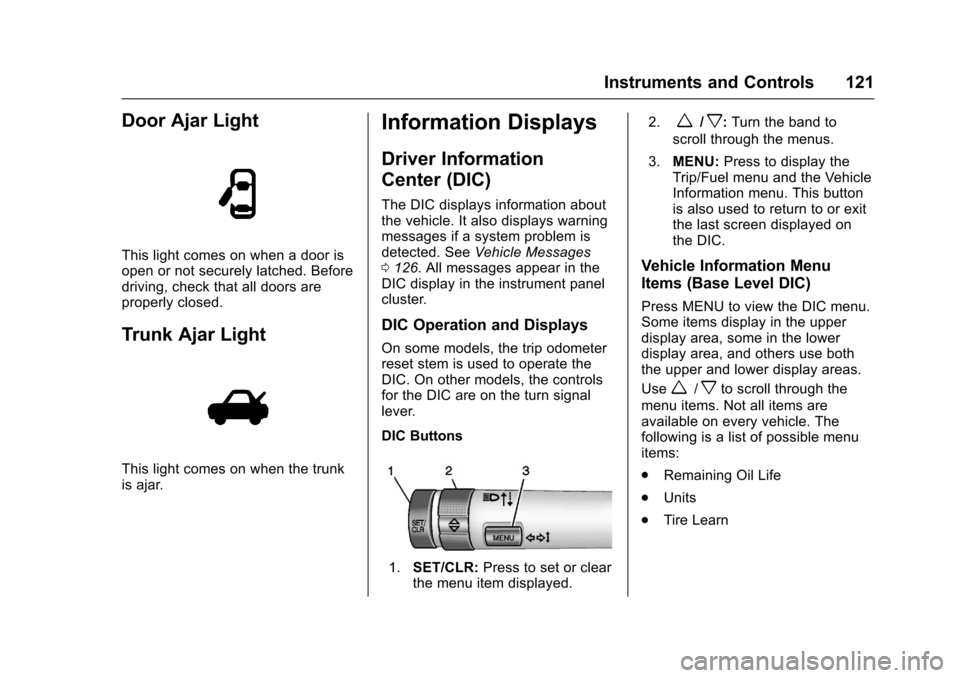
DIC Buttons
1.SET/CLR:Press to set or clearthe menu item displayed.
2.w/x:Turn the band to
scroll through the menus.
3.MENU:Press to display theTrip/Fuel menu and the VehicleInformation menu. This buttonis also used to return to or exitthe last screen displayed onthe DIC.
Vehicle Information Menu
Items (Base Level DIC)
Press MENU to view the DIC menu.Some items display in the upperdisplay area, some in the lowerdisplay area, and others use boththe upper and lower display areas.
Usew/xto scroll through the
menu items. Not all items areavailable on every vehicle. Thefollowing is a list of possible menuitems:
.Remaining Oil Life
.Units
.Tire Learn
Page 123 of 342

Chevrolet Sonic Owner Manual (GMNA-Localizing-U.S./Canada-10122660) -2017 - crc - 5/13/16
122 Instruments and Controls
Remaining Oil Life
This menu is not available while thevehicle is moving. This displayshows an estimate of the oil's
remaining useful life. If 99:%is
displayed, that means 99% of thecurrent oil life remains.
When the remaining oil life is low,
the:%CHANGEmessagewill
appear on the display. The oilshould changed as soon aspossible. SeeEngine Oil0220.Inaddition to the engine oil life systemmonitoring the oil life, additionalmaintenance is recommended in theMaintenance Schedule. SeeMaintenance Schedule0290.
Remember, the Oil Life display mustbe reset after each oil change. It willnot reset itself. Also, be careful notto reset the Oil Life displayaccidentally at any time other thanwhen the oil has just been changed.It cannot be reset accurately untilthe next oil change. To reset theengine oil life system, press SET/CLR while the Oil Life display isactive. SeeEngine Oil LifeSystem0222.
Units
This menu is not available while thevehicle is moving. Press SET/CLRwhile the unit display is active and
movew/xto change units when
UNIT SET is displayed. Press SET/CLR to confirm the setting. Select 1,2, or 3 for the unit display. 1 ismetric units, 2 is Imperial units, and3isUSunits.Thiswillchangethedisplays on the cluster and DIC tothe type of measurements selected.
Tire Learn
This display allows for matching ofthe TPMS sensors. The display willshow a vehicle with the approximatepressures of all four tires. Tirepressure is displayed in eitherkilopascal (kPa) or pounds persquare inch (psi). SeeTire PressureMonitor System0257andTirePressure Monitor Operation0258.
Trip/Fuel Menu Items (Base
Level DIC)
Press MENU until the Trip/Fuel
menu is displayed. Usew/xto
scroll through the menu items. On
some models, use the trip odometerreset stem to scroll through themenu. Not all items are available onevery vehicle. The following is a listof possible menu items:
.Trip Odometer
.Fuel Range
.Average Vehicle Speed
.Instantaneous Fuel Economy
.Average Fuel Economy
.Timer
Trip Odometer
This display shows the currentdistance traveled, in eitherkilometers (km) or miles (mi), sincethe last reset for the trip odometer.The trip odometer can be reset tozero by pressing SET/CLR orpressing and holding the tripodometer reset stem while the tripodometer display is showing.
Fuel Range
This display shows the approximatedistance the vehicle can be drivenwithout refueling. The fuel rangeestimate is based on an average of
Page 124 of 342
Chevrolet Sonic Owner Manual (GMNA-Localizing-U.S./Canada-10122660) -2017 - crc - 5/13/16
Instruments and Controls 123
the vehicle's fuel economy overrecent driving history and theamount of fuel remaining in the fueltank. Fuel range cannot be reset.
Average Vehicle Speed
This display shows the averagespeed of the vehicle in kilometersper hour (km/h) or miles perhour (mph). This average iscalculated based on the variousvehicle speeds recorded since thelast reset of this value. The averagespeed can be reset by pressingSET/CLR or pressing and holdingthe trip odometer reset stem whilethe Average Vehicle Speed displayis showing.
Instantaneous Fuel Economy
The instantaneous fuel economydisplay shows the current fueleconomy in liters per 100 kilometers(L/100 km) or miles pergallon (mpg). This number reflectsonly the approximate fuel economythat the vehicle has right now andchanges frequently as drivingconditions change. This displaycannot be reset.
Average Fuel Economy
This display shows the approximateaverage liters per 100 kilometers(L/100 km) or miles pergallon (mpg). This number iscalculated based on the number ofL/100 km (mpg) recorded since thelast time this menu item was reset.This number reflects only theapproximate average fuel economythat the vehicle has right now, andwill change as driving conditionschange. The fuel economy can bereset by pressing SET/CLR orpressing and holding the tripodometer reset stem while theAverage Fuel Economy display isshowing.
Timer
Available on some vehicles, thisdisplay can be used as a timer. Tostart the timer, press SET/CLR whileTimer is displayed. The display willshow the amount of time that haspassed since the timer was lastreset, not including time the ignitionis off. Time will continue to becounted as long as the ignition ison, even if another display is being
shown on the DIC. The timer willrecord up to 9 hours, 59 minutes,and 59 seconds (9:59:59) afterwhich the display will return to zero.To s t o p t h e t i m e r, p r e s s S E T / C L Rbriefly while Timer is displayed. Toreset the timer to zero, press andhold SET/CLR.
Trip/Fuel Menu Items
(Uplevel DIC)
Press MENU until the Trip/Fuel
menu is displayed. Usew/xto
scroll through the menu items. Notall items are available on everyvehicle. The following is a list ofpossible menu items:
.Digital Speedometer
.Trip 1
.Trip 2
.Fuel Range
.Instantaneous Fuel Economy
.Average Fuel Economy
.Average Vehicle Speed
.Timer
.Navigation