2017 CHEVROLET SILVERADO light
[x] Cancel search: lightPage 122 of 509

Chevrolet Silverado Owner Manual (GMNA-Localizing-U.S./Canada/Mexico-9956065) - 2017 - CRC - 4/29/16
Instruments and Controls 121
Steering Wheel Controls
If equipped, some audio controlscan be adjusted at the steeringwheel.
g:For vehicles with OnStar®or aBluetooth®system, press to interactwith those systems. SeeOnStarOverview0486,Bluetooth (VoiceRecognition - Base Radio)0221orBluetooth (Infotainment Controls -Base Radio)0217orBluetooth(Overview)0216orBluetooth(Infotainment Controls - Base Radiowith Touchscreen)0226,or“Bluetooth (Overview)”in theinfotainment manual.
i:Press to reject an incomingcall or end a current call. Press tomute or unmute the infotainmentsystem when not on a call.
oorp:Press to go to theprevious or next menu option.
worx:Press to go to the next orprevious selection.
V:Press to select a highlightedmenu option.
The favorite and volume switchesare on the back of the steeringwheel.
1. Favorite: When on a radiosource, press to select the nextor previous favorite. When on amedia source, press to selectthe next or previous track.
2. Volume: Press to increase ordecrease the volume.
Heated Steering Wheel
(:If equipped, press to turn it on oroff. A light next to the buttondisplays when the feature isturned on.
The steering wheel takes aboutthree minutes to start heating.
Page 126 of 509

Chevrolet Silverado Owner Manual (GMNA-Localizing-U.S./Canada/Mexico-9956065) - 2017 - CRC - 4/29/16
Instruments and Controls 125
Certain power accessory plugs maynot be compatible with theaccessory power outlet and couldoverload vehicle or adapter fuses.If a problem is experienced, seeyour dealer.
When adding electrical equipment,be sure to follow the properinstallation instructions included withthe equipment. SeeAdd-OnElectrical Equipment0345.
Caution
Hanging heavy equipment from
the power outlet can cause
damage not covered by the
vehicle warranty. The power
outlets are designed for
accessory power plugs only, such
as cell phone charge cords.
Power Outlet 110/120 Volt
Alternating Current
Base Shown, Uplevel Similar
If equipped with this power outlet, itcan be used to plug in electricalequipment that uses a maximumlimit of 150 watts.
For vehicles with a center console,the 110/120 volt power outlet is infront of the cupholders in the centerconsole.
For vehicles with bench seats, the11 0 / 1 2 0 v o l t p o w e r o u t l e t i s o n t h ecenter stack.
An indicator light on the outlet turnson to show it is in use. The lightcomes on when the ignition is inON/RUN, equipment requiring lessthan 150 watts is plugged into theoutlet, and no system fault isdetected.
The indicator light does not come onwhen the ignition is in LOCK/OFF orif the equipment is not fully seatedinto the outlet.
If equipment is connected usingmore than 150 watts or a systemfault is detected, a protection circuitshuts off the power supply and theindicator light turns off. To reset thecircuit, unplug the item and plug itback in or turn the RetainedAccessory Power (RAP) off andthen back on. SeeRetainedAccessory Power (RAP)0271.
The power outlet is not designed forthe following, and may not workproperly if they are plugged in:
.Equipment with high initial peakwattage, such ascompressor-driven refrigeratorsand electric power tools.
Page 128 of 509

Chevrolet Silverado Owner Manual (GMNA-Localizing-U.S./Canada/Mexico-9956065) - 2017 - CRC - 4/29/16
Instruments and Controls 127
To c h a r g e a m o b i l e d e v i c e :
1. Remove all objects from thecharging pad. The system maynot charge if there are anyobjects on the charging pad.
2. Place the mobile device face
up on the@symbol on the
charging pad.
3. The}will display on theV
on the infotainment screen.This indicates that the mobiledevice is properly positionedand charging. If a phone isplaced on the charging pad
and}does not display,
remove the phone from thepad, turn 180 degrees and waitthree seconds before placing/aligning the phone on the padagain.
Warning Lights,
Gauges, and
Indicators
Warning lights and gauges cansignal that something is wrongbefore it becomes serious enoughto cause an expensive repair orreplacement. Paying attention to thewarning lights and gauges couldprevent injury.
Some warning lights come on brieflywhen the engine is started toindicate they are working. Whenone of the warning lights comes onand stays on while driving, or whenone of the gauges shows there maybe a problem, check the section thatexplains what to do. Waiting to dorepairs can be costly and evendangerous.
Page 131 of 509

Chevrolet Silverado Owner Manual (GMNA-Localizing-U.S./Canada/Mexico-9956065) - 2017 - CRC - 4/29/16
130 Instruments and Controls
Cluster Menu (Uplevel Cluster)
There is an interactive display areain the center of the instrumentcluster.
Use the right steering wheel controlto open and scroll through thedifferent items and displays.
Pressoto access the cluster
applications. Useworxto scroll
through the list of availableapplications. Not all applications willbe available on all vehicles.
.Info App. This is where theselected Driver InformationCenter (DIC) displays can be
viewed. See“Driver InformationCenter (DIC) (Uplevel)”in theIndex.
.Audio
.Phone
.Navigation
.Settings
Audio
PressVto select the Audio app,
then presspto enter the Audio
menu. In the Audio menu browse formusic, select from the favorites,or change the audio source. In the
main view, useworxto change
the station or go to the next orprevious track.
Phone
PressVto select the Phone app,
then presspto enter the Phone
menu. In the Phone menu, if there isno active phone call, view recentcalls, scroll through contacts, selectfrom the favorites, or change the
phone source. If there is an activecall, mute the phone or switch tohandset operation.
Navigation
PressVto select the Navigation
app, then presspto enter the
Navigation menu. If there is noactive route, you can resume thelast route and turn the voiceprompts on/off. If there is an activeroute, you can cancel the route.
Settings
PressVto select the Settings app.
Useworxto scroll through items
in the Settings menu.
Units :Presspwhile Units is
displayed to enter the Units menu.Choose English or metric units by
pressingVwhile the desired item is
highlighted. A checkmark will bedisplayed next to the selected item.
Info Pages :Presspwhile Info
Pages is displayed to enter the InfoPages menu and select the items to
Page 132 of 509

Chevrolet Silverado Owner Manual (GMNA-Localizing-U.S./Canada/Mexico-9956065) - 2017 - CRC - 4/29/16
Instruments and Controls 131
be displayed in the Info app. See“Driver Information Center (DIC)(Uplevel)”in the Index.
Speed Warning :The SpeedWarning display allows the driver toset a speed that they do not want toexceed. To set the Speed Warning,
presspwhen Speed Warning is
displayed, or pressVon the main
view to set the speed value. Pressworxto adjust the value. PressVto set the speed. Once the speedis set, this feature can be turned off
by pressingVwhile viewing this
page. If the selected speed limit isexceeded, a pop-up warning isdisplayed with a chime.
Software Information :Pressp
while Software Information ishighlighted to display open sourcesoftware information.
Speedometer
The speedometer shows thevehicle's speed in either kilometersper hour (km/h) or miles perhour (mph).
Odometer
The odometer shows how far thevehicle has been driven, in eitherkilometers or miles.
Trip Odometer
The trip odometer shows how farthe vehicle has been driven sincethe trip odometer was last reset.
The trip odometer is accessed andreset through the Driver InformationCenter (DIC). SeeDriverInformation Center (DIC) (BaseLevel)0145orDriver InformationCenter (DIC) (Uplevel)0147.
Tachometer
The tachometer displays the enginespeed in revolutions perminute (rpm).
Fuel Gauge
Metric
English
Page 133 of 509
Chevrolet Silverado Owner Manual (GMNA-Localizing-U.S./Canada/Mexico-9956065) - 2017 - CRC - 4/29/16
132 Instruments and Controls
When the ignition is on, the fuelgauge indicates about how muchfuel is left in the tank.
There is an arrow near the fuelgauge pointing to the side of thevehicle the fuel door is on.
When the indicator nears empty, thelow fuel light comes on. There still isalittlefuelleft,butthevehicleshould be refueled soon.
Here are four things that someowners ask about. None of theseshow a problem with the fuel gauge:
.At the service station, the fuelpump shuts off before the gaugereads full.
.It takes a little more or less fuelto fill up than the gaugeindicated. For example, thegauge may have indicated thetank was half full, but it actuallytook a little more or less thanhalf the tank's capacity to fillthe tank.
.The gauge moves a little whileturning a corner or speeding up.
.The gauge takes a few secondsto stabilize after the ignition isturned on, and goes back toempty when the ignition isturned off.
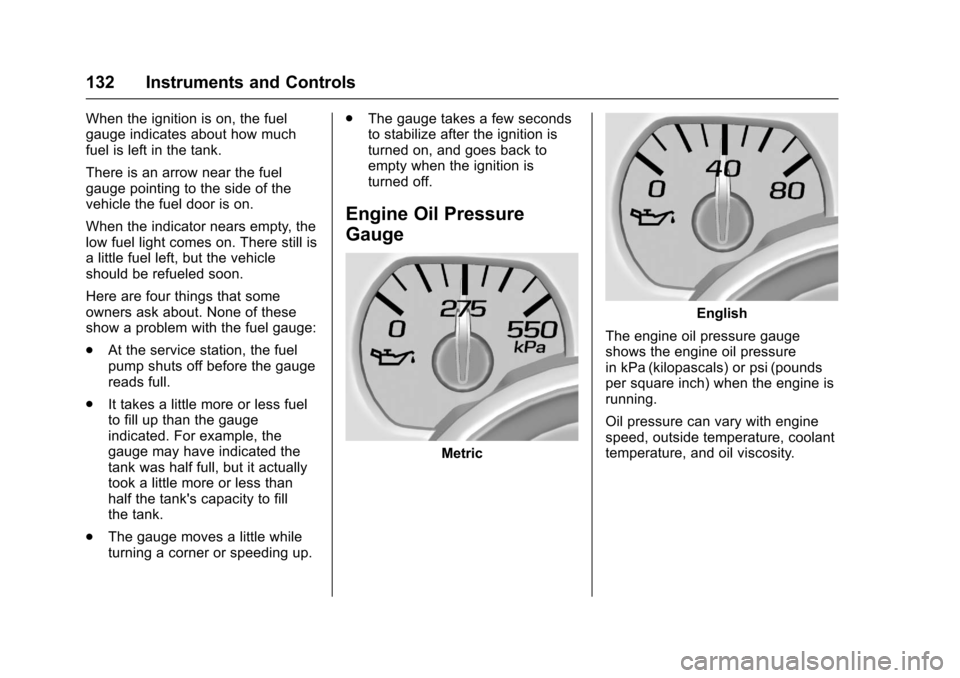
Engine Oil Pressure
Gauge
Metric
English
The engine oil pressure gaugeshows the engine oil pressurein kPa (kilopascals) or psi (poundsper square inch) when the engine isrunning.
Oil pressure can vary with enginespeed, outside temperature, coolanttemperature, and oil viscosity.
Page 135 of 509

Chevrolet Silverado Owner Manual (GMNA-Localizing-U.S./Canada/Mexico-9956065) - 2017 - CRC - 4/29/16
134 Instruments and Controls
Voltmeter Gauge
When the ignition is on, this gaugeindicates the battery voltage.
When the engine is running, thisgauge shows the condition of thecharging system. The gauge cantransition from a higher to lower or alower to higher reading. This isnormal. If the vehicle is operatingoutside the normal operating range,the charging system light comes on.SeeCharging System Light0138for more information. The voltmetergauge may also read lower when infuel economy mode. This is normal.
Readings outside the normaloperating range can also occurwhen a large number of electricalaccessories are operating in thevehicle and the engine is left idlingfor an extended period. Thiscondition is normal since thecharging system is not able toprovide full power at engine idle. Asengine speeds are increased, thiscondition should correct itself ashigher engine speeds allow thecharging system to create maximumpower.
The vehicle can only be driven for ashort time with the readings outsidethe normal operating range. If thevehicle must be driven, turn off allaccessories, such as the radio andair conditioner.
Readings outside the normaloperating range indicate a possibleproblem in the electrical system.Have the vehicle serviced as soonas possible.
Safety Belt Reminders
Driver Safety Belt Reminder
Light
There is a driver safety beltreminder light on the instrumentcluster.
When the vehicle is started, thislight flashes and a chime may comeon to remind the driver to fastentheir safety belt. Then the light stayson solid until the belt is buckled.This cycle may continue severaltimes if the driver remains orbecomes unbuckled while thevehicle is moving.
If the driver safety belt is buckled,neither the light nor the chimecomes on.
Page 136 of 509

Chevrolet Silverado Owner Manual (GMNA-Localizing-U.S./Canada/Mexico-9956065) - 2017 - CRC - 4/29/16
Instruments and Controls 135
Passenger Safety Belt
Reminder Light
There may be a passenger safetybelt reminder light near thepassenger airbag status indicator.SeePassenger SensingSystem082.
For vehicles equipped with thepassenger safety belt reminder light,when the vehicle is started this lightflashes and a chime may come onto remind passengers to fasten theirsafety belt. Then the light stays onsolid until the belt is buckled. Thiscycle continues several times if thepassenger remains or becomesunbuckled while the vehicle ismoving.
If the passenger safety belt isbuckled, neither the chime nor thelight comes on.
The front passenger safety beltreminder light and chime may turnon if an object is put on the seatsuch as a briefcase, handbag,grocery bag, laptop, or otherelectronic device. To turn off thereminder light and/or chime, removethe object from the seat or bucklethe safety belt.
Airbag Readiness Light
This light shows if there is anelectrical problem with the airbagsystem. The system check includesthe airbag sensor(s), passengersensing system (if equipped), thepretensioners, the airbag modules,the wiring, and the crash sensingand diagnostic module. For moreinformation on the airbag system,seeAirbag System074.
The airbag readiness light comes onfor several seconds when thevehicle is started. If the light doesnot come on then, have it fixedimmediately.
{Warning
If the airbag readiness light stays
on after the vehicle is started or
comes on while driving, it means
the airbag system might not be
working properly. The airbags in
the vehicle might not inflate in a
crash, or they could even inflate
without a crash. To help avoid
injury, have the vehicle serviced
right away.
If there is a problem with the airbagsystem, a Driver Information Center(DIC) message may also come on.SeeAirbag SystemMessages0155.