2017 CHEVROLET SILVERADO ignition
[x] Cancel search: ignitionPage 393 of 509

Chevrolet Silverado Owner Manual (GMNA-Localizing-U.S./Canada/Mexico-9956065) - 2017 - CRC - 4/29/16
392 Vehicle Care
FusesUsage
19 Integrated chassiscontrol module
20 Electronicsuspension controlmodule
21 Fuel pump powermodule
22 Upfitter 1
23 Upfitter 2
24 Front wiper
25 ABS Valves
26 Upfitter 2
27 Upfitter 3
28 Right parkinglamps
29 Left parking lamps
30 Upfitter 3
31 Upfitter 4
32 Upfitter 4
33 Reverse lamps
34 Engine controlmodule/Ignition
FusesUsage
35 A/C clutch
36 Heated mirrors
37 Upfitter 1
38 Centerhigh-mountedstoplamp
39 Miscellaneous/Ignition
40 Transmission/Ignition
41 Fuel pump 2
42 Cooling fan clutch
43 Engine
44 Fuel injectors A–odd
45 Fuel injectors B–even
46 O2 Sensor B
47 Throttle control
48 Horn
49 Fog lamps
50 O2 Sensor A
FusesUsage
51 Engine controlmodule
52 Interior heater
53 Accessory powermodule/TPM pump
54 Front washer
55 A/C/Batteryregulated voltagecontrol
56 A/C module/Battery pack
57 Transmissioncontrol module/Engine controlmodule
58 Headlamps
74 Electric runningboards (ifequipped)
76 Fuel pump prime
Page 397 of 509

Chevrolet Silverado Owner Manual (GMNA-Localizing-U.S./Canada/Mexico-9956065) - 2017 - CRC - 4/29/16
396 Vehicle Care
The vehicle may not be equippedwith all of the fuses, relays, andfeatures shown.
Fuses Usage
1Accessorypoweroutlet 2
Fuses Usage
2SEO/Retainedaccessory power
3Universalremotesystem/Interiorrearview mirror
6Bodycontrolmodule3
7Bodycontrolmodule5
8Driverwindowswitch/Mirror switch
9–
10 Accessory poweroutlet/Retainedaccessory power
11 A c c e s s o r y p o w e routlet battery
12 Accessory poweroutlet 1/Cigarettelighter
13 Discrete logic ignitionswitch
14 Switch backlighting
17 Body control module 1
19–
Page 398 of 509
Chevrolet Silverado Owner Manual (GMNA-Localizing-U.S./Canada/Mexico-9956065) - 2017 - CRC - 4/29/16
Vehicle Care 397
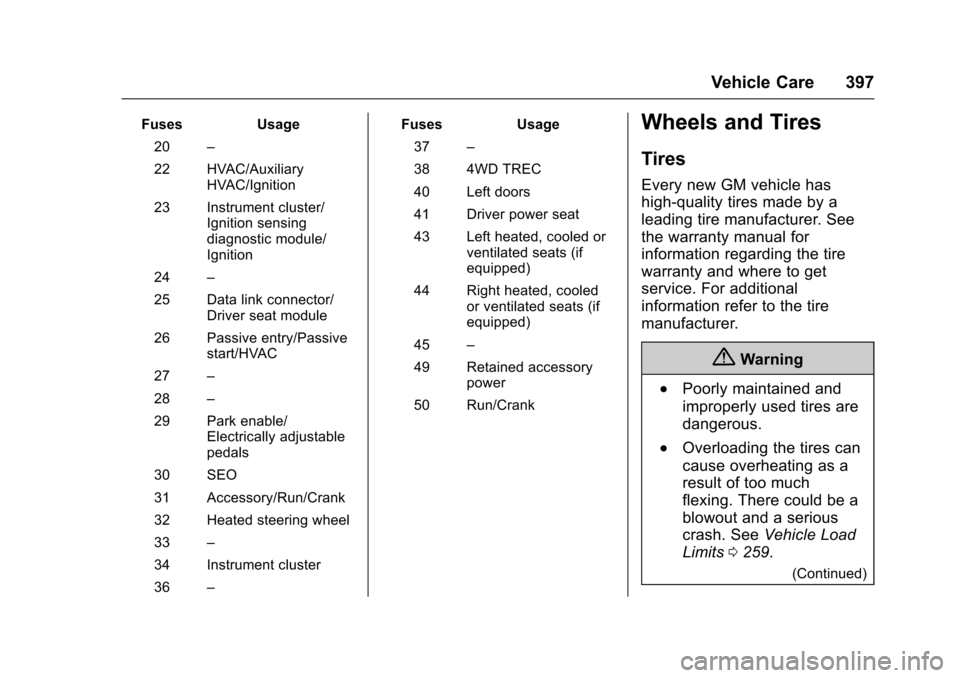
FusesUsage
20–
22 HVAC/AuxiliaryHVAC/Ignition
23 Instrument cluster/Ignition sensingdiagnostic module/Ignition
24–
25 Data link connector/Driver seat module
26 Passive entry/Passivestart/HVAC
27–
28–
29 Park enable/Electrically adjustablepedals
30 SEO
31 Accessory/Run/Crank
32 Heated steering wheel
33–
34 Instrument cluster
36–
FusesUsage
37–
38 4WD TREC
40 Left doors
41 Driver power seat
43 Left heated, cooled orventilated seats (ifequipped)
44 Right heated, cooledor ventilated seats (ifequipped)
45–
49 Retained accessorypower
50 Run/Crank
Wheels and Tires
Tires
Every new GM vehicle has
high-quality tires made by a
leading tire manufacturer. See
the warranty manual for
information regarding the tire
warranty and where to get
service. For additional
information refer to the tire
manufacturer.
{Warning
.Poorly maintained and
improperly used tires are
dangerous.
.Overloading the tires can
cause overheating as a
result of too much
flexing. There could be a
blowout and a serious
crash. SeeVehicle Load
Limits0259.
(Continued)
Page 410 of 509

Chevrolet Silverado Owner Manual (GMNA-Localizing-U.S./Canada/Mexico-9956065) - 2017 - CRC - 4/29/16
Vehicle Care 409
located on the instrument cluster.If the warning light comes on, stopas soon as possible and inflate thetires to the recommended pressureshown on the Tire and LoadingInformation label. SeeVehicle LoadLimits0259.
AmessagetocheckthepressureinaspecifictiredisplaysintheDriverInformation Center (DIC). The lowtire pressure warning light and theDIC warning message come on ateach ignition cycle until the tires areinflated to the correct inflationpressure. If the vehicle has DICbuttons, tire pressure levels can beviewed. For additional informationand details about the DICoperation and displays, seeDriverInformation Center (DIC) (BaseLevel)0145orDriver InformationCenter (DIC) (Uplevel)0147andTire Messages0157.
The low tire pressure warning lightmay come on in cool weather whenthe vehicle is first started, and thenturn off as the vehicle is driven. Thiscould be an early indicator that the
air pressure is getting low andneeds to be inflated to the properpressure.
ATire and Loading Information labelshows the size of the originalequipment tires and the correctinflation pressure for the tires whenthey are cold. SeeVehicle LoadLimits0259,foranexampleoftheTire and Loading Information labeland its location. Also seeTirePressure0405.
The TPMS can warn about a lowtire pressure condition but it doesnot replace normal tiremaintenance. SeeTire Inspection0411,Tire Rotation0412andTires0397.
Caution
Tire sealant materials are not all
the same. A non-approved tire
sealant could damage the TPMS
sensors. TPMS sensor damage
caused by using an incorrect tire
sealant is not covered by the
vehicle warranty. Always use only
(Continued)
Caution (Continued)
the GM approved tire sealant
available through your dealer or
included in the vehicle.
TPMS Malfunction Light and
Message
The TPMS will not function properlyif one or more of the TPMS sensorsare missing or inoperable. When thesystem detects a malfunction, thelow tire pressure warning lightflashes for about one minute andthen stays on for the remainder ofthe ignition cycle. A DIC warningmessage also displays. Themalfunction light and DIC warningmessage come on at each ignitioncycle until the problem is corrected.Some of the conditions that cancause these to come on are:
.One of the road tires has beenreplaced with the spare tire. Thespare tire does not have aTPMS sensor. The malfunctionlight and the DIC messageshould go off after the road tire
Page 411 of 509

Chevrolet Silverado Owner Manual (GMNA-Localizing-U.S./Canada/Mexico-9956065) - 2017 - CRC - 4/29/16
410 Vehicle Care
is replaced and the sensormatching process is performedsuccessfully. See "TPMS SensorMatching Process" later in thissection.
.The TPMS sensor matchingprocess was not done or notcompleted successfully afterrotating the tires. Themalfunction light and the DICmessage should go off aftersuccessfully completing thesensor matching process. See"TPMS Sensor MatchingProcess" later in this section.
.One or more TPMS sensors aremissing or damaged. Themalfunction light and the DICmessage should go off when theTPMS sensors are installed andthe sensor matching process isperformed successfully. Seeyour dealer for service.
.Replacement tires or wheels donot match the original equipmenttires or wheels. Tires and wheelsother than those recommended
could prevent the TPMS fromfunctioning properly. SeeBuyingNew Tires0415.
.Operating electronic devices orbeing near facilities using radiowave frequencies similar to theTPMS could cause the TPMSsensors to malfunction.
If the TPMS is not functioningproperly, it cannot detect or signal alow tire condition. See your dealerfor service if the TPMS malfunctionlight and DIC message come onand stay on.
TPMS Sensor Matching
Process
Each TPMS sensor has a uniqueidentification code. The identificationcode needs to be matched to a newtire/wheel position after rotating thevehicle’stiresorreplacingoneormore of the TPMS sensors. Also,the TPMS sensor matching processshould be performed after replacingasparetirewitharoadtirecontaining the TPMS sensor. Themalfunction light and the DIC
message should go off at the nextignition cycle. The sensors arematched to the tire/wheel positions,using a TPMS relearn tool, in thefollowing order: driver side front tire,passenger side front tire, passengerside rear tire, and driver side rear.See your dealer for service or topurchase a relearn tool. A TPMSrelearn tool can also be purchased.See Tire Pressure Monitor SensorActivation Tool atwww.gmtoolsandequipment.com orcall 1-800-GM TOOLS(1-800-468-6657).
There are two minutes to match thefirst tire/wheel position, andfive minutes overall to match all fourtire/wheel positions. If it takeslonger, the matching process stopsand must be restarted.
The TPMS sensor matchingprocess is:
1. Set the parking brake.
2. Turn the ignition to ON/RUNwith the engine off.
Page 424 of 509

Chevrolet Silverado Owner Manual (GMNA-Localizing-U.S./Canada/Mexico-9956065) - 2017 - CRC - 4/29/16
Vehicle Care 423
Double Cab
1. Wheel Blocks
2. Wing Nut Retaining Tool Kit
3. Tool Kit
4. Jack
5. Jack Knob
For regular cab models, theequipment you will need is behindthe passenger seat. For double andcrew cab models, the equipment ison the shelf behind the passengerside second row seat.
1. Turn the knob on the jackcounterclockwise to lower thejack head to release the jackfrom its holder.
2. Turn the wing nutcounterclockwise to remove thewheel blocks and the wheelblock retainer.
3. Turn the wing nut used toretain the storage bag andtools counterclockwise toremove it.
Use the jack handle extensions andthe wheel wrench to remove theunderbody-mounted spare tire.
1. Spare Tire (Valve StemPointed Down)
2. Tire/Wheel Retainer
3. Hoist Cable
4. Hoist Assembly
5. Hoist Shaft
6. Jack Handle Extensions
7. Wheel Wrench
8. Spare Tire Lock (IfEquipped)
9. Hoist Shaft Access Hole
10. Hoist End of Extension Tool
1. Open the spare tire lock coveron the bumper and use theignition key to remove thespare tire lock (8). To removethe spare tire lock, insert theignition key, turn, and pullstraight out.
2. Assemble the wheel wrench (7)and the two jack handleextensions (6), as shown.
Page 434 of 509

Chevrolet Silverado Owner Manual (GMNA-Localizing-U.S./Canada/Mexico-9956065) - 2017 - CRC - 4/29/16
Vehicle Care 433
Caution
Ignoring these steps could result
in costly damage to the vehicle
that would not be covered by the
vehicle warranty. Trying to start
the vehicle by pushing or pulling it
will not work, and it could damage
the vehicle.
1. Check the other vehicle.It must have a 12-volt batterywith a negative ground system.
Caution
If the other vehicle does not have
a12-voltsystemwithanegative
ground, both vehicles can be
damaged. Only use a vehicle that
has a 12-volt system with a
negative ground for jump starting.
2. If you have a vehicle with adiesel engine with twobatteries, you should knowbefore you begin that,especially in cold weather, you
may not be able to get enoughpower from a single battery inanother vehicle to start yourdiesel engine. If your vehiclehas more than one battery,using the battery that is closerto the starter will reduceelectrical resistance. This islocated on the passenger side,in the rear of the enginecompartment.
3. Get the vehicles close enoughso the jumper cables canreach, but be sure the vehiclesare not touching each other.If they are, it could cause anunwanted ground connection.Yo u w o u l d n o t b e a b l e t o s t a r tyour vehicle, and the badgrounding could damage theelectrical systems.
To a v o i d t h e p o s s i b i l i t y o f t h evehicles rolling, set the parkingbrake firmly on both vehiclesinvolved in the jump startprocedure. Put the automatictransmission in P (Park) or amanual transmission in Neutralbefore setting the parkingbrake. If you have a
four-wheel-drive vehicle, besure the transfer case is in adrive gear, not in N (Neutral).
Caution
If any accessories are left on or
plugged in during the jump
starting procedure, they could be
damaged. The repairs would not
be covered by the vehicle
warranty. Whenever possible, turn
off or unplug all accessories on
either vehicle when jump starting.
4. Turn off the ignition on bothvehicles. Unplug unnecessaryaccessories plugged into theaccessory power outlets. Turnoff the radio and all the lampsthat are not needed. This willavoid sparks and help saveboth batteries. And it couldsave the radio!
5. Open the hood on the othervehicle and locate thepositive (+) and negative (✓)terminal locations on thatvehicle.
Page 439 of 509

Chevrolet Silverado Owner Manual (GMNA-Localizing-U.S./Canada/Mexico-9956065) - 2017 - CRC - 4/29/16
438 Vehicle Care
{Warning
Shifting a four-wheel-drive
vehicle's transfer case into
N(Neutral)cancausethevehicle
to roll even if the transmission is
in P (Park). You or others could
be injured. Set the parking brake
before shifting the transfer case
to N (Neutral).
To d i n g h y t o w :
1. Position the vehicle beingtowed behind the tow vehicle,facing forward and on a levelsurface.
2. Securely attach the vehiclebeing towed to the tow vehicle.
3. Apply the parking brake andstart the engine.
4. Shift the transfer case toN(Neutral). See“Shifting intoN(Neutral)”underFour-WheelDrive0284.Checkthatthevehicle is in N (Neutral) byshifting the transmission toR(Reverse)andthentoD
(Drive). There should be nomovement of the vehicle whileshifting.
5. Turn the engine off.
Caution
Failure to disconnect the negative
battery cable or to have it contact
the terminals can cause damage
to the vehicle.
6. Disconnect the negativebattery cable at the battery andsecure the nut and bolt. Coverthe negative battery post with anon-conductive material toprevent any contact with thenegative battery terminal.
7. Shift the transmission toP(Park).
Caution
If the steering column is locked,
vehicle damage may occur.
8. Move the steering wheel tomake sure the steering columnis unlocked.
9. With a foot on the brake pedal,release the parking brake.Keep the ignition key in thetowed vehicle in ACC/ACCESSORY to prevent thesteering column from locking.
Disconnecting the Towed Vehicle
Before disconnecting the towedvehicle:
1. Park on a level surface.
2. Set the parking brake, thenshift the transmission toP(Park),andmovetheignitionkey to OFF.
3. Connect the battery.
4. Apply the brake pedal.
5. Turn the ignition on with theengine off. Shift the transfercase out of N (Neutral) toTw o - W h e e l D r i v e H i g h . S e e“Shifting out of N (Neutral)”underFour-Wheel Drive0284.