2017 CHEVROLET MALIBU steering wheel
[x] Cancel search: steering wheelPage 117 of 419
Chevrolet Malibu Owner Manual (GMNA-Localizing-U.S./Canada/Mexico-10122664) - 2017 - crc - 5/23/16
116 Instruments and Controls
Cluster Menu
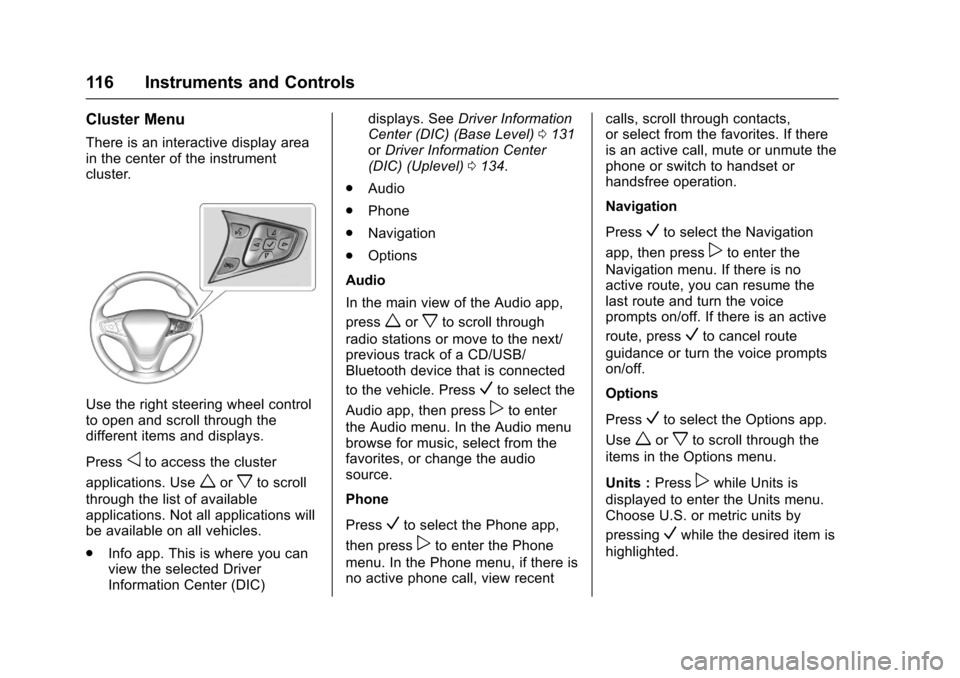
There is an interactive display areain the center of the instrumentcluster.
Use the right steering wheel controlto open and scroll through thedifferent items and displays.
Pressoto access the cluster
applications. Useworxto scroll
through the list of availableapplications. Not all applications willbe available on all vehicles.
.Info app. This is where you canview the selected DriverInformation Center (DIC)
displays. SeeDriver InformationCenter (DIC) (Base Level)0131orDriver Information Center(DIC) (Uplevel)0134.
.Audio
.Phone
.Navigation
.Options
Audio
In the main view of the Audio app,
pressworxto scroll through
radio stations or move to the next/previous track of a CD/USB/Bluetooth device that is connected
to the vehicle. PressVto select the
Audio app, then presspto enter
the Audio menu. In the Audio menubrowse for music, select from thefavorites, or change the audiosource.
Phone
PressVto select the Phone app,
then presspto enter the Phone
menu. In the Phone menu, if there isno active phone call, view recent
calls, scroll through contacts,or select from the favorites. If thereis an active call, mute or unmute thephone or switch to handset orhandsfree operation.
Navigation
PressVto select the Navigation
app, then presspto enter the
Navigation menu. If there is noactive route, you can resume thelast route and turn the voiceprompts on/off. If there is an active
route, pressVto cancel route
guidance or turn the voice promptson/off.
Options
PressVto select the Options app.
Useworxto scroll through the
items in the Options menu.
Units :Presspwhile Units is
displayed to enter the Units menu.Choose U.S. or metric units by
pressingVwhile the desired item is
highlighted.
Page 124 of 419
Chevrolet Malibu Owner Manual (GMNA-Localizing-U.S./Canada/Mexico-10122664) - 2017 - crc - 5/23/16
Instruments and Controls 123
Caution (Continued)
costly repairs not covered by the
vehicle warranty. This could also
affect the vehicle’sabilitytopass
an Emissions Inspection/
Maintenance test. See
Accessories and
Modifications0280.
If the light is flashing :Amalfunction has been detected thatcould damage the emission controlsystem and increase vehicleemissions. Diagnosis and servicemay be required.
To h e l p p r e v e n t d a m a g e , r e d u c evehicle speed and avoid hardaccelerations and uphill grades.If towing a trailer, reduce theamount of cargo being hauled assoon as possible.
If the light continues to flash, find asafe place to park. Turn the vehicleoff and wait at least 10 secondsbefore restarting the engine. If thelight is still flashing, follow the
previous guidelines and see yourdealer for service as soon aspossible.
If the light is on steady :Amalfunction has been detected.Diagnosis and service may berequired.
Check the following:
.If fuel has been added to thevehicle using the capless funneladapter, make sure that it hasbeen removed. See“Filling theTa n k w i t h a P o r t a b l e G a s C a n”underFilling the Tank0269.The diagnostic system candetect if the adapter has beenleft installed in the vehicle,allowing fuel to evaporate intothe atmosphere. A few drivingtrips with the adapter removedmay turn off the light.
.Poor fuel quality can causeinefficient engine operation andpoor driveability, which may goaway once the engine is warmedup. If this occurs, change thefuel brand. It may require at
least one full tank of the properfuel to turn the light off. SeeFuel0268.
If the light remains on, see yourdealer.
Emissions Inspection and
Maintenance Programs
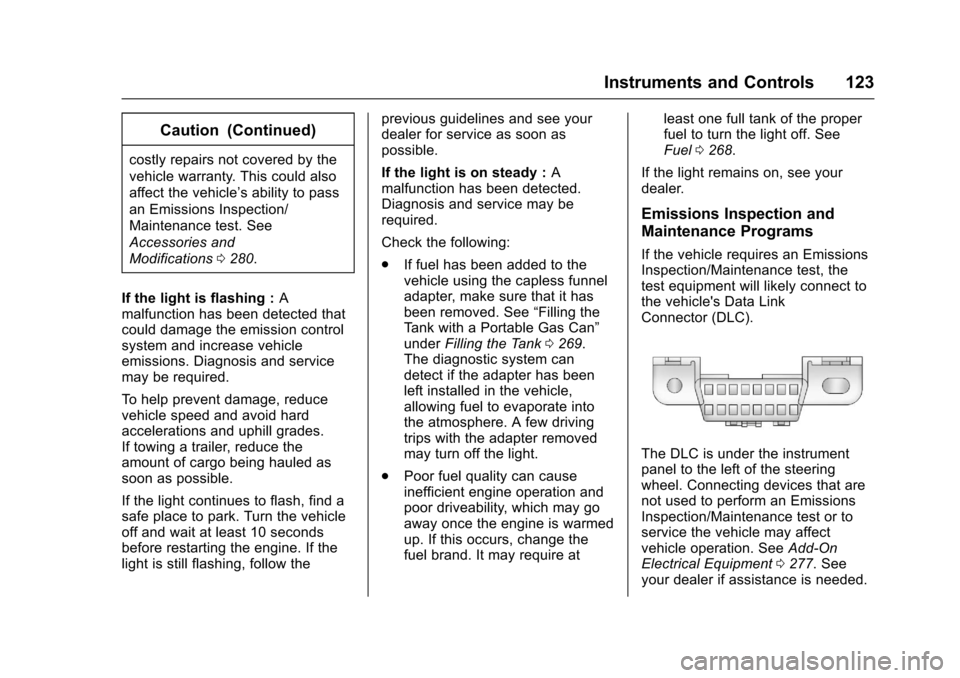
If the vehicle requires an EmissionsInspection/Maintenance test, thetest equipment will likely connect tothe vehicle's Data LinkConnector (DLC).
The DLC is under the instrumentpanel to the left of the steeringwheel. Connecting devices that arenot used to perform an EmissionsInspection/Maintenance test or toservice the vehicle may affectvehicle operation. SeeAdd-OnElectrical Equipment0277.Seeyour dealer if assistance is needed.
Page 127 of 419
Chevrolet Malibu Owner Manual (GMNA-Localizing-U.S./Canada/Mexico-10122664) - 2017 - crc - 5/23/16
126 Instruments and Controls
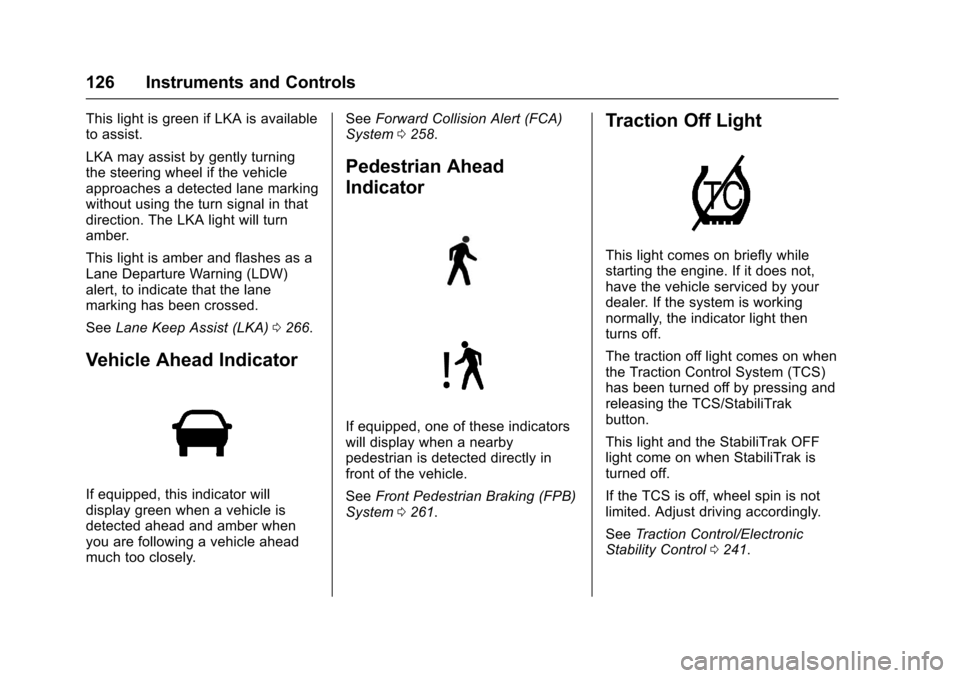
This light is green if LKA is availableto assist.
LKA may assist by gently turningthe steering wheel if the vehicleapproaches a detected lane markingwithout using the turn signal in thatdirection. The LKA light will turnamber.
This light is amber and flashes as aLane Departure Warning (LDW)alert, to indicate that the lanemarking has been crossed.
SeeLane Keep Assist (LKA)0266.
Vehicle Ahead Indicator
If equipped, this indicator willdisplay green when a vehicle isdetected ahead and amber whenyou are following a vehicle aheadmuch too closely.
SeeForward Collision Alert (FCA)System0258.
Pedestrian Ahead
Indicator
If equipped, one of these indicatorswill display when a nearbypedestrian is detected directly infront of the vehicle.
SeeFront Pedestrian Braking (FPB)System0261.
Traction Off Light
This light comes on briefly whilestarting the engine. If it does not,have the vehicle serviced by yourdealer. If the system is workingnormally, the indicator light thenturns off.
The traction off light comes on whenthe Traction Control System (TCS)has been turned off by pressing andreleasing the TCS/StabiliTrakbutton.
This light and the StabiliTrak OFFlight come on when StabiliTrak isturned off.
If the TCS is off, wheel spin is notlimited. Adjust driving accordingly.
SeeTr a c t i o n C o n t r o l / E l e c t r o n i cStability Control0241.
Page 145 of 419
Chevrolet Malibu Owner Manual (GMNA-Localizing-U.S./Canada/Mexico-10122664) - 2017 - crc - 5/23/16
144 Instruments and Controls
SERVICE DRIVER ASSIST
SYSTEM
If this message displays, take thevehicle to your dealer to repair thesystem.
Adaptive Cruise Control (ACC),Forward Collision Alert (FCA),Active Emergency Braking System,Assistance Systems for Parking orBacking, and/or Lane Keep Assist(LKA) system may not work. Do notuse these systems until the vehiclehas been repaired.
SERVICE FRONT CAMERA
If this message remains on aftercontinued driving, the vehicle needsservice. Take the vehicle to yourdealer. Do not use the FrontPedestrian Braking (FPB), ForwardCollision Alert (FCA), ForwardAutomatic Braking (FAB), LaneKeep Assist (LKA), and LaneDeparture Warning (LDW) features.
SERVICE PARK ASSIST
This message displays if there is aproblem with the Parking Assistsystem. Do not use this system tohelp you park. See your dealer forservice.
SERVICE SIDE DETECTION
SYSTEM
If this message remains on aftercontinued driving, the vehicle needsservice. Side Blind Zone Alert(SBZA), Lane Change Alert (LCA),and Rear Cross Traffic Alert (RCTA)features will not work. Take thevehicle to your dealer.
SIDE DETECTION SYSTEM
UNAVAILABLE
This message indicates that SideBlind Zone Alert (SBZA), LaneChange Alert (LCA), and RearCross Traffic Alert (RCTA) aredisabled either because the sensoris blocked and cannot detectvehicles in the blind zone, or thevehicle is passing through an openarea, such as the desert, wherethere is insufficient data foroperation. This message may also
activate during heavy rain or due toroad spray. The vehicle does notneed service. For cleaning, see"Washing the Vehicle" underExterior Care0358.
TAKE STEERING
If LKA does not detect active driversteering, an alert and chime may beprovided. Move the steering wheelto dismiss. SeeLane Keep Assist(LKA)0266.
Propulsion Power
Messages
PROPULSION POWER IS
REDUCED
This message displays when thepropulsion power is reduced andcan affect the ability to accelerate.If this message is on, but there is noreduction in performance, proceedto your destination. Theperformance may be reduced thenext time the vehicle is driven. Thevehicle may be driven at a reducedspeed while this message is on, butmaximum acceleration and speedmay be reduced. If this message
Page 146 of 419
Chevrolet Malibu Owner Manual (GMNA-Localizing-U.S./Canada/Mexico-10122664) - 2017 - crc - 5/23/16
Instruments and Controls 145
stays on when the malfunctionindicator lamp is on, the vehicleshould be taken to your dealer forservice as soon as possible.
Ride Control System
Messages
SERVICE TRACTION
CONTROL
This message displays when thereis a problem with the TractionControl System (TCS). When thismessage is displayed, the systemwill not limit wheel spin. Adjust yourdriving accordingly. See your dealerfor service.
SERVICE STABILITRAK
This message displays if there is aproblem with the StabiliTrak system.If this message appears, try to resetthe system. Stop; turn off the enginefor at least 15 seconds; then startthe engine again. If this messagestill comes on, it means there is aproblem. See your dealer forservice. The vehicle is safe to drive;
however, you do not have thebenefit of StabiliTrak, so reduceyour speed and drive accordingly.
Airbag System Messages
SERVICE AIRBAG
This message displays if there is aproblem with the airbag system. Seeyour dealer for service.
Security Messages
THEFT ATTEMPTED
This message displays if the vehicledetects a tamper condition.
Service Vehicle Messages
SERVICE AC SYSTEM
This message displays if there is aproblem with the air conditioningsystem. Take the vehicle to yourdealer for service.
SERVICE KEYLESS START
SYSTEM
This message is displayed if there isaproblemwiththepushbuttonstartsystem. Take the vehicle to yourdealer for service.
SERVICE VEHICLE SOON
This message displays if there is aproblem with the vehicle. Take thevehicle to your dealer for service.
Steering System
Messages
SERVICE POWER STEERING
This message displays and a chimemay sound when there may be aproblem with the power steeringsystem. If this message displaysand a reduction in steeringperformance or loss of powersteering assistance is noticed, seeyour dealer.
Page 152 of 419
Chevrolet Malibu Owner Manual (GMNA-Localizing-U.S./Canada/Mexico-10122664) - 2017 - crc - 5/23/16
Instruments and Controls 151
Remote Door Unlock
Select to set which doors will unlock
when pressingKon the RKE
transmitter. SeeRemote KeylessEntry (RKE) System Operation032.
Select Driver Door or All Doors.
Remote Start Auto Cool Seats
If equipped and turned on, thisfeature will turn the ventilated seatson when using remote start onwarm days.
Select Off, On-Driver andPassenger, or On-Driver.
Remote Start Auto Heat Seats
Select to enable or disable whichseat will come on when remote startis used. SeeHeated and VentilatedFront Seats060.
Select Off, On-Driver andPassenger, or On-Driver.
Passive Door Unlock
Select to set which doors will unlockwhen the RKE transmitter is withinrange and using the button on the
outside driver door handle to unlockthe vehicle. SeeRemote KeylessEntry (RKE) System Operation032.
Select Driver Door Only or AllDoors.
Passive Door Lock
This allows passive locking to beturned on or off and selectsfeedback. SeeRemote KeylessEntry (RKE) System Operation032.
Select Off, On, or On With HornChirp.
Remote Left in Vehicle Reminder
This feature sounds an alert whenthe RKE transmitter is left in thevehicle. This menu also enablesRemote No Longer Left in Vehiclealert.
Select Off or On.
Return to Factory Settings
Select to return all vehiclepersonalizations to the defaultsettings.
Select Yes or No.
Software Information
Select to view the radio softwareinformation.
Valet Mode (If Equipped)
This will lock the infotainmentsystem and steering wheel controls.It may also limit access to vehiclestorage locations (if equipped).
To e n a b l e v a l e t m o d e :
1. Enter a four-digit code on thekeypad.
2. Select Enter to go to theconfirmation screen.
3. Re-enter the four-digit code.
Select LOCK or UNLOCK to lock orunlock the system. Press BACK togo back to the previous menu.
Personalization Menu (Radio
with Touchscreen)
Settings can be made with theignition on and the vehicle notmoving.
Page 153 of 419
Chevrolet Malibu Owner Manual (GMNA-Localizing-U.S./Canada/Mexico-10122664) - 2017 - crc - 5/23/16
152 Instruments and Controls
The following are all possiblepersonalization features. Dependingon the vehicle, some may not beavailable.
{:Press to access the HomePage Menu.
QorR:To u c h t o s c r o l l t h r o u g h t h emenus or setup items.
0:To u c h t o e x i t o r r e t u r n t o t h eprevious screen or menu.
To a c c e s s t h e m e n u :
1. Press{.
2. Touch Settings.
To u c h t h e m e n u i t e m t o s e l e c t i t .Each of the menus is detailed in thefollowing information.
Settings menus and functions mayvary depending on vehicle options.
The following list of menu items maybe available:
.Time and Date
.Language
.Rear Seat Reminder
.Va l e t M o d e
.Te e n D r i v e r
.Radio
.Vehicle
.Bluetooth
.Apple CarPlay
.Android Auto
.Voice
.USB Auto Launch
.Turn Display Off
.Rear Camera
.Return to Factory Settings
.Software Information
Time and Date
Select Time and Date to adjust theclock. SeeClock0107.
Language
Select, then select from theavailable language(s).
Rear Seat Reminder
This allows for a chime and amessage‘Look in Rear Seat’whenthe rear door has been openedbefore or during operation of thevehicle.
Select Off or On.
Valet Mode (If Equipped)
This will lock the infotainmentsystem and steering wheel controls.It may also limit access to vehiclestorage locations (if equipped).
To e n a b l e v a l e t m o d e :
1. Enter a four-digit code on thekeypad.
2. Touch Enter to go to theconfirmation screen.
3. Re-enter the four-digit code.
To u c h L O C K o r U N L O C K t o l o c k o runlock the system. Touch Back togo back to the previous menu.
Teen Driver
See“Te e n D r i v e r”under“Settings”in the infotainment manual.
Page 168 of 419
Chevrolet Malibu Owner Manual (GMNA-Localizing-U.S./Canada/Mexico-10122664) - 2017 - crc - 5/23/16
Lighting 167
Turn and Lane-Change
Signals
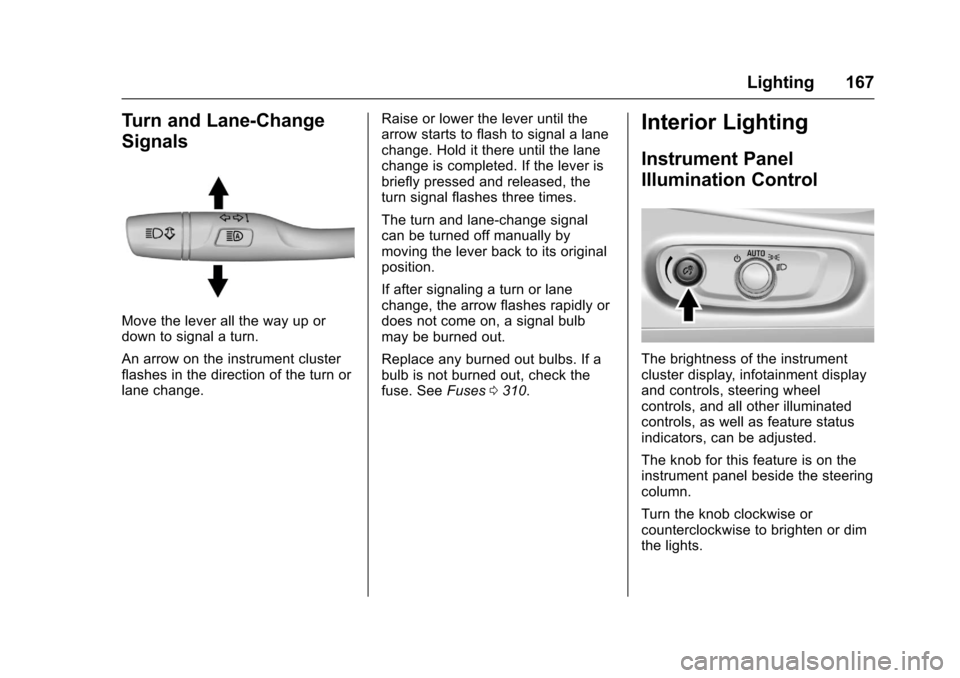
Move the lever all the way up ordown to signal a turn.
An arrow on the instrument clusterflashes in the direction of the turn orlane change.
Raise or lower the lever until thearrow starts to flash to signal a lanechange. Hold it there until the lanechange is completed. If the lever isbriefly pressed and released, theturn signal flashes three times.
The turn and lane-change signalcan be turned off manually bymoving the lever back to its originalposition.
If after signaling a turn or lanechange, the arrow flashes rapidly ordoes not come on, a signal bulbmay be burned out.
Replace any burned out bulbs. If abulb is not burned out, check thefuse. SeeFuses0310.
Interior Lighting
Instrument Panel
Illumination Control
The brightness of the instrumentcluster display, infotainment displayand controls, steering wheelcontrols, and all other illuminatedcontrols, as well as feature statusindicators, can be adjusted.
The knob for this feature is on theinstrument panel beside the steeringcolumn.
Turn the knob clockwise orcounterclockwise to brighten or dimthe lights.