2017 CHEVROLET MALIBU radio
[x] Cancel search: radioPage 160 of 419
Chevrolet Malibu Owner Manual (GMNA-Localizing-U.S./Canada/Mexico-10122664) - 2017 - crc - 5/23/16
Instruments and Controls 159
Guidance Lines
Select to turn Off or On. SeeAssistance Systems for Parking orBacking0253.
Rear Park Assist Symbols
Select to turn Off or On. SeeAssistance Systems for Parking orBacking0253.
Return to Factory Settings
Select and the following maydisplay:
.Restore Vehicle Settings
.Clear All Private Data
.Restore Radio Settings
Restore Vehicle Settings
This allows selection of restoringvehicle settings.
Select Continue or Cancel.
Clear All Private Data
Select to clear all private informationfrom the vehicle.
Select Continue or Cancel.
Restore Radio Settings
This allows selection to restoreradio settings.
Select Continue or Cancel.
Software Information
Select to view the infotainmentsystem current software information.
Universal Remote
System
SeeRadio FrequencyStatement0393.
Universal Remote System
Programming
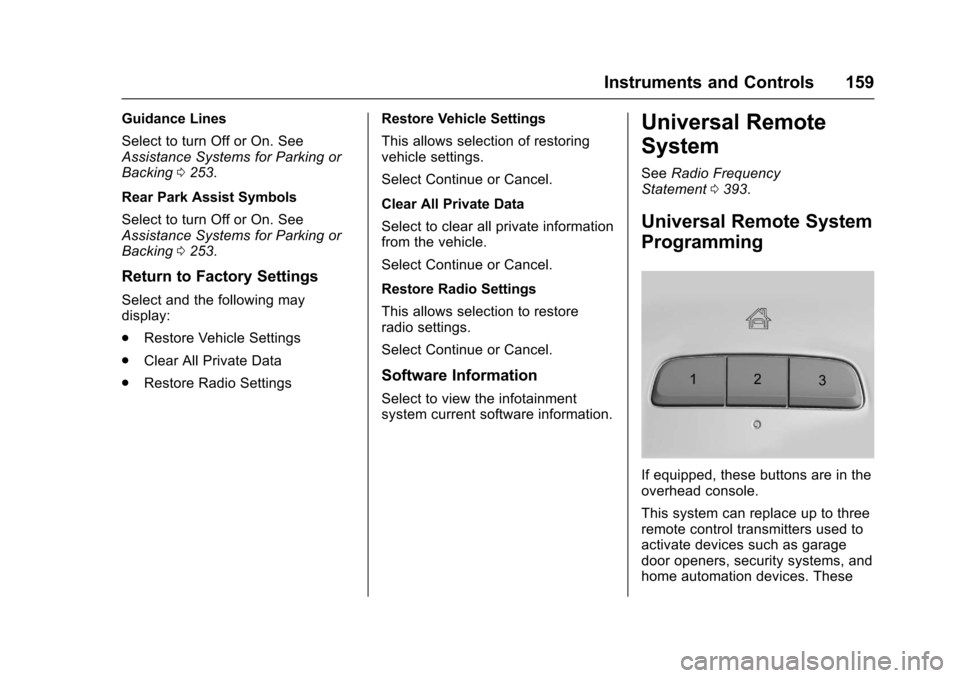
If equipped, these buttons are in theoverhead console.
This system can replace up to threeremote control transmitters used toactivate devices such as garagedoor openers, security systems, andhome automation devices. These
Page 161 of 419
Chevrolet Malibu Owner Manual (GMNA-Localizing-U.S./Canada/Mexico-10122664) - 2017 - crc - 5/23/16
160 Instruments and Controls
instructions refer to a garage dooropener, but can be used for otherdevices.
Do not use the Universal Remotesystem with any garage door openerthat does not have the stop andreverse feature. This includes anygarage door opener modelmanufactured before April 1, 1982.
Read these instructions completelybefore programming the UniversalRemote system. It may help to haveanother person assist with theprogramming process.
Keep the original hand-heldtransmitter for use in other vehiclesas well as for future programming.Erase the programming whenvehicle ownership is terminated.See“Erasing Universal RemoteSystem Buttons”later in thissection.
To p r o g r a m a g a r a g e d o o r o p e n e r ,park outside directly in line with andfacing the garage door openerreceiver. Clear all people andobjects near the garage door.
Make sure the hand-held transmitterhas a new battery for quick andaccurate transmission of theradio-frequency signal.
Programming the Universal
Remote System
For questions or help programmingthe Universal Remote system, call1-800-355-3515 or seewww.homelink.com.
Programming involvestime-sensitive actions, and may timeout causing the procedure to berepeated.
To p r o g r a m u p t o t h r e e d e v i c e s :
1. Hold the end of the hand-heldtransmitter about 3 to 8 cm (1to 3 in) away from theUniversal Remote systembuttons with the indicator lightin view. The hand-heldtransmitter was supplied by themanufacturer of the garagedoor opener receiver.
2. At the same time, press andhold both the hand-heldtransmitter button and one ofthe three Universal Remote
system buttons to be used tooperate the garage door. Donot release either button untilthe indicator light changes fromaslowtoarapidflash.Thenrelease both buttons.
Some garage door openersmay require substitution ofStep 2 with the procedureunder“Radio Signals forCanada and Some GateOperators”later in this section.
3. Press and hold the newlyprogrammed Universal Remotesystem button for five secondswhile watching the indicatorlight and garage dooractivation.
.If the indicator light stays oncontinuously or the garagedoor moves when thebutton is pressed, thenprogramming is complete.There is no need tocomplete Steps 4–6.
.If the indicator light doesnot come on or the garagedoor does not move, asecond button press may
Page 162 of 419
Chevrolet Malibu Owner Manual (GMNA-Localizing-U.S./Canada/Mexico-10122664) - 2017 - crc - 5/23/16
Instruments and Controls 161
be required. For a secondtime, press and hold thenewly programmed buttonfor five seconds. If the lightstays on or the garage doormoves, programming iscomplete.
.If the indicator light blinksrapidly for two seconds,then changes to a solid lightand the garage door doesnot move, continue withprogramming Steps 4–6.
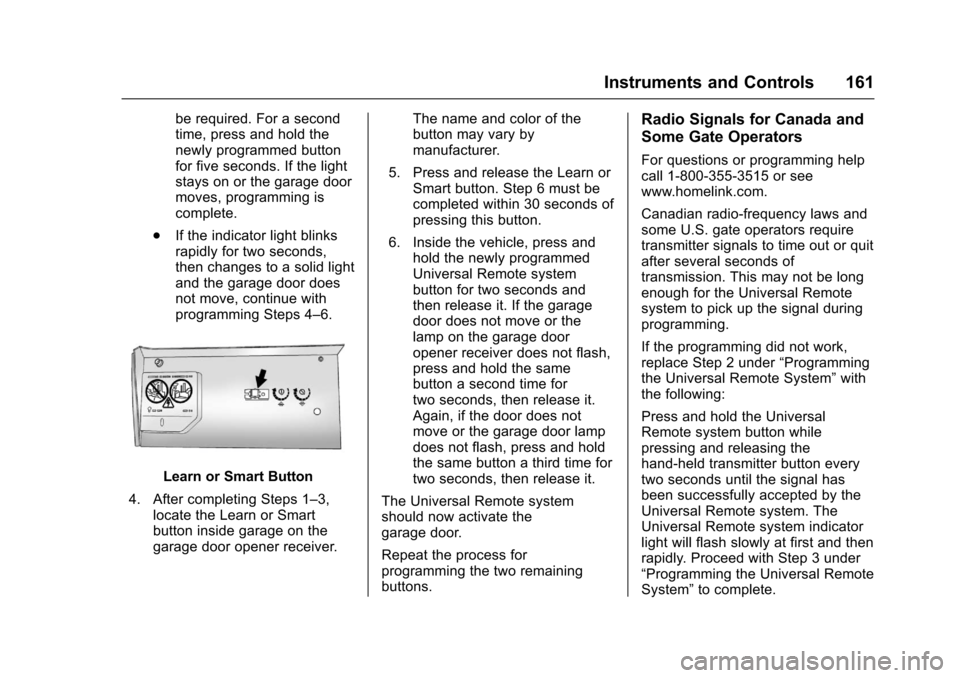
Learn or Smart Button
4. After completing Steps 1–3,locate the Learn or Smartbutton inside garage on thegarage door opener receiver.
The name and color of thebutton may vary bymanufacturer.
5. Press and release the Learn orSmart button. Step 6 must becompleted within 30 seconds ofpressing this button.
6. Inside the vehicle, press andhold the newly programmedUniversal Remote systembutton for two seconds andthen release it. If the garagedoor does not move or thelamp on the garage dooropener receiver does not flash,press and hold the samebutton a second time fortwo seconds, then release it.Again, if the door does notmove or the garage door lampdoes not flash, press and holdthe same button a third time fortwo seconds, then release it.
The Universal Remote systemshould now activate thegarage door.
Repeat the process forprogramming the two remainingbuttons.
Radio Signals for Canada and
Some Gate Operators
For questions or programming helpcall 1-800-355-3515 or seewww.homelink.com.
Canadian radio-frequency laws andsome U.S. gate operators requiretransmitter signals to time out or quitafter several seconds oftransmission. This may not be longenough for the Universal Remotesystem to pick up the signal duringprogramming.
If the programming did not work,replace Step 2 under“Programmingthe Universal Remote System”withthe following:
Press and hold the UniversalRemote system button whilepressing and releasing thehand-held transmitter button everytwo seconds until the signal hasbeen successfully accepted by theUniversal Remote system. TheUniversal Remote system indicatorlight will flash slowly at first and thenrapidly. Proceed with Step 3 under“Programming the Universal RemoteSystem”to complete.
Page 172 of 419
Chevrolet Malibu Owner Manual (GMNA-Localizing-U.S./Canada/Mexico-10122664) - 2017 - crc - 5/23/16
Infotainment System 171
Infotainment
System
Introduction
Infotainment . . . . . . . . . . . . . . . . . . 171Theft-Deterrent Feature . . . . . . 172Overview . . . . . . . . . . . . . . . . . . . . . 173Home Page (Radio withTo u c h s c r e e n ) . . . . . . . . . . . . . . . 1 7 5Operation . . . . . . . . . . . . . . . . . . . . . 176
Radio
AM-FM Radio . . . . . . . . . . . . . . . . 178Satellite Radio . . . . . . . . . . . . . . . . 181Radio Reception . . . . . . . . . . . . . . 182Backglass Antenna . . . . . . . . . . . 183Multi-Band Antenna . . . . . . . . . . 183
Audio Players
Avoiding Untrusted MediaDevices . . . . . . . . . . . . . . . . . . . . . 184USB Port . . . . . . . . . . . . . . . . . . . . . 184
Phone
Bluetooth (Overview) . . . . . . . . . 190Bluetooth (InfotainmentControls Radio withoutTo u c h s c r e e n ) . . . . . . . . . . . . . . . 1 9 1
Bluetooth (InfotainmentControls Radio withTo u c h s c r e e n ) . . . . . . . . . . . . . . . 1 9 5Apple CarPlay andAndroid Auto . . . . . . . . . . . . . . . . 199Hands-Free Phone . . . . . . . . . . . 200
Trademarks and License
Agreements
Trademarks and LicenseAgreements . . . . . . . . . . . . . . . . . 202
Introduction
Infotainment
Base radio information is included inthis manual. See the infotainmentmanual for information on otheravailable infotainment systems.
Read the following pages tobecome familiar with these features.
{Warning
Ta k i n g y o u r e y e s o f f t h e r o a d f o r
too long or too often while using
any infotainment feature can
cause a crash. You or others
could be injured or killed. Do not
give extended attention to
infotainment tasks while driving.
Limit your glances at the vehicle
displays and focus your attention
on driving. Use voice commands
whenever possible.
The infotainment system has built-infeatures intended to help avoiddistraction by disabling somefunctions when driving. These
Page 174 of 419
Chevrolet Malibu Owner Manual (GMNA-Localizing-U.S./Canada/Mexico-10122664) - 2017 - crc - 5/23/16
Infotainment System 173
Overview
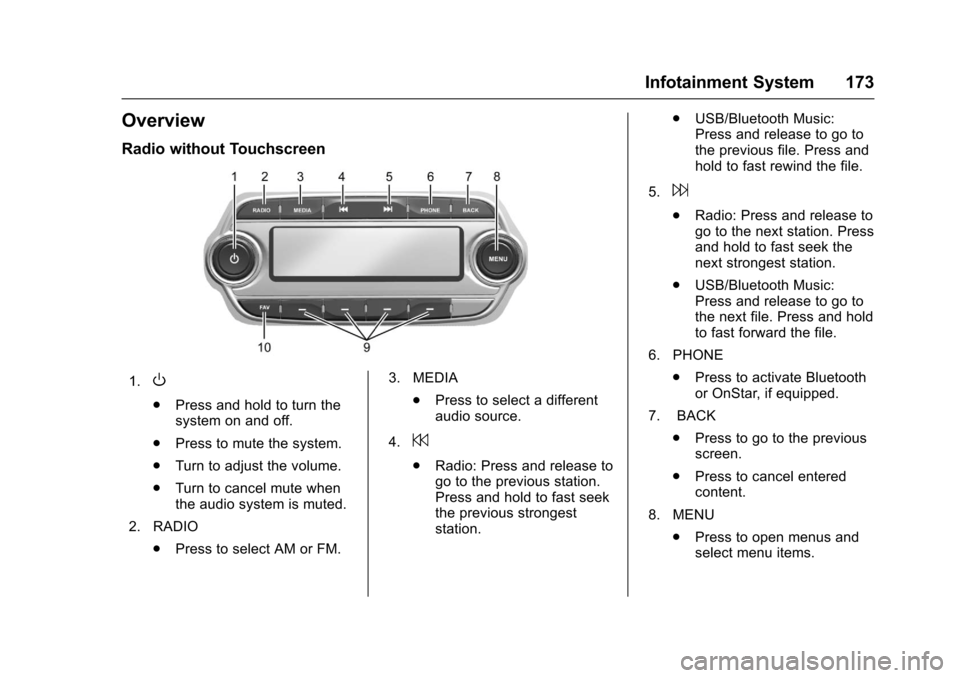
Radio without Touchscreen
1.O
.Press and hold to turn thesystem on and off.
.Press to mute the system.
.Turn to adjust the volume.
.Turn to cancel mute whenthe audio system is muted.
2. RADIO
.Press to select AM or FM.
3. MEDIA
.Press to select a differentaudio source.
4.7
.Radio: Press and release togo to the previous station.Press and hold to fast seekthe previous strongeststation.
.USB/Bluetooth Music:Press and release to go tothe previous file. Press andhold to fast rewind the file.
5.6
.Radio: Press and release togo to the next station. Pressand hold to fast seek thenext strongest station.
.USB/Bluetooth Music:Press and release to go tothe next file. Press and holdto fast forward the file.
6. PHONE
.Press to activate Bluetoothor OnStar, if equipped.
7. BACK
.Press to go to the previousscreen.
.Press to cancel enteredcontent.
8. MENU
.Press to open menus andselect menu items.
Page 175 of 419
Chevrolet Malibu Owner Manual (GMNA-Localizing-U.S./Canada/Mexico-10122664) - 2017 - crc - 5/23/16
174 Infotainment System
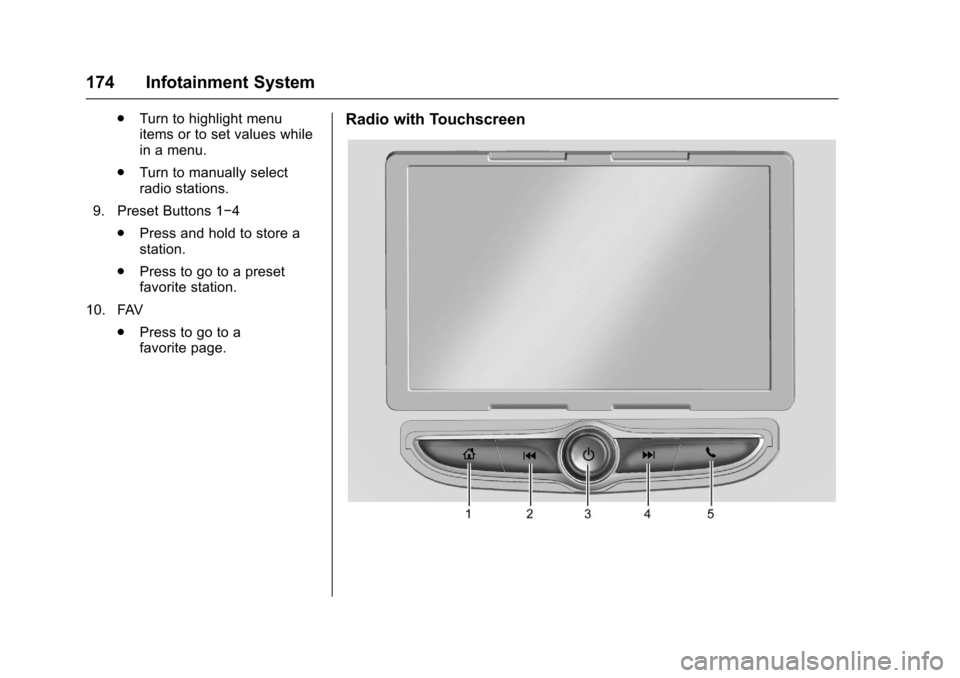
.Turn to highlight menuitems or to set values whilein a menu.
.Turn to manually selectradio stations.
9. Preset Buttons 1✓4
.Press and hold to store astation.
.Press to go to a presetfavorite station.
10. FAV
.Press to go to afavorite page.
Radio with Touchscreen
Page 176 of 419
Chevrolet Malibu Owner Manual (GMNA-Localizing-U.S./Canada/Mexico-10122664) - 2017 - crc - 5/23/16
Infotainment System 175
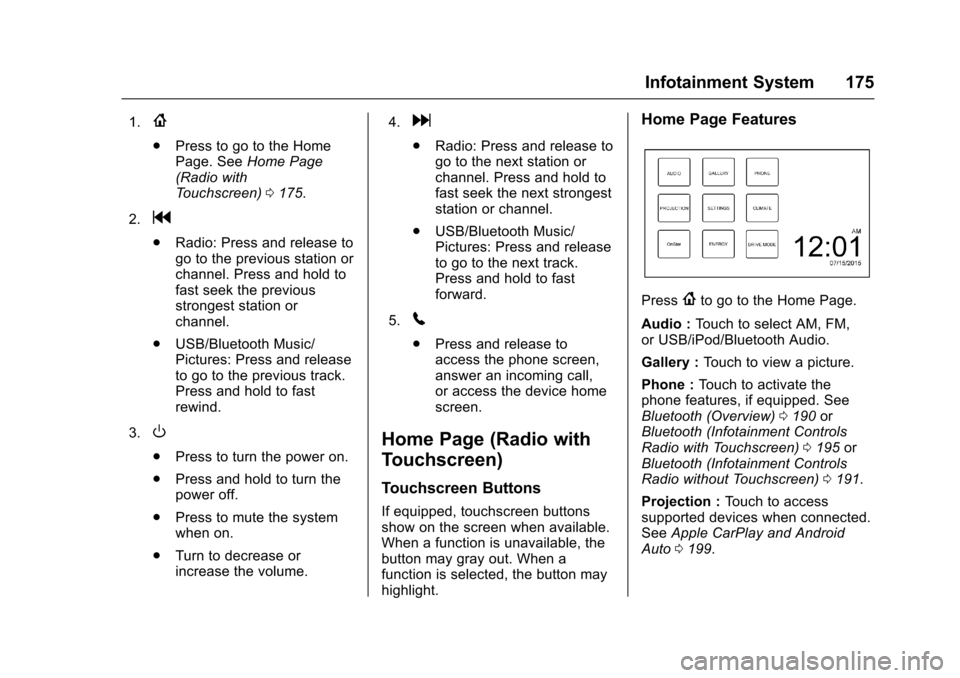
1.{
.Press to go to the HomePage. SeeHome Page(Radio withTo u c h s c r e e n )0175.
2.g
.Radio: Press and release togo to the previous station orchannel. Press and hold tofast seek the previousstrongest station orchannel.
.USB/Bluetooth Music/Pictures: Press and releaseto go to the previous track.Press and hold to fastrewind.
3.O
.Press to turn the power on.
.Press and hold to turn thepower off.
.Press to mute the systemwhen on.
.Turn to decrease orincrease the volume.
4.d
.Radio: Press and release togo to the next station orchannel. Press and hold tofast seek the next strongeststation or channel.
.USB/Bluetooth Music/Pictures: Press and releaseto go to the next track.Press and hold to fastforward.
5.5
.Press and release toaccess the phone screen,answer an incoming call,or access the device homescreen.
Home Page (Radio with
Touchscreen)
Touchscreen Buttons
If equipped, touchscreen buttonsshow on the screen when available.When a function is unavailable, thebutton may gray out. When afunction is selected, the button mayhighlight.
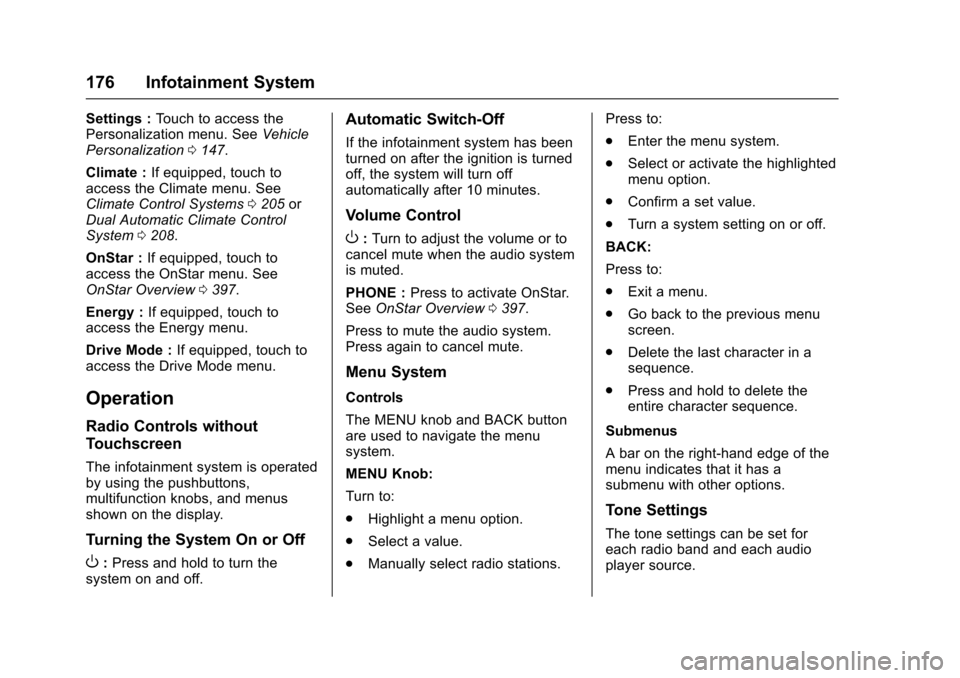
Home Page Features
Press{to go to the Home Page.
Audio :To u c h t o s e l e c t A M , F M ,or USB/iPod/Bluetooth Audio.
Gallery :To u c h t o v i e w a p i c t u r e .
Phone :To u c h t o a c t i v a t e t h ephone features, if equipped. SeeBluetooth (Overview)0190orBluetooth (Infotainment ControlsRadio with Touchscreen)0195orBluetooth (Infotainment ControlsRadio without Touchscreen)0191.
Projection :To u c h t o a c c e s ssupported devices when connected.SeeApple CarPlay and AndroidAuto0199.
Page 177 of 419
Chevrolet Malibu Owner Manual (GMNA-Localizing-U.S./Canada/Mexico-10122664) - 2017 - crc - 5/23/16
176 Infotainment System
Settings :To u c h t o a c c e s s t h ePersonalization menu. SeeVehiclePersonalization0147.
Climate :If equipped, touch toaccess the Climate menu. SeeClimate Control Systems0205orDual Automatic Climate ControlSystem0208.
OnStar :If equipped, touch toaccess the OnStar menu. SeeOnStar Overview0397.
Energy :If equipped, touch toaccess the Energy menu.
Drive Mode :If equipped, touch toaccess the Drive Mode menu.
Operation
Radio Controls without
Touchscreen
The infotainment system is operatedby using the pushbuttons,multifunction knobs, and menusshown on the display.
Turning the System On or Off
O:Press and hold to turn thesystem on and off.
Automatic Switch-Off
If the infotainment system has beenturned on after the ignition is turnedoff, the system will turn offautomatically after 10 minutes.
Volume Control
O:Turn to adjust the volume or tocancel mute when the audio systemis muted.
PHONE :Press to activate OnStar.SeeOnStar Overview0397.
Press to mute the audio system.Press again to cancel mute.
Menu System
Controls
The MENU knob and BACK buttonare used to navigate the menusystem.
MENU Knob:
Turn to:
.Highlight a menu option.
.Select a value.
.Manually select radio stations.
Press to:
.Enter the menu system.
.Select or activate the highlightedmenu option.
.Confirm a set value.
.Turn a system setting on or off.
BACK:
Press to:
.Exit a menu.
.Go back to the previous menuscreen.
.Delete the last character in asequence.
.Press and hold to delete theentire character sequence.
Submenus
Abarontheright-handedgeofthemenu indicates that it has asubmenu with other options.
Tone Settings
The tone settings can be set foreach radio band and each audioplayer source.