2017 CHEVROLET MALIBU cruise control
[x] Cancel search: cruise controlPage 221 of 419
Chevrolet Malibu Owner Manual (GMNA-Localizing-U.S./Canada/Mexico-10122664) - 2017 - crc - 5/23/16
220 Driving and Operating
Winter Driving
Driving on Snow or Ice
Snow or ice between the tires andthe road creates less traction orgrip, so drive carefully. Wet ice canoccur at about 0 °C (32 °F) whenfreezing rain begins to fall. Avoiddriving on wet ice or in freezing rainuntil roads can be treated.
For Slippery Road Driving:
.Accelerate gently. Acceleratingtoo quickly causes the wheels tospin and makes the surfaceunder the tires slick.
.Turn on Traction Control. SeeTr a c t i o n C o n t r o l / E l e c t r o n i cStability Control0241.
.The Antilock Brake System(ABS) improves vehicle stabilityduring hard stops, but thebrakes should be applied soonerthan when on dry pavement.SeeAntilock Brake System(ABS)0236.
.Allow greater following distanceand watch for slippery spots. Icypatches can occur on otherwise
clear roads in shaded areas.The surface of a curve or anoverpass can remain icy whenthe surrounding roads are clear.Avoid sudden steeringmaneuvers and braking whileon ice.
.Turn off cruise control.
Blizzard Conditions
Stop the vehicle in a safe place andsignal for help. Stay with the vehicleunless there is help nearby.If possible, use RoadsideAssistance. SeeRoadsideAssistance Program0387.Togethelp and keep everyone in thevehicle safe:
.Turn on the hazard warningflashers.
.Tie a red cloth to an outsidemirror.
{Warning
Snow can trap engine exhaust
under the vehicle. This may
cause exhaust gases to get
inside. Engine exhaust contains
carbon monoxide (CO), which
cannot be seen or smelled. It can
cause unconsciousness and even
death.
If the vehicle is stuck in snow:
.Clear snow from the base ofthe vehicle, especially anyblocking the exhaust pipe.
.Open a window about 5 cm(2 in) on the vehicle sidethat is away from the wind,to bring in fresh air.
.Fully open the air outlets onor under the instrumentpanel.
.Adjust the climate controlsystem to circulate the airinside the vehicle and set
(Continued)
Page 242 of 419
Chevrolet Malibu Owner Manual (GMNA-Localizing-U.S./Canada/Mexico-10122664) - 2017 - crc - 5/23/16
Driving and Operating 241
SeeWarning Lights, Gauges, andIndicators0111andDriverInformation Center (DIC) (BaseLevel)0131orDriver InformationCenter (DIC) (Uplevel)0134.Intheevent of a controller problem, thebrake pedal may be harder to pushand the stopping distance may belonger.
Ride Control Systems
Traction Control/
Electronic Stability
Control
System Operation
The vehicle has a Traction ControlSystem (TCS) and StabiliTrak®,anelectronic stability control system.These systems help limit wheel slipand assist the driver in maintainingcontrol, especially on slippery roadconditions.
TCS activates if it senses that anyof the drive wheels are spinning orbeginning to lose traction. When thishappens, TCS applies the brakes tothe spinning wheels and reducesengine power to limit wheel spin.
StabiliTrak activates when thevehicle senses a difference betweenthe intended path and the directionthe vehicle is actually traveling.StabiliTrak selectively appliesbraking pressure to any one of the
vehicle wheel brakes to assist thedriver in keeping the vehicle on theintended path.
If cruise control is being used andtraction control or StabiliTrak beginsto limit wheel spin, cruise control willdisengage. Cruise control may beturned back on when roadconditions allow.
Both systems come onautomatically when the vehicle isstarted and begins to move. Thesystems may be heard or felt whilethey are operating or whileperforming diagnostic checks. Thisis normal and does not mean thereis a problem with the vehicle.
It is recommended to leave bothsystems on for normal drivingconditions, but it may be necessaryto turn TCS off if the vehicle getsstuck in sand, mud, ice, or snow.SeeIf the Vehicle Is Stuck0221and“Turning the Systems Off andOn”later in this section.
Page 244 of 419
Chevrolet Malibu Owner Manual (GMNA-Localizing-U.S./Canada/Mexico-10122664) - 2017 - crc - 5/23/16
Driving and Operating 243
To t u r n o f f b o t h T C S a n d S t a b i l i T r a k ,
press and holdguntil the traction
off lightiand StabiliTrak OFF
lightgcome on and stay on in the
instrument cluster.
To t u r n T C S a n d S t a b i l i T r a k o n
again, press and releaseg.The
traction off lightiand StabiliTrak
OFF lightgin the instrument cluster
turn off.
Adding accessories can affect thevehicle performance. SeeAccessories andModifications0280.
Cruise Control
Cruise control lets the vehiclemaintain a speed of about 40 km/h(25 mph) or more without keepingyour foot on the accelerator. Cruisecontrol does not work at speedsbelow 40 km/h (25 mph).
{Warning
Cruise control can be dangerous
where you cannot drive safely at
asteadyspeed.Donotuse
cruise control on winding roads or
in heavy traffic.
Cruise control can be dangerous
on slippery roads. On such roads,
fast changes in tire traction can
cause excessive wheel slip, and
you could lose control. Do not use
cruise control on slippery roads.
With the Traction Control System(TCS) or Electronic Stability Control(ESC), the system may begin tolimit wheel spin while you are usingcruise control. If this happens,cruise control will automatically
disengage. SeeTr a c t i o n C o n t r o l /Electronic Stability Control0241.If a collision alert occurs whencruise control is activated, cruisecontrol is disengaged. SeeForwardCollision Alert (FCA) System0258.When road conditions allow you tosafely use it again, cruise controlcan be turned back on.
If the brakes are applied, cruisecontrol disengages.
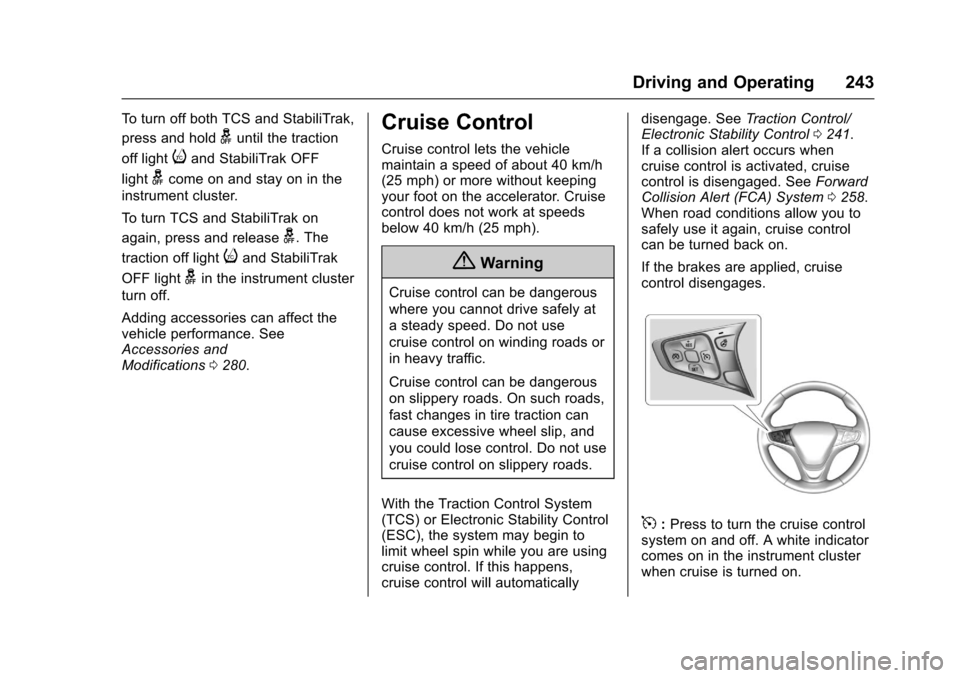
5:Press to turn the cruise controlsystem on and off. A white indicatorcomes on in the instrument clusterwhen cruise is turned on.
Page 245 of 419
Chevrolet Malibu Owner Manual (GMNA-Localizing-U.S./Canada/Mexico-10122664) - 2017 - crc - 5/23/16
244 Driving and Operating
*:Press to disengage cruisecontrol without erasing the setspeed from memory.
+RES :If there is a set speed inmemory, press to resume thatspeed or press and hold toaccelerate. If cruise control isalready active, use to increasevehicle speed.
✓SET :Press briefly to set thespeed and activate cruise control.If cruise control is already active,use to decrease vehicle speed.
Setting Cruise Control
If5is on when not in use, -SET or
+RES could get bumped and go into
cruise when not desired. Keep5
off when cruise is not being used.
To s e t a s p e e d :
1. Press5to turn the cruise
system on.
2. Get up to the desired speed.
3. Press and release -SET. Thedesired set speed brieflyappears in the instrumentcluster.
4. Remove your foot from theaccelerator pedal.
The cruise control indicator on theinstrument cluster turns green aftercruise control has been set to thedesired speed. SeeInstrumentCluster (Base Level)011 2orInstrument Cluster (Uplevel)011 4.
Resuming a Set Speed
If cruise control is set at a desiredspeed and then the brakes areapplied, cruise control isdisengaged without erasing the setspeed from memory.
Once the vehicle speed reachesabout 40 km/h (25 mph) or more,briefly press +RES. The vehiclereturns to the previous set speed.
Increasing Speed While UsingCruise Control
If the cruise control system isalready activated:
.Press and hold +RES until thevehicle accelerates to thedesired speed, then release it.
.To i n c r e a s e t h e s p e e d i n s m a l lincrements, briefly press +RES.For each press, the vehicle goesabout 1 km/h (1 mph) faster.
The speedometer reading can bedisplayed in either English or metricunits. SeeDriver Information Center(DIC) (Base Level)0131orDriverInformation Center (DIC) (Uplevel)0134.Theincrementvalueuseddepends on the units displayed.
Reducing Speed While UsingCruise Control
If the cruise control system isalready activated:
.Press and hold -SET until thedesired lower speed is reached,then release it.
.To s l o w d o w n i n s m a l lincrements, briefly press -SET.For each press, the vehicle goesabout 1 km/h (1 mph) slower.
Page 246 of 419
Chevrolet Malibu Owner Manual (GMNA-Localizing-U.S./Canada/Mexico-10122664) - 2017 - crc - 5/23/16
Driving and Operating 245
The speedometer reading can bedisplayed in either English or metricunits. SeeDriver Information Center(DIC) (Base Level)0131orDriverInformation Center (DIC) (Uplevel)0134.Theincrementvalueuseddepends on the units displayed.
Passing Another Vehicle WhileUsing Cruise Control
Use the accelerator pedal toincrease the vehicle speed. Whenyou take your foot off the pedal, thevehicle will slow down to theprevious set cruise speed. Whilepressing the accelerator pedal orshortly following the release tooverride cruise control, brieflypressing -SET will result in cruisecontrol set to the current vehiclespeed.
Using Cruise Control on Hills
How well the cruise control workson hills depends upon the vehiclespeed, load, and the steepness ofthe hills. When going up steep hills,you might have to step on theaccelerator pedal to maintain the
vehicle speed. When goingdownhill, you might have to brake orshift to a lower gear to keep yourspeed down. If the brake pedal isapplied, cruise control willdisengage.
Ending Cruise Control
There are four ways to end cruisecontrol:
.Step lightly on the brake pedal.
.Press*.
.Shift the transmission toN(Neutral).
.Press5to turn cruise control
system off completely.
Erasing Speed Memory
The cruise control set speed is
erased from memory if5is pressed
or if the vehicle is turned off.
Adaptive Cruise Control
If equipped with Adaptive CruiseControl (ACC), it allows you toselect the cruise control set speedand following gap. Read this entiresection before using this system.The following gap is the followingtime between your vehicle and avehicle detected directly ahead inyour path moving in the samedirection. If no vehicle is detected inyour path, ACC works like regularcruise control. ACC uses cameraand radar sensors. SeeRadioFrequency Statement0393.
If a vehicle is detected in your path,ACC can apply acceleration orlimited, moderate braking tomaintain the selected following gap.To d i s e n g a g e A C C , a p p l y t h e b r a k e .If ACC is controlling your vehiclespeed when the Traction ControlSystem (TCS) or StabiliTrak systemactivates, the ACC mayautomatically disengage. SeeTr a c t i o n C o n t r o l / E l e c t r o n i c S t a b i l i t yControl0241.Whenroad
Page 247 of 419
Chevrolet Malibu Owner Manual (GMNA-Localizing-U.S./Canada/Mexico-10122664) - 2017 - crc - 5/23/16
246 Driving and Operating
conditions allow ACC to be safelyused, the ACC can be turnedback on.
ACC will not engage if the TCS orStabiliTrak system is disabled.
{Warning
ACC has limited braking ability
and may not have time to slow
the vehicle down enough to avoid
acollisionwithanothervehicle
you are following. This can occur
when vehicles suddenly slow or
stop ahead, or enter your lane.
Also see“Alerting the Driver”in
this section. Complete attention is
always required while driving and
you should be ready to take
action and apply the brakes. See
Defensive Driving0216.
{Warning
ACC will not detect or brake for
children, pedestrians, animals,
or other objects.
Do not use ACC when:
.On winding and hilly roadsor when the sensors areblocked by snow, ice, or dirt.The system may not detectavehicleahead.Keeptheentire front of the vehicleclean.
.Visibility is low, such as infog, rain, or snowconditions. ACCperformance is limited underthese conditions.
.On slippery roads wherefast changes in tire tractioncan cause excessivewheel slip.
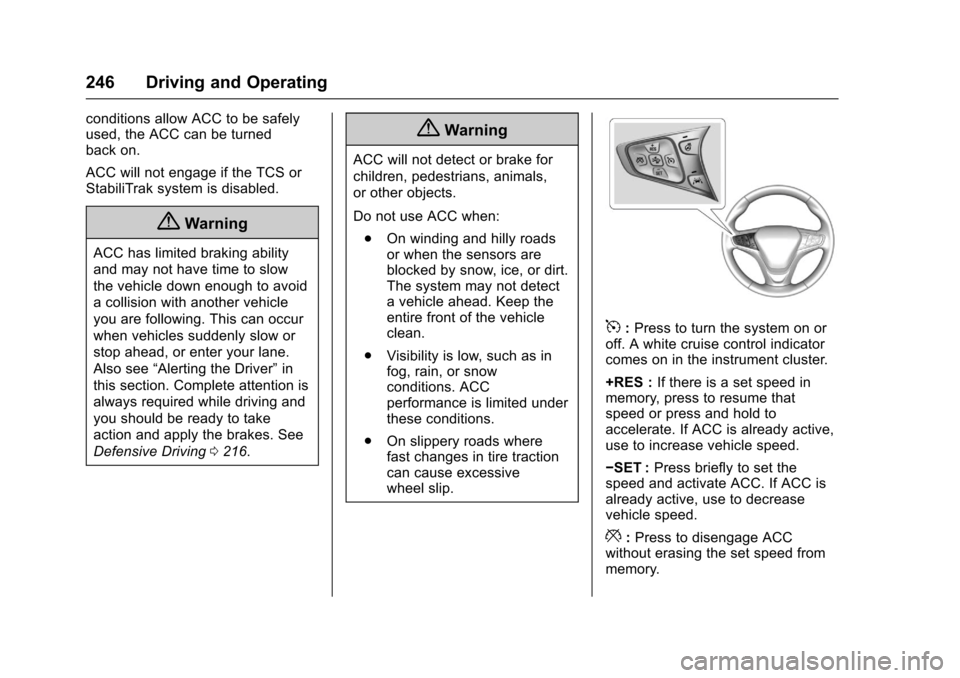
5:Press to turn the system on oroff. A white cruise control indicatorcomes on in the instrument cluster.
+RES :If there is a set speed inmemory, press to resume thatspeed or press and hold toaccelerate. If ACC is already active,use to increase vehicle speed.
✓SET :Press briefly to set thespeed and activate ACC. If ACC isalready active, use to decreasevehicle speed.
*:Press to disengage ACCwithout erasing the set speed frommemory.
Page 248 of 419
Chevrolet Malibu Owner Manual (GMNA-Localizing-U.S./Canada/Mexico-10122664) - 2017 - crc - 5/23/16
Driving and Operating 247
[:Press to select a following gaptime (or distance) setting for ACC ofFar, Medium, or Near.
Setting Adaptive Cruise Control
If ACC is on when not in use,5
could get pressed and ACC couldbecome active when not desired.Keep ACC off when it is notbeing used.
Select the set speed desired forcruise. This is the vehicle speedwhen no vehicle is detected inits path.
ACC will not set at a speed lessthan 25 km/h (16 mph), although itcan be resumed when driving atlower speeds.
To s e t A C C :
1. Press5.
2. Get up to the desired speed.
3. Press and release -SET.
4. Remove your foot from theaccelerator.
After ACC is set, it may immediatelyapply the brakes if a vehicle aheadis detected closer than the selectedfollowing gap.
The ACC indicator displays in theinstrument cluster. When the ACC isactive, the indicator turns green.
Be mindful of speed limits,surrounding traffic speeds, andweather conditions when selectingthe set speed.
Resuming a Set Speed
If the ACC is set at a desired speedand then the brakes are applied, theACC is disengaged without erasingthe set speed from memory.
To b e g i n u s i n g A C C a g a i n , b r i e f l ypress +RES. The vehicle returns tothe previous set speed.
Increasing Speed While ACC is ata Set Speed
If ACC is already activated, do oneof the following:
.Use the accelerator to get to thehigher speed. Press -SET.Release the control and theaccelerator pedal. The vehiclewill now cruise at the higherspeed.
When the accelerator pedal ispressed, ACC will not brakebecause it is overridden.Awarningmessagewillappearon the Driver Information Center(DIC). SeeCruise ControlMessages0139.
.Press and hold +RES until thedesired set speed appears onthe display, then release it.
.To i n c r e a s e v e h i c l e s p e e d i nsmall increments, briefly press+RES. For each press, thevehicle goes 1 km/h or (1 mph)faster.
Page 251 of 419
Chevrolet Malibu Owner Manual (GMNA-Localizing-U.S./Canada/Mexico-10122664) - 2017 - crc - 5/23/16
250 Driving and Operating
See“Go Notifier”in“Collision/Detection Systems”underVehiclePersonalization0147.
When the vehicle ahead drivesaway, press +RES or theaccelerator pedal to resume ACC.If stopped for more thantwo minutes or if the driver door isopened and the driver safety belt isunbuckled, the ACC automaticallyapplies the Electric Parking Brake(EPB) to hold the vehicle. TheElectric Parking Brake status lightwill turn on. SeeElectric ParkingBrake0238.ToreleasetheEPB,press the accelerator pedal.
ADICwarningmessagemaydisplay indicating to shift to P (Park)before exiting the vehicle. SeeCruise Control Messages0139.
{Warning
If ACC has stopped the vehicle,
and if ACC is disengaged, turned
off, or canceled, the vehicle will
no longer be held at a stop. The
vehicle can move. When ACC is
(Continued)
Warning (Continued)
holding the vehicle at a stop,
always be prepared to manually
apply the brakes.
{Warning
Leaving the vehicle without
placing it in P (Park) can be
dangerous. Do not leave the
vehicle while it is being held at a
stop by ACC. Always place the
vehicle in P (Park) and turn off
the ignition before leaving the
vehicle.
ACC Override
If using the accelerator pedal whileACC is active, a warning messageon the DIC will indicate thatautomatic braking will not occur.SeeCruise Control Messages0139.ACCwillresumeoperationwhen the accelerator pedal is notbeing pressed.
{Warning
The ACC will not automatically
apply the brakes if your foot is
resting on the accelerator pedal.
Yo u c o u l d c r a s h i n t o a v e h i c l e
ahead of you.
Curves in the Road
{Warning
On curves, ACC may not detect a
vehicle ahead in your lane. You
could be startled if the vehicle
accelerates up to the set speed,
especially when following a
vehicle exiting or entering exit
ramps. You could lose control of
the vehicle or crash. Do not use
ACC while driving on an entrance
or exit ramp. Always be ready to
use the brakes if necessary.