2017 CHEVROLET MALIBU remote start
[x] Cancel search: remote startPage 39 of 419
Chevrolet Malibu Owner Manual (GMNA-Localizing-U.S./Canada/Mexico-10122664) - 2017 - crc - 5/23/16
38 Keys, Doors, and Windows
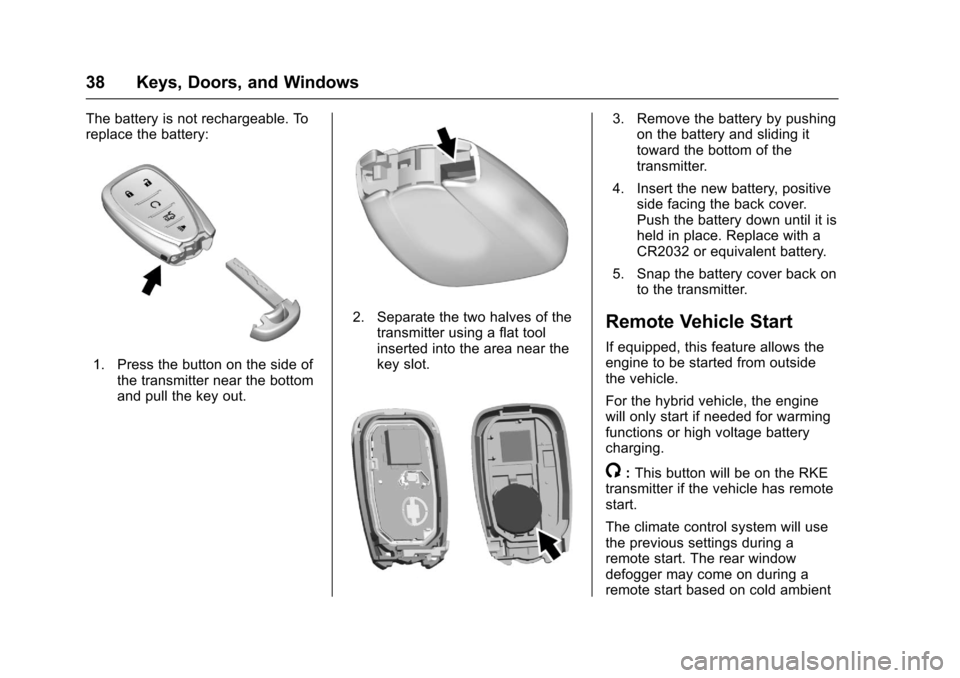
The battery is not rechargeable. Toreplace the battery:
1. Press the button on the side ofthe transmitter near the bottomand pull the key out.
2. Separate the two halves of thetransmitter using a flat toolinserted into the area near thekey slot.
3. Remove the battery by pushingon the battery and sliding ittoward the bottom of thetransmitter.
4. Insert the new battery, positiveside facing the back cover.Push the battery down until it isheld in place. Replace with aCR2032 or equivalent battery.
5. Snap the battery cover back onto the transmitter.
Remote Vehicle Start
If equipped, this feature allows theengine to be started from outsidethe vehicle.
For the hybrid vehicle, the enginewill only start if needed for warmingfunctions or high voltage batterycharging.
/:This button will be on the RKEtransmitter if the vehicle has remotestart.
The climate control system will usethe previous settings during aremote start. The rear windowdefogger may come on during aremote start based on cold ambient
Page 40 of 419
Chevrolet Malibu Owner Manual (GMNA-Localizing-U.S./Canada/Mexico-10122664) - 2017 - crc - 5/23/16
Keys, Doors, and Windows 39
conditions. The rear defog indicatorlight does not come on during aremote start.
If the vehicle has heated seats, theymay come on during a remote start.SeeHeated and Ventilated FrontSeats060.
Laws in some local communitiesmay restrict the use of remotestarters. For example, some lawsrequire a person using remote startto have the vehicle in view. Checklocal regulations for anyrequirements.
Other conditions can affect theperformance of the transmitter. SeeRemote Keyless Entry (RKE)System032.
Do not use remote start if thevehicle is low on fuel.
Starting the Engine Using RemoteStart
To s t a r t t h e e n g i n e u s i n g t h e r e m o t estart feature:
1. Press and releaseQ.
2. Immediately after completing
Step 1, press and hold/for at
least four seconds or until theturn signal lamps flash. Theturn signal lamps flashingconfirms the request to remotestart the vehicle has beenreceived.
When the engine starts, the parkinglamps will turn on and remain on aslong as the engine is running. Thedoors will be locked and the climatecontrol system may come on.
The engine will continue to run for10 minutes. After 30 seconds,repeat the steps if a 10-minuteextension is desired. Remote startcan be extended only once.
Start the vehicle before driving.
Extending Engine Run Time
The engine run time can beextended by another 10 minutes,if during the first 10 minutesSteps 1 and 2 are repeated whilethe engine is still running. Anextension can be requested30 seconds after starting. When theremote start is extended, the
second 10-minute period is addedon to the first 10 minutes for a totalof 20 minutes.
The remote start can only beextended once.
Amaximumoftworemotestarts,or a single start with an extension,is allowed between ignition cycles.
The vehicle's ignition must beturned on and then back off beforethe remote start procedure can beused again.
Canceling a Remote Start
To c a n c e l a r e m o t e s t a r t , d o o n e o fthe following:
.Aim the RKE transmitter at the
vehicle and press and hold/
until the parking lamps turn off.
.Turn on the hazard warningflashers.
.Turn the vehicle on and then off.
Page 41 of 419
Chevrolet Malibu Owner Manual (GMNA-Localizing-U.S./Canada/Mexico-10122664) - 2017 - crc - 5/23/16
40 Keys, Doors, and Windows
Conditions in Which Remote StartWill Not Work
The remote vehicle start feature willnot operate if:
.Atransmitterisinthevehicle.
.The hood is not closed.
.The hazard warning flashersare on.
.The malfunction indicator lampis on.
.The engine coolant temperatureis too high.
.The oil pressure is low.
.Tw o r e m o t e v e h i c l e s t a r t s , o r asingle remote start with anextension, have alreadybeen used.
.The vehicle is not in P (Park).
Door Locks
{Warning
Unlocked doors can be
dangerous.
.Passengers, especiallychildren, can easily openthe doors and fall out of amoving vehicle. The doorscan be unlocked andopened while the vehicle ismoving. The chance ofbeing thrown out of thevehicle in a crash isincreased if the doors arenot locked. So, allpassengers should wearsafety belts properly and thedoors should be lockedwhenever the vehicle isdriven.
.Yo u n g c h i l d r e n w h o g e t i n t ounlocked vehicles may beunable to get out. A childcan be overcome byextreme heat and can sufferpermanent injuries or even
(Continued)
Warning (Continued)
death from heat stroke.Always lock the vehiclewhenever leaving it.
.Outsiders can easily enterthrough an unlocked doorwhen you slow down or stopthe vehicle. Locking thedoors can help prevent thisfrom happening.
To l o c k o r u n l o c k t h e d o o r s f r o m t h eoutside:
.PressQorKon the Remote
Keyless Entry (RKE) transmitter.SeeRemote Keyless Entry(RKE) System Operation032.
.Use the key in the driver door.The key lock cylinder is coveredwith a cap.
Page 49 of 419
Chevrolet Malibu Owner Manual (GMNA-Localizing-U.S./Canada/Mexico-10122664) - 2017 - crc - 5/23/16
48 Keys, Doors, and Windows
Vehicle with a Low TransmitterBattery”underRemote KeylessEntry (RKE) System Operation032.
If the vehicle does not start with theother transmitter or when thetransmitter is in the transmitterpocket, the vehicle needs service.See your dealer who can servicethe theft-deterrent system and haveanewtransmitterprogrammedtothe vehicle.
Do not leave the transmitter ordevice that disarms or deactivatesthe theft-deterrent system in thevehicle.
Exterior Mirrors
Convex Mirrors
{Warning
Aconvexmirrorcanmakethings,
like other vehicles, look farther
away than they really are. If you
cut too sharply into the right lane,
you could hit a vehicle on the
right. Check the inside mirror or
glance over your shoulder before
changing lanes.
The passenger side mirror is convexshaped. A convex mirror's surface iscurved so more can be seen fromthe driver seat.
Power Mirrors
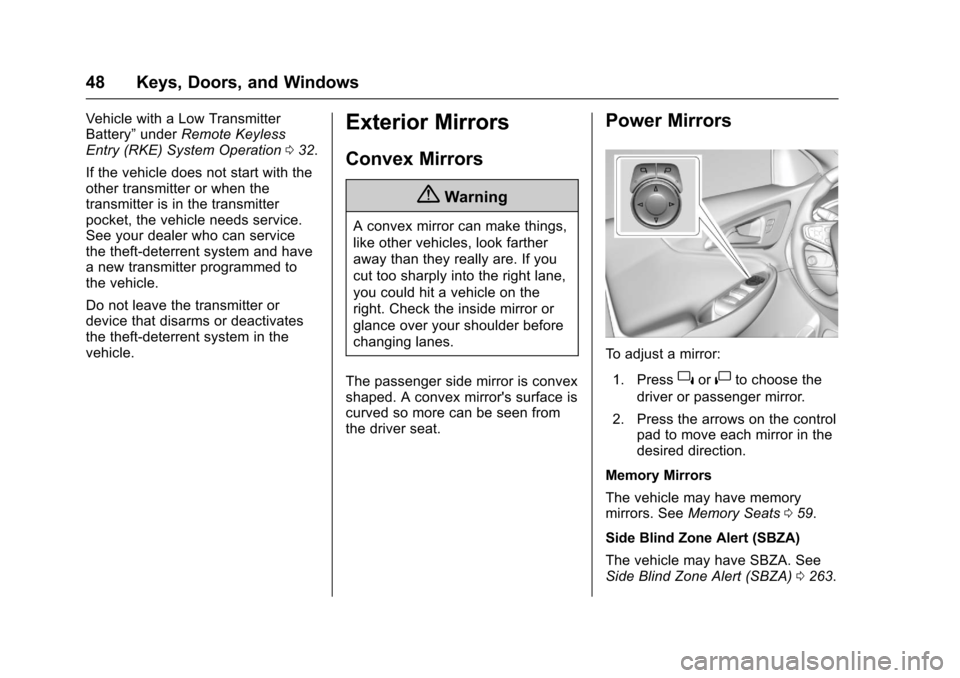
To a d j u s t a m i r r o r :
1. Press}or|to choose the
driver or passenger mirror.
2. Press the arrows on the controlpad to move each mirror in thedesired direction.
Memory Mirrors
The vehicle may have memorymirrors. SeeMemory Seats059.
Side Blind Zone Alert (SBZA)
The vehicle may have SBZA. SeeSide Blind Zone Alert (SBZA)0263.
Page 62 of 419
Chevrolet Malibu Owner Manual (GMNA-Localizing-U.S./Canada/Mexico-10122664) - 2017 - crc - 5/23/16
Seats and Restraints 61
If available, the buttons are on theclimate control panel. To operate,the engine must be running.
PressLorMto heat the driver or
passenger seat cushion andseatback. Indicator lights on thebutton show the current setting.
Press the button once for thehighest setting. With each press ofthe button, the heated seat willchange to the next lower setting,and then to the off setting. Thelights indicate three for the highestsetting and one for the lowest.
The passenger seat may takelonger to heat up.
Press{orCto ventilate the driver
or passenger seat. Indicator lightson the button show the currentsetting.
Press the button once for thehighest setting. With each press ofthe button, the ventilated seat willchange to the next lower setting,and then to the off setting. Thelights indicate three for the highestsetting and one for the lowest.
Auto Heated Seats
When the vehicle is on, this featurewill automatically activate theheated seats at the level required bythe vehicle’sinteriortemperature.
The active high, medium, low, or offheated seat level will be indicatedby the manual heated seat buttonson the center stack. Use the manualheated seat buttons on the centerstack to turn auto heated seats off.If the passenger seat is unoccupied,the auto heated seats feature willnot activate that seat. The autoheated seats feature can beprogrammed to always be enabledwhen the vehicle is on.
SeeVehicle Personalization0147.
Remote Start Auto Heated andVentilated Seats
During a remote start, the heated orventilated seats, if equipped, can beturned on automatically. When it iscold outside, the heated seats turnon, and when it is hot outside theventilated seats turn on. The heatedor ventilated seats are canceledwhen the ignition is turned on. Press
the button to use the heated orventilated seats after the vehicle isstarted.
The heated or ventilated seatindicator lights on the button do notturn on during a remote start.
The heated seat temperatureperformance of an unoccupied seatmay be reduced. This is normal.
The heated or ventilated seats willnot turn on during a remote startunless they are enabled in thevehicle personalization menu. SeeRemote Vehicle Start038andVehicle Personalization0147.
Page 63 of 419
Chevrolet Malibu Owner Manual (GMNA-Localizing-U.S./Canada/Mexico-10122664) - 2017 - crc - 5/23/16
62 Seats and Restraints
Rear Seats
Rear Seat Reminder
Look in Rear Seat ReminderFeature
If equipped, this message displaysunder certain conditions indicatingthere may be an item or passengerin the rear seat. Check beforeexiting the vehicle.
This feature will activate when asecond row door is opened whilethe vehicle is on or up to 10 minutesbefore the vehicle is turned on,including if the vehicle was startedremotely. There will be an alertwhen the vehicle is turned off. Thealert does not directly detect objectsin the rear seat; instead, undercertain conditions, it detects when arear door is opened and closed,indicating that there may besomething in the rear seat.
The feature is active only once eachtime the vehicle is turned on and off,and will require reactivation byopening and closing the second rowdoors. There may be an alert evenwhen there is nothing in the rear
seat; for example, if a child enteredthe vehicle through the rear doorand left the vehicle without thevehicle being shut off.
The feature can be turned on or offthroughVehiclePersonalization0147.
Folding the Seatback
Either side of the seatback can befolded down for more cargo space.Fold a seatback only when thevehicle is not moving.
Caution
Folding a rear seat with the safety
belts still fastened may cause
damage to the seat or the safety
belts. Always unbuckle the safety
belts and return them to their
normal stowed position before
folding a rear seat.
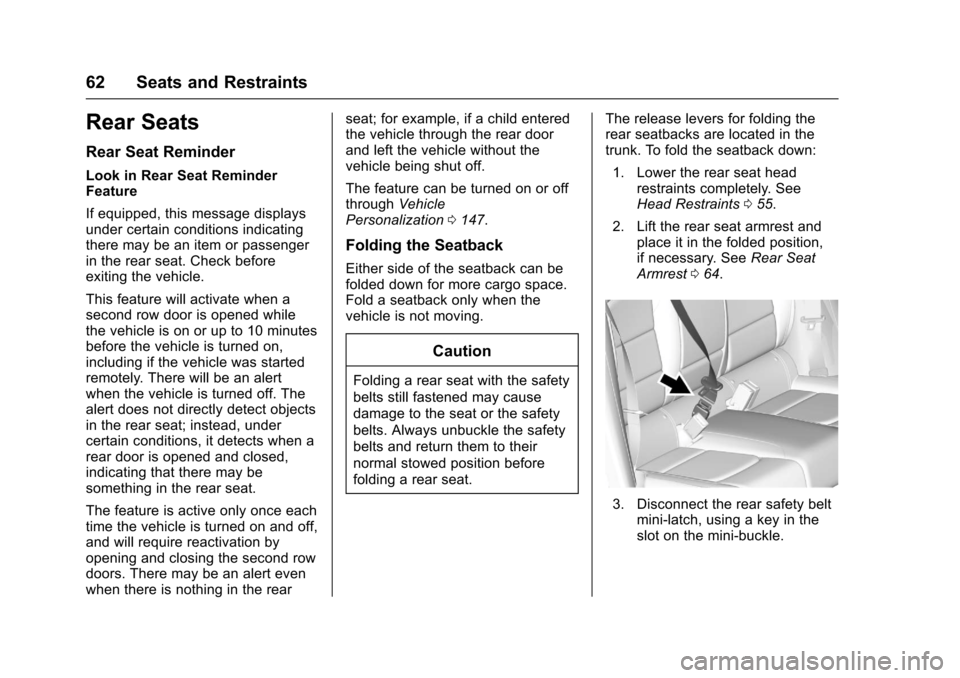
The release levers for folding therear seatbacks are located in thetrunk. To fold the seatback down:
1. Lower the rear seat headrestraints completely. SeeHead Restraints055.
2. Lift the rear seat armrest andplace it in the folded position,if necessary. SeeRear SeatArmrest064.
3. Disconnect the rear safety beltmini-latch, using a key in theslot on the mini-buckle.
Page 105 of 419
Chevrolet Malibu Owner Manual (GMNA-Localizing-U.S./Canada/Mexico-10122664) - 2017 - crc - 5/23/16
104 Instruments and Controls
Lamp Messages . . . . . . . . . . . . . . 142Object Detection SystemMessages . . . . . . . . . . . . . . . . . . . 142Propulsion PowerMessages . . . . . . . . . . . . . . . . . . . 144Ride Control SystemMessages . . . . . . . . . . . . . . . . . . . 145Airbag System Messages . . . . 145Security Messages . . . . . . . . . . . 145Service Vehicle Messages . . . . 145Steering SystemMessages . . . . . . . . . . . . . . . . . . . 145Starting the VehicleMessages . . . . . . . . . . . . . . . . . . . 146Tire Messages . . . . . . . . . . . . . . . . 146Transmission Messages . . . . . . 146Vehicle ReminderMessages . . . . . . . . . . . . . . . . . . . 147Window Messages . . . . . . . . . . . 147
Vehicle Personalization
Vehicle Personalization . . . . . . . 147
Universal Remote System
Universal Remote System . . . . 159Universal Remote SystemProgramming . . . . . . . . . . . . . . . 159Universal Remote SystemOperation . . . . . . . . . . . . . . . . . . . 162
Controls
Steering Wheel
Adjustment
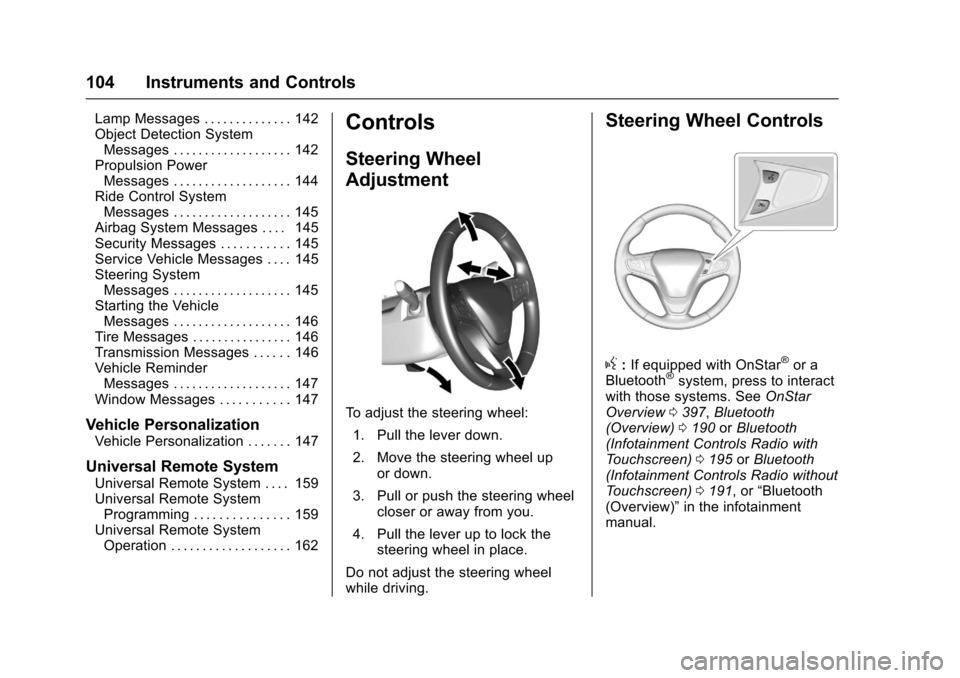
To a d j u s t t h e s t e e r i n g w h e e l :
1. Pull the lever down.
2. Move the steering wheel upor down.
3. Pull or push the steering wheelcloser or away from you.
4. Pull the lever up to lock thesteering wheel in place.
Do not adjust the steering wheelwhile driving.
Steering Wheel Controls
g:If equipped with OnStar®or aBluetooth®system, press to interactwith those systems. SeeOnStarOverview0397,Bluetooth(Overview)0190orBluetooth(Infotainment Controls Radio withTo u c h s c r e e n )0195orBluetooth(Infotainment Controls Radio withoutTo u c h s c r e e n )0191,or“Bluetooth(Overview)”in the infotainmentmanual.
Page 142 of 419
Chevrolet Malibu Owner Manual (GMNA-Localizing-U.S./Canada/Mexico-10122664) - 2017 - crc - 5/23/16
Instruments and Controls 141
Engine Oil Messages
CHANGE ENGINE OIL SOON
This message displays when theengine oil needs to be changed.When the engine oil is changed, besure to reset the Oil Life System.SeeEngine Oil Life System0291,Driver Information Center (DIC)(Base Level)0131orDriverInformation Center (DIC) (Uplevel)0134,Engine Oil0288,andMaintenance Schedule0369.
ENGINE OIL HOT, IDLE
ENGINE
This message displays when theengine oil temperature is too hot.Stop and allow the vehicle to idleuntil it cools down.
OIL PRESSURE LOW—STOP
ENGINE
This message displays if low oilpressure levels occur. Stop thevehicle as soon as safely possibleand do not operate it until the causeof the low oil pressure has been
corrected. Check the oil as soon aspossible and have the vehicleserviced by your dealer.
Engine Power Messages
ENGINE POWER IS REDUCED
This message displays when thevehicle's engine power is reduced.Reduced engine power can affectthe vehicle's ability to accelerate.If this message is on, but there is noreduction in performance, proceedto your destination. Theperformance may be reduced thenext time the vehicle is driven. Thevehicle may be driven at a reducedspeed while this message is on, butmaximum acceleration and speedmay be reduced. Anytime thismessage stays on, or displaysrepeatedly, the vehicle should betaken to your dealer for service assoon as possible.
Fuel System Messages
FUEL LEVEL LOW
This message displays when thevehicle is low on fuel. Refuel assoon as possible.
TIGHTEN GAS CAP
This message displays when thefuel cap is not on tight. Tighten thefuel cap.
Key and Lock Messages
NO REMOTE KEY WAS
DETECTED PLACE KEY IN
TRANSMITTER POCKET THEN
START YOUR VEHICLE
This message displays when tryingto start the vehicle if an RKEtransmitter is not detected. Thetransmitter battery may be weak.See“Starting the Vehicle with a LowTransmitter Battery”underRemoteKeyless Entry (RKE) SystemOperation032.