2017 CHEVROLET MALIBU charging
[x] Cancel search: chargingPage 123 of 419
Chevrolet Malibu Owner Manual (GMNA-Localizing-U.S./Canada/Mexico-10122664) - 2017 - crc - 5/23/16
122 Instruments and Controls
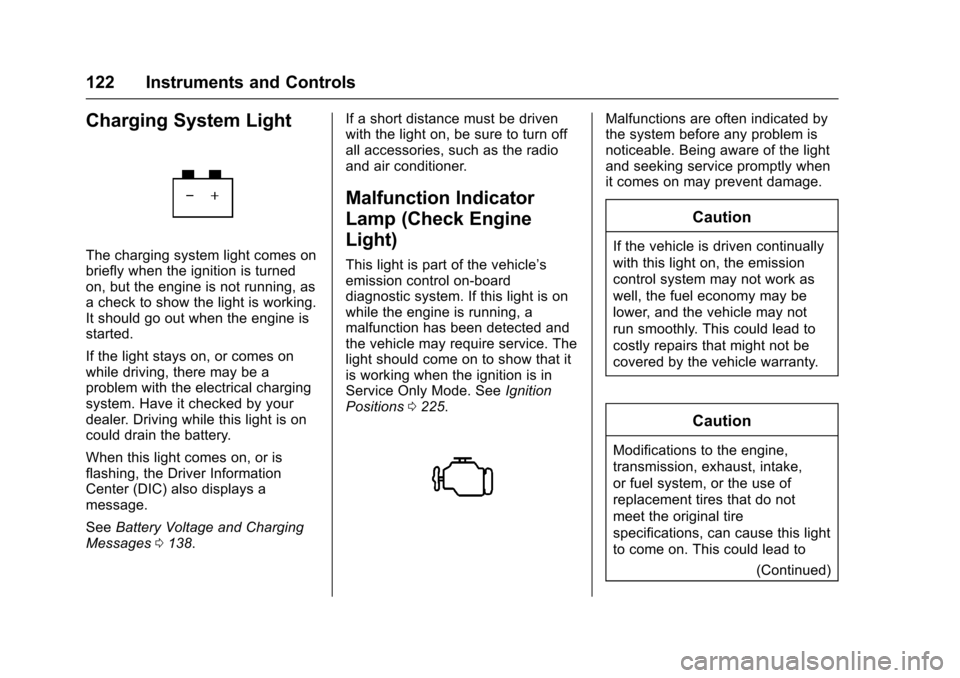
Charging System Light
The charging system light comes onbriefly when the ignition is turnedon, but the engine is not running, asachecktoshowthelightisworking.It should go out when the engine isstarted.
If the light stays on, or comes onwhile driving, there may be aproblem with the electrical chargingsystem. Have it checked by yourdealer. Driving while this light is oncould drain the battery.
When this light comes on, or isflashing, the Driver InformationCenter (DIC) also displays amessage.
SeeBattery Voltage and ChargingMessages0138.
If a short distance must be drivenwith the light on, be sure to turn offall accessories, such as the radioand air conditioner.
Malfunction Indicator
Lamp (Check Engine
Light)
This light is part of the vehicle’semission control on-boarddiagnostic system. If this light is onwhile the engine is running, amalfunction has been detected andthe vehicle may require service. Thelight should come on to show that itis working when the ignition is inService Only Mode. SeeIgnitionPositions0225.
Malfunctions are often indicated bythe system before any problem isnoticeable. Being aware of the lightand seeking service promptly whenit comes on may prevent damage.
Caution
If the vehicle is driven continually
with this light on, the emission
control system may not work as
well, the fuel economy may be
lower, and the vehicle may not
run smoothly. This could lead to
costly repairs that might not be
covered by the vehicle warranty.
Caution
Modifications to the engine,
transmission, exhaust, intake,
or fuel system, or the use of
replacement tires that do not
meet the original tire
specifications, can cause this light
to come on. This could lead to
(Continued)
Page 134 of 419
Chevrolet Malibu Owner Manual (GMNA-Localizing-U.S./Canada/Mexico-10122664) - 2017 - crc - 5/23/16
Instruments and Controls 133
Remaining Oil Life :Displays anestimate of the oil's remaining usefullife. If REMAINING OIL LIFE 99% isdisplayed, that means 99% of thecurrent oil life remains.
When the remaining oil life is low,the CHANGE ENGINE OIL SOONmessage will appear on the display.SeeEngine Oil Messages0141.The oil should be changed as soonas possible. SeeEngine Oil0288.In addition to the engine oil lifesystem monitoring the oil life,additional maintenance isrecommended in the MaintenanceSchedule. SeeMaintenanceSchedule0369.
The Oil Life display must be resetafter each oil change. Do not resetthe Oil Life display accidentally atany time other than when the oil hasjust been changed. It cannot bereset accurately until the next oilchange. To reset the engine oil lifesystem, seeEngine Oil LifeSystem0291.
Oil Pressure :Oil pressure isdisplayed in either kilopascal (kPa)or in pounds per square inch (psi).
Oil pressure can vary with enginespeed, outside temperature, and oilviscosity. On some models, the oilpump will vary engine oil pressureaccording to engine needs. Oilpressure may change quickly as theengine speed or load varies. This isnormal. If the oil pressure warninglight or Driver Information Center(DIC) message indicates oilpressure outside the normaloperating range, check the vehicle'soil as soon as possible. SeeEngineOil Messages0141.
Tire Pressure :Displays a vehiclewith the approximate pressures ofall four tires. Tire pressure isdisplayed in either kilopascal (kPa)or in pounds per square inch (psi).SeeTire Pressure Monitor System0327andTire Pressure MonitorOperation0328.
Battery Voltage :Displays thecurrent battery voltage, if equipped.Battery voltage changes are normalwhile driving. SeeCharging SystemLight0122.Ifthereisaproblemwith the battery charging system,
the DIC will display a message. SeeBattery Voltage and ChargingMessages0138.
Coolant Temperature :Shows theengine coolant temperature in eitherdegrees Celsius (°C) or degreesFahrenheit (°F).
Speed Warning :This display isused to set the vehicle speed atwhich the speed warning chimesounds and the alert is displayed.The speed can be set by pressingVwhile the speed warning displayis showing.
Units :Movewxto change
between Metric or US when the Unit
display is active. PressVto confirm
the setting. This will change thedisplays on the DIC to the type ofmeasurements you select.
ECO Drive Assist Menu (ECO)
Items
Usewxto scroll through the
menu items. Not all items areavailable on every vehicle. Thefollowing is a list of all possiblemenu items:
Page 138 of 419
Chevrolet Malibu Owner Manual (GMNA-Localizing-U.S./Canada/Mexico-10122664) - 2017 - crc - 5/23/16
Instruments and Controls 137
Following Distance Indicator :When Adaptive Cruise Control(ACC) is not engaged, the currentfollow time to the vehicle ahead isdisplayed as a time value on thispage. When ACC has beenengaged, the display switches to thegap setting page. This page showsthe current gap setting along withthe vehicle ahead indicator.
Battery Voltage :Displays thecurrent battery voltage, if equipped.Battery voltage changes are normalwhile driving. SeeCharging SystemLight0122.Ifthereisaproblemwith the battery charging system,the DIC will display a message. SeeBattery Voltage and ChargingMessages0138.
Coolant Temperature :Shows theengine coolant temperature in eitherdegrees Celsius (°C) or degreesFahrenheit (°F).
Oil Pressure :Oil pressure isdisplayed in either kilopascal (kPa)or in pounds per square inch (psi).
Oil pressure can vary with enginespeed, outside temperature, and oilviscosity. On some models, the oil
pump will vary engine oil pressureaccording to engine needs. Oilpressure may change quickly as theengine speed or load varies. This isnormal. If the oil pressure warninglight or Driver Information Center(DIC) message indicates oilpressure outside the normaloperating range, check the vehicle'soil as soon as possible. SeeEngineOil Messages0141.
Drive Cycle Info (Hybrid) :Thisscreen displays the distancetraveled and average fuel economyfor the current trip. The screen willalso be shown when the vehicle isturned off displaying the previoustrip’sinformation.
Efficiency Gauge (Hybrid) :Thisgauge is a guide to driving in anefficient manner by keeping theindicator in the center of the gauge.
.Accel: If the indicator moves tothe right of the gauge,acceleration is too aggressive tooptimize efficiency.
.Brake: If the indicator moves tothe left side of the gauge,braking is too aggressive tooptimize efficiency.
To t a l P o w e r D i s p l a y ( H y b r i d ) :Provides a numeric display of thetotal power being used to propel orstop the vehicle. The display showsthe power being provided by thebattery or charging the battery aswell as the power provided by theengine.
EV Operation (Hybrid) :The barmoves from left to right as the driverrequests more power from thepropulsion system. While in EVmode, maintaining the bar in thegreen zone will allow the driver tomaximize EV operation.
Blank Page :Shows noinformation.
Page 139 of 419
Chevrolet Malibu Owner Manual (GMNA-Localizing-U.S./Canada/Mexico-10122664) - 2017 - crc - 5/23/16
138 Instruments and Controls
Vehicle Messages
Messages displayed on the DICindicate the status of the vehicle orsome action that may be needed tocorrect a condition. Multiplemessages may appear one afteranother.
The messages that do not requireimmediate action can beacknowledged and cleared by
pressingV.
The messages that requireimmediate action cannot be cleareduntil that action is performed.
All messages should be takenseriously; clearing the messagedoes not correct the problem.
The following are the possiblemessages and some informationabout them.
Battery Voltage and
Charging Messages
BATTERY SAVER ACTIVE
(12-Volt Battery)
This message displays when thevehicle has detected that the batteryvoltage is dropping beyond areasonable point. The battery saversystem starts reducing features ofthe vehicle that may be noticed. Atthe point that features are disabled,this message displays. Turn offunnecessary accessories to allowthe battery to recharge.
LOW BATTERY (12-Volt
Battery)
This message is displayed when thebattery voltage is low. SeeBattery -North America0301.
SERVICE BATTERY
CHARGING SYSTEM
This message is displayed whenthere is a fault in the batterycharging system. Take the vehicle toyour dealer for service.
Brake System Messages
BRAKE FLUID LOW
This message is displayed when thebrake fluid level is low. SeeBrakeFluid0300.
SERVICE BRAKE ASSIST
This message may be displayedwhen there is a problem with thebrake boost assist system. Whenthis message is displayed, the brakeboost assist motor might be heardoperating and you might noticepulsation in the brake pedal. This isnormal under these conditions. Takethe vehicle to your dealer forservice.
SERVICE PARKING BRAKE
This message is displayed whenthere is a problem with the ElectricParking Brake. SeeElectric ParkingBrake0238.Takethevehicletoyour dealer.
Page 149 of 419
Chevrolet Malibu Owner Manual (GMNA-Localizing-U.S./Canada/Mexico-10122664) - 2017 - crc - 5/23/16
148 Instruments and Controls
Entering the PersonalizationMenus
Select Settings from the home page.
The following menus may beavailable:
.Phone Connection (MTP Only)
.Time and Date
.To n e S e t t i n g s
.Auto Volume Control
.Maximum Startup Volume
.Vehicle Settings
Phone Connection (MTP Only)
Select and the following maydisplay:
.Charging Only
.Scan Music Folder Only
.Scan All Folders
Charging Only
This feature will charge a MediaTransfer Protocol (MTP) devicewhen connected to the USB port.Bluetooth®audio will beunavailable.
Turn MENU to highlight, then pressto select.
Scan Music Folder Only
This feature will scan and indexmusic folders on an MTP devicewhen connected to the USB port.
Turn MENU to highlight, then pressto select.
Scan All Folders
This feature will scan and index allfolders on an MTP device whenconnected to the USB port.
Turn MENU to highlight, then pressto select.
Time and Date
Select Time and Date to adjust theclock. SeeClock0107.
Tone Settings
Select to set the radio tone. See“To n e S e t t i n g s”under“RadioControls without Touchscreen”inOperation0176.
Auto Volume Control
This feature automatically adjuststhe radio volume based on thespeed of the vehicle.
Select the desired value.
Maximum Startup Volume
When the vehicle is started and theradio volume is greater than this setlevel, the volume is adjusted to thislevel.
Select the desired value.
Vehicle Settings
Select and the following maydisplay:
.Climate and Air Quality
.Comfort and Convenience
.Languages
.Lighting
.Power Door Locks
.Remote Lock, Unlock, Start
.Return to Factory Settings
.Software Information
.Va l e t M o d e
Page 170 of 419
Chevrolet Malibu Owner Manual (GMNA-Localizing-U.S./Canada/Mexico-10122664) - 2017 - crc - 5/23/16
Lighting 169
Lighting Features
Entry Lighting
Some exterior lamps and most ofthe interior lamps turn on briefly atnight or in areas with limited lightingwhen the Remote Keyless Entry
(RKE) transmitterKbutton is
pressed. SeeRemote Keyless Entry(RKE) System Operation032.Afterabout 30 seconds the exterior lampsturn off, then the dome lamps andremaining interior lamps dim to off.Entry lighting can be disabledmanually by changing the ignitionout of the OFF position, or by
pressing the RKE transmitterQ
button.
This feature can be changed. SeeVehicle Personalization0147.
Exit Lighting
Some exterior lamps and interiorlights come on at night, or in areaswith limited lighting, when the driverdoor is opened after the ignition isturned off. The dome lamp comeson after the ignition is changed to
the OFF position. The exteriorlamps and dome lamp remain on forasetamountoftime,thenautomatically turn off.
The exterior lamps turn offimmediately by turning the exteriorlamp control off.
This feature can be changed. SeeVehicle Personalization0147.
Battery Load
Management
The vehicle has Electric PowerManagement (EPM), whichestimates the battery's temperatureand state of charge. It then adjuststhe voltage for best performanceand extended life of the battery.
When the battery's state of chargeis low, the voltage is raised slightlyto quickly bring the charge back up.When the state of charge is high,the voltage is lowered slightly toprevent overcharging. If the vehiclehas a voltage display on the DriverInformation Center (DIC), you may
see the voltage move up or down.This is normal. If there is a problem,an alert will be displayed.
The battery can be discharged atidle if the electrical loads are veryhigh. This is true for all vehicles.This is because the generator(alternator) may not be spinning fastenough at idle to produce all thepower that is needed for very highelectrical loads.
Ahighelectricalloadoccurswhenseveral of the following are on, suchas: headlamps, high beams, foglamps, rear window defogger,climate control fan at high speed,heated seats, engine cooling fans,trailer loads, and loads plugged intoaccessory power outlets.
EPM works to prevent excessivedischarge of the battery. It does thisby balancing the generator's outputand the vehicle's electrical needs.It can increase engine idle speed togenerate more power, wheneverneeded. It can temporarily reducethe power demands of someaccessories.
Page 171 of 419
Chevrolet Malibu Owner Manual (GMNA-Localizing-U.S./Canada/Mexico-10122664) - 2017 - crc - 5/23/16
170 Lighting
Normally, these actions occur insteps or levels, without beingnoticeable. In rare cases at thehighest levels of corrective action,this action may be noticeable to thedriver. If so, a DIC message mightbe displayed and it is recommendedthat the driver reduce the electricalloads as much as possible. SeeBattery Voltage and ChargingMessages0138.
Battery Power Protection
The battery saver feature isdesigned to protect the vehicle'sbattery.
If some interior lamps are left onand the ignition is turned off, thebattery rundown protection systemautomatically turns the lamp off aftersome time.
Exterior Lighting Battery
Saver
The exterior lamps turn off about10 minutes after the ignition isturned off, if the parking lamps orheadlamps have been manually lefton. This protects against draining
the battery. To restart the 10-minutetimer, turn the exterior lamp controlto the off position and then back tothe parking lamp or headlampposition.
To k e e p t h e l a m p s o n f o r m o r e t h a n10 minutes, the ignition must be inthe ACC/ACCESSORY or ON/RUNposition.
Page 184 of 419
Chevrolet Malibu Owner Manual (GMNA-Localizing-U.S./Canada/Mexico-10122664) - 2017 - crc - 5/23/16
Infotainment System 183
interfere with radio reception. Whenthis happens, try reducing the trebleon the radio.
SiriusXM Satellite Radio
Service
If equipped, SiriusXM SatelliteRadio Service provides digital radioreception. Tall buildings or hills caninterfere with satellite radio signals,causing the sound to fade in andout. In addition, traveling or standingunder heavy foliage, bridges,garages, or tunnels may cause lossof the SiriusXM signal for a periodof time.
Cell Phone Usage
Cell phone usage, such as makingor receiving phone calls, charging,or just having the phone on maycause static interference with theradio. Unplug the phone or turn it offif this happens.
Backglass Antenna
The AM-FM antenna is integratedwith the rear window defogger,located in the rear window. Makesure that the inside surface of the
rear window is not scratched andthat the lines on the glass are notdamaged. If the inside surface isdamaged, it could interfere withradio reception. For proper radioreception, the antenna connectorneeds to be properly attached to thepost on the glass.
If a cellular telephone antennaneeds to be attached to the glass,make sure that the grid lines for theAM-FM antenna are not damaged.There is enough space between thegrid lines to attach a cellulartelephone antenna withoutinterfering with radio reception.
Caution
Using a razor blade or sharp
object to clear the inside rear
window can damage the rear
window antenna and/or the rear
window defogger. Repairs would
not be covered by the vehicle
warranty. Do not clear the inside
rear window with sharp objects.
Caution
Do not apply aftermarket glass
tinting with metallic film. The
metallic film in some tinting
materials will interfere with or
distort the incoming radio
reception. Any damage caused to
the backglass antenna due to
metallic tinting materials will not
be covered by the vehicle
warranty.
Multi-Band Antenna
The multi-band antenna is on theroof of the vehicle. The antenna isused for OnStar, the SiriusXMSatellite Radio Service System, andGPS (Global Positioning System),if the vehicle has these features.Keep the antenna clear ofobstructions for clear reception.
If the vehicle has a sunroof, and it isopen, reception can also beaffected.