2017 CHEVROLET EXPRESS CARGO VAN battery
[x] Cancel search: batteryPage 103 of 346

Chevrolet Express Owner Manual (GMNA-Localizing-U.S./Canada/Mexico-9967827) - 2017 - crc - 5/2/16
102 Instruments and Controls
Center (DIC) can also appear. SeeBattery Voltage and ChargingMessages011 2for moreinformation. This light could indicatethat there are problems with agenerator drive belt, or that there isan electrical problem. Have itchecked right away. If the vehiclemust be driven a short distance withthe light on, turn off accessories,such as the radio and airconditioner.
Malfunction Indicator
Lamp (Check Engine
Light)
This light is part of the vehicle’semission control on-boarddiagnostic system. If this light is onwhile the engine is running, amalfunction has been detected andthe vehicle may require service. Thelight should come on to show that itis working when the ignition is inON/RUN and the engine is notrunning. SeeIgnitionPositions0176.
Malfunctions are often indicated bythe system before any problem isnoticeable. Being aware of the lightand seeking service promptly whenit comes on may prevent damage.
Caution
If the vehicle is driven continually
with this light on, the emission
control system may not work as
well, the fuel economy may be
lower, and the vehicle may not
run smoothly. This could lead to
costly repairs that might not be
covered by the vehicle warranty.
Caution
Modifications to the engine,
transmission, exhaust, intake,
or fuel system, or the use of
replacement tires that do not
meet the original tire
specifications, can cause this light
to come on. This could lead to
costly repairs not covered by the
vehicle warranty. This could also
affect the vehicle’sabilitytopass
an Emissions Inspection/
Maintenance test. See
Accessories and
Modifications0216.
If the light is flashing :Amalfunction has been detected thatcould damage the emission controlsystem and increase vehicleemissions. Diagnosis and servicemay be required.
To h e l p p r e v e n t d a m a g e , r e d u c evehicle speed and avoid hardaccelerations and uphill grades.
Page 104 of 346

Chevrolet Express Owner Manual (GMNA-Localizing-U.S./Canada/Mexico-9967827) - 2017 - crc - 5/2/16
Instruments and Controls 103
If towing a trailer, reduce theamount of cargo being hauled assoon as possible.
If the light continues to flash, find asafe place to park. Turn the vehicleoff and wait at least 10 secondsbefore restarting the engine. If thelight is still flashing, follow theprevious guidelines and see yourdealer for service as soon aspossible.
If the light is on steady :Amalfunction has been detected.Diagnosis and service may berequired.
Check the following:
.Alooseormissingfuelcapmaycause the light to come on. SeeFilling the Tank0200.Afewdriving trips with the capproperly installed may turn thelight off.
.Poor fuel quality can causeinefficient engine operation andpoor driveability, which may goaway once the engine is warmedup. If this occurs, change thefuel brand. It may require at
least one full tank of the properfuel to turn the light off. SeeFuel0198.
If the light remains on, see yourdealer.
Emissions Inspection and
Maintenance Programs
If the vehicle requires an EmissionsInspection/Maintenance test, thetest equipment will likely connect tothe vehicle's Data LinkConnector (DLC).
The DLC is under the instrumentpanel to the left of the steeringwheel. Connecting devices that arenot used to perform an EmissionsInspection/Maintenance test or toservice the vehicle may affectvehicle operation. SeeAdd-OnElectrical Equipment0212.Seeyour dealer if assistance is needed.
The vehicle may not passinspection if:
.The light is on when the engineis running.
.The light does not come onwhen the ignition is in ON/RUNwhile the engine is off.
.Critical emission control systemshave not been completelydiagnosed. If this happens, thevehicle would not be ready forinspection and might requireseveral days of routine drivingbefore the system is ready forinspection. This can happen ifthe 12-volt battery has recentlybeen replaced or run down, or ifthe vehicle has been recentlyserviced.
See your dealer if the vehicle willnot pass or cannot be made readyfor the test.
Page 113 of 346
Chevrolet Express Owner Manual (GMNA-Localizing-U.S./Canada/Mexico-9967827) - 2017 - crc - 5/2/16
112 Instruments and Controls
sensor, the system must re-learn thetire positions. To re-learn the tirepositions, seeTire Pressure MonitorSystem0261.SeeTire Inspection0265,Tire Rotation0265andTireMessages011 8.
Change Compass Zone
The vehicle may have this feature.To c h a n g e t h e c o m p a s s z o n ethrough the DIC, seeCompass090.
Calibrate Compass
The vehicle may have this feature.The compass can be manuallycalibrated. To calibrate the compassthrough the DIC, seeCompass090.
Blank Display
This display shows no information.
Vehicle Messages
Messages displayed on the DICindicate the status of the vehicle orsome action may be needed tocorrect a condition. Multiplemessages may appear one afteranother.
The messages that do not requireimmediate action can beacknowledged and cleared by
pressingV(Set/Reset).
The messages that requireimmediate action cannot be cleareduntil that action is performed.
All messages should be takenseriously and clearing the messagedoes not correct the problem.
The following are the possiblemessages and some informationabout them.
If the vehicle has a diesel engine,see the Duramax dieselsupplement.
Battery Voltage and
Charging Messages
SERVICE BATTERY
CHARGING SYSTEM
On some vehicles, this messagedisplays if there is a problem withthe battery charging system. Undercertain conditions, the chargingsystem light may also turn on in theinstrument cluster. SeeChargingSystem Light0101.Drivingwiththisproblem could drain the battery.Turn off all unnecessaryaccessories. Have the electricalsystem checked as soon aspossible. See your dealer.
Brake System Messages
SERVICE BRAKE SYSTEM
This message displays along withthe brake system warning light ifthere is a problem with the brakesystem. SeeBrake System WarningLight0104.Ifthismessageappears, stop as soon as possibleand turn off the vehicle. Restart thevehicle and check for the message
Page 116 of 346
Chevrolet Express Owner Manual (GMNA-Localizing-U.S./Canada/Mexico-9967827) - 2017 - crc - 5/2/16
Instruments and Controls 115
stays on, the vehicle should betaken to your dealer for service assoon as possible.
Fuel System Messages
FUEL LEVEL LOW
This message displays and a chimesounds if the fuel level is low. Refuelas soon as possible. SeeFuelGauge096andFuel0198formore information.
TIGHTEN GAS CAP
This message may display alongwith the check engine light on theinstrument cluster if the fuel cap isnot tightened properly. SeeMalfunction Indicator Lamp (CheckEngine Light)0102.Reinstallthefuel cap fully. SeeFilling the Tank0200.Thediagnosticsystemcandetermine if the fuel cap has beenleft off or improperly installed.Alooseormissingfuelcapallowsfuel to evaporate into theatmosphere. A few driving trips withthe cap properly installed shouldturn this light and message off.
Key and Lock Messages
REPLACE BATTERY IN
REMOTE KEY
This message displays if a RemoteKeyless Entry (RKE) transmitterbattery is low. The battery needs tobe replaced in the transmitter. See“Battery Replacement”underRemote Keyless Entry (RKE)System Operation025.
Lamp Messages
AUTOMATIC LIGHT
CONTROL OFF
This message displays when theautomatic headlamps are turned off.SeeExterior Lamp Controls0125.
AUTOMATIC LIGHT
CONTROL ON
This message displays when theautomatic headlamps are turned on.SeeExterior Lamp Controls0125.
TURN SIGNAL ON
This message displays and a chimesounds if a turn signal is left on for1.2 km (0.75 mi). Move the turnsignal lever to the off position.
Object Detection System
Messages
PARK ASST BLOCKED SEE
OWNERS MANUAL
This message displays if there issomething interfering with the RearParking Assist (RPA) system. SeeParking Assist0197.
PARK ASSIST OFF
After the vehicle has been started,this message displays to remind thedriver that the Rear Parking Assist(RPA) system has been turned off.Press the set/reset button or the tripodometer reset stem toacknowledge this message andclear it from the DIC display. To turnthe RPA system back on, seeParking Assist0197.
Page 121 of 346
Chevrolet Express Owner Manual (GMNA-Localizing-U.S./Canada/Mexico-9967827) - 2017 - crc - 5/2/16
120 Instruments and Controls
Entering the Feature
Settings Menu
1. Turn the ignition on and placethe vehicle in P (Park).
To a v o i d e x c e s s i v e d r a i n o nthe battery, it is recommendedthat the headlamps areturned off.
2. PressUto enter the feature
settings menu.
If the menu is not available,FEATURE SETTINGSAVA I L A B L E I N PA R K w i l ldisplay. Before entering themenu, make sure the vehicle isin P (Park).
Feature Settings Menu Items
The following are customizationfeatures that allow you to programsettings to the vehicle:
DISPLAY IN ENGLISH
This feature will only display if alanguage other than English hasbeen set. This feature allows you tochange the language in which theDIC messages appear to English.
PressUuntil the PRESSVTO
DISPLAY IN ENGLISH screenappears on the DIC display. Pressthe set/reset button once to displayall DIC messages in English.
LANGUAGE
This feature allows you to select thelanguage in which the DICmessages will appear.
PressUuntil the LANGUAGE
screen appears on the DIC display.
PressVonce to access the settings
for this feature. Then pressUto
scroll through the following settings:
ENGLISH (default) :All messageswill appear in English.
FRANCAIS :All messages willappear in French.
ESPANOL :All messages willappear in Spanish.
ARABIC :All messages will appearin Arabic.
NO CHANGE :No change will bemade to this feature. The currentsetting will remain.
To s e l e c t a s e t t i n g , p r e s sVwhile
the desired setting is displayed onthe DIC. A beep will sound once alanguage has been selected.
AUTO DOOR LOCK
This feature allows you to selectwhen the doors willautomatically lock.
PressUuntil AUTO DOOR LOCK
appears on the DIC display.
PressVonce to access the settings
for this feature. Then pressUto
scroll through the following settings:
SHIFT OUT OF PARK (default) :The doors will automatically lockwhen the vehicle is shifted out ofP(Park).
AT V E H I C L E S P E E D :The doorswill automatically lock when thevehicle speed is above 13 km/h(8 mph) for three seconds.
NO CHANGE :No change will bemade to this feature. The currentsetting will remain.
Page 126 of 346
Chevrolet Express Owner Manual (GMNA-Localizing-U.S./Canada/Mexico-9967827) - 2017 - crc - 5/2/16
Lighting 125
Lighting
Exterior Lighting
Exterior Lamp Controls . . . . . . . 125Exterior Lamps OffReminder . . . . . . . . . . . . . . . . . . . 126Headlamp High/Low-BeamChanger . . . . . . . . . . . . . . . . . . . . 126Flash-to-Pass . . . . . . . . . . . . . . . . 126Daytime RunningLamps (DRL) . . . . . . . . . . . . . . . 126Automatic HeadlampSystem . . . . . . . . . . . . . . . . . . . . . . 127Hazard Warning Flashers . . . . . 128Turn and Lane-ChangeSignals . . . . . . . . . . . . . . . . . . . . . . 128
Interior Lighting
Instrument Panel IlluminationControl . . . . . . . . . . . . . . . . . . . . . . 129Dome Lamps . . . . . . . . . . . . . . . . . 129Reading Lamps . . . . . . . . . . . . . . 130
Lighting Features
Entry/Exit Lighting . . . . . . . . . . . . 130Battery Load Management . . . 130Battery Power Protection . . . . . 131
Exterior Lighting
Exterior Lamp Controls
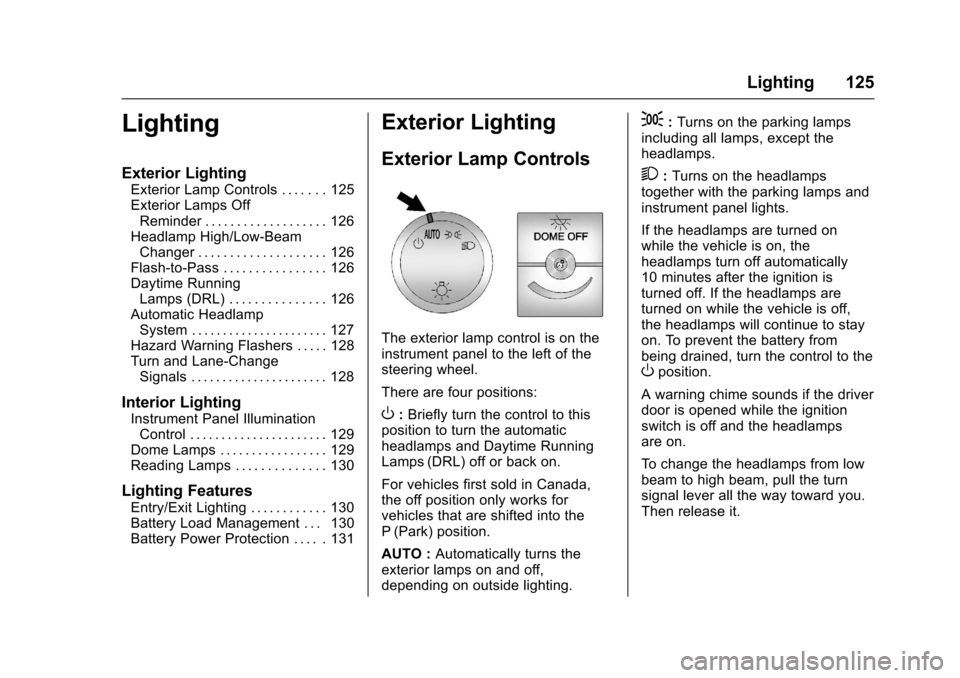
The exterior lamp control is on theinstrument panel to the left of thesteering wheel.
There are four positions:
O:Briefly turn the control to thisposition to turn the automaticheadlamps and Daytime RunningLamps (DRL) off or back on.
For vehicles first sold in Canada,the off position only works forvehicles that are shifted into theP(Park) position.
AUTO :Automatically turns theexterior lamps on and off,depending on outside lighting.
;:Turns on the parking lampsincluding all lamps, except theheadlamps.
2:Turns on the headlampstogether with the parking lamps andinstrument panel lights.
If the headlamps are turned onwhile the vehicle is on, theheadlamps turn off automatically10 minutes after the ignition isturned off. If the headlamps areturned on while the vehicle is off,the headlamps will continue to stayon. To prevent the battery frombeing drained, turn the control to theOposition.
Awarningchimesoundsifthedriverdoor is opened while the ignitionswitch is off and the headlampsare on.
To c h a n g e t h e h e a d l a m p s f r o m l o wbeam to high beam, pull the turnsignal lever all the way toward you.Then release it.
Page 131 of 346
Chevrolet Express Owner Manual (GMNA-Localizing-U.S./Canada/Mexico-9967827) - 2017 - crc - 5/2/16
130 Lighting
Reading Lamps
If equipped with reading lamps,press the button next to each lampto turn it on or off.
The vehicle may also have readinglamps in other locations. The lampscannot be adjusted.
Lighting Features
Entry/Exit Lighting
The vehicle has an illuminatedentry/exit feature.
The dome lamps come on if theE
DOME OFF button is in theextended position, when a door isopened, or the key is removed fromthe ignition.
Battery Load
Management
The vehicle may have ElectricPower Management (EPM) thatestimates the battery's temperatureand state of charge. It then adjuststhe voltage for best performanceand extended life of the battery.
When the battery's state of chargeis low, the voltage is raised slightlyto quickly bring the charge back up.When the state of charge is high,the voltage is lowered slightly toprevent overcharging. If the vehiclehas a voltmeter gauge or a voltagedisplay on the Driver Information
Center (DIC), you may see thevoltage move up or down. This isnormal. If there is a problem, analert will be displayed.
The battery can be discharged atidle if the electrical loads are veryhigh. This is true for all vehicles.This is because the generator(alternator) may not be spinning fastenough at idle to produce all thepower that is needed for very highelectrical loads.
Ahighelectricalloadoccurswhenseveral of the following are on, suchas: headlamps, high beams, foglamps, rear window defogger,climate control fan at high speed,heated seats, engine cooling fans,trailer loads, and loads plugged intoaccessory power outlets.
EPM works to prevent excessivedischarge of the battery. It does thisby balancing the generator's outputand the vehicle's electrical needs.It can increase engine idle speed togenerate more power, wheneverneeded. It can temporarily reducethe power demands of someaccessories.
Page 132 of 346
Chevrolet Express Owner Manual (GMNA-Localizing-U.S./Canada/Mexico-9967827) - 2017 - crc - 5/2/16
Lighting 131
Normally, these actions occur insteps or levels, without beingnoticeable. In rare cases at thehighest levels of corrective action,this action may be noticeable to thedriver. If so, a Driver InformationCenter (DIC) message might bedisplayed, such as SERVICEBATTERY CHARGING SYSTEM.If this messages displays, it isrecommended that the driver reducethe electrical loads as much aspossible. SeeBattery Voltage andCharging Messages011 2.
Battery Power Protection
This feature shuts off the domelamps if they are left on for morethan 10 minutes when the ignition isin LOCK/OFF. This helps to preventthe battery from running down.