2017 CHEVROLET CRUZE power
[x] Cancel search: powerPage 60 of 405
Chevrolet Cruze Owner Manual (GMNA-Localizing-U.S./Canada/Mexico-
9803785) - 2017 - CRC - 4/13/16
Seats and Restraints 59
Seats and
Restraints
Head Restraints
Head Restraints . . . . . . . . . . . . . . . 60
Front Seats
Seat Adjustment . . . . . . . . . . . . . . . 61
Power Seat Adjustment . . . . . . . . 62
Reclining Seatbacks . . . . . . . . . . . 62
Heated Front Seats . . . . . . . . . . . . 64
Rear Seats
Rear Seats . . . . . . . . . . . . . . . . . . . . 65
Safety Belts
Safety Belts . . . . . . . . . . . . . . . . . . . . 67
How to Wear Safety BeltsProperly . . . . . . . . . . . . . . . . . . . . . . 68
Lap-Shoulder Belt . . . . . . . . . . . . . 69
Safety Belt Use During Pregnancy . . . . . . . . . . . . . . . . . . . . 71
Safety Belt Extender . . . . . . . . . . . 72
Safety System Check . . . . . . . . . . 72
Safety Belt Care . . . . . . . . . . . . . . . 72
Replacing Safety Belt System Parts after a Crash . . . . . . . . . . . 73
Airbag System
Airbag System . . . . . . . . . . . . . . . . . 73
Where Are the Airbags? . . . . . . . 75
When Should an AirbagInflate? . . . . . . . . . . . . . . . . . . . . . . . 76
What Makes an Airbag
Inflate? . . . . . . . . . . . . . . . . . . . . . . . 77
How Does an Airbag Restrain? . . . . . . . . . . . . . . . . . . . . . 78
What Will You See after an Airbag Inflates? . . . . . . . . . . . . . . 78
Passenger Sensing System . . . 79
Servicing the Airbag-Equipped Vehicle . . . . . . . . . . . . . . . . . . . . . . . 84
Adding Equipment to the Airbag-Equipped Vehicle . . . . . 84
Airbag System Check . . . . . . . . . . 85
Replacing Airbag System Parts after a Crash . . . . . . . . . . . . . . . . . 85
Child Restraints
Older Children . . . . . . . . . . . . . . . . . 86
Infants and Young Children . . . . 87
Child Restraint Systems . . . . . . . 90
Where to Put the Restraint . . . . . 91
Lower Anchors and Tethers forChildren (LATCH System) . . . . 92
Replacing LATCH System Parts After a Crash . . . . . . . . . . . . . . . . . 99 Securing Child Restraints (With
the Safety Belt in the
Rear Seat) . . . . . . . . . . . . . . . . . . . 99
Securing Child Restraints (With the Safety Belt in the
Front Seat) . . . . . . . . . . . . . . . . . . 101
Page 63 of 405
Chevrolet Cruze Owner Manual (GMNA-Localizing-U.S./Canada/Mexico-
9803785) - 2017 - CRC - 4/13/16
62 Seats and Restraints
Power Seat Adjustment
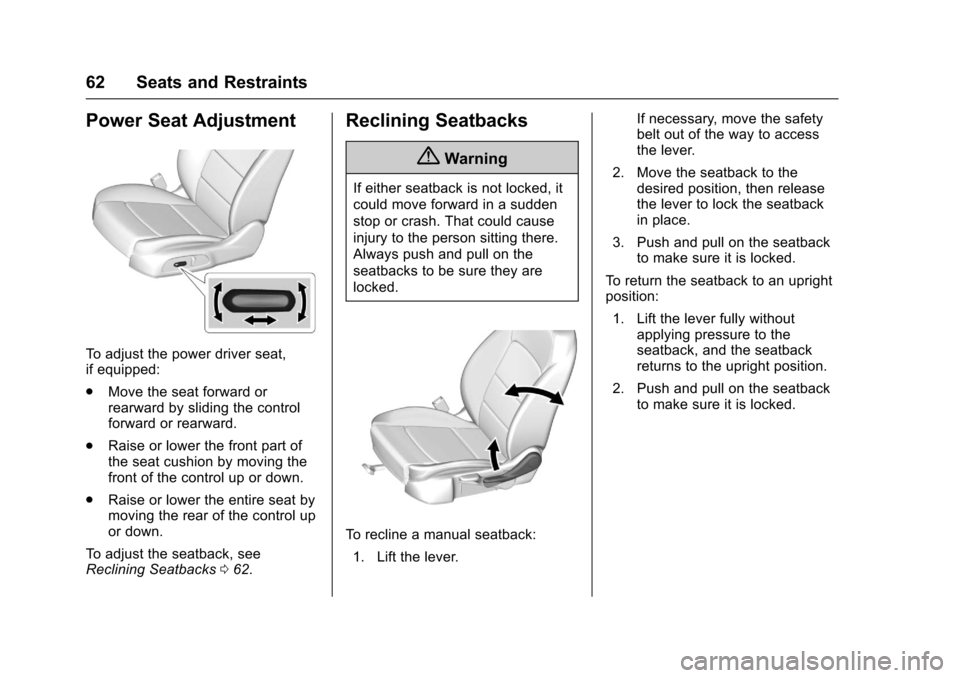
To adjust the power driver seat,
if equipped:
.Move the seat forward or
rearward by sliding the control
forward or rearward.
. Raise or lower the front part of
the seat cushion by moving the
front of the control up or down.
. Raise or lower the entire seat by
moving the rear of the control up
or down.
To adjust the seatback, see
Reclining Seatbacks 062.
Reclining Seatbacks
{Warning
If either seatback is not locked, it
could move forward in a sudden
stop or crash. That could cause
injury to the person sitting there.
Always push and pull on the
seatbacks to be sure they are
locked.
To recline a manual seatback:
1. Lift the lever. If necessary, move the safety
belt out of the way to access
the lever.
2. Move the seatback to the desired position, then release
the lever to lock the seatback
in place.
3. Push and pull on the seatback to make sure it is locked.
To return the seatback to an upright
position: 1. Lift the lever fully without applying pressure to the
seatback, and the seatback
returns to the upright position.
2. Push and pull on the seatback to make sure it is locked.
Page 64 of 405
Chevrolet Cruze Owner Manual (GMNA-Localizing-U.S./Canada/Mexico-
9803785) - 2017 - CRC - 4/13/16
Seats and Restraints 63
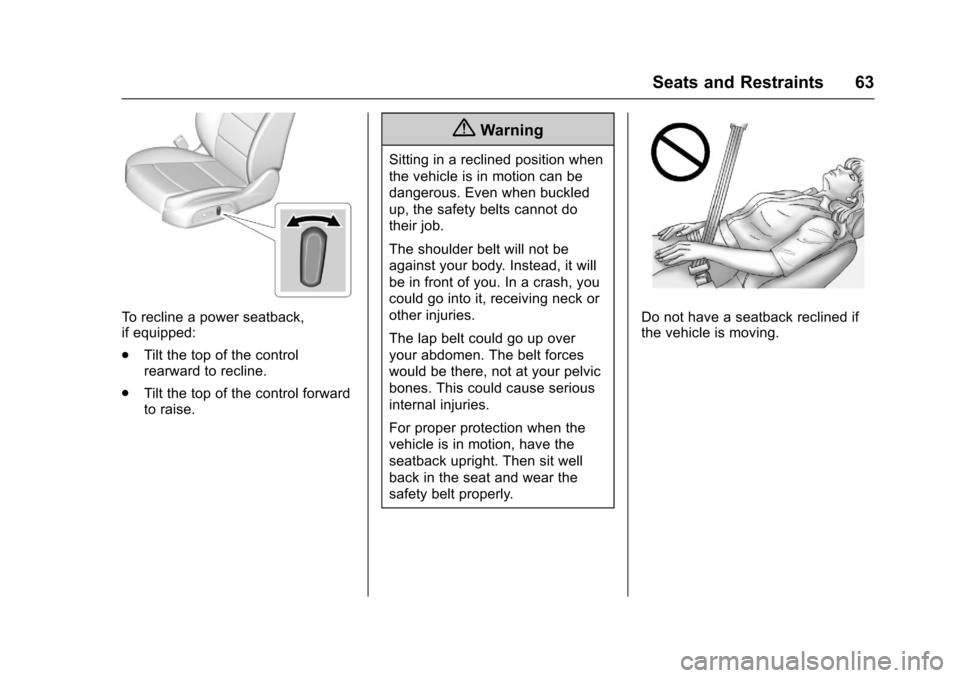
To recline a power seatback,
if equipped:
.Tilt the top of the control
rearward to recline.
. Tilt the top of the control forward
to raise.
{Warning
Sitting in a reclined position when
the vehicle is in motion can be
dangerous. Even when buckled
up, the safety belts cannot do
their job.
The shoulder belt will not be
against your body. Instead, it will
be in front of you. In a crash, you
could go into it, receiving neck or
other injuries.
The lap belt could go up over
your abdomen. The belt forces
would be there, not at your pelvic
bones. This could cause serious
internal injuries.
For proper protection when the
vehicle is in motion, have the
seatback upright. Then sit well
back in the seat and wear the
safety belt properly.
Do not have a seatback reclined if
the vehicle is moving.
Page 108 of 405
Chevrolet Cruze Owner Manual (GMNA-Localizing-U.S./Canada/Mexico-
9803785) - 2017 - CRC - 4/13/16
Instruments and Controls 107
Instruments and
Controls
Controls
Steering Wheel Adjustment . . . 108
Steering Wheel Controls . . . . . . 108
Heated Steering Wheel . . . . . . . 109
Horn . . . . . . . . . . . . . . . . . . . . . . . . . . 109
Windshield Wiper/Washer . . . . 109
Compass . . . . . . . . . . . . . . . . . . . . . 110
Clock . . . . . . . . . . . . . . . . . . . . . . . . . 111
Power Outlets . . . . . . . . . . . . . . . . 112
Wireless Charging . . . . . . . . . . . . 114
Warning Lights, Gauges, and
Indicators
Warning Lights, Gauges, andIndicators . . . . . . . . . . . . . . . . . . . 115
Instrument Cluster . . . . . . . . . . . . 116
Speedometer . . . . . . . . . . . . . . . . . 121
Odometer . . . . . . . . . . . . . . . . . . . . . 121
Trip Odometer . . . . . . . . . . . . . . . . 121
Tachometer . . . . . . . . . . . . . . . . . . . 121
Fuel Gauge . . . . . . . . . . . . . . . . . . . 122
Engine Coolant Temperature Gauge . . . . . . . . . . . . . . . . . . . . . . 123
Safety Belt Reminders . . . . . . . . 124
Airbag Readiness Light . . . . . . . 125 Passenger Airbag Status
Indicator . . . . . . . . . . . . . . . . . . . . 125
Charging System Light . . . . . . . 126
Malfunction Indicator Lamp . . . 126
Brake System Warning Light . . . . . . . . . . . . . . . . . . . . . . . . 128
Antilock Brake System (ABS) Warning Light . . . . . . . . . . . . . . . 129
Up-Shift Light . . . . . . . . . . . . . . . . . 129
Lane Keep Assist (LKA) Light . . . . . . . . . . . . . . . . . . . . . . . . 129
Vehicle Ahead Indicator . . . . . . 130
Traction Off Light . . . . . . . . . . . . . 130
StabiliTrak
®OFF Light . . . . . . . . 130
Traction Control System (TCS)/ StabiliTrak
®Light . . . . . . . . . . . 131
Wait-to-Start Light . . . . . . . . . . . . 131
Tire Pressure Light . . . . . . . . . . . 131
Engine Oil Pressure Light . . . . 132
Low Fuel Warning Light . . . . . . 132
Diesel Exhaust Fluid (DEF) Warning Light . . . . . . . . . . . . . . . 132
Security Light . . . . . . . . . . . . . . . . . 133
High-Beam On Light . . . . . . . . . . 133
Front Fog Lamp Light . . . . . . . . . 133
Lamps On Reminder . . . . . . . . . 133
Cruise Control Light . . . . . . . . . . 133
Door Ajar Light . . . . . . . . . . . . . . . 134
Information Displays
Driver Information Center (DIC) (Base Level) . . . . . . . . . . . . . . . . 134
Driver Information Center (DIC) (Uplevel) . . . . . . . . . . . . . . . . . . . . 137
Vehicle Messages
Vehicle Messages . . . . . . . . . . . . 140
Battery Voltage and ChargingMessages . . . . . . . . . . . . . . . . . . . 140
Brake System Messages . . . . . 140
Compass Messages . . . . . . . . . . 140
Cruise Control Messages . . . . . 141
Door Ajar Messages . . . . . . . . . . 141
Engine Cooling System Messages . . . . . . . . . . . . . . . . . . . 141
Engine Oil Messages . . . . . . . . . 142
Engine Power Messages . . . . . 142
Fuel System Messages . . . . . . . 142
Diesel Exhaust Fluid Messages . . . . . . . . . . . . . . . . . . . 142
Diesel Particulate Filter Messages . . . . . . . . . . . . . . . . . . . 143
Key and Lock Messages . . . . . 143
Lamp Messages . . . . . . . . . . . . . . 144
Object Detection System Messages . . . . . . . . . . . . . . . . . . . 144
Ride Control System Messages . . . . . . . . . . . . . . . . . . . 146
Airbag System Messages . . . . 146
Safety Belt Messages . . . . . . . . 146
Page 113 of 405
Chevrolet Cruze Owner Manual (GMNA-Localizing-U.S./Canada/Mexico-
9803785) - 2017 - CRC - 4/13/16
112 Instruments and Controls
If auto timing is set, the time
displayed on the clock may not
update immediately when driving
into a new time zone.
To set the clock display:1. Select SETTINGS from the Home Page, then select Time
and Date.
2. Select Clock Display.
3. Turn the MENU knob to Off or On.
4. Press the MENU knob to select.
Press
oBACK to go to the last
menu and save the changes.
Uplevel Radio Using
Touchscreen Controls
The infotainment system controls
are used to access the time and
date settings through the menu
system. See “Using the System”
under “Introduction” in the
infotainment manual. To set the time:
1. Touch SETTINGS from the Home Page, then touch Time
and Date.
2. Touch Set Time and touch
«
orªto increase or decrease
hours, minutes, and AM or PM.
Touch 12–24 Hr for 12 or
24 hour clock.
3. Touch
}to go back to the
previous menu.
Auto Set requires an OnStar
subscription.
If auto timing is set, the time
displayed on the clock may not
update immediately when driving
into a new time zone.
To set the date: 1. Touch SETTINGS from the Home Page, then touch Time
and Date.
2. Touch Set Date and touch
«
orªto increase or decrease
month, day, or year. 3. Touch
}to go back to the
previous menu.
To set the clock display: 1. Touch SETTINGS and touch Time and Date.
2. Touch Clock Display and touch OFF or ON to turn the clock
display off or on.
3. Touch
}to go back to the
previous menu.
The clock settings can also be
accessed by touching the time
display, then touching Set.
Power Outlets
Power Outlet 12-Volt Direct
Current
The accessory power outlet can be
used to plug in electrical equipment,
such as a cell phone or MP3 player.
There is an accessory power outlet
on the center floor console in front
of the shift lever. This outlet is
powered when the ignition is in the
ON/RUN or ACC/ACCESSORY
position, or until the driver door is
Page 114 of 405
Chevrolet Cruze Owner Manual (GMNA-Localizing-U.S./Canada/Mexico-
9803785) - 2017 - CRC - 4/13/16
Instruments and Controls 113
opened within 10 minutes of turning
off the vehicle. SeeRetained
Accessory Power (RAP) 0219.
Open the cover to access.
Caution
Leaving electrical equipment
plugged in for an extended period
of time while the vehicle is off will
drain the battery. Always unplug
electrical equipment when not in
use and do not plug in equipment
that exceeds the maximum
20 amp rating.
Certain electrical accessories may
not be compatible with the
accessory power outlet and could
overload vehicle or adapter fuses.
If a problem is experienced, see
your dealer.
When adding electrical equipment,
be sure to follow the installation
instructions included with the
equipment. See Add-On Electrical
Equipment 0262.
Caution
Hanging heavy equipment from
the power outlet can cause
damage not covered by the
vehicle warranty. The power
outlets are designed for
accessory power plugs only, such
as cell phone charge cords.
Power Outlet 110/120V Volt
Alternating Current
If equipped with this power outlet it
can be used to plug in electrical
equipment that uses a maximum
limit of 150 watts.
The power outlet is on the rear of
the center console.
An indicator light on the outlet turns
on to show it is in use. The light
comes on when the ignition is in
ON/RUN and equipment requiring
less than 150 watts is plugged into
the outlet, and no system fault is
detected.
The indicator light does not come on
if the ignition is in LOCK/OFF, if no
equipment is plugged into the outlet,
or if the equipment is plugged in but
not fully seated in the outlet.
If equipment is connected using
more than 150 watts or a system
fault is detected, the equipment may
Page 115 of 405

Chevrolet Cruze Owner Manual (GMNA-Localizing-U.S./Canada/Mexico-
9803785) - 2017 - CRC - 4/13/16
114 Instruments and Controls
operate briefly then turn off.
A protection circuit shuts off the
power supply and the indicator light
turns off. To reset the circuit, unplug
the item and plug it back in or turn
the Retained Accessory Power
(RAP) off and then back on. See
Retained Accessory Power (RAP)
0219. The power restarts when
equipment using 150 watts or less is
plugged into the outlet and a system
fault is not detected.
The power outlet is not designed for
the following, and may not work
properly if they are plugged in:
. Equipment with high initial peak
wattage, such as
compressor-driven refrigerators
and electric power tools.
. Other equipment requiring an
extremely stable power supply,
such as
microcomputer-controlled
electric blankets and touch
sensor lamps.
. Medical equipment.Wireless Charging
The vehicle may have a wireless
charging pocket in the center floor
console. The system wirelessly
charges one PMA or Qi compatible
mobile device.
To check for phone or other device
compatibility:
.In the U.S., see
my.chevrolet.com/learn.
. In Canada, see
gmtotalconnect.ca.
. Or, see your dealer for details.
{Warning
Wireless charging can affect the
operation of an implanted
pacemaker or other medical
devices. If you have one, it is
recommended to consult with
your doctor before using the
wireless charging system.
The vehicle must be in ON/RUN,
ACC/ACCESSORY, or Retained
Accessory Power (RAP). The wireless charging feature may not
correctly indicate charging when the
vehicle is in RAP. See
Retained
Accessory Power (RAP) 0219.
The operating temperature is −20 °C
(−4 °F) to 60 °C (140 °F) for the
charging system and 0 °C (32 °F) to
35 °C (95 °F) for the phone.
{Warning
Remove all metal objects from the
charging pocket before charging
your mobile device. Metal objects,
such as coins, keys, rings,
or paper clips, between the phone
and the charger will become very
hot. On the rare occasion that the
charging system does not detect
a metal object, and the object
gets wedged between the phone
and the charger, remove the
phone and allow the metallic
object to cool before removing it
from the charging pocket, to
prevent burns.
Page 143 of 405
Chevrolet Cruze Owner Manual (GMNA-Localizing-U.S./Canada/Mexico-
9803785) - 2017 - CRC - 4/13/16
142 Instruments and Controls
Engine Oil Messages
CHANGE ENGINE OIL SOON
This message displays when the
engine oil needs to be changed.
When you change the engine oil, be
sure to reset the Oil Life System.
SeeEngine Oil Life System 0273
and Driver Information Center (DIC)
(Uplevel) 0137 orDriver Information
Center (DIC) (Base Level) 0134 for
information on how to reset the
system. See Engine Oil0270 and
Maintenance Schedule 0352 for
more information.
OIL PRESSURE LOW —STOP
ENGINE
This message displays if low oil
pressure levels occur. Stop the
vehicle as soon as safely possible
and do not operate it until the cause
of the low oil pressure has been
corrected. Check the oil as soon as
possible and have the vehicle
serviced by your dealer.
Engine Power Messages
ENGINE POWER IS REDUCED
This message displays when the
vehicle's engine power is reduced.
Reduced engine power can affect
the vehicle's ability to accelerate.
If this message is on, but there is no
reduction in performance, proceed
to your destination. The
performance may be reduced the
next time the vehicle is driven. The
vehicle may be driven at a reduced
speed while this message is on, but
maximum acceleration and speed
may be reduced. Anytime this
message stays on, or displays
repeatedly, the vehicle should be
taken to your dealer for service as
soon as possible.
Fuel System Messages
FUEL LEVEL LOW
This message displays when the
vehicle is low on fuel. Refuel as
soon as possible.
TIGHTEN GAS CAP (Gas
Engine Only)
This message displays when the
fuel cap is not on tight on vehicles
with gasoline engines. Tighten the
fuel cap.
WATER IN FUEL —CONTACT
SERVICE
This message displays when water
level in the diesel fuel filter exceeds
a specified level. Residual water in
the diesel fuel filter must be drained.
Water in Fuel (Diesel) 0255.
Diesel Exhaust Fluid
Messages
For more information on these
messages, see “Exhaust Fluid Low”
or “Exhaust Fluid Quality Poor” in
Diesel Exhaust Fluid 0223.
EXHAUST FLUID RANGE:
XXXX KM (MI)
When the exhaust fluid is getting
low, the range will be displayed in
either kilometers or miles. It is
normal for the EXHAUST FLUID
RANGE to vary based on vehicle