2017 CHEVROLET BOLT EV instrument panel
[x] Cancel search: instrument panelPage 153 of 361
Chevrolet Bolt EV Owner Manual (GMNA-Localizing-U.S./Canada/Mexico-
10122739) - 2017 - CRC - 10/3/16
152 Lighting
Raise or lower the lever until the
arrow starts to flash to signal a lane
change. Hold it there until the lane
change is completed.
If the lever is briefly pressed and
released, the turn signal flashes
three times.
The turn and lane-change signal
can be turned off manually by
moving the lever back to its original
position.
If after signaling a turn or lane
change, the arrow flashes rapidly or
does not come on, a signal bulb
may be burned out.
Replace any burned out bulbs. If a
bulb is not burned out, check the
fuse. SeeUnderhood Compartment
Fuse Block 0264.Interior Lighting
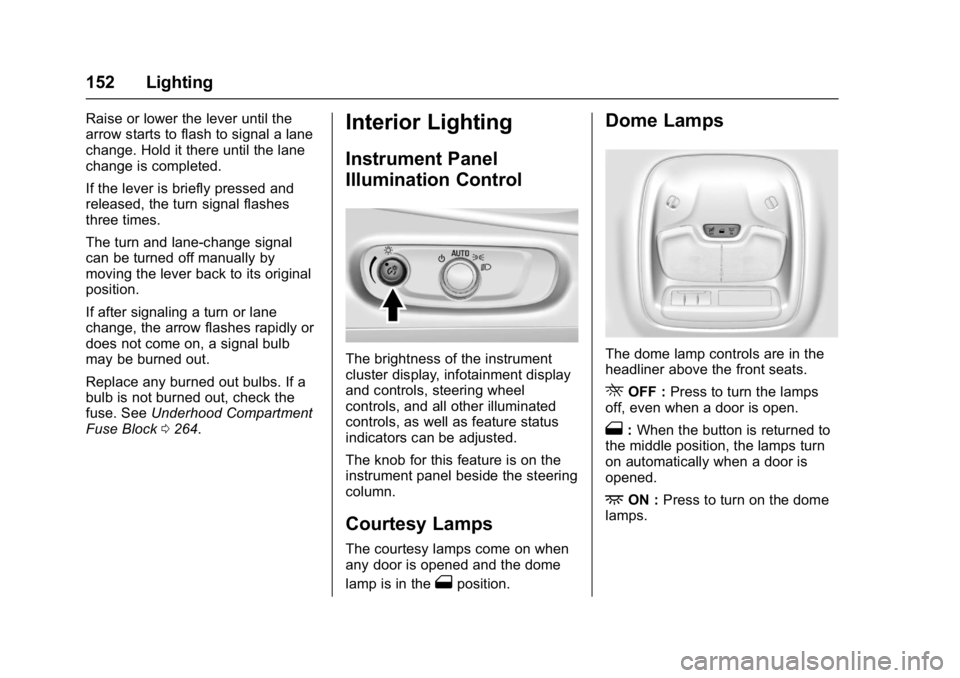
Instrument Panel
Illumination Control
The brightness of the instrument
cluster display, infotainment display
and controls, steering wheel
controls, and all other illuminated
controls, as well as feature status
indicators can be adjusted.
The knob for this feature is on the
instrument panel beside the steering
column.
Courtesy Lamps
The courtesy lamps come on when
any door is opened and the dome
lamp is in the
1position.
Dome Lamps
The dome lamp controls are in the
headliner above the front seats.
ROFF : Press to turn the lamps
off, even when a door is open.
1: When the button is returned to
the middle position, the lamps turn
on automatically when a door is
opened.
+ON : Press to turn on the dome
lamps.
Page 186 of 361

Chevrolet Bolt EV Owner Manual (GMNA-Localizing-U.S./Canada/Mexico-
10122739) - 2017 - CRC - 10/3/16
Climate Controls 185
Climate Control Touch Screen
The heated seats, if equipped,
climate on/off, recirculation, heat,
and air conditioning can be
controlled by touching Climate
Settings on the infotainment display.
A selection can then be made on
the climate settings page.
Automatic Operation
The system automatically controls
the fan speed, air delivery, air
conditioning, electric heating, and
recirculation to heat or cool the
vehicle to the selected temperature.
When AUTO is lit, all five functions
operate automatically. Each function
can also be manually set and the
selected setting is displayed or the
indicator is lit. Functions not
manually set will continue to be
automatically controlled, even if the
AUTO indicator is not lit.
For automatic operation:1. Press AUTO. 2. Set the temperature. An initial
setting of 22 °C (72 °F) is
recommended. Allow the
system time to stabilize. Adjust
the temperature as needed.
Manual Operation
ON : Touch to turn the climate
control system on and off.
The climate control system will turn
on when any climate control button
is pressed on the center stack or
touched on the touch screen. To
turn the system off, touch ON again
or lower the fan speed until off.
When the climate control system is
turned on again, it will use the
previous climate control settings. To
change the setting, press the button
again.
DorC: Press the buttons to
increase or decrease the fan speed.
The fan speed setting appears on
the infotainment display. Manually
adjusting the fan speed cancels
automatic fan control. Press AUTO
to return to automatic operation.
Touch ON to turn off the fan and the
climate control system. Temperature Control :
Turn the
knob clockwise or counterclockwise
to increase or decrease the
temperature setting.
Air Delivery Mode Control :
Press
c,d, or0on the
center stack to change the direction
of airflow. Any combination of the
three buttons can be selected. The
selected air delivery mode button
indicator is lit.
Pressing any button cancels
automatic air delivery control and
the direction of the airflow can be
controlled manually. Press AUTO to
return to automatic operation.
0: Air is directed to the
windshield.
d: Air is directed to the instrument
panel outlets.
c: Air is directed to the floor
outlets.
0MAX : Air is directed to the
windshield and the fan runs at a
higher speed. Fog or frost is cleared
from the windshield more quickly.
Page 188 of 361

Chevrolet Bolt EV Owner Manual (GMNA-Localizing-U.S./Canada/Mexico-
10122739) - 2017 - CRC - 10/3/16
Climate Controls 187
Caution
Do not try to clear frost or other
material from the inside of the
front windshield and rear window
with a razor blade or anything
else that is sharp. This may
damage the rear window
defogger grid and affect the
radio's ability to pick up stations
clearly. The repairs would not be
covered by the vehicle warranty.
Remote Start : The climate control
system may be started by using the
Remote Keyless Entry (RKE)
transmitter. The climate control
system will default to an appropriate
heating or cooling mode. See
Remote Start 039.
The rear window defogger turns on
if it is cold outside.
Sensors
Indicator Light and Solar
Sensor (ILSS)
The ILSS is on top of the instrument
panel, near the windshield, where it
monitors solar intensity.
The climate control system uses the
sensor information to adjust the
temperature, fan speed,
recirculation, and air delivery mode
for best comfort.
Do not cover the sensor; otherwise
the automatic climate control system
may not work properly. Humidity Sensor
The humidity sensor is near the
base of the inside rearview mirror.
The climate control system uses the
sensor information to adjust the
temperature and recirculation for
best comfort.
Outside Air Temperature Sensor
The outside air temperature sensor
is behind the front grille of the
vehicle. The vehicle uses the sensor
information to display outside air
temperature. The climate control
system uses the information to
adjust the climate system operation.
Page 189 of 361

Chevrolet Bolt EV Owner Manual (GMNA-Localizing-U.S./Canada/Mexico-
10122739) - 2017 - CRC - 10/3/16
188 Climate Controls
Air Vents
Adjustable air vents are in the
center and on the side of the
instrument panel.
Move the slats to change the
direction of the airflow. The center
air vent does not close completely.
Move the slats to change the
direction of the airflow.
Additional air vents are located
beneath the windshield and the
driver and passenger side door
windows, and in the footwells.
These are fixed and cannot be
adjusted.Operation Tips
.
Keep all outlets open whenever
possible for best system
performance.
. Keep the path under all seats
clear of objects to help circulate
the air inside the vehicle more
effectively.
. Use of non-GM approved hood
deflectors can adversely affect
the performance of the system.
. Do not attach any devices to the
air vent slats. This restricts
airflow and may cause damage
to the air vents.
Page 234 of 361

Chevrolet Bolt EV Owner Manual (GMNA-Localizing-U.S./Canada/Mexico-
10122739) - 2017 - CRC - 10/3/16
Driving and Operating 233
2. Push the rearward edge of thecharge port door and release to
open the door.
In cold weather conditions, ice
may form around the charge
port door. Remove ice from the
area before attempting to open
or close the charge port door.
3. Open the liftgate, lift the load
floor cover, and remove the
charge cord. 4. Plug the charge cord into the
electrical outlet. Verify the
charge cord status and select
the appropriate charge level.
See Electrical Requirements
for Battery Charging 0246.
See Charge Cord 0239. See
“Charge Limit Selection” under
Programmable Charging 0124.5. Plug in the AC vehicle plug of
the charge cord into the charge
port on the vehicle. Make sure
the AC vehicle plug is fully
connected to the AC charge
port. If it is not properly seated,
the charge may not occur. 6. Verify that the Charging Status
Indicator illuminates on top of
the instrument panel and an
audible chirp occurs. See
Charging Status Feedback
0236.
7. To arm the charge cord theft alert, lock the vehicle twice with
the RKE transmitter. To disarm
this feature, see “Energy
Settings” underEnergy
Information 0131.
End Charge 1. Unlock the vehicle with the RKE transmitter to disarm the
charge cord theft alert.
2. Unplug the vehicle plug of the charge cord from the vehicle.
Unlock the vehicle plug of the
charge cord from the vehicle by
pressing the button on the top
of the charge cord plug.
3. Close the charge port door by pressing firmly in the center
until it latches.
4. Unplug the charge cord from the electrical outlet.
Page 235 of 361

Chevrolet Bolt EV Owner Manual (GMNA-Localizing-U.S./Canada/Mexico-
10122739) - 2017 - CRC - 10/3/16
234 Driving and Operating
5. Place the charge cord into thestorage compartment.
DC Charging (If Equipped)
DC Charging Station Hardware
Check the charge station DC
vehicle plug for compatibility with
the DC charge port on this vehicle.
When recharging at a DC fast
charge station, the power cable
connected to the vehicle must be
less than 10 m (33 ft) in length.
Follow the steps listed on the
charging station to perform a DC
vehicle charge.
If for any reason DC charging does
not begin or is interrupted, check
the DC charge station display for
messages. Unplug to restart the DC
charge process.
Start Charge
1. Make sure the vehicle is parked.
2. Push the rearward edge of the charge port door and release to
open the door. In cold weather conditions, ice
may form around the charge
port door. The charge port door
may not open on the first
attempt. Remove ice from the
area and repeat attempting to
open the charge port door.
3. Unlatch the DC charging dust
cover and lower it fully.
4. Plug in the DC vehicle plug into the DC charge port on the
vehicle. Make sure that the DC
vehicle plug is fully connected
to the DC charge port. If it is
not properly seated then the
charge may not occur. Proper plug connection can be can be
checked by information on
the DIC.
5. Follow the steps listed on the charging station to start
charging. The Electric Parking
Brake will automatically apply
once the charge process has
been started.
6. Once charging, the DC vehicle plug will be locked to the DC
charge port and cannot be
disconnected while charging is
active.
7. Verify that the Charging Status Indicator illuminates on top of
the instrument panel and an
audible chirp occurs. See
Charging Status Feedback
0236.
Caution
Do not attempt to disconnect the
DC vehicle plug while charging is
active. This action may damage
vehicle or charging station
hardware.
Page 237 of 361

Chevrolet Bolt EV Owner Manual (GMNA-Localizing-U.S./Canada/Mexico-
10122739) - 2017 - CRC - 10/3/16
236 Driving and Operating
Charging Status
Feedback
The vehicle has a Charging Status
Indicator (CSI) at the center of the
instrument panel near the
windshield. When the vehicle is
plugged in and the vehicle power is
off, the CSI indicates the following:
.Short Flashing Green –Vehicle
is plugged in. Battery is not fully
charged. Flash rate increases
from one to four flashes as
battery charges. .
Long Flashing Green –Vehicle
is plugged in. Battery is not fully
charged. Battery charging is
delayed.
. Solid Green –Vehicle is plugged
in. Battery is fully charged.
. Solid Yellow –Vehicle is plugged
in. It is normal for the CSI to turn
yellow for a few seconds after
plugging in a compatible charge
cord. The solid yellow may be
extended depending on the
vehicle and if there is a total
utility interruption via OnStar.
See Utility Interruption of
Charging 0245. This may also
indicate that the charging
system has detected a fault and
will not charge the battery. See
“Charge Cord Status Indicators”
in Charge Cord 0239. If the vehicle is plugged in and
vehicle power is on, the CSI will
flash or will be solid green,
depending on the charge level.
If the vehicle is plugged in and the
CSI is off, a total utility interruption
using OnStar or a charging fault has
been detected. See
Utility
Interruption of Charging 0245 or
“Charge Cord Status Indicators” in
Charge Cord 0239.
A message displays if the vehicle is
not able to charge.
Following is the vehicle feedback
when the charge cord is plugged in.
Page 249 of 361

Chevrolet Bolt EV Owner Manual (GMNA-Localizing-U.S./Canada/Mexico-
10122739) - 2017 - CRC - 10/3/16
248 Vehicle Care
Vehicle Care
General Information
General Information . . . . . . . . . . 249
California Proposition65 Warning . . . . . . . . . . . . . . . . . 249
California Perchlorate Materials Requirements . . . . . 249
Accessories and Modifications . . . . . . . . . . . . . . . . 250
Vehicle Checks
Doing Your OwnService Work . . . . . . . . . . . . . . . 250
Hood . . . . . . . . . . . . . . . . . . . . . . . . . 251
Underhood Compartment Overview . . . . . . . . . . . . . . . . . . . . 253
Cooling System . . . . . . . . . . . . . . 254
Washer Fluid . . . . . . . . . . . . . . . . . 255
Brakes . . . . . . . . . . . . . . . . . . . . . . . 256
Brake Fluid . . . . . . . . . . . . . . . . . . . 257
Battery - North America . . . . . . 257
Wiper Blade Replacement . . . . 259
Headlamp Aiming
Headlamp Aiming . . . . . . . . . . . . 261
Bulb Replacement
Bulb Replacement . . . . . . . . . . . . 261
Halogen Bulbs . . . . . . . . . . . . . . . . 261
High Intensity Discharge (HID) Lighting . . . . . . . . . . . . . . . . . . . . . 262
LED Lighting . . . . . . . . . . . . . . . . . 262
Taillamps, Turn Signal,
Stoplamps, and Back-Up
Lamps . . . . . . . . . . . . . . . . . . . . . . 262
License Plate Lamp . . . . . . . . . . 262
Replacement Bulbs . . . . . . . . . . . 263
Electrical System
High Voltage Devices and Wiring . . . . . . . . . . . . . . . . . . . . . . . 263
Electrical System Overload . . . 263
Underhood Compartment Fuse Block . . . . . . . . . . . . . . . . . . . . . . . . 264
Instrument Panel Fuse Block . . . . . . . . . . . . . . . . . . . . . . . . 268
Wheels and Tires
Tires . . . . . . . . . . . . . . . . . . . . . . . . . . 270
All-Season Tires . . . . . . . . . . . . . . 270
Winter Tires . . . . . . . . . . . . . . . . . . 271
Self-Sealing Tires . . . . . . . . . . . . 271
Tire Sidewall Labeling . . . . . . . . 272 Tire Designations . . . . . . . . . . . . . 273
Tire Terminology and
Definitions . . . . . . . . . . . . . . . . . . 273
Tire Pressure . . . . . . . . . . . . . . . . . 276
Tire Pressure Monitor System . . . . . . . . . . . . . . . . . . . . . . 277
Tire Pressure Monitor Operation . . . . . . . . . . . . . . . . . . . 278
Tire Inspection . . . . . . . . . . . . . . . . 281
Tire Rotation . . . . . . . . . . . . . . . . . 281
When It Is Time for New Tires . . . . . . . . . . . . . . . . . . . . . . . . 282
Buying New Tires . . . . . . . . . . . . . 283
Different Size Tires and Wheels . . . . . . . . . . . . . . . . . . . . . . 284
Uniform Tire Quality Grading . . . . . . . . . . . . . . . . . . . . . 285
Wheel Alignment and Tire Balance . . . . . . . . . . . . . . . . . . . . . 286
Wheel Replacement . . . . . . . . . . 286
Tire Chains . . . . . . . . . . . . . . . . . . . 287
If a Tire Goes Flat . . . . . . . . . . . . 288
Tire Sealant and Compressor Kit . . . . . . . . . . . . . 289
Storing the Tire Sealant and Compressor Kit . . . . . . . . . . . . . 295