2017 CHEVROLET BOLT EV instrument cluster
[x] Cancel search: instrument clusterPage 149 of 361

Chevrolet Bolt EV Owner Manual (GMNA-Localizing-U.S./Canada/Mexico-
10122739) - 2017 - CRC - 10/3/16
148 Lighting
Lighting
Exterior Lighting
Exterior Lamp Controls . . . . . . . 148
Exterior Lamps OffReminder . . . . . . . . . . . . . . . . . . . 150
Headlamp High/Low-Beam Changer . . . . . . . . . . . . . . . . . . . . 150
Flash-to-Pass . . . . . . . . . . . . . . . . 150
Daytime Running Lamps (DRL) . . . . . . . . . . . . . . . 150
Automatic Headlamp System . . . . . . . . . . . . . . . . . . . . . . 150
Hazard Warning Flashers . . . . . 151
Turn and Lane-Change Signals . . . . . . . . . . . . . . . . . . . . . . 151
Interior Lighting
Instrument Panel IlluminationControl . . . . . . . . . . . . . . . . . . . . . . 152
Courtesy Lamps . . . . . . . . . . . . . . 152
Dome Lamps . . . . . . . . . . . . . . . . . 152
Reading Lamps . . . . . . . . . . . . . . 153
Lighting Features
Entry Lighting . . . . . . . . . . . . . . . . 153
Exit Lighting . . . . . . . . . . . . . . . . . . 153
Battery Power Protection . . . . . 154
Exterior Lighting
Exterior Lamp Controls
The exterior lamp control is on the
instrument panel to the left of the
steering column.
P: Turns the exterior lamps on
and off.
AUTO : Turns the exterior lamps on
and off automatically depending on
outside lighting.
;: Turns on the parking lamps
including all lamps, except the
headlamps. The instrument panel
lights also turn on.
5: Turns on the headlamps
together with the parking lamps and
instrument panel lights.
IntelliBeam®System
If equipped, this system turns the
vehicle's high-beam headlamps on
and off according to surrounding
traffic conditions.
The system turns the high-beam
headlamps on when it is dark
enough and there is no other traffic
present.
This light comes on in the
instrument cluster when the
IntelliBeam system is enabled.
Page 150 of 361

Chevrolet Bolt EV Owner Manual (GMNA-Localizing-U.S./Canada/Mexico-
10122739) - 2017 - CRC - 10/3/16
Lighting 149
Turning On and Enabling
IntelliBeam
To enable the IntelliBeam system,
press
bon the turn signal lever
when the exterior lamp control is in
the AUTO or
5position.
The blue high-beam on light
appears on the instrument cluster
when the high beams are on.
Driving with IntelliBeam
The system only activates the high
beams when driving over 40 km/h
(25 mph).
There is a sensor near the top
center of the windshield that
automatically controls the system. Keep this area of the windshield
clear of debris to allow for best
system performance.
The high-beam headlamps remain
on, under the automatic control,
until one of the following situations
occurs:
.
The system detects an
approaching vehicle’s
headlamps.
. The system detects a preceding
vehicle’s taillamps.
. The outside light is bright
enough that high-beam
headlamps are not required.
. The vehicle's speed drops below
20 km/h (12 mph).
. The IntelliBeam system is
disabled by the high/low-beam
changer or the flash-to-pass
feature. If this happens,
press
bon the turn signal
lever when the exterior
lamp control is in the AUTO
or
5position. The instrument cluster light will
come on to indicate the
IntelliBeam system is
reactivated.
The high beams may not turn off
automatically if the system cannot
detect another vehicle's lamps
because of any of the following:
. The other vehicle’s lamps are
missing, damaged, obstructed
from view, or otherwise
undetected.
. The other vehicle‘s lamps are
covered with dirt, snow, and/or
road spray.
. The other vehicle’s lamps cannot
be detected due to dense
exhaust, smoke, fog, snow, road
spray, mist, or other airborne
obstructions.
. The vehicle's windshield is dirty,
cracked, or obstructed by
something that blocks the view
of the light sensor.
Page 151 of 361

Chevrolet Bolt EV Owner Manual (GMNA-Localizing-U.S./Canada/Mexico-
10122739) - 2017 - CRC - 10/3/16
150 Lighting
.The vehicle is loaded such that
the front end points upward,
causing the light sensor to aim
high and not detect headlamps
and taillamps.
. Driving on winding or hilly roads.
The IntelliBeam system may need to
be disabled if any of the above
conditions exist.
Exterior Lamps Off
Reminder
A warning chime sounds if the driver
door is opened while the vehicle is
off and the exterior lamps are on.
Headlamp High/
Low-Beam Changer
Push the turn signal lever away
from you and release, to turn the
high beams on. To return to low
beams, push the lever again or pull
it toward you and release.
This indicator light turns on in the
instrument cluster when the
high-beam headlamps are on.
Flash-to-Pass
To flash the high beams, pull the
turn signal lever toward you, and
release.
Daytime Running
Lamps (DRL)
DRL can make it easier for others to
see the front of your vehicle during
the day. Fully functional DRL are
required on all vehicles first sold in
Canada.
The DRL system comes on in
daylight when the following
conditions are met:
. The power button is on. .
The exterior lamp control is
in AUTO.
. The light sensor determines it is
daytime.
. The vehicle is not in P (Park).
When the DRL are on, the taillamps,
sidemarker lamps, instrument panel
lights, and other lamps will not
be on.
The DRL turn off when the
headlamps are turned to
Por the
vehicle is off.
For vehicles first sold in Canada,
the DRL can only be turned off
when the electric drive unit is in
P (Park).
Automatic Headlamp
System
The headlamps come on
automatically when the exterior
lamp control is set to AUTO and it is
dark enough outside.
Page 152 of 361

Chevrolet Bolt EV Owner Manual (GMNA-Localizing-U.S./Canada/Mexico-
10122739) - 2017 - CRC - 10/3/16
Lighting 151
There is a light sensor on top of the
instrument panel. Do not cover the
sensor, otherwise the headlamps
will come on when they are not
needed.
The system may also turn on the
headlamps when driving through a
parking garage or tunnel.
When it is bright enough outside,
the headlamps will turn off or may
change to Daytime Running
Lamps (DRL).
The automatic headlamp system
turns off when the exterior lamp
control is turned to
Por the vehicle
is off.
Lights On with Wipers
If the windshield wipers are
activated in daylight with the vehicle
on, and the exterior lamp control is
in AUTO, the headlamps, parking
lamps, and other exterior lamps
come on. The transition time for the
lamps coming on varies based on
wiper speed. When the wipers are
not operating, these lamps turn off.
Move the exterior lamp control to
P
or;to disable this feature.
Hazard Warning Flashers
The hazard warning flasher button
is on the center stack.
|: Press to make the front and
rear turn signal lamps flash on and
off. This warns others that you are
having trouble. Press the button
again to turn the flashers off.
When the hazard warning flashers
are on, the turn signals will
not work.
Turn and Lane-Change
Signals
Move the lever all the way up or
down to signal a turn.
An arrow on the instrument cluster
flashes in the direction of the turn or
lane change.
Page 153 of 361
Chevrolet Bolt EV Owner Manual (GMNA-Localizing-U.S./Canada/Mexico-
10122739) - 2017 - CRC - 10/3/16
152 Lighting
Raise or lower the lever until the
arrow starts to flash to signal a lane
change. Hold it there until the lane
change is completed.
If the lever is briefly pressed and
released, the turn signal flashes
three times.
The turn and lane-change signal
can be turned off manually by
moving the lever back to its original
position.
If after signaling a turn or lane
change, the arrow flashes rapidly or
does not come on, a signal bulb
may be burned out.
Replace any burned out bulbs. If a
bulb is not burned out, check the
fuse. SeeUnderhood Compartment
Fuse Block 0264.Interior Lighting
Instrument Panel
Illumination Control
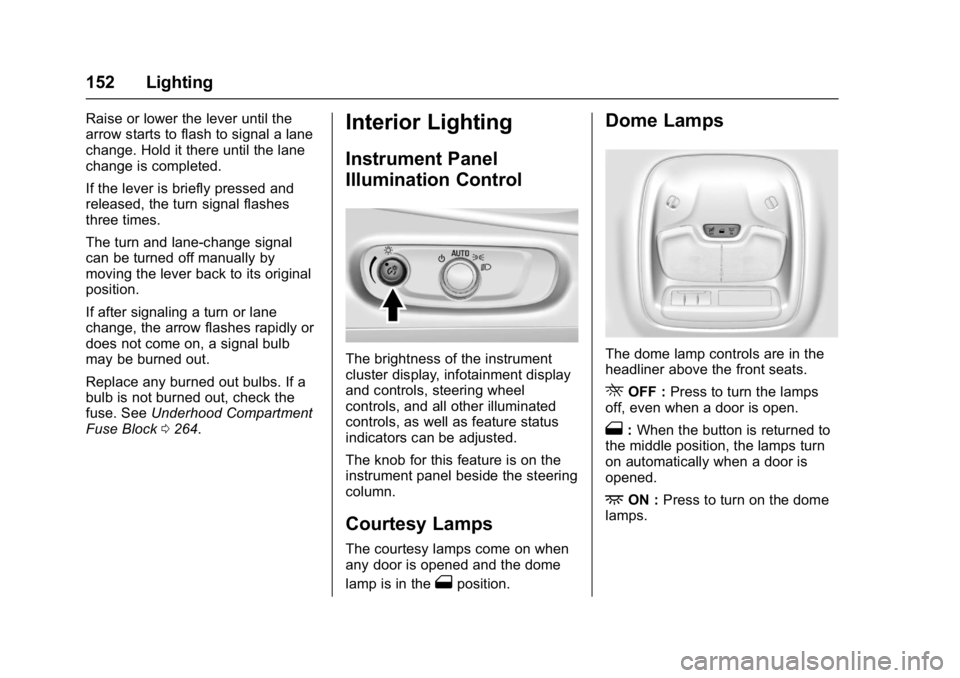
The brightness of the instrument
cluster display, infotainment display
and controls, steering wheel
controls, and all other illuminated
controls, as well as feature status
indicators can be adjusted.
The knob for this feature is on the
instrument panel beside the steering
column.
Courtesy Lamps
The courtesy lamps come on when
any door is opened and the dome
lamp is in the
1position.
Dome Lamps
The dome lamp controls are in the
headliner above the front seats.
ROFF : Press to turn the lamps
off, even when a door is open.
1: When the button is returned to
the middle position, the lamps turn
on automatically when a door is
opened.
+ON : Press to turn on the dome
lamps.
Page 156 of 361
Chevrolet Bolt EV Owner Manual (GMNA-Localizing-U.S./Canada/Mexico-
10122739) - 2017 - CRC - 10/3/16
Infotainment System 155
Infotainment
System
Introduction
Introduction . . . . . . . . . . . . . . . . . . . 155
Theft-Deterrent Feature . . . . . . 156
Overview . . . . . . . . . . . . . . . . . . . . . 156
Operation . . . . . . . . . . . . . . . . . . . . . 156
Software Updates . . . . . . . . . . . . 159
Radio
AM-FM Radio . . . . . . . . . . . . . . . . 160
Satellite Radio . . . . . . . . . . . . . . . . 162
Multi-Band Antenna . . . . . . . . . . 163
Audio Players
USB Port . . . . . . . . . . . . . . . . . . . . . 164
Auxiliary Devices . . . . . . . . . . . . . 170
Bluetooth Audio . . . . . . . . . . . . . . 170
OnStar System
OnStar System . . . . . . . . . . . . . . . 173
Phone
Bluetooth . . . . . . . . . . . . . . . . . . . . . 173
Hands-Free Phone . . . . . . . . . . . 175
Settings
Settings . . . . . . . . . . . . . . . . . . . . . . 177
Teen Driver . . . . . . . . . . . . . . . . . . . 178
Downloadable Applications
Downloading Apps . . . . . . . . . . . 181
Trademarks and License
Agreements
Trademarks and LicenseAgreements . . . . . . . . . . . . . . . . . 182
Introduction
Read the following pages to
become familiar with the features.
{Warning
Taking your eyes off the road for
too long or too often while using
any infotainment feature can
cause a crash. You or others
could be injured or killed. Do not
give extended attention to
infotainment tasks while driving.
Limit your glances at the vehicle
displays and focus your attention
on driving. Use voice commands
whenever possible.
The infotainment system has built-in
features intended to help avoid
distraction by disabling some
functions when driving. These
functions may gray out when they
are unavailable. Many infotainment
features are also available through
the instrument cluster and steering
wheel controls.
Page 203 of 361

Chevrolet Bolt EV Owner Manual (GMNA-Localizing-U.S./Canada/Mexico-
10122739) - 2017 - CRC - 10/3/16
202 Driving and Operating
instrument cluster, the vehicle is
ready to be driven. This could take
up to 15 seconds at extremely cold
temperatures.
Service Mode
This power mode is available for
service and diagnostics, and to
verify the proper operation of the
malfunction indicator lamp as may
be required for emission inspection
purposes. With the vehicle off, and
the brake pedal not applied,
pressing and holding POWER
Ofor
more than five seconds will place
the vehicle in Service Mode. The
instruments and audio systems will
operate as they do in ON/RUN, but
the vehicle will not be able to be
driven. The propulsion system will
not start in Service Mode. Press
POWER
Oagain to turn the
vehicle off.
Caution
Placing the vehicle in Service
Mode will use the 12-volt battery.
Do not use Service Mode for an
extended period, or the vehicle
may not start.
STOPPING THE VEHICLE/OFF :
To turn the vehicle off, press
POWER
Owith the vehicle in
P (Park). Retained Accessory Power
(RAP) will remain active until the
driver door is opened. When turning
off the vehicle, if the vehicle is not in
P (Park), the gear will go to P (Park)
and then power off automatically.
If the vehicle must be shut off in an
emergency:
1. Brake using a firm and steady pressure. Do not pump the
brakes repeatedly. This may
deplete power assist, requiring
increased brake pedal force.
2. Shift the vehicle to N (Neutral). This can be done while the
vehicle is moving. After shifting to N (Neutral), firmly apply the
brakes and steer the vehicle to
a safe location.
3. Come to a complete stop, shift to P (Park), and turn the vehicle
off by pressing POWER
O.
4. Set the parking brake.
{Warning
Turning off the vehicle while
moving may disable the airbags.
While driving, only shut the
propulsion system off in an
emergency.
If the vehicle cannot be pulled over,
and must be shut off while driving,
press and hold POWER
Ofor
longer than two seconds, or press
twice in five seconds.
Page 204 of 361

Chevrolet Bolt EV Owner Manual (GMNA-Localizing-U.S./Canada/Mexico-
10122739) - 2017 - CRC - 10/3/16
Driving and Operating 203
Starting and Stopping the
Vehicle
Starting Procedure
Press the P (Park) button on the
shifter, or move the shift lever into
N (Neutral). The propulsion system
will not start in any other position.
Caution
Do not try to shift to P (Park) if the
vehicle is moving or the electric
drive unit could be damaged.
Shift to P (Park) only when the
vehicle is stopped.
Caution
If you add electrical parts or
accessories, you could change
the way the vehicle operates. Any
resulting damage would not be
covered by the vehicle warranty.The Remote Keyless Entry (RKE)
transmitter must be in the vehicle.
Press the brake pedal, then press
and release POWER
O.
If the RKE transmitter is not in the
vehicle or something is interfering
with the transmitter, a message
displays in the Driver Information
Center (DIC).
If the vehicle will not start due to a
low RKE transmitter battery, the
vehicle can still be driven. See Key
and Lock Messages 0137 and
Remote Keyless Entry (RKE)
System Operation 033.
A vehicle ready light displays in the
lower right corner of the instrument
cluster when the vehicle is ready to
be driven.
The instrument cluster also displays
an active battery gauge when the
vehicle is ready to be driven. Restarting Procedure
If the vehicle must be restarted
while it is still moving, move the shift
lever to N (Neutral) and press
POWER
Otwice without pressing
the brake pedal. The propulsion
system will not restart in any other
position.
A chime will sound if the driver door
is opened while the vehicle is in ON/
RUN. Always press POWER
Oto
turn the vehicle off before exiting.
Stopping Procedure
For information on how to turn the
vehicle off, see Power Button0201.
Retained Accessory
Power (RAP)
The following features will operate
for up to 10 minutes or until the
driver door is opened:
.
Audio System
. Accessory Power Outlets
. Power Windows