2017 CHEVROLET BOLT EV charging
[x] Cancel search: chargingPage 125 of 361

Chevrolet Bolt EV Owner Manual (GMNA-Localizing-U.S./Canada/Mexico-
10122739) - 2017 - CRC - 10/3/16
124 Instruments and Controls
Information Displays
Power Flows
To view the Power Flow screens on
the infotainment display, touch
Energy and then touch Flow.
The Power Flow screens indicate
the current operating condition. The
screens show energy flow to and
from the high voltage battery while
the vehicle is being driven. These
components will be highlighted
when they are active.
Programmable Charging
Important Information About
Portable Electric Vehicle Charging
.Charging an electric vehicle can
stress a building’ s electrical
system more than a typical
household appliance.
. Before you plug in to any
electrical outlet, have a qualified
electrician inspect and verify the
electrical system (electrical
outlet, wiring, junctions, and
protection devices) for
heavy-duty service at a 12 amp
continuous load.
. Electrical outlets may wear out
with normal usage or may be
damaged over time, making
them unsuitable for electric
vehicle charging.
. Check the electrical outlet/plug
while charging and discontinue
use if the electrical outlet/plug is
hot, then have the electrical
outlet serviced by a qualified
electrician. .
When outdoors, plug into an
electrical outlet that is
weatherproof while in use.
. Mount the charge cord to reduce
strain on the electrical
outlet/plug.
. Do not place the charge cord in
a position where it is expected to
be submerged in water.
{Danger
Improper use of portable electric
vehicle charge cords may cause
a fire, electrical shock, or burns,
and may result in damage to
property, serious injury, or death.
. Do not use extension cords,
multi-outlet power strips,
splitters, grounding
adaptors, surge protectors,
or similar devices.
. Do not use an electrical
outlet that is worn or
damaged, or will not hold
the plug firmly in place.
(Continued)
Page 126 of 361

Chevrolet Bolt EV Owner Manual (GMNA-Localizing-U.S./Canada/Mexico-
10122739) - 2017 - CRC - 10/3/16
Instruments and Controls 125
Danger (Continued)
.Do not use an electrical
outlet that is not properly
grounded.
. Do not use an electrical
outlet that is on a circuit with
other electrical loads.
See Charge Cord 0239.
Programmable Charging
Modes
To view the current charge mode
status, touch Energy on the
infotainment display, and then touch
Charging.
The charge Start and charge
Complete time estimations are also
displayed on the screen. These
estimations are most accurate when
the vehicle is plugged in and in
moderate temperature conditions. Charge Mode Selection
Immediate :
The vehicle starts
charging as soon as it is connected
to an electrical outlet. See Plug-In
Charging 0231.
Departure : The vehicle will
schedule charging to complete by
the programmed departure time.
The vehicle estimates the charging schedule based on programmed
departure times, charge rate limits,
electric rate preference and
schedule, and priority charging
settings. If there is not sufficient
time after the charge cord is
plugged in, the vehicle will not be
fully charged by the departure time.
Departure Time Entry
The Departure charge mode allows
for the departure time to be entered
to match your personal schedule.
1. With Departure charge mode
selected, touch Edit.
2. The current programmed departure time is displayed on
the tab with the day of the
week. Select the tab for the
day of the week to be edited.
Page 127 of 361

Chevrolet Bolt EV Owner Manual (GMNA-Localizing-U.S./Canada/Mexico-
10122739) - 2017 - CRC - 10/3/16
126 Instruments and Controls
3. Touch+or −to change the
hours and minutes.
4. Touch
yorzto change AM
or PM.
5. Touch
0to exit the screen.
Charge Current Limit Selection
The charge current limit setting
allows the vehicle’s charge current
to be selected so it matches the
capability of the charging location.
If the vehicle consistently stops
charging after being plugged in, or if
a circuit breaker continues to trip,
reducing to a lower charge current
limit setting may resolve the issue.
The charge current limit setting
should be configured to match the
electrical current rating for the
electrical outlet that the charge cord
is connected to. On the Charge
Mode tab, change the Charge Limit
selection between:
. 12 amps
. 8 amps Exact current levels may vary from
the values shown in this manual.
Check the vehicle for the available
levels.
The charge limit can be changed
and saved using Location Based
Charging settings. The default value
is the lower current limit. The charge
current limit will reset to the lower
value when the vehicle is shifted
from P (Park) unless the Location
Based Charging feature is active
and set to retain this preference.
See
“Location Based Charging” later
in this section.
{Warning
Using a charge level that exceeds
the electrical circuit or electrical
outlet capacity may start a fire or
damage the electrical circuit. Use
the lowest charge level until a
qualified electrician inspects the
electrical circuit capacity. Use the
lowest charge level if the
electrical circuit or electrical outlet
capacity is not known. Electric Rate Preference
The vehicle estimates the charging
start time based on the utility rate
schedule, utility rate preference, and
programmed departure time for the
current day of the week. The vehicle
will charge during the least
expensive rate periods to achieve a
full battery charge by the departure
time. Electrical rate information from
the utility company for the charging
location is required for this mode.
If the selected charge mode is
Departure, then electric rate
preference selection will display.
Electric Rate Preference Selection
From the Charge Mode tab on the
Charging screen with Departure
charge mode selected, touch More
to select the Electric Rate
Preference.
Page 128 of 361

Chevrolet Bolt EV Owner Manual (GMNA-Localizing-U.S./Canada/Mexico-
10122739) - 2017 - CRC - 10/3/16
Instruments and Controls 127
Touch one of the following options
to select the Electric Rate
Preference:
.Off: Delay charging based on
departure.
. Off-Peak Only: Charge during
Off-Peak Rates.
. Cost Optimized Off- and
Mid-Peak: Charge during
Mid-Peak and Off-Peak Rates.
. Cost Optimized All Rates:
Charge during Peak, Mid-Peak,
and Off-Peak Rates.
Charging begins at the start time
and is complete by the departure
time only if sufficient time is allowed
after the charge cord is plugged in. For example, if the vehicle is
plugged in for only one hour prior to
the departure time, and the battery
is completely discharged, the
vehicle will not be fully charged by
the departure time regardless of the
rate selection.
Also, if the selected electric rate
settings result in a very long charge
completion time, the vehicle will
start charging immediately upon
plug-in. For example, if the electric
rate table is set up with all Peak
rates and the rate preference is to
charge during Off-Peak rates only,
then the vehicle will start charging
immediately upon plug-in.
Electric Rate Schedule
From the Charge Mode tab on the
Charging screen, with Departure
charge mode and an Electric Rate
Preference selected, touch Edit next
to Electric Rate Preference.Select one of the following for the
Charge Completion option:
.
Earliest Possible
. Latest Possible
Edit Electric Rate Schedule
Electric rates, or cost per unit, may
vary based on time, weekday/
weekend, and season. During the
day when the demand for electricity
is high, the rates are usually higher
and called Peak rates. At night
when the demand for electricity is
low, the rates are usually lower and
called Off-Peak rates. In some
areas, a Mid-Peak rate is offered.
Page 129 of 361
Chevrolet Bolt EV Owner Manual (GMNA-Localizing-U.S./Canada/Mexico-
10122739) - 2017 - CRC - 10/3/16
128 Instruments and Controls
Contact the utility company to obtain
the rate schedule for your area. The
summer and winter start dates must
be established to use a summer/
winter schedule.
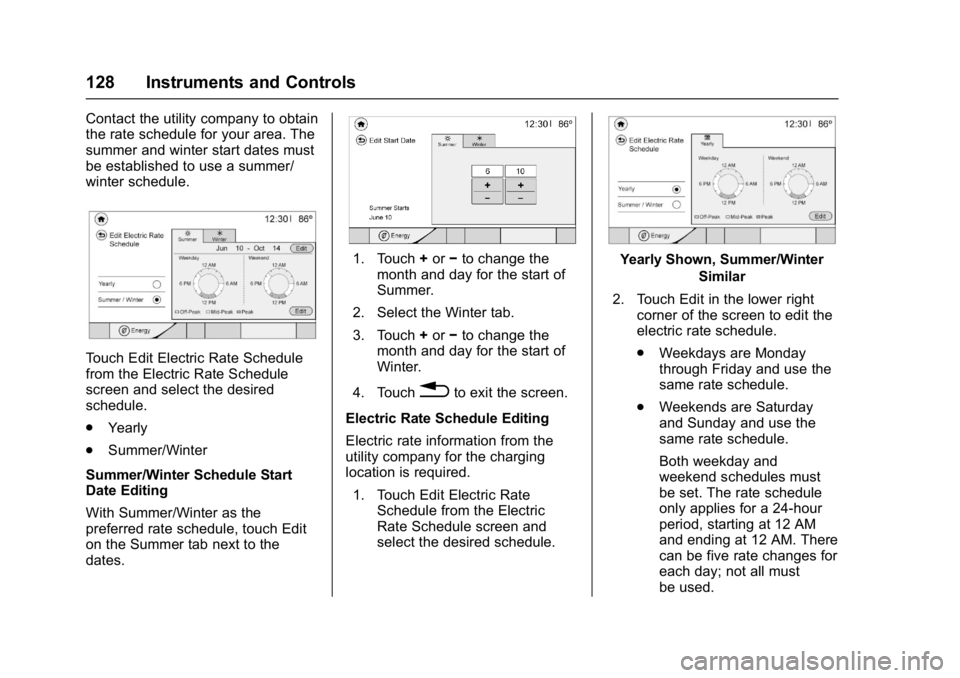
Touch Edit Electric Rate Schedule
from the Electric Rate Schedule
screen and select the desired
schedule.
.Yearly
. Summer/Winter
Summer/Winter Schedule Start
Date Editing
With Summer/Winter as the
preferred rate schedule, touch Edit
on the Summer tab next to the
dates.
1. Touch +or −to change the
month and day for the start of
Summer.
2. Select the Winter tab.
3. Touch +or −to change the
month and day for the start of
Winter.
4. Touch
0to exit the screen.
Electric Rate Schedule Editing
Electric rate information from the
utility company for the charging
location is required. 1. Touch Edit Electric Rate Schedule from the Electric
Rate Schedule screen and
select the desired schedule.
Yearly Shown, Summer/Winter
Similar
2. Touch Edit in the lower right corner of the screen to edit the
electric rate schedule.
.Weekdays are Monday
through Friday and use the
same rate schedule.
. Weekends are Saturday
and Sunday and use the
same rate schedule.
Both weekday and
weekend schedules must
be set. The rate schedule
only applies for a 24-hour
period, starting at 12 AM
and ending at 12 AM. There
can be five rate changes for
each day; not all must
be used.
Page 130 of 361
Chevrolet Bolt EV Owner Manual (GMNA-Localizing-U.S./Canada/Mexico-
10122739) - 2017 - CRC - 10/3/16
Instruments and Controls 129
Select Weekday or
Weekend.
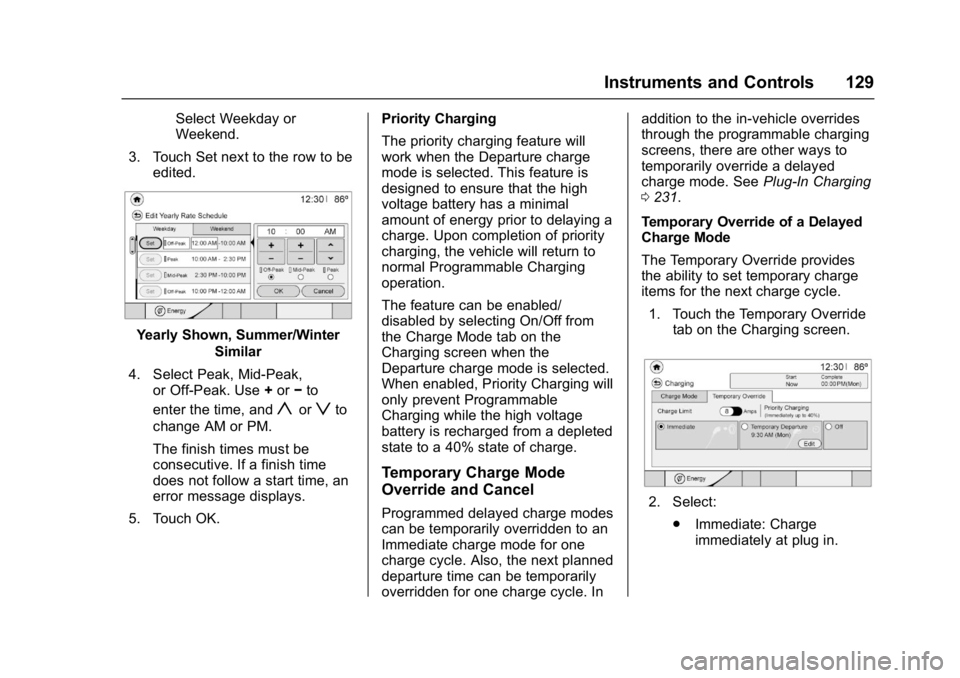
3. Touch Set next to the row to be edited.
Yearly Shown, Summer/Winter
Similar
4. Select Peak, Mid-Peak, or Off-Peak. Use +or −to
enter the time, and
yorzto
change AM or PM.
The finish times must be
consecutive. If a finish time
does not follow a start time, an
error message displays.
5. Touch OK. Priority Charging
The priority charging feature will
work when the Departure charge
mode is selected. This feature is
designed to ensure that the high
voltage battery has a minimal
amount of energy prior to delaying a
charge. Upon completion of priority
charging, the vehicle will return to
normal Programmable Charging
operation.
The feature can be enabled/
disabled by selecting On/Off from
the Charge Mode tab on the
Charging screen when the
Departure charge mode is selected.
When enabled, Priority Charging will
only prevent Programmable
Charging while the high voltage
battery is recharged from a depleted
state to a 40% state of charge.
Temporary Charge Mode
Override and Cancel
Programmed delayed charge modes
can be temporarily overridden to an
Immediate charge mode for one
charge cycle. Also, the next planned
departure time can be temporarily
overridden for one charge cycle. In addition to the in-vehicle overrides
through the programmable charging
screens, there are other ways to
temporarily override a delayed
charge mode. See
Plug-In Charging
0 231.
Temporary Override of a Delayed
Charge Mode
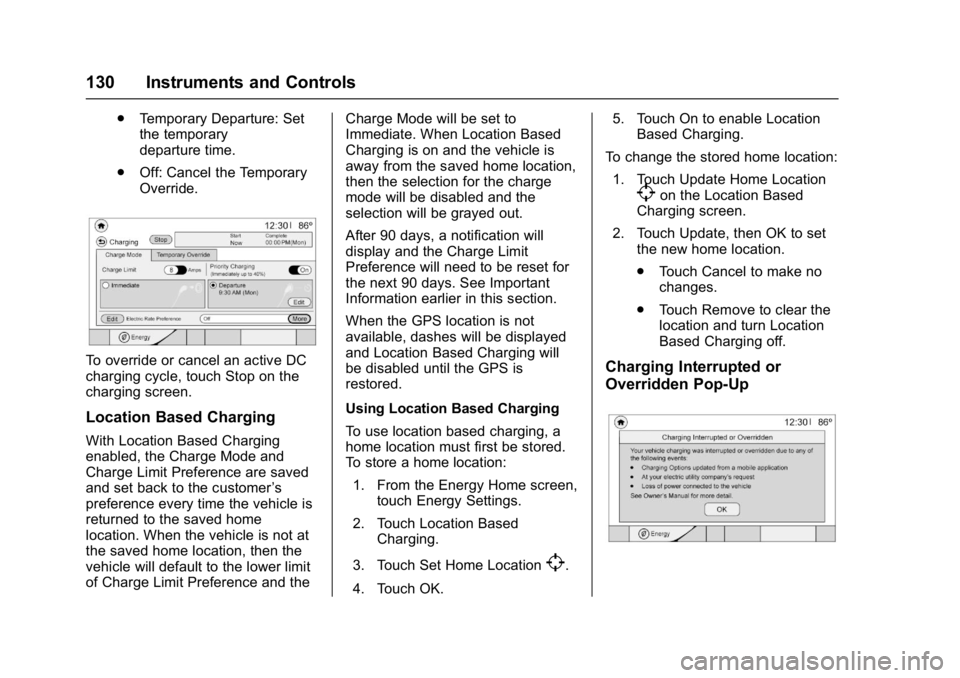
The Temporary Override provides
the ability to set temporary charge
items for the next charge cycle. 1. Touch the Temporary Override tab on the Charging screen.2. Select:
.Immediate: Charge
immediately at plug in.
Page 131 of 361
Chevrolet Bolt EV Owner Manual (GMNA-Localizing-U.S./Canada/Mexico-
10122739) - 2017 - CRC - 10/3/16
130 Instruments and Controls
.Temporary Departure: Set
the temporary
departure time.
. Off: Cancel the Temporary
Override.
To override or cancel an active DC
charging cycle, touch Stop on the
charging screen.
Location Based Charging
With Location Based Charging
enabled, the Charge Mode and
Charge Limit Preference are saved
and set back to the customer ’s
preference every time the vehicle is
returned to the saved home
location. When the vehicle is not at
the saved home location, then the
vehicle will default to the lower limit
of Charge Limit Preference and the Charge Mode will be set to
Immediate. When Location Based
Charging is on and the vehicle is
away from the saved home location,
then the selection for the charge
mode will be disabled and the
selection will be grayed out.
After 90 days, a notification will
display and the Charge Limit
Preference will need to be reset for
the next 90 days. See Important
Information earlier in this section.
When the GPS location is not
available, dashes will be displayed
and Location Based Charging will
be disabled until the GPS is
restored.
Using Location Based Charging
To use location based charging, a
home location must first be stored.
To store a home location:
1. From the Energy Home screen, touch Energy Settings.
2. Touch Location Based Charging.
3. Touch Set Home Location
[.
4. Touch OK. 5. Touch On to enable Location
Based Charging.
To change the stored home location: 1. Touch Update Home Location
[on the Location Based
Charging screen.
2. Touch Update, then OK to set the new home location.
.Touch Cancel to make no
changes.
. Touch Remove to clear the
location and turn Location
Based Charging off.
Charging Interrupted or
Overridden Pop-Up
Page 132 of 361

Chevrolet Bolt EV Owner Manual (GMNA-Localizing-U.S./Canada/Mexico-
10122739) - 2017 - CRC - 10/3/16
Instruments and Controls 131
The Charging Interrupted or
Overridden pop-up will appear if any
of the following conditions occur:
.The charging options have been
updated through the mobile app.
See KeyPass 044.
. The charge process was
interrupted by the utility
company through OnStar as
authorized by the vehicle owner
(available in select regions).
. There was an unintended loss of
AC power during the plug-in
charge event. For example,
there was a power outage or the
charge cord was unplugged from
the wall.
See Utility Interruption of Charging
0 245.
Programmable Charging
Disabled
When the Programmable Charging
system is disabled, the Unable to
Charge screen will display.
Energy Information
To view Energy Detail, Energy
Usage Score, and Efficiency History,
touch Energy on the infotainment
display, and then touch Information.
Touch
horkto go to the next
screen.
Energy Detail
This screen displays how energy is
being used since the last time the
high voltage battery was fully
charged. It includes Driving and
Accessories, Climate Settings, and
Battery Conditioning. The circle
graph displays these percentages.
Energy Used and Distance Traveled
are also displayed on the screen. Energy Usage Score
This screen provides an estimate of
the factors that influence energy
usage since the last full charge of
the high voltage battery. A positive
Score is desired to reach the
vehicle’s optimal energy usage
rating.
.
Technique includes accelerating
and braking.
. Terrain includes road conditions,
such as hills, rain, and snow and
may be affected by wind and tire
pressure.
. Climate Settings includes how
the heat and air conditioning
are used.