2017 CADILLAC XTS steering wheel
[x] Cancel search: steering wheelPage 191 of 314
Cadillac XTS Owner Manual (GMNA-Localizing-MidEast-10292881) - 2017 -
crc - 7/1/16
190 DRIVING AND OPERATING
Caution
Do not repeatedly brake or
accelerate heavily when TCS is off.
The vehicle driveline could be
damaged.
To turn off only TCS, press and
release
g. The Traction Off Lighti
displays in the instrument cluster and
the appropriate DIC message is
displayed. See Ride Control System
Messages 0141. To turn TCS on again,
press and release
g. The Traction Off
Light
idisplayed in the instrument
cluster will turn off and the
appropriate DIC message is displayed.
If TCS is limiting wheel spin when
g
is pressed, the system will not turn off
until the wheels stop spinning.
To turn off both TCS and StabiliTrak,
press and hold
guntil the Traction
Off Light
iand StabiliTrak Off
Light
gcome on and stay on in the
instrument cluster. The appropriate
DIC message is displayed. See RideControl System Messages
0141. To
turn TCS and StabiliTrak on again,
press and release
g. The Traction Off
Light
iand StabiliTrak Off Lightg
in the instrument cluster turn off and
the appropriate DIC message is
displayed.
Adding accessories can affect the
vehicle performance. See Accessories
and Modifications 0222.
Magnetic Ride Control
The Magnetic Ride Control monitors
the suspension system.
Based on road conditions, steering
wheel angle, and vehicle speed, the
system automatically adjusts to
provide the best handling while
providing a smooth ride. The Tour and
Sport Modes will feel similar on a
smooth road.
Tour : Use for normal city and
highway driving. This setting provides
a smooth, soft ride.
Sport : Use where road conditions or
personal preference demand more
control. This setting provides more
“feel,” or response to road conditions. The vehicle is normally in Tour Mode.
Sport Mode is engaged when the shift
lever is placed in M (Manual Mode).
When the shift lever is placed in D
(Drive) the system will revert back to
Tour Mode.
The Driver Information Center (DIC)
briefly displays the appropriate
message on vehicle startup or when a
new mode is selected. See
Ride Control
System Messages 0141.
Limited-Slip Rear Axle
Vehicles with a limited-slip rear axle
can give more traction on snow, mud,
ice, sand or gravel. When traction is
low, this feature allows the drive
wheel with the most traction to move
the vehicle. The limited-slip rear axle
also gives the driver enhanced control
when cornering hard or completing a
maneuver, such as a lane change.
Page 198 of 314

Cadillac XTS Owner Manual (GMNA-Localizing-MidEast-10292881) - 2017 -
crc - 7/1/16
DRIVING AND OPERATING 197
Selecting the Follow Distance
When a slower moving vehicle is
detected ahead within the selected
following gap, ACC will adjust the
vehicle's speed and attempt to
maintain the follow distance gap
selected.
Press
[on the steering wheel to
adjust the following gap. Each press
cycles the gap button through three
settings: Far, Medium, or Near.
When pressed, the current gap setting
displays briefly on the instrument
cluster and HUD. The gap setting will
be maintained until it is changed.
Since each gap setting corresponds to
a following time (Far, Medium,
or Near), the following distance will
vary based on vehicle speed. The
faster the vehicle speed, the further
back your vehicle will follow a vehicle
detected ahead. Consider traffic and
weather conditions when selecting the
following gap. The range of selectable
gaps may not be appropriate for all
drivers and driving conditions. Changing the gap setting
automatically changes the alert timing
sensitivity (Far, Medium, or Near) for
the Forward Collision Alert (FCA)
feature. See
Forward Collision Alert
(FCA) System 0206.
Alerting the Driver
If ACC is engaged, driver action may
be required when ACC cannot apply
sufficient braking because of
approaching a vehicle too rapidly.
When this condition occurs, the
collision alert symbol on the HUD will
flash on the windshield. Either eight
beeps will sound from the front,
or both sides of the Safety Alert Seat
will pulse five times. See “Collision/
Detection Systems” underVehicle
Personalization 0144.
See Defensive Driving 0168. Approaching and Following a
Vehicle
The vehicle ahead indicator is in the
instrument cluster and HUD display.
The vehicle ahead indicator only
displays when a vehicle is detected in
your vehicle’s path moving in the
same direction.
If this indicator is not displaying, ACC
will not respond to or brake to
vehicles ahead.
ACC automatically slows the vehicle
down and adjusts vehicle speed to
follow the vehicle in front at the
selected follow gap. The vehicle speed
increases or decreases to follow the
vehicle in front of you, but will not
exceed the set speed. It may apply
limited braking, if necessary. When
braking is active, the brake lights will
come on. The automatic braking may
Page 207 of 314

Cadillac XTS Owner Manual (GMNA-Localizing-MidEast-10292881) - 2017 -
crc - 7/1/16
206 DRIVING AND OPERATING
Use caution while backing up when
towing a trailer, as the RCTA
detection zones that extend out from
the back of the vehicle do not move
further back when a trailer is towed.
Turning the Features On or Off
PressXon the center stack to turn
on or off the Front and Rear Parking
Assist, Reverse Automatic Braking
(RAB), Rear Cross Traffic Alert
(RCTA), and the Backing Warning
System at the same time. The
indicator light next to the button
comes on when the features are on
and turns off when the features have
been disabled.
Turn off parking assist, RCTA, and
RAB when towing a trailer.
To turn the RPA symbols or guidance
lines (on some models) on or off, see
“Rear Camera ”under Vehicle
Personalization 0144.
RCTA can also be turned on or off
through vehicle personalization. See
“Collision/Detection Systems” under
Vehicle Personalization 0144.
Assistance Systems for
Driving
If equipped, when driving the vehicle
in a forward gear, Forward Collision
Alert (FCA), Lane Departure Warning
(LDW), Side Blind Zone Alert (SBZA),
and/or the Forward Automatic Braking
(FAB) System can help to avoid a
crash or reduce crash damage.
Forward Collision Alert
(FCA) System
If equipped, the FCA system may help
to avoid or reduce the harm caused by
front-end crashes. When approaching
a vehicle ahead too quickly, FCA
provides a red flashing alert on the
windshield and rapidly beeps or pulses
the driver seat. FCA also lights an
amber visual alert if following another
vehicle much too closely.
FCA detects vehicles within a distance
of approximately 60 m (197 ft) and
operates at speeds above 40 km/h
(25 mph). If the vehicle has Adaptive
Cruise Control (ACC), it can detect
vehicles to distances of approximately 110 m (360 ft) and operates at all
speeds. See
Adaptive Cruise
Control 0194.
{Warning
FCA is a warning system and does
not apply the brakes. When
approaching a slower-moving or
stopped vehicle ahead too rapidly,
or when following a vehicle too
closely, FCA may not provide a
warning with enough time to help
avoid a crash. It also may not
provide any warning at all. FCA
does not warn of pedestrians,
animals, signs, guardrails, bridges,
construction barrels, or other
objects. Be ready to take action and
apply the brakes. See Defensive
Driving 0168.
FCA can be disabled with the FCA
steering wheel control, or if your
vehicle is equipped with Adaptive
Cruise Control (ACC), through vehicle
personalization. See the “Auto
Page 209 of 314

Cadillac XTS Owner Manual (GMNA-Localizing-MidEast-10292881) - 2017 -
crc - 7/1/16
208 DRIVING AND OPERATING
The vehicle ahead indicator will
display amber when you are following
a vehicle ahead much too closely.
Selecting the Alert Timing
The Collision Alert control is on the
steering wheel. Press
[to set the
FCA timing to Far, Medium, or Near,
or on some vehicles, Off. The first
button press shows the current setting
on the DIC. Additional button presses
will change this setting. The chosen
setting will remain until it is changed
and will affect the timing of both the
Collision Alert and the Tailgating
Alert features. The timing of both
alerts will vary based on vehicle speed. The faster the vehicle speed, the
farther away the alert will occur.
Consider traffic and weather
conditions when selecting the alert
timing. The range of selectable alert
timings may not be appropriate for all
drivers and driving conditions.
If your vehicle is equipped with
Adaptive Cruise Control (ACC),
changing the FCA timing setting
automatically changes the following
gap setting (Far, Medium, or Near).
Unnecessary Alerts
FCA may provide unnecessary alerts
for turning vehicles, vehicles in other
lanes, objects that are not vehicles,
or shadows. These alerts are normal
operation and the vehicle does not
need service.
Cleaning the System
If the FCA system does not seem to
operate properly, cleaning the outside
of the windshield in front the rearview
mirror, and cleaning the front of the
vehicle where radar sensors are
located, may correct the issue.
Forward Automatic
Braking (FAB)
If the vehicle has Adaptive Cruise
Control (ACC), it also has FAB, which
includes Intelligent Brake Assist (IBA).
When the system detects a vehicle
ahead in your path that is traveling in
the same direction that you may be
about to crash into, it can provide a
boost to braking or automatically
brake the vehicle. This can help avoid
or lessen the severity of crashes when
driving in a forward gear. Depending
on the situation, the vehicle may
automatically brake moderately or
hard. This forward automatic braking
can only occur if a vehicle is detected.
This is shown by the FCA vehicle
ahead indicator being lit. See
Forward
Collision Alert (FCA) System 0206.
The system works when driving in a
forward gear above 4 km/h (2 mph).
It can detect vehicles up to
approximately 60 m (197 ft).
Page 218 of 314

Cadillac XTS Owner Manual (GMNA-Localizing-MidEast-10292881) - 2017 -
crc - 7/1/16
DRIVING AND OPERATING 217
Following Distance
Stay at least twice as far behind the
vehicle ahead as you would when
driving the vehicle without a trailer.
This can help to avoid situations that
require heavy braking and sudden
turns.
Passing
More passing distance is needed when
towing a trailer. Because the rig is
longer, it is necessary to go farther
beyond the passed vehicle before
returning to the lane.
Backing Up
Hold the bottom of the steering wheel
with one hand. To move the trailer to
the left, move your hand to the left.
To move the trailer to the right, move
your hand to the right. Always back
up slowly and, if possible, have
someone guide you.
Making TurnsCaution
Making very sharp turns while
trailering could cause the trailer to
come in contact with the vehicle.
The vehicle could be damaged.
Avoid making very sharp turns
while trailering.
When turning with a trailer, make
wider turns than normal so the trailer
will not strike soft shoulders, curbs,
road signs, trees, or other objects. Use
the turn signal well in advance and
avoid jerky or sudden maneuvers.
Turn Signals When Towing a
Trailer
The turn signal indicators on the
instrument cluster flash whenever
signaling a turn or lane change.
Properly hooked up, the trailer lamps
also flash, telling other drivers the
vehicle is turning, changing lanes,
or stopping. When towing a trailer, the arrows on
the instrument cluster flash for turns
even if the bulbs on the trailer are
burned out. Check occasionally to be
sure the trailer bulbs are still working.
Driving on Grades
Reduce speed and shift to a lower gear
before starting down a long or steep
downgrade. If the transmission is not
shifted down, the brakes might have
to be used so much that they would
get hot and no longer work well.
The vehicle can tow in D (Drive). Use
a lower gear if the transmission shifts
too often.
When towing at high altitude on steep
uphill grades, engine coolant boils at a
lower temperature than at normal
altitudes. If the engine is turned off
immediately after towing at high
altitude on steep uphill grades, the
vehicle could show signs similar to
engine overheating. To avoid this, let
the engine run while parked,
preferably on level ground, with the
transmission in P (Park) for a few
minutes before turning the engine off.
If the overheat warning comes on, see
Engine Overheating
0237.
Page 222 of 314

Cadillac XTS Owner Manual (GMNA-Localizing-MidEast-10292881) - 2017 -
crc - 7/1/16
VEHICLE CARE 221
Vehicle Care
General Information
General Information . . . . . . . . . . . . . 222
Accessories andModifications . . . . . . . . . . . . . . . . . . . 222
Vehicle Checks
Doing Your OwnService Work . . . . . . . . . . . . . . . . . . . . 223
Hood . . . . . . . . . . . . . . . . . . . . . . . . . . . . . . 223
Engine Compartment Overview . . . . . . . . . . . . . . . . . . . . . . . . . 224
Engine Cover . . . . . . . . . . . . . . . . . . . . . . 227
Engine Oil . . . . . . . . . . . . . . . . . . . . . . . . . 228
Engine Oil Life System . . . . . . . . . . . 230
Automatic Transmission Fluid . . . . . . . . . . . . . . . . . . . . . . . . . . . . . 231
Engine Air Cleaner/Filter . . . . . . . . . 231
Cooling System . . . . . . . . . . . . . . . . . . . 233
Engine Coolant . . . . . . . . . . . . . . . . . . . 234
Engine Overheating . . . . . . . . . . . . . . 237
Overheated Engine Protection Operating Mode . . . . . . . . . . . . . . . . . 238
Power Steering Fluid . . . . . . . . . . . . . 238
Washer Fluid . . . . . . . . . . . . . . . . . . . . . 239
Brakes . . . . . . . . . . . . . . . . . . . . . . . . . . . . . 240
Brake Fluid . . . . . . . . . . . . . . . . . . . . . . . 241
Battery . . . . . . . . . . . . . . . . . . . . . . . . . . . . 242
All-Wheel Drive . . . . . . . . . . . . . . . . . . 242 Starter Switch Check . . . . . . . . . . . . . 243
Automatic Transmission Shift
Lock Control Function
Check . . . . . . . . . . . . . . . . . . . . . . . . . . . . 243
Park Brake and P (Park)
Mechanism Check . . . . . . . . . . . . . . 243
Wiper Blade Replacement . . . . . . . 244
Windshield Replacement . . . . . . . . 244Headlamp Aiming
Headlamp Aiming . . . . . . . . . . . . . . . . 245
Bulb Replacement
Bulb Replacement . . . . . . . . . . . . . . . . 245
High Intensity Discharge (HID) Lighting . . . . . . . . . . . . . . . . . . . . . . . . . 245
LED Lighting . . . . . . . . . . . . . . . . . . . . . 245
Back-Up Lamps . . . . . . . . . . . . . . . . . . . 245
License Plate Lamp . . . . . . . . . . . . . . 246
Replacement Bulbs . . . . . . . . . . . . . . . 247
Electrical System
Electrical System Overload . . . . . . 247
Fuses and Circuit Breakers . . . . . . 248
Engine Compartment Fuse Block . . . . . . . . . . . . . . . . . . . . . . . . . . . . 248
Instrument Panel Fuse Block . . . . 251
Rear Compartment Fuse Block . . . . . . . . . . . . . . . . . . . . . . . . . . . . 252
Wheels and Tires
Tires . . . . . . . . . . . . . . . . . . . . . . . . . . . . . . . 254 All-Season Tires . . . . . . . . . . . . . . . . . . 255
Winter Tires . . . . . . . . . . . . . . . . . . . . . . 255
Low-Profile Tires . . . . . . . . . . . . . . . . . 256
Summer Tires . . . . . . . . . . . . . . . . . . . . 256
Tire Pressure . . . . . . . . . . . . . . . . . . . . . . 256
Tire Pressure for High-Speed
Operation . . . . . . . . . . . . . . . . . . . . . . . . 257
Tire Pressure Monitor System . . . 258
Tire Pressure Monitor Operation . . . . . . . . . . . . . . . . . . . . . . . . 259
Tire Inspection . . . . . . . . . . . . . . . . . . . 262
Tire Rotation . . . . . . . . . . . . . . . . . . . . . 262
When It Is Time for New Tires . . . . . . . . . . . . . . . . . . . . . . . . . . . . . 263
Buying New Tires . . . . . . . . . . . . . . . . 264
Different Size Tires and Wheels . . . . . . . . . . . . . . . . . . . . . . . . . . 265
Wheel Alignment and Tire Balance . . . . . . . . . . . . . . . . . . . . . . . . . . 265
Wheel Replacement . . . . . . . . . . . . . . 266
Tire Chains . . . . . . . . . . . . . . . . . . . . . . . 266
If a Tire Goes Flat . . . . . . . . . . . . . . . . 267
Tire Changing . . . . . . . . . . . . . . . . . . . . . 268
Compact Spare Tire . . . . . . . . . . . . . . 272
Jump Starting
Jump Starting . . . . . . . . . . . . . . . . . . . . . 273
Towing the Vehicle
Towing the Vehicle . . . . . . . . . . . . . . . 276
Recreational Vehicle Towing . . . . 276
Page 232 of 314

Cadillac XTS Owner Manual (GMNA-Localizing-MidEast-10292881) - 2017 -
crc - 7/1/16
VEHICLE CARE 231
How to Reset the Engine Oil Life
System
Reset the system whenever the engine
oil is changed so that the system can
calculate the next engine oil change.
To reset the system:1. Using the DIC controls on the right side of the steering wheel,
display REMAINING OIL LIFE on
the DIC. See Driver Information
Center (DIC) 0128. When
remaining oil life is low, the
CHANGE ENGINE OIL SOON
message will appear on the
display. See Engine Oil
Messages 0137.
2. Press SEL on the DIC controls and hold SEL down for a few
seconds to clear the CHANGE
ENGINE OIL SOON message and
reset the oil life at 100%.
Be careful not to reset the oil life
display accidentally at any time
other than after the oil is
changed. It cannot be reset
accurately until the next oil
change. The oil life system can also be reset as
follows:
1. Turn the ignition on with the engine off.
2. Fully press and release the accelerator pedal three times
within five seconds.
If the CHANGE ENGINE OIL
SOON message is not on, the
system is reset.
The system is reset when the
CHANGE ENGINE OIL SOON message
is off.
If the CHANGE ENGINE OIL SOON
message comes back on when the
vehicle is started, the engine oil life
system has not been reset. Repeat the
procedure.
Automatic Transmission
Fluid
A transmission fluid leak is the only
reason for fluid loss. If a leak occurs,
take the vehicle to your dealer and
have it repaired as soon as possible. See your dealer to have the fluid and
filter changed at the intervals listed in
the
Maintenance Schedule 0288.
Engine Air Cleaner/Filter
The engine air cleaner/filter is in the
engine compartment on the passenger
side of the vehicle. See Engine
Compartment Overview 0224.
When to Inspect the Engine Air
Cleaner/Filter
For intervals on changing and
inspecting the engine air cleaner/filter,
see Maintenance Schedule 0288.
How to Inspect the Engine Air
Cleaner/Filter
Do not start the engine or have the
engine running with the engine air
cleaner/filter housing open. Before
removing the engine air cleaner/filter,
make sure that the engine air cleaner/
filter housing and nearby components
are free of dirt and debris. Remove the
engine air cleaner/filter. Lightly tap
and shake the engine air cleaner/filter
(away from the vehicle), to release
dust and dirt. Inspect the engine air
cleaner/filter for damage, and replace
Page 253 of 314
Cadillac XTS Owner Manual (GMNA-Localizing-MidEast-10292881) - 2017 -
crc - 7/1/16
252 VEHICLE CARE
FusesUsage
14 Diagnostic link connector
15 Airbag AOS
16 Glove box
17 HVAC controller
18 Logistics
19 –
20 Telematics (OnStar)
21 CGM
22 Steering wheel controls/Backlight
23 Body control module 3
24 Body control module 2
25 Power steering column
26 AC DC inverter
Relays Usage
R1 Glove box
R2 Logistics Relays
Usage
R3 Retained accessory power
Rear Compartment Fuse
Block
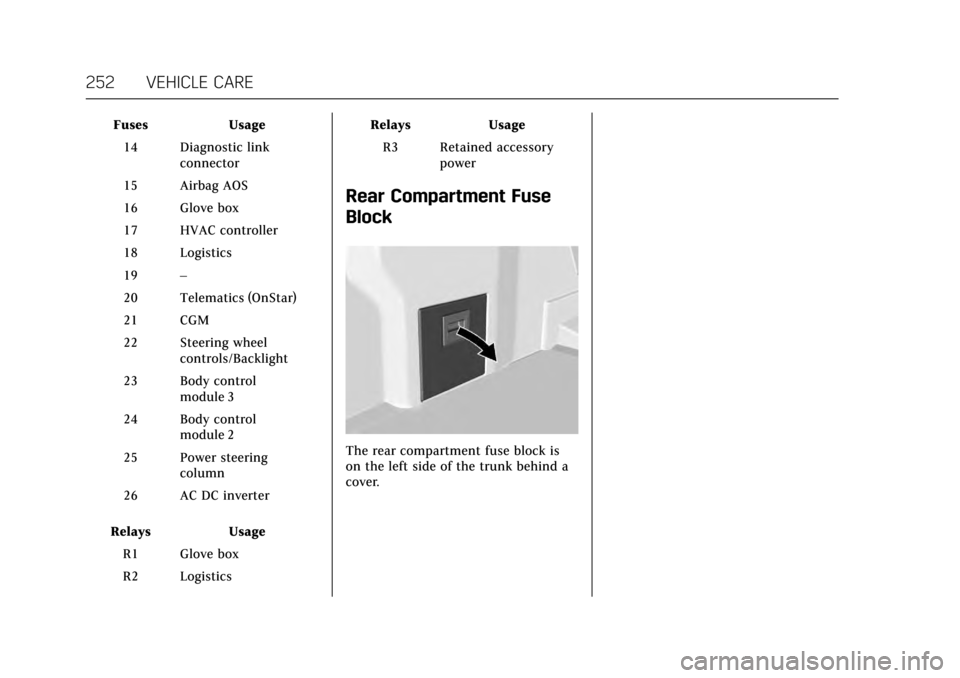
The rear compartment fuse block is
on the left side of the trunk behind a
cover.