2017 CADILLAC ATS automatic transmission
[x] Cancel search: automatic transmissionPage 159 of 335

Cadillac ATS/ATS-V Owner Manual (GMNA-Localizing-MidEast-10287885) -
2017 - crc - 6/16/16
158 INFOTAINMENT SYSTEM
.Event Odometer: Displays the
distance driven since the recording
began.
. Drive Mode: Displays the vehicle’s
current drive mode.
Performance Timing:
Displays these vehicle metrics:
. Vehicle Speed: Same as Sport.
. Engine Rotations Per Minute
(RPMs): Same as Sport.
. Transmission State (Current Gear):
Same as Sport.
. 0–100 km/h (0–60 mph), 0–
200 km/h (0–100 mph), 400 m (1/
4 mi), and 0–200–0 km/h (0–100–
0 mph): The timer starts recording
as soon as the vehicle accelerates. As the vehicle passes each speed
and distance milestone, it is
displayed on the overlay.
. Throttle Position: Displays
the percentage of throttle applied
from 0–100%.
. StabiliTrak Active Indicator: The
graphic only displays if the active
handling systems are activated.
Naming Convention
The recorded video file name is stored
as the recorded date and the length of
the recording.
If the recorded session was recorded
while the system was in Valet Mode,
the file name will display the mode,
date, and length of time.
Settings
Touch the Settings button from the
PDR menu to display settings.
Valet Mode Recording : Allows
recording preferences to be selected.
It is recommended that a blank SD
card be used. Available choices are:
. Automatically record when in
Valet Mode: Enables the PDR to
begin recording as soon as the
vehicle is in Valet Mode.
. Overwrite existing data when
memory full: Allows manual
overwriting of previous recordings,
one at a time starting with the
oldest, when the current recording
requires additional storage to
continue.
Page 171 of 335

Cadillac ATS/ATS-V Owner Manual (GMNA-Localizing-MidEast-10287885) -
2017 - crc - 6/16/16
170 DRIVING AND OPERATING
Driving and
Operating
Driving Information
Distracted Driving . . . . . . . . . . . . . . . . 171
Defensive Driving . . . . . . . . . . . . . . . . 171
Control of a Vehicle . . . . . . . . . . . . . . 171
Braking . . . . . . . . . . . . . . . . . . . . . . . . . . . . 172
Steering . . . . . . . . . . . . . . . . . . . . . . . . . . . 172
Off-Road Recovery . . . . . . . . . . . . . . . . 173
Loss of Control . . . . . . . . . . . . . . . . . . . 173
Track Events and CompetitiveDriving . . . . . . . . . . . . . . . . . . . . . . . . . . 174
Driving on Wet Roads . . . . . . . . . . . 178
Hill and Mountain Roads . . . . . . . . 178
Winter Driving . . . . . . . . . . . . . . . . . . . . 179
If the Vehicle Is Stuck . . . . . . . . . . . 180
Vehicle Load Limits . . . . . . . . . . . . . . 181
Starting and Operating
New Vehicle Break-In . . . . . . . . . . . . 184
Composite Materials . . . . . . . . . . . . . 184
Ignition Positions . . . . . . . . . . . . . . . . 185
Starting the Engine . . . . . . . . . . . . . . 186
Retained Accessory Power (RAP) . . . . . . . . . . . . . . . . . . . . 188
Shifting Into Park . . . . . . . . . . . . . . . . 188
Shifting out of Park . . . . . . . . . . . . . . 189 Parking over Things
That Burn . . . . . . . . . . . . . . . . . . . . . . . 190
Extended Parking . . . . . . . . . . . . . . . . . 190
Engine Exhaust
Engine Exhaust . . . . . . . . . . . . . . . . . . . 190
Running the Vehicle While Parked . . . . . . . . . . . . . . . . . . . . . . . . . . . 191
Automatic Transmission
Automatic Transmission . . . . . . . . . 191
Manual Mode . . . . . . . . . . . . . . . . . . . . . 193
Brakes
Antilock Brake System (ABS) . . . . 195
Parking Brake (Manual) . . . . . . . . . . 195
Parking Brake (Electric) . . . . . . . . . . 196
Brake Assist . . . . . . . . . . . . . . . . . . . . . . . 197
Hill Start Assist (HSA) . . . . . . . . . . . 198
Ride Control Systems
Traction Control/ElectronicStability Control . . . . . . . . . . . . . . . . 198
Driver Mode Control . . . . . . . . . . . . . 199
Competitive Driving Mode (FE4 Only) . . . . . . . . . . . . . . . . . . . . . . . 201
Limited-Slip Rear Axle (Except V-Series) . . . . . . . . . . . . . . . . . . . . . . . . . 204
Limited-Slip Rear Axle (V-Series Only) . . . . . . . . . . . . . . . . . . 204
Cruise Control
Cruise Control . . . . . . . . . . . . . . . . . . . . 204
Adaptive Cruise Control . . . . . . . . . 207
Driver Assistance Systems
Driver Assistance Systems . . . . . . . 214
Assistance Systems for Parkingor Backing . . . . . . . . . . . . . . . . . . . . . . . 215
Assistance Systems for Driving . . . . . . . . . . . . . . . . . . . . . . . . . . 218
Forward Collision Alert (FCA) System . . . . . . . . . . . . . . . . . . . . . . . . . . 218
Forward Automatic Braking (FAB) . . . . . . . . . . . . . . . . . . . 221
Side Blind Zone Alert (SBZA) . . . . 222
Lane Change Alert (LCA) . . . . . . . . 222
Lane Departure Warning (LDW) . . . . . . . . . . . . . . . . . 224
Lane Keep Assist (LKA) . . . . . . . . . . 224
Fuel
Fuel . . . . . . . . . . . . . . . . . . . . . . . . . . . . . . . 226
Fuel Additives . . . . . . . . . . . . . . . . . . . . 226
Filling the Tank . . . . . . . . . . . . . . . . . . 227
Filling a Portable Fuel Container . . . . . . . . . . . . . . . . . . . . . . . . 229
Trailer Towing
General Towing Information . . . . 230
Conversions and Add-Ons
Add-On Electrical Equipment . . . 230
Page 186 of 335

Cadillac ATS/ATS-V Owner Manual (GMNA-Localizing-MidEast-10287885) -
2017 - crc - 6/16/16
DRIVING AND OPERATING 185
{Warning
Rocker extensions may break under
pressure, resulting in property
damage or injury. Do not stand on
the rocker extension or use it as
a step.
Ignition Positions
The vehicle has an electronic keyless
ignition with pushbutton start.
Pressing the button cycles it through
three modes: ACC/ACCESSORY, ON/
RUN/START, and Stopping the
Engine/OFF.The Remote Keyless Entry (RKE)
transmitter must be in the vehicle for
the system to operate. If the
pushbutton start is not working, the
vehicle may be near a strong radio
antenna signal causing interference to
the keyless access system. See
Remote
Keyless Entry (RKE) System
Operation 028.
To shift out of P (Park), the vehicle
must be in ON/RUN and the brake
pedal must be applied.
Stopping the Engine/OFF (No
Indicator Lights) : When the vehicle
is stopped, press ENGINE START/
STOP once to turn the engine off.
If the vehicle is in P (Park), the
ignition will turn off, and Retained
Accessory Power (RAP) will remain
active. See Retained Accessory Power
(RAP) 0188.
If the vehicle is not in P (Park), the
ignition will return to ACC/
ACCESSORY and display a message in
the Driver Information Center (DIC).
See Transmission Messages 0136.
When the vehicle is shifted into
P (Park), the ignition system will
switch to OFF. Do not turn the engine off when the
vehicle is moving. This will cause a
loss of power assist in the brake and
steering systems and disable the
airbags.
If the vehicle must be shut off in an
emergency:
1. Brake using a firm and steady pressure. Do not pump the
brakes repeatedly. This may
deplete power assist, requiring
increased brake pedal force.
2. Shift the vehicle to N (Neutral). This can be done while the
vehicle is moving. After shifting
to N (Neutral), firmly apply the
brakes and steer the vehicle to a
safe location.
3. Come to a complete stop, shift to P (Park), and turn the ignition to
OFF. On vehicles with an
automatic transmission, the shift
lever must be in P (Park) to turn
the ignition switch to the OFF
position.
4. Set the parking brake. See Parking Brake (Manual) 0195 or
Parking Brake (Electric) 0196.
Page 189 of 335
Cadillac ATS/ATS-V Owner Manual (GMNA-Localizing-MidEast-10287885) -
2017 - crc - 6/16/16
188 DRIVING AND OPERATING
Auto Engine Stop/Start
When the brakes are applied and the
vehicle is at a complete stop, the
engine may turn off. When stopped,
the tachometer may point to AUTO
STOP, seeTachometer 0110. When
the brake pedal is released or the
accelerator pedal pressed, the engine
may restart.
Auto Stop may be deactivated if:
. A minimum vehicle speed is not
reached.
. The engine or transmission is not
at the required operating
temperature.
. The outside temperature is not in
the required operating range,
typically below −10 °C (14 °F) or
above 50 °C (122 °F).
. The shift lever is in any gear other
than D (Drive).
. The battery has been recently
disconnected.
. The battery charge is low. .
The interior comfort level has not
reached the required level for the
climate control system or defog
settings. See Dual Automatic
Climate Control System 0160 or
Dual Automatic Climate Control
System 0163.
. The Auto Stop time is greater than
two minutes.
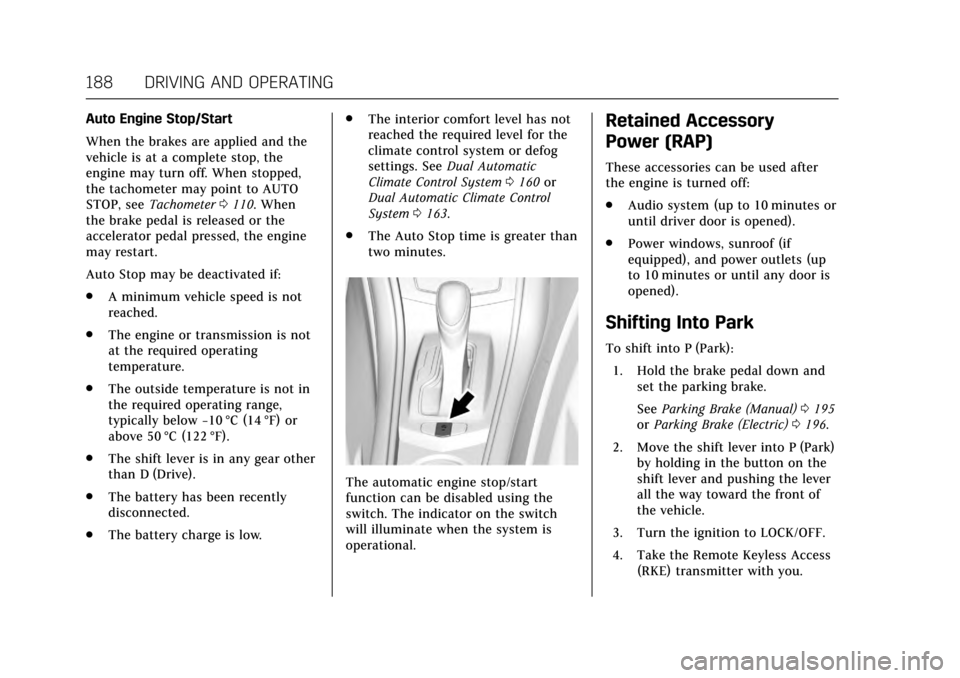
The automatic engine stop/start
function can be disabled using the
switch. The indicator on the switch
will illuminate when the system is
operational.
Retained Accessory
Power (RAP)
These accessories can be used after
the engine is turned off:
.Audio system (up to 10 minutes or
until driver door is opened).
. Power windows, sunroof (if
equipped), and power outlets (up
to 10 minutes or until any door is
opened).
Shifting Into Park
To shift into P (Park):
1. Hold the brake pedal down and set the parking brake.
See Parking Brake (Manual) 0195
or Parking Brake (Electric) 0196.
2. Move the shift lever into P (Park) by holding in the button on the
shift lever and pushing the lever
all the way toward the front of
the vehicle.
3. Turn the ignition to LOCK/OFF.
4. Take the Remote Keyless Access (RKE) transmitter with you.
Page 192 of 335

Cadillac ATS/ATS-V Owner Manual (GMNA-Localizing-MidEast-10287885) -
2017 - crc - 6/16/16
DRIVING AND OPERATING 191
Warning (Continued)
.There are holes or openings
in the vehicle body from
damage or aftermarket
modifications that are not
completely sealed.
If unusual fumes are detected or if
it is suspected that exhaust is
coming into the vehicle: . Drive it only with the
windows completely down.
. Have the vehicle repaired
immediately.
Never park the vehicle with the
engine running in an enclosed area
such as a garage or a building that
has no fresh air ventilation.
Running the Vehicle While
Parked
It is better not to park with the engine
running.
If the vehicle is left with the engine
running, follow the proper steps to be
sure the vehicle will not move. See
Shifting Into Park 0188 and Engine
Exhaust 0190.
Automatic Transmission
P : This position locks the rear wheels.
Use this position when starting the
engine because the vehicle cannot
move easily.
{Warning
It is dangerous to get out of the
vehicle if the shift lever is not fully
in P (Park) with the parking brake
firmly set. The vehicle can roll.
(Continued)
Page 194 of 335

Cadillac ATS/ATS-V Owner Manual (GMNA-Localizing-MidEast-10287885) -
2017 - crc - 6/16/16
DRIVING AND OPERATING 193
D :This position is for normal driving.
It provides the best fuel economy.
If you need more power for passing,
and you are:
. Going less than 55 km/h (35 mph),
push the accelerator pedal about
halfway down.
. Going about 55 km/h (35 mph) or
more, push the accelerator all the
way down.
The transmission will shift down
to a lower gear and have more
power.
Downshifting the transmission in
slippery road conditions could result
in skidding; see “Skidding”underLoss
of Control 0173.
Caution
Spinning the tires or holding the
vehicle in one place on a hill using
only the accelerator pedal may
damage the transmission. The
repair will not be covered by the
vehicle warranty. If you are stuck,
(Continued)
Caution (Continued)
do not spin the tires. When
stopping on a hill, use the brakes to
hold the vehicle in place.
While in Sport Mode, the vehicle
monitors driving behavior, and
automatically enables Performance
Shift Features when spirited driving is
detected. These features maintain
lower transmission gears to increase
available engine braking and improve
acceleration response. The vehicle will
exit these features and return to
normal operation after a short period
when no spirited driving is detected.
See Driver Mode Control 0199.
Manual Mode
Driver Shift Control (DSC)
Caution
Driving with the engine at a high
rpm without upshifting while using
Driver Shift Control (DSC), could
damage the vehicle. Always upshift
when necessary while using DSC.
Vehicles with DSC may either use the
shift lever or the tap shift controls on
the back of the steering wheel (if
equipped) to manually shift the
automatic transmission.
Page 195 of 335

Cadillac ATS/ATS-V Owner Manual (GMNA-Localizing-MidEast-10287885) -
2017 - crc - 6/16/16
194 DRIVING AND OPERATING
To use DSC using the shift lever:1. Move the shift lever to the left from D (Drive) to M (Manual
Mode). The transmission will be
in Manual Mode and will hold
the current gear.
2. Move the shift lever forward to upshift or rearward to downshift.
3. To cancel DSC, move the shift lever back to D (Drive).
Tap Shift
If equipped, the tap shift controls are
on the back of the steering wheel. To use DSC using the tap shift
controls:
1. Move the shift lever to the left from D (Drive) to M (Manual
Mode). The transmission will be
in Manual Mode and will hold
the current gear.
2. Pull the control toward you to shift. Pull the left control to
(−) downshift, and the right
control to (+) upshift.
3. To cancel DSC, move the shift lever back to D (Drive).
Tap Shift Mode can also be used
temporarily while driving in D (Drive).
Pull either the (+) upshift or
(−) downshift control.
To cancel Tap Shift Mode, hold
the (+) upshift control for two seconds.
If no action is taken, the vehicle
returns to automatic shifting after a
brief period of driving at a steady
speed, or when the vehicle comes to
a stop.
While using the DSC feature, the
vehicle will have firmer, quicker
shifting. This can be used for sport driving, climbing or descending hills,
staying in gear longer, downshifting
for more power, or engine braking.
The transmission will only allow
shifting into gears appropriate for the
vehicle speed and engine revolutions
per minute (rpm). The transmission
will not automatically shift to the next
lower or higher gear if the engine rpm
is too high or too low.
If shifting is prevented for any reason,
a DIC message will appear. See
Transmission Messages
0136.
When accelerating the vehicle from a
stop in snowy and icy conditions, it is
suggested to shift into second gear.
A higher gear allows the vehicle to
gain more traction on slippery
surfaces. See Driver Mode
Control 0199.
Page 201 of 335
Cadillac ATS/ATS-V Owner Manual (GMNA-Localizing-MidEast-10287885) -
2017 - crc - 6/16/16
200 DRIVING AND OPERATING
selected, the suspension, steering, and
powertrain will change calibrations to
achieve the desired mode
characteristics. If the vehicle is
equipped with Magnetic Ride Control,
selecting the various Driver Modes
adjusts the ride of the vehicle to
enhance the ride performance for the
road conditions and the
selected mode.
The Driver Mode Control has three or
four modes: Tour, Sport, Snow/Ice,
and Track (V-Series Only). Press and
release the MODE button (ATS) or
press the
yorzbutton (ATS-V) on
the center console to activate the
mode menu in the cluster. The first
press of the button will show the
current mode. Subsequent presses will
scroll though the available modes. The
Tour and Sport modes will feel similar
on a smooth road. Select a new
setting whenever driving conditions
change.
Tour Mode
Use for normal city and highway
driving to provide a smooth, soft ride.
Sport Mode
Use where road conditions or personal
preference demand a more controlled
response.
When selected, the Sport mode
indicator will display in the Driver
Information Center (DIC).
When in Sport or Track mode, the
vehicle will shift automatically but
may hold a lower gear longer than it
would in the normal driving mode
based on braking, throttle input, and
vehicle lateral acceleration. See
Automatic Transmission 0191. The
steering will change to provide more
precise control. If the vehicle has
Magnetic Ride Control, the suspension
will change to provide better
cornering performance.
Competitive Driving Mode can be
accessed through this mode.
Snow/Ice Mode
Use when more traction is needed
during slippery conditions. The
transmission will use 2 (Second) gear
instead of 1 (First) gear when accelerating from a stop. The vehicle
will upshift normally when the vehicle
is moving.
For V-Series only, Snow/Ice mode will
use a different accelerator pedal map
to optimize traction on a slippery
surface. The accelerator pedal will
reduce engine torque at small pedal
inputs. The transmission will also
shift differently to assist in
maintaining traction.
When selected, the Snow/Ice mode
indicator will display in the DIC.
This feature is not intended for use
when the vehicle is stuck in sand,
mud, ice, snow, or gravel. If the
vehicle becomes stuck, see
If the
Vehicle Is Stuck 0180.
Track Mode (V-Series Only)
Use when maximum vehicle handling
is desired. When selected, the Track
Mode indicator will display in the DIC.
Accelerator pedal is adjusted to give
maximum control during the highest
level of spirited driving.