Page 236 of 344

Buick Regal Owner Manual (GMNA-Localizing-U.S./Canada/Mexico-
9804381) - 2017 - crc - 8/30/16
Vehicle Care 235
High Intensity Discharge
(HID) Lighting
{Warning
The High Intensity Discharge
(HID) lighting system operates at
a very high voltage. If you try to
service any of the system
components, you could be
seriously injured. Have your
dealer or a qualified technician
service them.
After an HID headlamp bulb has
been replaced, the beam might be a
slightly different shade than it was
originally. This is normal.
Headlamps, Front Turn
Signal and Parking
Lamps
Low-Beam Headlamp/Daytime
Running Lamp (Base)
1. For the driver side bulb, remove the windshield washer
bottle filler neck by firmly
pulling it straight up and out of
the bottle.
2. Remove the cap from the back of the headlamp assembly.
3. Disconnect the electrical connector.
4. Remove the bulb socket from the headlamp assembly.
5. Reverse Steps 1–4 to install.
High/Low-Beam Headlamps
(Uplevel)
The high/low-beam headlamps on
the uplevel headlamp system are
High Intensity Discharge (HID) and
should be replaced by your dealer.
Front Turn Signal and
Sidemarker Lamps (Base and
Uplevel)
1. Remove the outside cap from the uplevel headlamp
assembly.
2. Remove the bulb socket from the headlamp assembly.
3. Remove the bulb from the socket.
4. Reverse Steps 1–3 to install.
Fog Lamps
To replace the fog lamp bulb: 1. Locate the bulb assembly under the front fascia.
2. Disconnect the electrical connector from the bulb
assembly.
3. Remove the bulb by turning it counterclockwise and pulling it
straight out of the assembly.
4. Install the new bulb by turning it clockwise into the assembly.
Page 237 of 344

Buick Regal Owner Manual (GMNA-Localizing-U.S./Canada/Mexico-
9804381) - 2017 - crc - 8/30/16
236 Vehicle Care
5. Reconnect the electricalconnector to the bulb
assembly.
Taillamps, Turn Signal,
Stoplamps, and Back-Up
Lamps
To replace any one of these bulbs:
1. Open the trunk. See Trunk
Release 09.
2. Remove the trunk trim panel push pin.
3. Pull the trunk trim panel back to gain access to the taillamp
assembly.
4. Remove the three nuts that secure the taillamp assembly. 5. Remove the taillamp assembly
and disconnect the wiring
harness connector.
6. Turn the bulb socket counterclockwise to remove it.
7. Pull the bulb from the socket.
8. Install a new bulb.
9. Turn the bulb socket clockwise to install it.
10. Reverse Steps 2–4 to reinstall the taillamp assembly.
License Plate Lamp
Lamp Assembly
Bulb Assembly
1. Bulb Socket
2. Bulb
3. Lamp Assembly
To replace one of these bulbs:
1. Push the release tab toward the lamp assembly.
2. Pull the lamp assembly down to remove.
3. Turn the bulb socket (1) counterclockwise to remove it
from the lamp assembly (3).
4. Pull the bulb (2) straight out of the bulb socket (1).
Page 238 of 344
Buick Regal Owner Manual (GMNA-Localizing-U.S./Canada/Mexico-
9804381) - 2017 - crc - 8/30/16
Vehicle Care 237
5. Push the replacement bulbstraight into the bulb socket
and turn the bulb socket
clockwise to install it into the
lamp assembly.
6. Push the lamp assembly back into position until the release
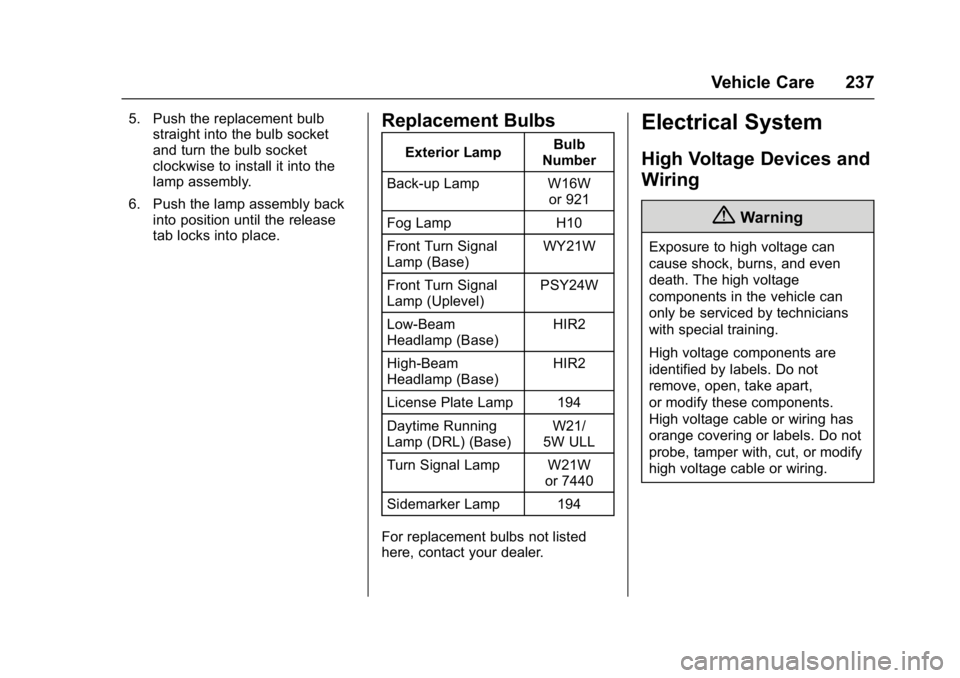
tab locks into place.Replacement Bulbs
Exterior Lamp Bulb
Number
Back-up Lamp W16W or 921
Fog Lamp H10
Front Turn Signal
Lamp (Base) WY21W
Front Turn Signal
Lamp (Uplevel) PSY24W
Low-Beam
Headlamp (Base) HIR2
High-Beam
Headlamp (Base) HIR2
License Plate Lamp 194
Daytime Running
Lamp (DRL) (Base) W21/
5W ULL
Turn Signal Lamp W21W or 7440
Sidemarker Lamp 194
For replacement bulbs not listed
here, contact your dealer.
Electrical System
High Voltage Devices and
Wiring
{Warning
Exposure to high voltage can
cause shock, burns, and even
death. The high voltage
components in the vehicle can
only be serviced by technicians
with special training.
High voltage components are
identified by labels. Do not
remove, open, take apart,
or modify these components.
High voltage cable or wiring has
orange covering or labels. Do not
probe, tamper with, cut, or modify
high voltage cable or wiring.
Page 239 of 344

Buick Regal Owner Manual (GMNA-Localizing-U.S./Canada/Mexico-
9804381) - 2017 - crc - 8/30/16
238 Vehicle Care
Electrical System
Overload
The vehicle has fuses and circuit
breakers to protect against an
electrical system overload.
When the current electrical load is
too heavy, the circuit breaker opens
and closes, protecting the circuit
until the current load returns to
normal or the problem is fixed. This
greatly reduces the chance of circuit
overload and fire caused by
electrical problems.
Fuses and circuit breakers protect
power devices in the vehicle.
Replace a bad fuse with a new one
of the identical size and rating.
If there is a problem on the road and
a fuse needs to be replaced, the
same amperage fuse can be
borrowed. Choose some feature of
the vehicle that is not needed to use
and replace it as soon as possible.
Headlamp Wiring
An electrical overload may cause
the lamps to go on and off, or in
some cases to remain off. Have theheadlamp wiring checked right away
if the lamps go on and off or
remain off.
Windshield Wipers
If the wiper motor overheats due to
heavy snow or ice, the windshield
wipers will stop until the motor cools
and will then restart.
Although the circuit is protected
from electrical overload, overload
due to heavy snow or ice may
cause wiper linkage damage.
Always clear ice and heavy snow
from the windshield before using the
windshield wipers.
If the overload is caused by an
electrical problem and not snow or
ice, be sure to get it fixed.
Fuses and Circuit
Breakers
The wiring circuits in the vehicle are
protected from short circuits by a
combination of fuses and circuit
breakers. This greatly reduces the
chance of damage caused by
electrical problems.
To check a fuse, look at the
silver-colored band inside the fuse.
If the band is broken or melted,
replace the fuse. Be sure to replace
a bad fuse with a new one of the
identical size and rating.
Fuses of the same amperage can
be temporarily borrowed from
another fuse location, if a fuse goes
out. Replace the fuse as soon as
possible.
To identify and check fuses, circuit
breakers, and relays, see
Engine
Compartment Fuse Block 0239 and
Instrument Panel Fuse Block 0241.
Page 240 of 344
Buick Regal Owner Manual (GMNA-Localizing-U.S./Canada/Mexico-
9804381) - 2017 - crc - 8/30/16
Vehicle Care 239
Engine Compartment
Fuse Block
To remove the fuse block cover,
press the three retaining clips on the
cover and lift it straight up.
Caution
Spilling liquid on any electrical
component on the vehicle may
damage it. Always keep the
covers on any electrical
component.
Engine Compartment Fuse Block
The vehicle may not be equipped
with all of the fuses, relays, and
features shown. Fuse Usage
1 Transmission control module
2 Engine control module
3 – Fuse Usage
4 –
5 Ignition/ Transmission control
module/Engine
control module
6 Windshield wiper
7 BPIM (eAssist only)
Page 242 of 344
Buick Regal Owner Manual (GMNA-Localizing-U.S./Canada/Mexico-
9804381) - 2017 - crc - 8/30/16
Vehicle Care 241
FuseUsage
54 Rear vision camera
55 Power windows/ Mirrors
56 Windshield washer
57 –
58 –
59 Secondary air induction
(eAssist only)
60 Heated mirrors
61 –
62 Canister vent solenoid
63 –
64 HVAC pump (eAssist only)
65 –
66 SAI check valve (eAssist only)
67 Fuel system control module
68 – Fuse
Usage
69 Battery sensor
70 Right low-beam headlamp/DRL
71 –
Relay Usage
1 A/C control
2 Starter
3 –
4 Front wiper (step 2)
5 Front wiper (step 1)
6 Right low-beam headlamp/DRL
7 Main relay
8 Auxiliary heater pump (eAssist only)
9 Cooling fan
10 Cooling fan 11 Transmission auxiliary pump
(eAssist only)
12 – Relay
Usage
13 Cooling fan
14 HID headlamps/Left low-beam
headlamp/DRL
15 Ignition
16 Secondary AIR pump (eAssist only)
17 Window/Mirror defogger
Instrument Panel Fuse
Block
Page 243 of 344

Buick Regal Owner Manual (GMNA-Localizing-U.S./Canada/Mexico-
9804381) - 2017 - crc - 8/30/16
242 Vehicle Care
The instrument panel fuse block is
located in the instrument panel, on
the driver side of the vehicle.
To access the fuses, open the
storage compartment. Press in on
the sides of the compartment to
release it from the instrument panel.
Pull the door toward you to release
it from the hinge.
Instrument Panel Fuse BlockItem Usage
1 Suspension control module/Universal
garage door
opener/ESC Item Usage
2 Body control module 1
3 Body control module 5
4 Radio
5 Radio displays/ Parking assist/
Infotainment/Module
tunnel control
6 Instrument panel power outlet
7 Console power outlet
8 Body control module 3
9 Body control module 4
10 Body control module 8
11 Front HVAC blower
12 Right front seat
13 Left front seat Item Usage
14 Diagnostic link connector
15 Airbag
16 Steering wheel controls
17 HVAC controller
18 Service fuse/ Logistics relay
19 Memory seats
20 Automatic occupant sensing
21 Instrument cluster
22 Discrete logic ignition switch/
Passive entry/
Passive start
23 Body control module 6
24 Body control module 2
25 OnStar
26 –
Page 257 of 344

Buick Regal Owner Manual (GMNA-Localizing-U.S./Canada/Mexico-
9804381) - 2017 - crc - 8/30/16
256 Vehicle Care
There are two minutes to match the
first tire/wheel position, and
five minutes overall to match all four
tire/wheel positions. If it takes
longer, the matching process stops
and must be restarted.
The TPMS sensor matching
process is:1. Set the parking brake.
2. Turn the ignition to ON/RUN with the engine off or place the
vehicle power mode in ON/
RUN/START.
See Ignition Positions (Key
Access) 0167 orIgnition
Positions (Keyless Access)
0 168.
3. Make sure the Tire Pressure info page option is turned on.
The info pages on the DIC can
be turned on and off through
the Settings menu.
See Driver Information Center
(DIC) (Base Level) 0119 or
Driver Information Center (DIC)
(Uplevel) 0122. 4. Use the DIC controls on the
right side of the steering wheel
to scroll to the Tire Pressure
screen under the DIC
info page.
5. Press and hold the
V(Set/
Reset) button located in the
center of the DIC controls.
The horn sounds twice to
signal the receiver is in relearn
mode and the TIRE
LEARNING ACTIVE message
displays on the DIC screen.
6. Start with the driver side front tire.
7. Place the relearn tool against the tire sidewall, near the valve
stem. Then press the button to
activate the TPMS sensor.
A horn chirp confirms that the
sensor identification code has
been matched to this tire and
wheel position.
8. Proceed to the passenger side front tire, and repeat the
procedure in Step 7. 9. Proceed to the passenger side
rear tire, and repeat the
procedure in Step 7.
10. Proceed to the driver side rear tire, and repeat the procedure
in Step 7. The horn sounds two
times to indicate the sensor
identification code has been
matched to the driver side rear
tire, and the TPMS sensor
matching process is no longer
active. The TIRE LEARNING
ACTIVE message on the DIC
display screen goes off.
11. Turn the ignition to LOCK/OFF or press STOP to turn the
ignition off.
12. Set all four tires to the recommended air pressure
level as indicated on the Tire
and Loading Information label.

