2017 BMW X3 ignition
[x] Cancel search: ignitionPage 15 of 265

Automatic headlamp con‐
trol 101
Adaptive Light Control 102
High-beam Assistant 102Instrument lighting 1047Steering column stalk, leftTurn signal 75High beams, head‐
light flasher 75High-beam Assistant 102Roadside parking lights 100Onboard computer 948Steering wheel buttons, leftCruise control on/off, inter‐
rupt 142Active Cruise Control on/off, in‐
terrupting 136Cruise control: store speedCruise control: resume speedActive Cruise Control: reduce
distanceActive Cruise Control: increase
distanceCruise control rocker switch9Instrument cluster 8410Steering wheel buttons, rightEntertainment source, see Own‐
er's Manual for Navigation, Enter‐
tainment and Communication 6Volume, see Owner's Manual for
Navigation, Entertainment and
Communication 6Voice activation 27Telephone, see Owner's Manual
for Navigation, Entertainment and
Communication 6Thumbwheel for selection lists 9311Steering column stalk, rightWiper 75Rain sensor 76Clean the windshields and head‐
lamps 77Rear window wiper 7712Start/stop the engine and switch
the ignition on/off 69Auto Start/Stop function 7013Horn, total area14Steering wheel heating 6315Adjust the steering wheel 63Seite 15CockpitAt a glance15
Online Edition for Part no. 01 40 2 969 976 - II/16
Page 18 of 265
iDriveVehicle features and options
This chapter describes all standard, country-
specific and optional features offered with the
series. It also describes features that are not
necessarily available in your car, e. g., due to
the selected options or country versions. This
also applies to safety-related functions and
systems. The respectively applicable country
provisions must be observed when using the
respective features and systems.
The concept
The iDrive combines the functions of many
switches. Thus, these functions can be oper‐
ated from a central location.
WARNING
Operating the integrated information
systems and communication devices while
driving can distract from traffic. It is possible to lose control of the vehicle. There is risk of an
accident. Only use the systems or devices
when the traffic situation allows. If necessary,
stop and use the systems and devices while
the vehicle is stationary.◀Overview of control elements
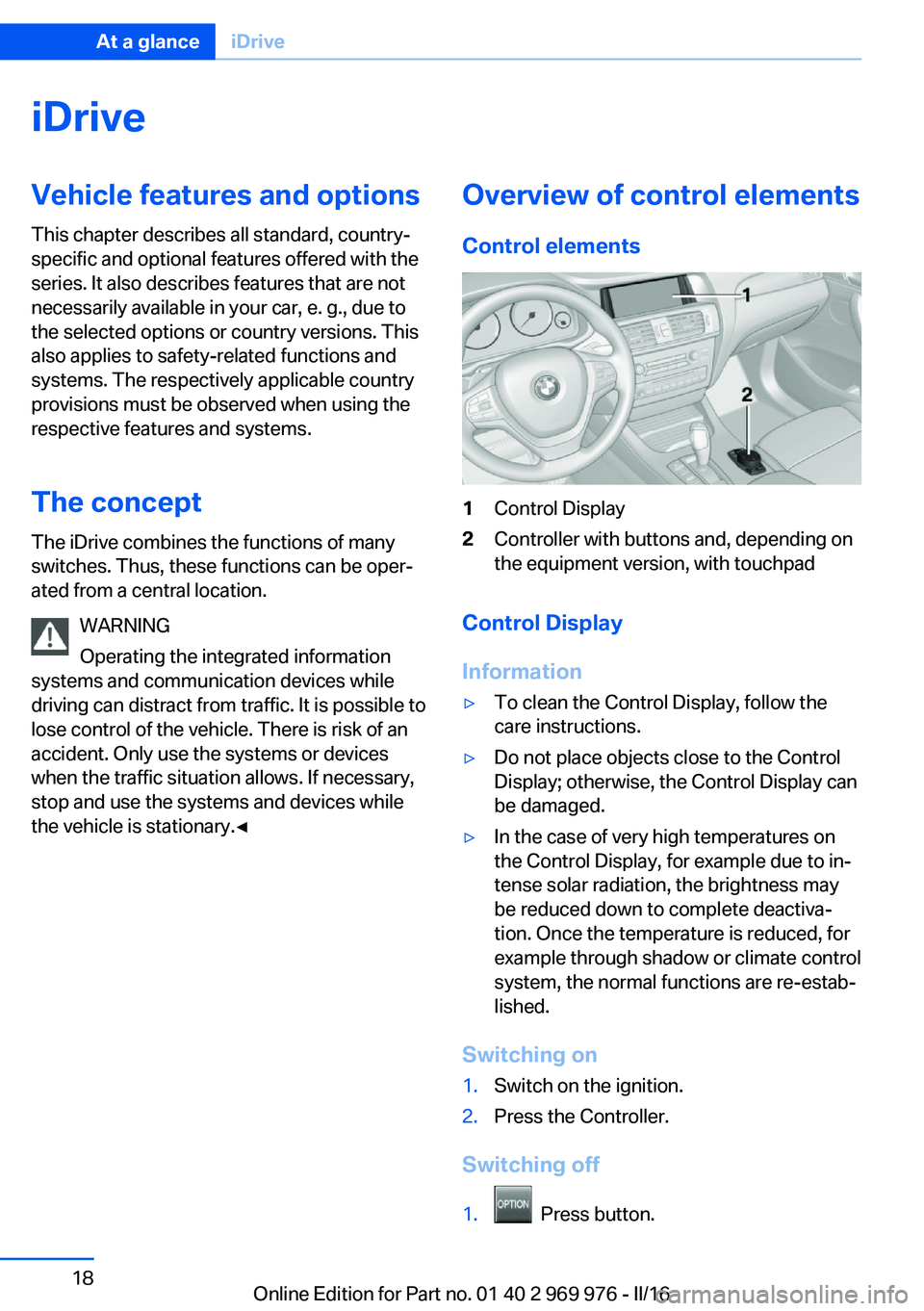
Control elements1Control Display2Controller with buttons and, depending on
the equipment version, with touchpad
Control Display
Information
▷To clean the Control Display, follow the
care instructions.▷Do not place objects close to the Control
Display; otherwise, the Control Display can
be damaged.▷In the case of very high temperatures on
the Control Display, for example due to in‐
tense solar radiation, the brightness may
be reduced down to complete deactiva‐
tion. Once the temperature is reduced, for
example through shadow or climate control
system, the normal functions are re-estab‐
lished.
Switching on
1.Switch on the ignition.2.Press the Controller.
Switching off
1. Press button.
Seite 18At a glanceiDrive18
Online Edition for Part no. 01 40 2 969 976 - II/16
Page 25 of 265

Deleting the button assignments
1.Press buttons 1 and 8 simultaneously for
approx. 5 seconds.2."OK"
Deleting personal in the
vehicle
The concept
Depending on the usage, the vehicle saves
personal data, such as stored radio stations.
These personal data can be permanently de‐
leted through iDrive.
General information
Depending on the equipment package, the fol‐
lowing data can be deleted:
▷Personal Profile settings.▷Stored radio stations.▷Stored Favorites buttons.▷Travel and onboard computer information.▷Music collection.▷Navigation, for example stored destina‐
tions.▷Phone book.▷Online data, for example Favorites, cook‐
ies.▷Voice notes.▷Login accounts.▷RemoteApp smartphone tethering.Altogether, the deletion of the data can take up
to 30 minutes.
Functional requirement Data can only be deleted while stationary.
Deleting data Heed and follow the instructions on the Con‐
trol Display.1.Switch on the ignition.2."Settings"3.Open "Options".4."Delete personal data"5."Continue"6."OK"
Entering letters and numbers
General information
On the Control Display:
1.Turn the Controller: select letters or num‐
bers.2.Select additional letters or numbers if
needed.3."OK": confirm the entry.SymbolFunction Press the Controller: delete the let‐
ter or number. Press the Controller for an extended
period: delete all letters or numbers.
Switching between cases, letters and
numbers
Depending on the menu, you can switch be‐
tween entering upper and lower case, letters
and numbers:
Seite 25iDriveAt a glance25
Online Edition for Part no. 01 40 2 969 976 - II/16
Page 44 of 265

Unlocking
Grasp the door handle on the driver's or front
passenger door completely, arrow.
This corresponds with pressing the button
on the remote control.
Locking
Touch the surface on the door handle of the
driver's or front passenger door, arrow, with
your finger for approx. 1 second without grasp‐
ing the door handle.
This corresponds with pressing the button
on the remote control.
To save battery power, ensure that the ignition
and all power consumers are deactivated be‐
fore locking the vehicle.
Convenient closing WARNING
With convenient closing, body parts can
be jammed. There is a risk of injury. Make sure
that the area of movement of the doors is clear
during convenient closing.◀
Touch the surface on the door handle of the
driver's or front passenger door, arrow, with
your finger and hold it there without grasping
the door handle.
This corresponds with pressing and holding
the button
on the remote control.
In addition to locking, the windows and the
glass sunroof close and the exterior mirrors
fold in.
Unlocking the tailgate separately
Press button on tailgate's exterior.
This corresponds with pressing the button
on the remote control.
The situation of the doors does not change.
Take the remote control with you and do not
leave it in the cargo area; otherwise, the re‐
mote control is locked inside the vehicle when
the tailgate is closed.
CAUTION
The tailgate swings back and up when it
opens. There is a risk of property damage.
Make sure that the area of movement of the
tailgate is clear during opening and closing.◀
Opening and closing the tailgate with
no-touch activation
General information The tailgate can be opened with no-touch acti‐
vation using the remote control you are carry‐
ing. With automatic tailgate operation, it can also be closed with no-touch activation. Two
sensors detect a forward-directed foot motion
Seite 44ControlsOpening and closing44
Online Edition for Part no. 01 40 2 969 976 - II/16
Page 48 of 265

Indicator lamp on the interior mirror▷The indicator lamp flashes briefly every
2 seconds:
The alarm system is switched on.▷Indicator lamp flashes for approx. 10 sec‐
onds, then it flashes briefly every 2 sec‐
onds:
Interior motion sensor and tilt alarm sensor
are not active, as doors, hood, or tailgate
are not correctly closed. Correctly closed
access points are secured.
When the still open access points are
closed, interior motion sensor and tilt alarm
sensor will be switched on.▷The indicator lamp goes out after unlock‐
ing:
The vehicle has not been tampered with.▷The indicator lamp flashes after unlocking
until the engine ignition is switched on, but
no longer than approx. 5 minutes:
An alarm has been triggered.
Tilt alarm sensor The tilt of the vehicle is monitored.
The alarm system responds in situations such
as attempts to steal a wheel or when the car is
towed.
Interior motion sensor The windows and glass sunroof must be
closed for the system to function properly.
Avoiding unintentional alarms
The tilt alarm sensor and interior motion sen‐
sor can be switched off together, such as in
the following situations:▷In automatic car washes.▷In duplex garages.▷During transport on trains carrying vehi‐
cles, at sea or on a trailer.▷With animals in the vehicle.
Switching off the tilt alarm sensor and
interior motion sensor
Press the remote control button again
within 10 seconds as soon as the vehicle
is locked.
The indicator lamp lights up for approx. 2 sec‐
onds and then continues to flash.
The tilt alarm sensor and interior motion sen‐
sor are turned off until the vehicle is locked
again.
Switching off the alarm
▷Unlock vehicle with the remote control or
switch on the ignition, if needed through
emergency detection of remote control, re‐
fer to page 35.▷With Comfort Access: if you are carrying
the remote control on your person, grasp
the driver side or front passenger side door
handle completely.
Power windows
Information WARNING
Unattended children or animals can
cause the vehicle to move and endanger them‐
selves and traffic, e.g., due to the following ac‐
tions:
▷Pressing the Start/Stop button.Seite 48ControlsOpening and closing48
Online Edition for Part no. 01 40 2 969 976 - II/16
Page 60 of 265

The center head restraint cannot be removed.
Seat and mirror memory The conceptTwo driver's seat and exterior mirror positions
can be stored per profile and called up. Set‐
tings for the backrest width and lumbar sup‐
port are not stored in memory.
Information WARNING
Using the memory function while driving
can lead to unexpected movements of the
seat. Vehicle control could be lost. There is a
risk of an accident. Only retrieve the memory
function when the vehicle is stationary.◀
WARNING
There is risk of jamming when moving
the seats. There is a risk of injury or risk of
property damage. Make sure that the area of
movement of the seat is clear prior to any ad‐
justment.◀
Overview
Storing
1.Switch on the ignition.2.Set the desired position.3. Press button. The LED in the but‐
ton lights up.4.Press selected button 1 or 2 while the LED
is lit. The LED goes out.
Button was pressed inadvertently:
Press button again.
The LED goes out.
Calling up settings
General information
There are two ways to call up the memory
function:
▷Comfort function.▷Safety function.
Comfort function
1.Open the driver's door.2.If necessary, switch off the ignition.3.Briefly press the desired button 1 or 2.
The corresponding seat position is performed
automatically.
The procedure stops when a switch for adjust‐
ing the seat or one of the buttons is pressed.
Safety mode
1.Close the driver's door or switch on the ig‐
nition.2.Press and hold the desired button 1 or 2
until the adjustment procedure is com‐
pleted.
Calling up of a seat position
deactivated
After a brief period, calling up stored seat posi‐
tions is deactivated to save battery power.
To reactivate calling up of a seat position:
▷Open or close the door or tailgate.▷Press a button on the remote control.▷Press the Start/Stop button.Seite 60ControlsAdjusting60
Online Edition for Part no. 01 40 2 969 976 - II/16
Page 68 of 265

DrivingVehicle features and options
This chapter describes all standard, country-
specific and optional features offered with the
series. It also describes features that are not
necessarily available in your car, e. g., due to
the selected options or country versions. This
also applies to safety-related functions and
systems. The respectively applicable country
provisions must be observed when using the
respective features and systems.
Start/Stop button The concept Pressing the Start/Stop button
switches the ignition on or off
and starts the engine.
Steptronic transmission: the en‐
gine starts with the brake pedal
pressed when you press the Start/Stop button.
Ignition onSteptronic transmission: press the Start/Stop
button, and do not press on the brake pedal at
the same time.
All vehicle systems are ready for operation.
Most of the indicator and warning lights in the
instrument cluster light up for a varied length
of time.
To save battery power when the engine is off,
switch off the ignition and any unnecessary
electronic systems/power consumers.
Ignition off Steptronic transmission: press the Start/Stop
button again without stepping on the brake.
All indicator lights in the instrument cluster go
out.To save battery power when the engine is off,
switch off the ignition and any unnecessary
electronic systems/power consumers.
Information
When switching off the ignition, the selector
lever position P is selected automatically if the
selector lever position D or R is selected.
The ignition is switched off automatically in the
following situations while the vehicle is station‐
ary and the engine is off:▷When locking the vehicle, and when the
low beams are activated.▷Shortly before the battery is discharged
completely, so that the engine can still be
started.▷When opening or closing the driver door, if
the driver's safety belt is unbuckled and
the low beams are turned off.▷While the driver's safety belt is unbuckled
with driver's door open and low beams off.
The low beams switch to parking lights after
approx. 15 minutes of no use.
Radio ready state
Activate radio-ready state: when the engine is
running: press the Start/Stop button.
Some electronic systems/power consumers
remain ready for operation.
The radio-ready state is switched off automati‐
cally in the following situations:
▷After approx. 8 minutes.▷When the vehicle is locked using the cen‐
tral locking system.▷Shortly before the battery is discharged
completely, so that the engine can still be
started.Seite 68ControlsDriving68
Online Edition for Part no. 01 40 2 969 976 - II/16
Page 69 of 265

The radio-ready state remains active if, for ex‐
ample, the ignition is automatically switched
off for the following reasons:▷Opening or closing the driver's door.▷Unfastening of the driver's safety belt.▷When automatically switching from low
beams to parking lights.
If the engine is switched off and the ignition is
switched on, the system automatically
switches to the radio-ready state if the lights
are turned off or, if correspondingly equipped,
the daytime running lights are activated.
Starting the engine
Information DANGER
If the exhaust pipe is blocked or ventila‐
tion is insufficient, harmful exhaust gases can
enter into the vehicle. The exhaust gases con‐
tain carbon monoxide, an odorless and color‐
less but highly toxic gas. In enclosed areas, ex‐
haust gases can also accumulate outside of
the vehicle. There is danger to life. Keep the
exhaust pipe free and ensure sufficient ventila‐
tion.◀
WARNING
An unsecured vehicle can begin to move
and possibly roll away. There is risk of an acci‐
dent. Before exiting, secure the vehicle against
rolling.
In order to ensure that the vehicle is secured
against rolling away, observe the following:
▷Set the parking brake.▷On uphill grades or on a downhill slope,
turn the front wheels in the direction of the
curb.▷On uphill grades or on a downhill slope,
also secure the vehicle, e.g., with a wheel
chock.◀ATTENTION
In the case of repeated starting attempts
or repeated starting in quick succession, the
fuel is not burned or is inadequately burned.
The catalytic converter can overheat. There is
a risk of damage to property. Avoid repeated
starting in quick succession.◀
Diesel engine
If the engine is cold and temperatures are be‐
low approx. 32 ℉/0 ℃, the start process may
be delayed somewhat due to automatic pre‐
heating.
A Check Control message is displayed.
Steptronic transmission
Starting the engine1.Depress the brake pedal.2.Press the Start/Stop button.
The ignition is activated automatically for a
certain time and is stopped as soon as the en‐
gine starts.
Engine stop
Information WARNING
Unattended children or animals can
cause the vehicle to move and endanger them‐
selves and traffic, e.g., due to the following ac‐
tions:
▷Pressing the Start/Stop button.▷Releasing the parking brake.▷Opening and closing the doors or win‐
dows.▷Engaging selector lever position N.▷Using vehicle equipment.Seite 69DrivingControls69
Online Edition for Part no. 01 40 2 969 976 - II/16