2017 BMW 6 SERIES GRAN COUPE roof
[x] Cancel search: roofPage 17 of 261
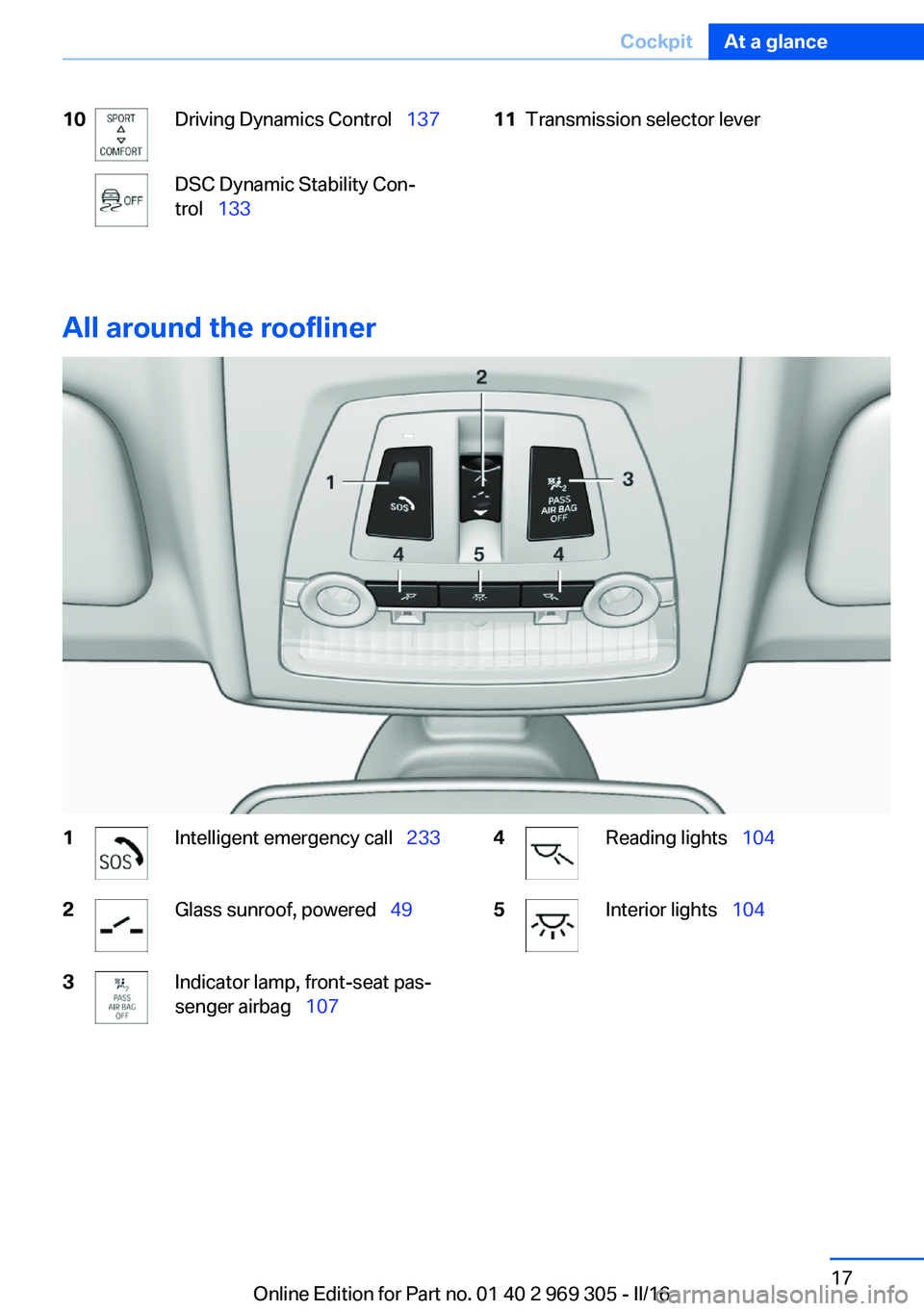
10Driving Dynamics Control 137DSC Dynamic Stability Con‐
trol 13311Transmission selector lever
All around the roofliner
1Intelligent emergency call 2332Glass sunroof, powered 493Indicator lamp, front-seat pas‐
senger airbag 1074Reading lights 1045Interior lights 104Seite 17CockpitAt a glance17
Online Edition for Part no. 01 40 2 969 305 - II/16
Page 28 of 261

Information on Emergency
Requests
Do not use the voice activation system to ini‐
tiate an Emergency Request. In stressful situa‐
tions, the voice and vocal pitch can change.
This can unnecessarily delay the establish‐
ment of a phone connection.
Instead, use the SOS button, refer to
page 233, close to the interior mirror.
Environmental conditions▷Say the commands, numbers, and letters
smoothly and with normal volume, empha‐
sis, and speed.▷Always say commands in the language of
the voice activation system.▷Keep the doors, windows, and glass sun‐
roof closed to prevent noise interference.▷Avoid making other noise in the vehicle
while speaking.Seite 28At a glanceVoice activation system28
Online Edition for Part no. 01 40 2 969 305 - II/16
Page 38 of 261

Using the remote control
Information WARNING
People or animals in the vehicle can lock
the doors from the inside and lock themselves
in. The vehicle can then not be opened from
the outside. There is a risk of injury. Take the
remote control along so that the vehicle can be
opened from the outside.◀
Unlocking Press button on the remote control.
Depending on the settings, refer to page 44,
the following access points are unlocked.▷Driver's door and fuel filler flap.▷All doors, tailgate, and fuel filler flap.
In addition, the following functions are exe‐
cuted:
▷The interior lights are switched on, when it
is dark outside, the courtesy lamps are also
switched on. This function is not available,
if the interior lamps were switched off man‐
ually.▷The welcome lamps are switched on, if this
function was activated.▷With anti-theft protection: Anti-theft pro‐
tection is switched off.▷The alarm system, refer to page 45, is
switched off.
Convenient opening
Press and hold this button on the re‐
mote control after unlocking.
The windows are opened, the glass sunroof is
tilted and the sliding visor moves back, as long
as the button on the remote control is pressed.
Locking
WARNING
Unlocking from the inside is only possi‐
ble with special knowledge.
If people must spend a longer time in the vehi‐
cle while it is very hot or cold outside, there is a
risk of injuries or danger to life. Do not lock the
vehicle from the outside when there are people
in it.◀
The driver's door must be closed. Press button on the remote control.
All doors, the tailgate, and the fuel filler flap are
being locked.
With anti-theft protection:
Anti-theft protection is switched on. It pre‐
vents the doors from being unlocked using the
lock buttons or the door openers.
The alarm system, refer to page 45, is
switched on.
Switching on interior lights and
courtesy lights
Press button on the remote control with
the vehicle locked.
The courtesy lamps are only switched on when
it is dark outside. This function is not available,
if the interior lamps were switched off man‐
ually.
If the button is pressed again within 10 sec‐
onds after vehicle was locked, the interior mo‐
tion sensor and tilt alarm sensor of the anti-
theft warning system, refer to page 46, are
turned off. After locking, wait 10 seconds be‐
fore pressing the button again.
Panic mode
You can trigger the alarm system if you find
yourself in a dangerous situation.
Press button on the remote control for
at least 3 seconds.Seite 38ControlsOpening and closing38
Online Edition for Part no. 01 40 2 969 305 - II/16
Page 43 of 261

Unlocking
Grasp the handle of a vehicle door completely,
arrow.
This corresponds with pressing the button
on the remote control.
Locking
Touch the surface on the handle of a vehicle
door, arrow, with your finger for approx. 1 sec‐
ond without grasping the door handle.
This corresponds with pressing the button
on the remote control.
To save battery power, ensure that the ignition
and all power consumers are deactivated be‐
fore locking the vehicle.
Convenient closing WARNING
With convenient closing, body parts can
be jammed. There is a risk of injury. Make sure
that the area of movement of the doors is clear
during convenient closing.◀
Touch the surface on the handle of a vehicle
door, arrow, with your finger and hold it there
without grasping the door handle.
This corresponds with pressing and holding
the button
on the remote control.
In addition to locking, the windows and the
glass sunroof close and the exterior mirrors
fold in.
Separately unlocking the tailgate Press on the top half of the BMW label.
This corresponds with pressing the button
on the remote control.
The situation of the doors does not change.
Malfunction
Remote control detection by the vehicle can
among others be malfunctioning under the fol‐
lowing circumstances:
▷The battery of the remote control is dis‐
charged. Replace the battery, refer to
page 35.▷Interference of the radio connection from
transmission towers or other equipment
with high transmit power.▷Shielding of the remote control due to
metal objects.▷Interference of the radio connection from
mobile phones or other electronic devices
in direct proximity.
Do not transport the remote control together
with metal objects or electronic devices.
Seite 43Opening and closingControls43
Online Edition for Part no. 01 40 2 969 305 - II/16
Page 46 of 261

When the still open access points are
closed, interior motion sensor and tilt alarm
sensor will be switched on.▷The indicator lamp goes out after unlock‐
ing:
The vehicle has not been tampered with.▷The indicator lamp flashes after unlocking
until the engine ignition is switched on, but
no longer than approx. 5 minutes:
An alarm has been triggered.
Tilt alarm sensor The tilt of the vehicle is monitored.
The alarm system responds in situations such
as attempts to steal a wheel or when the car is
towed.
Interior motion sensor The windows and glass sunroof must be
closed for the system to function properly.
Avoiding unintentional alarms The tilt alarm sensor and interior motion sen‐
sor can be switched off together, such as in
the following situations:
▷In automatic car washes.▷In duplex garages.▷During transport on trains carrying vehi‐
cles, at sea or on a trailer.▷With animals in the vehicle.
Switching off the tilt alarm sensor and
interior motion sensor
Press the remote control button again
within 10 seconds as soon as the vehicle
is locked.
The indicator lamp lights up for approx. 2 sec‐
onds and then continues to flash.
The tilt alarm sensor and interior motion sen‐
sor are turned off until the vehicle is locked
again.
Switching off the alarm▷Unlock vehicle with the remote control or
switch on the ignition, if needed through
emergency detection of remote control, re‐
fer to page 35.▷With Comfort Access: if you are carrying
the remote control on your person, grasp
the driver side or front passenger side door
handle completely.
Power windows
Information WARNING
Unattended children or animals can
cause the vehicle to move and endanger them‐
selves and traffic, e.g., due to the following ac‐
tions:
▷Pressing the Start/Stop button.▷Releasing the parking brake.▷Opening and closing the doors or win‐
dows.▷Engaging selector lever position N.▷Using vehicle equipment.
There is risk of accidents or injuries. Do not
leave children or animals unattended in the ve‐
hicle. Take the remote control with you when
exiting and lock the vehicle.◀
Overview
Power windows
Seite 46ControlsOpening and closing46
Online Edition for Part no. 01 40 2 969 305 - II/16
Page 49 of 261

Raising and lowering the roller
sunblinds together
Press and hold this button.
Glass sunroof, powered with tilt function
General information The glass sunroof and the sliding visor can be
operated together or separately, using the
same switch.
The glass sunroof is operational when the igni‐
tion is switched on.
Information
WARNING
Body parts can be jammed when operat‐
ing the glass sunroof. There is a risk of injury.
Make sure that the area of movement of the
glass sunroof is clear during opening and clos‐
ing.◀
WARNING
Unattended children or animals can
cause the vehicle to move and endanger them‐
selves and traffic, e.g., due to the following ac‐
tions:
▷Pressing the Start/Stop button.▷Releasing the parking brake.▷Opening and closing the doors or win‐
dows.▷Engaging selector lever position N.▷Using vehicle equipment.
There is risk of accidents or injuries. Do not
leave children or animals unattended in the ve‐
hicle. Take the remote control with you when
exiting and lock the vehicle.◀
Tilting up and closing glass sunroof
▷Push switch briefly upward.
The closed glass sunroof is
tilted and the sliding visor
opens slightly.▷Briefly press out the switch
twice in succession toward
the rear past the resistance
point.
Closed glass sunroof is tilted
and the sliding visor moves
all the way back.▷To close the switch, press upward briefly
or twice forward past the resistance point.
Additional options:
▷Convenient opening, refer to page 38, via
the remote control.▷Closing by means of Comfort Access, refer
to page 42.
Opening/closing the sliding visor
▷Press the switch in the de‐
sired direction to the resist‐
ance point and hold it there.
The sliding visor moves, as
long as the switch is held
down.▷Press the switch in the desired direction
past the resistance point.
The sliding visor moves automatically.
Pressing the switch upward stops the motion.
Seite 49Opening and closingControls49
Online Edition for Part no. 01 40 2 969 305 - II/16
Page 50 of 261

Pinch protection systemIf the closing force exceeds a specific value as
a glass sunroof closes, the closing action is in‐
terrupted. The glass sunroof is tilted again.
WARNING
Body parts can be jammed when operat‐
ing the glass sunroof. There is a risk of injury.
Make sure that the area of movement of the
glass sunroof is clear during opening and clos‐
ing.◀
Closing without the pinch protection system
If there is an external danger or if, e. g., icing
prevents automatic closing, push the switch
forward past the resistance point and hold it.
The glass sunroof closes without jam protec‐
tion. Make sure that the closing area is clear.
Initializing after a power failure
After a power failure during the opening or
closing process, the glass sunroof can only be
operated to a limited extent.
Initializing the system
The system can be initialized when the vehicle
is stationary and the engine is running.
During the initialization, the glass sunroof
closes without jam protection.
WARNING
Body parts can be jammed when operat‐
ing the glass sunroof. There is a risk of injury.
Make sure that the area of movement of the
glass sunroof is clear during opening and clos‐
ing.◀
Press the switch up and hold it
until the initialization is com‐
plete:▷Initialization begins within
15 seconds and is com‐
pleted when the glass sun‐roof and sliding visor are
completely closed.▷The glass sunroof closes without jam pro‐
tection.Seite 50ControlsOpening and closing50
Online Edition for Part no. 01 40 2 969 305 - II/16
Page 53 of 261

Backrest widthChange the width of the back‐
rest using the side wings to ad‐
just the lateral support.
Shoulder support
Also supports the back in the shoulder area:
▷Results in a relaxed seating position.▷Reduces strain on the shoulder muscles.
Active seat
The concept Active adjustment of the seat cushion's con‐
tours reduces muscular tension and fatigue to
help prevent lower back pain.
Overview
Press button. The LED lights up.
Changing the seat position
Requirements▷Vehicle at a standstill.▷When the door is open, the seat is accessi‐
ble from the side on which the door is
open.
For safety reasons, the driver's seat cannot
be adjusted if only the door behind the
driver is open.
Controls
Press and hold this button until the seat has
moved to the desired position. Releasing the
button stops window/roof movement.
Front seat heating
Overview
Seat heating
Switching on Press button once for each tempera‐
ture level.
Seite 53AdjustingControls53
Online Edition for Part no. 01 40 2 969 305 - II/16