2017 BMW 6 SERIES GRAN COUPE run flat
[x] Cancel search: run flatPage 215 of 261

valve with the available connector on the
sealant container.
This prevents leftover sealant from escap‐
ing from the container.4.Wrap the empty sealant container in suita‐
ble material to avoid dirtying the cargo
area.5.Stow the Mobility System back in the vehi‐
cle.
Distributing the sealant
Immediately drive approx. 5 miles/10 km to en‐
sure that the sealant is evenly distributed in the
tire.
Do not exceed a speed of 50 mph/80 km/h.
If possible, do not drive at speeds less than
12 mph/20 km/h.
To correct the tire inflation pressure
1.Stop at a suitable location.2.Screw the connection hose of the com‐
pressor directly onto the tire valve stem.3.Insert the connector into the power socket
inside the vehicle.4.Correct the tire inflation pressure to
2.5 bar.▷Increase pressure: with the ignition
turned on or the engine running, switch
on the compressor.▷To reduce the pressure: press the but‐
ton on the compressor.
Continuing the trip
Do not exceed the maximum permissible
speed of 50 mph/80 km/h.
Reinitialize the Flat Tire Monitor.
Reinitialize the Tire Pressure Monitor.
Replace the nonworking tire and the sealant
container of the Mobility System as soon as
possible.
Snow chains
Fine-link snow chains The manufacturer of your vehicle recommends
use of fine-link snow chains. Certain types of
fine-link snow chains have been tested by the
manufacturer of the vehicle and recommended
as road-safe and suitable.
Information regarding suitable snow chains is
available from a dealer’s service center or an‐
other qualified service center or repair shop.
Use WARNING
With the mounting of snow chains on un‐
suitable tires, the snow chains can come into
contact with vehicle parts. There is a risk of ac‐
cidents or a risk of property damage. Only
mount snow chains on tires that are desig‐
nated by their manufacturer as suitable for the
use of snow chains.◀
Use only in pairs on the rear wheels, equipped
with the tires of the following size:▷225/55 R 17.▷245/45 R 18.
Follow the snow chain manufacturer's instruc‐
tions.
Make sure that the snow chains are always
sufficiently tight. Re-tighten as needed ac‐
cording to the snow chain manufacturer's in‐
structions.
Do not initialize the Flat Tire Monitor after
mounting snow chains, as doing so may result
in incorrect readings.
Do not initialize the Tire Pressure Monitor after
mounting snow chains, as doing so may result
in incorrect readings.
When driving with snow chains, briefly activate
Dynamic Traction Control if needed.
Seite 215Wheels and tiresMobility215
Online Edition for Part no. 01 40 2 969 305 - II/16
Page 231 of 261
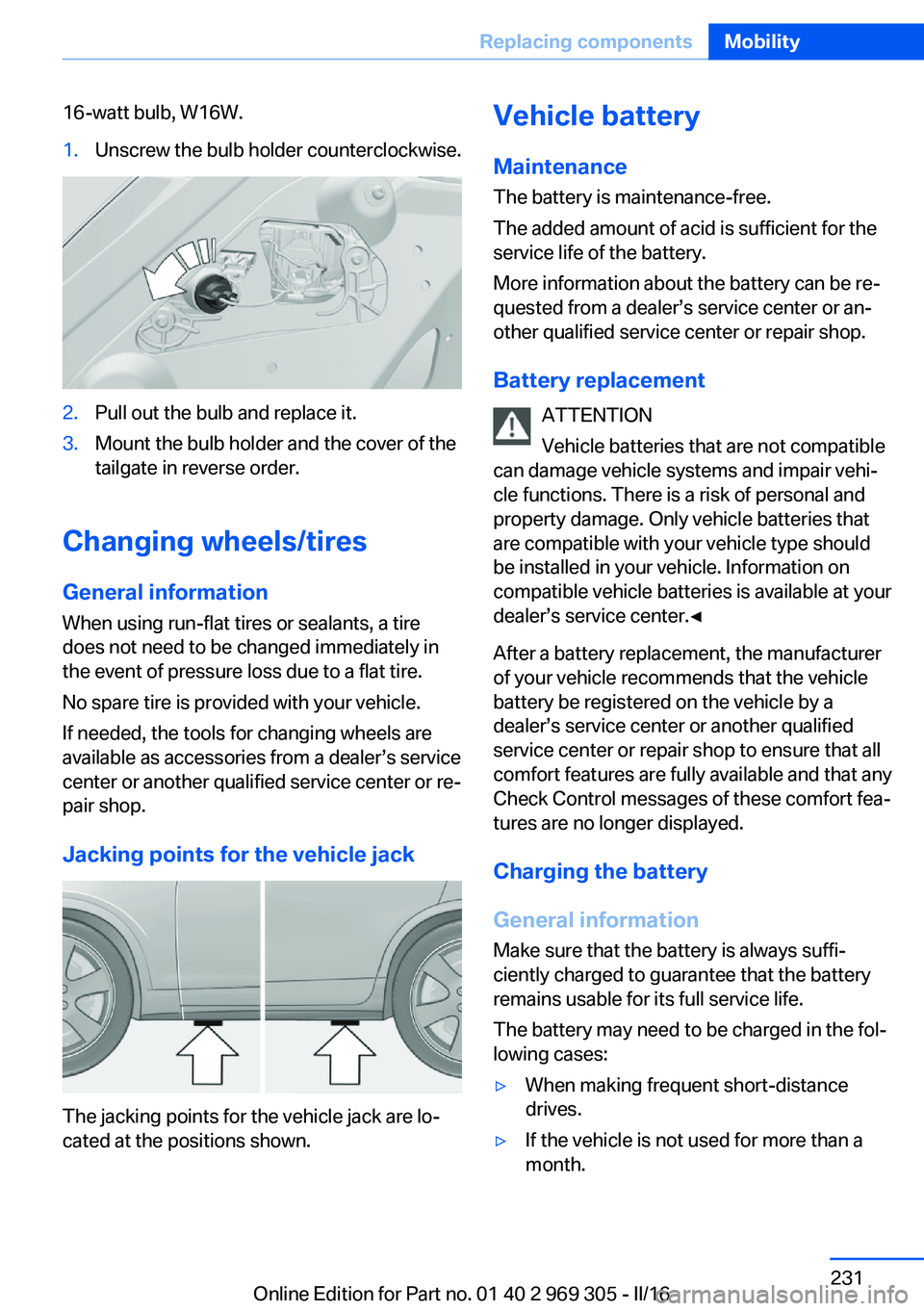
16-watt bulb, W16W.1.Unscrew the bulb holder counterclockwise.2.Pull out the bulb and replace it.3.Mount the bulb holder and the cover of the
tailgate in reverse order.
Changing wheels/tires
General information
When using run-flat tires or sealants, a tire
does not need to be changed immediately in
the event of pressure loss due to a flat tire.
No spare tire is provided with your vehicle.
If needed, the tools for changing wheels are
available as accessories from a dealer’s service
center or another qualified service center or re‐
pair shop.
Jacking points for the vehicle jack
The jacking points for the vehicle jack are lo‐
cated at the positions shown.
Vehicle battery
Maintenance
The battery is maintenance-free.
The added amount of acid is sufficient for the
service life of the battery.
More information about the battery can be re‐
quested from a dealer’s service center or an‐ other qualified service center or repair shop.
Battery replacement ATTENTION
Vehicle batteries that are not compatible
can damage vehicle systems and impair vehi‐
cle functions. There is a risk of personal and
property damage. Only vehicle batteries that
are compatible with your vehicle type should
be installed in your vehicle. Information on
compatible vehicle batteries is available at your
dealer’s service center.◀
After a battery replacement, the manufacturer
of your vehicle recommends that the vehicle
battery be registered on the vehicle by a
dealer’s service center or another qualified
service center or repair shop to ensure that all
comfort features are fully available and that any
Check Control messages of these comfort fea‐
tures are no longer displayed.
Charging the battery
General information
Make sure that the battery is always suffi‐
ciently charged to guarantee that the battery
remains usable for its full service life.
The battery may need to be charged in the fol‐
lowing cases:▷When making frequent short-distance
drives.▷If the vehicle is not used for more than a
month.Seite 231Replacing componentsMobility231
Online Edition for Part no. 01 40 2 969 305 - II/16
Page 252 of 261
COMFORT program, DrivingDynamics Control 139
Compressor 212
Condensation on win‐ dows 165
Condensation under the vehi‐ cle 187
Condition Based Service CBS 226
Configure driving mode 140
Confirmation signal 44
ConnectedDrive, see Owner's Manual for Navigation, En‐
tertainment and Communi‐
cation
ConnectedDrive Services
Container for washer fluid 76
Continued driving with a flat tire 110 , 113
Control Display 18
Control Display, settings 96
Controller 19
Control systems, driving sta‐ bility 133
Convenient opening with the remote control 38
Coolant 224
Coolant level 224
Coolant temperature 89
Cooling function 163
Cooling, maximum 163
Cooling system 224
Cornering light 102
Corrosion on brake discs 186
Cosmetic mirror 171
Courtesy lamps during un‐ locking 38
Courtesy lamps with the vehi‐ cle locked 38
Cruise control 147
Cruise control, active with Stop&Go function 141
Cruise control with distance control, see active cruise
control, ACC 141 Cruise control without dis‐
tance control, see cruise
control 147
Cruising range 90
Cup holder 179
Current fuel consumption 90
D
Damage, tires 210
Damping control, dy‐ namic 136
Data, technical 246
Date 90
Daytime running lights 102
Defrosting, see Windows, de‐ frosting 165
Dehumidifying, air 163
Deleting personal data 24
Deletion of personal data 24
Destination distance 95
Digital clock 90
Dimensions 246
Dimmable exterior mirrors 59
Dimmable interior mirror 60
Direction indicator, see Turn signals 73
Display, electronic, instru‐ ment cluster 81
Display in windshield 98
Display lighting, see Instru‐ ment lighting 104
Displays 82
Displays, cleaning 242
Disposal, coolant 225
Disposal, vehicle battery 232
Distance control, see PDC 150
Distance to destination 95
Divided screen view, split screen 23
Door lock 39
Door lock, see Remote con‐ trol 34
Doors, Automatic Soft Clos‐ ing 41 Downhill control 135
Drive mode 137
Drive-off assistant 133
Drive-off assistant, see DSC 133
Driver assistance, see Intelli‐ gent Safety 114
Driving Assistant, see Intelli‐ gent Safety 114
Driving Dynamics Con‐ trol 137
Driving instructions, break- in 184
Driving notes, general 184
Driving on racetracks 187
Driving stability control sys‐ tems 133
Driving tips 184
DSC Dynamic Stability Con‐ trol 133
DTC Dynamic Traction Con‐ trol 134
Dynamic Damping Con‐ trol 136
Dynamic Drive 136
Dynamic Stability Control DSC 133
Dynamic Traction Control DTC 134
E
ECO PRO 191
ECO PRO, bonus range 192
ECO PRO display 191
ECO PRO displays 83
ECO PRO driving mode 191
ECO PRO mode 191
ECO PRO Tip - driving in‐ struction 193
EfficientDynamics 193
Electronic displays, instru‐ ment cluster 81
Electronic oil measure‐ ment 220 Seite 252ReferenceEverything from A to Z252
Online Edition for Part no. 01 40 2 969 305 - II/16
Page 255 of 261

Lamp replacement, rear 230
Lane departure warning 126
Lane margin, warning 126
Language on Control Dis‐ play 97
Lashing eyes, securing cargo 189
LATCH child restraint fixing system 64
Launch Control 80
Leather, care 241
LED headlights, bulb replace‐ ment 229
LED light 229
LEDs, light-emitting di‐ odes 229
Length, vehicle 246
Letters and numbers, enter‐ ing 24
License plate lamp, bulb re‐ placement 230
Light 100
Light-alloy wheels, care 241
Light control 102
Light-emitting diodes, LEDs 229
Lighting 100
Lighting, speaker 104
Lights and bulbs 228
Light switch 100
Load 189
Loading 188
Lock, door 39
Locking/unlocking via door lock 39
Locking/unlocking with re‐ mote control 38
Locking, automatic 44
Locking, settings 44
Locking via tailgate 41
Lock, power window 47
Locks, doors, and win‐ dows 65
Low beams 100
Low beams, automatic, see High-beam Assistant 103 Lower back support 52
Lumbar support 52
M
Maintenance 226
Maintenance require‐ ments 226
Maintenance, service require‐ ments 91
Maintenance system, BMW 226
Make-up mirror 171
Malfunction displays, see Check Control 85
Manual air distribution 164
Manual air flow 164
Manual brake, see Parking brake 70
Manual mode, Steptronic transmission 78
Manual operation, door lock 39
Manual operation, exterior mirrors 59
Manual operation, Park Dis‐ tance Control PDC 151
Manual operation, rearview camera 153
Manual operation, Side View 156
Manual operation, Top View 157
Marking, run-flat tires 212
Massage seat, front 53
Master key, see Remote con‐ trol 34
Maximum cooling 163
Maximum speed, display 92
Maximum speed, winter tires 211
Measurement, units of 97
Medical kit 234
Memory for seat, mirrors, steering wheel 57
Menu, EfficientDynamics 193 Menu in instrument clus‐
ter 93
Menus, operating, iDrive 18
Menus, see iDrive operating concept 19
Messages, see Check Con‐ trol 85
Microfilter 165
Minimum tread, tires 209
Mirror 58
Mirror memory 57
Mobile communication devi‐ ces in the vehicle 185
Mobility System 212
Modifications, technical, see Own Safety 7
Moisture in headlight 229
Monitor, see Control Dis‐ play 18
Mounting of child restraint systems 63
Multifunctional instrument display 82
Multifunction steering wheel, buttons 14
N
Navigation, see Owner's Manual for Navigation, En‐
tertainment and Communi‐
cation
Neck restraints, front, see Head restraints 56
Neutral cleaner, see wheel cleaner 241
New wheels and tires 210
Night Vision 123
Night Vision device, see Night Vision 123
O OBD Onboard Diagnosis 227
OBD, see OBD Onboard Di‐ agnosis 227 Seite 255Everything from A to ZReference255
Online Edition for Part no. 01 40 2 969 305 - II/16
Page 257 of 261

RES button, see ActiveCruise Control, ACC 141
RES button, see Cruise con‐ trol 147
Reserve warning, see Range 90
Reset, Tire Pressure Monitor TPM 109
Residual heat, automatic cli‐ mate control 164
Retreaded tires 211
Reversing lamp, bulb replace‐ ment 230
Roadside parking lights 100
Roller sunblinds 48
Roll stabilization, see Adap‐ tive Drive 136
Roll stabilization, see Dy‐ namic Drive 136
RON recommended fuel grade 201
RSC Run Flat System Com‐ ponent, see Run-flat
tires 212
Rubber components, care 241
Run-flat tires 212
S Safe braking 186
Safety belt reminder for driv‐ er's seat and front passen‐
ger seat 56
Safety belts 55
Safety belts, care 242
Safety Package, see Active Protection 130
Safety switch, windows 47
Safety systems, airbags 105
Saving fuel 190
Screen, see Control Dis‐ play 18
Screwdriver, see Onboard ve‐ hicle tool kit 228
Sealant 212 Seat belts, see Safety
belts 55
Seat heating, front 53
Seat heating, rear 54
Seating position for chil‐ dren 62
Seat, mirror, and steering wheel memory 57
Seats 51
Seat ventilation, front 54
Securing cargo 189
Selection list in instrument cluster 93
Selector lever, Steptronic transmission 77
Sensors, care 242
Service and warranty 8
Service requirements, Condi‐ tion Based Service
CBS 226
Service requirements, dis‐ play 91
Service, Roadside Assis‐ tance 234
Services, ConnectedDrive
SET button, see Active Cruise Control, ACC 141
SET button, see Cruise con‐ trol 147
Settings, locking/unlock‐ ing 44
Settings on Control Dis‐ play 96
Settings, storing for seat, mir‐ rors, steering wheel 57
Shift paddles on the steering wheel 79
Shift point indicator 84
Shoulder support 53
Side airbags 105
Side View 155
Signaling, horn 14
Signals when unlocking 44
Sitting safely 51
Size 246
Ski bag 175 Smallest turning radius 246
Smoker's package 171
Snow chains 215
Socket 172
Socket, OBD Onboard Diag‐ nostics 227
SOS button 233
Spare fuse 232
Speaker lighting 104
Speed, average 95
Speed limit detection 92
Speed limit detection, com‐ puter 95
Speed limits, display 92
Speed warning 96
Split screen 23
SPORT+ - program, Dynamic Driving Control 139
Sport displays, torque dis‐ play, performance dis‐
play 96
SPORT program, driving dy‐ namics 139
Sport program, transmis‐ sion 78
Stability control systems 133
Standard equipment 7
Start/stop, automatic func‐ tion 68
Start/Stop button 66
Start function during malfunc‐ tion 35
Starting the engine 67
Status control display, tires 109
Status of Owner's Manual 7
Steering, Integral Active Steering 137
Steering wheel, adjusting 60
Steering wheel heating 60
Steering wheel memory 57
Steptronic Sport transmis‐ sion, see Steptronic trans‐
mission 77
Steptronic transmission 77
Stopping the engine 67 Seite 257Everything from A to ZReference257
Online Edition for Part no. 01 40 2 969 305 - II/16
Page 258 of 261

Storage compartments 177
Storage compartments, loca‐ tions 177
Storage, tires 211
Storing the vehicle 242
Suitable engine oil types 222
Summer tires, tread 209
Sun visor 171
Supplementary text mes‐ sage 88
Surround View 152
Suspension settings 137
Switch for Dynamic Driving Control 137
Switch-on times, parked-car ventilation 168
Switch, see Cockpit 14
Symbols 6
Symbols in the status field 22
SYNC program, automatic cli‐ mate control 164
T Tachometer 89
Tail and brake lights 230
Tailgate closing 41
Tailgate, emergency unlock‐ ing 42
Tailgate, hotel function 42
Tailgate opening 41
Tailgate via remote con‐ trol 39
Tail lamps 230
Tail lamps, bulb replace‐ ment 230
Technical changes, see Own Safety 7
Technical data 246
Telephone, see Owner's Manual for Navigation, En‐
tertainment and Communi‐
cation
Temperature, automatic cli‐ mate control 163 Temperature display for ex‐
ternal temperature 89
Temperature, engine oil 89
Terminal, starting aid 235
Text message, supplemen‐ tary 88
Theft alarm system, see Alarm system 45
Thermal camera, see Night Vision 123
Thigh support 52
Through-loading system 174
Tilt alarm sensor 46
Tilt glass roof 49
Tilt, seats 51
Time of arrival 95
Tire damage 210
Tire identification marks 208
Tire inflation pressure 202
Tire inflation pressure moni‐ tor, see FTM 112
Tire Pressure Monitor TPM 108
Tire repair kit, see Mobility System 212
Tires, changing 210
Tire sealant, see Mobility System 212
Tires, everything on wheels and tires 202
Tires, run-flat tires 212
Tire tread 209
Tone, see Owner's Manual for Navigation, Entertainment
and Communication
Tool 228
Top View 156
Total vehicle weight 247
Touchpad 21
Towing 236
Tow-starting 236
TPM Tire Pressure Moni‐ tor 108
Traction control 134
TRACTION, driving dynam‐ ics 134 TRACTION program, driving
dynamics 138
Transmission lock, electronic unlocking 79
Transmission, see Steptronic transmission 77
Transporting children safely 62
Tread, tires 209
Triple turn signal activa‐ tion 73
Trip odometer 89
Trip onboard computer 95
Trip recorder, see Trip odom‐ eter 89
Turning circle 246
Turning circle lines, rearview camera 154
Turn signals, operation 73
Turn signals, rear, bulb re‐ placement 230
U
Unintentional alarm 46
Units of measurement 97
Universal remote control 169
Unlock button, Steptronic transmission 77
Unlocking/locking via door lock 39
Unlocking/locking with re‐ mote control 38
Unlocking, settings 44
Updates made after the edito‐ rial deadline 7
Upholstery care 241
USB interface, general infor‐ mation 173
USB port, see USB inter‐ face 173
V Vanity mirror 171 Seite 258ReferenceEverything from A to Z258
Online Edition for Part no. 01 40 2 969 305 - II/16