2017 AUDI TT ROADSTER light
[x] Cancel search: lightPage 131 of 314
CD
CD
.... N
" N .... 0 r--. V, co
Audi connect services
Basic functions
Applies to: vehicles with Audi connect
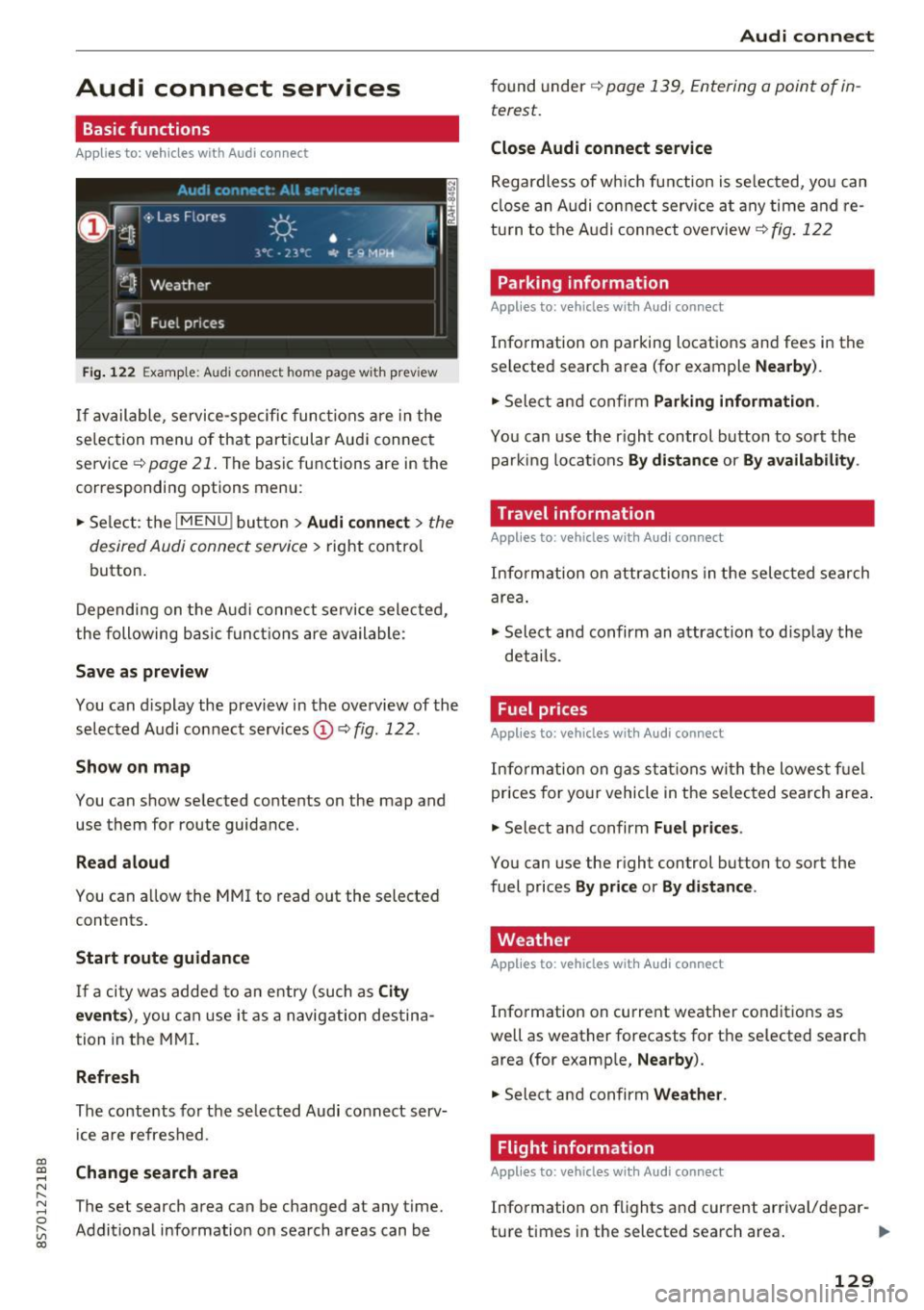
Fig. 12 2 Example: A udi co nn ect home page w ith prev iew
If available, service-specific func tions are in the
se lec tion menu o f th at particular Aud i connec t
service ~
page 21. The basic functions are in the
correspondi ng options menu:
.,. Se lect: the
I MENU ! button> Audi connect > the
desired Audi connec t service>
right contro l
button.
D epending on the A ud i connect se rvice sele cte d,
the following basic fun ctions are ava ilable:
Save as preview
You can d isplay the preview in the overview of the
se lected A udi connect services ©~
fig. 122 .
Show on map
You can show se lected contents on the map and
use them for route guidance.
Read aloud
You can a llow the MM I to read out the selected
contents .
Start route guidance
If a city was added to a n entry (such as City
event s),
you can use i t as a navig ation destina
tion in the M MI.
Refresh
The conte nts for the se lected Audi co nnect serv
i ce are refreshed .
Change search area
The set search area can be changed at any time.
Addit io nal information on search areas can be
Audi connect
found under ~ page 139, Entering a point of in
terest .
Close Audi connect service
Regardless of wh ich func tion is se lec ted, yo u can
cl ose an A udi con nect service a t any time and re
tu rn to the A udi conne ct overview
~ fig . 122
Parking information
Applies to: vehicles with Audi connect
Info rmation on parking locations and fees in the
se lected search area (for example
Nearby ).
.,. Sele ct and confirm Parking information .
You can use the right control button to sort the
parki ng locat ions
By distance or By availability .
Travel information
Applies to: vehicles with Audi connect
Info rm ation on attr actions in the selec ted search
are a.
.,. Select and confirm an attraction to disp lay the
details .
Fuel prices
Applies to: vehicles with Audi connect
Inform ation on gas s ta tions wi th the lowes t fu el
prices for yo ur vehicle in the selec ted sea rch area .
.,. Select and confirm
Fuel price s.
You can use the right control button to sort the
fuel prices
By pr ice or By d istance .
Weather
Applies to: vehicles with Audi connect
Info rmation on current weather conditions as
well as weather forecasts for the selected search area (for examp le,
Nearby ).
.,. Sele ct and confirm Weather .
Flight information
Applies to: vehicles with Audi connect
Info rmation on f lights and cur rent arrival/depar-
ture times in the selected search area . ..,.
129
Page 132 of 314
Audi connect
"' Se lect and confirm F light informati on.
You can se lect the desired information us ing the
right contro l button.
City events
A pplies to: ve hicles w ith Aud i co nn ect
Information on events in various categories in
the desired search area .
"' Se lect and confirm
City eve nts> left control
button
> category .
Online news
App lies to: ve hicles w ith Aud i co nn ect
You can check the current headlines of your fa
vorite pub lications in the MMI.
Requirement: your myAudi account must be sub
scr ibed to newsfeeds and yo ur vehicle must be
connected to myAudi
q page 128.
"' Se lect: Online new s > desired newsfeed > a
headline.
(D Tips
If you have not subscr ibed to any persona l
newsfeeds in yo ur myAud i account, pre-con
fig ured newsfeeds will be displayed.
Twitter
A ppl ies to: ve hicles w ith Aud i co nn ect
You can access the most important functions in
your Twitter account through your MMI.
Requirement:
You must have connected your myAudi account
with Twitter. Additional information on this can be found in the
Aud i conn ect ( myAud i) operating
manual under
m y.audiu sa. com .
You must have connected your vehicle with
myAudi
q page 128.
"'Se lect Twitter > left contro l butto n > desired
function
(for example, T re nd s).
The fo llowing categories can be selected in the
Tw itter menu :
130
-My tw eet s: News Feed and the Tweets you have
posted are listed .
-Home : the Tweets for everyone you fo llow are
disp layed .
-Trend s: top ics on Twitter that are c urrent ly
popular with in a country .
D ifferent functions are ava ilable depend ing on
t h e Twitter category yo u have selected :
-New tw eet: you ca n post a new tweet using
pre-made temp lates or us ing custom ized tem
plates in your myAudi account.
- Refr esh: the selected Twitter funct ion is re
freshed .
-Favorit e: set a Tweet as favorite to show yo u
liked it.
- Retweet : you can quote a Tweet to share it w ith
others.
(D Tips
- You can find addit ional information on con
necting your myAud i account with Twitter in
the
Audi connect (myAudi) operating man
ual at
my .audiu sa.com .
-Other settings such as account, language,
Tweet security and locat ion settings
cannot
be changed in the MMI. These changes must
be made on the Tw itter website.
- You can only connect
one Tw itter account
with your myAudi accoun t.
- Audi connect makes it possible to access
Twitte r. Permanent availability ca nnot be
guaranteed, because that depends on Twi t
ter .
Audi connect services in navigation
App lies to : vehicles wi th navigat ion syste m and Aud i connect
The following Audi connect services are current ly
available :
- Navigation with
online map view and Street
View
Q page 147.
- Point of Intere st (POI) on line search with
voi ce re cognition
(s uch as restauran ts): plan
route guidance using the MM I control pane l
and the vo ice recognition system
c;, page 108. ..,_
Page 138 of 314
Navigation
Navigation
Opening navigation
A pplies to: ve hicles w ith navigation system
The navigation system directs you to your destination, around traffic incidents and on alternative
routes, if desired.
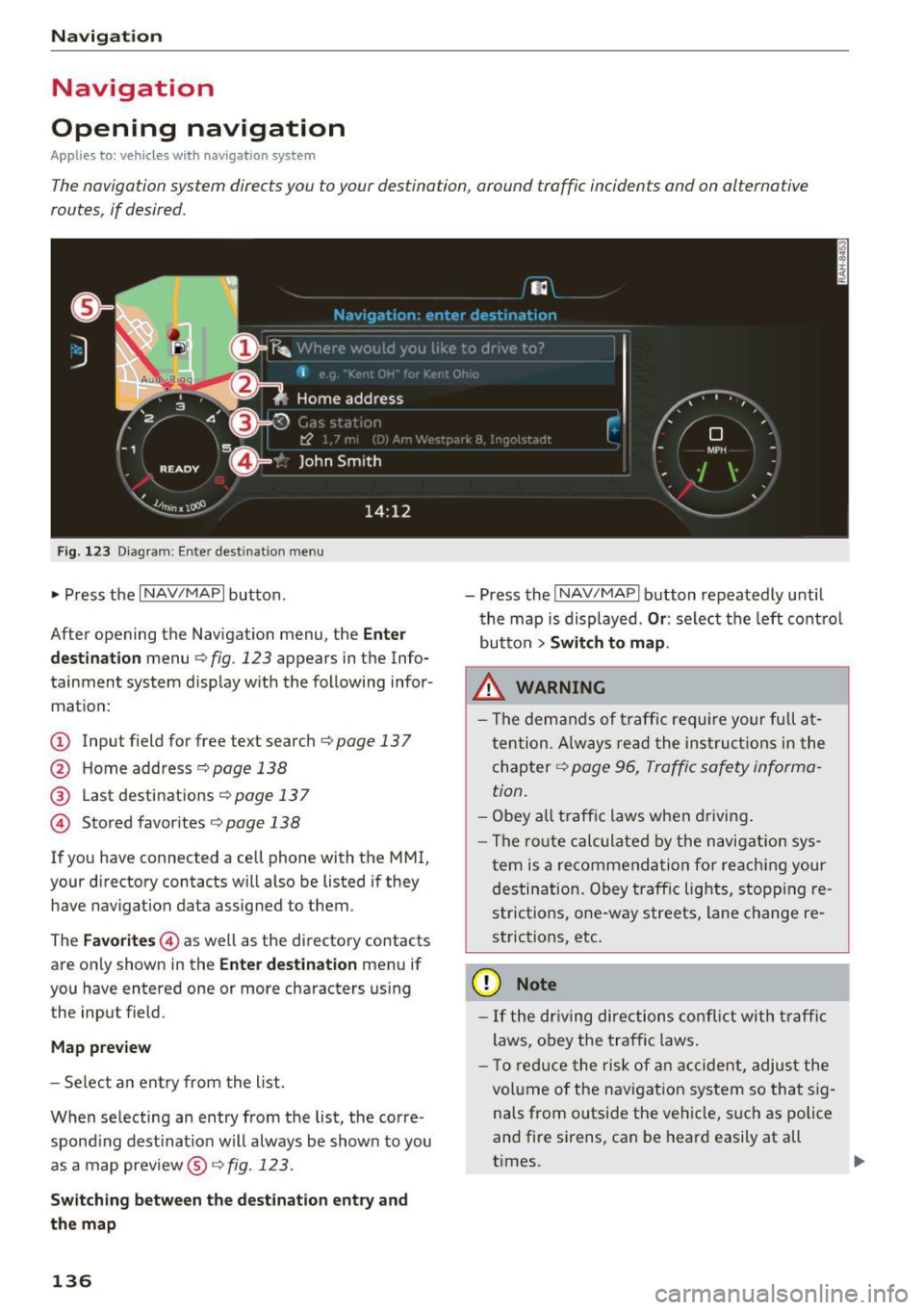
Fig. 123 Diagram: Enter destination menu
~ Press the I NAV/MAPI button.
After opening the Navigation menu, the
Enter
destination
menu Q fig. 123 appears in the Info
tainment system display with the following infor mat ion:
(!) Input field for free text search q page 13 7
@ Home address 9poge 138
@ Last destinations qpoge 137
© Stored favorites q page 138
If you have connected a cell phone with the MMI,
your directory contacts will also be listed if they
have navigation data assigned to them .
The
Favorites © as well as the directory contacts
are only shown in the
Enter destination menu if
you have entered one or more characters using the input field.
Map preview
-Select an entry from the list.
When selecting an entry from the list, the corre
spond ing dest ination will always be show n to you
as a map preview®~
fig. 123.
Switching between the destination entry and
the map
136
- Press the I NAV/MAPI button repeatedly until
the map is displayed .
Or: select the left control
button
> Switch to map.
.&_ WARNING
-The demands of traffic require your full at
tention. Always read the instructions in the
chapter
9 page 96, Traffic safety informa
tion.
- Obey all traffic laws when driving.
- The route calculated by the navigation sys-
tem is a recommendation for reaching your
destination. Obey traffic lights, stopp ing re
strictions, one-way streets, lane change re
strictions, etc.
(D Note
- If the dr iving directions conflict with traffic
laws, obey the traffic laws.
- T o reduce the risk of an accident, adjust the
volume of the navigation system so that sig
nals from outside the vehicle, such as police
and fire sirens, can be heard easily at all
times.
-
Page 148 of 314
Navig ation
on highways , possib le parking lots and rest areas
are shown, which you can select as a stopover .
POis along the route
Requirement: route gu idance must be active.
Searching fo r points of interest along your cur
rent route See
<=> page 139 .
Additional options on the map
Applies to: vehicles with navigation system
~ Press the I NAV/MAPI button repeated ly until
the map is d isp layed
¢ page 144, fig. 130.
~ Press t he right contro l bu tton.
Depending on the funct ion selected , the follow
i n g options ca n also be se lected under the
Map
menu :
Cancel rout e guidance : see¢ page 141 .
Map settings : see <=> page 146.
Route c rite ria : see ¢ page 143 .
Voice guidance : see <=> page 143.
Nav igat ion sett ing s: see ¢ page 142 .
Online traffic data *: se e <=> page 148 .
Show altern ative route s: see<=> page 143.
Parking along the route : parking options near
the vehicle are disp layed.
Save current position : you can save your current
ve hicle position as a favorite <=>
page 142 or save
it as a contact in the di rectory <=>
page 142.
Aud i connect at this locat ion *: allows you to
search for
City events or Weather at the entered
locat ion .
Country inform ation : you can d isp lay the appli
cable urban and rural speed lim its for any coun
try/state. T his information w ill be automatically
shown to you in the route information @
<=> page 144, fig. 130 when the speed lim it is ex
ceeded , if this function is act ivated
¢ page 147.
Avoid route *: when route guidance is act ive, the
calc ulated route w ill avoid the area you have
specified (max imum: 12 mi (20 km)), if possible .
The navigation system ca lcula tes an a lter nat ive
146
route . The route to be avo ided that you have en
tered applies only to the current route and must be set again, if needed. The areas you have se
l ected to avoid w ill appear with red and white
shading on the map .
' Map settings
Applies to: vehicles with navigation system
~ Press the I NAV /MAPI button repeatedly until
the map is displayed
<=> page 144, fig . 130 .
~ Select: r ight cont rol b utton> Map settings .
Depending on the selected function, the follow
i ng settings can be selected :
Map colors
Day /Night :
the map is displayed w ith a light/
dark background.
Automatic : when the lights switch on, the map
colors switch from day to n ight .
Map display
Standard
<=> page 14 4, fig . 129.
Google E arth * <=>page 147 , fig. 131.
Traffic <=> page 148.
Map orientation
Destinati on:
the map indic ates the des tin ation
and is or ien ted to t he nor th .
2 D heading up map /2D north up map : the cur
r ent vehicle pos ition is d isplayed. The map is ori
ented in the d irect ion of t rave l o r to t he no rth.
3D map : when this function is sw itched on, the
cu rrent veh icle pos it io n is shown on a three-di
mensiona l map and oriented in t he d irect ion of
travel. At a sc ale of 62 mi ( 100 k m) and l arger ,
the map o rientation is to the north.
Overview : the entire route from the v ehicle pos i
t ion to the des tina tion o r the next stopove r is d is
played on the m ap. The m ap scale depends o n
the length of the ro ute and adapts automatically .
The map is oriented to the north . ..,.
Page 158 of 314
Media
Media
Introduction
There are various media drives and connections
available in the MMI. You can play , for example,
audio/video files from the Jukebox* or connect
your mobile device to the Audi music interface*
and operate it through the MMI.
Notes
General information
Media and format restrictions:
the MMI (includ
ing the SD card reader and the USB storage de
vice connection*) was tested with a variety of products and media on the market. However,
there may be cases where individual devices or media and audio/video* files may not be recog
nized, may play only with restrictions or may not
play at all.
Digital Rights Management: please note that
t he audio/video files are subject to copyright pro
tection .
The media drives do not play files that are pro
tected by ORM and that are identified with the
symbol
!'.TI.
Data security: never store important data on SD
cards, the Jukebox*, CDs/DVDs or mobile devices.
Audi AG is not responsible for damaged or lost
files and media .
Loading times: the more files/folders/playlists
that are on a storage medium, the longer it will
take to load the audio/video files* . Audi recom
mends using storage media tha t only contain au
dio/video files* . To decrease the time it takes to
load audio/video files*, create subfolders (for ex
ample , for the artist or album). The loading time
will also increase when importing files.
Additional information: when playing, audio
files are automatically displayed with any addi
tional information that is stored (such as the ar
tist, track and album cover).
If this information is
not available on the storage medium, the MMI
will check the Grace note metadata database.
156
However, in some cases, the additional informa
tion may not be displayed.
Restricted functionality: reset the Media set
tings
to the factory default settings if functional
ity is restricted
¢ page 176.
Reset the Jukebox* to the factory default set
tings if functionality is restricted
¢page 176.
For information about the properties of support
ed media and file formats, see
¢ page 169 .
((D} Note
You are responsible for all precautions taken
for data protection, anti-virus protection and
protection against loss of data on mobile de
vices that are used to access the Internet
through the Wi-Fi hotspot.
CD/DVD operation
CD/DVD and format restrictions:
the functionali
ty of individual storage media may be limited due
to the variety of blank CDs/DVDs available and
the various capacities . Aud io CDs or video DVDs
with copy protection, CDs/DVDs that do not con
form to the standard and multisession CDs may
have limited playback or may not play at all. Audi
recommends finalizing the recording process
when creating multisession CDs . Multisession is
not supported for DVDs .
Using CDs/DVDs, the CD drive or the DVD drive:
to ensure correct, high-quality playback and to
prevent damage to the drive or disc reading er
rors, always store CDs/DVDs in a protective
sleeve and do not expose them to direct sunlight.
Do
not use:
- Damaged, dirty or scratched CDs/DVDs
- Single CDs/DVDs (3 inch/8 cm diameter)
- CD/DVDs that are not round
- CDs/DVDs with labels
- Protective rings
- Cleaning CDs
Thermal protection switch : CD/DVD playback
may be temporarily unavailable if outside tem
peratures are extremely hot or cold. A thermal
Page 164 of 314
Media
@ Tips
-Depending on the Internet connection and
network traffic, a connection loss can occur
during p layback of on line media serv ices.
- Online media and Internet radio usage de·
pends on the service avai lability of the third
party provider.
- Audi AG simply makes the access to online
media serv ices possible th rough the MMI
and does not take any respons ibility for the
contents of the online med ia services.
- Always read the chapter <=>page 133, About
Audi connect.
- Depending on the mobile device used, the re
may be interrupt ions during media playback
and when using the
Audi MMI connect app .
To avoid interruptions when usi ng a mob ile
d evice, do not loc k the sc reen on yo ur mo
bile devi ce and keep the
Audi MMI connect
a pp in the foreground.
- Contact you r authorized Audi dea ler or au
thorized Audi Se rvice F acili ty for a ddi tional
i n format io n a bout o n line medi a.
Multimedia connections
USB adapter for Audi music interface or
USB charging port
Depending on the vehicle equipment , you can
connect your mobile devices (such as a smart
phone or MP3 player) to the Audi music interface
or a USB charging port using a special USB
adapter.
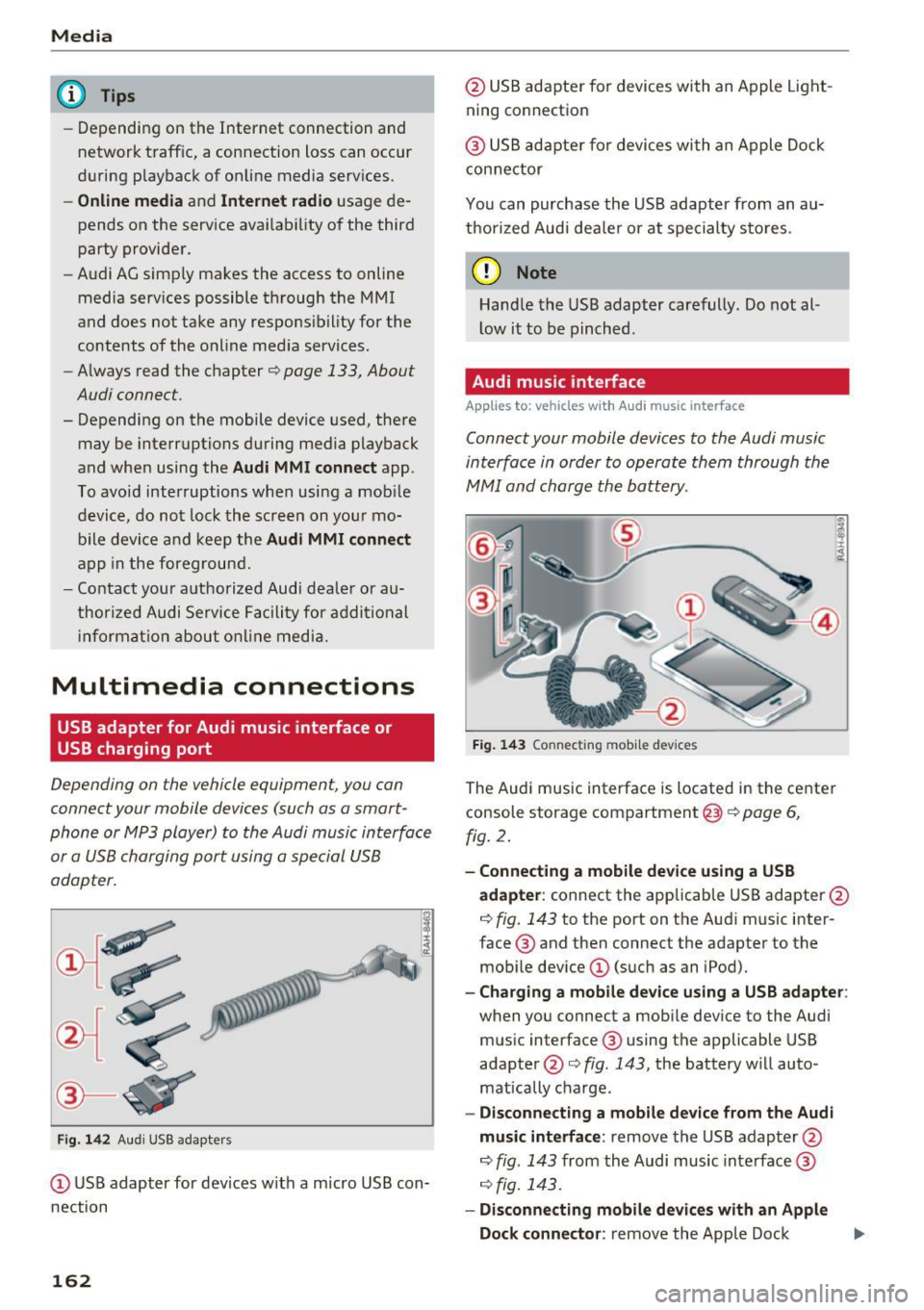
Fig . 14 2 Aud i USS ada pte rs
CD US B adapter for dev ices w it h a m icro USB con
nection
162
@ USB adapte r fo r devi ces wi th an Apple Light
ning connection
@ USB ad ap ter fo r devices wi th an Apple Dock
con nector
You can purchase the USB adapter from an au
tho rized Audi dea ler or at specialty s to res.
(D Note
Hand le the USB adapter carefully. Do not al
l ow it to be pinched .
Audi music interface
Applies to: vehicles with Aud i music interface
Connect your mobile devices to the Audi music
interface in order to operate them through the
MMI and charge the battery.
Fi g. 14 3 Connect ing mob ile devic es
The Audi music interface is located in the center
console storage compartment @
~ page 6,
fig. 2.
- Connecting a mobile device using a USB
adapter :
connect the applicab le USB adapter @
c:!) fig. 143 to the port on the Audi music inter
face ® and then connect the adapter to the
mob ile dev ice
CD (suc h as an iPod).
- Charging a mobile device using a USB adapter :
when you connect a mobile device to the Audi
mus ic interface ® using the applicable USB
adapter @<=> fig . 143 , the battery w ill auto
mat ically cha rge.
- Disconnecting a mobile d evice from the Audi
music interface :
remove the USB adapter @
<=> fig . 143 from the Audi music interface ®
r=;, fig. 143.
-Disconn ecting mobile devices with an Apple
Dock connecto r:
remove the Apple Dock .,..
Page 167 of 314
CD
CD
.... N
" N .... 0 r--. V, co
Media center
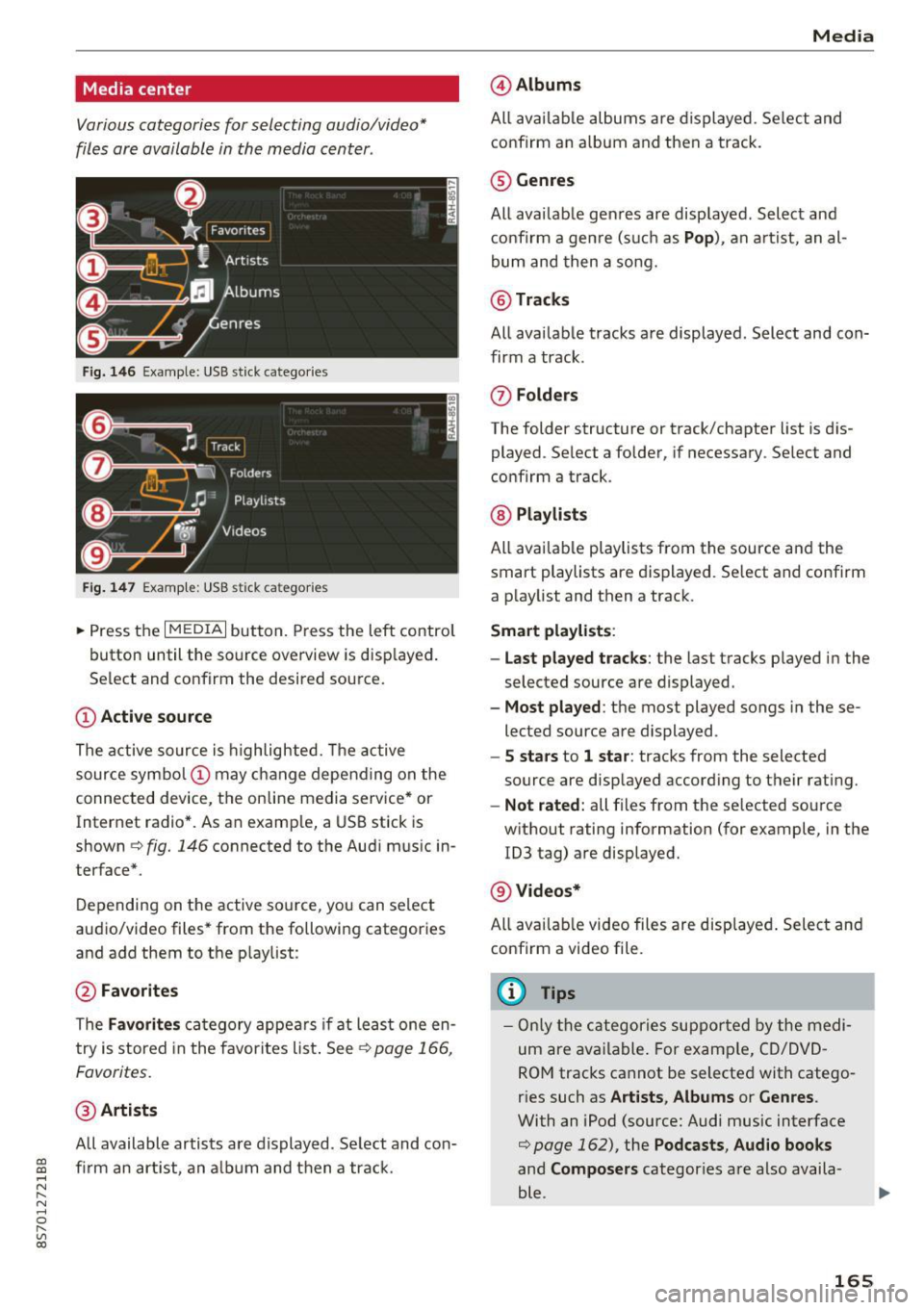
Various categories for selecting audio/video*
files are available in the media center .
Fig. 146 Example: USB stick catego ries
Fig . 147 Examp le: USB stick categories
~ Press the I MEDIAi button. Press the left control
button until the source overview is disp layed.
Se lect and confirm the desired source.
(!) Active source
The active source is highlighted. The active
source symbol @ may change depending on the
connected device, t he online media service* or
Internet radio*. As an example, a USB stick is
shown ¢
fig. 146 connected to the Audi music in
terface*.
Depending on the active source, you can select
audio/video files* from the fo llowing categories
and add them to the playlist:
@ Favorites
The Favorites category appears if at least one en
try is stored in the favorites list . See
¢ page 166,
Favorites.
@ Artists
All available artists are displayed. Se lect and con
f ir m an artist, an album and then a track.
Media
@ Albums
All available albums are displayed . Select and
confirm an album and then a track .
® Genres
All availab le genres are displayed. Select and
confirm a genre (s uch as
Pop ), an artist, an al
bum and then a song.
@ Tracks
All available tracks are displayed . Select and con
firm a track.
0 Folders
The folder structure or track/chapter list is dis
played . Select a folder, if necessary . Select and
confirm a track.
® Playlists
All availab le playlists from the source and the
smart playlists are displayed. Se lect and confirm
a playlist and then a track.
Smart playlists :
- Last played tracks :
the last tracks played in the
selected source are displayed.
- Most played : the most played songs in these
lected source are displayed.
- 5 stars to 1 star: tracks from the selected
source are displayed according to their rating.
- Not rated: all files from the selected source
without rating information (for example, in the
!D3 tag) are displayed.
@ Videos*
All ava ilab le video files are displayed . Select and
confirm a video file.
@ Tips
-Only the categories supported by the medi
um are available . For example, CD/DVD
ROM tracks cannot be selected with catego
r ies such as
Artists , Albums or Genres .
With an iPod (source: Audi music interface
¢ page 162), the Pod casts, Audio books
and Composers categor ies are also availa
ble .
165
Page 175 of 314
co
co
.... N
" N .... 0
" "' c:o
Audi smartphone interface
Setup
App lies to: ve hicles with Audi smartpho ne interface
You can connect your smartphone to the MMI us
ing the Audi smartphone interface . Certain con
tent on your smartphone is adapted to the Info
tainment system display while driving and can
be operated through the MMI control panel.
Requirement:
The vehicle must be stationary and the ignition
must be switched on.
iPhone generation 5 or higher with Lightning
connector and iOS 7.1.2 operating system or
h igher.
O r:
Smartphone with Android Auto app and Android
5 .0 Loll ipop operating system or higher.
.,. Connect your smar tphone to the Audi music in
te rface
c:> page 162 using a USB adapter
¢page 162, fig. 142 .
.. Se lect and confirm A cti va te Apple CarPl ay or
Acti vate And roid Auto now.
.. Follow the system instruct ions.
.,. Pay attention to any add itional system prompts
on your smartphone if applicable.
If you chose not to use Apple CarPlay or Android
Auto when connecting your smartphone for the
first time, you can start the Audi smartphone in
terface later on using the
Connection m an ager .
.. Se lect: I MENU I button > Audi smartphone in·
terfa ce
> Change to connecti on manager .
.. Connect your smar tphone to the Audi music in
terface
c:>page 162 using a USB adapter
¢page 162, fig. 142 .
.. Se lect and confirm Audi smartphone : in the
Connection manager c:> page 176. You can se
lect your smartphone in the list of devices that
are already paired
c:> page 177.
.,. Follow the system instruct ions.
l ) In preparat io n at the t ime of pr inting.
Aud i smartphon e int erfac e
{!) Tips
-The functions that can be used depend on
the fo llow ing factors, among others:
- the brand of your smartphone
- the vers ion of the operating system in
your smartphone
- the software ve rsion of the app used
- the USB adapter cab le and correct connec-
tion
- your cell phone service provider
- the customized settings on your smart -
phone
- One of the factors
above or a combina tion
of any of them could cause your smartphone
to be incompatib le wit h the Audi smart
phone interface. Compatibility cannot be
guaranteed for all types of smartphones.
For more informat ion and assistance, refe r
to the use r guide and the manufactu rer of
your smartphone .
- If the connected smartphone has voice con
tr ol, you can operate your smartpho ne usi ng
the external voice recognition system*
c:>page 113.
-The menu language show n in the MMI is
based on the settings in you r smartphone .
- The time d isplayed in the MMI is based o n
t he settings in your smartphone.
- Several MMI functions are not avai lab le
when Apple Car Play or Andro id Auto is ac
tive.
- You cannot co nnect any mob ile dev ices via
Bl uetooth when an App le CarPlay connec
tion is act ive .
- Whe n the Apple CarPlay connection is ac
tive,
Tag this song for iTunes*1 ) is not ava il
able
¢page 152 .
Operating
Appl ies to: vehicles wit h Audi smartp hone interface
Opening a menu
App le CarPlay : you can go back to the Apple Ca r
Play main me nu regardless of the selected menu
item by p ressing and holding the
I BACKI button. Ill>-
173