2017 AUDI TT ROADSTER lights
[x] Cancel search: lightsPage 16 of 314

Instruments and indicator lights
Drive to an autho rized Aud i dea ler or a uth orized
Aud i Service Facility immediately to have t he
malfunct ion corrected .
11111 Engine start sy stem: malfunction! Plea se
contact Service
There is a malfunction in the eng ine start ing sys
tem.
Dr ive to an authorized Aud i deale r or authorized
Aud i Serv ice Facility immediately to have the
malfunct io n corrected.
f;. 11) Electronic stabilization control (ESC )
and
( 8) anti-lock braking system (ABS )
If the DJ indicato r light b links whi le driving, the
E SC or ASR (Anti-Slip Reg ulation) is actively reg u
lating.
If the
DJ indicato r light turns on, the system has
switched the ESC off . In this case, you can switch
the ignition off and then on to switch the ESC on
again. The indicator light turns off when the sys
tem is functioning fully.
Stabili zation control (E SC ): sport. Warning! Re
duced stability
I f t he II indicator light turns on, ESC sport
mode was switched on using the
I -" O FF I button
¢
page 89 . You can turn the ESC on again by
press the
I -" OFFI b utton again.
Stabilization control (E SC): off. Warning ! Re
duced stabil ity
I f t he II indicato r light tur ns on, t he ESC was re
s tricted or switched off using the
I ~ OF FI button
¢ page 89 . The message ESC OFF also appears .
You can turn the ESC on again by press the
I -" OF FI button again .
The system switches on whe n the ign ition is
sw itched on. The
II indicato r light turns off
when the system is functioning fully .
Stabilization control (ESC ): malfun ction ! Se e
owner 's manual
Stabilization control (ESC / AB S): malfun ction!
See owner' s manual
ABS: malfunction! See ow ner 's manual
14
If the DJ indicator light and the ABS indicator
li ght
rJE (USA mode ls)/ ti] (Canada models)
turn on and this message appears, there is a mal
funct ion in the ABS system or electronic differen
tia l lock. This also causes the ESC to malfunction .
The brakes still function with their normal power, but ABS is not active .
Drive to an authorized A udi dealer or authori zed
Audi Service Facility immediate ly to have the
malfunction corrected .
,&. WARNING
If the ... (USA models) JII (Canada mod
e ls) brake system indicator light turns on to
gether with the ABS and ESC ind ic a tor lights,
the ABS/ESC regulating function may have
failed. Functions that s tabilize the vehicle are
no longer avai lab le . This could cause the vehi
cle to swerve, which increases the risk that
the vehicle will slide. Drive carefully to the nearest authorized Aud i dea ler or authorized
Audi Service Fac ility and have the malfunction
corrected .
0) Tips
For additional informat ion on ESC and ABS,
see¢
page 88.
(0) Brake pads
&J Brake pads: wear limit reached . You can con
t inue driv ing . Please contact Se rvice
The brake pads are worn.
Drive to an authorized A udi dealer or authorized
Audi Se rvice Facility immediate ly to have the
brake pads checked.
App lies to : USA mode ls
The &J i ndicator lig ht turns on together with the
... indicator light
!f Safety systems
The E,I indicator lig ht monitors the safety sys
tems.
Page 17 of 314

co
co
Safety system
If them indicator light turns on or blinks, there
is a malfunction in a safety system.
Drive to an authorized Audi dealer or authorized
Audi Service Facility immediately to have the
malfunction corrected.
_& WARNING
-
Have the safety systems inspected immedi
ately. Otherwise, there is a risk that the sys
tems may not activate during a collision,
which increases the risk of serious injury or death.
c±::, Engine control
If the II indicator light turns on if there is a mal
function in the engine control.
Drive slowly to an authorized Audi dealer or au
thori zed Audi Service Facility to have the engine
checked.
C Malfunction indicator lamp (MIL)
The malfunction indicator lamp (MIL) is part of
the On Board Diagnostic system (OBD II) . The
¢..ij symbol turns on when the ignition is switched
on and turns off again once the engine is started
and running at a steady idle speed. This indicates
that the MIL is functioning correctly.
The indicator light turns on if there is a malfunc
tion in the engine electronics. See an authorized
Audi dealer or authorized Audi Service Facility to
have the malfunction corrected.
For additional information, see¢
page 17.
!?) Engine speed limitation
Appl ies to: vehicles with engine speed li m itation
(ii Maximum engine speed: XXXX rpm
The engine speed is automatically limited to the
speed displayed in the driver information system .
This protects the engine from overheating.
;:::: The engine speed limitation deactivates once the
" ~ engine is no longer in the critical temperature 0
" "' c:o
Instruments and indicator lights
range and you have released the accelerator ped
al once.
If the engine speed limitation was activated by
an engine control malfunction, the
II indicator
light also turns on. Make sure the engine speed
does not go above the speed displayed, for exam
ple when downshifting. Drive to an authorized
Audi dealer or authorized Audi Service Facility im
mediately to have the malfunction corrected.
~ Engine oil level (min.)
Ill Please check oil level
You may continue driving for the time being.
Check the engine oil level as soon as possible
<=> page 237.
-If the engine oil level is too low, add engine oil
¢page 239.
-If the engine oil level is correct and the indica
tor light still turns on, drive at low engine
speed to an authorized Audi dealer or author
ized Audi Service Facility .
"'' Engine oil sensor
• Oil level system: malfunction! Please con
tact Service
The sensor to check the engine oil level has
failed . Drive to an authorized Audi dealer or au
thorized Audi Service Facility immediately to have
the malfunction corrected .
• Oil level sensor: oil change necessary. Please
contact Service
The engine oil level is too high.
Drive to an authorized Audi dealer or authorized
Audi Service Facility immediately to have the
malfunction corrected.
(D Note
Refer to the description in the Owner's Man
ual ¢
page 239, Checking the engine oil level
and adding engine oil.
15
Page 18 of 314
Instruments and indicator lights
jj Tank system
D Please r efu el
If the indicator light turns on for the first time
a nd the message appears, there are about 1.9
ga l (7
L) of fue l left in the tank.
II] Plea se refuel immediately
If the indicator light turns on the message ap
pears , the fue l tank is almost empty . Refuel the
veh icle immediate ly.
D Tank s ystem: ma lfunction! Please contact
Service
If t h e ind icator lig ht tur ns on and th is mess age
appears, there is a mal func tion in the tank sys
tem .
D rive to an a uth o rized Aud i dea le r or authorized
Aud i Serv ice Facility immediately to have t he
malfunct ion cor re cted.
@ For the sake of the environment
Fue l sho uld never enter the sewe r system or
come into con ta ct w ith the gr ound.
(D Tips
More informat ion on refueling is ava ilable on
page
~ page 232.
~ Washer fluid level
(,-5 JJlea se add w asher fluid
F ill the washer fluid for the w indshield washer
system and the headlight washe r system* when
the ign ition is switc hed off ~
page 244.
"V! Windshield wipers
iii Windshield wipers : malfun ction ! Plea se
contact Service
There is a malfunction wi th the windshie ld w ip
e rs.
Dr ive to an autho rized Aud i dea ler or authorized
Aud i Serv ice Facility immediately to have the
malfunct io n corrected.
16
-:(f>:-Bulb failure indicator
If the II ind icator light tu rns on, a bulb has
failed . T he mess age indi cates the loc ation of the
bulb.
Replace the bu lb immediate ly .
Vehicle lights: malfunct ion! Please contact
S ervice
There is a ma lfunction in the headlights or the
li ght sw itch. Drive to an author iz ed Audi dealer or
authori zed Aud i Serv ice Facility immediately to
have the malfunction cor rected .
A WARNING
-Light bulbs a re under p ressure and can ex
plode when b ulbs are replaced, wh ich in
creases the risk of inju ry .
- With gas-discharge lamps* (xenon head
lights), the high-vo ltage component must
be handled appr opria tely. Ot he rw ise, there
is a risk of fatal injury.
~(D Headlight range control system
II Headlight range control : malfunction! See
owne r's manual
There is a ma lf u n ction in the headlight range
contro l system , which may cause gla re for o ther
drivers.
D rive to an author ized A udi dealer or autho rized
A udi Se rvice Fac il ity immed iate ly to have the
malfunction correc ted .
§0 Audi adaptive light
App lies to : vehicles wi th Audi ada ptive ligh t
II Audi adaptive light: malfunction! See own
er 's manual
-
The re is a ma lfunction in the adap tive lights. The
he adlig hts st ill func tion.
D rive to an au thorized A udi dealer or autho rized
A udi Se rvice Fac ility immediate ly to have the
malfunction cor rec ted .
Page 19 of 314
CD
CD
.... N
" N .... 0 r--. V, co
@:.D Light/rain sensor
l!I Automatic headlights: malfunction! See
owner' s manual
El Automatic wipers : malfun ction! See owner 's
manual
The light/ra in sensor is malf unct ion ing.
The low beams remain switched on at all times
for safety reasons when the light switch is in the
AUTO position. You can continue to turn the
lights on and off using the light switch . You can
still cont rol a ll wipe r functions that a re inde
pendent of the ra in se nsor.
Drive to an authorized Aud i dea ler or a ut horized
Audi Service Facility immediately to have t he
malfunction corrected .
; Adaptive dampers
Applies to: vehicles with Audi drive select
B Suspension : malfunction! You may continue
driving
There is an adaptive damper malf unct ion.
Drive to an aut horize d Aud i dea le r or a uthorized
Aud i Service Facility immediately to have t he
malfunct ion corrected.
¢i ¢ Turn signals
If t he B or Ill indicator light b links, a t urn sig
n a l is turned on. If both indicator lig hts are blink
i ng, the eme rgency flash ers a re on .
On-Board Diagnostic
system (OBD)
Malfunction indicator lamp (MIL)
The malfunction indica to r l amp (MIL) ¢.j in the
in str ument cluster is part of the O n Board Diag
n os tic Sys tem ( OBD II).
The warning/indicator light turns on w hen the ig
ni tion is switched o n and turns off once the e n
g ine is s tarted an d is runn ing in id le at a stab le
speed. This indica tes th at the MIL is functioning
cor re ct ly.
Instruments and indicator lights
If the light does not turn off after starting the
engine
or turns on while driving, this may in di
cate there is a malfunction in the engine.
If the
indicato r turns on, the cata lytic conve rter may be
damaged .
Drive
with reduced engine performan ce (avo id
high speeds for extended per io d s of t ime and/o r
fast acceleration) and have the ma lfunction cor
rected. See an author ized Audi dealer or author
ized Audi Service Facility.
The in dicator may turn on if the e lectron ic speed
li miter is faulty. For add it iona l information, see
¢ page 72, Electronic speed limiter.
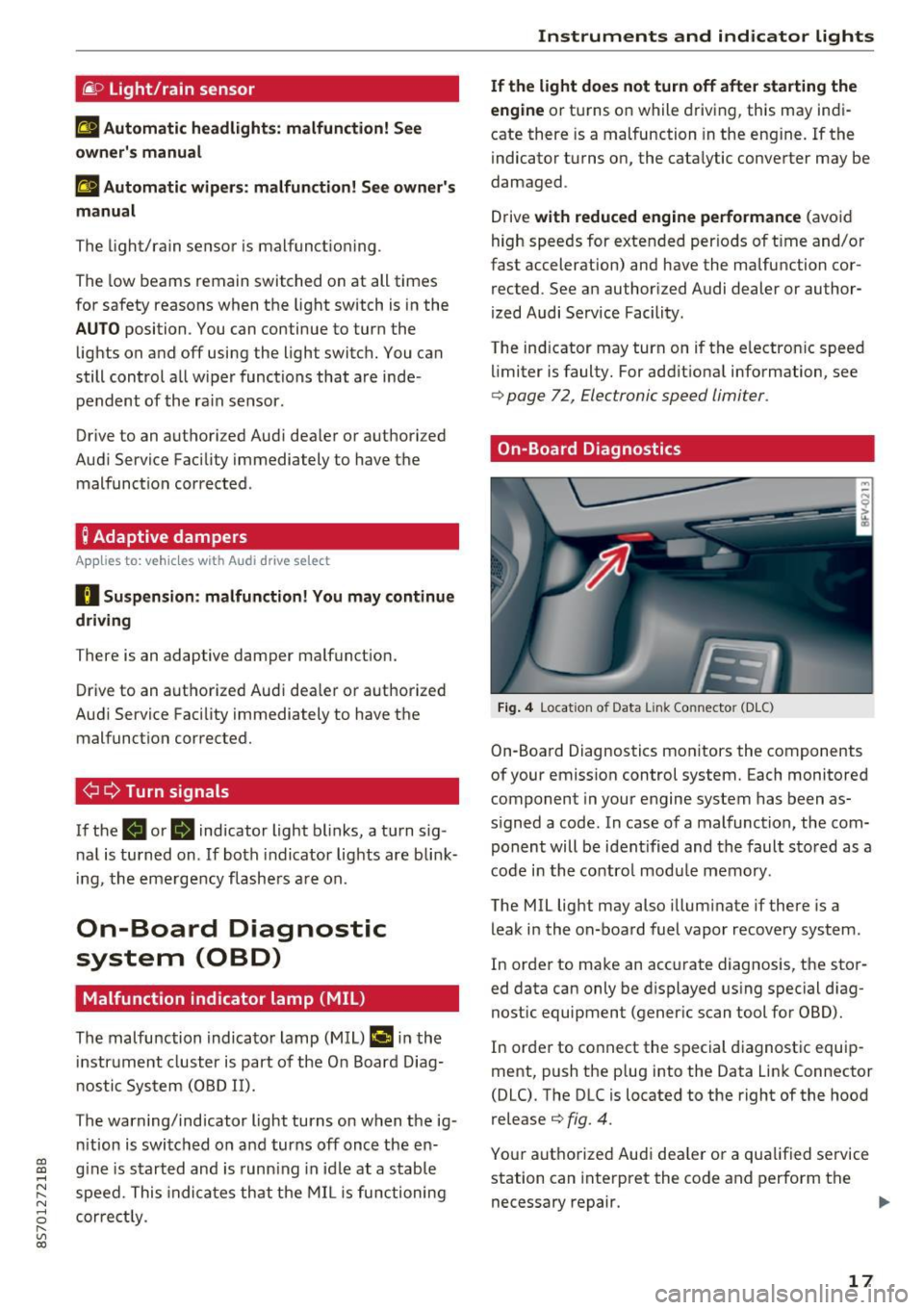
On-Board Diagnostics
Fig. 4 Location of Data Link Connector (DLC)
On-Boa rd Diagnostics mo nitors the components
of your emission control system. Each monitored
component in your engine system has been as
s igned a code. In case o f a malfunction, the com
ponent will be i dent ified and the faul t st o red as a
co de i n t he co ntro l mo dule mem ory.
The MIL lig ht may also illum inate if there is a
leak in the on-boa rd fuel vapor recovery system .
In or de r to ma ke an acc urate diagnosis, the sto r
ed data can only be d isplayed using special d iag
nostic equipment (gener ic scan to ol for OBD).
In order to co nnect the s pecial diagnost ic equi p
ment, push the p lug into the Data Link Connector
(DLC). T he DLC is located to the right of the hood
re lease
¢ fig. 4.
You r aut horize d Aud i dea le r or a qua lified se rvice
station can inte rpret the code and perform the
necessary repair.
IJJI,
17
Page 20 of 314
Instruments and indicator lights
A WARNING
Do not use the diagnostic connector for pe r
sonal use . Incorrect usa ge can cause malfunc-
18
-
tions, which can increase the risk of a co lli
sion!
Page 26 of 314
Opening and clo sin g
Opening and closing
Central locking
Description
You can lock and u nlock the veh icle centrally. You
have the following options:
- Remote control key
c::> page 26,
-Sensors in the door handles* c::> page 27,
- Lock cylinder on the driver 's door c::> page 29,
o r
- Central locking switch inside
c::> page 28.
Auto Lo ck
The A uto Lock f unct ion locks all doors and the
luggage compartment lid once the speed has ex
ceeded approx imately 9 mph (1S km/h) .
The vehicle can be unlocked if the openi ng func
tion in the centra l locking system sw itch is used
or one of the door handles is pulled. The A uto
L ock function can be switched on and off in the
Infotainment system
c::> page 28.
I n t he event of a crash with a irbag deployment ,
t he doors will a lso automat ically unlock to allow
access to the veh icle .
Selective unlocking
The doors and luggage compartment lid w ill lock
when they close. You can set in the Infotainment
system whether
only the driver's door or the en
tire veh icle should be unlocked when unlocking
c::> page 28 .
Turn signals
The turn s ignals flash tw ice when you unlock the
veh icle and flash once when you lock the vehicle .
I f the bli nking continues, one of the doo rs or the
luggage compartment lid is not closed or the ig
nition is still switched on .
Unintentionally locking yourself out
The follow ing cond itions prevent you from lock
ing your remo te contro l key in the vehicle :
- If the driver's door is open, the vehicle cannot
be locked by pressing the
I@ button on the re-
24
mote contro l key or touching the locking sen
sor* on a door.
- When lock ing using the
Im button in the central
locking switch, the vehicle will not lock if a door
is open
c::> page 28 .
-On veh icles with a convenience key *, the lug
gage compartment lid unlocks again after clos
ing if the most recent ly used key is in the lug
gage compartment. The emergency f lashers
blink four times.
Do not lock your vehicle with the remote cont rol
key or convenience key* until all doors and the
l uggage compartment lid are closed. This helps
to prevent you from locking yourself out acciden
tally .
¢j) Tips
- Do not leave va luables unattended in the ve
hicle. A locked veh icle is not a safe!
- The LED in the driver's door rail blinks when
you lock the vehicle. If the LED lights up for
approximate ly 30 seconds after locking,
there is a malfunction in the centra l locking
system . Have the problem corrected by an
authorized Audi dealer or au tho rized Aud i
Service Facili ty.
Key set
• J
-- --
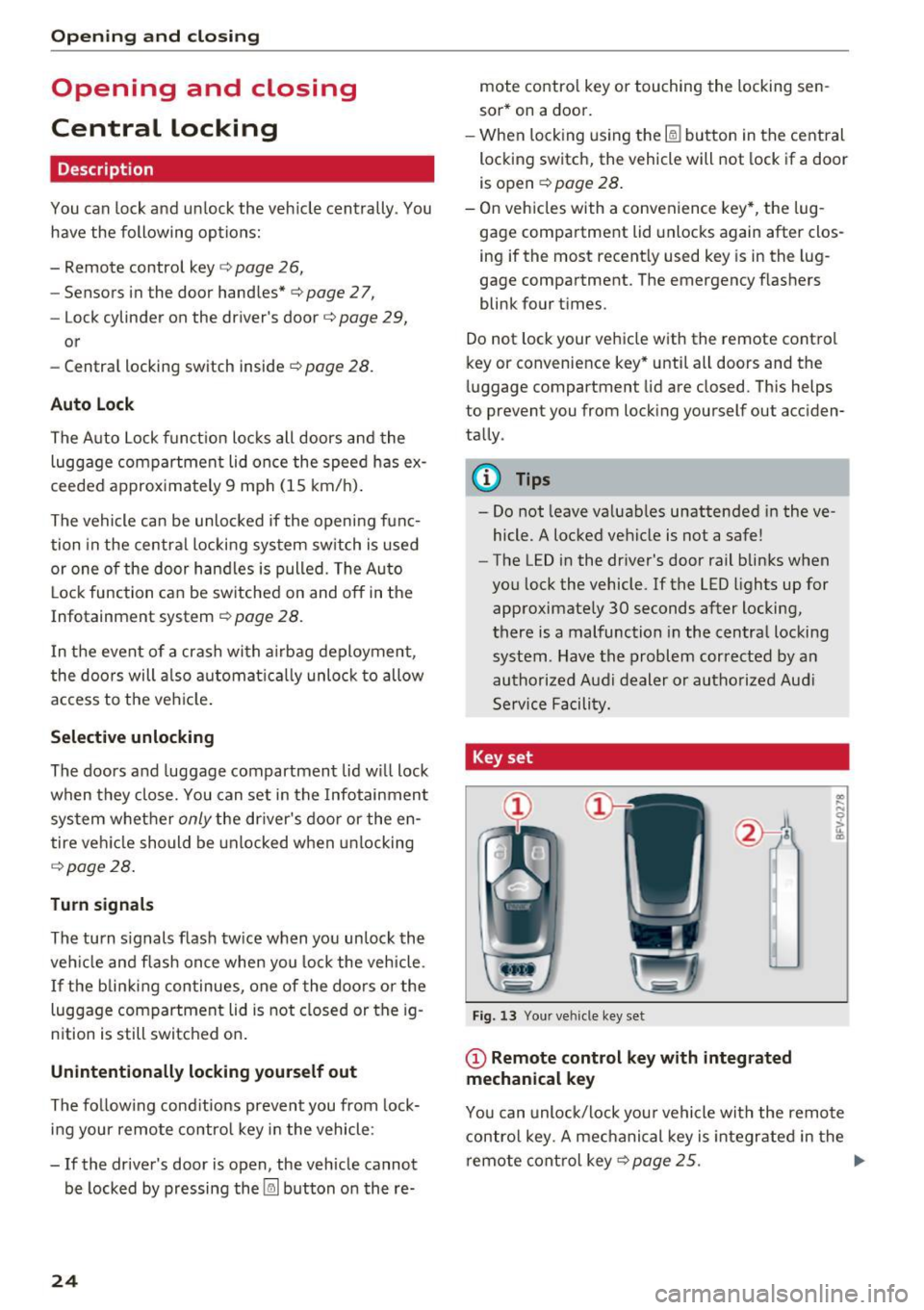
Fig. 13 Your ve hicle key set
(D Remote control key with integrated
mechanical key
.. .... N 0 :l, u. CD
You can unloc k/lock you r vehicle with the remo te
contro l key. A mechanical key is integr ated in the
remote cont rol key
c::>page 25 . ..,.
Page 33 of 314
CD
CD
.... N
" N ,-I 0 r--. V, co
@ Tips
-You can still open and close the windows for
approximately 10 minutes after turn ing the
ignition off. The power windows do not
switch off until the driver's door or front passenger's door has been opened.
- When opening the doors and when open
i ng/closing the power top, the windows au
tomatically lower approximately 10 mm.
Convenience opening/closing
All windows can be opened and closed at the
same time.
Convenience opening feature
• Press the Im button on the remote control key
until all windows reach the desired position.
Convenience closing feature
• Press the {D button on the remote control key
u nti l all windows are closed¢
A or
Convenience closing with the convenience
key*
• Touch the sensor* on the door handle long
enough until all windows and the power top*
are closed . Do not place your hand in the door
hand le when doing this.
Setting convenience opening in the
Infotainment system
• Select in the Infotainment system: !MENUI but
ton
> Vehicle> left control button >Vehicle set
tings .
To enable the convenience window opening func
tion, the
Long press to open windows function
must be switched
on.
.&_ WARNING
- Never close the windows or power top* care lessly or in an uncontrolled manner, be
cause this increases the risk of injury.
- For security reasons, the windows and the
power top* can only be opened and closed
with the remote control key at a maximum
distance of approximately 6 ft (2 m) away
Open ing and closing
from the vehicle . Always pay attention when
pressing the
Im button to close the w indows
and the power top* so that no one is
pinched. The closing process w ill stop im
mediately when the
Im button is released .
Correcting power window malfunctions
You can reactivate the one-touch up/down func
tion if it malfunctions.
• Pull the power window switch up until the win
dow is completely raised.
• Release the switch and pull it up aga in for at
least one second .
Garage door opener
(Homelink)
Description
Applies to : veh icles w ith garage door o pen er (Home link)
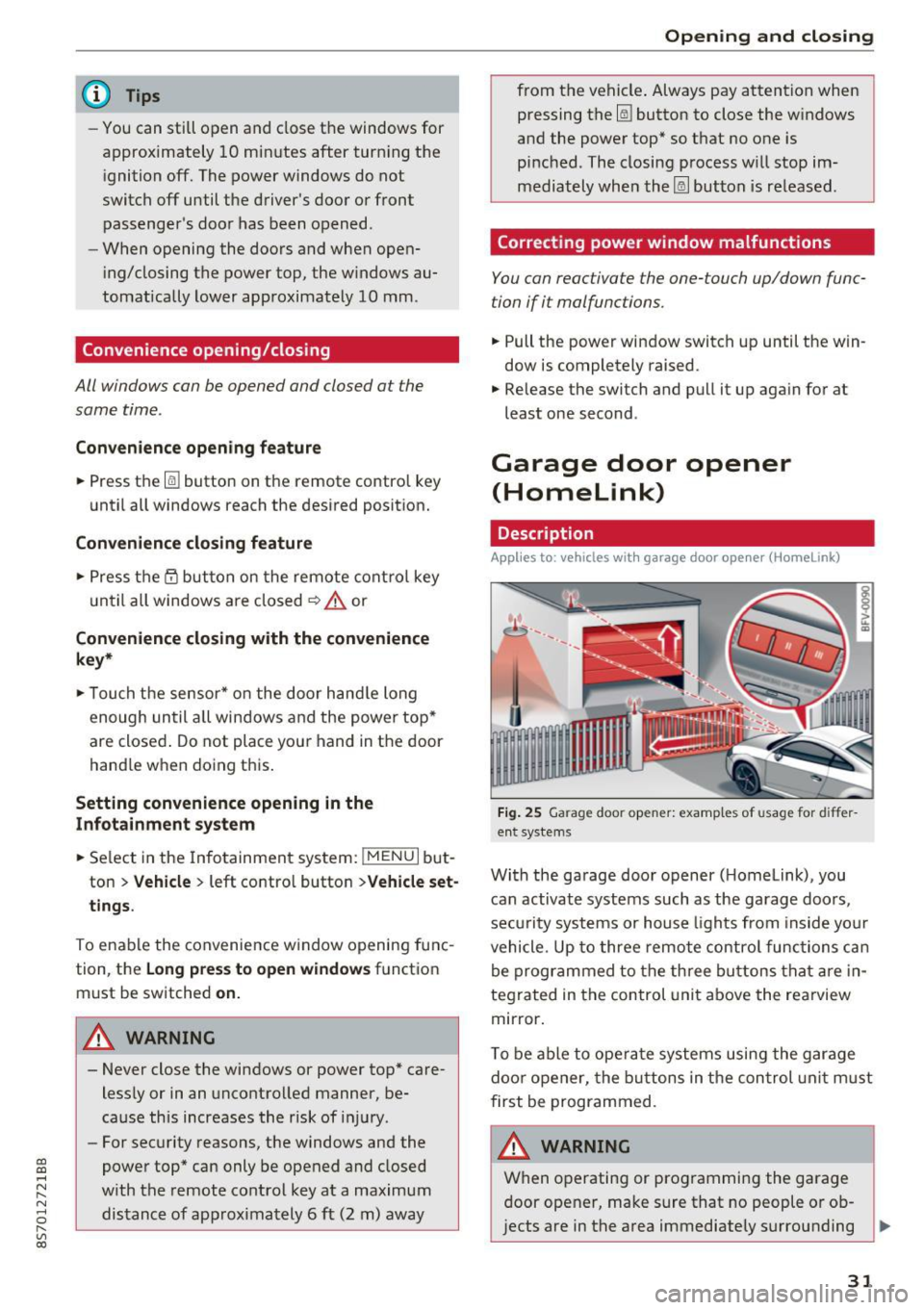
Fig. 25 Garage door opener: examples of usage for differ
ent systems
With the garage door opener ( Homelink), you
can activate systems such as the garage doors,
security systems or house lights from inside your
vehicle. Up to three remote control functions can
be programmed to the three buttons that are in
tegrated in the control unit above the rearview
mirror.
T o be able to operate systems using the garage
door opener, the buttons in the control unit must
first be programmed.
A WARNING ~
When operating or programming the garage
door opener, make sure that no people or ob
jects are in the area immediately surrounding ..,.
31
Page 41 of 314
CD
CD
.... N
" N ...... 0
" V, co
Lights and Vision
Exterior Lighting
Switching lights on and off
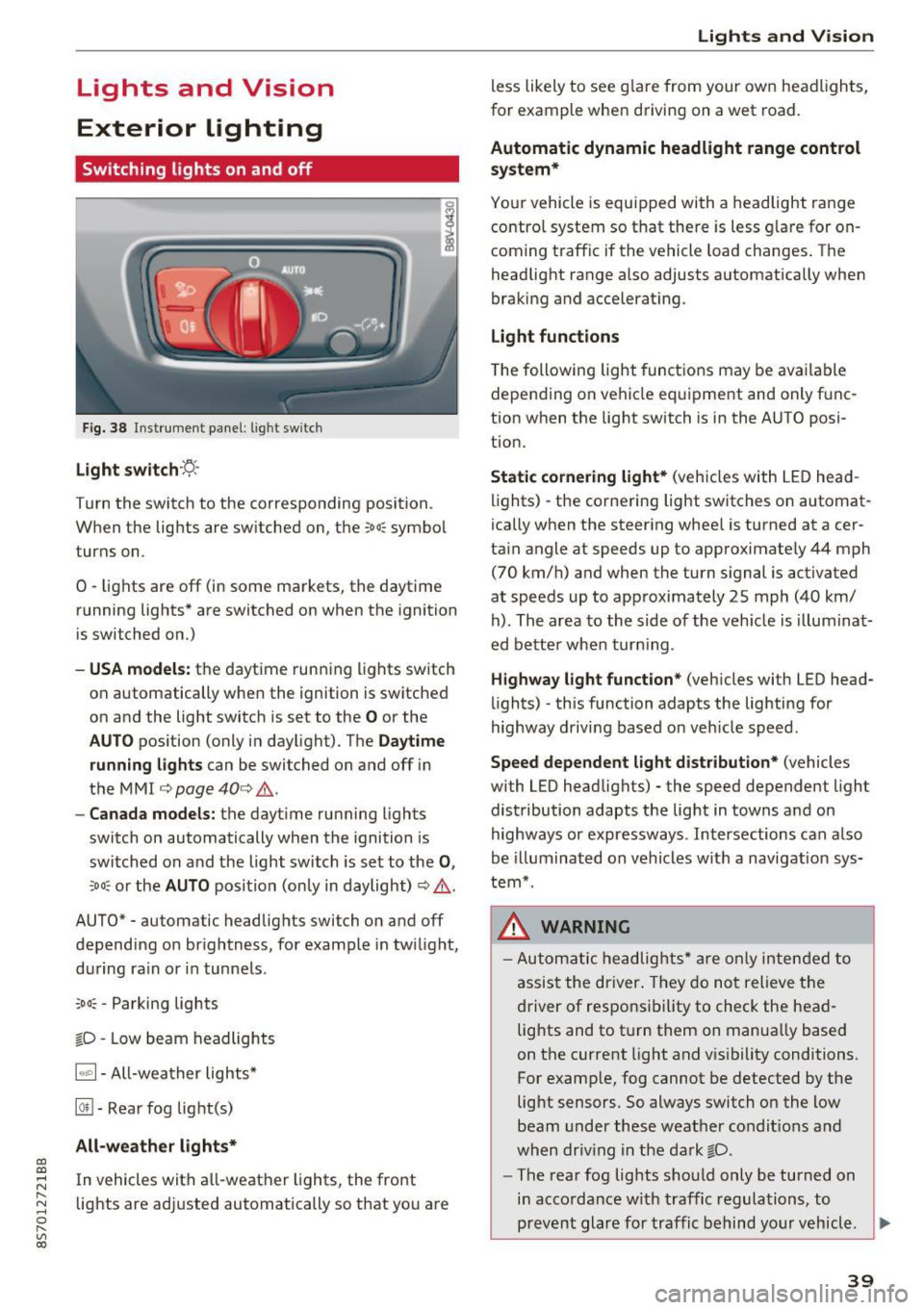
Fig. 38 Instrument panel: l ig ht switc h
Light switch ·:<'>'.·
Turn the switch to the corresponding position.
When the lights are switched on, the
;oo: symbol
turns on.
0 · lights are off (in some markets, the daytime
running lights* are switched on when the ignition
is switched on.)
-USA model s: the daytime running lights sw itch
on automatically when the ignition is switched
on and the light switch is set to the
O or the
AUTO pos ition (only in daylight). The D aytime
runn ing lights
can be switched on and off i n
the MMI
¢ page 40 ¢ &.
- Canada models: the dayt ime running lights
switch on automatically when the ignition is
switched on and the light switch is set to the
0 ,
;oo: or the AUTO posit ion (only in daylight) ¢ & .
AUTO* - automatic headlig hts switch on and off
depending on brightness, for example in tw ilight,
during ra in or in tunne ls .
~oo: -Parking lights
gD -Low beam headlights
IQ., 1-All-weather lights*
@il -Rear fog lig ht(s)
All-weather light s*
In vehicles with all-weather lights, the front
lights are adjusted automatically so that yo u are
Lights and V ision
less likely to see g lare from your own headlights,
for example when driving on a wet road.
Automatic dynamic headlight range control
system*
Your vehicle is equipped with a headlight range
contro l system so that there is less g lare for on
coming traff ic if the vehicle load changes . The
headlight range also adjusts automatically when
braking and accelerat ing .
Light function s
The following light funct ions may be avai lable
depending on vehicle eq uipment and only f unc
tion when the lig ht switch is in the AUTO posi
tion.
Static cornering light * (vehicles with LED head
li ghts) - the cornering light switches on automat
ica lly when the steer ing whee l is turned at acer
ta in angle at speeds up to approximate ly 44 mph
(70 km/h) and when the turn signal is activated
at speeds up to approximately 25 mph (40 km/
h) . The area to the side of the veh icle is illumina t
ed bette r when turn ing .
Highway l ight function * (vehicles with LED head
lights) -th is function adapts the lighting for
highway driving based o n veh icle speed.
Speed dependent light distribution* (vehicles
with LED headlights) - the speed dependent l ight
distribution adapts the lig ht in towns a nd on
highways or expressways . Intersections can a lso
be illuminated on vehicles w ith a navigation sys
tem*.
_& WARNING
- Autom atic headlights * are only inten ded to
a ssis t the driver . They do no t relieve t he
d river of respo nsibility to check the head
lig hts and to t urn them on manua lly based
on the current light and v is ibility conditions.
For example, fog cannot be detected by the
light sensors . So always switch on the low
beam under these weather condit ions a nd
when dr iv ing in the da rk
gD .
-The rear fog lights shou ld only be turned on
i n acco rdanc e w ith traffic regulations, to
prevent glare for traffic behind yo ur v ehicl e.
~
39