2017 AUDI S4 check oil
[x] Cancel search: check oilPage 313 of 386
and have the cooling system inspected. If the
cooling system is not leaking, a loss can come
from the coolant boiling through overheating and being pushed out of the cooling system.
A WARNING
- The cooling system is under pressure. Do
not open the coolant expansion tank cap
when the engine is hot. This increases the
risk of burns .
- The coolant add itive and the coolant can be
dangerous to your health. For this reason,
keep the coolant in the original container
and away from children. There is a risk of
poisoning.
- When working in the engine compartment,
remember that the radiator fan can switch
on even if the ignition is switched off, which
increases the risk of injury.
(D Note
Do not add coolant if the expansion tank is
empty. There may be a ir in the cooling sys
tem, which increases the risk of engine dam
age . If this is the case, do not continue driv
ing . See an authorized Audi dealer or author
ized Audi Service Facility for assistance.
Brake fluid
Checking brake fluid level
The brake fluid level can be checked with a quick
glance .
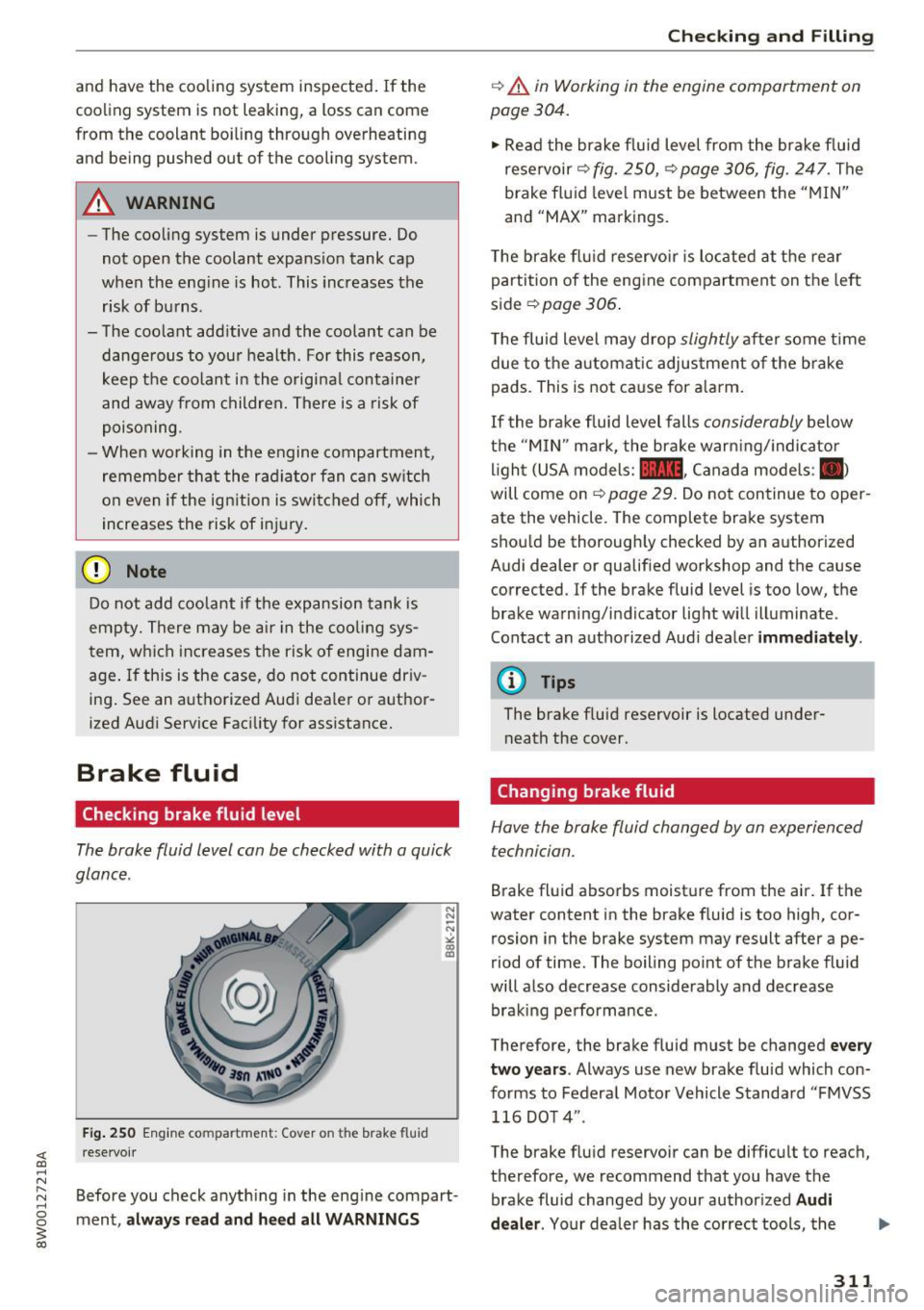
Fig. 250 Engine compa rtment: Cover o n the brake fluid
rese rvoir
Before you check anything in the eng ine compart
ment,
always read and heed all WARNINGS
Checking and Filling
c::> .&. in Working in the engine compartment on
page 304.
" Read the brake fluid level from the brake fluid
reservoir
c::> fig. 250, c::> page 306, fig. 247. The
brake fluid level must be between the "MIN"
and "MAX" markings.
The brake flu id reservoir is located at the rear
partition of the engine compartment on the left
side
~ page 306 .
The fluid level may drop slightly after some time
due to the automatic adjustment of the brake
pads . This is not cause for alarm.
If the brake fluid level falls considerably below
the "MIN" mark, the brake warning/indicato r
light (USA models:
11111 , Canada models : II>
will come on c::> page 29. Do not continue to oper
ate the vehicle. The complete brake system
should be thoroughly checked by an authorized
Audi dealer or qualified workshop and the cause
corrected . If the brake fluid level is too low, the
brake warning/indicator light will illuminate .
Contact an authorized Audi dealer
immediately .
@ Tips
The brake fluid reservoir is located under
neath the cover.
Changing brake fluid
Hove the broke fluid changed by on experienced
technician.
Brake fluid absorbs moisture from the air. If the
water content in the brake fluid is too high, cor
rosion in the brake system may result after ape
riod of time. The boiling point of the brake fluid
will also decrease considerably and decrease braking performance .
Therefore, the brake fluid must be changed
every
two years .
Always use new brake fluid which con
forms to Federal Motor Vehicle Standard "FMVSS
116 DOT 4" .
The brake fluid reservoir can be difficult to reach,
therefore, we recommend that you have the brake fluid changed by your authorized
Audi
dealer.
Your dealer has the correct tools, the
311
Page 318 of 386

Check ing and F illing
Windshield washer
system
.........
w •
F ig. 252 Engin e comp artm ent : wash er fluid r ese rvoir cap
"' N
0
~ 00 m
The washer fluid reservoir O contains the clean
ing solution for the windshield and the headlight
washer system* c>
page 306, fig. 24 7. The reser
voir capacity can be found inc>
page 362 .
To reduce the risk of lime sca le deposits on the
spray nozzles, use clean water with low amounts
of calci um. Always add window cleaner to the wa
t er. When the outside temper atures are co ld, an
anti-free zing agent should be added to the water
so that it does not freeze .
Cl) Note
-The concentration of anti-free zing agent
must be adjusted to the vehicle operating
conditions in the respective climate. A con
centration that is too high can lead to veh i
cle damage .
- Never add rad iator anti -freeze or other addi
tives to the washer fluid .
- Do not use a glass cleaner that contains
paint solvents, beca use this could damage
the pa int.
Service interval display
The service interval display detects when your ve
hicle is due for service.
Checking se rv ice intervals
You can check the rema ining distance or time un
til the next oil change or next inspection i n the
I nfotainment system .
316
.. Select in the Infotainment system : the !MENUI
button > V ehicle > left control button > Se rvice
& che cks > Ser vice inte rvals .
Resettin g the indicator
You r authorized Audi dea le r or authorized Audi
Se rvice Facility w ill reset the se rvice interval dis
play after performing service.
If you have changed the oi l yourself, yo u must re
set the o il change interval.
.. Select in the Infotainment system: thel
M ENU !
button > Vehicle > left control button > Ser vic e
& check s > Service int erv al s > Re set oil chang e
int erva l.
If an o il cha nge or inspection is due, you can ac
cess it i n the Infota inment system. The display
works in two stages :
-Se rv ice re mind er: after a certain distance is
dr iven, a message appears in the instrument
cluste r display eve ry t ime the ignition is switch
ed on. The remaining d istance and time is dis
played briefly .
-Serv ic e due : if your vehicle has reached a se rv
ice in terva l, a message appears briefly after
sw itching the ignition on.
(D Note
- Only reset the oil change indicator if the oi l
was changed.
- Following the se rvice interva ls is cr itical to
ma inta ining the se rvice l ife and val ue of
yo ur vehicle, especially the engine. Even if
the mileage on the vehi cle is low, do not ex
ceed the time for the next service .
- Calc ulat ing the time to the next oil change
is interrupted when the vehicle battery is
disconnected.
If the vehicle is not driven for
a long period of time, check the mainte
nance schedule so that you can fo llow the
maintenance intervals .
Page 319 of 386

Wheels
Wheels and tires
General information
.,.Check your tires regularly for
damage (punctures, cuts, cracks
and bulges). Remove foreign ob
jects from the tire tread.
.,. If driving over curbs or similar
obstacles, drive slowly and ap
proach the curb at an angle.
.,.Have faulty tires or rims re
placed immediately.
"'Protect your tires from oil,
grease and fue l.
.,.M ark tires before removing
them so that the same running
direction can be maintained if
they are reinstalled.
"'Lay tires flat when storing and
store them in a cool, dry location
with as little exposure to light as
possible.
(D Note
-Please note that summer and
winter tires are designed for
the conditions that are typical in those seasons. Audi recom
mends using winter tires dur
ing the winter months. Low
temperatures significantly de crease the elasticity of summ
er tires, which affects traction
Wheels
and braking ability. If summer
tires are used in very cold
temperatures, cracks can form
on the tread bars, resulting in
permanent tire damage that
can cause loud driving noise
and unbalanced tires.
-Burn ished, polished or
chromed rims must not be
used in winter driving condi
tions. The surface of the rims
does not have sufficient corro
sion protection for this and
could be permanently dam aged by road salt or similar
substances.
Tire designations
Fig. 253 T ir e designations on the side -
wall Ill>
317
Page 362 of 386

Emergency situations
If you must lift your vehicle with a floor jack to
work underneath, be sure the vehicle is safely
supported on stands intended for this purpose .
Front lifting point
T he lift ing po int is loc ated on the floo r pan re in
for cement about at the same leve l as t he jack
mounting po int r=;,
fig. 279. Do not lift the veh i
cle at the vertical sill re inforcement.
Rear lifting point
T he lift ing po int is loca ted on the vert ica l re in
for cement of the lower sill fo r t he on b oard ja ck
r=:> fig. 280 .
Lifting with vehicle jack
Refer to r=;, page 347.
A WARNING
- To reduce the risk of ser io us injury and vehi
cl e d amage.
- Always lift t he ve hicle only at the special
wo rkshop ho ist and floo r jack lift po ints il
lustrated
r=;, fig . 279 a nd r=;, fig. 280.
- Fa ilure to lift the vehicle at these poin ts
could cause the vehicle to tilt or fa ll from
a lift if there is a change in vehicle weight
distr ibut io n and balance. This might hap
pen, for exam ple, when heavy co mpo
n e nts s uch as the engine b lock or tra ns
mi ssio n are removed.
- When removing heavy components like
th ese, a nchor vehicle to hoist o r add cor re
s pon ding weigh ts t o ma in ta in t he ce nte r o f
gr avit y. Ot herwise, t he ve hicl e migh t tilt or
s lip
off the hoist, causing ser ious perso na l
injury .
(D Note
- Be awa re o f th e followi ng poi nts before li ft
in g th e ve hicle:
-The vehicle should never be lifted or
jacked up from underneath the engine oil
pan, the transmiss ion housing, the front
or rear axle or the body side members .
This could lead to serious damage.
- To avoid damage to the underbody or
chassis frame, a rubber pad must be in-
360
serted between the floor jack and the lift
points.
- Before driving over a workshop hoist ,
check that the vehicle weight does not
exceed the permissible lifting capacity of
the hoist.
- Before driving over a workshop hoist , en
sure that there is sufficient clearance be
tween the hoist and low parts of the ve
hicle .
Page 363 of 386
Technical data
Vehicle specifications
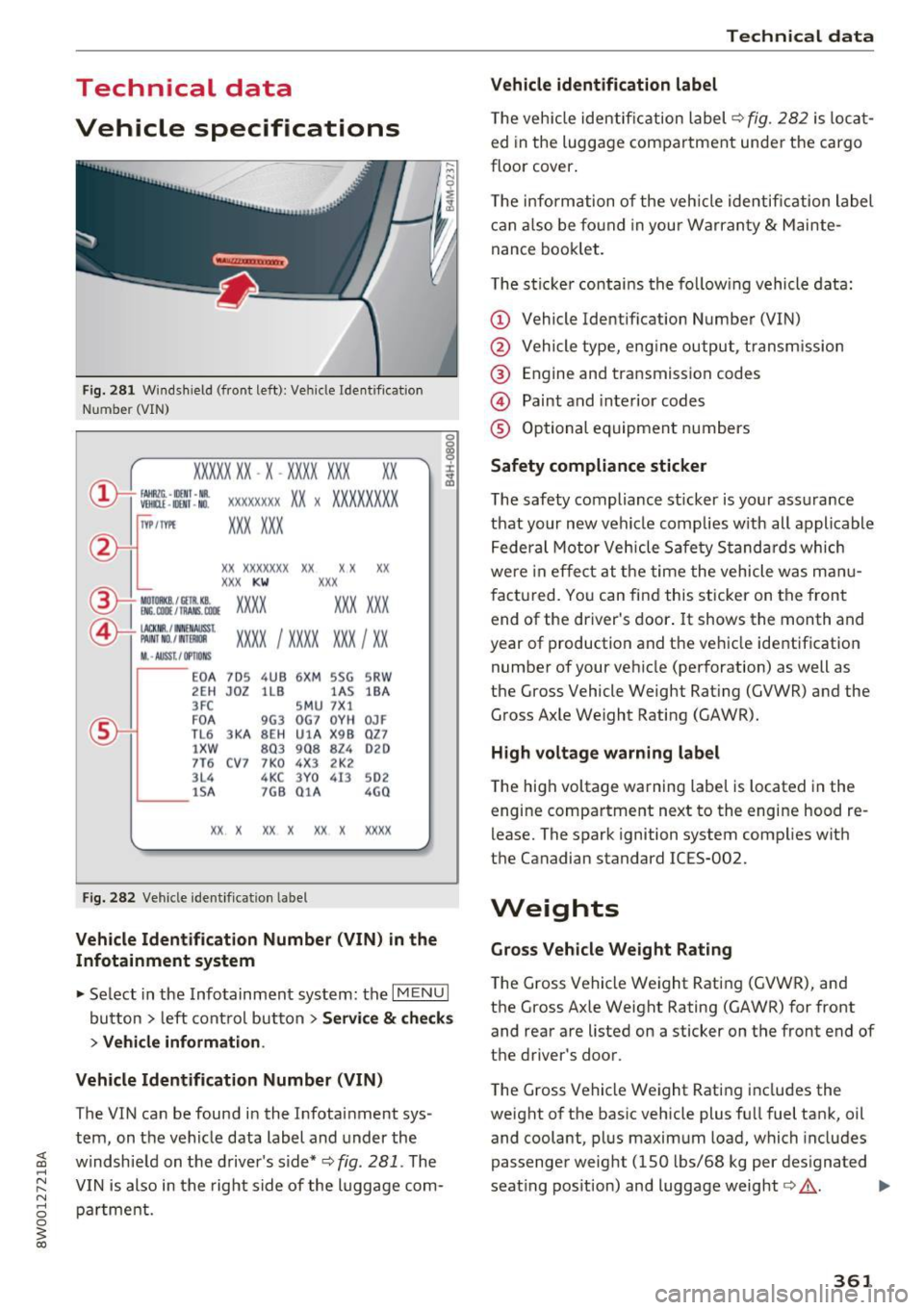
F ig. 281 W indshield (front left): Ve hicle Ident ification
Number (VIN)
XXXXX XX -X -XX XX X XX XX
CD+ ~t :1 :: xxxxxxxx xx x xxx xxxxx
TVP/fffl XXX XXX
XX XXXXXXX XX X X XX
XXX
KW XXX
®i ~:J ·f lfils~~ XXXX XXX XXX
®-+ ~N:a=i~l xxxx ; xxxx xx x ; xx
11. • AUSS, I OPTIONS
E0 A
7D 5 4UB 6
XM 5SG 5R W
2E H
J0Z lL B l
A S lB A
3FC SM U 7 Xl
F 0 A 9G3 0G7 0YH 0JF
TL 6 3KA 8EH UlA X 98 Q Z7
lXW 803 908 824 020
7T6 C V7 7 K0 4 X3 2K2
3L4
4KC 3 Y 0 413
502
lSA 7GB 01 A 4G0
XX . X XX X XX X xxxx
Fig. 282 Vehicle identification label
Vehicle Identification Number (VIN) in the
Infotainment system
• Select in the Infotainment system: the I MENU I
button > left control button > Service & checks
> Vehicle information.
Vehicle Identification Number (VIN)
The VIN can be found in the Infotainment sys
tem, on the vehicle data label and under the
windshield on the driver's side*¢
fig. 281 . The
VIN is also in the right side of the luggage com
partment.
Technical data
Vehicle identification label
T he veh icle identification label¢ fig. 282 is locat
ed in the luggage compartment under the cargo
floor cover .
T he information of the veh icle identification label
can also be found in your Warranty
& Mainte
nance booklet.
The sticker contains the fol low ing vehicle data:
(D Vehicle Identification Number (VIN)
@ Vehicle type, eng ine output, transm ission
@ Engine and transmission codes
@ Paint and interior codes
® Optional equipment numbers
Safety compliance sticker
The safety compliance sticker is your assurance
that your new vehicle complies w ith all applicable
Federal Motor Vehicle Safety Standards which
were in effect at the time the vehicle was manu
factured. You can find this sticker on the front end of the driver's door.
It shows the month and
year of production and the vehicle identification number of your vehicle (perforation) as well as
the Gross Vehicle Weight Rating (GVWR) and the Gross Axle Weight Rating (GAWR).
High voltage warning label
The high voltage warning label is located in the
engine compartment next to the engine hood re
lease. The spark ignition system complies with
the Canadian standard ICES-002.
Weights
Gross Vehicle Weight Rating
The Gross Vehicle Weight Rating (GVWR), and
the Gross Axle Weight Rating (GAWR) for front
and rear are listed on a sticker on the front end of
the driver's door .
The Gross Vehicle Weight Rating includes the
weight of the basic vehicle plus full fuel tank, oil and coolant, plus maximum load, which includes
passenger weight (150 lbs/68 kg per designated
seating pos ition) and luggage weight¢,&. . .,.
361
Page 367 of 386

<( a, .... N ,....
N .... 0 0
3 a,
@ For the sake of the environment
-Changing the engine settings will adversely
affect emission levels. This is detrimental to
the environment and increases fuel con
sumption.
- Always observe environmental regulations
when disposing of old engine oil, used brake
fluid, dirty engine coolant, spent batteries
or worn out tires .
- Undeployed airbag modules and pretension
ers might be classified as Perchlorate Mate
rial -special handling may apply, see
www .dtsc.ca.gov/hazardouswaste/perchlo
rate . When the vehicle or parts of the re
straint system including airbag modules
safety belts with pretensioners are scrap
ped, all applicable laws and regulations
must be observed. Your authorized Audi
dealer is familiar with these requirements
and we recommend that you have your deal er perform this service for you.
Accessories and
technical changes
Additional accessories and parts replacement
Always consult an authori zed Audi dealer before
purchasing accessories.
Your vehicle incorporates the latest safety design
features ensuring a high standard of active and passive safety.
Th is safety could be compromised by non-ap
proved changes to the vehicle. For this reason, if
parts have to be replaced, please observe the fol
lowing points when installing additional accesso
ries :
Approved Audi accessories and genuine Audi parts are available from authorized Audi dealers.
These dealers also have the necessary facilities, tools and trained specialists to install the parts
and accessories properly .
Consumer information
A WARNING
Using the wrong spare parts or using non-ap
proved accessories can cause damage to the
vehicle and serious personal injury.
- Use only accessories expressly approved by
Audi and genuine Audi spare parts
- These parts and accessories have been spe
cially designed to be used on your vehicle.
- Never install accessories such as telephone
cradles or beverage holders on airbag covers
or within the airbag deployment zones . Do
ing so will increase the risk of injury if air
bags are triggered in an accident!
- Before you check anything in the engine
compartment, always read and heed all
WARNINGS
9 page 304.
(D Note
- If items other than genuine Audi spare
parts, add-on equipment and accessory
items are used or if repair work is not per
formed according to specified methods, this
can result in severe damage to your vehi
cle's engine and body (such as corrosion)
and adversely affect your vehicle's warranty.
- If emergency repairs must be performed
elsewhere, have the vehicle examined by an
authorized Audi dealer as soon as possible.
- The manufacturer cannot be held liable for
damage which occurs due to failure to com
ply with these stipulations.
Technical Modifications
Our guid elines must be complied with when t ech
nical modifications are made.
Always consult an authorized Audi dealer before
starting work on any modifications.
This will help ensure that vehicle function, per
formance and safety are not impaired
9 ,& .
Attempting to work on electronic components
and the software used with them can cause mal
functions. Because of the way electronic compo
nents are interconnected with each other, such
malfunctions can also have an adverse affect on
other systems that are not directly involved. This ..,.
365
Page 373 of 386

Switching displays . . . . . . . . . . . . . . . . . . . . 12
View . . . . . . . . . . . . . . . . . . . . . . . . . . . . . . . 14
Driver Information System . . . . . . . . . . . . . . 16
Service interval display ...... .. .. .... . 316
Driver seat
refer to Seating position . . . . . . . . . . . . . . 237
Driver's door (indicator light) . . . . . . . . . . . . . 35
Drives
refertoMed ia ............... .. .
209,217
Drive select . . . . . . . . . . . . . . . . . . . . . . . . . . 121
Driving economically . . . . . . . . . . . . . . . . . . . 73
Driving safely . . . . . . . . . . . . . . . . . . . . . . . . 236
Driving through water . . . . . . . . . . . . . . . . . . 73
Driving time . . . . . . . . . . . . . . . . . . . . . . . . . . 16
DVD drive (media dr ives) . ..... ... ... .. . 210
Dynamic steering
Indicator light
Dynamic volume 121
137
refer to System volume . . . . . . . . . . . . . . . 234
E
E-mail
E . l conom1ca route ............ ... ... .. .
166
194
eco (climate control system) . . . . . . . . . . . . . 69
EDL
refer to Electronic Differentia l Lock . . . . . 134
Electromechanical parking brake
refer to Parking brake . . . . . . . . . . . . . . . . . 81
Electromechanical power steering . . . . . . . 137
Indicator light . . . . . . . . . . . . . . . . . . . . . . 13 7
E lectronic differential lock . . . . . . . . . . . . . .
134
Electronic Differential Lock
Indicator light . . . . . . . . . . . . . . . . . . . . . . .
32
Electronic immobilizer . . . . . . . . . . . . . . . . . . 38
Electronic Stabilization Control . . . . . . . . . . 134
Indicator light . . . . . . . . . . . . . . . . . . . . . . . 32
Sport mode . . . . . . . . . . . . . . . . . . . . . . . . 135
Emergency assistance . . . . . . . . . . . . . . . . . 343
Emergency call
Audi connect emergency call and service .
184
Emergency flashers . . . . . . . . . . . . . . . . . . . . 53
Indicator light . . . . . . . . . . . . . . . . . . . . . . . 36
<( ~ Emergency locking the front passenger's door .42
N ~ Emergency starting . . . . . . . . . . . . . . . . . . . 356
.... 0 0
3
Emissions control system
Catalytic converter . . . . . . . . . . . . . . . . . . .
303
Diesel particulate filter . . . . . . . . . . . . . . . 303
Emissions data . . . . . . . . . . . . . . . . . . . . . . . 361
Energy consumers . . . . . . . . . . . . . . . . . . . . . 17
Energy management . . . . . . . . . . . . . . . . . . 138
Indicator light . . . . . . . . . . . . . . . . . . . . . . . 31
Engine
Coolant . . . . . . . . . . . . . . . . . . . . . . . . . . . .
310
preheating . . . . . . . . . . . . . . . . . . . . . . . . . . 76
Start/Stop system . . . . . . . . . . . . . . . . . . . . 78
starting . . . . . . . . . . . . . . . . . . . . . . . . . . . . . 76
Starting with jumper cables . . . . . . . . . . . 356
Stopping . . . . . . . . . . . . . . . . . . . . . . . . . . . . 76
Engine compartment
Closing the hood . . . . . . . . . . . . . . . . . . . .
305
Opening the hood . . . . . . . . . . . . . . . . . . . 305
Overv iew . . . . . . . . . . . . . . . . . . . . . . . . . . . 306
Safety precautions . . . . . . . . . . . . . . . . . . . 304
Engine control (indicator light) . . . . . . . . . . . 33
Engine oil . . . . . . . . . . . . . . . . . . . . . . . . . . . 306
adding . . . . . . . . . . . . . . . . . . . . . . . . . . . . 308
Chang ing . . . . . . . . . . . . . . . . . . . . . . . . . . 309
Checking oil leve l . . . . . . . . . . . . . . . . . . . . 308
Consumption . . . . . . . . . . . . . . . . . . . . . . .
308
Indicator light . . . . . . . . . . . . . . . . . . . . 32, 34
Oil consumption . . . . . . . . . . . . . . . . . . . . . 307
Oil grades . . . . . . . . . . . . . . . . . . . . . . . . . . 306
Specification and viscosity . . . . . . . . . . . . . 306
Engine sound . . . . . . . . . . . . . . . . . . . . . . . . 121
Engine speed limitation (indicator light) 34
Engine Start/Stop mode
refer to Start/Stop system . . . . . . . . . . . . . 80
Engine warm-up request
Indicator light . . . . . . . . . . . . . . . . . . . . . . .
34
Enhanced view .. .. .. ... ....... ... .. .. . 14
Entering characters/numbers (speller) ... . 148
Entering letters (speller) . . . . . . . . . . . . . . . 148
Entertainment sliding menu . . . . . . . . . . . . 146
Entry/exit lighting . . . . . . . . . . . . . . . . . . . . . 52
Environment
Proper disposal of drained brake fluid ...
311
Proper disposal of drained engine oil . . . . 309
Unleaded fuel . . . . . . . . . . . . . . . . . . . . . . . 296
Event Data Recorder (EDR) . . . . . . . . . . . . . 139
Exterior lighting . . . . . . . . . . . . . . . . . . . . . . . 50
External speech dialog system . . . . . . . . . . 159
371