2017 AUDI S3 SEDAN button
[x] Cancel search: buttonPage 94 of 400

Driving
Drive to an a uth o rized Audi dea ler or authorized
Audi Service Facility immediately to have the
malfunct ion corrected .
rm Transmis sion malfunction : no reverse ge ar
( you can continue driving )
Drive to an a uthorized Aud i dea le r or aut horized
Aud i Serv ice Facility immediately to have the
malfunct io n corrected.
[O] Tran smis sion malfunction: You can continue
driving in D until engine off
Drive the vehicle away from moving traffic and
park. See an authorized Audi dealer or autho rized
Aud i Serv ice Facility for assistance .
rm Transmission : too hot. Pleas e adapt d riving
style
Continue driving mode rately. When the indicator
light turns off , you can continue driving normal
ly .
rm Transmis sion : please p ress brake pedal and
select gear ag ain
If the transmission malfu nctions be ca u se the
temperature is too high, a message appears
when the transmission is cooled.
Selector lever emergency release
Applies to: vehicles with automatic transmissions
If the vehicle's power supply fails, the selector
lever can be released in an emergency .
Fig. 100 Selecto r leve r: remov ing the s hifter boot
92
Fig . 101 Se lector leve r: u si ng the eme rgency release to
mov e out of the Park pos iti on
To maneuver or tow the vehicle, the emergency
release must be used to
move the selector lever
from the P position.
The emergency release mechanism is located in
the right area unde r the selector lever shift gate .
Using the emergency release can be complicated .
We recommend contacting an authorized Audi
dealer or author ized Audi Service Fac ility for as
s ista nce, if necessary .
The screwdr iver from the vehicle tool kit located
i n the luggage compartment is needed to for the
emergency re lease
r::;, page 353 . Use the flat side
of the reversible sc rewdriver blade .
Removing the shifter boot
.. Set the park ing brake <®> r::;, .&. to secure your
vehicle from ro lling. If th is is not possible, se
cure your vehicle from rolling using another
method.
.,. Sw itch the ignit ion off .
.,. To loosen the shifter boot, carefully inse rt the
fla t side of the s crewd river si deways in to the
slit nea r the sh ifte r boot
r::;, fig. 100 .
.,. Care fully p ry t he sh ifter boot o ut w ith t he
screwdriver wh ile gripping the boot at the fold
and pulling it upward and out -arrow -unti l all
four corne rs are re leased .
.. Fold the shifter boot up around the sh ifter knob
¢fig. 101.
Selector lever emergency release
.. Press and hold the ye llow release b utton with
the screwdriver
¢ fig. 101 .
.. Press the release button in the selector lever @
and move the lever into the N position .
II>
Page 98 of 400

e-tron
for the high-voltage battery can lead to serious damage and/or a decrease of the capacity
void coverage under the New Vehicle Limited
Warranty.
Starting/driving the vehicle
Applies to: ve hicles w ith plug -in hybrid drive
The vehicle is started and stopped with the
I START STOP I button. Please also read the in
formation under
c::> page 78, Starting the engine .
Establishing drive ready mode
See c::> A in Introduction on page 94.
Requirement: a charging cable must not be con
nected to the vehicle
c::> page 117 and the selec
tor lever must be in the P or N position.
- Press the brake pedal.
- Press the
I STAR T STOPI button .
When the vehicle enters drive ready mode, the
status message
e-tron READY appears briefly in
the instrument cluster display and the needle in
the power meter points to
READY c::> page 97.
Driving
The vehicle starts with the electric motor after
establishing the dr ive ready mode and if the con
ditions for electric drive mode have been met
c::> page 100.
The conditions to drive are essentially the same
as for the automatic transmission
c::> page 85 .
You and your passengers should anticipate the
possibility of a sporty acce leration.
Ending drive ready mode
- Place the selector lever in the P position.
- Switch the ignition off with the
I STAR T STOPI
button.
Vehicle sound
The vehicle generates an electronic engine sound
so that your vehicle can be heard from the out
side when in electr ic drive mode. The veh icle
sound automatically fades out at higher speeds
when the sounds from the tires and wind start in
creasing.
96
Switching the ignition on/off
You can switch the ignition on without establish
ing drive ready mode.
- Press the
I START STOP ! button to switch the
ign ition on and off. Do not press the brake ped
al whi le doing this.
When the ignition is sw itched on, the needle
points at
OFF @c::>page 97, fig. 103 or OFF is
displayed @c::>page97, fig .103.
No indicator lights stay turned on when the igni
tion is switched off .
Ignition is switched off automatically
To prevent the vehicle battery from draining, the
ignition will switch off automatically under the
follow ing cond it ions:
- The vehicle must have already been driven.
- The vehicle is stationary.
- The gasoline engine must not be runn ing .
- The driver's door must be open.
- The driver's safety belt must be unbuckled .
- The brake pedal must not be pressed.
In this case, the activated low beam is replaced
by the parking light. The message
Side marker
lights automatically shut off in
30 minutes. See
owner's manual
appears in the instrument clus
ter display . The parking lights w ill switch off af
ter approx imately 30 minutes or when you lock
the veh icle.
If the gasoline engine was not stopped, the mo
tor continues runn ing and the ignit ion does not
automat ica lly switch off
c::> A .
A WARNING
To reduce the risk of poisoning, never allow
the eng ine to run in confined spaces.
(D Tips
The vehicle cannot start when outs ide tem
peratures are below-18 °F (-28 °C)
c::> page 98.
-
Page 101 of 400

a, a, .... N
" N .... 0 N > 00
If the i ndicator lig ht t urns on and th is message
ap pears, there may be an en gine contro l ma l
function.
The ~* indicator light in t he instr u
ment cluster also turns on. The engine output is
reduced. Drive to an author ized Audi dealer or
author ized Audi Se rvice Facility immed iate ly to
h ave the ma lf u nct ion co rrected .
Ill e-tron mode: EV currently unavailable
This message appears when the 141 button is
p ressed and the cond itions for elect ric drive
mode a re not met .
@vehicle sound: malfunction! Pedestrians
cannot hear vehicle. Please contact Service
The vehicle sou nd is no longe r fu nct io nin g. Drive
ex tremely c are fully, sin ce o thers m ay no t hea r
your ve hicle. Dr ive to an au th orized Audi de aler
or author ized Audi Se rvice Facility immed iate ly to
have the ma lf u nction co rrecte d.
Range display
Applies to: vehicles with plug-in hybrid drive
Fig. 104 Inst rument cl uster: ra nge d is p lay
The range c an be displ aye d in t he t rip co mputer.
You can access the range disp lay with the mul ti
function steering wheel buttons
r::!') page 13, Mul
tifunction steering wheel plus o r
r::!') page 16, Mul
tifunction steering wheel.
D epen ding on t he se lected plug -in hybrid mode,
the display gives t he fo llowing informat ion:
(D Re mai ning ele ctric mo tor range or combined
to tal range
@ Rema ining gasol ine engine rang e
® Remaining electric motor range
e-tron
(D Tips
The values given are base d on the latest con
sumption val ues .
Range and statistics
Applies to: vehicles with plug-in hybrid drive
Fig. 105 In fotainme nt system: e-tro n range mo nito r
Opening the range monitor
The range monitor in the Infotainment system
s h ows the relat ions hip between ene rgy co nsu m
ers and elect ric ranger::!')
fig. 105 . The three larg
est ene rgy cons umers w ill be listed i n se que ntial
o rder. Sw itching off the co nsu mers increases the
ele ctri c range .
.,. Select i n the Infotainment system: I MENU ! but
t on
> Vehicle > left con trol button > Range &
statistics > Range
Opening the statistics
The stat istics in the Infota inment system show
t h e d istances dr iven without emiss ions (electric)
and with fuel. The values a re ta ken from the
sho rt-term memory and long-te rm memory of
t h e on-bo ard com puter.
.,. Select in the Infotainment system: I MENU! but
t on
> Vehicle > left control b utton > Range &
statistics > e-tron statistics
.,. To switch be twee n the short-te rm an d long
t er m memo ry, tur n the left th umbwheel o n the
m ultifun ction steeri ng wheel.
99
Page 102 of 400

e-tron
Setting plug -in hybrid drive modes
Applies to: vehicles with plug -in hybrid drive
You con select between one electric mode and
two hybrid modes .
Fig. 10 6 Center conso le: button &
"' "'
i (0
~ To set the mode, press the ld' I button repeated
ly until the desired mode is displayed in the in
strument cluster/Infotainment system.
You can change modes whe n the vehicle is s ta
tionary or while driving . If the ve hicle operat ing
conditions will not allow you to set the mode
manually, the last active mode is selected.
The active mode is displayed the first t ime t he
ld• I
button is pressed.
av e -tron mode : EV -EV mode is elec tric dr iv ing
only. EV mode is active at the beginning of every
tr ip depending on the operating condition of the
veh icle . The LED in the
lal button turns on.
The . indicator light also appears in the instru
ment cluster. The gasoline engine remains
turned off, as long as the condit ions for electric
driving are met
c:;, page 100 , Conditions for elec
tric driving .
~ e-tron mode: Hybrid -the electric motor and
the gasoline engine work efficiently together in
hybrid mode. The high-voltage battery will be
used to the fullest extent when th is mode is
sw itched on . Th is mode is bes t suited for long
d istances .
.. ~ e-tron mode : Battery Hold -the electric mo
tor and the gasoli ne engine work together in Bat
tery Hold mode, so that the high-voltage battery
charg e level is ma inta ined as much as possible .
100
@ Tips
-Applies to: Battery Hold mode : the high
voltage battery charge level can also de crease depending on the driving behavior.
- If you select the sport driving mode S whe n
in EV mode, the Battery Hold mode is auto
matically se lected.
- If
the !& ! c:;, page 100 button is pressed
wh ile i n sport driv ing mode S, the transm is
sion switches automatically to normal mode
D.
- When temperatures are below approxi
mately
14 °F ( -10 °(), the vehicle heat out
put in EV mode is reduced in orde r to attai n
highe r ra nges. If the windows fog up o r a
highe r heat output is desi red, switch on the
Hyb rid or Battery Hold mode.
Conditions for electric driving
Applies to : vehicles with plug-in hybrid drive
The EV mode c an only be swi tc h ed o n if the fol
l owing condit ions are met:
- T he cha rge level of the high-vol tage batte ry
m ust be sufficient .
- Th e temperature of the hig h-vol tag e batte ry
m ust be adequate (o utside temper atures not
below app roxima tely
1 4 °F / -10°( an d no t
above
1 04° F / 40°()
- Th e speed must not be higher th an approxi-
mate ly
80 mph (13 0 km/h).
- Kick-down must no t be a ctivated.
- Th e sport drive mode S m ust no t be selected .
EV mode is switched off if one or more of the
cond it ions are not met . The gasoline engine w ill
start automatically . The
111 ind icator light turns
o n as a message in the instrument cl uster . The
L ED in t he
l.c! 'I bu tto n and the . in dicator lig ht
tu rn off.
E lectric dr ive mode will not co ntinue automati
ca lly . React ivate the EV mode
¢ pag e 100 .
(D Tips
It may be necessary for the gaso line e ngine to
r un lo nger for technical reasons, such as
..,.
Page 104 of 400

e-tron
Driving situations Conditions Vehicle behavior
- Reduce the vehicle speed by re- Fuel consumption can be reduced by
leasing the accelerator peda l and coasting .
not by braking.
-Use the S selector lever position A sporty driv ing style increases fuel con -
and tiptron ic mode sparingly . sumption .
- Do not run the gasoline engine The temperature of the gasoline engine
while the vehicle is parked to warm rises very s lowly and the fuel consump-
the eng ine. tion increases considerably.
-Use the rear w indow/exterior This conserves the energy in the h igh-volt -
Driving in cold weath- mirror defroster and the seat
heat-age battery so that it is availab le to run
ing sparing ly. the vehicle in electric mode.
er
-Park the veh icle in a ga rage over-
This reduces exposure of the high-voltage
night.
Energy flow display
Ap plies to : ve hicles w ith p lug- in hybr id drive
F ig . 107 In strument cluste r: energy flow display
An energy flow display can be shown in the in
strument cluster display/Infotainment system
U .
The image is animated in the Infotainment sys
tem
ll .
Image in the instrument cluster display
Select the view of the energy flow display on the
m ultifunction steering wheel.
• Applies to : vehicles with Audi v irtual cockpit :
Select on the multifunction steering wheel: left
contro l button
> Energy flow.
l) Not availa ble in a ll Infota inm en t systems .
102
battery to cold temperatures . The re-
quired temperature range for the high-
voltage battery will then be reached more
qu ickly after you start driving.
Fig. 108 Infota inment system•: ene rgy flow display
• Applies to: veh icles with ana log instrument
cluster: Select the tab
Trip computer, and turn
the left thumbwheel on the multifunction
steer ing wheel to open the
Energy flow dis
play .
Image in the Infotainment display
1>
• Select in the Infotainment system : IMENUj but
ton
> Vehicle > left control button > Audi drive
select .
Page 107 of 400

a, a, ..... N
" N ..... 0 N > 00
_& WARNING
-Read and follow t he warn ings in
¢page 316, Working in the engin e com
partment before opening the hood and
che cking the coo lan t level.
- The e xpansion ta nk @ may only be ope ned
and filled by an a uthorized Aud i dea le r or
au tho riz e d Au di Service Fac ility.
- Coo lant can en ter the inside of the high
voltage battery when filling the expa nsion
t an k@ and ca use a short circui t, which in
cr eases the ris k of fire.
Refueling
Opening the fuel filler door
App lies to: ve hicles with plug-in hybrid drive
Fig. 112 Dr ive r's doo r: Butto n il
The tan k system must be vented be fore refueling
.. Swi tch the ign ition off with the I
button.
.. Pull on the ~ switch.
.. The fue l filler door wi ll open automatica lly af-
ter venting is com plete .
R ead and fo llow the directions for inserti ng the
f u el pump noz zle
¢ page 105.
Re ad and fo llow the inst ruct ions for re fueling
¢ page 313.
e-tron
Inserting the fuel pump nozzle
Applies to: vehicles with pl ug-in hybrid drive
Fig. 11 3 Fueling proced ure: i nsert t he f uel p ump nozz le
correct ly
M ake s ure w hen inse rting the fuel pump noz zle
t h at you do no t press o n the fuel filler door o pen
er (!) with the fue l pump nozzle . See the label in
the f uel fi ller
door @. Otherwise, a va lve wi ll
close in the fue l filler neck and fueling w ill stop
even if t he tank is not full.
Yo u m ust vent the tank system again if you press
on the fue l filler doo r opener . The fuel p ump noz
zle can stay in the fuel filler neck when doing
t hi s. Vent the tank system by pu lling
the @!
switch in the dr iver 's door ¢ page 105 .
Messages
Applies to: vehicles with pl ug -in hybrid drive
ti Tank flap open . Please press button again to
refuel
Fueling is possib le for a certain amount of time
after press ing
the~ button . Yo u m ust press the
@I button again if th is time is exceeded .
ti Tank flap malfunction! Unlock tank flap
manually . See owner's manual
T he re is a ma lfunction. Yo u must manually un
lock the fue l fi ller door
¢ page 106 .
ti Warning! Limited power
The fue l tank is almos t emp ty . You must ant ici
p at e a sign ifi can t power loss. Drive immed iate ly
t o a ga s st at ion .
POWER LIMIT Warning! Limited power
105
Page 113 of 400
a, a, ..... N
" N ..... 0 N > 00
Removing the charging syst em from the
charging clip
• Remove the power cable connector from the
socket @.
• Unwind the cable from the charging connector
mount (D.
• To loosen the control unit from the bracket,
push the lock ing mechan ism @ upward
9fig. 119.
Transport ing
App lies to: veh icles with plug-in hybrid drive
Fig. 1 20 Storage bag
• Store the charg ing system and the special
charg ing cable* in the bag befo re transport ing .
• Secure the bag using the tie-downs ¢ page 66.
The flat hook must be secured to the left side
of the tie-downs.
_& WARNING
- If the vehicle charging cab le is not secured
or pos itioned correct ly, it can slide out of
place and endanger vehicle occupants when
brak ing, when changing directions, or in an
acc ident.
- Never transport the Audi e-tron charging system or the special charg ing cable" unse
cured.
- Store the Audi e-tron charging system or the spec ial charging cable* in the storage
bag in the luggage compartment.
- Always transport the storage bag in the lug
gage compartment and never i n the passen
ger compartment (for example the seats or
in front of them) .
e-tron
Charging overview
Applies to: vehicles with pl ug-in hybrid drive
Fig. 121 Charging system : control unit
Fi g. 122 Rad iator grille: veh icle charg ing port and bu tton
module
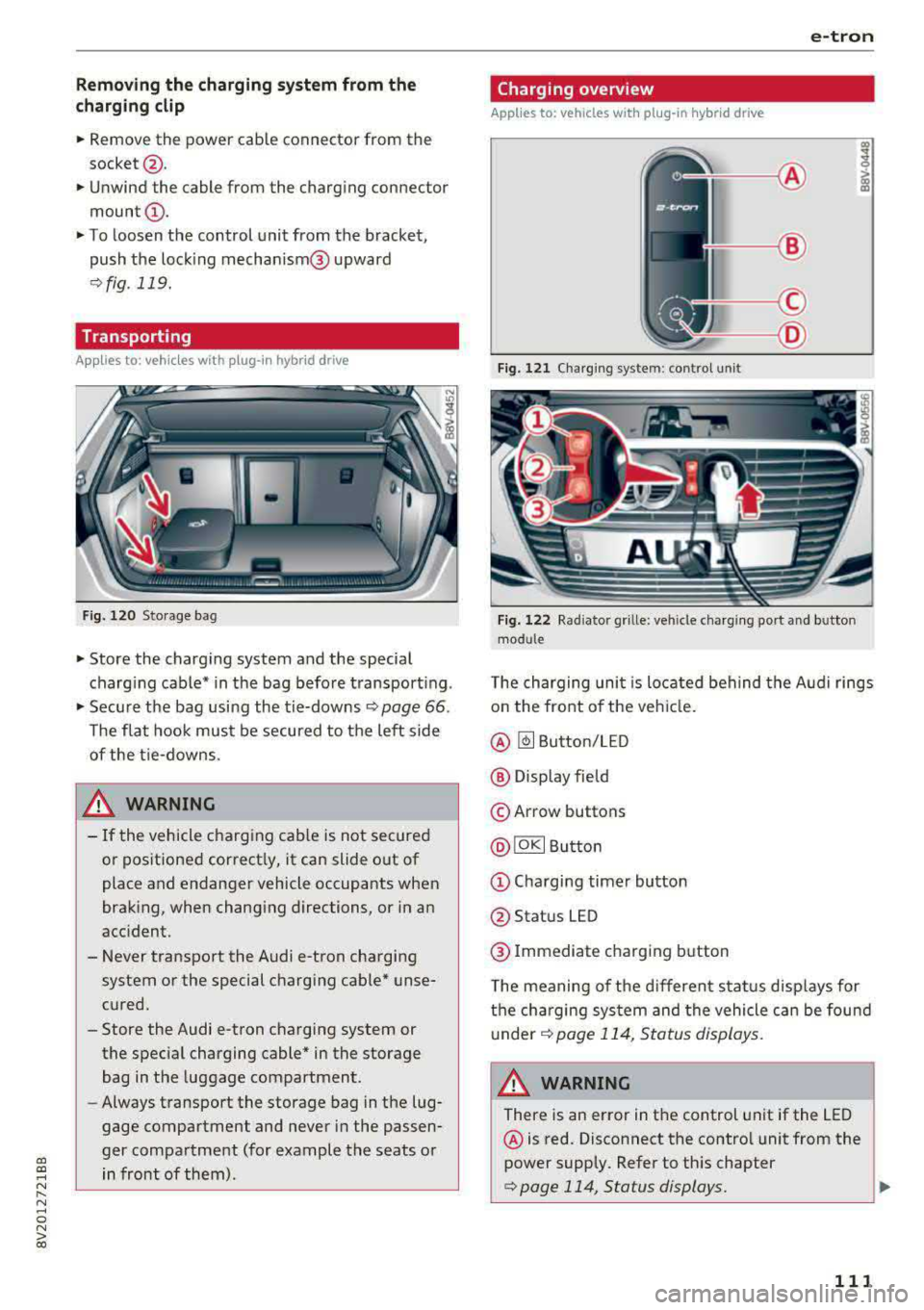
T he charging uni t is located behind the Audi rings
o n the front of the vehicle .
@ ~ Button/LED
@ Display field
© Arrow buttons
@IOKI Butto n
(D Chargi ng timer button
@ Status LED
@ Immediate charging button
T he meaning of the d ifferent status displays for
the cha rging sys tem and the vehicle can be found
u nder
9 page 114, S tatus displays.
A WARNING
There is an error in the control unit if the LED
@ is red. Disconnect the contro l unit from the
power supply. Refer to th is chapter
¢page 114, Status displays. ..,
111
Page 114 of 400

e-tron
@ Tips
-The device runs a se lf-test after power has
been restored to the control unit.
- You can activate a PI N for the control unit
¢ page 117 .
- The vehicle cannot be star te d if a cha rgi ng
connector is connected .
Before charging
App lies to: ve hicles w ith p lug- in hy brid drive
F ig. 1 23 Radiator g rille: ope ning the c harg ing uni t cove r
Fig. 124 Radiator g rille : cha rgi ng por t cap
"Unl ock the ve hicle if necessary ¢ page 34.
... Make s ure that the selector lever is in the P po
sition and drive ready mode is switched off
¢ page 96.
"Turn the lock until it is ve rtical to open the cov
er on the charging
unit ¢ fig. 123 .
... Slide the cover caref ully to t he s ide if necessa
ry .
... Remove the lock on the c harg ing po rt
¢fig. 124.
"Inser t power plug @ or© into the socke t
¢page 108 , fig. 114 .
l) Not availa ble in a ll Info ta in m en t sy ste m s.
112
... Plug the vehicle charging connecto r ©
¢ page 108, fig. 114 into the vehicle charging
port ¢ fig. 124. The c harging p rocess starts au
tomatically if no charg ing timer is set .
(D Tips
Remove ice and s now from the cover using a
h and brush and solvent-free de icing sp ray .
Charging
App lies to : vehicles wi th plug-in hybrid drive
You can switch between the immediate charg ing
@ and charging timer Q) options d uring the
charg ing process if a charg ing t imer is set . Press
the des ired button to do this .
You have different charging options:
Immediate charging
To start the c harging process immed iate ly, press
the b utton @
¢page 111 , fig. 122 . The LE D in
the button turns on.
Setting the charging timer
You can delay the ch arging time w ith the charg
i ng t imer in the Infota inment system
ll _ Yo u can
set two diffe rent timers.
" If a time r was alrea dy set, p ress t he bu tto n Q)
¢page 111, fig. 12 2. The LED in the button
t urns on .
... To set a charging timer , select: IMENU ! button>
Vehicle > left control button > Charge > r ight
control button >
Program timer .
... Select Individual timer or Repeat timer .
... Set the departu re time, the da te or day of the
week .
... You ca n activate the climate cont rol w ith the
charging t imer d uring the c harg ing process by
sele ct ing
Air conditioning wit h the cont rol
knob.
A ./ appears in the box. This activ ation is
separa te from the Infotai nment system set
tings in t he climate cont rol
menu ¢ page 118.
... Press the IBACKI b utton. ..,_