2017 AUDI S3 SEDAN seats
[x] Cancel search: seatsPage 74 of 400

Warm and cold
driver is transferred to the front passenger's
side . This applies a t emperature change to the
front passenger's side .
8/r Blower
Using the regulator 8£?, you can manually adjust
the volume of air generated by the blower to your
p reference . The blower shou ld always run at a
low setting to prevent the windows from fogging
and to ensure a continuous exchange of air inside
the vehicle . To have the blower regulated auto
mat ically , press the AUTO button.
~/ :,0/ ~ Air distribution
The air distribution can adjusted with the but
tons. To have the air distribution regulated auto mat ically, press the AUTO button.
The round air vents in the cockpit are adjustable
qpage 73.
To keep the front s ide windows from fogging up
in damp weathe r, we recommend opening the
side air vents and tilting them to the side .
Foot vents are located under the front seats and
adjustable vents on the end of the center console
to heat the rear of the vehicle .
::!_ Defrosting
The windsh ield and s ide windows are defrosted
or cleared of condensation as qu ickly as possible .
The max imum amount of air flows ma inly from
the vents below the windshield. Recirculation
mode switches off. The temperature shou ld be
set at +72°F (22°() o r higher. The temperature is
controlled automatica lly. In the
;Ix setting, the
A/C cooling mode switches on automatically , d e
pending on the outside air temperature.
The AUTO button switches the defroster off.
cE) Recirculation mode
The recirculation mode can be turned on manua l
ly or automatically*.
- Switching manual recirculation mode on and
off: Press
the~ button.
72
- Automatic * reci rculation mode: auto recircula
tion needs to be activated in the Infotainment
system. Select in the Infotainment system:
I MENU I but ton > Vehicle > left control button >
Air conditioning > Auto recirculation
The air
quality sensor that is designed for diesel and
gasoline exhaust automatically sw itches the re
circulation mode on or off depending on the
level of pollutants in the outside air.
In rec irculat ion mode, the air inside the vehicle is
c ir culated and filtered. This prevents the unfil
tered air outs ide the veh icle from entering the
vehicle inte rior. Switching rec irculation mode on
whe n driving through a tunnel or when sitting in
traffic is recommended
q .&..
Pressing the~ button, AUTO or the ;fx button
switches recircula tion mode off.
T he system switches to recirculation mode when
driv ing in reverse when the engine is cold .
SP. Rear window defogger
If the rear window defogger is activated when
the igni tion is switched on, the battery manage
ment determines based on the battery charge if
i t is possible to turn on . Otherwise, the rear w in
dow defogger functions with the engine running
and switches off automatically after approxi
mately 10 -20 minutes, depending on the out
side temperature .
To prevent the rear window defogger from
switching off automat ica lly, press and hold the
!fP. button for more than two seconds. This re
mains stored up to approximate ly 15 minutes af
te r turning off the ignition.
J Seat heating*
Pressing the J button switches the seat heat ing
on at the highest setting (level 3) . The LEDs indi
cate the temperat ure level. To reduce the tem
perature , press the button again. T o switc h the
seat heating off, press the button repeatedly un
ti l the LED turns off .
After approximately 10 minutes, the seat heating
a utomat ically switches from level 3 to level 2.
.,..
Page 75 of 400

a, a, ..... N
" N ..... 0 N > 00
_& WARNING
-You should not use the recirculation mode
for an extended period of time, because no
fresh a ir is drawn in and the windows can
fog when coo ling mode* is switched off .
T his increases the r is k of an accide nt.
- Individuals with reduced sensitivity to pain
o r temperat ure cou ld develop burns when
using the seat heating fu nction . To reduce
the risk of injury, these ind iv iduals should
not use seat heating.
(D Note
To avoid damage to the heat ing elements in
the seats, do not kneel on the sea ts or place
heavy loads on a small area of the seat.
@ Tips
-The setting for the seat heating on the driv
er's side is ass igned to the key that is in use.
-If the front passenger's seat heat ing is
turned on, it will not turn on again automat
i ca lly if more than 10 m inutes have passed
between sw itching the ign ition off and
switching it on again .
Adjusting the air vents
Fig. 87 Cockp it: adjust ing the air vents
The fol low ing settings are possib le ¢fig. 87:
- CD Air flow amount
-@ Air flow direction
To adjust the
air fl ow a mount , turn the ridged
outer adjusting ring
CD ¢ fig. 87. To stop the air
flow, turn the adjusting ring all the way to the right .
Warm and cold
To adjust the air fl ow directio n, turn the air vent
gri ll insert @.
Steering wheel heating
Applies to: vehicles with steering wheel heating
The steering wheel rim can be heated.
"' Press the ~ ¢ page 15, fig. 11 button on the
mu ltifunction steering wheel to switch the
steering whee l heating on and off. The mes
sage
St ee ring wheel h eatin g: on/St eering
w hee l heating: off
appears in the instrument
cluster display.
T he temperature is mainta ined at a constant lev
el when steering wheel heating is switched on.
T he s teering wheel heating settings a re stored
automat ica lly and assigned to the remote control
key that is in use .
If the steering wheel heating cannot be sw itched
on, the message:
S te e ring wh eel h eating : off ap
pears. Dr ive to an authorized Audi dea ler or au
thorized Audi Service Facility immediately to have
the malfunction corrected.
73
Page 113 of 400
a, a, ..... N
" N ..... 0 N > 00
Removing the charging syst em from the
charging clip
• Remove the power cable connector from the
socket @.
• Unwind the cable from the charging connector
mount (D.
• To loosen the control unit from the bracket,
push the lock ing mechan ism @ upward
9fig. 119.
Transport ing
App lies to: veh icles with plug-in hybrid drive
Fig. 1 20 Storage bag
• Store the charg ing system and the special
charg ing cable* in the bag befo re transport ing .
• Secure the bag using the tie-downs ¢ page 66.
The flat hook must be secured to the left side
of the tie-downs.
_& WARNING
- If the vehicle charging cab le is not secured
or pos itioned correct ly, it can slide out of
place and endanger vehicle occupants when
brak ing, when changing directions, or in an
acc ident.
- Never transport the Audi e-tron charging system or the special charg ing cable" unse
cured.
- Store the Audi e-tron charging system or the spec ial charging cable* in the storage
bag in the luggage compartment.
- Always transport the storage bag in the lug
gage compartment and never i n the passen
ger compartment (for example the seats or
in front of them) .
e-tron
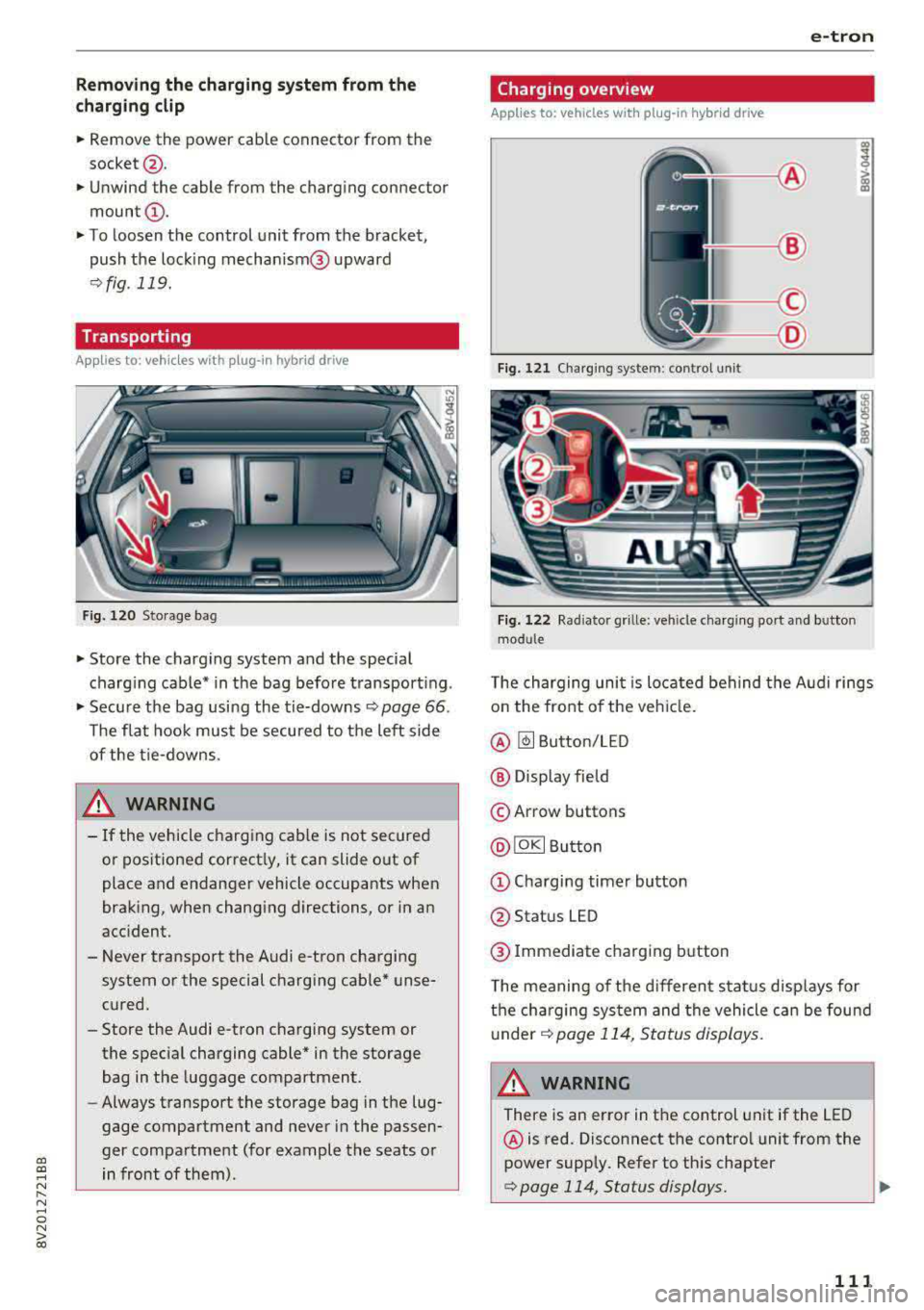
Charging overview
Applies to: vehicles with pl ug-in hybrid drive
Fig. 121 Charging system : control unit
Fi g. 122 Rad iator grille: veh icle charg ing port and bu tton
module
T he charging uni t is located behind the Audi rings
o n the front of the vehicle .
@ ~ Button/LED
@ Display field
© Arrow buttons
@IOKI Butto n
(D Chargi ng timer button
@ Status LED
@ Immediate charging button
T he meaning of the d ifferent status displays for
the cha rging sys tem and the vehicle can be found
u nder
9 page 114, S tatus displays.
A WARNING
There is an error in the control unit if the LED
@ is red. Disconnect the contro l unit from the
power supply. Refer to th is chapter
¢page 114, Status displays. ..,
111
Page 195 of 400

CXl CXl .... N r--N .... 0 N > 00
Different functions are available depending on
the Twitter category you have selected:
- New twe et: you can post a new tweet using
pre-made temp lates or using myAudi tem
plates that you have created yourse lf .
- Refr es h: the selected Tw itter function is re
freshed.
- Favori te: mark a Tweet as favo rite to show you
l ik ed it.
- Retw eet: you can quote a Tweet to share it with
others.
(j) Tips
- Other settings such as account, language,
Tweet security and location settings
cannot
be changed in the MMI. These changes must
be made on the Twitter website .
- You can only connect
one Twitter account
wi th you r myAudi account.
- Audi connect (Infotainment) makes it possi
ble to access Tw itter. Permanen t ava ilability
cannot be guaranteed, because that de
pends on Twitter.
Travel (travel guide)
Applies to: vehicles with Audi connect (Infotainmen t)
You can use the Audi MMI connect opp to store
points of interest on your mobile device (such as
a smartphone) and then use them for route
guidance in the MMI .
Requirement:
The
A udi MM I connect app must be installed and
open on your mobile device .
You must be logged i nto your myAud i account in
the
A udi MMI conn ect app and you must have se
l ected your vehicle.
The Wi-Fi funct ion on your mobile device and on
the MMI must be switched on.
The MMI must be connected to the network.
.,. Press: I MENU I button > Audi conne ct > left con-
t ro l button
> Inf ormati on category > Tra ve l.
Afte r opening the travel guide, travel tips in yo ur
a rea will be displayed incl uding c urrent rat ings as
well as the correspond ing category.
Audi c onn ect ( Inf ota inm ent )
.,. Press the le ft control button to change the cat
egory (such as bars nearby) .
A WARNING
= -
-It is only safe to use tablets, laptops, mo
b ile dev ices and other similar devices when
the vehicle is stationary because, like all loose objects, they co uld be thrown around
the inside of the vehicle in a crash and cause
serious inju ries. Store these types of devices
securely while d riving.
- Do not use any wireless devices on the front
seats within range of the airbags while dr iv
ing. Also read the warnings in the chapte r
¢ page 271, Front airbags.
(D Tips
-Units of measurement, language settings
and time are shown in the Infotainment sys
tem display based on how they were set in
the system settings
¢ page 241.
Audi connect (Infotainment) in navigation
Applies to: vehicles with navigation system and Audi connect
(Infotainment)
.,. Select : !MENUI button> A udi conn ect > left
control button >
Na vig atio n.
The following Audi connect Infotainment services
are currently ava ilable:
- Navigation with
online m ap vie w and Street
Vi ew
¢ page 212.
- Point of Intere st (POI) on line sea rch with
v oi ce re cognit ion
(such as restaurants): plan
route guidance using the MMI contro l pane l
¢ page 203 and the voice recogn ition system
¢ page 170 .
-Set up destinations in your MMI using your
myAu di account or onl in e map vie w
¢page 212 .
-On line traff ic informat ion : receive up-to-the
m inute traffic informat ion about acc idents,
road construction and other inc idents
¢ page 215 .
-Map update: import navigation map updates
direct ly to your veh icle using an SD card or as
an online update
¢ page 213.
193
Page 197 of 400

CXl CXl .... N r--N .... 0 N > 00
Wi-Fi hotspot
Applies to: vehicles with Wi-Fi hotspot
You con use the MMI as a Wi-Fi hotspot to con
nect up to eight Wi-Fi devices to the Internet. While driving, restricted use of unsecured, light,
small wireless devices is only possible from the
rear of the vehicle.
Requirement: the ignition must be switched on.
• Select: I MENU I button > Tele ph one> right con-
trol button >
Wi -F i s ettin gs.
The follow ing settings can be modified:
Wi-Fi
The MMI Wi-F i hotspot is deactivated at the fac
tory . Switch the Wi-Fi hotspot to
H otsp ot before
establishing a connection between your vehicle
and your W i- Fi dev ice.
- On : the MMI Wi-Fi hotspot is active and visible
to other devices . You can connect your Wi-Fi
device with the MMI.
- Off: the MMI W i-F i hotspot is deactivated . An
I n ternet connection fo r Wi-Fi devices is not
poss ible.
_& WARNING
- T o reduce the risk of an accident, use the
Audi connect In fotainment services with a
Wi-Fi hotspot only in the rear seat when the
vehicle is in motion, or on ly when the vehi
cle is stationary.
- It is only safe to use tab lets, laptops, mo
bile devices and other similar devices when
the vehicle is stationary because, like all loose objects, they could be thrown around
the ins ide of the vehicle in a crash and cause
serious injur ies. Store these types of devices
securely while driving.
- Do not use any w ireless devices on the front
seats w ith in range of the a irbags while driv
ing. Also read the warn ings in the chapter
~page 271, Front airbags.
- As the driver, do not allow usage of the Wi
Fi hotspot to dist ract you from driving, as
this could increase the risk of an accident .
-
Audi conn ect ( Inf ota inm ent )
(D Note
-Under some conditions, certain mobile devi
ces and operating systems may automati
cally switch from your vehicle's Wi-Fi hot
spot to the device's mobile data connection.
In that event , standard text and data usage
rates would apply wh ile the device's mobile
data connection is in use. Please refer to
documentation provided by your mobile de
vice's manufacture and your data carrier for details, related terms and privacy state
ment.
- You a re responsib le for all precautions tak
en for data protection, anti -virus protection
and protection against loss of data on mo
bile devices that are used to access the In
ternet through the Wi-Fi hotspot.
(D Tips
- In vehicles without Audi connect (Infotain
ment)*, the use of the Wi-Fi hotspot is only
possible for the W i-Fi audio player*. A data
connect ion to the Internet cannot be estab
lished.
- For add itional information about the Audi
connect Infotainment services, visit
ww w.a udiusa.c o m /aud iconn ect .
Configuring the data
connection
Applies to: vehicles with Audi connect (Infotainment)
The data connection for Audi connect Infotain
ment services is pre-configured at the factory.
However, if a configuration should be necessary,
you con adjust the following settings.
• Select: ! MENU I button> right control button>
Connecti on manag er.
• Select: right control button > Online setti ngs >
Data c onnec tion setting s.
Using the Data co nnection settin gs menu, you
can set when an Internet connection should be
made . T he Internet connection disconnects auto
matically once the requested Audi connect Info
tainment service no longer requires any data.
The following options can be selected:
195
Page 198 of 400

Audi connect (Infotainm ent )
Aud i conn ect (MMI)
W ith the Audi c onn ect (MMI) function, yo u can
Allo w or Deny the use of A udi connect Infotain
m ent services if the connection is set to
N o re
q uest
or With reque st .
Wi-Fi devic es*
Using the Wi-Fi de vic e s function, you can All ow
or D eny a connection to the Interne t.
A WARNING
- As the driver, do not allow usage of the Wi
Fi hotspot to distract you from driving, as
this could increase the risk of an accident.
- It is only safe to use tab lets, laptops, mo
bile devices and other similar devices when
the vehicle is stationary because, like all
loose objects, they could be thrown around
the inside of the vehicle in a crash and cause
serious injur ies. Store these types of devices
securely whi le driving .
- Do not use any w ireless devices on the front
seats w ith in range of the a irbags while driv
ing . Also read the warnings in the chapter
q page 2 71, Front airbags.
Audi connect
(Infotainment) general
information
Audi connect Infotainment services
Applies to: vehicles with Audi connect (Infotainment)
@ Tips
- You can on ly use services supported by Audi
connect (Infotainment) if you have the op
tiona l MMI Navigation plus equipment with
MMI touch* and Audi connect (Infotain
ment) .
- Use of the LTE* mob ile network standard is
not available in every country . Contact an
authorized Audi dealer or authorized Audi
Service Fac ility or your cell phone serv ice
provider for additional informat ion .
- Usage of Audi connect Infotainment serv
ices depends on the availability of services
through th ird party prov iders .
196
- Audi connect Infotainment services are on ly
available within the cell phone network cov
erage from your cell phone service provider.
- Audi connect Infotainment services are
available in the USA. Audi connect Infotain
ment services are currently not availab le in
Canada or in Mexico.
- Also read the information in the chapter
q page 177, Telephone.
-Availability, scope, prov iders, screen display
and costs of services may vary depending on
the country, model, mode l year, end device
and rates. Additional information can be
found under
www .audiu sa .com /aud icon
nect
- An initial registration/act ivat ion on the
myAudi platform at
www .audiusa .com /
m yaudi
is requ ired to use individual serv
ices. You can contact an author ized Audi
dealer or Aud i connect (Infotainmen t) cus
tomer service at (877) SOS -AUDI (2834) to
rece ive information on options for expand
ing your usage and any costs that may re
sult.
- The Audi connect Infotainment services are
a Wi-Fi/lnternet-based system . If the sys
tem does not function correct ly even
though all of the requirements are met,
please try again later or contact Audi con
nect (Infotainment) customer service at
(877) SOS-AUDI (2834).
- For detailed information on Aud i connect
(Infota inment) and the Terms of Use, refer
to
www .audiusa.com /aud iconnect .
Data protection
Applies to: vehicles with Aud i connect (Infotainment)
(D Tips
- Your pr ivacy is important to us.
- AUDI AG colle cts, processes, s hares and
t ransmits your personal info rmation in a c
c o rdance w ith legal reg ulations in order to
ensure p roper function and availability of
the individua l Audi connect Infotainment
serv ices. You can view the complete, current
and valid Audi connect (Infotainment) data
protection policy in your MMI. The myAud i
..,.
Page 228 of 400

Media
(D Tips
-Check for any connection requests on your
Bluetooth dev ice .
- Mult iple Bluetooth audio players can be
connected to the MMI, but only one mobile
device can be active.
- Bluetooth protocols AVRCP ( 1.0/1.3/1.4)
and A2DP are suppo rted.
- Note the volume setting on your Bluetooth device. A ud i recommends setting your mo
bile device to the maxim um vo lume when
us ing it as a Bluetooth audio player.
- The supported media functions (such as
sh uffle) depend on the Bluetooth device be
i ng used.
- For more information on the supported de
v ices, visit
www.aud iusa.com /bluetooth or
contact an author ized Audi dealer or author
i zed Audi Service Facility.
Wi-Fi audio player
A ppl ies to: ve hicles w ith Wi-F i
Using the Wi-Fi audio player media source on the
MMI, you can connect and operate your Wi-Fi-ca
pable media player (such as a smartphone) to wirelessly play music from your media player
li
brary. The media player is connected through the
vehicle's Wi -Fi hotspot. A UPnP Server opp or an
integrated UPnPIDLNA server on your media
player is required to access your media player
li
brary.
Requirement: the Wi-Fi function on your media
p layer must be sw itched on. The
Aud i MMI con
n ect
app or a UPnP server app must be installed
on your med ia p layer .
Or: you must be us ing a
media player with an integrated UPnP/DLNA
server.
- Connecting a medi a playe r: press the I MEDIA !
button. Press the left control button unti l the
sources
overview ¢ page 230 is displayed . Se
lect and co nfirm
W i-Fi audio play er 0
¢ page 230, fig . 214 .
- If necessary, select and confirm Wi-F i turn ed
off > Turn on Wi-Fi
to activate Wi-Fi in the
MMI. Select
Wi-Fi s etti ng s, if necessa ry . Se lect
226
the same settings on the wireless media player
that are used for the Wi- Fi hotspot .
-Starting the Wi-Fi audio pla yer : start the Audi
MMI connect
app or a UPnP server app, or set
media permissions on your media player.
Operating the medi a pl ayer : the med ia p layer is
operated through the MM I.
- Press the left control button repeatedly until
the
Folders menu item appears. Select and con
firm
Folder s.
- Playing music from the medi a pla yer:
select
and confirm
M edia cent er.
Web r adio :
see ¢ page 22 7.
A WARNING
-As the d river, do not allow usage of the Wi
Fi hotspot to distract you from driving, as
this could increase the r isk of an accident.
- It is on ly safe to use tablets, laptops, mo
bi le devices and other similar dev ices when
the vehicle is stat ionary because, like all
loose objects, they co uld be thrown around
the inside of the ve hicle in a c rash and ca use
serio us inju ries . Store these types of devices
secure ly while driving.
- Do not use any wire less devices on the front
seats wi thin range of the airbags while dr iv
ing . Also read and follow the warn ings in
¢ page 271, Front airbags.
(D Note
A lways fo llow the information fo und in ¢ (!) in
Wi -Fi hotspo t on page 195.
(D Tips
- Always read the chapter¢ page 196, Audi
connect (Infotainment) general informa
tion.
- Please note that a Wi-F i connection does
not automatically make it possible to use
the Interne t. For addit io nal info rm ation,
see
¢ page 190 .
- To avoid interr upt ions du ring playback, de
act ivate the powe r saving function on the
media player or connect it to a charger.
Page 230 of 400

Media
-Do not u se any wireless devices on the fro nt
seats within range of the airba gs w hile driv
ing. Also read and follow the warnings in
r=> page 271, Fro nt airbags.
CD Note
- Always follow the information found in ¢ 0
in Wi-Fi hotspot on page 195 .
-Please note that there generally are add i
tiona l costs when using an online media
service account, especially when it is used i nternationally.
{!) Tips
-Depending on the Internet connection and
network traff ic, a connection loss can occur
during p layback of on line media serv ices.
-Online media and Internet radio usage de
pends on the serv ice avai lability of the third
party provider.
- Audi AG simply makes the access to on line
media serv ices possible t hrough the MMI
and does not take any respons ibility for the
contents of the onli ne med ia serv ices .
-Always read the chapter r:> page 196, Audi
connect (Infotainment) general informa tion.
-Depending on the mobile device used, the re
may be interr uptions du ring media playback
and when using the
Audi MMI connect app.
T o avoi d inter ruption s when usi ng a mob ile
device, do no t loc k t he s creen on you r mo
bi le dev ice a nd keep the
Audi MMI connect
app in the foreground .
- Co ntact an a utho rized Audi dea le r or a u
thorized Audi Service Facili ty for additional
informat ion about on line media .
228
Multimedia connections
USB adapter for Audi music interface
You can connect your mobile devices (such as a
smartphone or
MP3 player) to the Audi music in
terface and charge them using a special USB
adapter .
®-
Fig. 2 11 Audi USB adapters
You can purchase the USB adapter ¢ fig . 211
from an author ized Audi dealer or at spec ia lty
stores:
Q) USB adapter for devices with a micro USB con
nect ion
@ USB adapter for devices with an Apple Light
ning connect ion
@ USB adapte r for devices with an Apple Dock
connector
You can conne ct your mob ile dev ices throug h the
Audi music interface to the MM I using the USB
adapter and charge the battery at the same time.
Applies to: vehicles wit h Aud i music interface
-Audi musi c interface : Refer to¢ page 229.
CD Note
Handle the USB adapter carefully. Do not al
l ow it to be pinched .