2017 AUDI A8 audio
[x] Cancel search: audioPage 198 of 354
Rear Seat Entertainment
Restarting the RSE
(reset)
Applies to: ve hicles w ith Rear Seat Ente rta inment
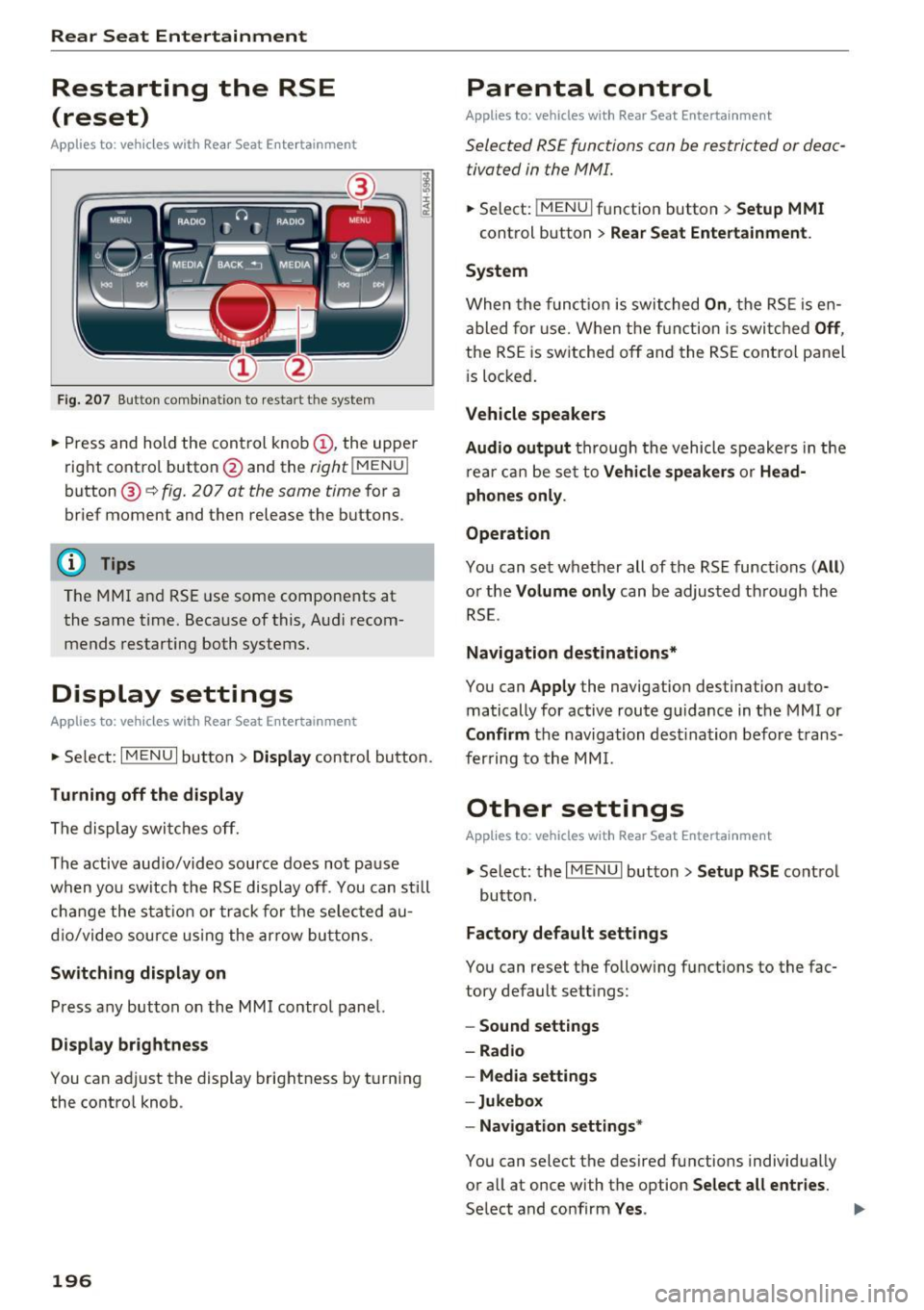
F ig. 207 Button combination to restart th e system
... Press and hold the control knob (D , the upper
right control button @and the
righ t!MENUI
button ® c:::> fig. 207 at the same time for a
brief moment and then release the buttons .
@ Tips
The MMI and RSE use some components at
the same time. Because of this, Audi recom
mends restarting both systems.
Display settings
Applies to: vehicles with Rear Seat Enterta inment
... Se lect: I MENU I button > Display control button.
Turning off the display
The display switches off.
The active aud io/video source does not pause
when yo u switch the RSE display off . You can still
change the stat ion or track for the selected au
dio/video source using the arrow buttons.
Switching display on
Press any button on the MMI control panel.
Display brightness
You can adjust the display brightness by turning
the control knob .
196
Parental control
Applies to: ve hicles with Rear Seat Entertainment
Selected RSE functions can be restricted or deac
tivated in the MMI.
... Select: I MEN u I fu nction button > Setup MMI
control button > Rear Seat Entertainment.
System
When the function is switched On, the RSE is en
abled for use. When the function is switched
Off,
the RSE is switched off and the RSE control panel
i s locked.
Vehicle speakers
Audio output
through the vehicle speakers in the
rear can be set to
Vehicle speakers or Head
phones only.
Operation
You can set whether all of the RSE functions (All)
or the Volume only can be adjusted through the
RSE.
Navigation destinations*
You can Apply the navigation destination auto
matically for active route guidance in the MMI or
Confirm the navigation dest ination before trans
ferring to the MMI.
Other settings
App lies to: vehicles with Rear Seat Enterta inment
.,. Select: the I MENU I button> Setup RSE control
button.
Factory default settings
You can reset the following functions to the fac
tory default settings:
- Sound settings
- Radio
- Media settings
-Jukebox
- Navigation settings*
You can select the desired functions individually
or all at once with the option
Select all entries.
Select and confirm Yes . .,,.
Page 200 of 354

Rear Seat Entertainment
Labeling the wireless headphones
-Attach the supplied label CD or@ c::> fig. 209 on
the inside of the left/right wire less head
phones.
La beling the w ireless headphones:
CD Wireless headphones label (paired with the
left RSE display)
@ Wireless headphones label (paired with the
right RSE display)
Switching wireless headphones on/off
- Switching on:
to switch the wire less head
phones on, press the On/Off button
CD
9 fig. 208 on the right earpiece (R) for approxi
mately
3 seconds and release it once the LED
@ starts blinking . The light @will blink s lowly
once the connection to the wireless head phones has been established.
- Switching off : to switch the wireless head
phones off, press and hold the On/Off button
CD until the LED @turns off.
The wireless headphones switch off automatical ly about five minutes after the RSE switches off.
Disconnect wireless headphones
You can delete the pairing between the wireless
headphones and the RSE if yo u need to switch
out the headphones o r change the pairing .
- Select:
I M ENU I button> Setup RSE control but
ton
> Headphones > Delete wireless head
phones.
A WARNING
- For safety reasons, as the driver, only use
the headphones when the vehicle is station
ary to reduce the r isk of a crash .
- When driving, store the headphones secure
ly so that they do not move around in the
vehicle interior when braking or in a crash.
- Maintain a moderate volume leve l when lis
tening to audio playback through the head
phones. Continuous exposure to extreme
volume levels may result in loss of hearing.
198
-
@ Tips
-If the wire less headphones were already
paired, the connection to the headphones
will be reestablished after switching the
RSE on if the headphones are sw itched on.
- The RSE only supports wireless headphones
from your authorized Audi dealer.
- Audio/video output through the wire less
headphones stops during the pairing proc
ess.
- The pairing process must be done separate
ly for the left and right w ireless head
phones. The wireless headphones are as
signed to the left or right RSE display de
pend ing on the side of the RSE control unit
where you started the pairing process. The
pairing between the wireless headphones
and the lef t/r ight RSE display is ide ntifi ed
with a label.
- Volume that is too high or too low is auto
matically adjusted to a preset leve l when
the wireless headphones are connected.
Charging and changing the battery
Applies to: vehicles with Rear Seat Entertainment
If the light on the wireless headphones turns
red the batteries are low and need to be charg-
,
ed or replaced .
Fig. 210 Connec tion for the charg ing cable/battery com
partm ent
-Charging the battery : connect the charging ca
ble to the connection
CD c::> fig . 210 on the bot
tom side of the left earpiece (L) . Then connect
the charging cable to the cigarette lighter * /12
Volt socket* in the rear center console.
Or:
charge the battery for the wireless headphones .,.
Page 202 of 354

Rear Seat Entertainment
Media drives/
connections
Overview
A pplies to: ve hicles with Rea r Seat E ntertainment
The RSE media drives are Located above the
pass-through behind
a blind. Slide the blind up
ward to open the RSE media drives .
C
Fig. 2 12 RSE media drives
Fig. 213 Aud i m usic in terface
RSE media drive overview c> fig. 212 :
@ Eject button
@ DVD slot
© SD card reader
The RSE Audi music interface
c> fig. 213 is locat
ed in the storage compartment under the center
armrest ®
c> page 193 , fig. 202. You can con
nect a portable audio dev ice (such as an iPod or
USB storage dev ice) to the Audi music interface
using a special adapter cable*.
CD Interface on Audi music interface
@ Jack for connecting to the A udi music in te r
face
® Adapter cable* (such as iPod adapter cab le*)
@ iPod jack on the iPod adap ter cable*
200
@ iPod
The RS E media dr ives a nd the Audi mus ic inter
face a re sta rted and oper ated through the RS E.
The desig n and p roperties of the RSE media
drives are the same as the MMI drives. You can
find detailed information on
c> page 180.
{!) Tips
- Th e DVD changer * is loca ted in t he ve hicle
glove compartment . For more in formation
on the DVD c hanger *, refer to
c> page 181.
- You can only access t he DV D changer * in the
MMI t hrough the RSE. The other M MI med ia
dr ives a re not avai lab le from the rear of the
vehicle.
Navigation
Opening navigation
App lies to: vehicles wit h Rear Seat Entertai nmen t and naviga
tion syste m
Fig. 214 Navigat ion ma in funct io ns (RS E)
.. Select: the I MENU I button > Na vigat ion.
After selecting Navigation, the last men u that
was open is disp layed.
- Di splaying navigation fun ction s: press the
Route guidance control b utton.
The following func tions a re availab le for plann ing
a desti nation:
CD E nte r po int of interest
@ L oa d las t destin ation
® Enter a destination using an address
@) Open the map/use a destination from the
map
Page 204 of 354

Rear Seat Entertainment
The radio functions match those in the MMI. For
more information on the Radio menu, refer to
c::>page 177.
You can store a separate presets list in the RSE
that may contain up to SO stations from all fre
quency bands. You can a lso display the station
name for the selected radio stat ion or change the
station sorting separately in both RSE disp lays.
Playing media
A pp lies to: ve hicles w ith Rea r Seat E nte rtainment
.,. Select : I MEDIAi button .
The media functions match those in the MMI to a
large extent. For more information on the Media
menu, refer to
c::> page 189.
Possible sources are:
(D Jukebox
@ SD card reader
® DVD drive
@ DVD changer*
® Audi music interface (such as iPod, USB or ex
ternal audio/video input)
Different functions are available depending on
the active source and the medium inserted.
(D Tips
- The Album browser function is not available
in the RSE .
- The copy and delete process cannot be
started simultaneous ly when accessing the
Jukebox from both systems at the same
time.
Video playback information
Playback combinations
A pp lies to: ve hicles w ith Rea r Seat E nte rtainment
When se lecting the same video source, both
sound and picture w ill play through both RSE dis
plays.
202
If different video sou rces are started on both RSE
displays, only certain picture/sound playback
combinations are poss ible and they depend on
the selected video sources.
Complete output format (sound and video
image) on both RSE displays
Se lect a video DVD as the first video source in the
DVD drive and then the following source:
- DVD changer*
- Aud i music interface with AV adapter cable*/
iPod adapter cab le plus*
Playing only sound on the second RSE
display
There is only sound output for the second v ideo
source if you:
- Start a video DVD in the DVD drive as the first
source and sele ct a video file from the Jukebox
or the SD card as the second source.
- Sta rt a video file from the Juke box as the first
source, and select a video file from the SD card
or from the Aud i music interface using an AV
adapter cable* /USB adap ter cable" /iPod adapt
er cable plus * as the second sou rce and vice
versa .
- Start a video DVD/video fi le in the DVD chang
er * as the first source, and select a video file
from the Jukebox, SD card or from the Audi mu
sic interface using an AV adapter cable*/USB
adapter cable*/iPod adapter cable plus* as the
second source.
No picture/sound playback on the second
RSE display
If a video file from the Jukebox, from an SD card
or from the Audi music interface w ith the USB
adapter cable* is already play ing o n one RSE dis
play, playback of a video DVD in the DVD drive on
the other RSE display is not possible.
Page 207 of 354

sound distribu tion)/ Driver (sound dist ribution
aime d toward th e driver) or
All /Front /Rear .
- Surround level* :
you can adjust the vo lume of
t h e sur round effect by tu rning the contro l
kno b.
-AudioPilot (dynamic road noise compensa
tion)* :
select and confirm Active /Inactive.
When the funct io n is act ive, the vo lume is a uto
matically ad justed depending on the leve l of
noise ins ide the ve hicle.
- Sound focus* (adjusting the sound distribu
tion ):
select and conf irm All (symmet rical
sou nd
di stribution)/ Movie (optimal so und dis
t ribution fo r playing a
movie)/ Front/Rear .
- Volume balancing *:
the dynam ic road noise
compensation can be ad justed by t urni ng the
co ntro l knob .
@Subwoofer* I@ Bass/ © Treble
You can a djust the Subwoofer *, Bass and Treble
settings by turning the cont ro l knob. The
changed settings only apply fo r the aud io source
that is active a t the t ime . Th is allows you to ad
just t he sound se tt in gs for eac h aud io source sep
a ra tely .
® Balance/Fader (sound focus)
- Adjusting the sound distribution using the
MMI touch :
move your finger on the MMI touch
contro l pane l in the desir ed di rect io n.
Adjusting the system
volume
.,. Se le ct: th e IMENU J butto n> Tone.
Navigation* control button
Voice guidance volume /Entertainment volume :
volume of navigation prompts du ring act ive
ro ute gui dance. Music vol ume dur ing navigation
p romp ts m eans tha t the vol ume o f aud io p lay
b ack is tem porar ily lowe red w hen the p arking
s ys tem or vo ice g uidan ce is active .
Voice guidance : refer to q pag e 174 .
0 !:! Voice guidance on during call : see c>page 174 .
N ,..._
N ...... 0 0 :c '
Telephone* control button
Ring tone volume /Call volume :
you ca n adjust
t h e se lec ted ring tone vo lume o r cal l vo lume by
tu rnin g the cont ro l knob. The
Call volume can
o nl y be adj usted during a ca ll.
Systems control button
Voice recognition volume. :
you c an adju st the
vo lu m e of the an noun cemen ts by turni ng the
contro l kno b.
MMI touch volume *: the vo lume of the MMI
touch pr om pts ca n be adju sted by tu rn ing the
c on tro l k n ob .
Other settings
.,. Sele ct: the I M ENU I butto n > Setup MMI co ntr ol
bu tton.
Language
The language ca n be changed fo r the Info tain
me nt display, t he d river info rmation sys tem dis
play , voice guida nce* and t he voice re cogn ition
syste m*.
En glish, French an d Spanish are ava ila ble .
Measurement units
The following meas urement u nits can be set in
t h e Infotainment disp lay and d river info rmat ion
system.
- Speed (mph o r km/ h)
- Distance (miles o r kilomete rs)
- Temperature (°Fo r 0
( )
-Fuel consumption (L/1 00k m, mpg ( US) , m pg
(U K) or km/l)
- Volume (lite rs , ga llons ( UK) o r gallons (US))
Voice recognition
Applies to : vehicles wit h voice recog nitio n system
Command display : the display of possible com
mands during vo ice input can be switched
On or
Off .
Short dialogue : prompts in a shorte r fo rmat can
be switched
On o r Off .
Input signal :
the beep inp ut sig na l during a dia -
l og can be switched
On or Off. .,.
205
Page 241 of 354

0 co .... N ,..._
N .... 0 0 :c '
whenever the ignition is switched on.
A WARNING
- If the PASSENGER AIR BAG OFF light does
not go out when an adult is sitting on the
front passenger seat after taking the steps described above, make sure the adult is
properly seated and restrained at one of the
rear seating positions.
- Have the airbag system inspected by your
Audi dealer before transporting anyone on
the front passenger seat.
{D) Tips
If the weight-sensing mat in the front passen
ger seat detects an empty seat, the front air
bag on the passenger side will be turned off,
and the
PASSENGER AIR BAG OFF light will
stay on.
Repair, care and disposal of the airbags
Parts of the airbag system are installed at many
different places on your Audi. Installing, remov
ing, servicing or repairing a part in an area of the
vehicle can damage a part of an airbag system
and prevent that system from working properly in a collision .
There are some important things you have to
know to make sure that the effectiveness of the
system will not be impaired and that discarded
components do not cause injury or pollute the
environment.
A WARNING
Improper care, servicing and repair proce
dures can increase the risk of personal injury
and death by preventing an airbag from de
ploying when needed or deploying an airbag
unexpectedly:
- Never cover, obstruct, or change the steer
ing wheel horn pad or airbag cover or the in
strument panel or modify them in any way.
- Never attach any objects such as cup holders
or telephone mountings to the surfaces cov
ering the airbag units.
Airbag system
-For cleaning the horn pad or instrument
panel, use only a soft, dry cloth or one mois
tened with plain water. Solvents or cleaners
could damage the airbag cover or change
the stiffness or strength of the material so
that the airbag cannot deploy and protect properly.
- Never repair, adjust, or change any parts of
the airbag system.
-All work on the steering wheel, instrument panel, front seats or electrical system (in
cluding the installation of audio equipment,
cellular telephones and CB radios, etc.) must be performed by a qualified technician
who has the training and special equipment
necessary.
- For any work on the airbag system, we
strongly recommend that you see your au
thorized Audi dealer or qualified workshop.
- Never modify the front bumper or parts of
the vehicle body.
- Always make sure that the side airbag can
inflate without interference:
- Never install seat covers or replacement
upholstery over the front seatbacks that
have not been specifically approved by
Audi.
- Never use additional seat cushions that
cover the areas where the side airbags in
flate.
- Damage to the original seat covers or to
the seam in the area of the side airbag
module must always be repaired immedi
ately by an authorized Audi dealer.
- The airbag system can be activated only
once. After an airbag has inflated, it must
be replaced by an authorized Audi dealer or
qualified technician who has the technical
information, training and special equipment
necessary.
- The airbag system can be deployed only
once. After an airbag has been deployed, it
must be replaced with new replacement
parts designed and approved especially for
your Audi model version. Replacement of complete airbag systems or airbag components must be performed by qualified work-
shops only. Make sure that any airbag
Ill-
239
Page 342 of 354

Index
A
A/C (a utomat ic cl imate contro l) . . . . . . . . . . 70
Accessories .. .. .. .. . .. .... .. .. .. .. 60 ,338
Active lane assist ( lane depa rture ass ist) . . 102
Clean ing the camera a rea . . . . . . . . . . . . . 307
Mes sages . . . . . . . . . . . . . . . . . . . . . . . . . . 103
Adapter cable (A udi music inter face) . . . . . 185
Adapt ive a ir suspension/sport . . . . . . . . . . . 110
Adapt ive c ru ise control. . . . . . . . . . . . . . . . . . 94
Clean ing the senso rs . . . . . . . . . . . . . . . . . 307
Messages . . . . . . . . . . . . . . . . . . . . . . . . . . 101
Adj usting the so und . . . . . . . . . . . . . . . . . . . 204
Ad justing the so und (tone) . . . . . . . . . . . . . 195
Adj usting the tempe rature (automatic climate
control system ) . . . . . . . . . . . . . . . . . . . . . . . . 71
Ad justing the vol ume
R SE . . . . . . . . . . . . . . . . . . . . . . . . . . . . . . . 194
A irbag .. .. .. .. .. ............. .... .. . 226
Airbag system . . . . . . . . . . . . . . . . . . . . 234, 244
Care . . . . . . . . . . . . . . . . . . . . . . . . . . . . . . 239
Ch ildren . . . . . . . . . . . . . . . . . . . . . . . . . . . 249
Ch ild rest raints . . . . . . . . . . . . . . . . . . . . . 250
Compo nen ts (front a irbags) . . . . . . . . . . . 232
D anger of fitting a child seat on the fron t
p a ssenger sea t . . . . . . . . . . . . . . . . . . . . . . 22 7
Disposal . . . . . . . . . . . . . . . . . . . . . . . . . . . 239
F ront airbags ..... . .. ..... ... .. . 230,23 1
Important information . . . . . . . . . . . . . . . 226
Knee airbags . . . . . . . . . . . . . . . . . . . . . . . . 240
Mon ito ring . . . . . . . . . . . . . . . . . . . . . . . . . 236
PASS ENG ER AIR BAG O FF light . . . . . . . . . 237
Repairs . . . . . . . . . . . . . . . . . . . . . . . . . . . . 239
Safety ins tructions . . . . . . . . . . . . . . . . . . . 238
Side airbags . . . . . . . . . . . . . . . . . . . . . . . . 24 3 Ant
i-free ze
Windshie ld washer system . . . . . . . . . . . . 281
Ant i- L oc k Bra king System (ABS) . . . . . . . . . 126
Ant i-Slip Regu lation (ASR) . . . . . . . . . . . . . . 126
Armrest . . . . . . . . . . . . . . . . . . . . . . . . . . . . . . 55
Audi connect . . . . . . . . . . . . . . . . . . . . . . . . . 157
Data connection . . . . . . . . . . . . . . . . . . . . . 161
Data p rotection . . . . . . . . . . . . . . . . . . . . . 163
Se rvices (ove rview) . . . . . . . . . . . . . . . . . . 159
Setup . . . . . . . . . . . . . . . . . . . . . . . . . . . . . 157
Audi music inte rface . . . . . . . . . . . . . . . . . . . 185
Adapter cable . . . . . . . . . . . . . . . . . . . . . . . 185
Connec ting and dis connect ing . . . . . . . . . 185
Screen settings . . . . . . . . . . . . . . . . . . . . . 190
Audio player
refer to Blue tooth . . . . . . . . . . . . . . . . . . . 183
Audio trac k (DVD) . . . . . . . . . . . . . . . . . . . . . 190
A udi Se rvice Repair Manuals and Literatu re 33 6
A UTO
Automat ic climate control system . . . . . . . 70
Automat ic head ligh ts . . . . . . . . . . . . . . . . . 43
Auto Lock (central locking) . . . . . . . . . . . . . . 2 7
A utoma tic belt re trac tor . . . . . . . . . . . . . . . 221
Automat ic climate contro l . . . . . . . . . . . . . . . 69
Automat ic traffic rerouting . . . . . . . . . . . . . 172
Automat ic transmission (tiptron ic) . . . . . . . . 83
E mergency mode . . . . . . . . . . . . . . . . . . . . . 87
Hill descent co ntrol . . . . . . . . . . . . . . . . . . . 86
Overboost . . . . . . . . . . . . . . . . . . . . . . . . . . . 87
Parking lock emergency release . . . . . . . . . 88
Automat ic w ipe/wash system . . . . . . . . . . . . 50
Auto Safety Hot line . . . . . . . . . . . . . . . . . . . 214
Average economy . . . . . . . . . . . . . . . . . . . . . . 12
Average speed . . . . . . . . . . . . . . . . . . . . . . . . 12
Side curtain airbags . . . . . . . . . . . . . . . . . . 24 5
We igh t-sens ing ma t . . . . . . . . . . . . . . . . . 250
B
Aircraft
Tra nsport ing you r vehicle . . . . . . . . . . . . . 330
Air distribution (a utom atic cl imate cont ro l) . 71
Ai r pressure (T ire Pressu re Moni to ring Sys -
tem) . . . . . . . . . . . . . . . . . . . . . . . . . . . . . . . 302
A ir suspension . . . . . . . . . . . . . . . . . . . . . . . 110
Alignment pin (changing the whe el) . . . . . . 312
All seaso n tires . . . . . . . . . . . . . . . . . . . . . . . 298
Alter nat ive route . . . . . . . . . . . . . . . . . . . . . 172
340
BACK butto n 134
Ba lance (sound) . . . . . . . . . . . . . . . . . . . . . . 2 05
Be lt tens ioners . ... .. .. .... .... ... 216,224
B lended gaso line . . . . . . . . . . . . . . . . . . . . . 267
B lowe r (a utoma tic climate contro l) . . . . . . . . 71
B luetoot h
Audio player . . . . . . . . . . . . . . . . . . . . . . . . 183
Connect ing a cell phone . . . . . . . . . . . . . . 146
Booster seats . . . . . . . . . . . . . . . . . . . . . . . . 256
Page 345 of 354

0 co .... N ,..... N .... 0 0 :c '
Emergency assistance . . . . . . . . . . . . . . . . . 312
Emergency braking function . . . . . . . . . . . . . 81
Em ergency flashe rs . . . . . . . . . . . . . . . . . . . . 46
Emergency locking the front passenger 's door .3.2
Emergency operation
Front passenger's door . . . . . . . . . . . . . . . .
32
Fuel filler door . . . . . . . . . . . . . . . . . . . . . . 270
Luggage compartment lid . . . . . . . . . . . . . . 36
Panoramic sunroof . . . . . . . . . . . . . . . . . . . . 40
Sliding/tilt ing sunroof . . . . . . . . . . . . . . . . . 39
Sun shade (roof) . . . . . . . . . . . . . . . . . . . . . 40
Emergency release
Parking lock . . . . . . . . . . . . . . . . . . . . . . . . .
88
Emergency starting . . . . . . . . . . . . . . . . . . . 327
Emissions data . . . . . . . . . . . . . . . . . . . . . . . 333
Energy consumers (efficiency program) . . . . 13
En ergy management . . . . . . . . . . . . . . . . . . 130
Engine
Start/Stop-System . . . . . . . . . . . . . . . . . . . .
78
Starting/stopping . . . . . . . . . . . . . . . . . . . . 76
Starting with jumper cables . . . . . . . . . . . 327
Engine compartment ......... .. .. .... . 271
Opening/closing the hood . . . . . . . . . . . . . 273
Engine oil
Changing 274
277
Specification and viscosity...... .. .... . 274
Engine sound . . . . . . . . . . . . . . . . . . . . . . . . 110
Entering a destination . . . . . . . . . . . . . 165, 169
Entering an address . . . . . . . . . . . . . . . . . . 165
From the map . . . . . . . . . . . . . . . . . . . . . . 166
La st destinations . . . . . . . . . . . . . . . . . . . . 168
Starting point (presentation mode) . . . . . 172
Entering letters (speller) . . . . . . . . . . . . . . . 137
Entering numbers/symbols (speller) ..... . 137
Entry assistance . . . . . . . . . . . . . . . . . . . . 58, 76
Environment
Catalytic converter . ... .. .... .. .. .. ...
271
Envi ronmenta Uy-friendly/ economical driv-
ing ...... ... ............. ...... ... .. 74
Fueling . . . . . . . . . . . . . . . . . . . . . . . . . . . . 269
Proper disposal of drained engine oil . . . . 277
Unleaded f uel . . . . . . . . . . . . . . . . . . . . . . . 267
EPC (engine control) . . . . . . . . . . . . . . . . . . . . 23
ESN
refer to Serial number (radio) . . . . . . . . . . 178
Index
Event Data Recorder (EDR) . . . . . . . . . . . . . 132
Exterior lighting . . . . . . . . . . . . . . . . . . . . . . . 43
Exterior mirrors . . . . . . . . . . . . . . . . . . . . . . . 4 7
F
Factory default settings
Multi Media Interface
................
RSE ...... .. .. .. .. ............... ..
Fader (sound)
Fastening Booster seats
.. .. .. ... ........... ...
Convertib le child safety seats ...... .. . .
Infant seats
... .. .. ............... ..
Fast forwarding/rewinding (audio/video
file)
......... ' . .. .. ................ .
206
196
205
256
255
254
190
Fast forwarding (audio/video file) . . . . . . . . 190
Favorite (navigation) . . . . . . . . . . . . . . 168, 172
File format (media) . . . . . . . . . . . . . . . . . . . 186
Floor mats.. .... .. .................. . 212
Folding table . . . . . . . . . . . . . . . . . . . . . . . . . . 62
Foot pedals . . . . . . . . . . . . . . . . . . . . . . . . . . 212
Free text search
T elephone. .... ................... ..
151
Freeze protection
Coo lant add itive . . . . . . . . . . . . . . . . . . . . .
277
Front airbags
Description . . . . . . . . . . . . . . . . . . . . . . . . .
230
Frontal collisions and the laws of physics . . 219
Front passenger seat adjustment . . . . . . . . . 58
Front seats
Adjusting . . . . . . . . . . . . . . . . . . . . . . . . . .
209
Child restraints in the front seat . . . . . . . . 227
also refer to Seats . . . . . . . . . . . . . . . . . . . . 54
Fuel
Additives . . . . . . . . . . . . . . . . . . . . . . . . . . .
267
Blended gasoline . . . . . . . . . . . . . . . . . . . . 267
Current economy . . . . . . . . . . . . . . . . . . . . . 12
Economy . . . . . . . . . . . . . . . . . . . . . . . . . . . 333
Fuel filler neck . . . . . . . . . . . . . . . . . . . . . . 268
Fuel gauge . . . . . . . . . . . . . . . . . . . . . . . . 9, 10
Fuel tank capacity . . . . . . . . . . . . . . . . . . . 334
Gasoline . . . . . . . . . . . . . . . . . . . . . . . . . . . 267
Gasoline additives 268
Octane rating . . . . . . . . . . . . . . . . . . . . . . . 267
Recommendation . . . . . . . . . . . . . . . . . . . . 267
Saving fuel .... .. ................ 74, 110
343