2017 AUDI A8 ignition
[x] Cancel search: ignitionPage 45 of 354

C) C0 ....
"' ,....
"' .... 0 0 :r
Exterior Lighting
Switching the headlights on and off
Fig. 44 I nstrument pane l: l ig ht sw itc h w ith all -weather
li g hts
The headlights only wo rk when the ignition is
sw itche d on. While sta rting the engine or when
switching off the ignition, the headlights will go
off and only the side marker lig hts will be on .
I f the sys tem is not operati ng p roperly, a warning
symbol in the dr ive r informa tion d ispl ay is dis
p layed
.::> page 24 .
Light switch --r;..-
T u rn the swi tch ~ fig . 44 to the co rresponding
position . When the lights are switched on, the
:o o:
symbol turns on .
0 - The lights a re off or the daytime runni ng
l ights are on :
-USA models: The daytime running lig hts will
come on automatically when the ignition is on
and the light sw itch
c:> fig . 44 is in the O posi
t ion or the
AUTO position (only i n day light con
di tions). The
Daytime running lights function
can be turned o n and off i n the MM I
c:> page 45, i=> .&,.
-Canada models : The dayt ime runn ing lights
will come on au toma tically when t he igni tion is
on a nd the light swi tch
c:> fig . 44 is in the O po
s ition, the
:oo : pos ition or the AUTO position
(o nly in daylig ht conditions)
c::> &. .
AUTO -Automat ic he ad lights sw itch on and off
de pend ing on br igh tness, for example in tw ilight,
d uring rain or in tunne ls
c:> &. .
Lights and V ision
:oo: -Side ma rker ligh ts
iD -Low beam hea dlights
~ -All-weather lig hts
l2!l -Rear fog lights*. When the rear fog lights are
on, the symbol
O* on the sw itch will i lluminate .
All-weather lights
The front lights a re adjus ted au toma tic a lly so
that you are less likely to see g lare from your ow n
head lig hts, for example when d riving on a wet
road.
Automatic dynamic headlight range control*
Yo ur vehicle is equ ipped wi th a headlight r ange
contro l system so tha t the head lig hts do not
blind oncoming t raffic if the vehicle load
c h anges . The hea dlight range also ad justs auto
matically when brak ing and acce lerating .
Light functions
The following light funct ions are available de
p ending on veh icle equipment and o nly fu nction
whe n the light switch is in t he AUTO position.
You can deactivate these functions in the MMI under
Audi adaptive light c:> page 45 .
Static cornering light* -the cornering light
switches on automatically when the steering
whee l is turned at a certai n angle at s peeds up to
app roximately 44 mph (70 km/h) and when the
turn s ignal is activated at speeds up to approxi
mately 25 mph (40 km/h) . The area to t he side of
t h e ve hicle is illuminated better w hen turning.
Dynamic curve light * -the curve lig ht adapts it
self to the curves in the road .
Highway l ight function* -this function adapts
the lig hting for highway driving based on vehicle
speed .
A WARNING
---Automatic headlights are only int ended to
assist the driver. They do no t relieve the
driver of his responsib ility to check the
headligh ts and to turn them on manually
ac co rdi ng to t he cur rent light a nd v is ib ili ty
condi tio ns . Fo r example, fog c annot be
43
Page 46 of 354

Lights and Vision
detected by the light sensors. So always
switch on the headlights gD under these
weather conditions and when driving in the
dark .
- Crashes can happen when you cannot see
the road ahead and when you cannot be
seen by other motorists . Always turn on the
headlights so that you can see ahead and so
that others can see your car from the back.
- The rear fog lights should only be turned on in accordance with traffic regulation, as the
lights are bright for following traffic.
- Please observe legal regulations when using
the lighting systems described .
(D Tips
-The light sensor* for automatic dynamic
headlight range control* is located in the
rear view mirror mount . You should there
fore not apply any stickers to the windshield
in this area in order to prevent malfunctions
or failures .
- In the event of a light sensor malfunction,
the driver is notified in the instrument clus
ter display~
page 25.
- You will hear a warning tone if you open the
driver door when the exterior lights are
switched on.
- In cool or damp weather, the inside of the
headlights, turn signals and tail lights can
fog over due to the temperature difference
between the inside and outside. They will
clear shortly after switching them on. This
does not affect the service life of the light ing .
44
Turn signal and high beam lever
The turn signal lever operates the turn signals,
the high beams and the headlight flasher .
Fig. 45 Turn signal an d high beam leve r
Turn signals¢ Q
N 0 .... 0 :i: .. m
The turn signals activate when you move the lev
er into a turn signal position when the ignition is
switched on.
© -right turn signal
@-left turn signal
The turn signal blinks three times if you just tap
the lever.
High beams and headlight flasher ~D
Move the lever to the corresponding position:
@ -high beams on (vehicles with High beam as
sistant* ~
page 44)
@)-high beams off or headlight flasher
T he
Iii indicator light in the instrument cluster
turns on.
A WARNING
High beams can cause glare for other drivers,
which increases the risk of an accident . For
this reason, only use the high beams or the
headlight flasher when they will not create
glare for other drivers .
High beam assistant
Applies to: vehicles with high beam assistant
A camera on the rearview mirror mount can de-
tect light sources from other road users. The high
beams switch on or off automatically depending
ll>
Page 48 of 354

Lights and Vision
Coming home , Leaving home
The coming home func tion illuminates the area
outside the ve hicle when you turn the ignition off
and open the driver 's door. To t urn the f unct ion
on, s ele ct
Lights when lea ving car > On.
The leav ing home ill uminates t he area o utside
the vehicle when you unlock the vehicle . To turn
the function on, select
Lights when unlocking
car > On.
The com ing home and le aving home f unctions
only operate w hen it is dark and the light sw itch
is in the
AUTO position.
Emergency flashers
F ig. 46 Center conso le: eme rge ncy f la sh er butto n
The emergency flashers ma kes ot her drivers
aware of yo ur vehicle in dangerous si tuations .
• Press the
&,. button to switch the eme rgency
flashers on or off.
You can indicate a lane change or a turn when the
emergency flas hers are sw itched on by us ing the
t urn sig nal lever. The emerge ncy flashers stop
tempo rarily.
The emergency flashers also work when the igni
tion is turned off.
46
Interior lighting
Front and rear interior lighting
F ig . 47 Front head lin er: interio r li ghtin g co ntr ols
Fi g. 48 Rea r h eadl iner: Readi ng li ght
Press the corresponding button ¢ fig. 47:
~ - Int erio r l ight ing o n/off
[!I -Door cont act swi tc h on/off . T he inter io r li ght
i ng is controlled automa tic a lly .
~ - Reading lights on/off
~ * -Sw itch the rear reading lights on/off from
the cockpit .
I REAR MODE i* -Switching the rear reading lights
on/off from the cockp it: press the
I REAR MODE !
button and then the co rresponding button~ in
the cockpit .
Ambient lighting
Applies to: vehicles with amb ient l ig hting
You can select a color prof ile and b rightness for
the ambi ance lighting in var ious areas of the ve
hicle, called zones.
Page 50 of 354

Lights and Vision
Q/P -Adjusting the left/right exterior mirror.
Move the knob in the desired direction.
(@. -Heat ing the mirror glass depending on the
outside temperature .
9 -Folding exterior mirrors* . In the Infotain
ment system, you can select if the mirrors fold in
automatically when you lock the vehicle
¢page 32.
Front passenger's exterior mirror tilt
function*
To help you see the curb when back ing into a
parking space, the surface of the mirror tilts
slightly. For this to happen, the knob must be in
the position for the front passenger's outside
mirror.
You can adjust the tilted mi rror surface by turn
ing the knob in the desired direction. When you
move out of reverse and into another gear, the
new mirror position is stored and assigned to the
key you are using.
The mirror goes back into its original position
once you drive forward faster than 9 mph
(15 km/h) or turn the ignition off.
A WARNING
Curved mirror surfaces (aspheric or convex*)
enlarge the field of vision. However, they
make objects in the mirror appear smaller
and farther away. Your may estimate incor
rectly when you use these mirrors to gauge
your distance from the vehicles behind you
when changing lanes, wh ich increases the risk
of an accident.
(D Note
- If the mirror housing was moved by outs ide
forces (such as an impact when maneuver in g), you must use the power fold ing func
tion to fold the mirror all the way out. The
mirror housing must not be moved back in
to place by hand because this would impair
the function of the m irror mechanism.
- If you wash the vehicle in an automatic car
wash, you must fold the exterior mirrors in
to reduce the risk of damage to the mirrors.
48
Never fold power fold ing exterior mirrors by
hand . On ly fold them in and out using the
power controls.
(D Tips
- If the power adjusting function malfunc
tions, the glass in both mirrors can be ad
justed by pressing on the edge of it by hand.
- The exterior mirror settings are stored with
the memory function*¢
page 59.
Dimming the mirror
Fig. 51 Automatic dimm ing rearv iew mirror
0
~ 0 :i:
a'i
.. To dim the interior rearview mirror and both ex
terior mirrors*, press the button @. The LED @
turns on. The interior rearv iew mirror and exte
r ior mirrors* dim automatically when light
shines on them, for example from headlights
on a vehicle behind you.
A WARNING
Electrolyte fluid can leak out from broken
mirror glass. This liqu id can irritate the skin,
eyes and respiratory system. If there is con
tact with the fluid, flush immediately with
p lenty of water . Consult a physician if neces
sary.
-
- Repeated or long-term exposure to electro
lyte fluid can lead to irritation of the air
ways, especially in people with asthma or other respiratory conditions. Take deep
breaths immediately after leaving the vehi
cle or, if this is not possible, open all of the
doors and w indows as wide as possible.
- If electrolyte fluid enters the eyes, flush
them thoroughly with a large amount of
Page 52 of 354
Lights and Vision
Retracting the rear door sun sh ades*
.. To re trac t the sun shade from the drive r's s eat ,
press the left/right rear powe r window switc h
~ in the driver's door .
.. To retract the sun shade from the
rear of the
vehicle ,
press the power window switch Q;;; in
the left/right rear door .
You can adjust the settings for the rear sun shade so the shade retracts automatically when you se
lect the reverse gear. Select:
CAR function button
> Car sy stem s control button > Vehicle settings
> Automatic rear blind > On. The settings are au
tomatically sto red and assigned to the remote
con trol key. The sun shade is extended again as
soon as the vehicle is trave ling fo rwa rd a t a speed
g rea ter than 9 mph (15 km/h) if the ignition has
not been swi tched o ff in the mean time .
.&_ WARNING
Always pay caref ul attention when closing the
sunshades . Pinching could ca use serio us inju
r ies.
@ Tips
- Pressing the l~•~ l b utton several t imes in a
r ow can trigger the overload protection. The
su n shade can only be extended/retracted
again after a br ief waiting period.
- The rear win dow sun shade on ly functions
when the vehicle interior is warmer than
14°F (-10°().
Vanity mirror in the rear
App lies to: veh icles with vanity mirrors in the rear
Fig. 55 Rea r head liner: va nity m irro r
50
.. Press the button to fold the mirror o pen . The
mirror lighting turns on automatically .
.. To change the mir ror's angle, move it forward/
back with your hand.
Windshield wipers
Switching the windshield wipers on
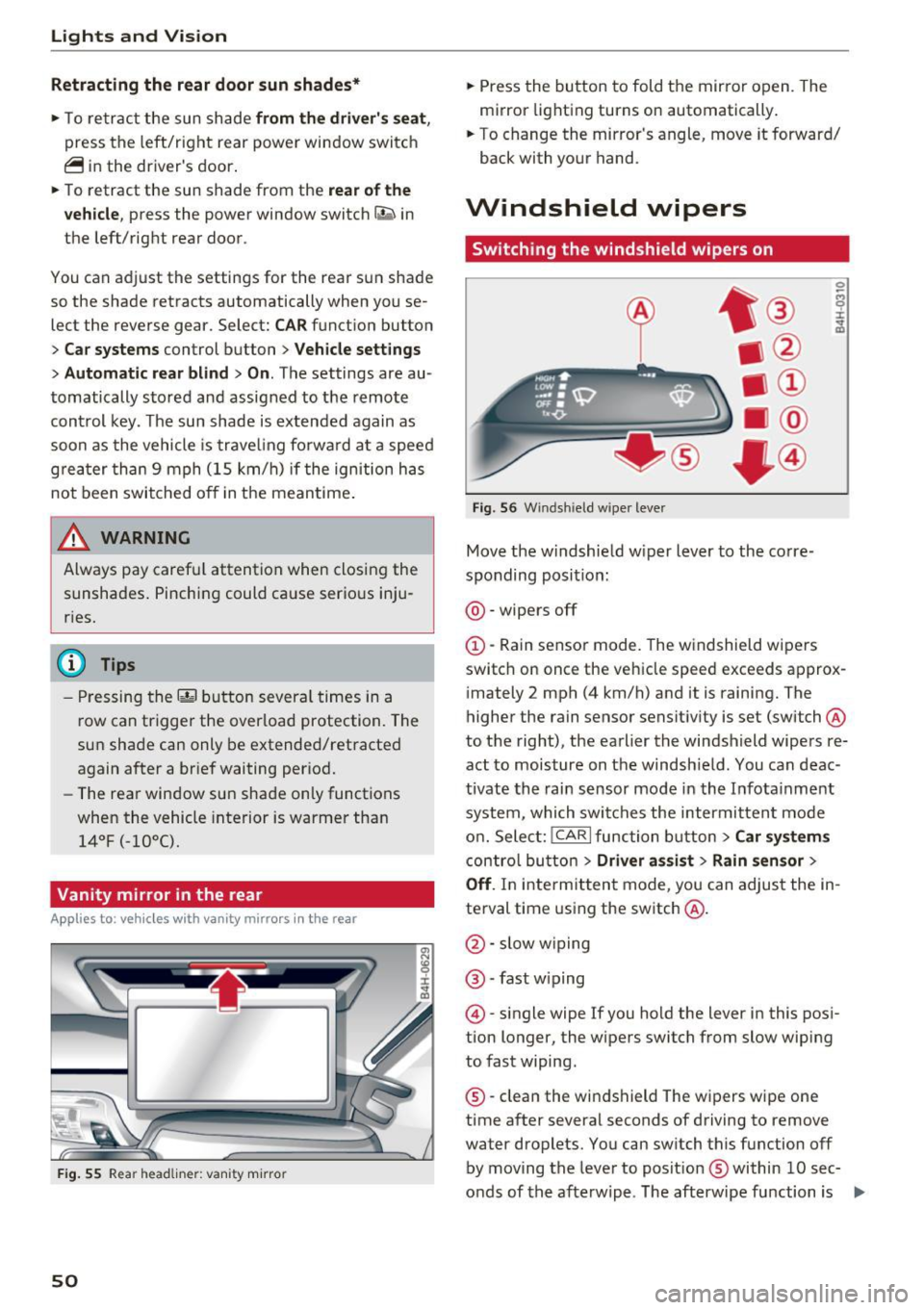
Fig. 56 W indsh ield w iper lever
Move the w indshie ld w iper lever to the co rre
sponding posi tion:
@ -wipers off
@-Rain sensor mode. The windshield wi pe rs
switch on once the vehicle speed exceeds appro x
i mately 2 mph (4 km/h) and it is raining. The
higher the rain sensor sensit iv ity is set (switch @
to t he right), the earlier the windshield wipers re
act to moisture on the windsh ie ld . You can deac
tivate the rain sensor mode in the I nfota inment
system, which swi tches the intermitten t mo de
o n. Sele ct:
!CARI function button> Car sy stem s
contro l bu tto n > Driver as sist > Rain sensor >
Off . In inte rmitten t mode, you can adjus t the in
te rval time using the switch @.
@-slow w iping
@ -fast w iping
@ -single wipe If you hold the lever in this pos i
t ion longer, the wipers switch from slow wiping
to fast wiping.
® -clean the wi ndshield The w ipers w ipe one
time a fter several seconds of driving to remove
water droplets. You can sw itch this function off
by moving the leve r to posit ion ® within
10 sec
o nds of the a fterwipe . The afterwipe function is ..,_
Page 53 of 354

0 co .... N ,..... N .... 0 0 :c '
on.
C leaning the headlights. The headlight washer
system operates only when the low beam head lights are switched on.
If you move the lever to
position @, the headlights and the night vision
assist camera* are cleaned at intervals.
A WARNING
- The rain sensor is only intended to assist the
driver. The driver may still be responsible
for manually sw itching the wipers on based
on v is ibility conditions .
- The w indshield may not be treated with wa
ter-repelling windsh ield coating agents . Un
favorable conditions, such as wetness, dark ness, and when the sun is low, can cause in
creased g lare, which increases the risk of an
acc ident. W iper blade chatter is a lso poss i
ble.
- Prope rly f unction ing windsh ield wiper
blades are required fo r a clear view and safe
driving
c:> page 51, Replacing the wiper
blades.
(D Note
- If there is frost, make su re t he windshie ld
wiper blades are not fro zen to the wind
shield. Sw itching on the windshield wipers
when the blades are frozen to the wind
shield can damage the wiper blades.
- Prior to using a car wash, the windshield
wiper system must be switched
off (lever in
pos ition
@ ). This prevents the wipers from
switching on un intent ionally and causing
damage to the w indshield w iper system .
- The windshield wipers switch
off when the
i gnition is sw itched off. You can activate the
windsh ield wipers after the ign it ion is
switched back on by moving the winds hield
wiper lever to any posit ion.
- Worn o r dirty windshield wiper blades result
i n streak ing . This can affect the ra in sensor
funct ion. Check you r windshield wiper
blades regu larly.
Light s and Vision
-The washer fluid nozz les for the windshield
washer system are heated at low tempera
t u res when the ign ition is on .
- When stopping tempo rari ly, such as at a
traffic light, the speed of the windshield
w ipers automatically reduces by one level.
Cleaning the wiper blades
Clean the wiper b lades when you see w iper
streaks . Clean the wiper blades with a soft towel
and glass cleane r.
.. Place the windshie ld w iper arms in the service
position
c:> page 51.
.. Fold the windshield w iper arms away from the
w indshield .
A WARNING
Dirty windshie ld wiper b lades can impa ir vi
sion, wh ich increases the ris k of an acciden t.
Replacing the wiper blades
The service position is set in the Infotainment
system .
Fig. 57 Removing winds hield wiper b lades
Wind shi eld wiper se rvice po sition /b lade
r epl ace ment po sit ion
~
~
M 0 :i: ... m
.. Switch the ignition off and move the windshield
w iper lever to position @briefly
c::> page 50,
fig. 56. The windshield wipers move into the
serv ice position .
.. To br ing the wiper b lades back into the original
position, switch the ignition on and ope rate the
w indshield w iper lever.
You can also turn the service posit io n on or off in
the Infotainment system: ..,_
51
Page 54 of 354

Lights and Vision
• Switch the windshield wipers off (position @
¢page 50, fig. 56).
• Select: the ICARI function button > Car systems
control button
> Servicing & checks > Wiper
service position.
> On .
Removing the wiper blade
• Fold the windshield wiper arm away from the
windshield.
• Press the locking knob@c:>
fig. 57 on the wiper
blade . Hold the wiper blade firmly.
• Remove the wiper blade in the direction of the
arrow .
Installing the wiper blade
• Insert the new wiper blade into the mount on
the wiper arm @until it clicks into place.
• Place the wiper arm back on the windshield.
• Turn the service position off.
A WARNING
For safety reasons, the windshield wiper
blades should be replaced once or twice each
year.
(D Note
- The windshield wiper blades must only be
folded away when in the service position!
Otherwise, you risk damaging the paint on
the hood or the windshield wiper motor.
- You should not move your vehicle or press
the windshield wiper lever when the wiper
arms are folded away from the windshield.
The windshield wipers would
move back in
to their original position and could damage
the hood and windshield.
- You can also use the service position, for ex
ample, if you want to protect the windshield
from icing by using a
cover.
- You cannot activate the service position
when the hood is open.
52
Digital compass
Switching the compass on and off
Applies to: vehicles wit h digital com pass
Fig. 58 Inter ior rearview mirror : d ig ital compass activated
• To turn the compass in the mirror on or off,
press the button @ until the compass display
in the mirror appears or disappears.
The digital compass only works when the ignition
is tur ned on. The directions are indicated with ab
breviations:
N (north), NE (northeast), E (east),
SE (southeast), S (south), SW (southwest), W
(west), NW (northwest).
(D Tips
To prevent inaccurate compass readings, do
not bring any remote controls, electrical devi
ces or metallic objects near the mirror.
Page 59 of 354

C) C0 ....
"' " "' .... 0 0 :r
-The power seats can also be adjusted when
the ignition is switched off. For this reason,
children should never be left unattended in
the vehicle - they could be injured!
- Be careful when ad justing the seat. Unsu
pervised or careless seat adjustment can
pinch fingers o r hands ca using injur ies.
- Applies to vehicles with reclining seat*:
- Do not use the fron t passenger's seat for
seating when it is in the reclining position .
This increases the risk of serious injury or
death.
- Never adjust the reclining position when
the front passenger 's seat is occupied.
This increases the risk of injury.
- Do not tilt the display if the driver's view
of the right exterior mirror w ill be ob
structed .
- Make sure the area between the leg sup
port and the front passenger 's seat back
rest is clear before folding the leg support
in so that you are not pinched.
(D Tips
- The massage function switches off auto
matically after approx imately 10 minutes.
- If you
cannot ad just the reclining seat * or
the front passenger's seat from the rear, it is possible that:
- t he front passenger's seat memory fu nc
t ion is swi tched off~ page
59, or
- the c hild safety lock is switched on (the~
button ~ page 37 or the right
T button
~ page 37 is turned on in the dr iver's
door), o r
- the front passenger seat adjustment is
switched off in the Infotainment system
~ page
SB.
Seats and storag e
Massage function remote control
Applies to: vehicles with reclining seat and massage function
Fig. 66 Remote cont rol: rec lin ing seat massage functions
The remote controls are located in the rear cen
ter console ¢ page 62, fig. 72 . The massage
funct ion is only ava ilable when the ignition is
switched on.
.,. To open the remote control compartment,
press the left button and fold the center arm
rest upward .
.,. To adjust the massage type, press the appropr i
ate button @·@ . The LED in the button turns
on .
.,. To adjust the speed/inte nsity, turn the thumb
wheel @I® . The LEDs indicate the speed/in
tensity.
.. Press the selected massage type again to
sw itch the massage function off.
Massage types
@ -Wave
@ -Pul sating
© -Stretch
@ -Lumbar
(D Tips
- The massage function switches off auto
matically after approximate ly 10 minutes .
- If you activate a massage type aga in, the
last selected intensity and speed will be se
lected .
57