2017 AUDI A8 belt
[x] Cancel search: beltPage 83 of 354

C) C0 ....
"' " "' .... 0 0 :r
parking brake
Fig . 94 Center conso le: park ing brake
Your vehicle is equipped with an e lectromechani
cal parking brake@~
fig. 94. The parking brake
is designed to prevent the vehicle from rolling
un intentionally and replaces the hand brake.
Setting/manually releasing the parking
brake
.. Pull the<®> switch to set the parking brake. The
LED in the switch illuminates. The -(USA
models)/ . (Canada models) indicator light al
so turns on in the instrument cluster display .
.. To release the parking brake manually, press
the brake or acce lerator pedal while the igni
t ion is switched on and press the© switch at
the same time. The LED in the button and the
indicator light in the display turn off.
Releasing the parking brake automatically
Requirement: the driver's door must be closed,
the dr iver's safety belt must be latched and the
parking brake must be set.
.,. To start driving and release the park ing brake
automatically, press the acce lerator peda l as
usual.
In addition to releasing the parking brake auto mat ically, other convenience and safety funct ions
are available when you start driving~
page 82,
Starting from a stop.
Preventing the automatic parking brake
release
The vehicle could begin rolling unintentionally,
depending on the hill or if towing a trailer.
Driving
.. To prevent the parking brake from releasing au
tomatically, pull and hold the(®) switch and press the accelerator peda l. The parking brake
remains set and prevents the vehicle from roll
ing backward .
.,. You can release the<®> switch again once you
are sure that you are giving enough driving
force to the wheels by press ing the accelerator
pedal.
Emergency braking function
You can use the emergency braking function in an
emergency situation, or if the standard brake op
eration malfunctions or is disabled.
.. Pull and hold the(®) switch.
.. As soon as you release the <®> switch or acceler-
ate, the braking stops.
Pulling and ho lding the© switch wh ile driving
the vehicle activates the emergency braking func
tion. The vehicle is braked at all four wheels by
activating the hydraulic brake system. The brak
ing effect is sim ilar to heavy braking ~_& .
To reduce the risk of activating the emergency
braking by mistake, a warning tone (buzzer)
sounds when the© switch is pulled . Emergency
braking stops as soon as the© switch is released
or the accelerator pedal is pressed.
Parking
.. Press the brake pedal to stop the veh icle.
.,. Pull the(®) switch to set the parking brake.
.,. Select the P selector lever position .
.,. Tu rn the engine off~_& .
.,. Turn the steering w heel when parking o n in
clines so that the wheels w ill roll into the curb
if the vehicle starts moving.
& WARNING
-
-Do not press the acce lerator peda l inadver
tently if a gear is selected when the vehicle
is stationary and the engine is running. Oth
erwise, the vehicle will start to move imme
diately and this could result in an accide nt.
- Eme rgency braking should only be used in
an emergency, when the normal brake pedal
has failed or the brake pedal is obstructed . ..,.
81
Page 84 of 354

Driving
During emergency braking, your vehicle will
brake similar to heavy braking. ESC and the
associated components (ABS, ASR, EDL)
cannot overcome the laws of physics. In cor
ners and when road or weather conditions
are bad, a full brake application can cause
the vehicle to skid or the rear end to swerve,
which increases the risk of an accident.
- If the power supply fails, you cannot set the
parking brake if it is released. In this case,
park the vehicle on level ground and secure
it by placing the selector lever in the P posi
tion. See an authorized Audi dealer or au
thorized Audi Service Facility for assistance.
- Always take the vehicle key with you when leaving your vehicle, even for a short period
of time. This applies particularly when chil
dren remain in the vehicle . Otherwise chil
dren could start the engine, release the
parking brake or operate electrical equip
ment such as power windows, which in
creases the risk of an accident.
- No one should remain in the vehicle when it is locked -especially children. Locked doors
make it more difficult for emergency work
ers to get into the vehicle, which puts lives
at risk.
(D Tips
When stopping at a traffic signal or stopping in city traffic, you can set the parking brake
manually. The vehicle does not have to be
held with the brake pedal. The parking brake
eliminates the tendency to creep when a se
lector lever position is engaged. As soon as
you press the accelerator pedal, the parking brake releases automatically and your vehicle
starts to move
c> page 82.
(D} Tips
-Occasional noises when the parking brake is
set and released are normal and are not a
cause for concern.
- The parking brake goes through a self-test
cycle at regular intervals when the vehicle is
stopped. Any noises associated with this are normal.
82
- If there is a power failure, the parking brake
will not set if it is released, and it will not release if it is set ¢&. . See an authorized
Audi dealer or authorized Audi Service Fa cility for assistance .
Starting from a stop
Various convenience and safety functions may be
available when the vehicle begins driving, de
pending on vehicle equipment .
Starting on hills with the parking brake set
Requirement: the driver 's door must be closed
and the driver's safety belt must be fastened.
.,. To start driving comfortably when on a hill, set
the parking brake and begin driving as usual.
The braking force of the parking brake does not
release automatically until the wheels build up
enough driving force.
Starting on hills with hill hold assist
Hill hold assist makes it easier to start on hills.
Requirement: the driver's door must be closed
and the engine must be running.
.,. To activate hill hold assist, press and hold the
brake pedal for several seconds. The vehicle
must be in an uphill direction of travel.
After releasing the brake pedal, the braking pow
er is maintained for a brief moment
c> &. to pre
vent the vehicle from rolling back when starting.
During this time, you can easily begin to move
your vehicle.
&_ WARNING
A ppl ies to: ve hicles with hill hold assist
- If you do not begin driving immediately or
the engine stalls after releasing the brake
pedal, your vehicle may begin to roll back
ward. Press the brake pedal or set the park
ing brake immediately .
- The intelligen t technology of hill hold assist
cannot overcome the limitations imposed by
natural physical laws. The increased comfort
offered by hill hold assist should not cause
you to take safety risks .
Page 88 of 354
Driving
-Do not inadvertent ly press the acce lerator
pedal when the vehicle is stationary. Other
wise the vehicle will start to move immedi
ately, eve n if the parking brake is set. This
cou ld resu lt in a crash .
(D Tips
For safety reasons, the parking brake is re
leased automatically only when the dr iver's
safety belt is engaged in the buckle .
Hill descent control
The hill descent control system assists the driver
when driving down hills .
Hill descent control activates when the transmis
sion is in the Dor S pos ition and you press the
brake pedal. The transmiss ion automatically se
lects a gear that is suitable for the hill . H ill de
scent control tries to mainta in the speed ach
ieved at the time of braking, within phys ical and
technical limi tations. If may sti ll be necessary to
adj ust the speed with the b rake pedal.
H ill descent contro l switches off o nce the hill lev
e ls out o r you press the accelerator peda l.
When operating the cruise contro l system
i::> page 92, hill descent control is also activated
when the speed is set.
A WARNING
H ill descent control cannot overcome phys ica l
lim itations, so it may not be able to maintain
a constant speed under all condit ions. Always
be ready to apply the brakes .
86
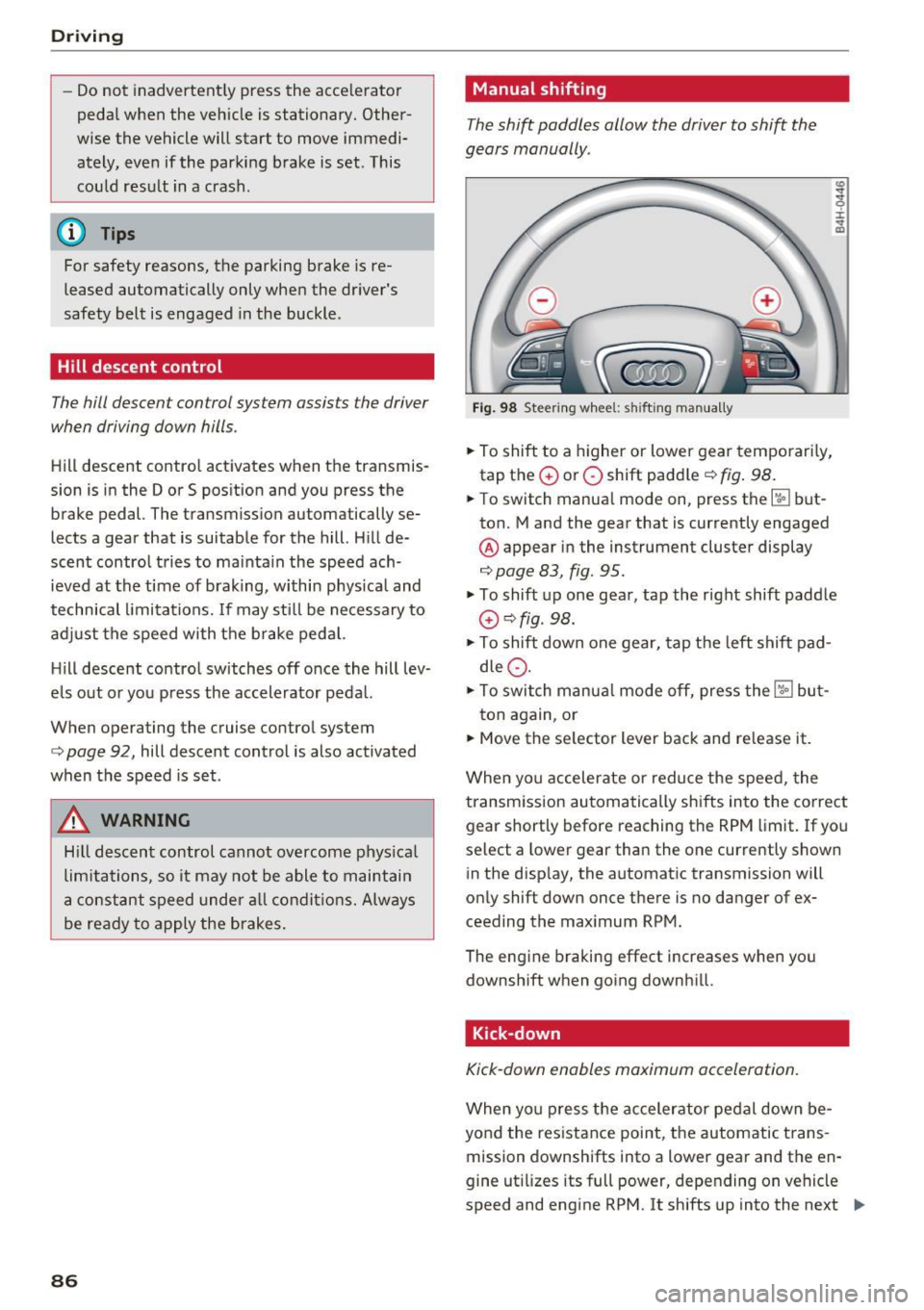
Manual shifting
The shi~ paddles allow the driver to shift the
gears manually .
Fig. 98 Steer ing whee l: s hifting man ually
.., To shift to a higher or lowe r gear temporari ly,
tap the
0 or 0 shift padd le i::> fig . 98 .
.., To switch manua l mode on , press the~ but
ton. Mand the gear that is currently engaged
@ appear in the instrument cluster display
i::>page 83, fig. 95.
I :i: .. m
.., To shift up one gear, tap the right shift paddle
G) c::>fig . 98.
.., To shift down one gear, tap the left shift pad
dle
Q .
.., To switch manua l mode off, press the ~ but-
ton again, or
.., Move the se lector lever back and re lease it.
When yo u accelerate or reduce the speed, the
transmission au tomatically shifts into the correct
gear shortly before reaching the RPM limit. If yo u
select a lower gear than the one currently shown
in the disp lay, the automatic transmission will
only shift down once there is no dang .er of ex
ceeding the maximum RPM.
The eng ine braking effect increases when you
downshift when going downh ill.
Kick-down
Kick-down enables maximum acceleration.
When yo u press the accelerator pedal down be
yond the res istance point, the automatic trans
mission downshifts into a lower gear and the en
gine ut ilizes its full power, depending on vehicle
speed and engine RPM. It shifts up into the next .,,_
Page 103 of 354

0 co .... N ,..._
N .... 0 0 :c '
Applies to: vehicles with Audi adaptive cruise contro l
.,. Se lect: t he I CAR I fu nction bu tton > Car systems
co ntro l bu tton > Driver a ssist > Audi braking
guard .
System -
Switch the bra kin g g ua rd On/ Off. When
you swit ch the ig nition on, the message
Braking
guard: Off
appears if t he sys tem is switched o ff.
Early warning -The distance and approac h warn
i ngs i n the display can be sw itched
On/ Off.
@ Tips
- Your settings are automatically stored and
ass igned to the remote cont rol key bei ng
used.
- If you restric t or sw itch off the ESC, the
braking gua rd also sw itches itself off
¢ page 12 7.
- Switch braking guard off when yo u are load
i ng t he ve hicle on to a vehicle ca rr ier, t rain,
shi p or other type o f transportation. This
c a n p reven t undesired w arnings from the
br akin g guard system.
Messages
Applies to: veh icles with Audi adaptive cruise control
Braking guard: Off
This message appea rs if the sys tem is switc hed
off through the In fota inme nt system . Otherwise ,
if the system is tur ned off, the informa tion ap
pears every time shortly after the start of t he
tr ip.
The message also appears if the system is not
avai la bl e d ue to a ma lfunction or if the ESC is
switched off~
page 127. If this is the case, the
system w ill not prov ide warnings about a possi
b le co llision.
Braking guard : engaged
This message appea rs if a sha rp bra ke press ure
was applied due to an ac ute wa rn ing.
ACC: unavailable
ACC and Audi braking guard: Unavailable Assist
T
he system cannot gua rantee that it will detect
objects co rrectly and is sw itched off . The sensors
have been moved or are faulty. The p re sense
funct ions may a lso be affected . D rive to an au
t h ori zed Audi dea ler or authorized Audi Service
Facility immed iate ly to have the malfunction cor
rected .
ACC: Currently unavailable. No sensor vis ion
ACC and Audi braking guard: Cu rrently unavail
able. No sensor vision
Th is mess age appears if the senso r view i s ob
str ucted, for examp le by leaves, snow , heavy
spray or dirt. Clean the sensors¢
page 94 ,
fig . 104.
ACC : Currently unavailabl e. Gradient too steep
The road exceeds the maximum poss ible angle
fo r safe adaptive c ruise cont rol operat io n. Adap
t ive cr uise control is sw itched off.
ACC: only available in D, Sor M
Se lect the D, Sor M selector leve r pos ition.
ACC : Currently unavailable. Parking brake ap •
plied
The ad apt ive cr uise cont rol system sw itches off
a utoma tica lly if the parking brake is se t.
ACC: Currently unavailable . Stability control
( ESC) input .
This message appears if the Electronic Stab iliza
t ion Control (ESC) is taking action to stab ilize the
vehicle . In t his case, adaptive cruise control
switches off automatically .
ACC off: manual control!
This message appears when adaptive cruise con
trol cannot set the parking brake. P ress the brake
pedal to prevent the vehicle from ro lling.
• ••
T h ree white do ts appear if a setting canno t be se
l ecte d w it h t he oper ati ng leve r. For ex ample, this
h appens if a daptive cr uise con trol c annot sta rt
driv ing a utomat ica lly in stop -and -go traff ic be
ca use the dr iver has not fastene d their safety
belt . ..,.
101
Page 134 of 354

Intelligent Technology
To restore the balance of energy, components
that require large amounts of energy are tempo
rarily scaled back or switched off. Heating sys
tems in particular require a great deal of energy .
If you notice, for example, that the seat heating"
or rear window defogger is not working, then it has been temporarily reduced or switched off .
These systems are available again as soon as the
energy supply has been restored.
In addition, you may notice that the idle speed
has slightly increased. That is normal and no
cause for concern . By increasing the idling speed,
the additional requ ired energy will be generated
and the vehicle battery will be charged.
Notice about data
recorded by the Event
Data Recorder and
vehicle control modules
Event Data Recorder
This vehicle is equipped with an Event Data Re
corder (EDR). The main purpose of an EDR is to
record, in certain crash or near crash-like situa
tions , such as an airbag deployment o r hitting a
road obstacle, data that will assist in understand
ing how a vehicle 's systems performed. The EDR
is designed to record data related to vehicle dy
namics and safety systems for a short period of
time, typically 30 seconds or less. The EDR in this
vehicle is designed to record such data as :
- How various systems in your vehicle were oper
ating;
- Whether or not the driver and passenger safety
belts were buckled/fastened;
- How far (if at all) the driver was depressing the
accelerator and/or brake pedal; and,
- How fast the vehicle was traveling.
These data can help prov ide a better understand
ing of the circumstances in which crashes and in
juries occur. NOTE: EDR data are recorded by your
vehicle only if a non-trivial crash situation occurs ;
no data are recorded by the EDR under normal
driving conditions and no personal data (e .g.,
name, gender, age, and crash location) are re
corded. However, other parties, such as law en-
132
forcement, could combine the EDR data with the
type of personally identifying data routinely ac
quired during a crash investigation.
To read data recorded by an EDR, special equ ip
ment is required, and access to the vehicle or the
EDR is needed . In addition to the vehicle manu
facturer, other part ies, such as law enforcement,
that have the special equipment, can read the in
formation if they have access to the vehicle or the
EDR .
Some state laws restrict the retrieval or down
loading of data stored by ED Rs installed in a vehi
cle for the express purpose of retrieving data af
ter an accident or crash event without the own
er 's consent .
Audi will not access the EDR and/or simi lar data
or give it to others -
- unless the vehicle owner (or lessee if the vehi
cle has been leased) agrees; or
- upon the official request by the police; or
- upon the order of a court of law or a govern-
ment agency; or
- for the defense of a lawsuit through the judicial
discovery process.
- Audi may also use the data for research about
veh icle operation and safety performance or
provide the data to a third party for research
purposes without identifying the specific vehi
cle or information about the identity of its own
er or lessee and only after the recorded vehicle
data has been accessed.
Vehicle control modules
Your vehicle is also equipped with a number of
electronic control modules for various vehicle
systems, such as engine management, emission control, airbags, and safety belts.
These electronic control modules record data during normal vehicle operation that may be
needed by trained technicians for diagnostic and
repair purposes. The recording capability of these
modules is limited to data (no sound is record
ed) . Only a small amount of data is actually re
corded over a very limited period of time, or stor
ed when a system fault is detected by a contro l
module . Some of the data stored may relate to .,._
Page 209 of 354

Driving safety
Basics
Safe driving habits
Please remember -safety first!
This chapter contains important information,
tips, instructions and warnings that you need to
read and observe for your own safety, the safety
of your passengers and others . We have summar
ized here what you need to know about safety
belts, airbags, child restraints as well as child
safety. Your safety is for us
priority number 1. Al
ways observe the information and warnings in
this section - for your own safety as well as that
of your passengers.
The information in this section applies to all
model versions of your vehicle. Some of the fea
tures descr ibed in this sections may be standard
equipment on some models, or may be optional
equipment on others. If you are not sure, ask
your authorized Audi dealer.
A WARNING
- Always make sure that you follow the in
structions and heed the WARNINGS in this
Manual. It is in your interest and in the in
terest of your passengers .
-
-Always keep the complete Owner's Litera
ture in your Audi when you lend or sell your
vehicle so that this important information
will always be available to the driver and
passengers.
- Always keep the Owner's literature handy so
that you can find it easily if you have ques
tions.
Safety equipment
The safety features are part of the occupant re
straint system and work together to help reduce the risk of injury in a wide variety of accident sit
uations.
~ Your safety and the safety of your passengers
~ should not be left to chance. Advances in tech-,..._
~ nology have made a var iety of features available 0
~ to help reduce the risk of injury in an accident. '
The following is a list of just a few of the safety
features in your Audi:
- sophisticated safety belts for driver and all pas-
senger seat ing pos itions,
- safety belt pretensioners,
- safety belt force limiters for the front seats,
- safety belt height adjustment systems for the
front seats,
- front airbags,
- knee airbags for the front seats
- side airbags in the front seats and outer rear
seats,
- side curtain airbags,
- special LATCH anchorages for child restraints,
- head restraints for each seating position,
- adjustable steering column.
These individual safety features, can work to gether as a system to help protect you and your
passengers in a w ide range of accidents . These
features cannot work as a system if they are not
always correctly adjusted and correctly used.
Safety is everybody's responsibility!
Important things to do before driving
Safety is everybody 's job! Vehicle and occupant
safety always depends on the informed and care
ful driver .
For your safety and the safety of your passen
gers,
before driving always:
.,. Make sure that all lights and signals are operat
ing correctly .
.,. Make sure that the tire pressure is correct.
.,. Make sure that all windows are clean and afford
good visibility to the outside .
.,. Secure all luggage and other items carefully
c:c.> page 65, c:c.> page 63 .
.,. Make sure that nothing can interfere with the
pedals.
.,. Adjust front seat, head restraint and mirrors
correctly for your height.
.,. Instruct passengers to adjust the head re
straints according to their height.
.,. Make sure to use the right child restraint cor
rectly to protect children
¢ page 248, Child
safety. ..,.
207
Page 210 of 354

Driving safety
• Sit properly in your seat and make sure that
your passengers do the same
c:> page 54, Seats
and storage.
• Fasten your safety belt and wear it properly . Al
so instruct your passengers to fasten their safe
ty belts properly
c:> page 218 .
What impairs driving safety?
Safe driving is directly related to the condition of
the vehicle, the driver as well as the driver 's abili
ty to concentrate on the road without being dis
tracted .
The driver is responsible for the safety of the ve
hicle and all of its occupants. If your ability to
drive is impaired, safety risks for everybody in the
vehicle increase and you also become a hazard to
everyone else on the road
c:> Li').. Therefore :
• Do not let yourself be distracted by passengers
or by using a cellular telephone .
• NEVER drive when your driving ability is im
paired (by medications, alcohol, drugs, etc.).
• Observe all traffic laws, rules of the road and
speed limits and plain common sense.
• ALWAYS adjust your speed to road, traffic and
weather conditions.
• Take frequent breaks on long trips. Do not drive
for more than two hours at a stretch.
• Do NOT drive when you are tired, under pres
sure or when you are stressed.
A WARNING
Impaired driving safety increases the risk of
ser ious personal injury and death whenever a
vehicle is being used.
208
Correct passenger
seating positions
Proper seating position for the driver
The proper driver seating position is important
for safe, relaxed driving.
Fig. 218 Correct seating posit ion
For your own safety and to reduce the risk of in
jury in the event of an accident, we recommend
that you adjust the driver's seat to the following position:
• Adjust the driver's seat so that you can easily
push the pedals all the way to the floor while
keeping your knee(s) slightly bent
c:> .&_ .
• Adjust the angle of the seatback so that it is in
an upright position so that your back comes in
full contact with it when you drive.
• Adjust the steering wheel so that there is a d is
tance of at least 10 inches (25 cm) between the
steering wheel and your breast bone
r::!) fig. 218.
If not possible, see your authorized Audi deal
ership about adaptive equipment.
• Adjust the steering wheel so that the steering
wheel and airbag cover points at your chest and
not at your face.
• Grasp the top of the steering wheel with your
elbow(s) slightly bent.
• Adjust the head restraint so the upper edge is
as even as possible with the top of your head .
If
that is not possible, try to adjust the head re
straint so that it is as close to this position as
possible.
• Fasten and wear safety belts correctly
c:>poge 221.
• Always keep both feet in the footwell so that
you are in control of the vehicle at all t imes .
Page 211 of 354

0 co .... N ,..... N .... 0 0 :c '
driver's seat, see ¢
page 54.
A WARNING
Drivers who are unbelted, out of position or
too close to the airbag can be seriously in
jured by an airbag as it unfolds. To help re
duce the risk of serious personal injury:
- Always adjust the driver's seat and the
steering wheel so that there are at least 10 inches (25 cm) between your breastbone
and the steering wheel.
- Always adjust the driver's seat and the
steering wheel so that there are at least
4 inches (10 cm) between the knees and the
lower part of the instrument panel.
- Always hold the steering wheel on the out
side of the steering wheel rim with your
hands at the 9 o'clock and 3 o'clock posi
tions to help reduce the risk of personal in
jury if the driver's airbag inflates.
- Never hold the steering wheel at the
12 o 'clock position or with your hands at
other positions inside the steering wheel
rim or on the steering wheel hub. Holding
the steering wheel the wrong way can cause
serious injuries to the hands, arms and head if the driver's airbag inflates.
- Pointing the steering wheel toward your face decreases the ability of the supplemen
tal driver's airbag to protect you in a colli
sion.
- Always sit in an upright position and never
lean against or place any part of your body
too close to the area where the airbags are
located.
- Before driving, always adjust the front seats and head restraints properly and make sure
that all passengers are properly restrained.
- Never adjust the seats while the vehicle is
moving . Your seat may move unexpectedly
and you could lose control of the vehicle.
- Never drive with the backrest reclined or
tilted far back! The farther the backrests are
tilted back, the greater the risk of injury due
to incorrect positioning of the safety belt
and improper seating position.
Driving safety
- Children must always ride in child seats
¢
page 248. Special precautions apply
when installing a child seat on the front passenger seat¢
page 226.
Proper seating position for the front
passenger
T he proper front passenger seating position is
important for safe, relaxed driving .
For your own safety and to reduce the risk of in
jury in the event of an accident, we recommend
that you adjust the seat for the front passenger
to the following position :
... Adjust the angle of the seatback so that it is in
an upright position and your back comes in full
contact with it whenever the vehicle is moving.
... Adjust the head restraint so the upper edge is
as even as possible with the top of your head.
If
that is not possible, try to adjust the head re
straint so that it is as close to this position as
possible ¢
page 210.
... Keep both feet flat on the floor in front of the
front passenger seat.
... Fasten and wear safety belts correctly
¢page 221.
For detailed information on how to adjust the
front passenger's seat, see ¢
page 54.
A WARNING
-Front seat passengers who are unbelted, out
of position or too close to the airbag can be
seriously injured or killed by the airbag as it
unfolds . To help reduce the risk of serious
personal injury:
- Passengers must always sit in an upright po
sition and never lean against or place any part of their body too close to the area
where the airbags are located.
- Passengers who are unbelted, out of posi
tion or too close to the airbag can be seri
ously injured by an airbag as it unfolds with
great force in the blink of an eye . ..,
209