2017 AUDI A5 CABRIOLET instrument cluster
[x] Cancel search: instrument clusterPage 87 of 266

a:,
a:,
...... N
" N ...... 0
0
LL co
Hill descent control switches off once the decline
levels out or you press the accelerator pedal.
On vehicles w ith the cruise control system*
¢ page 79, hill descent control is also activated
when the speed is set.
&,_ WARNING
H ill descent control cannot overcome physical
limitations, so it may not be able to maintain
a constant speed under all conditions. Always
be ready to apply the brakes.
Manual shift program
A ppl ies to: ve hicles w ith mul titronic/S tronic/tip troni c
Using the manual shift program you can man
ually select gears.
Fig. 98 Cente r console: shifting the gea rs manua lly
Fig. 99 Steering wheel: shift paddles•
Gear selection with selector lever
The tiptronic mode can be selected either with
the vehicle stationary or on the move.
• Push the selector lever to the right from D/5.
"' N N N ,.:i
~
An M appears in the instrument cluster display
as soon as the transmiss ion has shifted.
• To upshift, push the selector lever forwa rd to
the plus posit ion
0 ¢ fig . 98.
Automatic transmission
• To downshift, push the lever to the minus posi-
tion
0 .
Gear selection with shift paddles*
The shift paddles are activated when the selector
lever is in D/5 or the tip tronic manual shift pro
gram.
• To upshift, touch the sh ift paddle on the right
0 ¢fig. 99.
• To downshift, touch the shift paddle on the left
0-
• If you do not press a shift paddle within a short
time while in the 0/5 position, the transmission
wi ll return to automatic mode. To keep shifting
using the shift paddles, move the selector lever
to the right out of the D/S position.
The transmission automatically shifts up or down before critical engine speed is reached .
The transmission only allows manual shifting
when the engine speed is within the permitted
range.
@ Tips
- When you shift into the next lower gear, the
transmission will downshift on ly when there
is no possibility of over-revving the engine .
- When the kick-down comes on, the trans
mission will shift down to a lower gear, de
pending on vehicle and engine speeds.
- Tiptronic is inoperative when the transmis
sion is in the fail-safe mode.
Kick-down
Applies to : vehicles wi th mult itro nic/S tro nic/t ipt ronic
Kick-down enables maximum acceleration.
Applies to vehicles with a multitronic
transmission
When you depress the acce lerator pedal beyond
the resistance point, the transmission downshifts
into a lower gear ratio depending on the vehicle
speed and engine speed. As long as the accelera
tor pedal is depressed, the engine speed is auto-
matically regulated for maximum acceleration.
Ill>
85
Page 92 of 266

Audi adaptive cruise control and braking guard
Audi adaptive cruise
control
Description
A pplies to: ve hicles w ith Aud i adapt ive cruise co ntrol
F ig. 105 Detection range
What can Audi adaptive cruise control do?
The adaptive cruise control works in conjunct ion
with a radar sensor installed in the front of the
veh icle¢
page 88, fig. 102, wh ich is subject to
des ignated system limits
c:;;> page 90. Stationary
objects a re disregarded.
On open roads with no traffic, adaptive cru ise
control works like a regular cruise control sys
tem. The stored speed is ma inta ined. When ap
proaching a moving vehicle detected up ahead,
the adaptive cruise control system automatically
slows down to match that vehicle's speed and
then maintains the distance that the driver previ
ously stored. As soon as the system does not de
tect
a vehicle up ahead, adaptive cruise control
accelerates back up to the stored speed.
Which functions can be controlled?
When you switch adaptive cruise control on, you
can set the current speed as the "control speed"
¢ page 90, Switching on and off.
When driving, you can stop cruise control
¢
page 92 or change the speed ¢ page 91 at
any time.
You can also set the distance to the object ahead
and set the adaptive cruise control driving pro
gram
¢ page 92.
90
Switch ing on and off
App lies to : vehicles wit h Audi ada ptive cruise control
Fig. 106 Selector lever: switch ing o n/o ff
Fig. 107 Instrume nt cl uster: Aud i adapt ive cru ise con trol
You can set any speed between 20 mph and 95
mph (30 and 150 km/h) .
Indicator lamps and messages in the instrument
cluster display inform you about the current sys
tem status and settings.
Switching Audi adaptive cruise control on
"" Pull the lever toward you into position (D
¢ fig . 106 . ACC standby appears in the instru
ment cluster display .
Setting the speed and activating regulation
""To set the current speed, press the ISETI button
¢
page 9, fig . 4 . The set speed is shown in the .,_
Page 94 of 266
Audi adaptive cruise control and braking guard
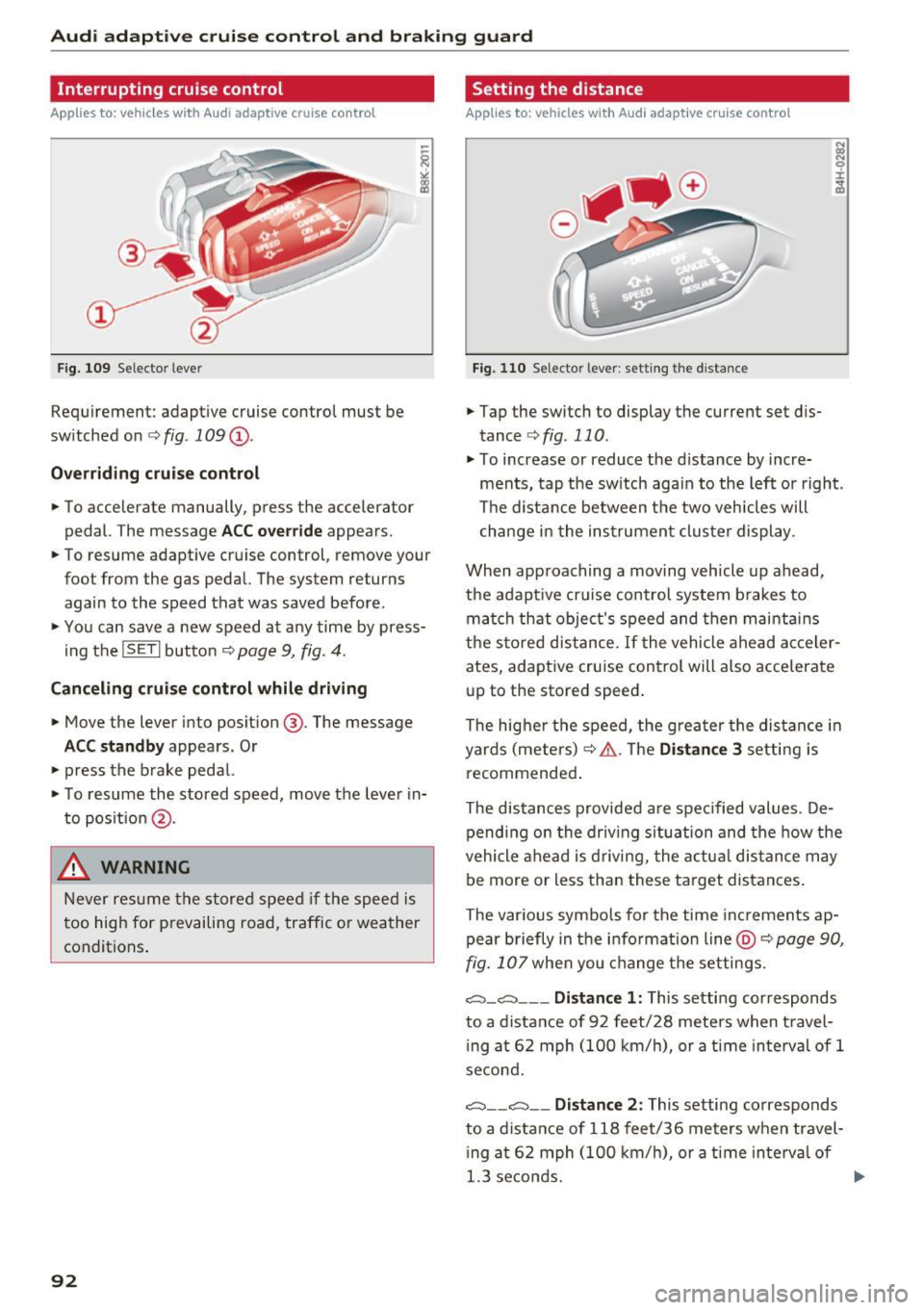
Interrupting cruise control
Applies to: vehicles with Audi adaptive cruise contro l
Fig. 109 Selector leve r
Requirement: adaptive cruise control must be
switched on
¢ fig . 109 (D.
Overriding cruise control
• To accelerate manually , press the accelerator
pedal. The message
ACC override appears.
• To resume adaptive cruise control, remove your
foot from the gas pedal. The system re turns
again to the speed that was saved before .
• You can
save a new speed at any time by press
ing the
IS ETI button ¢ page 9, fig . 4.
Canceling cruise control while driving
• Move the lever into position @. The message
ACC standby appears . Or
• press the brake pedal.
• To resume the stored speed, move the lever in
to position
@.
.,&. WARNING
Never resum e the stored speed if the speed is
too high for prevailing road, traffic or weather
conditions.
92
Setting the distance
Applies to: vehicles with Audi adaptive cruise control
Fig. 110 Se lector leve r: setting the distance
• Tap the switch to display the current set dis
tance
¢ fig . 110 .
• To increase or reduce the distance by incre
ments, tap the switch again to the left or right.
The distance between the two veh icles will
change in the instrument cluster display .
When approaching a moving vehicle up ahead,
the adapt ive cruise control system b rakes to
match that object's speed and then maintains
the stored distance.
If the vehicle ahead acceler
ates, adaptive cruise control will also accelerate
up to the stored speed .
The higher the speed, the greater the distance in
yards (meters)
r:::;, .&. . The Distance 3 setting is
recommended.
The distances provided are spec ified values . De
pending on the driving situation and the how the
vehicle ahead is driving, the actua l distance may
be more or less than these target distances .
The var ious symbo ls for the time increments ap
pear briefly in the information line
@r:::;, page 90,
fig. 107 when you change the settings.
~ -~--- Distance 1: This setting corresponds
to a distance of 92 feet/28 meters when travel
i ng at 62 mph (100 km/h), or a time interval of 1
second.
~ -- ~-- Distance 2: This setting corresponds
to a distance of 118 feet/36 meters when travel
i ng at 62 mph (100 km/h), or a time interva l of
1.3 seconds.
Page 95 of 266

a:,
a:,
...... N
" N ...... 0
0
LL co
Audi adaptive cruise control and braking guard
~--- ~-Di stance 3: This setting corresponds
to a distance of 164 feet/SO meters when travel
ing at 62 mph (100 km/h), or a time interval of
1.8 seconds.
~ ---- ~ Distance 4: This setting corresponds
to a distance of 210 feet/64 meters when travel
ing at 62 mph (100 km/h), or a time interval of
2 .3 seconds.
A WARNING
Following other vehicles too closely increases
the risk of collisions and ser ious personal in
jury.
- Setting short distances to the traffic ahead
reduces the time and distance available to
br ing your vehicle to a safe stop and makes
it even more necessary to pay close atten
tion to traffic.
- Always obey applicable traffic laws, use
good judgment, and select a safe following
distance for the traffic, road and weather
conditions.
¢j) Tips
- Distance 3
is set automatically each time
you switch the ignition on.
- Your standard sett ings are automat ically
stored and assigned to the remot e control
k ey be ing used.
Setting the driving program
Applies to: vehicles with Audi adaptive cruise control
Depending on the selected dr iv in g program and
d istance, driving behavior when accelerating w ill
vary from dynamic to comfortable.
Setting the driving program for vehicles
without Audi drive select*
~ In the radio/MM!*, select: !CARI function but
ton >
Adaptive cruise control > Driving prog. >
comfort, standard or dynamic . Or
~ Select: ICARI function button> Car systems*
contro l button > Driver ass ist > Adaptive cruise
control > Driving program* > Comfort, Stand
ard or Dynamic . Setting the driving mode for vehicles with
Audi drive select*
Refer to c!:>poge 102 .
(D Tips
Your settings are automatically stored and as
s ig ned to the remote control key being used.
Request for driver intervention
Applies to: vehicles with Audi adaptive cruise control
Fig. 111 Instrument cluster: request fo r driver interven
tion
In certain situa tions, the system will prompt yo u
to take action . This could happen, for example, if
braking by the adaptive cruise control system is
not enough to maintain enough distance to the
vehicle ahead.
T he instrument cluster will warn you about the
danger
c!:> fig. 111:
-A red vehicle is pictured in the display.
- The text
DISTANCE ! appears in the status bar.
- The red indicator light . blinks.
- In addition, a warning tone sounds.
93
Page 96 of 266

Audi adaptive cruise control and braking guard
Audi braking guard
Description
Applies to: vehicles w ith Audi adaptive cruise co ntro l
Fig. 112 Instrument cluster : approac h warning
Braking guard uses a radar sensor. It also func
tions within the limits of the system when adap
tive cruise control is switched off.
What can Audi braking guard do?
When detected in time, the system can assess
situations when a vehicle ahead brakes suddenly
or if your own vehicle is traveling at a high speed
and approaching a vehicle up ahead that is mov
ing more slowly. Braking guard does not react if
it cannot detect the situat ion.
The system advises you of various situations:
- The
distance warning is given if you are too
close to the vehicle ahead for a long time. If the
vehicle ahead brakes sharply, you will not be
able to avoid a collision. The indicator light .
in the display comes on.
- The
approach warning is given when a detected
vehicle up ahead in your lane is moving much
more slowly than you are or if it brakes sharply.
When this warning is given, it may only be pos
s ible to avoid a collision by swerving or braking
sharply. The indicator light . will warn yo u
about the danger¢
fig. 112. You will also hear
an acoustic signal.
If you do not react fast enough or do not react at
a ll to the situation, Braking guard will intervene
by braking and the message
braking guard inter
vention
will appear.
l) This is not ava ilab le in some countries.
94
- If a collision is imminent, the system will first
provide an
acute warning by briefly and sharply
app lying the brakes.
- If you do not react to the acute warning, brak
ing guard can brake within the limits of the sys
tem. This reduces the vehicle speed in the event
of a collis ion.
- At speeds under 20 mph (30 km/h), the system
can initiate a complete deceleration shortly be
fore a collision ll.
- If the braking guard senses that you are not
braking hard enough when a collision is immi
nent, it can increase the braking force.
Which functions can be controlled?
You can switch braking guard and the distance/
approach warning on or off in the radio or MMI
¢ page 95, Settings in the radio/MM!.
A WARNING
Lack of attent ion can cause collisions, other
accidents and ser ious personal injuries. The
braking guard is an assist system and cannot
prevent a collision by itself . The driver must
always intervene. The driver is always respon
sible for braking at the correct time .
- Always pay close attention to traffic, even
when the braking guard is switched on. Be
ready to intervene and be ready to take
complete control whenever necessary. Al
ways keep the safe and legal distance be
tween your vehicle and vehicles up ahead .
- Braking guard works within limits and will
not respond outside the system limits, for
examp le when approach ing a stopped vehi
cle or stationary obstacle (end of a traffic
jam or vehicle that has broken down in traf
fic).
- Always remember that the radar sensor for
the braking guard works only within defined
detection and range limits that may prevent
the proper detection of other vehicles.
- The radar sensor's function and range can
be reduced by rain, snow and heavy spray.
Moving vehicles up ahead may not be
-
Page 104 of 266

Audi drive select
sporty shifting characteristics . The S gear
position engages automatically.
- In vehicles that have dynamic steering*, op
erating noise is heard when starting or stop
ping the engine. This does not ind icate a
problem.
Selecting the driving mode
Applies to: vehicl es w ith Aud i dri ve select
You con choose between Comfort, Auto , Dynam
ic and Individual * modes.
N N 0
0
'l::=====:::: 1-'gi
drive I sel,.c,ct _ J -~-
Fig. 118 Center console: Control fo r Aud i dr ive select
Fig . 119 MMI*: A udi drive select
Adjusting the Individual mode
Applies to : ve hicles w ith MMI and Audi drive select
.,. To set the mode, press the ~:i:a button
r::!) fig. 118 multiple times until the desired
mode is displayed in the instrument cluster. Or
.,. In the MMI* , select: ICARlfunction button>
Comfort, Auto, Dynamic or Individual".
In vehicles without the MMI*, the ~:/:a button is
found underneath the shift/selector lever.
You can change the driving mode when the vehi
cle is stationary or while driving. If traff ic per
mits, after changing modes, briefly take your
foot off the accelerator pedal so that the recently
selected mode is also activated for the engine
and transm iss ion.
Comfort -provides a comfort-oriented vehicle
setup and is suited for long drives on highways.
Auto -provides an overall comfortable yet dy
namic driving feel and is suited for every day use.
Dynamic -gives the drive r a sporty driving fee l
and is suited to a sporty driving style .
Individual* -c>page 102.
&_ WARNING
Pay attention to traffic when operating drive
select to prevent potential risk of an accident.
You can personally specify the vehicle setup in the MMI* .
.,. Select the ICAR I function button > Set individu
al
control button. Once you select the menu,
you w ill automatically drive in the
individual
mode.
Systems Comfort
Engine/Transmission
ba lanced
Steering comfortable
Dynamic steering* comfortab le/indi rect
102
The equipment in you r vehicle will determine
which settings you can adjust. The following ta
ble provides an overview of the characteristics of
each driving mode.
Auto Dynamic
balanced
sporty
balanced sporty
ba lanced/d irec t sporty/direct
Page 134 of 266

Airbag syste m
safety seat. It can be a very dangerous p lace for
an infant or a child in a rearward-facing seat.
The Advanced Airbag System i n your veh icle has
been ce rt ified to comp ly with the requirements
of United States Federal Motor Vehicle Safety
Standard (FMVSS)
208, as well as Canada Motor
Veh icle Safety Standard (CMVSS)
208 as applica
b le at the time your vehicle was manufactured.
According to requirements, the front Advanced
Airbag System on the passenger s ide has been
certified for "suppression " for infants of about
12 month old and younger and for "low risk de
p loyment " for children aged
3 to 6 years o ld (as
defined in the standard).
The
PA SSENGER AIR BAG OFF light in the instru
ment panel tells you when the front Advanced
Ai rbag on the passenger side has been tu rned off
by the elect ronic cont rol unit.
Each t ime you tur n on the ignit ion , the
PASSEN
GER AIR BAG OFF
light will come on fo r a few
seconds and :
- will stay on if the front passenger seat is not
occupied,
- will s tay on if there is a small c hild or child re
straint on the front passenger seat,
- will go off if the front passenger seat is occu
pied by an adult as reg istered by the weight
sensing mat¢
page 140 , Monitoring the Ad
vanced Airbag System .
The PAS SENGER AIR BAG O FF light comes on
when the control unit detects a total we ight on
the front passenger seat that requires the front
airbag to be turned off.
If the tota l weight on the front passenger seat is
more than that of a typical 1 year -old child but
less than the we ight of a small adult, the front
a irbag on the passenger side can deploy (the
PAS SENGER AIR BAG OFF light does not come
on) .
If the PAS SENGER AIR BAG OFF light does
not come on, the front a irbag on the passenger
side has not been turned off by the electronic
control unit and can deploy if the control unit
senses an impact that meets the condit ions stor
ed in its memory.
For e xample, the airbag may deploy if:
132
- a small chi ld that is heavier than a typica l 1
year-o ld child is on th e front passenger seat
(regard less of whether the child is in one of the
child safety seats listed¢
page 152), or
- a child who has outgrown c hild restraints is on
the front passenger seat.
If the front passenger a irbag is t urned off, the
PASSENGER AIR BAG OFF light comes on in the
instrument cluster and stays on.
The fro nt airbag on the passenge r side may
not
deploy (the PAS SENGER AIR BAG OFF light does
not ill uminate and stay lit) even if a small adu lt
or teenager, or a passenger who is not sitting up
right with thei r back against a non-recl ined back
rest with the ir fee t on the vehicle floor in front of
the sea t is on the fron t passenger sea t
<=> page 112, Proper seating position for the driv
er .
If the front passenger a irbag deploys, the Feder
al Standard requires the airbag to meet the "low
risk" deployment cr iteria to reduce the r isk of in
jury through interaction w ith the airbag . "low
risk " deployment occurs in those crashes that
take place at lowe r de cele rations as defined in
the e lec tronic co ntro l unit ¢
page 140, PASSEN
GER AIR BAG OF F light.
Always remembe r, a chi ld safety seat or infant
c ar rie r ins talled on the front seat may be s truck
and knocked ou t of posit ion by t he rap idly i nflat
i ng passenge r's airbag in a frontal coll is ion . The
airbag could greatly red uce the effectiveness of
the child restraint and even seriously injure the child during inflation.
Fo r th is reason, and beca use the back seat is the
safest place for children -when properly restrain
ed according to their age and size -we strongly
recommend that children always sit in the back
seat
c> page 150, Child safety .
A WARNING
A child in a rearward-facing child safety seat
installed on the front passenger seat will be
seriously injured and can be killed if the front
a ir bag inflates - even with an Advanced Airbag
Sys tem.
Ill>
Page 139 of 266

a:,
a:,
...... N r--. N ...... 0
0
LL 00
greater detail below. Because the front passen
ger seat contains important parts of the Ad
vanced A irbag System, you must take care to pre
vent it from being damaged. Damage to the seat
may prevent the Advanced Airbag for the front
passenger seat from doing its job in a crash .
The front Ad vanced Airb ag S ystem con sis ts
of the follo wing :
-Crash sensors in the front of the vehicle that
measure vehicle acceleration/decelerat io n to
provide information to the Advanced Airbag
System about the severity of the crash .
- An electronic control unit, with integrated
crash sensors for front and side impacts . The
contro l unit "decides" whether to fire the front
airbags based on the information received from
the crash sensors. The control unit also "de
cides" whether the safety be lt pretensioners
shou ld be activated.
- An Advanced Airbag with gas generator and
contro l valve for the driver inside the steering
whee l hub .
- An Advanced Airbag with gas generator and
contro l valve inside the instrument pane l for
the front passenger.
- A weight -sensing mat under the upho lstery
padding of the front passenger seat cushion
that measures the total weight on the seat . The
information registered is sent continuously to
the electron ic control unit to regulate deploy
ment of the front Adva need A irbag on the pas
senger side.
- An airbag monitoring system and indicator
light i n the instrument cluster
¢page 140.
-A sensor in each front seat registers the dis
tance between the respective seat and the
steering wheel or instrument panel. The infor
mation reg istered is sent cont inuous ly to the
electronic control unit to regulate deployment
of the fro nt Adv a need A irbags.
- T he
PASS EN GE R AIR BAG OFF light comes on
and stays on in the center of the instrument
pane l¢
page 140, fig . 149 and tells you when
the front Advanced Airbag on the passenge r
side has been turned off.
- A sensor below the safety belt latch fo r the
front seat passenger to meas ure the tension on
Airb ag sys tem
the sa fety belt. The tension on the safety belt
and the weight registered by the weight-sens
ing mat help the control unit "decide" whether
the front airbag for the front passenger seat
should be turned off or not¢
page 131, Child
restraints on the front seat -some important
things to know.
- A sensor in the safety belt latch for the driver
and for the front seat passenger that senses
whether that safety belt is latched or not and
transmits this information to t he electronic
cont rol un it.
_& WARNING
Damage to the front passenge r seat can pre
vent the front airbag from working properly.
- Imp roper repair or disassembly of the front
passenger and driver seat will p revent the
Advanced Airbag System from f unctioning
properly.
- Repairs to the front passenger seat must be
performed by qualified and properly trained
workshop personne l.
- Never remove the front passenger or driver
seat from the vehicle.
- Never remove the upholstery from the front
passenger seat.
- Never d isassemble o r remove par ts from the
seat o r disconnect w ires from it.
- Never carry sh arp objects in your pocke ts or
p lace them on the seat. If the weight-sens
ing mat in the passenger seat is punctu red
it cannot work proper ly.
- Never carry things on your lap or carry ob
jects on the passenger seat. S uch items can
increase the weight reg istered by the
weight-sensing mat and send the wrong in
formation to the airbag control unit.
- Never store items under the front passenger
seat. Parts of the Advanced Airbag System
under the passenger seat could be dam
aged, p reventing them and the airbag sys
tem from working p roper ly.
- Never p lace seat covers or replacement up
holstery that have not been specifically ap
p roved by A udi on the front seats.
- Seat covers can prevent the Advanced A ir
bag System from recognizing chi ld
137