2017 AUDI A3 SEDAN ac setting
[x] Cancel search: ac settingPage 74 of 400

Warm and cold
driver is transferred to the front passenger's
side . This applies a t emperature change to the
front passenger's side .
8/r Blower
Using the regulator 8£?, you can manually adjust
the volume of air generated by the blower to your
p reference . The blower shou ld always run at a
low setting to prevent the windows from fogging
and to ensure a continuous exchange of air inside
the vehicle . To have the blower regulated auto
mat ically , press the AUTO button.
~/ :,0/ ~ Air distribution
The air distribution can adjusted with the but
tons. To have the air distribution regulated auto mat ically, press the AUTO button.
The round air vents in the cockpit are adjustable
qpage 73.
To keep the front s ide windows from fogging up
in damp weathe r, we recommend opening the
side air vents and tilting them to the side .
Foot vents are located under the front seats and
adjustable vents on the end of the center console
to heat the rear of the vehicle .
::!_ Defrosting
The windsh ield and s ide windows are defrosted
or cleared of condensation as qu ickly as possible .
The max imum amount of air flows ma inly from
the vents below the windshield. Recirculation
mode switches off. The temperature shou ld be
set at +72°F (22°() o r higher. The temperature is
controlled automatica lly. In the
;Ix setting, the
A/C cooling mode switches on automatically , d e
pending on the outside air temperature.
The AUTO button switches the defroster off.
cE) Recirculation mode
The recirculation mode can be turned on manua l
ly or automatically*.
- Switching manual recirculation mode on and
off: Press
the~ button.
72
- Automatic * reci rculation mode: auto recircula
tion needs to be activated in the Infotainment
system. Select in the Infotainment system:
I MENU I but ton > Vehicle > left control button >
Air conditioning > Auto recirculation
The air
quality sensor that is designed for diesel and
gasoline exhaust automatically sw itches the re
circulation mode on or off depending on the
level of pollutants in the outside air.
In rec irculat ion mode, the air inside the vehicle is
c ir culated and filtered. This prevents the unfil
tered air outs ide the veh icle from entering the
vehicle inte rior. Switching rec irculation mode on
whe n driving through a tunnel or when sitting in
traffic is recommended
q .&..
Pressing the~ button, AUTO or the ;fx button
switches recircula tion mode off.
T he system switches to recirculation mode when
driv ing in reverse when the engine is cold .
SP. Rear window defogger
If the rear window defogger is activated when
the igni tion is switched on, the battery manage
ment determines based on the battery charge if
i t is possible to turn on . Otherwise, the rear w in
dow defogger functions with the engine running
and switches off automatically after approxi
mately 10 -20 minutes, depending on the out
side temperature .
To prevent the rear window defogger from
switching off automat ica lly, press and hold the
!fP. button for more than two seconds. This re
mains stored up to approximate ly 15 minutes af
te r turning off the ignition.
J Seat heating*
Pressing the J button switches the seat heat ing
on at the highest setting (level 3) . The LEDs indi
cate the temperat ure level. To reduce the tem
perature , press the button again. T o switc h the
seat heating off, press the button repeatedly un
ti l the LED turns off .
After approximately 10 minutes, the seat heating
a utomat ically switches from level 3 to level 2.
.,..
Page 75 of 400

a, a, ..... N
" N ..... 0 N > 00
_& WARNING
-You should not use the recirculation mode
for an extended period of time, because no
fresh a ir is drawn in and the windows can
fog when coo ling mode* is switched off .
T his increases the r is k of an accide nt.
- Individuals with reduced sensitivity to pain
o r temperat ure cou ld develop burns when
using the seat heating fu nction . To reduce
the risk of injury, these ind iv iduals should
not use seat heating.
(D Note
To avoid damage to the heat ing elements in
the seats, do not kneel on the sea ts or place
heavy loads on a small area of the seat.
@ Tips
-The setting for the seat heating on the driv
er's side is ass igned to the key that is in use.
-If the front passenger's seat heat ing is
turned on, it will not turn on again automat
i ca lly if more than 10 m inutes have passed
between sw itching the ign ition off and
switching it on again .
Adjusting the air vents
Fig. 87 Cockp it: adjust ing the air vents
The fol low ing settings are possib le ¢fig. 87:
- CD Air flow amount
-@ Air flow direction
To adjust the
air fl ow a mount , turn the ridged
outer adjusting ring
CD ¢ fig. 87. To stop the air
flow, turn the adjusting ring all the way to the right .
Warm and cold
To adjust the air fl ow directio n, turn the air vent
gri ll insert @.
Steering wheel heating
Applies to: vehicles with steering wheel heating
The steering wheel rim can be heated.
"' Press the ~ ¢ page 15, fig. 11 button on the
mu ltifunction steering wheel to switch the
steering whee l heating on and off. The mes
sage
St ee ring wheel h eatin g: on/St eering
w hee l heating: off
appears in the instrument
cluster display.
T he temperature is mainta ined at a constant lev
el when steering wheel heating is switched on.
T he s teering wheel heating settings a re stored
automat ica lly and assigned to the remote control
key that is in use .
If the steering wheel heating cannot be sw itched
on, the message:
S te e ring wh eel h eating : off ap
pears. Dr ive to an authorized Audi dea ler or au
thorized Audi Service Facility immediately to have
the malfunction corrected.
73
Page 77 of 400

CXl CXl .... N ,.__
N .... 0 N > 00
next traffic light is red. This produces an engine
braking effect, which helps to protect the brakes
and tires and reduces the emissions and fuel con
sumption to zero (fuel shut-off during decelera
tion).
Shift efficiently
An effective way to save fuel is to upshift earlier.
Staying in a gear too long uses fuel unnecessari
ly .
Press down on the accelerator pedal slowly and
avoid "kick-down".
Avoid full acceleration
You should rarely travel at the maximum vehicle
speed. High speeds cause a disproportionately
high increase in fuel consumption, emissions and
traffic noise. Slower driving saves fuel.
Reduce idling time
The Start/Stop system* helps to reduce the idling
time automatically. In vehicles without the Start/
Stop system, it is efficient to switch the engine
off when stopped
at railroad crossings and long
red lights. Depending on the version of the en
gine, stopping the engine for as little as five sec
onds once it has reached operating temperature
still saves more fuel than leaving the engine run ning
-even when taking into account the amount
of extra fuel that is used to restart the engine.
It takes a very long time in idle to warm the en
gine up to operating temperature. Wear and
emissions are especially high in the warm-up
phase. Therefore, you should begin driving im
mediately after starting the engine. Avoid high
RPMs while doing this.
Have maintenance performed regularly
By having maintenance performed regularly on
your vehicle, you can help to reduce fuel con
sumption before you even start to drive. The maintenance condition of your vehicle not only
affects traffic safety and long-term value but al
so impacts
fuel consumption. A poorly main
tained engine can lead to fuel consumption that
is 10% higher than normal.
Driving
Avoid short trips
The engine and emissions control system must
reach their optimal
operating temperature to ef
fectively reduce consumption and emissions.
A cold engine uses a disproportionately high
amount of fuel. The engine reaches operating
temperature and consumption normalizes only
after approximately 2.5 miles (4 km).
Check the tire pressure
To save fuel, make sure the tires are always in
flated to the correct pressure
r=;, page 33 5. The
fuel consumption can increase by S% if the pres
sure is only 0.5 bar too low. Due to the increased
rolling resistance, low tire pressures will also
lead to greater tire
wear and will affect driving
behavior.
Do not drive on
winter tires year-round, as this
will consume up to 10% more fuel.
Eliminate unnecessary weight
Since every kilogram of extra weight increases
fuel consumption, a quick inspection of the lug
gage compartment may be worth it to avoid un
necessary weight.
When not being used, a roof rack should be re
moved to decrease the wind resistance of the ve
hicle. You will save approximately 12% of your
fuel when at speeds from 62-75 mph
(100-120 km/h).
Save energy
The engine drives the generator, which generates
electricity; the fuel consumption also increases
with the demand for electricity. Therefore, switch
electrical equipment off when you no longer
need it. Examples of equipment that uses a lot of
energy are air blowers at a high setting, the rear
window defogger and seat heating*.
(D Note
- Do not leave engine idling unattended after
starting. If warning lights should come on
to indicate improper operation, they would go unheeded. Extended idling also produces
heat, which could result in overheating or
IJ,-
75
Page 85 of 400

a, a, ..... N
" N ..... 0 N > 00
If the Start/Stop system has not turned off the
engine or if you have switched the Start/Stop sys
tem off manually, the ignition will not be auto
mat ically switched off and the engine w ill contin
ue to run
c:> ,& .
A WARNING
To reduce the risk of poisoning, never allow
the engine to run in confined spaces.
{!) Tips
If you select the D or N se lector lever position
in a vehicle with an automat ic transmission
after sh ift ing into reverse, the vehicle m ust
be driven fas ter than 6 m ph (10 km/h) in or
de r fo r the e ngine to switch off again.
Manually switching the Start/Stop system
on/off
Applies to: vehicles with Sta rt/Stop system
If you do not wish to use the system, you can
switch it off manually.
F ig . 93 Cen ter co nsole: Start/S top system button
-
"' To switch the Start/Stop system off/on man
ually, press the
l (A) ~I button. The LED in the but
ton turns on when the system is sw itched off .
@ Tips
If you switch the system off during a stop
phase, the engine will start again automati
cally.
Messages in the instrument cluster display
Applies to: veh icles with Start/Stop system
ml Automatic start /stop deactivated : Please re
s tart engine manually
D rivi ng
This message appears when spec ific conditions
are not met du ring a stop phase . The Start/Stop
system will
not be ab le to restart the engine. The
engi ne must be started manua lly .
ml Automati c start /stop system malfun ction!
Function unavailable
T he re is a m alfu nction in the S tart/Stop system.
Drive the vehicle to an a uth orized Aud i dea ler or
a uthori zed Serv ice Facility as soon as possible to
have the malfunction corrected.
Electromechanical
parking brake
F ig . 94 Cen ter console : park ing bra ke
ra 0 > co m
Yo ur vehicle is equipped with an electromechani
ca l parking brake
(D c:> fig. 94 . The parking brake
is des igned to prevent the veh icle from rol lin g
unintentionally and replaces the hand brake.
Setting /manually releasing the parking
brake
"' Pull the(®) switch to set the parking b rake. The
LED in the switch turns on. The
-(USA mod
els)/ . (Canada models) ind icator light also
turns on in the instrument cluster disp lay .
"'To re lease the park ing brake man ually, press
th e bra ke or accelerator peda l wh ile the ign i
tion is sw itched on and press the
(®) switc h at
t he same time. The LED i n the bu tton and the
in di cator light in the d isp lay turn off.
Releasing the parking brake automatically
Requireme nt: the driver's door must be closed
and the parking brake must be s et.
83
Page 92 of 400
Driving
Manual shifting (tiptronic mode)
Applies to: vehicles w ith a utomat ic t ransm iss io ns
The tiptronic mode allows the driver to shift the
gears manually .
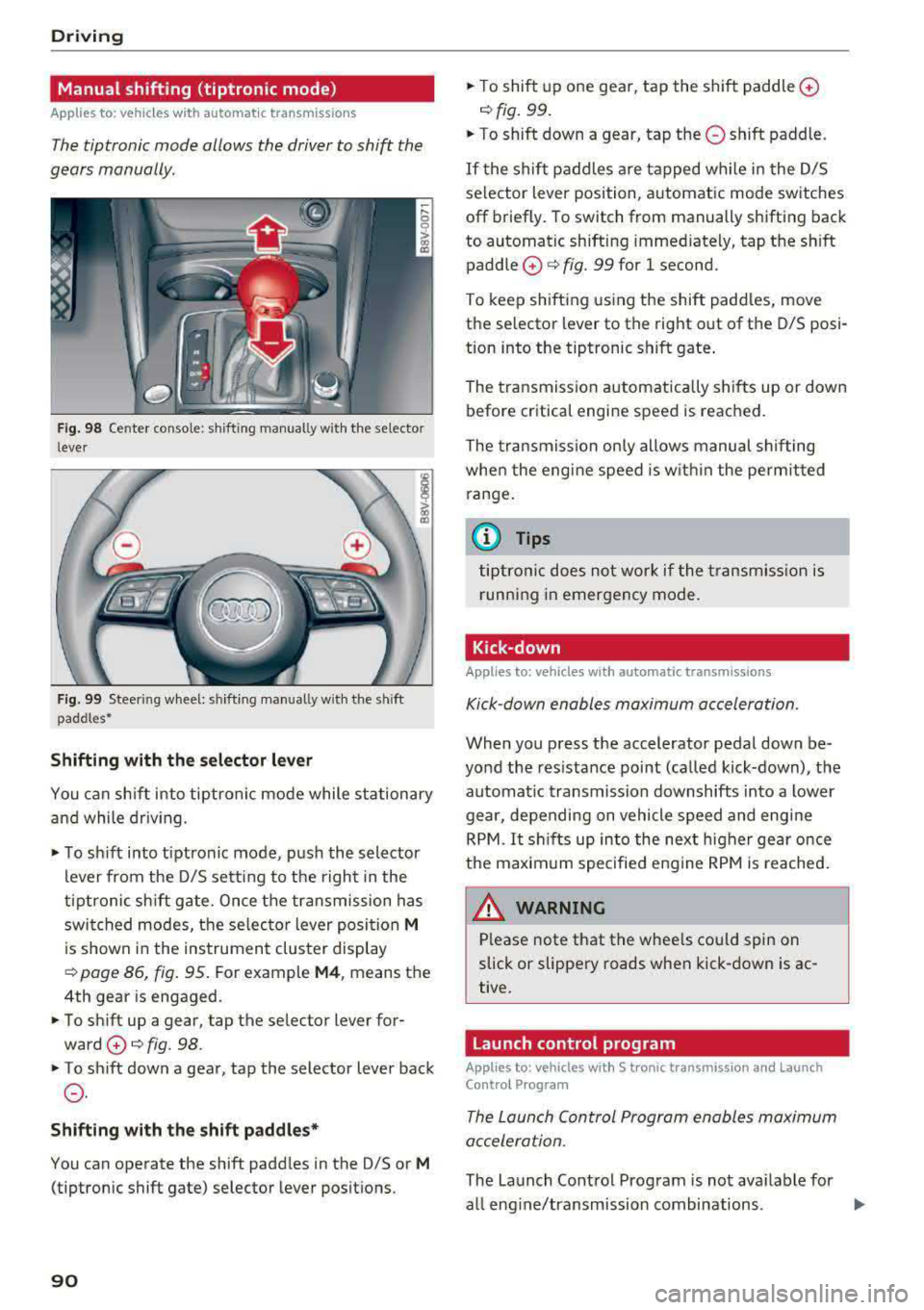
Fig. 98 Cente r conso le : shifting manually w ith the se lector
l ever
F ig. 99 Steer ing wheel: sh ifting manually w ith t he s hift
paddles •
Shifting with the selector lever
You can sh ift into tiptronic mode while stationary
and while driv ing.
.. To sh ift into tiptronic mode , pus h the selector
lever from the D/S setting to the r ight in the
tiptronic sh ift gate. Once the transmission has
swi tched modes, the se lec tor lever posi tion
M
is shown in the instrument cluster display
¢ page 86, fig. 95. For example M4 , means the
4th gear is engaged .
.. To sh ift up a gear, tap the se lector lever for
ward
0 ¢ fig. 98 .
.. To shift down a gear, tap the selector lever back
0 .
Shifting with the shift paddle s*
You can operate the shift padd les in the D/S or M
(tiptronic shift gate) selector lever positions.
90
.. T o shift up one gear, tap the shift paddle 0
¢ fig. 99 .
.. To shift down a gear, tap the 0 shift paddle.
If the shif t paddles a re tapped w hile i n the D/S
selector lever position, a utomatic mode switches
off briefly . To switch from manually shifting back
to automatic shifting immediately, tap t he sh ift
paddle
0 ¢ fig. 99 for 1 second.
To keep sh ifting us ing the shift padd les, move
the selector lever to the right out of the D/S posi
tion into the tiptronic shift gate .
The tr ansmission a utomatica lly shi fts up or dow n
before critical engi ne speed is reached.
The transmission on ly allows manual shifting
whe n the engi ne speed is w ith in the pe rmitted
range.
(j) Tips
tiptro nic does not wo rk if the transmiss ion i s
r unning in emergency mode .
Kick-down
Applies to : vehicles wi th auto matic transm issions
Kick -down enables maximum acceleration.
When you p ress the accelerator pedal down be
yond the res istance point (ca lled kick-down), the
automat ic transmission downshifts into a lower
gear, depending on vehicle speed and engi ne
R PM .
It shi fts up in to the next higher ge ar once
the maxim um specified eng ine RPM is reached .
A WARNING ,._
Please note that the whee ls could spin on
slick or slippe ry roads when kick-down is ac
tive.
Launch control program
App lies to: vehicles with S t ronic transmiss ion an d Launch
Co ntro l P rogram
The Laun ch Control Program enabl es maximum
acceleration.
The Launch Contro l Program is not ava ilable for
all eng ine/transmission combinations .
..,.
Page 102 of 400

e-tron
Setting plug -in hybrid drive modes
Applies to: vehicles with plug -in hybrid drive
You con select between one electric mode and
two hybrid modes .
Fig. 10 6 Center conso le: button &
"' "'
i (0
~ To set the mode, press the ld' I button repeated
ly until the desired mode is displayed in the in
strument cluster/Infotainment system.
You can change modes whe n the vehicle is s ta
tionary or while driving . If the ve hicle operat ing
conditions will not allow you to set the mode
manually, the last active mode is selected.
The active mode is displayed the first t ime t he
ld• I
button is pressed.
av e -tron mode : EV -EV mode is elec tric dr iv ing
only. EV mode is active at the beginning of every
tr ip depending on the operating condition of the
veh icle . The LED in the
lal button turns on.
The . indicator light also appears in the instru
ment cluster. The gasoline engine remains
turned off, as long as the condit ions for electric
driving are met
c:;, page 100 , Conditions for elec
tric driving .
~ e-tron mode: Hybrid -the electric motor and
the gasoline engine work efficiently together in
hybrid mode. The high-voltage battery will be
used to the fullest extent when th is mode is
sw itched on . Th is mode is bes t suited for long
d istances .
.. ~ e-tron mode : Battery Hold -the electric mo
tor and the gasoli ne engine work together in Bat
tery Hold mode, so that the high-voltage battery
charg e level is ma inta ined as much as possible .
100
@ Tips
-Applies to: Battery Hold mode : the high
voltage battery charge level can also de crease depending on the driving behavior.
- If you select the sport driving mode S whe n
in EV mode, the Battery Hold mode is auto
matically se lected.
- If
the !& ! c:;, page 100 button is pressed
wh ile i n sport driv ing mode S, the transm is
sion switches automatically to normal mode
D.
- When temperatures are below approxi
mately
14 °F ( -10 °(), the vehicle heat out
put in EV mode is reduced in orde r to attai n
highe r ra nges. If the windows fog up o r a
highe r heat output is desi red, switch on the
Hyb rid or Battery Hold mode.
Conditions for electric driving
Applies to : vehicles with plug-in hybrid drive
The EV mode c an only be swi tc h ed o n if the fol
l owing condit ions are met:
- T he cha rge level of the high-vol tage batte ry
m ust be sufficient .
- Th e temperature of the hig h-vol tag e batte ry
m ust be adequate (o utside temper atures not
below app roxima tely
1 4 °F / -10°( an d no t
above
1 04° F / 40°()
- Th e speed must not be higher th an approxi-
mate ly
80 mph (13 0 km/h).
- Kick-down must no t be a ctivated.
- Th e sport drive mode S m ust no t be selected .
EV mode is switched off if one or more of the
cond it ions are not met . The gasoline engine w ill
start automatically . The
111 ind icator light turns
o n as a message in the instrument cl uster . The
L ED in t he
l.c! 'I bu tto n and the . in dicator lig ht
tu rn off.
E lectric dr ive mode will not co ntinue automati
ca lly . React ivate the EV mode
¢ pag e 100 .
(D Tips
It may be necessary for the gaso line e ngine to
r un lo nger for technical reasons, such as
..,.
Page 110 of 400
e-tron
-When charging the high-voltage battery us
ing househo ld/industrial sockets, the elec
trical installat ion can be used at full capaci
ty. Having a qualified electrician regularly inspect the electrical installations that are
used for charging is recommended.
- The vehicle radio and TV systems may have
limited reception when charging the vehi
cle .
Charging at public
charging stations
Applies to: vehicles with plug- in hybrid drive
Use the charging cable supplied at the public
charging stat ion for charging. Contact an author
ized Audi dealer or authorized Aud i Service Facili
ty for more information.
• Fol low the operating instructions at the charg
ing station to charge the high-voltage battery .
• Unlock the veh icle if necessary ¢ page 34.
• Make sure that the selector lever is in the P po
sition and drive r eady mode is switched off.
• Turn the lock until it is vertical to open the cov
er on the charging unit ¢page 112 , fig . 123.
• Slide the cover carefully to the side if necessa
ry .
• Remove the lock on the charging port
¢ page 112, fig . 124.
• Remove the cap from the charging cable.
• Connect the cable to the veh icle charging port .
• If a charging timer is not set, the charging
process will start automatically depending on
the charg ing station
¢ page 112, Setting the
charging timer.
• The vehicle operating s tatus is indicated by the
status
LED @¢ table on page 115.
• Also read the information found in
¢ page 114 , After charging .
(D Tips
Only charge your vehicle at charging stations
that conform to the follow ing standards, de
pending on the country :
- GB/T 18487 .1 and GB/T 20234 (China)
- IEC 61851 and IEC 62196 (Europe)
- SAE Jl 772 (North America, Japan)
108
@ Tips
- It is not possible to charge using the charg
ing timer at some charg ing stations.
- You can use your Audi e-tron charging sys
tem if there is a household or industrial con
nection available at the charging station.
Charging the battery
with the Audi e-tron
charging system
Charging system overview
Applies to: vehicles with plug-in hybrid drive
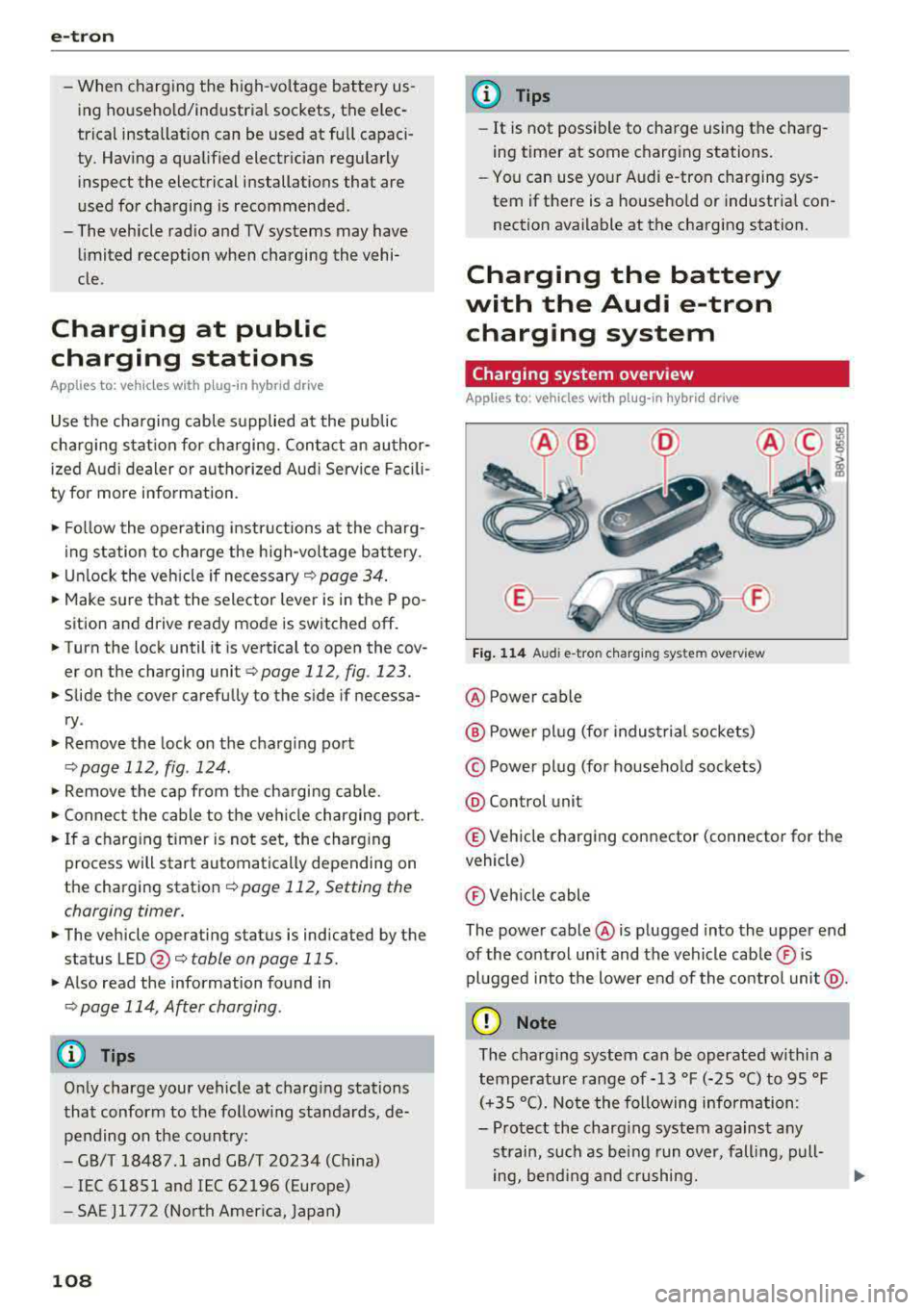
Fig. 114 Audi e-tro n charging sys tem overv iew
@ Power cable
@ P ower plug (for industrial sockets)
© Power plug (for household sockets)
@ Con trol unit
© Vehicle charging connector (connector for the
vehicle)
® Vehicle cable
The power cable @ is plugged into the upper end
of the control unit and the vehicle cable ® is
plugged into the lower end of the control unit@.
(D Note
The charg ing system can be operated within a
temperature range of-13 °F (-25 °C) to 95 °F (+35 °C). Note the following information:
- Protect the charging system against any
strain, such as being run over, falling, pull-
ing, bend ing and crushing.
II>-
Page 114 of 400

e-tron
@ Tips
-The device runs a se lf-test after power has
been restored to the control unit.
- You can activate a PI N for the control unit
¢ page 117 .
- The vehicle cannot be star te d if a cha rgi ng
connector is connected .
Before charging
App lies to: ve hicles w ith p lug- in hy brid drive
F ig. 1 23 Radiator g rille: ope ning the c harg ing uni t cove r
Fig. 124 Radiator g rille : cha rgi ng por t cap
"Unl ock the ve hicle if necessary ¢ page 34.
... Make s ure that the selector lever is in the P po
sition and drive ready mode is switched off
¢ page 96.
"Turn the lock until it is ve rtical to open the cov
er on the charging
unit ¢ fig. 123 .
... Slide the cover caref ully to t he s ide if necessa
ry .
... Remove the lock on the c harg ing po rt
¢fig. 124.
"Inser t power plug @ or© into the socke t
¢page 108 , fig. 114 .
l) Not availa ble in a ll Info ta in m en t sy ste m s.
112
... Plug the vehicle charging connecto r ©
¢ page 108, fig. 114 into the vehicle charging
port ¢ fig. 124. The c harging p rocess starts au
tomatically if no charg ing timer is set .
(D Tips
Remove ice and s now from the cover using a
h and brush and solvent-free de icing sp ray .
Charging
App lies to : vehicles wi th plug-in hybrid drive
You can switch between the immediate charg ing
@ and charging timer Q) options d uring the
charg ing process if a charg ing t imer is set . Press
the des ired button to do this .
You have different charging options:
Immediate charging
To start the c harging process immed iate ly, press
the b utton @
¢page 111 , fig. 122 . The LE D in
the button turns on.
Setting the charging timer
You can delay the ch arging time w ith the charg
i ng t imer in the Infota inment system
ll _ Yo u can
set two diffe rent timers.
" If a time r was alrea dy set, p ress t he bu tto n Q)
¢page 111, fig. 12 2. The LED in the button
t urns on .
... To set a charging timer , select: IMENU ! button>
Vehicle > left control button > Charge > r ight
control button >
Program timer .
... Select Individual timer or Repeat timer .
... Set the departu re time, the da te or day of the
week .
... You ca n activate the climate cont rol w ith the
charging t imer d uring the c harg ing process by
sele ct ing
Air conditioning wit h the cont rol
knob.
A ./ appears in the box. This activ ation is
separa te from the Infotai nment system set
tings in t he climate cont rol
menu ¢ page 118.
... Press the IBACKI b utton. ..,_