2017 AUDI A3 SEDAN ignition
[x] Cancel search: ignitionPage 348 of 400

Wheels
after switching the ignition on or while driving
and the
[tlJ indicator light in the instrument clus
ter blinks for approximately one minute and then
stays on, there is system malfunction. Check/cor rect the pressures on all four tires and store the
pressures
Q page 346 . If the indicator light does
turn off or turns on again after a short period of
time, drive to an authorized Audi dealer or au
thorized Audi Service Facility immediately to have
the malfunction corrected.
A WARNING
- If the tire pressure indicator appears in the
instrument cluster display, reduce your
speed immediately and avoid any hard
steering or braking maneuvers. Stop as soon
as possible and check the tires and their
pressures.
- The driver is responsible for maintaining the correct tire pressures. You must check the
tire pressures regularly.
- Under certain conditions (such as a sporty
driving style, winter conditions or unpaved
roads), the pressure monitor indicator may
be delayed.
- Do not use run-flat tires on your vehicle. Us
ing them when not permitted can lead to
vehicle damage or accidents.
@ Tips
- The tire pressure monitoring system can al
so stop working when there is an ESC/ABS
malfunction.
- Using snow chains may result in a system
malfunction.
- The tire pressure monitoring system in your
Audi was calibrated with "Audi Original
Tires"
¢ page 335. Using these tires is rec
ommended .
- The tire pressure monitoring system can on
ly monitor the tire pressure of the driving
tires. Check the tire pressure of the spare
wheel in the luggage compartment so that
if necessary it is ready for use.
346
· Storing tire pressures
Applies to: vehicles with Tire P ressure Monitoring System in
dicator
A change in tire pressure or a change in tires
must be stored in the system.
Before storing the tire pressures, make sure the
tire pressures of all four tires meet the specified
values and are adapted to the load¢
page 335.
.,. Select in the Infotainment system: IMENU ! but
ton
> Vehicle > Service & checks > Tire pres
sure monitoring
> Store tire pressure > Yes,
store now.
(D Tips
Do not store the tire pressures if snow chains
are installed.
Page 350 of 400

Care and cleaning
A WARNING
- Only wash the vehicle when the ignition is
off and follow the instructions from the car
wash operator to reduce the risk of acci
dents.
- To reduce the risk of cuts, protect yourself
from sharp metal components when wash
ing the underbody or the inside of the wheel
housings.
-After washing the vehicle, the braking effect may be delayed due to mo isture on the
brake rotors or ice in the winter. This in
creases the risk of an acc ident. The brakes
must be d ried first w ith a few careful b rake
applications.
(D Note
- If yo u wash the ve hicle in an automatic car
wash, yo u m ust fold the exte rior m irrors i n
to reduce the risk of damage to the mir rors.
Power folding exte rior mir rors* mus t onl y
b e fo lded i n and ou t using the powe r folding
funct ion .
- T o reduce t he risk of paint damage, do no t
wash the vehi cle i n dire ct sunlig ht.
-
- To red uce the risk of damage, do not wash
the power top* with a pressure washer.
- T o reduce the risk of damage to the s urface,
do not use insect removing sponges, kitchen
sponges o r similar items .
- Mat te finish painted vehicle components:
- To reduce the r isk of damage to the sur-
face, do not use polis hing agents or hard
wax.
- Never use protective wax. It can destroy
the matte finish effect .
- Do not place any stickers or magnetic
signs on vehicle parts painted with matte
finish paint. The paint could be damaged
when the stickers or magnets are re
moved.
@ For the sake of the environment
Only wash the veh icle in facili ties spec ially de
s igned for that pu rpose. This will reduce the
r isk of dirty wate r contam inated with o il from
ente ring the sewe r system.
Cleaning and care information
W hen clea ning and ca ring for individua l vehicle
components, refer to the fo llowing t ables. The
i n fo rmation conta ined there is s imply recom
mendations. Fo r quest ions or for components t
h at are not listed, cons ult an au tho rize d Aud i
de aler or au thor ized A udi Service Fac il ity. Also
f o llow the information fo und
in <=> .&. .
Ext erior cleaning
Component Situation Solution
Wind shield wiper
Deposits <=> page 58, Cleaning the wiper blades
blades
Headlights /
Deposits Soft sponge wi
th a m ild soap so lutiona)
Tail lights
Sensors /
Deposits Sensors: soft cloth with solvent-free cleaning solut ion
camera lens es Camera lenses: soft cloth w ith alcohol-free cleaning solu-
tion
Snow/ice Hand brus
h/solvent-free de -icing spray
Wheels Road salt Water
Bra ke dust Acid-free special clean
ing solution
348
Page 366 of 400

Fuses and bulbs
Fuses and bulbs
Fuses
Changing fuses
A fuse that has blown will have me tal strips that
have burned through .
Fig. 2 99 Stee rin g co lu m n a rea : cove r
Fig. 30 0 Left s ide of the engine co mpart ment: fuse cover
The fuses are located behind a cover in the steer
i n g column
area ¢ fig. 299 or under a cover on
the left side of the engine compartment
¢ fig. 300 .
• Switc h the ignition and all e lectr ica l equipment
off.
• Check the following table to see which fuse be
longs to the
equipment ¢ page 365.
• Remove the cover.
• Remove the plastic cl ip from the fuse panel
cove r in the eng ine
compartment ¢ fig. 300 .
• Remove the fuse us ing the plastic clamp.
• Replace the bu rned fuse w ith an identical new
o ne.
• Reinser t the cover.
364
Fuse color identification
Color Current rating
in amps
Black 1
Purple 3
Light brown 5
Brown 7.5
Red 10
Blue 15
Yellow 20
Wh ite or transpa re nt 25
Green 30
Orange 4 0
A WARNING
-
Do not repair fuses and never replace a blown
f u se with one that has a higher amp rat ing.
This can cause damage to the e lectr ica l sys
tem and a fire.
(D Note
If a new fuse burns out again sho rtly after you
h ave installed it, have the electrical system
checked as soon as possible by an authorized
A udi dealer or authorized Aud i Service Fac ili
ty .
(D Tips
-The following table does not list fuse loca
t ions that are not used.
- Some of the equipment listed in the fo llow
ing tables applies on ly to certai n model ver
sions or certa in optional equipment .
Page 368 of 400

Fuses and bulbs
No . Equipment
F49 Starter, clutch sensor, high-voltage bat-
tery, power electronics
FS3 Rear window defogger
The power seats* are protected via
circuit break
ers
that automatically switch on after a few sec
onds after the overload has been reduced.
Fuse assignment - engine compartment
F ig . 302 Engine co mpa rtment: fuse assignmen t
No. Equipment
Fl E
lectronic Stabilization Control (ESC)
F2 Electronic Stabilization Control ( ESC)
F3 Engine control module
Engine components, eng ine cooling, aux-
F4 ilia
ry heater coil relay (1+2), secondary
air injection pump relay
FS Engine components, tank system
F6 Brake light sensor
F7 Engine components, water pumps
FB Heat oxygen sensor
F9 Engine components, exhaust door, glow
time control module
FlO Fue l injectors, fuel control module
366
No . Equipment
Fll Auxiliary heater heating element 2
, en-
gine components
F l2 Auxiliary heater heating element 3
Fl3 Automatic transmission
F lS Horn
F l6 Ignition coils, CNG cut-off valve, power
and control electronics
Fl7 Elec
tronic Stabilization Control (ESC), en -
gine contro l module
Fl8 Terminal 30 (voltage
reference), battery
monitoring
F19 Windshield wipers
F20 Anti-theft alarm system
F 22 Terminal SO diagnosis, engine control
module
F2 3 Starter
F 24 Auxiliary heater heating element 1, brake
booster
F31 Vacuum pump, water pump
F33 Brake booster
F34 Brake booster
F35 A/C function relay
F37 Parking heater
Bulbs
Replacing light bulbs
For your safety, we recommend that you have
your authorized Audi dealer replace any bulbs for you.
It is becoming increasingly more and more diffi
cu lt to replace vehicle light bulbs since in many
cases, other parts of the car must first be re
moved before you are able to get to the bulb.
This applies especially to the light bulbs in the
front of your car which you can only reach
through the engine compartment.
Sheet meta l and bulb holders can have sharp
edges that can cause serious cuts, parts must be
correctly taken apa rt and then properly put back
together to help prevent breakage of parts and
..,.
Page 371 of 400
a, a, ..... N
" N ..... 0 N > 00
(D Note
-Applying a higher voltage booster battery
will cause expensive damage to sensitive electronic components, such as control
units, relays, radio, etc.
- There must be no electrical contact between the vehicles as otherwise current could al
ready start to flow as soon as the positive
(+) terminals are connected .
@ Tips
The discharged battery must be properly con
nected to the vehicle's electrical system.
When jump starting or charging the battery,
never connect the negative ground cable to
the battery negative post because the battery
manager system must be able to detect the
battery's state of charge. Always connect the
negative ground cable to the negative ground
post of the battery manager control unit.
Using jump start cables
Connect the jump start cables in the exact order
described below.
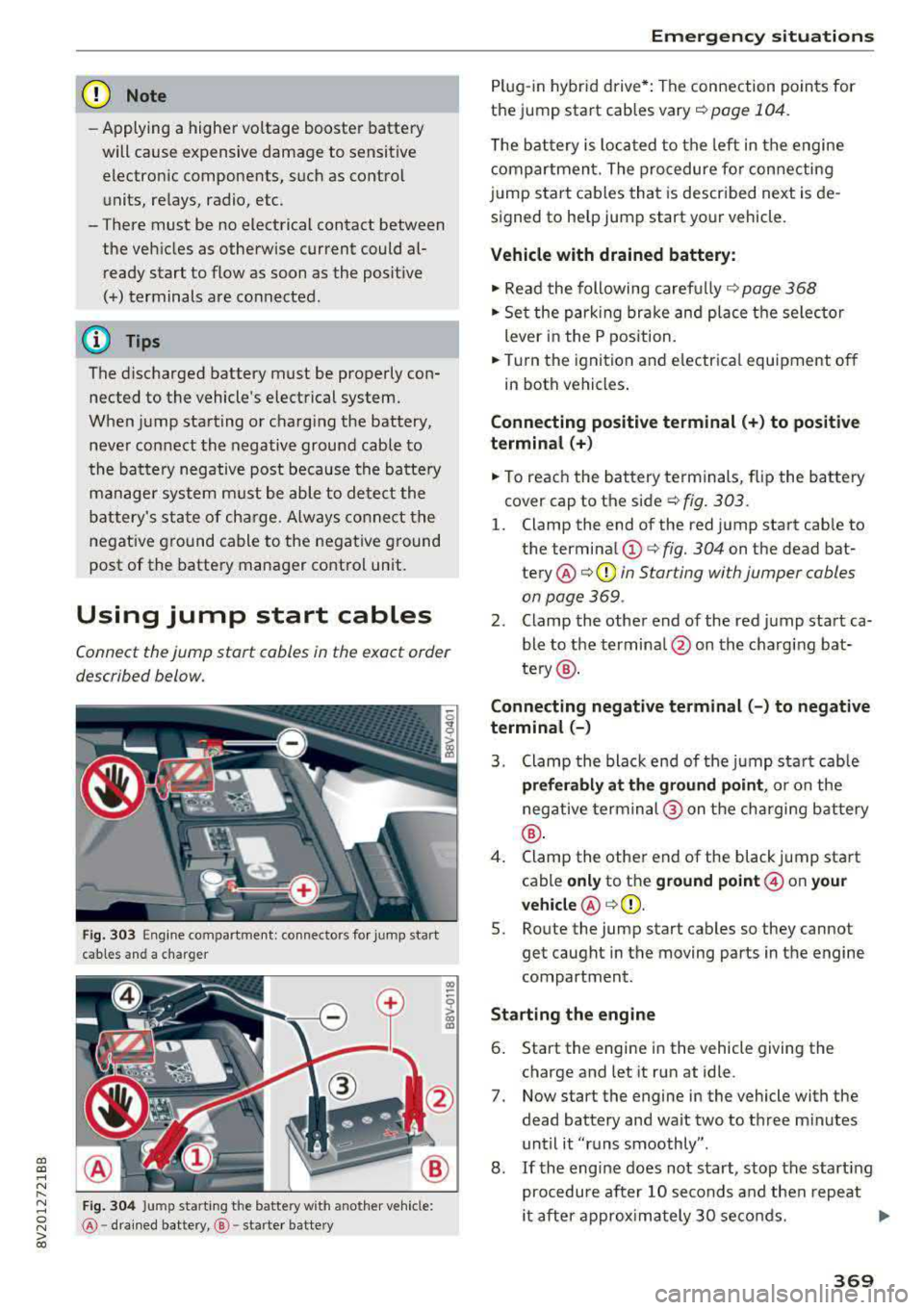
Fig. 303 Engine compartment: connectors for jump start
cables and a charger
Fig . 304 Ju mp starting t he battery wit h another vehicle:
@ -dra in ed battery, @-starter batte ry
Emergency situations
Plug-in hybrid drive*: The connection points for
the jump start cables
vary ¢ page 104.
The battery is located to the left in the engine
compartment. The procedure for connecting
jump start cables that is described next is de
signed to help jump start your vehicle.
Vehicle with drained battery:
.. Read the following carefully 9 page 368
.. Set the parking brake and place the se lector
lever in the P position .
.. Turn the ignition and electrical equipment off
in both vehicles .
Connecting positive terminal(+) to positive
terminal (+)
.. To reach the battery terminals, flip the battery
cover cap to the side¢ fig. 303 .
l. Clamp the end of the red jump start cab le to
the terminal
(D c> fig. 304 on the dead bat
tery @¢ 0 in Starting with jumper cables
on page 369 .
2. Clamp the other end of the red jump start ca
ble to the terminal @on the charging bat
te ry @ .
Connecting negative terminal(-) to negative
terminal (-)
3. Clamp the black end of the jump start cab le
preferably at the ground point, or on the
negative terminal @ on the charging battery
®·
4. Clamp the other end of the black jump start
cable
only to the ground point @ on your
vehicle @c>(D.
5. Route the jump start cables so they cannot
get caught in the moving parts in the engine
compartment.
Starting the engine
6. Start the engine in the vehicle giving the
charge and let it run at idle .
7. Now start the engine in the vehicle with the
dead battery and wait two to three m inutes
until it "runs smoothly" .
8.
If the engine does not start, stop the start ing
procedure after 10 seconds and then repeat
it after approx imately 30 seconds.
Ill>
369
Page 376 of 400

Techni cal data
Technical data
Vehicle data
XXXXX XX -X -X X XX XXX XX
®-+ : :::ti/:: XXXXXXXX XX X X X XX XXXX
IYP /l'YP! XXX XXX
XX XXXXXXX XX X X XX
XXX
K W XXX
f,\__J_ I IIJIORl
1
:tr:l~
1
XXXX I XXXX XXX I XX
II. -AlJSliT. / OPTIONS
EOA 7D5 4U B 6XM SS G SR W
2 EH JO Z l lB lAS lBA
3FC 5 MU 7X l
FDA 9G3 OG7 O YH OJF
TL 6 3 KA 8EH UlA X 9B O Z7
lX W
80 3 908 8Z4 02D
7T6 C V7
7KO 4 X3
2K2
3 l4 4 KC 3Y O 413 5 D2
lS A 7GB 0 1A 4GO
XX . X XX X XX X XXXX
Fig. 312 Veh icl e ident if ic ation labe l
Vehicle Identification Number (VIN )
The VIN numbe r is lo cated i n the following pla
ces :
0
0
~ :x: ... IX)
- In the Infotainment system: selec t*: select
IM ENU I button > Vehicle > left control b utton>
Ser vice & che cks > Vehicl e information .
-on the vehicle identification label
- u nder the windshield on the driver's side*
Vehicle identification label
The vehicle identification label ¢ fig. 312 is locat
ed in the luggage compartment under the cargo
floor cover.
The information of the vehicle identification label
can also be found in your Warranty
& Mainte·
nance booklet.
The sticker contains the following vehicle data :
(D Vehicle Iden tifica tion Number (VIN)
@ Vehicle type, engine output, transmission
@ Eng ine and transm ission codes
@ Pa int and interior codes
374
@ Optional equipment numbers
Safety compliance sticker
The safety compliance sticker is your assurance
that your new vehicle complies with all applicable Federal Motor Veh icle Safety S tandards which
were in ef fect at the time the vehicle was manu
factu red. You can find this sticker on the door
jamb on the driver's side. It shows the month and year of production and the veh icle identification
number of your veh icle (perforation) as well as
the Gross Vehicle Weight Ra ting (GVWR) and the
Gross Axle We ight Rating (GAWR).
H igh volt age warning label
The hig h voltage warn ing label is located in the
engine compartment next to the engine hood
re
lease. The spark ignition system complies w ith
the Canadian s tandard ICES-002.
Notes about technical
data
The values may diffe r for som e markets depend
i ng o n eq uipment installed in certa in mar kets
and the me asur ing me thods .
Please note that the specifica tions listed in the
vehicle documentat ion a lways take precedence .
(D Tips
Missing technical data was not ava ilable at
the time of pr int ing .
Weights
Gross Vehicle Weight Rating
The Gross Vehicle We ight Rating (GVWR), and
the Gross Axle Weig ht Rating (GAWR) for front
and rea r are listed on a sticker on the door jamb
o n the dr iver's side .
The Gross Vehicle We ight Rating includes the
weight of the bas ic vehicle plus full fuel tank, oil
and coolant , plus maximum load, which includes
passenger weight ( 150 lbs/68 kg per des ignated
seat ing pos ition) and luggage
weight ¢& . ..,_
Page 381 of 400

CXl CXl .... N ,.__
N .... 0 N > 00
today's automobiles, have steadily reduced the
scope of maintenance and repairs which can be
carried out by vehicle owners.
Also, safety and
environmental
concerns place very strict limits
on the nature of repairs and adjustments to en
gine and transmission parts which an owner can perform .
Maintenance, adjustments and repairs usually re
quire special tools, testing devices and other
equipment available to specially trained work
shop personnel in order to assure proper per
formance, reliability and safety of the vehicle and its many systems.
Improper maintenance, adjustments and repairs
can impair the operation and reliability of your
vehicle and even void your vehicle warranty .
Therefore, proof of servicing in accordance with
the maintenance schedule may be a condition for upholding a possible warranty claim made within
the warranty period.
Above all , operational safety can be adversely af
fected, creating unnecessary risks for you and
your passengers.
If in doubt about any servicing, have it done by
your authorized Audi dealer or any other properly equipped and qualified workshop. We strongly urge you to give your authorized Audi dealer the
opportunity to perform all scheduled mainte nance and necessary repairs. Your dealer has the
facilities, original parts and trained specialists to keep your vehicle running properly .
Performing limited maintenance yourself
The following pages describe a limited number of
procedures which can be performed on your vehi
cle with ordinary tools, should the need arise and
trained personnel be unavailable. Before per
forming any of these procedures, always thor
oughly read all of the applicable text and careful ly follow the instructions given . Always rigorously
observe the
WARNINGS provided .
Before you check anything in the engine com
partment, always read and heed all WARNINGS
c::> .&. and c::> page 316 .
Consumer information
A WARNING
-Serious personal injury may occur as a result
of improperly performed maintenance, ad
justments or repairs .
- Always be extremely careful when working
on the vehicle. Always follow commonly ac
cepted safety practices and general com mon sense. Never risk personal injury.
- Do not attempt any of the maintenance,
checks or repairs described on the following pages if you are not fully familiar with these
or other procedures with respect to the ve hicle, or are uncertain how to proceed.
- Do not do any work without the proper tools
and equipment. Have the necessary work
done by your authorized Audi dealer or an
other properly equipped and qualified work
shop.
- The engine compartment of any motor vehi cle is a potentially hazardous area. Never
reach into the area around or touch the radi
ator fan.
It is temperature controlled and
can switch on suddenly - even when the en
gine is off . The radiator fan switches on au
tomatically when the coolant reaches a cer
tain temperature and will continue to run
until the coolant temperature drops.
- Always switch off the ignition before anyone
gets under the vehicle.
-Always support your vehicle with safety
stands if it is necessary to work underneath
the vehicle . The jack supplied with the vehi
cle is not adequate for this purpose and
could collapse causing serious personal in
jury.
- If you must work underneath the vehicle
with the wheels on the ground, always make
sure the vehicle is on level ground, that the
wheels are always securely blocked and that
the engine cannot be started.
- Always make sure the transmission selector
lever (automatic transmission) is in P (Park
position) and the park brake is applied .
II>
379
Page 392 of 400

Index
Opening/closing
re fer to Unlocking/locking
36,37
Operating Multifunction steering wheel . . . . . . . . 13, 16
Multi Media Interface . . . . . . . . . . . . . . . . 159
Voice recognition system . . . . . . . . . . . . . 170
Options menu .. .. ............. 14, 160, 164
Outside temperatu re display . . . . . . . . . . . . . 10
Overview (Cockpit) . . . . . . . . . . . . . . . . . . . . . . 8
p
Paint damage . . . . . . . . . . . . . . . . . . . . . . . . 349
Paint number .. ...... .... ..... .... ... 374
Panorama glass roof. . . . . . . . . . . . . . . . . . . . 43
also refer to Convenience opening/closing 42
Parental control
DVD ... .. .. .. ... ..... ....... .... .. . 233
Parking aid Cleaning sensors/camera . . . . . . . . . . . . . 348
Parking brake
r e fer to Electromechanical parking brake . 83
Parking lights . . . . . . . . . . . . . . . . . . . . . . . . . 51
p k" ar ing systems . . . . . . . . . . . . . . . . . . . . . . 146
Malfunct ion . . . . . . . . . . . . . . . . . . . . . . . . 150
Rearview camera . . . . . . . . . . . . . . . . . . . . 148
Sett ings . . . . . . . . . . . . . . . . . . . . . . . . . . . 150
Parking (automatic transmission) . . . . . . . . . 88
Parts replacement . . . . . . . . . . . . . . . . . . . . 380
Pass -through . . . . . . . . . . . . . . . . . . . . . . . . . 68
PASSENGER AIR BAG OFF light . . . . . . . . . . 279
Paths (Owner's Manual) . . . . . . . . . . . . . . . . 160
Pause (audio/video file) . . . . . . . . . . . . . . . . 230
Pedals . . . . . . . . . . . . . . . . . . . . . . . . . . . . . . 252
Personal route assistance . . . . . . . . . . . . . . 206
Phonebook
refer to Contacts . . . . . . . . . . . . . . . . . . . . 185
Physical principles of a frontal collision . . . 259
Picture format (v ideo) . . . . . . . . . . . . . . . . . 233
Playback (media) . . . . . . . . . . . . . . . . . . . . . 230
Playlist . . . . . . . . . . . . . . . . . . . . . . . . . . . . . 232
Plug-in hybrid drive . . . . . . . . . . . . . . . . . . . . 94
12 Volt battery . . . . . . . . . . . . . . . . . . . . . . 104
Auxiliary climate control . . . . . . . . . . . . . . 118
Boost . . . . . . . . . . . . . . . . . . . . . . . . . . . . . 10 1
Charging . . . . . . . . . . . . . . . . . . . . . . . . . . . 106
Charging clip . . . . . . . . . . . . . . . . . . . . . . . 110
390
Charging dock . . . . . . . . . . . . . . . . . . . . . . 110
Charging system PIN . . . . . . . . . . . . . . . . . 117
Charging the high-voltage battery . . . . . . 108
Charging time . . . . . . . . . . . . . . . . . . . . . . 116
Cleaning the charging system . . . . . . . . . . 119
Climate control . . . . . . . . . . . . . . . . . . . . . 118
Coasting . . . . . . . . . . . . . . . . . . . . . . . . . . . 101
Coolant . . . . . . . . . . . . . . . . . . . . . . . . . . . . 104
Driving . . . . . . . . . . . . . . . . . . . . . . . . . . . . . 96
E-max (power availability) . . . . . . . . . . . . . 102
Efficient driving . . . . . . . . . . . . . . . . . . . . . 101
Ending drive ready mode . . . . . . . . . . . . . . . 96
Energy flow disp lay . . . . . . . . . . . . . . . . . . 102
E stablishing drive ready mode . . . . . . . . . . 96
EV mode .... .. .. .. .. ............. .. 100
High-voltage battery .. ......... 94 , 95, 117
High -voltage system . . . . . . . . . . . . . . . . . . 94
Indicator lights . . . . . . . . . . . . . . . . . . . . . . 98
Jump starting . . . . . . . . . . . . . . . . . . . . . . . 104
Power meter . . . . . . . . . . . . . . . . . . . . . . . . . 97
Range and statistics . . . . . . . . . . . . . . . . . . . 99
Range display . . . . . . . . . . . . . . . . . . . . . . . . 99
Recuperation . . . . . . . . . . . . . . . . . . . . . . . 101
Refueling . . . . . . . . . . . . . . . . . . . . . . . . . . 105
Setting the modes . . . . . . . . . . . . . . . . . . . 100
Starting the vehicle . . . . . . . . . . . . . . . . . . . 96
Sta tus dis plays . . . . . . . . . . . . . . . . . . . . . . 114
Switching the ignition on/off . . . . . . . . . . . 96
Tachometer . . . . . . . . . . . . . . . . . . . . . . . . . 97
T ire mobility kit . . . . . . . . . . . . . . . . . . . . . 103
Vehicle sound . . . . . . . . . . . . . . . . . . . . . . . . 96
Vehicle tool kit . . . . . . . . . . . . . . . . . . . . . . 103
Vehicle transport . . . . . . . . . . . . . . . . . . . . 104
Point of interest . . . . . . . . . . . . . . . . . . . . . . 203
Point of interest search . . . . . . . . . . . . . . . . 203
also refer to Point of interest . . . . . . . . . . 203
Polishing . . . . . . . . . . . . . . . . . . . . . . . . . . . . 349
Pollen filter
refer to Pollutant filter . . . . . . . . . . . . . . . . 70
Pollutant filter . . . . . . . . . . . . . . . . . . . . . . . . 70
Power meter . . . . . . . . . . . . . . . . . . . . . . . . . . 97
Power seat adjustment . . . . . . . . . . . . . . . . . 61
Power top . . . . . . . . . . . . . . . . . . . . . . . . . . . . 44
Cleaning . . . . . . . . . . . . . . . . . . . . . . . . . . . 349
Power windows . . . . . . . . . . . . . . . . . . . . . . . . 41
Child safety lock . . . . . . . . . . . . . . . . . . . . . . 41
Malfunction . . . . . . . . . . . . . . . . . . . . . . . . . 42