2017 Alfa Romeo MiTo warning
[x] Cancel search: warningPage 33 of 212
stopped in intermediate positions by
pressing the button again
Brief button pressure: “manual” sunroof
closing. If button is pressed briefly, the
front glass panel moves from the
completely open position and stops in the
position where the button is released. In
this case, the panel closes by pressing it.
This function makes it possible to place
the front glass panel in intermediate
positions in relation to those produced
through automatic closing.
IMPORTANT The sun roof must stay
closed if a transverse roof rack is fitted.
ANTI-PINCH DEVICE
The sun roof has an anti-pinch safety
system capable of detecting the
presence of an obstacle whilst the roof is
closing; when this happens, the system
stops and the movement of the front
glass is immediately reversed.
IMPORTANT The anti-pinch system is
disabled through continuous pressure of
button 2.
INITIALISATION PROCEDURE
The sunroof must be re-initialised after
disconnecting the battery or if the
relevant protection fuse is blown.Perform the following:
press button 2 until the roof is
completely closed. Then release the
button;
press button 2 and hold it down for at
least 10 seconds and/or until the glass
panel clicks forwards. Release the button
at this point;
within 5 seconds of the previous
operation, press button B and hold it
down: the front glass panel will complete
a full opening and closing cycle. Only
release the button at the end of this
cycle.
MAINTENANCE/EMERGENCY
In case of emergency or maintenance the
roof can be moved manually when there
is no power supply (opening/closing of
the front glass panel) by carrying out the
following operations:
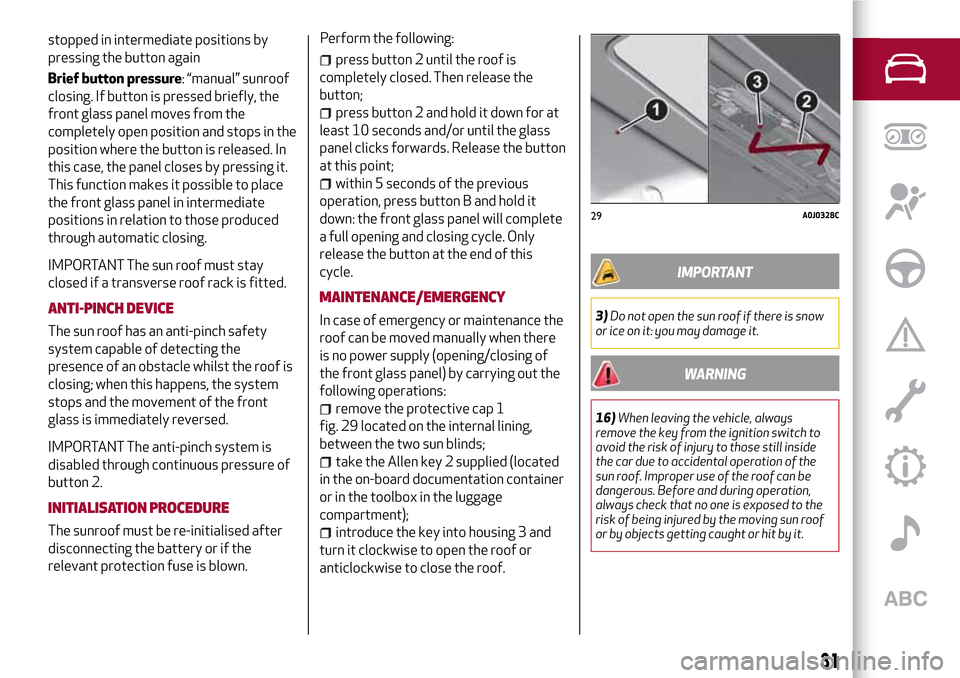
remove the protective cap 1
fig. 29 located on the internal lining,
between the two sun blinds;
take the Allen key 2 supplied (located
in the on-board documentation container
or in the toolbox in the luggage
compartment);
introduce the key into housing 3 and
turn it clockwise to open the roof or
anticlockwise to close the roof.
IMPORTANT
3)Do not open the sun roof if there is snow
or ice on it: you may damage it.
WARNING
16)When leaving the vehicle, always
remove the key from the ignition switch to
avoid the risk of injury to those still inside
the car due to accidental operation of the
sun roof. Improper use of the roof can be
dangerous. Before and during operation,
always check that no one is exposed to the
risk of being injured by the moving sun roof
or by objects getting caught or hit by it.
29A0J0328C
31
Page 34 of 212
ENGINE BONNET
17) 18) 19)
OPENING
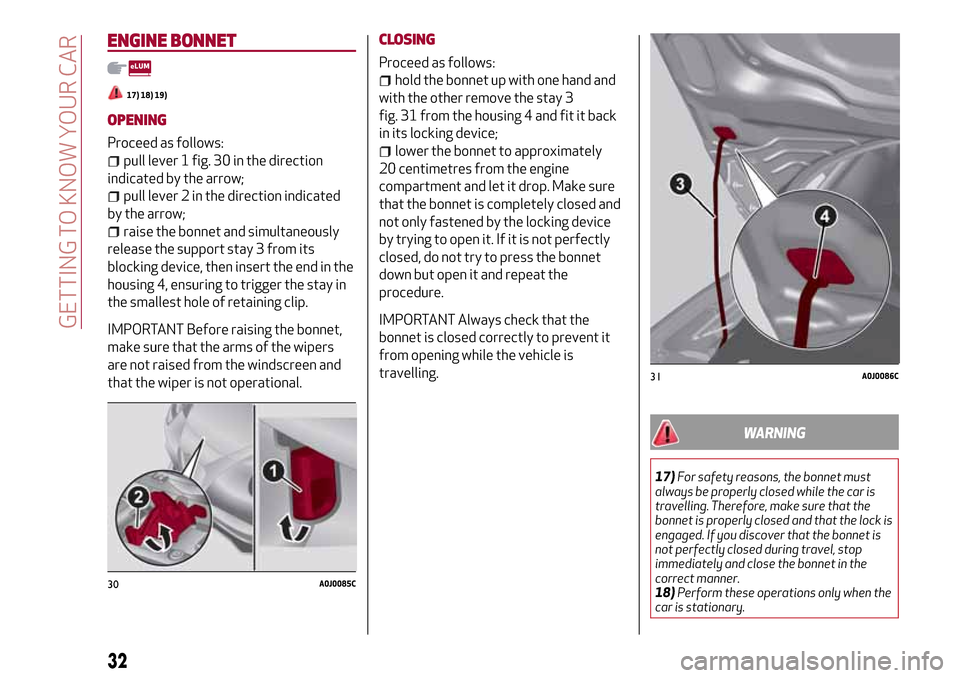
Proceed as follows:
pull lever 1 fig. 30 in the direction
indicated by the arrow;
pull lever 2 in the direction indicated
by the arrow;
raise the bonnet and simultaneously
release the support stay 3 from its
blocking device, then insert the end in the
housing 4, ensuring to trigger the stay in
the smallest hole of retaining clip.
IMPORTANT Before raising the bonnet,
make sure that the arms of the wipers
are not raised from the windscreen and
that the wiper is not operational.CLOSING
Proceed as follows:
hold the bonnet up with one hand and
with the other remove the stay 3
fig. 31 from the housing 4 and fit it back
in its locking device;
lower the bonnet to approximately
20 centimetres from the engine
compartment and let it drop. Make sure
that the bonnet is completely closed and
not only fastened by the locking device
by trying to open it. If it is not perfectly
closed, do not try to press the bonnet
down but open it and repeat the
procedure.
IMPORTANT Always check that the
bonnet is closed correctly to prevent it
from opening while the vehicle is
travelling.
WARNING
17)For safety reasons, the bonnet must
always be properly closed while the car is
travelling. Therefore, make sure that the
bonnet is properly closed and that the lock is
engaged. If you discover that the bonnet is
not perfectly closed during travel, stop
immediately and close the bonnet in the
correct manner.
18)Perform these operations only when the
car is stationary.
30A0J0085C
31A0J0086C
32
GETTING TO KNOW YOUR CAR
Page 39 of 212
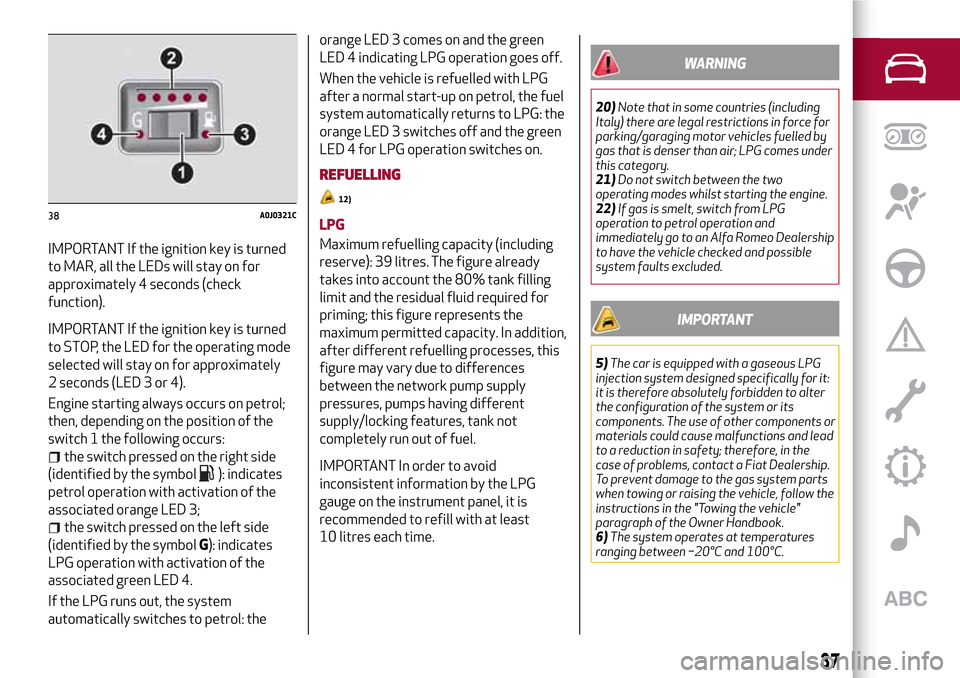
IMPORTANT If the ignition key is turned
to MAR, all the LEDs will stay on for
approximately 4 seconds (check
function).
IMPORTANT If the ignition key is turned
to STOP, the LED for the operating mode
selected will stay on for approximately
2 seconds (LED 3 or 4).
Engine starting always occurs on petrol;
then, depending on the position of the
switch 1 the following occurs:
the switch pressed on the right side
(identified by the symbol
): indicates
petrol operation with activation of the
associated orange LED 3;
the switch pressed on the left side
(identified by the symbolG): indicates
LPG operation with activation of the
associated green LED 4.
If the LPG runs out, the system
automatically switches to petrol: theorange LED 3 comes on and the green
LED 4 indicating LPG operation goes off.
When the vehicle is refuelled with LPG
after a normal start-up on petrol, the fuel
system automatically returns to LPG: the
orange LED 3 switches off and the green
LED 4 for LPG operation switches on.
REFUELLING
12)
LPG
Maximum refuelling capacity (including
reserve): 39 litres. The figure already
takes into account the 80% tank filling
limit and the residual fluid required for
priming; this figure represents the
maximum permitted capacity. In addition,
after different refuelling processes, this
figure may vary due to differences
between the network pump supply
pressures, pumps having different
supply/locking features, tank not
completely run out of fuel.
IMPORTANT In order to avoid
inconsistent information by the LPG
gauge on the instrument panel, it is
recommended to refill with at least
10 litres each time.
WARNING
20)Note that in some countries (including
Italy) there are legal restrictions in force for
parking/garaging motor vehicles fuelled by
gas that is denser than air; LPG comes under
this category.
21)Do not switch between the two
operating modes whilst starting the engine.
22)If gas is smelt, switch from LPG
operation to petrol operation and
immediately go to an Alfa Romeo Dealership
to have the vehicle checked and possible
system faults excluded.
IMPORTANT
5)The car is equipped with a gaseous LPG
injection system designed specifically for it:
it is therefore absolutely forbidden to alter
the configuration of the system or its
components. The use of other components or
materials could cause malfunctions and lead
to a reduction in safety; therefore, in the
case of problems, contact a Fiat Dealership.
To prevent damage to the gas system parts
when towing or raising the vehicle, follow the
instructions in the "Towing the vehicle"
paragraph of the Owner Handbook.
6)The system operates at temperatures
ranging between −20°C and 100°C.
38A0J0321C
37
Page 41 of 212
This section of the booklet gives you all the information you need
to understand, interpret and use the instrument panel correctly.
KNOWING THE INSTRUMENT PANEL
CONTROL PANEL AND ON-BOARD INSTRUMENTS .........40
DISPLAY....................................42
MENU ITEMS . . . ..............................43
TRIP COMPUTER . . . . ..........................45
WARNING LIGHTS AND MESSAGES . ..................46
EOBD SYSTEM (European On Board Diagnosis) . . . . . . . .....64
Page 42 of 212
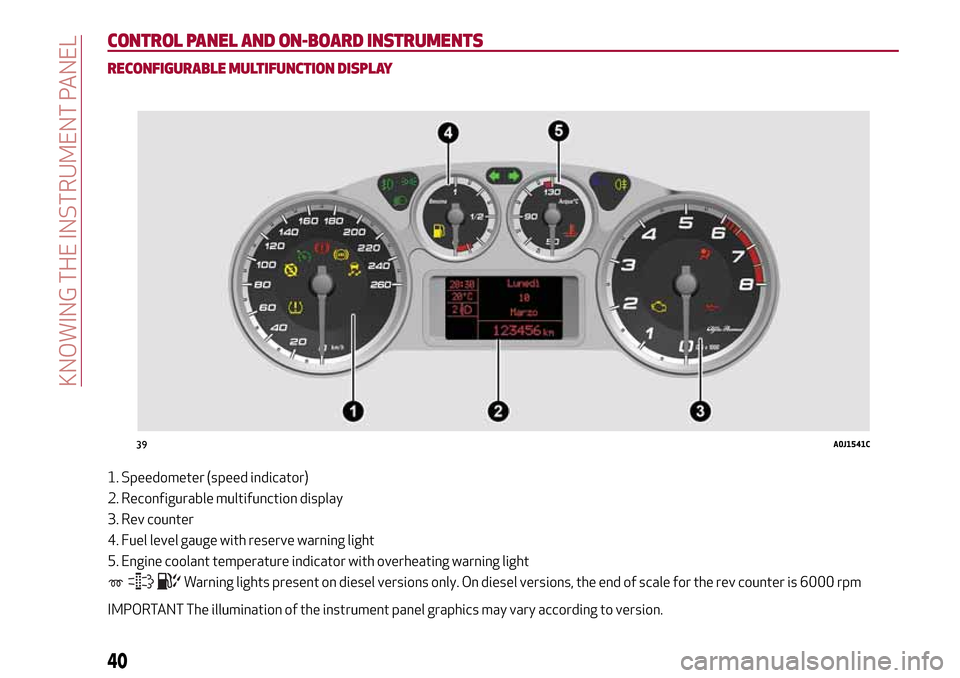
CONTROL PANEL AND ON-BOARD INSTRUMENTS
RECONFIGURABLE MULTIFUNCTION DISPLAY
1. Speedometer (speed indicator)
2. Reconfigurable multifunction display
3. Rev counter
4. Fuel level gauge with reserve warning light
5. Engine coolant temperature indicator with overheating warning light
Warning lights present on diesel versions only. On diesel versions, the end of scale for the rev counter is 6000 rpm
IMPORTANT The illumination of the instrument panel graphics may vary according to version.
39A0J1541C
40
KNOWING THE INSTRUMENT PANEL
Page 43 of 212
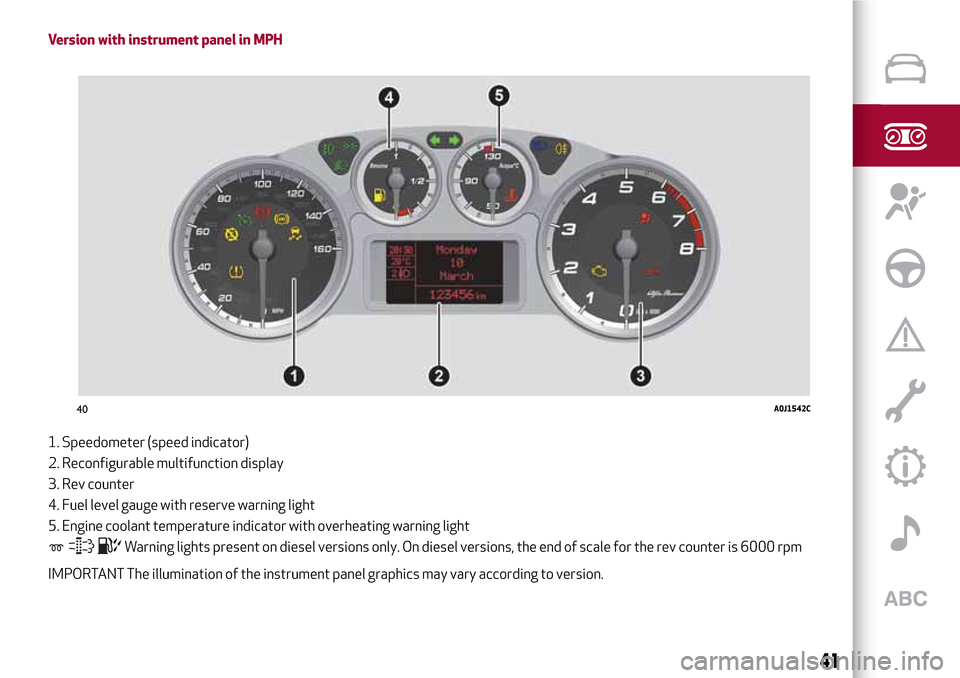
Version with instrument panel in MPH
1. Speedometer (speed indicator)
2. Reconfigurable multifunction display
3. Rev counter
4. Fuel level gauge with reserve warning light
5. Engine coolant temperature indicator with overheating warning light
Warning lights present on diesel versions only. On diesel versions, the end of scale for the rev counter is 6000 rpm
IMPORTANT The illumination of the instrument panel graphics may vary according to version.
40A0J1542C
41
Page 45 of 212

within the menu, they allow you to
scroll up or down;
during settings operations, they
increase or decrease values.
SETUP MENU
The menu comprises a series of options
which can be selected using the buttons
andto access the different
selection and setting (Setup) operations
indicated below.
Some options have a submenu. The menu
can be activated by briefly pressing the
SET/ button
.
The menu includes the following items:
MENU
LIGHTING
SPEED WARNING
HEADLIGHT SENSOR (where
provided)
RAIN SENSOR (where provided)
TRIP B ACTIVATION
SET TIME
SET DATE
FIRST PAGE (where provided)
SEE RADIO
AUTOCLOSE
MEASUREMENT UNIT
LANGUAGE
WARNINGS VOLUME
SEAT BELT BEEP
SERVICE
PASSENGER AIRBAG
DAYTIME RUNNING LIGHTS
COURTESY LIGHTS
EXIT MENU
On vehicles equipped withUconnect™
system (where provided), some menu
items are shown on the navigator display.
MENU ITEMS
IMPORTANT If there is anUconnect™
system, some menu items are displayed
and managed by the latter and not the
instrument panel (refer to the
description in the “Multimedia” chapter
or in the supplements available online).
Menu
Access to the Setup Menu.
Lighting
(only with side lights on)
Adjustment (8 levels) of the brightness of
the instrument panel, theUconnect™
system controls (where provided) and the
dual-zone automatic climate control
system controls (where provided).
Speed warning
Vehicle speed limit setting (km/h or mph).
When this is exceeded, the driver is
notified by an audible warning signal.
Headlight sensor
(where provided)
Automatic switch on/off of lights
according to external light conditions.
The dusk sensor sensitivity can be
adjusted according to 3 levels (level
1=minimum sensitivity, level 2=average
sensitivity, level 3=maximum sensitivity).
43
Page 46 of 212

Rain sensor
(where provided)
Adjustment (4 levels) of the sensitivity of
the rain sensor.
TripB activation
Activation (“On”) and deactivation (“Off”)
of Trip B display (partial trip counter). For
more information see the "Trip computer"
section.
Set time
Clock setting through two sub-menus:
“Time” and “Format”.
Set date
Date setting (day - month - year).
First page
(where provided)
Selection of the information you would
like to see on the main screen. You can
view the date or the trip distance.
See radio
On the instrument panel display, the
information onUconnect™system is
shown.
Autoclose
Activation of the automatic locking of the
doors on exceeding the speed of
20 km/h.
Measurement unit
Unit of measurement setting via three
submenus: “Distances”, “Fuelconsumption” and “Temperature”. If the
set distance unit is “km”, the display
allows the fuel consumption unit to be set
as km/l or l/100km. If the set distance
unit is “mi” the fuel consumption unit will
be displayed in “mpg”.
Language
Display language selection.
Warning volume
Adjustment (8 levels) of the volume of
the buzzer which accompanies the
display of failures/warnings.
Seat belt beep
This function can be displayed only after
an Alfa Romeo Dealership has
deactivated the SBR system (see
paragraph “SBR system” in the “Safety”
chapter).
Service
Display of information about km/mileage
intervals or, for versions/markets, where
provided, time intervals for car servicing.
Passenger airbag
Activation/deactivation of front
passenger side airbag and side air bag for
pelvis, chest and shoulder protection -
Side bag
Daytime running lights
Activation/deactivation of Daytime
Running Lights (DRL).Courtesy lights
This function turns on the internal
courtesy lights for approximately
25 seconds when the doors or luggage
compartment are opened using the
remote control. The courtesy lights are
turned off when the doors are closed or
locked using the remote control.
Exit Menu
Return to standard display screen.
44
KNOWING THE INSTRUMENT PANEL