2017 Alfa Romeo MiTo warning
[x] Cancel search: warningPage 18 of 212
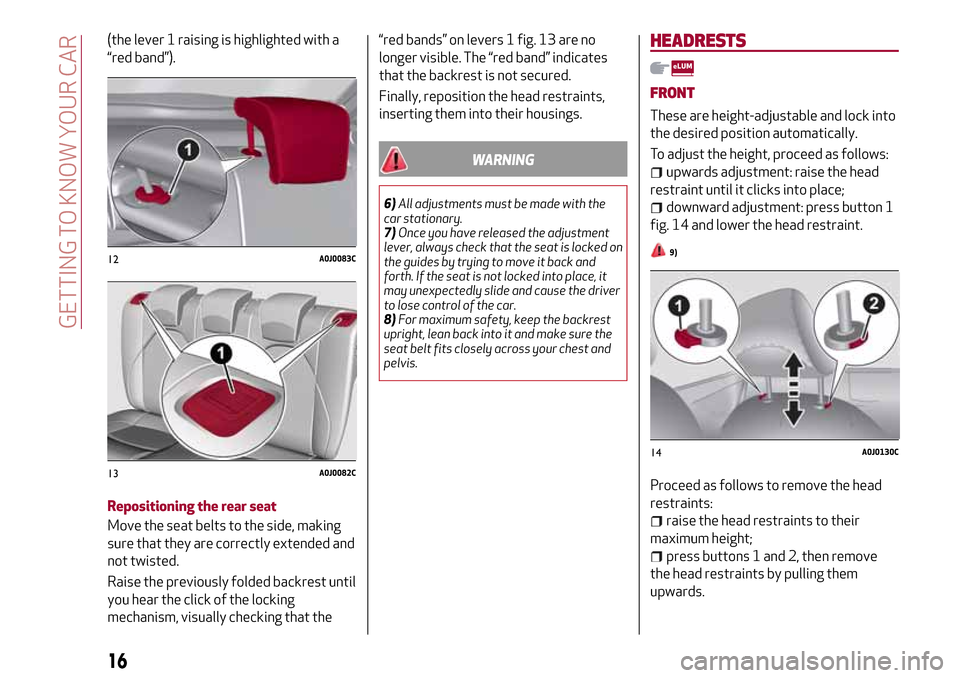
(the lever 1 raising is highlighted with a
“red band”).
Repositioning the rear seat
Move the seat belts to the side, making
sure that they are correctly extended and
not twisted.
Raise the previously folded backrest until
you hear the click of the locking
mechanism, visually checking that the“red bands” on levers 1 fig. 13 are no
longer visible. The “red band” indicates
that the backrest is not secured.
Finally, reposition the head restraints,
inserting them into their housings.
WARNING
6)All adjustments must be made with the
car stationary.
7)Once you have released the adjustment
lever, always check that the seat is locked on
the guides by trying to move it back and
forth. If the seat is not locked into place, it
may unexpectedly slide and cause the driver
to lose control of the car.
8)For maximum safety, keep the backrest
upright, lean back into it and make sure the
seat belt fits closely across your chest and
pelvis.
HEADRESTS
FRONT
These are height-adjustable and lock into
the desired position automatically.
To adjust the height, proceed as follows:
upwards adjustment: raise the head
restraint until it clicks into place;
downward adjustment: press button 1
fig. 14 and lower the head restraint.
9)
Proceed as follows to remove the head
restraints:
raise the head restraints to their
maximum height;
press buttons 1 and 2, then remove
the head restraints by pulling them
upwards.
12A0J0083C
13A0J0082C
14A0J0130C
16
GETTING TO KNOW YOUR CAR
Page 19 of 212
REAR
Two height-adjustable head restraints
are provided for the back seats (for the
adjustment see the previous paragraph).
On some versions a head restraint is also
provided for the central seat.
Proceed as follows to remove the head
restraints:
raise the head restraints to their
maximum height;
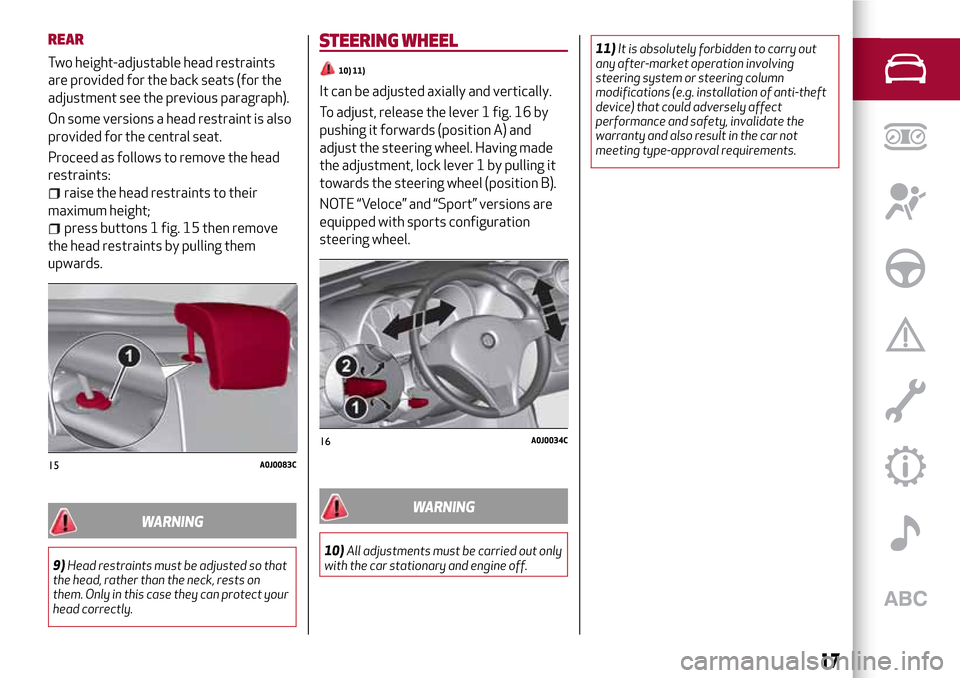
press buttons 1 fig. 15 then remove
the head restraints by pulling them
upwards.
WARNING
9)Head restraints must be adjusted so that
the head, rather than the neck, rests on
them. Only in this case they can protect your
head correctly.
STEERING WHEEL
10) 11)
It can be adjusted axially and vertically.
To adjust, release the lever 1 fig. 16 by
pushing it forwards (position A) and
adjust the steering wheel. Having made
the adjustment, lock lever 1 by pulling it
towards the steering wheel (position B).
NOTE “Veloce” and “Sport” versions are
equipped with sports configuration
steering wheel.
WARNING
10)All adjustments must be carried out only
with the car stationary and engine off.11)It is absolutely forbidden to carry out
any after-market operation involving
steering system or steering column
modifications (e.g. installation of anti-theft
device) that could adversely affect
performance and safety, invalidate the
warranty and also result in the car not
meeting type-approval requirements.
15A0J0083C
16A0J0034C
17
Page 20 of 212
REAR VIEW MIRRORS
INTERIOR MIRROR
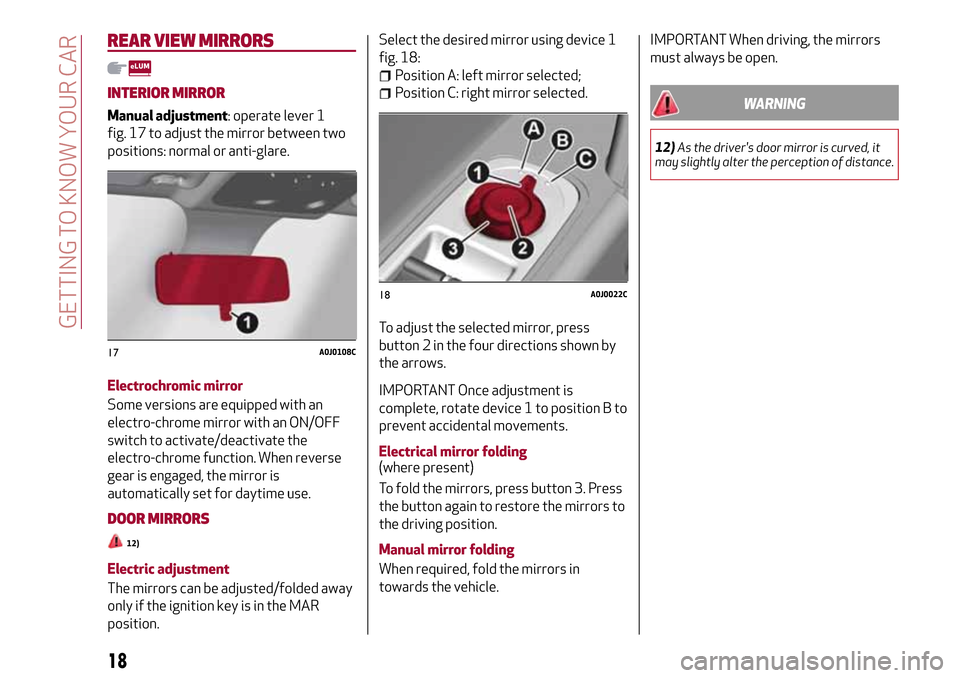
Manual adjustment: operate lever 1
fig. 17 to adjust the mirror between two
positions: normal or anti-glare.
Electrochromic mirror
Some versions are equipped with an
electro-chrome mirror with an ON/OFF
switch to activate/deactivate the
electro-chrome function. When reverse
gear is engaged, the mirror is
automatically set for daytime use.
DOOR MIRRORS
12)
Electric adjustment
The mirrors can be adjusted/folded away
only if the ignition key is in the MAR
position.Select the desired mirror using device 1
fig. 18:
Position A: left mirror selected;
Position C: right mirror selected.
To adjust the selected mirror, press
button 2 in the four directions shown by
the arrows.
IMPORTANT Once adjustment is
complete, rotate device 1 to position B to
prevent accidental movements.
Electrical mirror folding
(where present)
To fold the mirrors, press button 3. Press
the button again to restore the mirrors to
the driving position.
Manual mirror folding
When required, fold the mirrors in
towards the vehicle.
IMPORTANT When driving, the mirrors
must always be open.
WARNING
12)As the driver's door mirror is curved, it
may slightly alter the perception of distance.
17A0J0108C
18A0J0022C
18
GETTING TO KNOW YOUR CAR
Page 21 of 212

EXTERNAL LIGHTS
The left stalk fig. 19 operates most of
the exterior lights. The external lights can
only be switched on when the ignition key
is at MAR.
DAYTIME RUNNING LIGHTS (DRL)"Daytime Running Lights"
With the ignition key at MAR and ring nut
1 turned to
position, the daytime
running lights switch on. The other lights
and interior lighting stay off.
IMPORTANT The daytime running lights
are an alternative to the dipped
headlights for driving during the daytime
in countries where it is compulsory to
have lights on during the day; where it is
not compulsory, the use of daytime
running lights is permitted.IMPORTANT Daytime running lights
cannot replace dipped beam headlights
when driving at night or through tunnels.
The use of daytime running lights is
governed by the Highway Code of the
country in which you are driving. Comply
with legal requirements.
SIDE LIGHTS/DIPPED BEAM
HEADLIGHTS
With the ignition key turned to MAR, turn
the ring nut 1 to
.
The daytime running lights are switched
off and the side lights and dipped
headlights are switched on. The
warning light switches on in the
instrument panel.
PARKING LIGHTS
These lights can only be switched on with
ignition key at STOP or removed, by
moving ring nut 1 first to
position and
then to
position.
With the parking lights, also the plate
lights and front and rear direction lights
(daytime running lights DRL remain
switched off) switch on.
The
warning light switches on in the
instrument panel.
Operate the direction indicator stalk to
select the light side (right or left)
AUTOMATIC LIGHTING CONTROL
(AUTOLIGHT) (Dusk sensor)
(where provided)
A sensor, located on the windscreen,
detects the variations in outside
brightness depending on the light
sensitivity set with the Setup Menu: the
greater the sensitivity, the less external
light is required to activate the exterior
lights.
Activation
Turn the ring 1 to the
position to
activate automatic control of the dipped
beam headlights and taillights according
to the external light conditions.
When the lights are automatically
switched off, the front and rear fog lights
(if activated) are also switched off. The
next time the lights are switched on
automatically, the fog lights must be
reactivated manually (if required).
The headlights can only be flashed with
the sensor on. To activate the dipped
beam headlights, turn ring 1 to the
position
and then switch on the dippd
beam headlights.
MAIN BEAM HEADLIGHTS
To activate the main beam headlights,
with ring nut 1 to
, pull the stalk
towards the steering wheel beyond the
end of travel position. The
warning
light switches on in the instrument panel.
19A0J0063C
19
Page 22 of 212
When the stalk is pulled towards the
steering wheel again, beyond the end of
travel position, the main beam headlights
deactivate, the dipped headlights
reactivate and the
warning light
switches off.
It is not possible to switch on the main
beam headlights constantly if automatic
light control is active.
FLASHING
To do this, pull the stalk towards the
steering wheel (unstable position),
regardless of the position of ring nut 1.
The
warning light switches on in the
instrument panel.
HEADLIGHT ALIGNMENT CORRECTOR
This device works with the ignition key in
the MAR position and the dipped
headlights on.
Headlight alignment adjustment
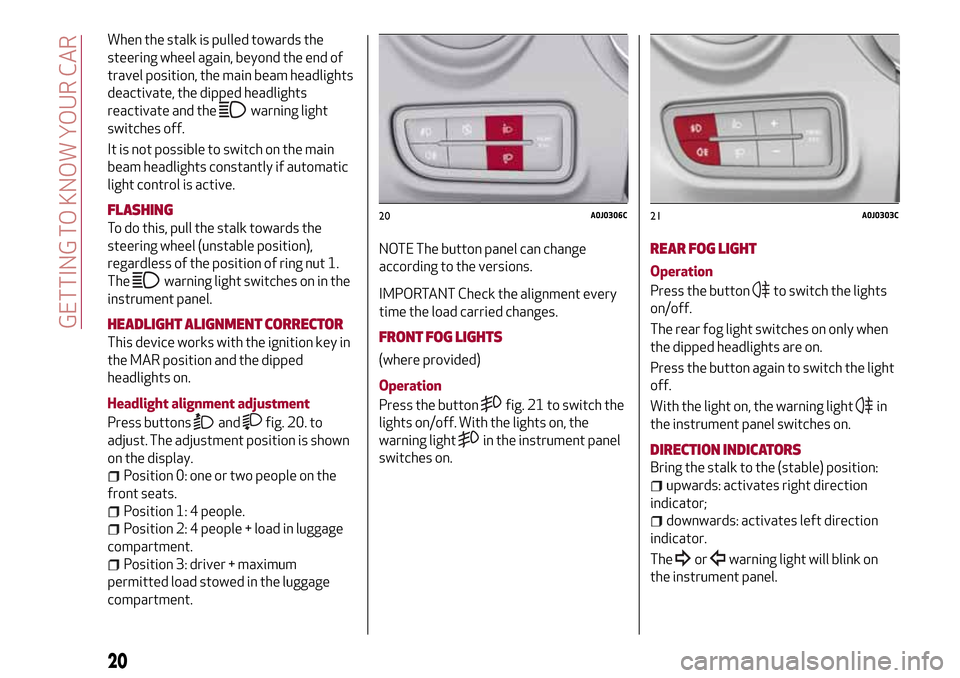
Press buttons
andfig. 20. to
adjust. The adjustment position is shown
on the display.
Position 0: one or two people on the
front seats.
Position 1: 4 people.
Position 2: 4 people + load in luggage
compartment.
Position 3: driver + maximum
permitted load stowed in the luggage
compartment.NOTE The button panel can change
according to the versions.
IMPORTANT Check the alignment every
time the load carried changes.
FRONT FOG LIGHTS
(where provided)
Operation
Press the button
fig. 21 to switch the
lights on/off. With the lights on, the
warning light
in the instrument panel
switches on.
REAR FOG LIGHT
Operation
Press the button
to switch the lights
on/off.
The rear fog light switches on only when
the dipped headlights are on.
Press the button again to switch the light
off.
With the light on, the warning light
in
the instrument panel switches on.
DIRECTION INDICATORS
Bring the stalk to the (stable) position:
upwards: activates right direction
indicator;
downwards: activates left direction
indicator.
The
orwarning light will blink on
the instrument panel.
20A0J0306C21A0J0303C
20
GETTING TO KNOW YOUR CAR
Page 23 of 212
The direction indicators are switched off
automatically when the steering wheel is
straightened.
"Lane change" function
If you wish to signal a lane change, place
the left stalk in the unstable position for
less than half a second. The direction
indicator on the selected side flashes
three times and then switches off
automatically.
"FOLLOW ME HOME" DEVICE
This device allows you to illuminate the
area in front of the car for a certain
amount of time.
Activation
With the key turned to STOP or removed,
pull the left-hand stalk 1 towards the
steering wheel within 2 minutes from
when the engine is turned off.
Each time the stalk is moved, the lights
stay on for an extra 30 seconds up to a
maximum of 210 seconds; then the lights
are switched off automatically.
When the stalk is operated, the warning
light
on the instrument panel
switches on. The display shows a
message and the time set for the
function.
The warning light comes on when the
stalk is operated and stays on until the
function is automatically deactivated.Each movement of the stalk only
increases the amount of time the lights
stay on.
Deactivation
Keep the stalk pulled towards the
steering wheel for more than 2 seconds.
EXTERNAL COURTESY LIGHTS
These light up the car and the space in
front of it when the doors are unlocked.
Activation
When the car is parked and the doors are
unlocked by pressing the
button on the
remote control (or the luggage
compartment is unlocked by pressing
), the dipped beam headlights, rear
side lights and number plate lights are
activated.
The lights stay on for approximately
25 seconds unless the doors and luggage
compartment are locked again with the
remote control or the doors (or luggage
compartment) are opened and reclosed.
In these cases they switch off after
5 seconds.
INTERIOR LIGHTS
FRONT CEILING LIGHT
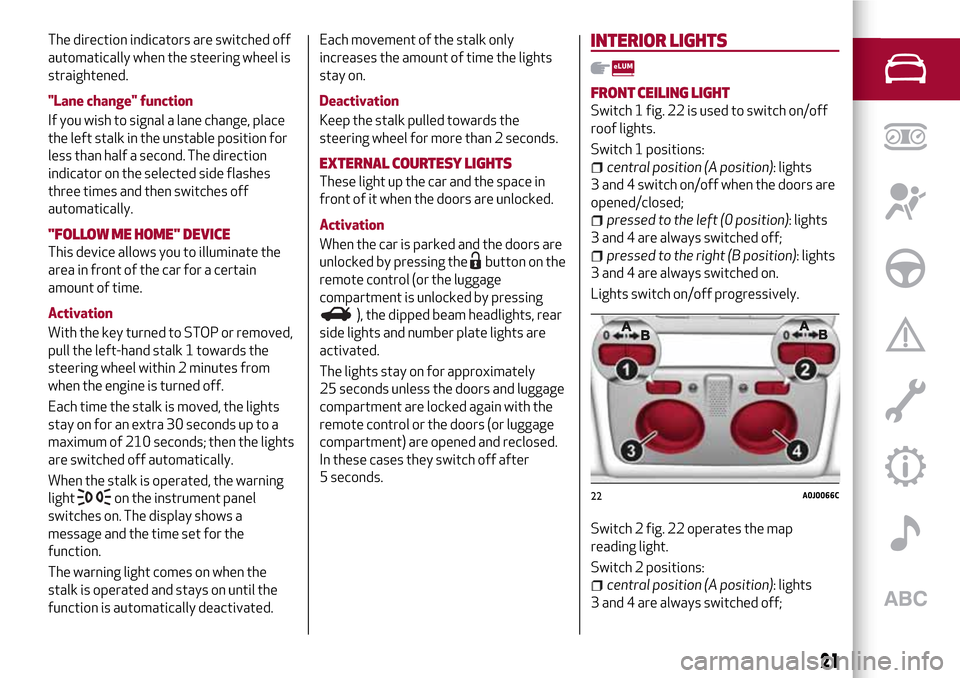
Switch 1 fig. 22 is used to switch on/off
roof lights.
Switch 1 positions:
central position (A position): lights
3 and 4 switch on/off when the doors are
opened/closed;
pressed to the left (0 position): lights
3 and 4 are always switched off;
pressed to the right (B position): lights
3 and 4 are always switched on.
Lights switch on/off progressively.
Switch 2 fig. 22 operates the map
reading light.
Switch 2 positions:
central position (A position): lights
3 and 4 are always switched off;
22A0J0066C
21
Page 25 of 212
REAR WINDOW WIPER / WASHER
(where provided)
This operates only with the ignition key
turned to MAR.
Turn ring 1 fromOposition to
position to operate the rear window
wiper as follows:
in intermittent mode when the
windscreen wiper is not operating;
in synchronous mode (at half the
speed of the windscreen wiper) when the
windscreen wiper is operating;
in continuous mode with reverse gear
engaged and the control active.
Pushing the stalk towards the dashboard
(rocking position) will activate the rear
window washer jet. Keep the stalk pushed
for more than half a second to activate
the rear window wiper as well. Releasing
the stalk will activate the smart washing
function, as described for the windscreen
wiper.
WARNING
13)Never use the windscreen wipers to
remove layers of snow or ice from the
windscreen. In such conditions, the
windscreen wiper may be subjected to
excessive stress and the motor cut-out
switch, which prevents operation for a few
seconds, may intervene. If operation is not
restored (even after restarting that car with
the key), contact an Alfa Romeo Dealership.14)Do not operate the windscreen wiper
with the blades lifted from the windscreen.
23
Page 32 of 212
make sure that the initialisation is
correct by checking that the windows
work automatically.
IMPORTANT
2)The system conforms to the 2000/4/EC
standard concerning the safety of
passengers leaning out of the passenger
compartment.
WARNING
15)Incorrect use of the electric windows
may be dangerous. Before and during their
operation, ensure that any passengers are
not at risk from the moving glass either by
personal objects getting caught in the
mechanism or by being hit by it directly.
When leaving the car, always remove the key
from the ignition to prevent accidental
operation of the electric windows from being
a hazard for those still on board.
ELECTRIC SUNROOF
(where provided)
16)
3)
The extensively glazed sun roof
comprises a moving glass panel and a sun
blind.
When the glazed panel is closed it allows
outside light to enter the passenger
compartment and you can see out of it.
OPERATION
The sun roof can be operated only with
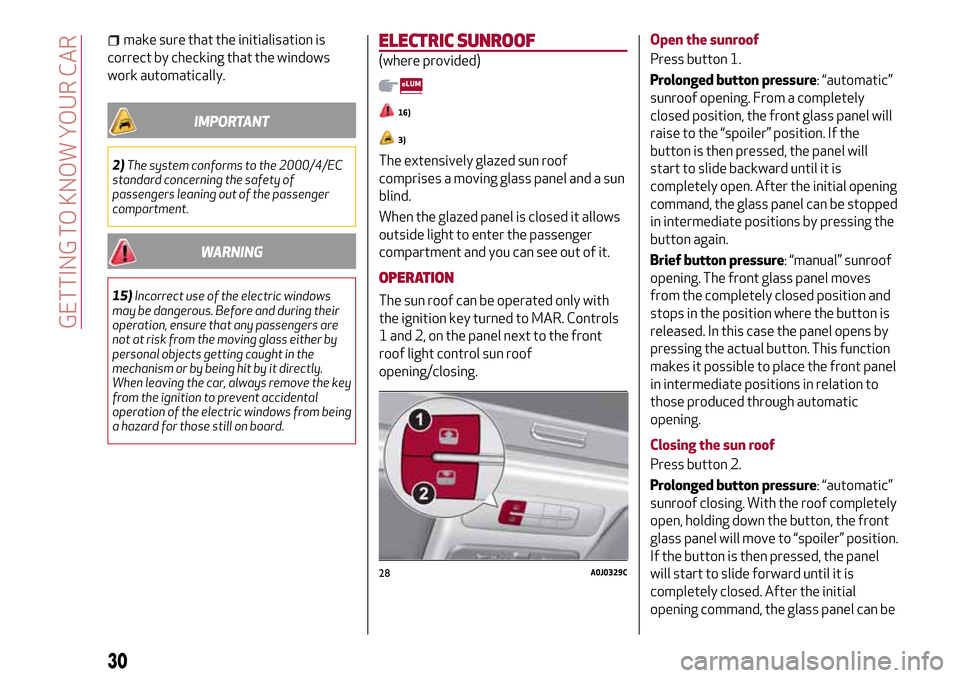
the ignition key turned to MAR. Controls
1 and 2, on the panel next to the front
roof light control sun roof
opening/closing.Open the sunroof
Press button 1.
Prolonged button pressure: “automatic”
sunroof opening. From a completely
closed position, the front glass panel will
raise to the “spoiler” position. If the
button is then pressed, the panel will
start to slide backward until it is
completely open. After the initial opening
command, the glass panel can be stopped
in intermediate positions by pressing the
button again.
Brief button pressure: “manual” sunroof
opening. The front glass panel moves
from the completely closed position and
stops in the position where the button is
released. In this case the panel opens by
pressing the actual button. This function
makes it possible to place the front panel
in intermediate positions in relation to
those produced through automatic
opening.
Closing the sun roof
Press button 2.
Prolonged button pressure: “automatic”
sunroof closing. With the roof completely
open, holding down the button, the front
glass panel will move to “spoiler” position.
If the button is then pressed, the panel
will start to slide forward until it is
completely closed. After the initial
opening command, the glass panel can be
28A0J0329C
30
GETTING TO KNOW YOUR CAR