2017 Alfa Romeo Giulietta clock
[x] Cancel search: clockPage 102 of 212
REPLACING AN EXTERIOR BULB
FRONT LIGHT CLUSTERS
These contain the bulbs for the side
lights/daytime running lights (DRL),
dipped beams, main beams and direction
indicators. The bulbs are arranged as
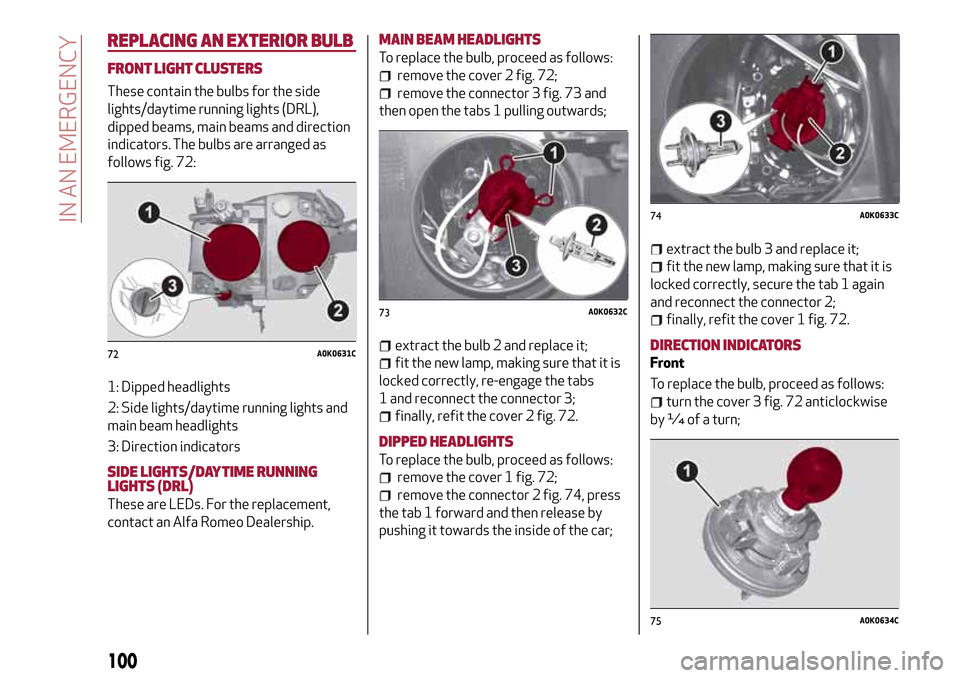
follows fig. 72:
1: Dipped headlights
2: Side lights/daytime running lights and
main beam headlights
3: Direction indicators
SIDE LIGHTS/DAYTIME RUNNING
LIGHTS (DRL)
These are LEDs. For the replacement,
contact an Alfa Romeo Dealership.
MAIN BEAM HEADLIGHTS
To replace the bulb, proceed as follows:
remove the cover 2 fig. 72;
remove the connector 3 fig. 73 and
then open the tabs 1 pulling outwards;
extract the bulb 2 and replace it;
fit the new lamp, making sure that it is
locked correctly, re-engage the tabs
1 and reconnect the connector 3;
finally, refit the cover 2 fig. 72.
DIPPED HEADLIGHTS
To replace the bulb, proceed as follows:
remove the cover 1 fig. 72;
remove the connector 2 fig. 74, press
the tab 1 forward and then release by
pushing it towards the inside of the car;
extract the bulb 3 and replace it;
fit the new lamp, making sure that it is
locked correctly, secure the tab 1 again
and reconnect the connector 2;
finally, refit the cover 1 fig. 72.
DIRECTION INDICATORS
Front
To replace the bulb, proceed as follows:
turn the cover 3 fig. 72 anticlockwise
by ¼ of a turn;
72A0K0631C
73A0K0632C
74A0K0633C
75A0K0634C
100
IN AN EMERGENCY
Page 104 of 212

remove the bulb by pushing it slightly
and turning it anticlockwise (1 = reversing
light bulb; 2 = rear fog light bulb) (see
fig. 80);
refit the bulb holder assembly
positioning it correctly, fasten screw
2 and then fix it by means of the retaining
tab 1. Reconnect connector 3 and finally
replace cover 1 fig. 78.
IMPORTANT Protect the tip of the
screwdriver with a cloth to prevent
scratching when removing the cover 1.
THIRD BRAKE LIGHTS
These are LED lights and are located on
the spoiler integrated with the tailgate.
For the replacement, contact an Alfa
Romeo Dealership.
NUMBER PLATE LIGHTS
To replace the bulbs, proceed as follows:
remove the number plate light units A
fig. 81;
turn the bulb holder 2
fig. 82 anticlockwise, extract the bulb
3 and replace it;
fit the new bulb, making sure it is
properly locked, then put the number
plate light units fig. 81 back in place,
making sure they are properly locked.
REPLACING FUSES
GENERAL INFORMATION
Fuses protect the electrical system: they
intervene (blow) in the event of a failure
or improper action on the system.
Use the pliers located inside the cover of
the engine compartment fuse box to
remove the fuses (see “Engine
compartment fuse box” for how to
remove the cover).
VERSIONS WITH "ALFA TCT"
AUTOMATIC TRANSMISSION
(for versions/markets, where provided)
The Alfa TCT transmission components
are protected by specific fuses. Contact
an Alfa Romeo Dealership if a fuse needs
replacing.
FUSEBOXS
Fuses are grouped together in fuseboxes
located in the engine compartment, on
the dashboard and inside the boot.
Engine compartment junction box
This is located next to the battery fig. 84:
to access the fuses, undo screws 1
fig. 83 and remove cover 2.
80A0K0638BC81A0K0905C
82A0K0640C
102
IN AN EMERGENCY
Page 179 of 212

SWITCHING THESYSTEM ON/OFF
The system is switched on/off by
pressing the
(ON/OFF) button/knob.
Turn the button/knob clockwise to
increase the radio volume or
anticlockwise to decrease it.
RADIO (TUNER) MODE
Press the RADIO button on the front
panel to activate radio mode.
Select the band by pressing the
corresponding button: “AM”, “FM” or
“DAB”.
Selecting a frequency band
Briefly press the "AM/FM" button to
switch from AM to FM and vice versa.
If the DAB tuner is available, briefly press
the "AM/FM", "AM/DAB", "FM/DAB"
buttons to select the desired band.
Indications on display
After the desired radio station is
selected, the following information is
shown on the display:
At the top: the list of radio stations
stored (presets) is displayed; the station
currently playing is highlighted.
In the middle: display of the name of the
current radio station and the buttons for
selecting the previous or next radio
station.
At the bottom:radio station selection,
radio band, tuning, track information and
audio settings.Searching for the previous/next radio
station
To search for the desired radio station,
rotate the BROWSE ENTER button/knob,
press the
orbuttons or use
the steering wheel controls
.
When searching forwards, if the system
reaches the end of the band, it will
automatically stop on the station where
the search has started from.
Previous/next radio station fast search
Hold down buttonson the
display: when the button is released, the
first tunable radio station will be
displayed.
Tuning the radio (AM/FM)
Press the "Tune" button on the display
and then enter the frequency of the radio
station using the keypad on the display.
In this mode, use buttons + and – to
fine-tune the frequency.
To delete an incorrect number (and enter
the correct station number) press the
(Delete) button.
After entering the last digit of the
station, the screen is deactivated and the
system tunes automatically to the
station selected (the number of the radio
station is displayed in the "Tune" text
box).The screen disappears automatically
after 5 seconds or manually by pressing
the "OK" or “X” buttons.
Exit the "Direct Tune" screen
Press the "Exit" or "Radio" button on the
display to return to the main system
screen.
DAB Radio
(for versions/markets, where provided)
Once DAB radio mode is selected, the
information on the current station is
displayed and the following functions.
Selection of the previous/next radio
station by:
turning the BROWSE ENTER
button/knob;
briefly pressing theor
buttons on the display;
Steering wheel control press.
Hold down the
buttons to
fast scroll the station list.
The "Browse" button is used to display:
the list of all DAB stations;
the list of stations filtered by "Genres";
the list of stations filtered by
"Ensembles" (broadcast group).
Setting the presets
Presets are available in all system modes
and are activated by touching one of the
preset buttons located in the upper area
of the display.
177
or
or
Page 180 of 212

If you are tuned to a radio station that
you wish to store, hold down the button
on the display which corresponds to the
desired preset or until an acoustic
confirmation signal is emitted.
The system can store up to 12 radio
stations in each mode: 3 radio stations
are displayed in the upper area.
Press the "All" button on the display to
show all the radio stations stored in the
frequency band selected.
Audio
To access the "Audio" menu, press the
SETTINGS button on the front panel,
scroll through the menu, then select and
press the "Audio" option on the display.
The following adjustments can be carried
out using the "Audio" menu:
"Equalizer" (for versions/markets,
where provided): to adjust the bass,
medium and treble settings;
"Balance/Fader" (left/right and
front/rear audio balance adjustment);
"Volume/Speed" (excluding versions
with Hi-Fi system) speed-dependent
automatic volume adjustment;
"Loudness" (for versions/markets,
where provided): improves audio quality
at low volumes;
"Auto-On Radio": provides the options
of radio on, radio off or restore status
when the ignition key was last turned to
STOP.
"Radio Off Delay": keeps the radio on
for a preset time after the ignition key is
turned to STOP.
MEDIA MODE
This chapter describes the interaction
modes for CD,
Bluetooth®, AUX and
USB/iPod operation.
Press the "Source" button to select the
desired audio source from those
available.
Change track (next/previous)
Briefly press the
button or press
on the steering wheel or, alternatively,
turn the BROWSE ENTER button/knob
clockwise to play the next track. Briefly
press the
button or presson the
steering wheel or, alternatively, turn the
BROWSE ENTER button/knob clockwise
to return to the beginning of the track or
return to the beginning of the previous
track of the track has been playing for
less than 8 seconds.
Fast forward/rewind through tracks
Press and hold down the
button to
fast forward the selected track or keep
the
button pressed to fast rewind
the track.
Track selection (Browse)
The selection options depend on the
device connected or the CD type
inserted.NOTE
Bluetooth®devices do not offer
the possibility of scrolling through tracks
using the above categories.
NOTE This button might be disabled for
some
Apple®devices.
Press the "Browse" button to activate
this function on the source being played.
Turn the BROWSE ENTER button/knob
to select the desired category and then
press the button/knob to confirm the
selection.
Press the "X" button to cancel the
function.
Track information display
Press the "Info" button to display the
information on the track being listened to
for devices that support the function.
Press the "X" button to exit the screen.
Shuffle
Press the ">" button then the "Shuffle"
button to play the tracks on the CD,
USB/iPod or
Bluetooth®in a random
order.
Press the "Shuffle" button again to
deactivate the function.
Repeat
Press the ">" button then the "Repeat"
button to activate the function.
Press the "Repeat" button again to
deactivate the function.
178
MULTIMEDIA
Page 183 of 212

Managing an incoming call
The buttons on the display allow the
following phone call functions to be
managed:
To answer a call: press the "Answer"
button or the
button on the steering
wheel controls;
To end a call: press the "Ignore" button
or the
button on the steering wheel
controls;
Ignore;
Put on hold/resume;
Deactivate/activate the microphone;
Transfer the call;
Switch from one call to the other;
Conference/merge two active calls.
Text message reader
To use this function the mobile phone
must support the SMS exchange function
through
Bluetooth®.
If this function is not supported by the
phone, the corresponding
button is
deactivated (grey).
When a text message is received, the
display will show a screen where the
options "Listen", "Call" or "Ignore" can be
selected.
The list of SMS messages received from
the mobile phone can be accessed by
pressing the
button.
NOTE Some mobile phones may not take
the SMS delivery confirmation settings
into account when interfacing withUconnect™. If an SMS message is sent via
Uconnect™, the user could face an
additional cost, without any warning, due
to the SMS delivery confirmation request
sent by the phone. For any problems
related to the above, contact your
telephone service provider.
SMS message options
Default SMS messages are stored in the
system memory and can be sent to
answer a received message or as a new
message:
Yes.
No.
Okay.
I can't talk right now.
Call me.
I'll call you later.
I'm on my way.
Thanks.
I will be late.
Stuck in traffic.
Start without me.
Where are you?
Are you there yet?
I need directions.
I'm lost.
See you later.
I will be 5 (or 10, 15, 20, 25, 30, 45,
60)* minutes late.
See you in 5 (or 10, 15, 20, 25, 30, 45,
60)* minutes.* Only use the numbers listed, otherwise
the system will not take the message.
“APPS” MODE
Press the APPS button on the front panel
to display the following operating
settings:
External temperature
Trip Computer
Clock
Bush
Uconnect™LIVE
Uconnect™LIVE SERVICES
Press the APPS button to access the
Uconnect™LIVEapplications.
The services available depend on the car
configuration and the market.
To use theUconnect™LIVEservices, you
need to download theUconnect™LIVE
app from Google Play or Apple Store and
register using the app or on
www.DriveUconnect.eu.
First access to the vehicle
Once you have launched the
Uconnect™LIVEApp and entered your
details, you have to pair the
Bluetooth®
with your smartphone and the radio, as
described in the "Pairing a mobile phone"
chapter, to access theUconnect™LIVE
services in your vehicle.
When pairing is complete, the connected
services can be accessed by pressing the
Uconnect™LIVEicon on the radio.
181
Page 184 of 212

Before you can use the connected
services, you must first do the
Bluetooth®pairing, then complete the
activation procedure by following the
instructions that appear in the
Uconnect™LIVEapp.
Settings of the Uconnect™ LIVE
services that can be managed through
the radio
From the dedicated radio menu for
Uconnect™LIVE servicesyou can access
the "Settings" section using the l'icon
In this section you can check the
system options and change them to suit
your own preferences.
System updates
If an update for theUconnect™LIVE
system is available while the
Uconnect™LIVEservices are being used,
the user will be informed with a message
on the radio screen.
Connected services that can be
accessed on the vehicle
The Efficient Drive and my:Car
applications were developed to improve
the customer's driving experience,
therefore they are available in all
markets where theUconnect™LIVE
services can be accessed.
If the navigation system is installed in the
radio, accessing theUconnect™LIVE
services enables use of the "Live"
services.Efficient Drive
The Efficient Drive application allows you
to display your driving behaviour in real
time, in order to help you reach a more
efficient driving style as far as
consumption and emissions are
concerned.
Driving style is evaluated by means of
four indices which monitor the following
parameters: acceleration, deceleration,
gearchange, speed
Display of the Efficient Drive
Press the Efficient Drive button to
interact with the function.
A screen will appear on the radio showing
4 indices: Acceleration, Deceleration,
Speed and Gear. These indices are grey
until the system has enough data to
evaluate the driving style. Once sufficient
data are available, the indices will have
5 colours depending on the evaluation:
dark green (very good), light green,
yellow, orange and red (very bad).
In the event of extended inactivity, the
display will show the average of the
indices until that moment (the "Average
index"), then the indices will be coloured
again in real time as soon as the vehicle is
restarted.my:Car
my:Car allows you to keep the "health" of
your vehicle always under control.
my:Car can detect malfunction in real
time and inform the user about the expiry
of the servicing interval. Press the
"my:Car" button to interact with the
application.
The display will show a screen with the
"care:Index" section, which provides all
the detailed information about the status
of the vehicle. Press the "Active
warnings" button to show (if present) the
details of the vehicle's faults which
caused a warning light to switch on.
SETTINGS
Press the SETTINGS button on the front
panel to display the main Settings menu.
NOTE The menu items displayed vary
according to the versions.
Display;
Clock & Date;
Safety/Assistance (for
versions/markets, where provided);
Lights (for versions/markets where
provided);
Doors and Door lock;
Audio;
Phone/Bluetooth;
Radio
Restore Default Settings.
182
MULTIMEDIA
Page 191 of 212

SWITCHING THESYSTEM ON/OFF
The system is switched on/off by
pressing the
(ON/OFF) button/knob.
Turn the button/knob clockwise to
increase the radio volume or
anticlockwise to decrease it.
RADIO (TUNER) MODE
Press the RADIO button on the front
panel to activate radio mode.
Selecting a frequency band
The various tuning modes can be
selected by touching the “AM”, “FM” and
“DAB” (for versions/markets where
provided) on the display.
Indications on display
After the desired radio station is
selected, the following information is
shown on the display:
At the top:display of the stored radio
station (preset) list. The station being
listened to is highlighted.
In the middle:display of the current
radio station’s name and the buttons for
selecting the band.
At the bottom:radio station selection,
tuning and audio settings.Searching for the previous/next radio
station
To search for the desired radio station,
rotate the BROWSE ENTER button/knob,
press thebuttons or use
the steering wheel controls
.
Previous/next radio station fast search
Hold down buttonson the
display: when the button is released, the
first tunable radio station will be
displayed.
Tuning the radio (AM/FM)
Press the “tune” button on the display and
then enter the frequency of the radio
station on the keyboard on the display.
In this mode, use buttons
andto
fine-tune the frequency.
To delete an incorrect number (and enter
the correct station number) press the
(Delete) button.
After the last digit of the station is
entered, the screen is deactivated and
the system tunes to the selected station
automatically.
The screen disappears automatically
after 5 seconds or manually by pressing
the "OK" or "X" (Delete) button.
Exit the "Direct Tune" screen
Press the “Exit” or “Radio” button on the
display to return to the system’s main
screen.DAB Radio
(for versions/markets, where provided)
Once DAB radio mode is selected, the
information on the current station is
displayed and the following functions.
Within each list, the "ABC" button allows
the user to skip to the desired letter in
the list.
The "Browse" button is used to display:
the list of all DAB stations;
the list of stations filtered by "Genres";
the list of stations filtered by
"Ensembles" (broadcast group).
Within each list, the "ABC" button allows
the user to skip to the desired letter in
the list.
Setting the presets
Presets are available in all system modes
and are activated by touching one of the
preset buttons located in the upper area
of the display.
If you are tuned to a radio station that
you wish to store, hold down the button
on the display which corresponds to the
desired preset or until an acoustic
confirmation signal is emitted.
The system can store up to 12 radio
stations in each mode: 4 radio stations
are displayed in the upper area.
Press the "browse" button on the display
to show all the radio stations stored in
the selected frequency band.
189
or
or
Page 192 of 212

Audio
To access the "Audio" menu, press the
"audio" button on the display.
The following adjustments can be carried
out using the "Audio" menu:
"Balance/Fader" (left/right and
front/rear audio balance adjustment);
"Equalizer" (for versions/markets,
where provided): to adjust the bass,
medium and treble settings;
"Volume/Speed" (excluding versions
with Hi-Fi system) speed-dependent
automatic volume adjustment;
"Loudness" (for versions/markets,
where provided): improves audio quality
at low volumes;
"Auto-On Radio": provides the options
of radio on, radio off or restore status
when the ignition key was last turned to
STOP.
MEDIA MODE
This chapter describes the interaction
modes related to operation of the SD
card (for versions/markets, where
provided) and the
Bluetooth®, AUX and
USB/iPod devices.
Press the “select source” button to select
the desired audio source from those
available.Change track (next/previous)
Briefly press the
button or turn the
BROWSE ENTER button/knob clockwise
to play the next track or briefly press the
button or turn the BROWSE ENTER
button/knob anticlockwise to return to
the beginning of the selected track or to
the beginning of the previous track if this
has been played for less than 8 seconds.
Fast forward/rewind through tracks
Press and hold down the
button to
fast forward the selected track or keep
the
button pressed to fast rewind
the track.
Track selection (Browse)
NOTE
Bluetooth®devices do not offer
the possibility of scrolling through tracks
using the above categories.
NOTE This button might be disabled for
some
Apple®devices.
Press the "Browse" button to activate
this function on the source being played.
Turn the BROWSE ENTER button/knob
to select the desired category and then
press the button/knob to confirm the
selection.
Press the "X" button to cancel the
function.Track information display
Press the "Info" button to display the
information on the track being listened to
for devices that support the function.
Press the "X" button to exit the screen.
Shuffle
Press the ">" button then the "Shuffle"
button to play the tracks on the SD card
(for versions/markets, where provided),
or on the USB/iPod or
Bluetooth®
devices in a random order.
Press the "Shuffle" button again to
deactivate the function.
Repeat
Press the ">" button then the "Repeat"
button to activate the function.
Press the "Repeat" button again to
deactivate the function.
Bluetooth® SOURCE
Pairing aBluetooth®deviceactivate theBluetooth®function on
the device;
press the MEDIA button on the front
panel;
if the “Media” source is active, press he
“select resource” button
select theBluetooth®Media source;press the "Add Device" button;
look forUconnect™on theBluetooth®
audio device.
190
MULTIMEDIA