2017 Alfa Romeo Giulia tire
[x] Cancel search: tirePage 108 of 268
The system may activate, assessing the
trajectory of the vehicle, for the presence of
reflecting metal objects different from other
vehicles, such as safety barriers, road
signs, barriers before parking lots, tollgates,
level crossings, gates, railways, objects
near road constructions sites or higher than
the vehicle (e.g. a fly-over). In the same
way, the system may intervene inside
multi-story parking lots or tunnels, or due
to a glare on the road surface. These
possible activations are a consequence of
the real driving scenario coverage by the
system and must not be regarded as
faults.
The system has been designed for road
use only. If the vehicle is driven on a track,
the system must be deactivated to avoid
unnecessary warnings. Automatic
deactivation is signaled by the dedicated
warning light/symbol switching on in the
instrument panel (refer to the instructions in
the "Warning Lights And Messages On The
Instrument Panel" in "Getting To Know Your
Instrument Panel" for further information).
Tire Pressure
Monitoring System
(TPMS)
The vehicle is equipped with a Tire
Pressure Monitoring System (TPMS)
that sends the inflation pressure
information of each tire to the control
unit, and will signal the driver in the
event of insufficient tire pressure.
Tire pressure will vary with temperature
by approximately 1 psi (7 kPa) for every
12°F (6.5°C). This means that when the outside temperature decreases, the tire
pressure will also decrease. Tire
pressure should always be set based
on cold inflation tire pressure. This is
defined as the tire pressure after the
vehicle has not been driven for at least
three hours, or driven less than 1 mile
(1.6 km) after a three hour period. The
cold tire inflation pressure must not
exceed the maximum inflation pressure
molded into the tire sidewall. Refer to
“Tires” in “Servicing And Maintenance”
for information on how to properly
inflate the vehicle’s tires. The tire
pressure will also increase as the
vehicle is driven. This is normal, and
there should be no adjustment for this
increased pressure.
The TPMS will signal the driver if
pressure falls below the warning limit for
any reason, including the effects of low
temperature and normal loss of
pressure from the tire.
The TPMS will stop indicating
insufficient tire pressure when pressure
is equal to or greater than the
prescribed cold inflation level.
Therefore, if insufficient tire pressure is
indicated by the () warning light
displaying in the instrument cluster,
increase the inflation pressure up to the
prescribed cold inflation value.
The system will automatically update,
and the “Tire Pressure Monitoring
Telltale Light” will turn off once the
system receives the updated tire
pressures. The vehicle may need to be driven for up to 20 minutes above
15 mph (24 km/h) in order for the TPMS
to receive this information.
Operating Example
For example, your vehicle may have a
recommended cold (parked for more
than three hours) placard pressure of
33 psi (227 kPa). If the ambient
temperature is 68°F (20°C), and the
measuredtirepressureis28psi
(193 kPa), a temperature drop to 20°F
(-7°C) will decrease the tire pressure to
approximately 24 psi (165 kPa). This tire
pressure is low enough to turn ON the
“Tire Pressure Monitoring Telltale Light.”
Driving the vehicle may cause the tire
pressure to rise to approximately 28 psi
(193 kPa), but the “Tire Pressure
Monitoring Telltale Light” will still be on.
In this situation, the “Tire Pressure
Monitoring Telltale Light” will turn off
only after the tires are inflated to the
vehicle’s recommended cold placard
pressure value.
106
SAFETY
Page 109 of 268
Caution!
The TPMS has been optimized for the
original equipment tires and wheels. TPMS
pressures and warning have been
established for the tire size equipped on
your vehicle. Undesirable system operation
or sensor damage may result when using
replacement equipment that is not of the
same size, type, and/or style. Aftermarket
wheels can cause sensor damage.
Using aftermarket tire sealants may
cause the Tire Pressure Monitoring System
(TPMS) sensor to become inoperable. After
using an aftermarket tire sealant it is
recommended that you take your vehicle to
an authorized dealership to have your
sensor function checked.
After inspecting or adjusting the tire
pressure always reinstall the valve stem
cap. This will prevent moisture and dirt
from entering the valve stem, which could
damage the TPMS sensor.
INSUFFICIENT TIRE PRESSURE
INDICATION
If an insufficient pressure value is
detected on one or more tires, the
warning light in the instrument
cluster will display alongside the
dedicated messages, the system will
highlight the tire or tires with insufficient
pressure graphically, and an acoustic
signal will be emitted. In this case, stop the car, check the
inflation pressure of each tire, and
inflate the necessary tire or tires to the
correct cold inflation pressure value,
shown on the display or in the
dedicated TPMS menu.
TPMS TEMPORARILY DISABLED
TPMS Check Message
When a system fault is detected, the
“Tire Pressure Monitoring Telltale Light”
will flash on and off for 75 seconds, and
then remain on solid. The system fault
will also sound a chime. If the ignition is
cycled, this sequence will repeat,
provided that the system fault still
exists. The “Tire Pressure Monitoring
Telltale Light” will turn off when the fault
condition no longer exists. A system
fault can occur due to any of the
following:
Jamming due to electronic devices
or driving next to facilities emitting the
same radio frequencies as the TPMS
sensors.
Installing some form of aftermarket
window tinting that affects radio wave
signals.
Lots of snow or ice around the
wheels or wheel housings.
Using tire chains on the vehicle.
Using wheels/tires not equipped with
TPMS sensors. After the punctured tire has been
repaired with the original tire sealant
contained in the TireKit, the previous
condition must be restored so that the
warning light is off during normal
driving.
TPMS Deactivation
The TPMS can be deactivated by
replacing all four wheel and tire
assemblies (road tires) with wheel and
tire assemblies that do not have TPMS
Sensors, such as when installing winter
wheel and tire assemblies on your
vehicle.
To deactivate the TPMS, first replace all
four wheel and tire assemblies (road
tires) with tires not equipped with Tire
Pressure Monitoring (TPM) Sensors.
Then, drive the vehicle for 10 minutes
above 15 mph (24 km/h). The TPMS
will chime, the "TPM Telltale Light" will
flash on and off for 75 seconds and
then remain on. The instrument cluster
will display the “SERVICE TPM
SYSTEM” message and then display
dashes (--) in place of the pressure
values.
Beginning with the next ignition switch
cycle, the TPMS will no longer chime or
display the “SERVICE TPM SYSTEM”
message in the instrument cluster.
Instead, dashes (--) will remain in place
of the pressure values.
To reactivate the TPMS, replace all four
wheel and tire assemblies (road tires)
with tires equipped with TPM sensors.
107
Page 110 of 268
Then, drive the vehicle for up to
10 minutes above 15 mph (24 km/h).
The TPMS will chime, the "TPM Telltale
Light" will flash on and off for
75 seconds and then turn off. The
instrument cluster will display the
“SERVICE TPM SYSTEM” message
and then display pressure values in
place of the dashes. On the next
ignition switch cycle the "SERVICE TPM
SYSTEM" message will no longer be
displayed, as long as no system fault
exists.
Note:
The TPMS is not intended to
replace normal tire care and
maintenance, or to provide warning of
a tire failure or condition.
The TPMS should not be used as a
tire pressure gauge while adjusting
your tire pressure.
Driving on a significantly
underinflated tire will cause the tire to
overheat, and can lead to tire failure.
Underinflation also reduces fuel
efficiency and tire tread life, and may
affect the vehicle’s handling and
stopping ability.
The TPMS is not a substitute for
proper tire maintenance, and it is the
driver’s responsibility to maintain
correct tire pressure using an accurate
tire pressure gauge, even if
underinflation has not reached the level to trigger illumination of the “Tire
Pressure Monitoring Telltale Light”.
Seasonal temperature changes will
affect tire pressure, and the TPMS will
monitor the actual tire pressure in the
tire.
General Information
The following regulatory statement
applies to all radio frequency (RF)
devices equipped in this vehicle:
This device complies with Part 15 of the
FCC rules and RSS-210 of Industry
Canada. Operation is subject to the
following two conditions:
(1) This device may not cause harmful
interference.
(2) This device must accept any
interference received, including
interference that may cause undesired
operation.
Note:
Changes or modifications not expressly
approved by the party responsible for
compliance could void the user’s
authority to operate the equipment.
OCCUPANT
RESTRAINT
SYSTEMS
Some of the most important safety
features in your vehicle are the restraint
systems:
Occupant Restraint
Systems Features
Seat Belt Systems
Supplemental Restraint Systems
(SRS) Air Bags
Child Restraints
Some of the safety features described
in this section may be standard
equipment on some models, or may be
optional equipment on others. If you are
not sure, ask your authorized dealer.
Important Safety
Precautions
Please pay close attention to the
information in this section. It tells you
how to use your restraint system
properly, to keep you and your
passengers as safe as possible.
Here are some simple steps you can
take to minimize the risk of harm from a
deploying air bag:
1. Children 12 years old and under
should always ride buckled up in a
vehicle with a rear seat.
108
SAFETY
Page 116 of 268
Switchable Automatic Locking
Retractors (ALR)
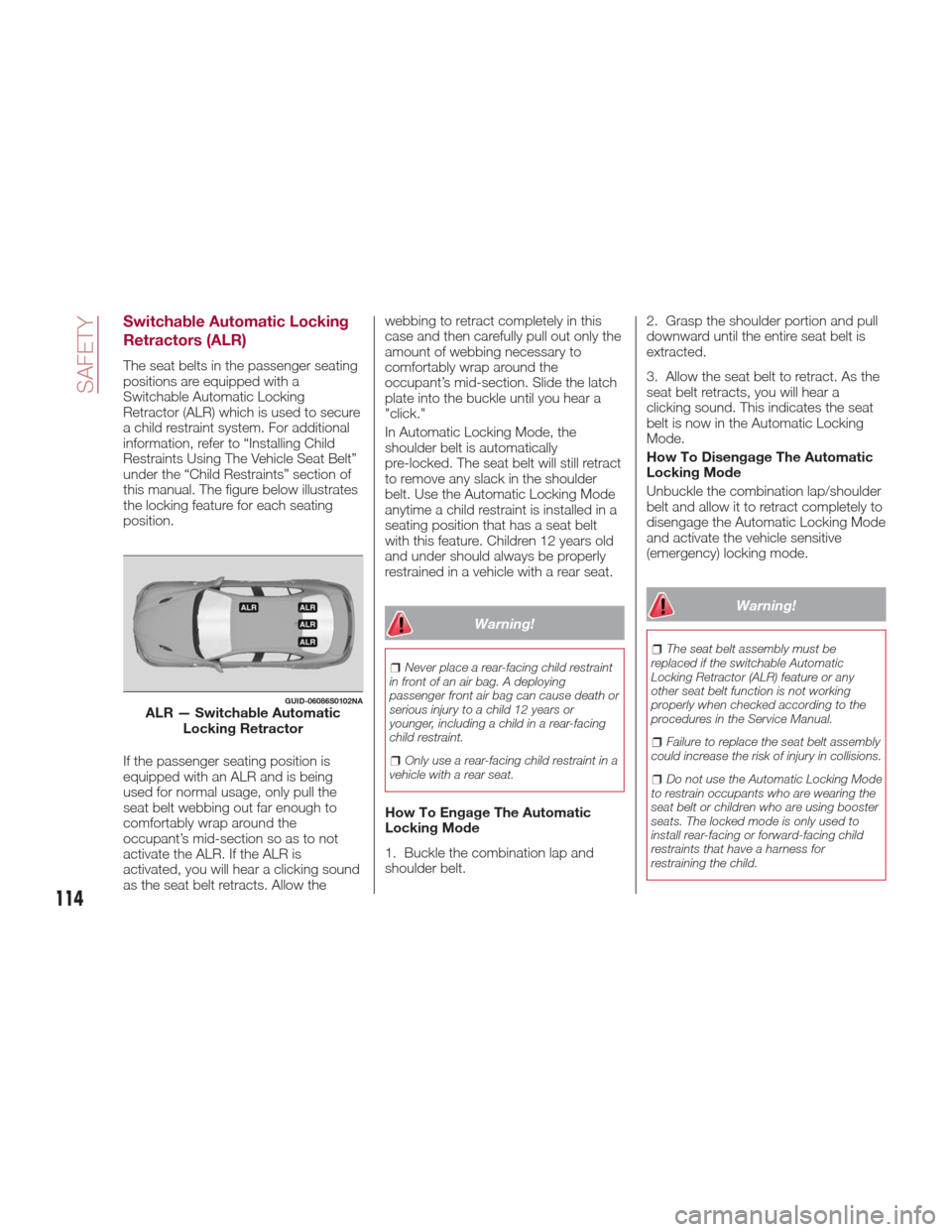
The seat belts in the passenger seating
positions are equipped with a
Switchable Automatic Locking
Retractor (ALR) which is used to secure
a child restraint system. For additional
information, refer to “Installing Child
Restraints Using The Vehicle Seat Belt”
under the “Child Restraints” section of
this manual. The figure below illustrates
the locking feature for each seating
position.
If the passenger seating position is
equipped with an ALR and is being
used for normal usage, only pull the
seat belt webbing out far enough to
comfortably wrap around the
occupant’s mid-section so as to not
activate the ALR. If the ALR is
activated, you will hear a clicking sound
as the seat belt retracts. Allow thewebbing to retract completely in this
case and then carefully pull out only the
amount of webbing necessary to
comfortably wrap around the
occupant’s mid-section. Slide the latch
plate into the buckle until you hear a
"click."
In Automatic Locking Mode, the
shoulder belt is automatically
pre-locked. The seat belt will still retract
to remove any slack in the shoulder
belt. Use the Automatic Locking Mode
anytime a child restraint is installed in a
seating position that has a seat belt
with this feature. Children 12 years old
and under should always be properly
restrained in a vehicle with a rear seat.
Warning!
Never place a rear-facing child restraint
in front of an air bag. A deploying
passenger front air bag can cause death or
serious injury to a child 12 years or
younger, including a child in a rear-facing
child restraint.
Only use a rear-facing child restraint in a
vehicle with a rear seat.
How To Engage The Automatic
Locking Mode
1. Buckle the combination lap and
shoulder belt. 2. Grasp the shoulder portion and pull
downward until the entire seat belt is
extracted.
3. Allow the seat belt to retract. As the
seat belt retracts, you will hear a
clicking sound. This indicates the seat
belt is now in the Automatic Locking
Mode.
How To Disengage The Automatic
Locking Mode
Unbuckle the combination lap/shoulder
belt and allow it to retract completely to
disengage the Automatic Locking Mode
and activate the vehicle sensitive
(emergency) locking mode.
Warning!
The seat belt assembly must be
replaced if the switchable Automatic
Locking Retractor (ALR) feature or any
other seat belt function is not working
properly when checked according to the
procedures in the Service Manual.
Failure to replace the seat belt assembly
could increase the risk of injury in collisions.
Do not use the Automatic Locking Mode
to restrain occupants who are wearing the
seat belt or children who are using booster
seats. The locked mode is only used to
install rear-facing or forward-facing child
restraints that have a harness for
restraining the child.
GUID-06086S0102NAALR — Switchable Automatic Locking Retractor
114
SAFETY
Page 124 of 268
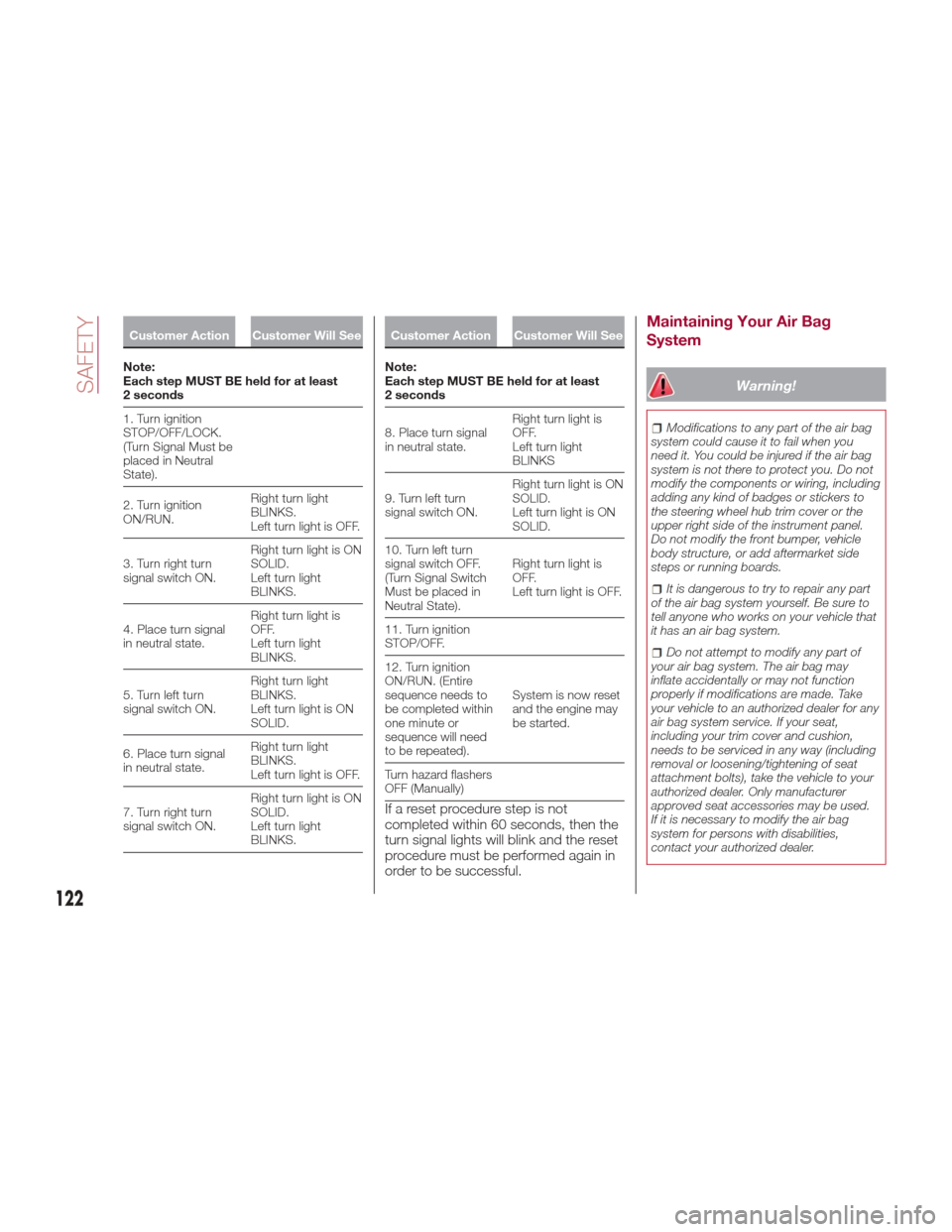
Customer Action Customer Will See
Note:
Each
step MUST BE held for at least
2 seconds
1. Turn ignition
STOP/OFF/LOCK.
(Turn Signal Must be
placed in Neutral
State).
2. Turn ignition
ON/RUN. Right turn light
BLINKS.
Left turn light is OFF.
3. Turn right turn
signal switch ON. Right turn light is ON
SOLID.
Left turn light
BLINKS.
4. Place turn signal
in neutral state. Right turn light is
OFF.
Left turn light
BLINKS.
5. Turn left turn
signal switch ON. Right turn light
BLINKS.
Left turn light is ON
SOLID.
6. Place turn signal
in neutral state. Right turn light
BLINKS.
Left turn light is OFF.
7. Turn right turn
signal switch ON. Right turn light is ON
SOLID.
Left turn light
BLINKS.
Customer Action Customer Will See
Note:
Each
step MUST BE held for at least
2 seconds
8. Place turn signal
in neutral state. Right turn light is
OFF.
Left turn light
BLINKS
9. Turn left turn
signal switch ON. Right turn light is ON
SOLID.
Left turn light is ON
SOLID.
10. Turn left turn
signal switch OFF.
(Turn Signal Switch
Must be placed in
Neutral State). Right turn light is
OFF.
Left turn light is OFF.
11. Turn ignition
STOP/OFF.
12. Turn ignition
ON/RUN. (Entire
sequence needs to
be completed within
one minute or
sequence will need
to be repeated). System is now reset
and the engine may
be started.
Turn hazard flashers
OFF (Manually)
If a reset procedure step is not
completed within 60 seconds, then the
turn signal lights will blink and the reset
procedure must be performed again in
order to be successful.
Maintaining Your Air Bag
System
Warning!
Modifications to any part of the air bag
system could cause it to fail when you
need it. You could be injured if the air bag
system is not there to protect you. Do not
modify the components or wiring, including
adding any kind of badges or stickers to
the steering wheel hub trim cover or the
upper right side of the instrument panel.
Do not modify the front bumper, vehicle
body structure, or add aftermarket side
steps or running boards.
It is dangerous to try to repair any part
of the air bag system yourself. Be sure to
tell anyone who works on your vehicle that
it has an air bag system.
Do not attempt to modify any part of
your air bag system. The air bag may
inflate accidentally or may not function
properly if modifications are made. Take
your vehicle to an authorized dealer for any
air bag system service. If your seat,
including your trim cover and cushion,
needs to be serviced in any way (including
removal or loosening/tightening of seat
attachment bolts), take the vehicle to your
authorized dealer. Only manufacturer
approved seat accessories may be used.
If it is necessary to modify the air bag
system for persons with disabilities,
contact your authorized dealer.
122
SAFETY
Page 160 of 268

While the accelerator pedal is pressed,
the system will not be able to control
the distance between the vehicle and
the one ahead. In this case, the speed
will be determined only by the position
of the accelerator pedal.
The system will return to normal
operation as soon as the accelerator
pedal is released.
The systemcannotbe set:
When pressing the brake pedal.
When the brakes are overheated.
When the electric park brake has
been operated.
When either P (PARK), R (REVERSE)
or N (NEUTRAL) is engaged.
When the engine rpm is above a
maximum threshold.
When the vehicle speed is not within
the operational speed range.
When the ESC (or ABS or other
stability control systems) are operating
or have just operated.
When the ESC system is off.
When the Forward Collision Warning
Plus system (if equipped) is braking
automatically.
In the event of system failure.
When the engine is off.
In case of obstruction of the radar
sensor (in this case the bumper area
where it is located must be cleaned).
If the system is set, the conditions
described above also cause a
cancellation or deactivation of the
system. These situations may vary
according to the conditions.
Note:
The system will not be deactivated
when speeds higher than those set are
reached by pressing the accelerator
pedal above 110 mph (180 km/h). In
these situations, the system may not
work correctly and it is recommended
to deactivate it.
Changing Speed
Increasing speed
Once the system has been activated,
you can increase the speed by lifting
the SET switch. Each time it is
operated, the speed increases by
1 mph.
By holding the button up, the set speed
will increase in increments of five mph
until the button is released. Then, the
new speed will be set.
Decreasing speed
Once the system has been activated,
you can decrease the speed by
lowering the SET switch. Each time it is
operated, the speed decreases by
1 mph. By holding the button down, the set
speed will decrease in increments of
five mph until the button is released.
Then, the new speed will be set.
Note:
Moving the SET switch allows you
to adjust the speed according to the
selected unit of measurement ("US" or
"metric") set on the Connect system
(see dedicated supplement).
When the unit of measurement is
set to metric, holding the SET switch
the speed will change in 10 km/h
increments.
By keeping the accelerator pedal
depressed, the vehicle can continue to
accelerate beyond the set speed. In this
case, use the SET switch to set the
speed to the vehicle’s current speed.
When you push the SET button to
reduce the speed, the braking system
intervenes automatically if the engine
brake does not slow the vehicle down
sufficiently to reach the set speed. The
device holds the set speed uphill and
downhill; however a slight variation is
entirely normal, particularly on slight
inclines.
The transmission could change to a
lower gear when driving downhill, or
when accelerating. This is normal and
necessary to maintain the set speed.
The system will disable while driving
if the brakes overheat.
158
STARTING AND OPERATING
Page 166 of 268
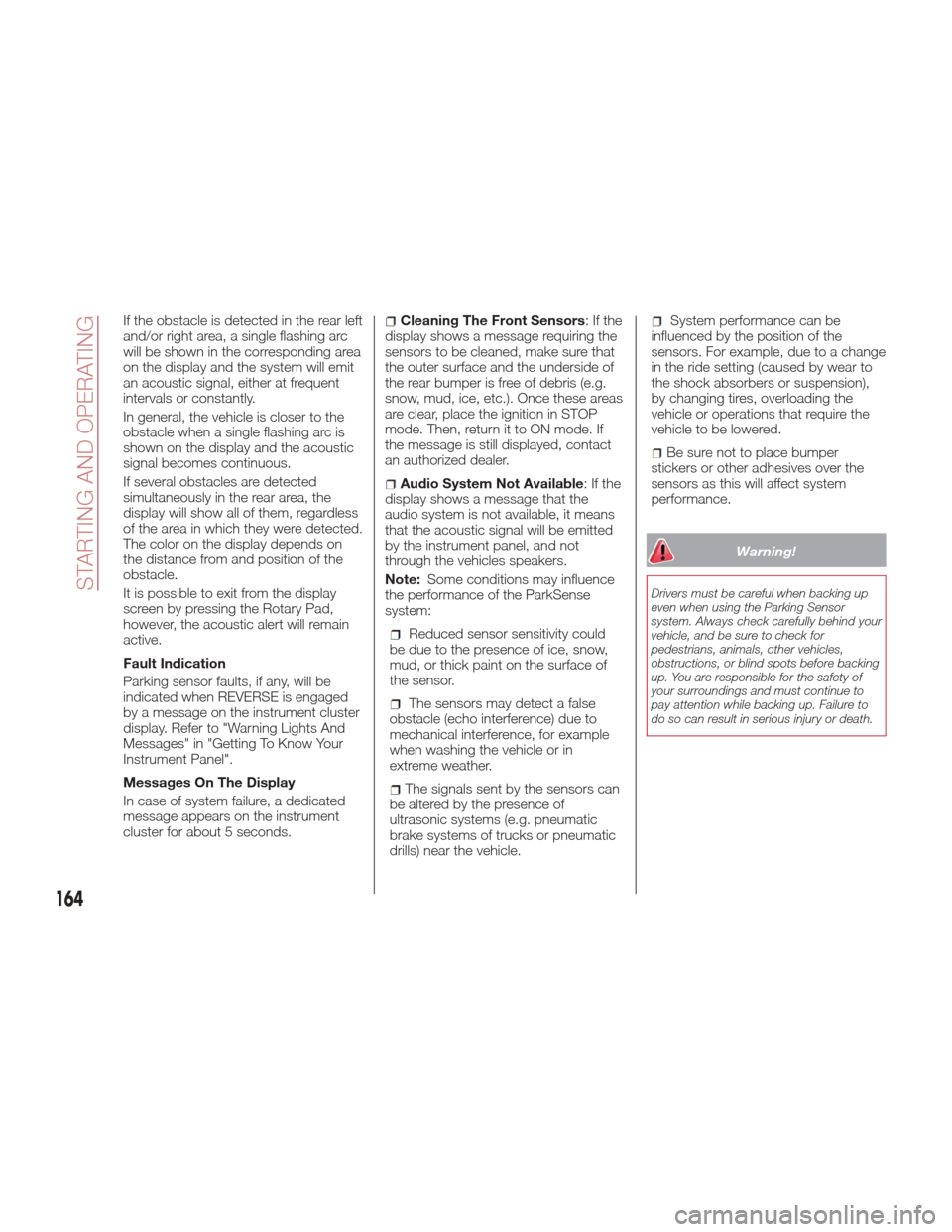
If the obstacle is detected in the rear left
and/or right area, a single flashing arc
will be shown in the corresponding area
on the display and the system will emit
an acoustic signal, either at frequent
intervals or constantly.
In general, the vehicle is closer to the
obstacle when a single flashing arc is
shown on the display and the acoustic
signal becomes continuous.
If several obstacles are detected
simultaneously in the rear area, the
display will show all of them, regardless
of the area in which they were detected.
The color on the display depends on
the distance from and position of the
obstacle.
It is possible to exit from the display
screen by pressing the Rotary Pad,
however, the acoustic alert will remain
active.
Fault Indication
Parking sensor faults, if any, will be
indicated when REVERSE is engaged
by a message on the instrument cluster
display. Refer to "Warning Lights And
Messages" in "Getting To Know Your
Instrument Panel".
Messages On The Display
In case of system failure, a dedicated
message appears on the instrument
cluster for about 5 seconds.Cleaning The Front Sensors:Ifthe
display shows a message requiring the
sensors to be cleaned, make sure that
the outer surface and the underside of
the rear bumper is free of debris (e.g.
snow, mud, ice, etc.). Once these areas
are clear, place the ignition in STOP
mode. Then, return it to ON mode. If
the message is still displayed, contact
an authorized dealer.
Audio System Not Available :Ifthe
display shows a message that the
audio system is not available, it means
that the acoustic signal will be emitted
by the instrument panel, and not
through the vehicles speakers.
Note: Some conditions may influence
the performance of the ParkSense
system:
Reduced sensor sensitivity could
be due to the presence of ice, snow,
mud, or thick paint on the surface of
the sensor.
The sensors may detect a false
obstacle (echo interference) due to
mechanical interference, for example
when washing the vehicle or in
extreme weather.
The signals sent by the sensors can
be altered by the presence of
ultrasonic systems (e.g. pneumatic
brake systems of trucks or pneumatic
drills) near the vehicle.
System performance can be
influenced by the position of the
sensors. For example, due to a change
in the ride setting (caused by wear to
the shock absorbers or suspension),
by changing tires, overloading the
vehicle or operations that require the
vehicle to be lowered.
Be sure not to place bumper
stickers or other adhesives over the
sensors as this will affect system
performance.
Warning!
Drivers must be careful when backing up
even when using the Parking Sensor
system. Always check carefully behind your
vehicle, and be sure to check for
pedestrians, animals, other vehicles,
obstructions, or blind spots before backing
up. You are responsible for the safety of
your surroundings and must continue to
pay attention while backing up. Failure to
do so can result in serious injury or death.
164
STARTING AND OPERATING
Page 169 of 268
System performance can be
influenced by the position of the
sensors. For example, due to a change
in the ride setting (caused by wear to
the shock absorbers or suspension),
by changing tires, overloading the
vehicle or operations that require the
vehicle to be lowered.
Be sure not to place bumper
stickers or other adhesives over the
sensors as this will affect system
performance.
Warning!
Drivers must be careful when backing up
even when using the Parking Sensor
system. Always check carefully behind your
vehicle, and be sure to check for
pedestrians, animals, other vehicles,
obstructions, or blind spots before backing
up. You are responsible for the safety of
your surroundings and must continue to
pay attention while backing up. Failure to
do so can result in serious injury or death.
Caution!
The Parking Sensor system is only a
parking aid and it is unable to recognize
every obstacle, including small obstacles.
Parking curbs might be temporarily
detected or not detected at all. Obstacles
located above or below the sensors will not
be detected when they are in close
proximity
The vehicle must be driven slowly when
using the Parking Sensor system in order
to be able to stop in time when an obstacle
is detected. It is recommended that the
driver looks over his/her shoulder when
using the Parking Sensor system.
LANE DEPARTURE
WARNING (LDW)
SYSTEM
Description
The Lane Departure Warning system
uses a forward looking camera located
on the windshield to detect lane
markings and measure vehicle position
within the lane boundaries.
When one or both lane limits are
detected and the vehicle passes over
one without the an activated turn signal,
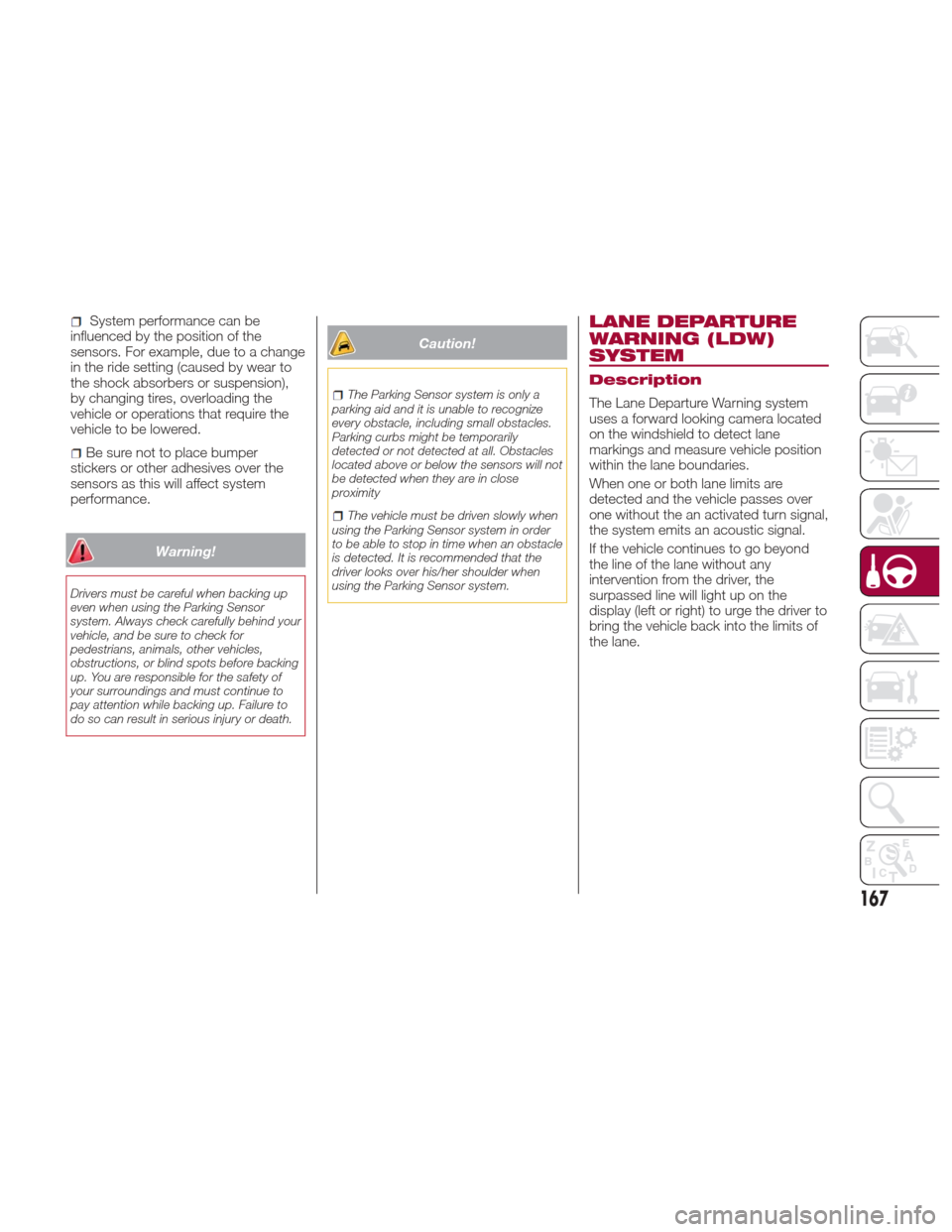
the system emits an acoustic signal.
If the vehicle continues to go beyond
the line of the lane without any
intervention from the driver, the
surpassed line will light up on the
display (left or right) to urge the driver to
bring the vehicle back into the limits of
the lane.
167