Page 68 of 297
2. From the passenger side with the door open, movethe two side locking handles towards each other and
lift the top from the retainers.
3. Roll up the soft top to the center of the vehicle, repeat the procedure on the drivers side of the vehicle. 4. Remove the soft top with both sides rolled up and
store it in the storage bag that is provided.
Installing The Soft Top
To install the soft top, proceed as follows:
1. With the doors open take the soft top and place it incenter of the vehicle.
Side Locking Handles
Soft Top Removal
66 UNDERSTANDING THE FEATURES OF YOUR VEHICLE
Page 82 of 297
Interior Light
The interior light is located in the headliner in between
the sun visors. The interior light can be set to three
different positions (off/left position, center position,
on/right position).
Using the interior light lens, push the lens to the right
from its center position and the lights are always on.
Push the lens to the left from its center position and the
lights are always off. Leave the lens in the center
position, and the light is turned on and off when the
doors are opened or closed.
CAUTION!
Before getting out of the vehicle be sure that the
Overhead Dome Lamp is in the center position or
that the lights are off to avoid draining the battery.
Interior Light Timing (Center Position)
There are four different modes of operation that can be
activated in this position:
•When one door is opened a three minute timer is
activated.
• When the key is removed from the ignition (within
two minutes of the ignition being turned off), a 10
second timer is activated.
• When the doors are unlocked with the key fob a 10
second timer is activated.
Interior Light (Off Position Shown)
80 UNDERSTANDING THE FEATURES OF YOUR VEHICLE
Page 83 of 297

•When the doors are locked with the key fob the lights
will turn off.
WINDSHIELD WIPERS AND WASHERS
The windshield wiper/washer controls are located on
the windshield wiper/washer lever on the right side of
the steering column. The front wipers are operated by
rotating a switch, located on the end of the lever.
Intermittent Wiper System
Use the intermittent wiper when weather conditions
make a single wiping cycle with a variable pause
between cycles. Rotate the end of the multifunction
lever to the first detent position. There are four possible
delay intervals that depend on the vehicle speed.
Windshield Wiper Operation
Rotate the end of the lever upward, to the first detent
past the intermittent settings for low-speed wiper op-
eration. Rotate the end of the lever upward to the
second detent past the intermittent settings for high-
speed wiper operation.
Mist
Use the mist feature when weather conditions make
occasional usage of the wipers necessary. Push the lever
upward to the mist position and release for a single
wiping cycle.
NOTE: The mist feature does not activate the washer
pump; therefore, no washer fluid will be sprayed on the
windshield. The wash function must be used in order to
spray the windshield with washer fluid.
Windshield Wiper/Washer Lever
3
UNDERSTANDING THE FEATURES OF YOUR VEHICLE 81
Page 98 of 297
INSTRUMENT PANEL FEATURES
1 — Climate Control Air Outlets6 — Switch Bank (A/C/Door Lock Switch/Door Mirror Demist-
ing)
2 — Exterior Light Lever 7 — Climate Controls
3 — Instrument Cluster 8 — Driver Air Bag
4 — Washer/Wiper Lever 9 — Instrument Cluster Display Control Buttons
5 — Passenger Air Bag 96 UNDERSTANDING YOUR INSTRUMENT PANEL
Page 118 of 297
INSTRUMENT CLUSTER DISPLAY
Your vehicle is equipped with an Instrument Cluster
Display, which offers useful information to the driver.
With the ignition in the STOP (OFF/LOCK) position
(and the key removed, for vehicles with mechanical
key), opening/closing of a door will activate the display
for viewing, and display the total miles or kilometers in
the odometer. Your Instrument Cluster Display is de-
signed to display important information about your
vehicle’s systems and features. Using a driver interac-
tive display located on the instrument panel, your
Instrument Cluster Display can show you how systems
are working and give you warnings when they aren’t.
The steering wheel mounted controls allow you to scroll
through and enter the main menus and submenus. You
can access the specific information you want and make
selections and adjustments.
The Instrument Cluster Display features a driver-
interactive display that is located in the instrument cluster.
The Instrument Cluster Display consists of the following:
•Digital Speedometer
• Vehicle Info
• Fuel Economy Info
• Trip Info
• Screen Setup
• Vehicle Settings
Instrument Cluster Display
116 UNDERSTANDING YOUR INSTRUMENT PANEL
Page 123 of 297

•When accessing the “Mode” submenu, briefly push
the SET/BACK button. The previously set display
format will flash on the display.
• Push and release the UP
orDOWNarrow
button to select “24h” or “12h.”
When you have selected the required settings, briefly
push the SET/BACK button to go back to the Time,
Mode submenu screen, or push and hold the SET/
BACK button (approximately one second) to go back to
the main screen without storing the settings.
Set Date
This function may be used to set the date (day - month
- year).
To change the date, proceed as follows:
1. Briefly push the SET/BACKbutton and “year” will
flash on the display.
2. Push and release the UP
orDOWNarrow
button for setting.
3. Briefly push the SET/BACKbutton and “month”
will flash on the display. 4. Push and release the
UP
orDOWNarrow
button for setting.
5. Briefly push the SET/BACKbutton and “day” will
flash on the display.
6. Push and release the UP
orDOWNbutton
for setting.
NOTE: The setting will increase or decrease by one
unit each time the UP
orDOWNarrow button
is pushed. Push and hold the UP
orDOWN
arrow button to increase/decrease the setting
rapidly. Save the setting by briefly pushing the
button when you approach the required setting.
• Briefly push the SET/BACKbutton to go back to the
menu screen, or push and hold the SET/BACK
button (approximately one second) to go back to the
main screen without storing the settings.
Autoclose
With this function active, the doors will automatically
lock at when the vehicle’s speed exceeds 12 MPH
(20 km/h).
4
UNDERSTANDING YOUR INSTRUMENT PANEL 121
Page 137 of 297
NOTE:The internal air recirculation system makes it
possible to reach the required heating or ventilation
conditions more quickly. Do not use the internal air
recirculation function on rainy/cold days to avoid the
possibility of the windows misting.
Climate Control
Proceed as follows:
1. Rotate the Temperature Control to the blue section.
2. Turn the Blower Control to 1 (1st fan speed). For rapid cooling, turn Blower Control to 4 (maximum
fan speed).
3. Move the Recirculation Control to
.
4. Turn the Mode Control to.
5. Press the A/C button.
Cooling Adjustment
Proceed as follows:
1. Move the Recirculation Control to
.
2. Rotate the Temperature Control towards the red section to increase the temperature. 3. Turn the Blower Control counterclockwise to reduce
the fan speed.
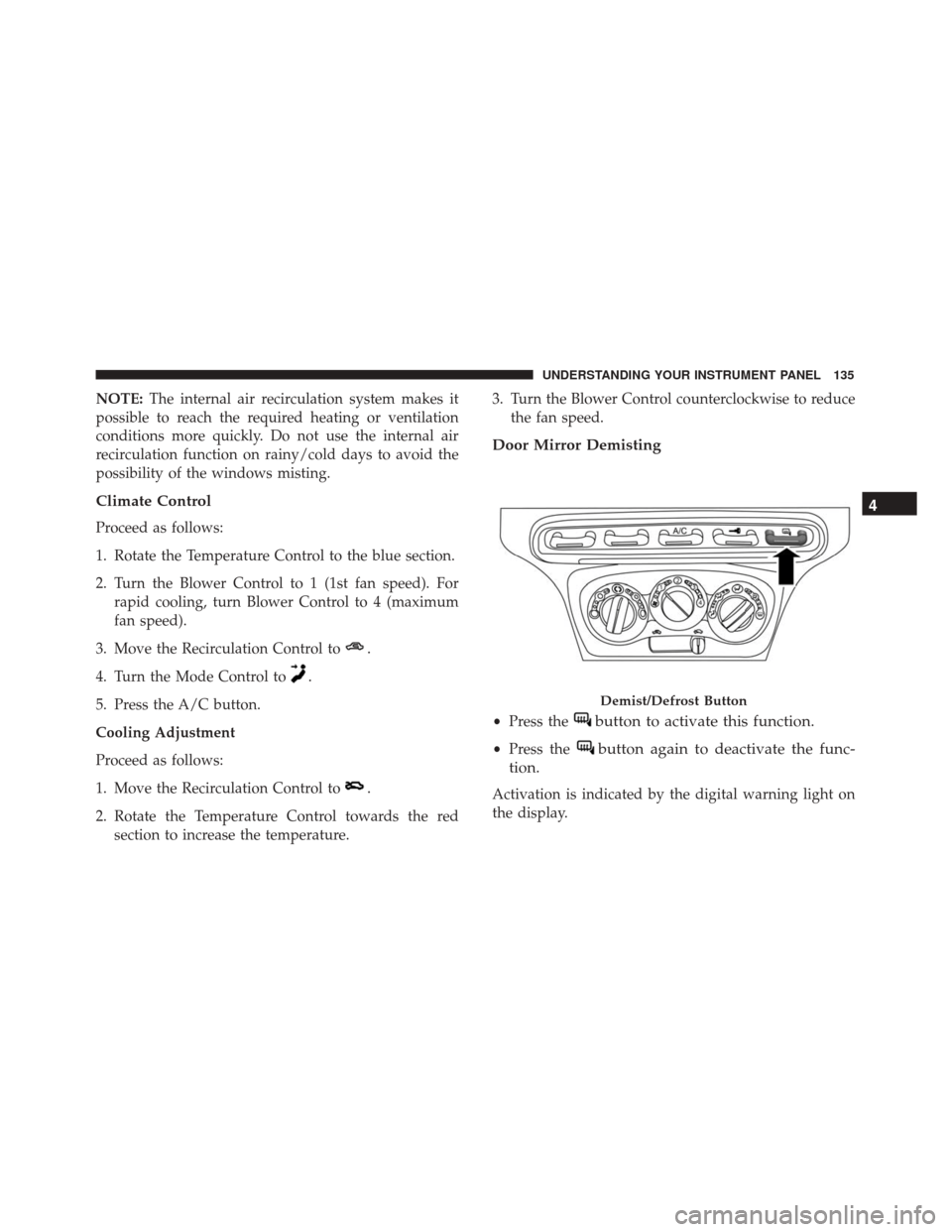
Door Mirror Demisting
•Press thebutton to activate this function.
•Press thebutton again to deactivate the func-
tion.
Activation is indicated by the digital warning light on
the display.
Demist/Defrost Button
4
UNDERSTANDING YOUR INSTRUMENT PANEL 135
Page 226 of 297

Refrigerant Recovery And Recycling HFO 1234yf
HFO 1234yf Air Conditioning Refrigerant is a hydro-
fluorocarbon (HFC) that is endorsed by the Environ-
mental Protection Agency and is an ozone-saving prod-
uct with a low GWP (Global Warming Potential).
However, the manufacturer recommends that air con-
ditioning service be performed by authorized dealer or
other service facilities using recovery and recycling
equipment.
NOTE:Use only manufacturer approved A/C system
PAG compressor oil, and refrigerants.
Body Lubrication
Locks and all body pivot points, including such items as
seat tracks, door hinge pivot points and rollers, liftgate,
tailgate, decklid, sliding doors and hood hinges, should
be lubricated periodically with a lithium based grease,
such as MOPAR Spray White Lube to assure quiet, easy
operation and to protect against rust and wear. Prior to
the application of any lubricant, the parts concerned
should be wiped clean to remove dust and grit; after
lubricating excess oil and grease should be removed. Particular attention should also be given to hood latch-
ing components to ensure proper function. When per-
forming other underhood services, the hood latch,
release mechanism and safety catch should be cleaned
and lubricated.
The external lock cylinders should be lubricated twice a
year, preferably in the Fall and Spring. Apply a small
amount of a high quality lubricant, such as MOPAR
Lock Cylinder Lubricant directly into the lock cylinder.
Wiper Blades
Clean the rubber edges of the wiper blades and the
windshield and rear window periodically with a
sponge or soft cloth and a mild nonabrasive cleaner.
This will remove accumulations of salt, waxes, or road
film, and help reduce streaking and smearing.
Operation of the wipers on dry glass for long periods
may cause deterioration of the wiper blades. Always
use washer fluid when using the wipers to remove salt
or dirt from a dry windshield or rear window.
Avoid using the wiper blades to remove frost or ice
from the windshield or rear window. Make sure that
they are not frozen to the glass before turning them on
224 MAINTAINING YOUR VEHICLE

