Page 232 of 553
231
uuAudio System Basic Operation uPlaying SiriusXM ® Radio
Features
To store a station:
1. Tune to the selected station.
2. Press the MENU button.
3. Rotate to select Save Preset, then press .
4. Rotate to select the preset number you want to store that station, then press
.
You can also store that station by the following procedure.
1. Tune to the selected station.
2. Rotate to select the preset number you want to store the station.
3. Press and hold for a few seconds.
1. Tune to the selected station.
2. Select More.
3. Select Save Preset .
4. Select the preset number you want to store that station.
You can also store that station by the following procedure.
1. Tune to the selected station.
2. Change the display to the preset screen.
3. Select and hold the preset number you want to store that station.
■Preset Memory1Playing SiriusXM ® Radio
You can store 12 SiriusXM ® stations into the preset
memory.
Interface Dial
On Demand Multi-Use DisplayTM
17 ACURA TLX-31TZ36200.book 231 ページ 2016年6月10日 金曜日 午後6時39分
Page 233 of 553
232
uuAudio System Basic Operation uPlaying a CD
Features
Playing a CD
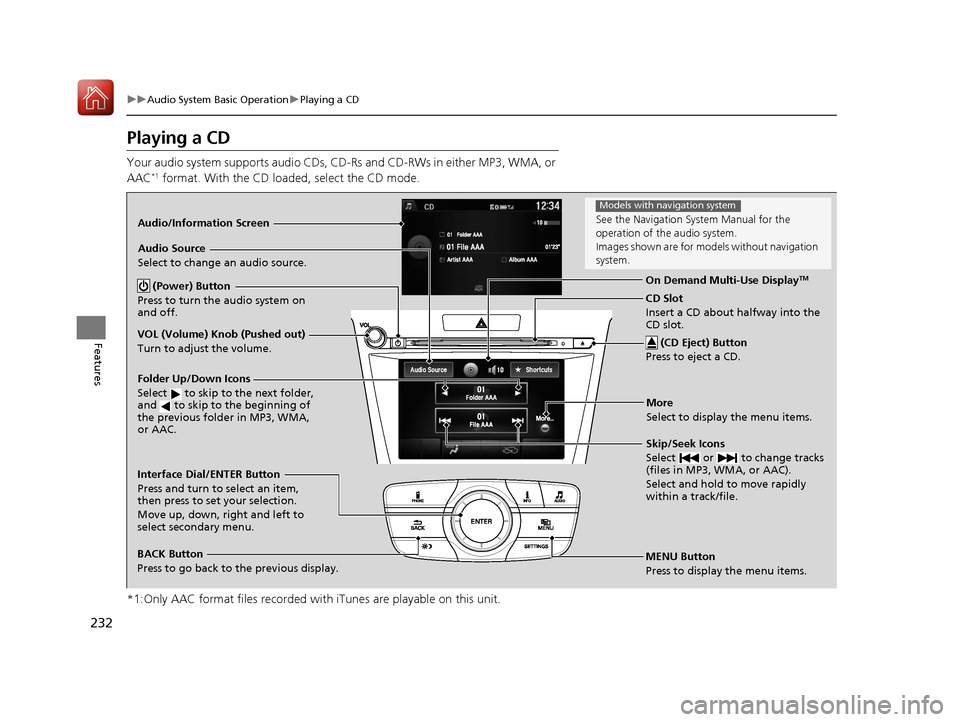
Your audio system supports audio CDs, CD-Rs and CD-RWs in either MP3, WMA, or
AAC*1 format. With the CD load ed, select the CD mode.
*1:Only AAC format files recorded with iTunes are playable on this unit.
Audio/Information Screen
MENU Button
Press to display the menu items. CD Slot
Insert a CD about halfway into the
CD slot. (CD Eject) Button
Press to eject a CD.
Folder Up/Down Icons
Select to skip to the next folder,
and to skip to the beginning of
the previous folder in MP3, WMA,
or AAC.
Audio Source
Select to change an audio source.
Skip/Seek Icons
Select or to change tracks
(files in MP3, WMA, or AAC).
Select and hold to move rapidly
within a track/file.
More
Select to display the menu items.
BACK Button
Press to go back to the previous display. Interface Dial/ENTER Button
Press and turn to select an item,
then press to set your selection.
Move up, down, right and left to
select secondary menu. On Demand Multi-Use Display
TM (Power) Button
Press to turn the audio system on
and off.
VOL (Volume) Knob (Pushed out)
Turn to adjust the volume.
See the Navigation Sy stem Manual for the
operation of the audio system.
Images shown are for mode ls without navigation
system.
Models with navigation system
17 ACURA TLX-31TZ36200.book 232 ページ 2016年6月10日 金曜日 午後6時39分
Page 234 of 553
Continued233
uuAudio System Basic Operation uPlaying a CD
Features
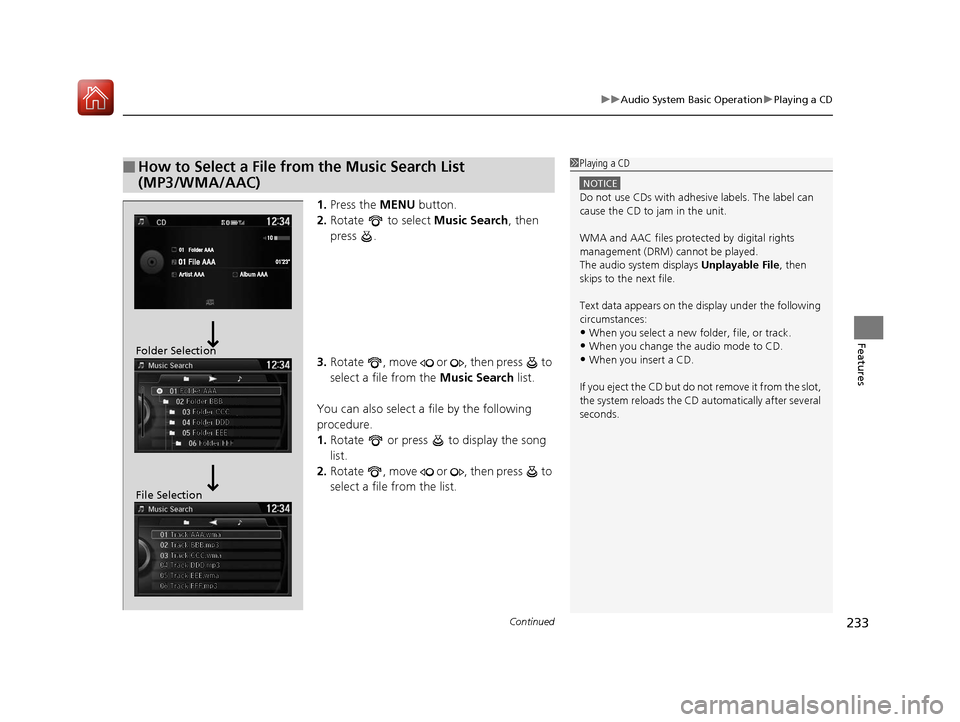
1. Press the MENU button.
2. Rotate to select Music Search, then
press .
3. Rotate , move or , then press to
select a file from the Music Search list.
You can also select a file by the following
procedure.
1. Rotate or press to display the song
list.
2. Rotate , move or , then press to
select a file from the list.
■How to Select a File from the Music Search List
(MP3/WMA/AAC)1Playing a CD
NOTICE
Do not use CDs with adhesive labels. The label can
cause the CD to jam in the unit.
WMA and AAC files protected by digital rights
management (DRM) cannot be played.
The audio system displays Unplayable File, then
skips to the next file.
Text data appears on the di splay under the following
circumstances:
•When you select a new folder, file, or track.
•When you change the audio mode to CD.
•When you insert a CD.
If you eject the CD but do not remove it from the slot,
the system reloads the CD automatically after several
seconds.Folder Selection
File Selection
17 ACURA TLX-31TZ36200.book 233 ページ 2016年6月10日 金曜日 午後6時39分
Page 235 of 553
uuAudio System Basic Operation uPlaying a CD
234
Features
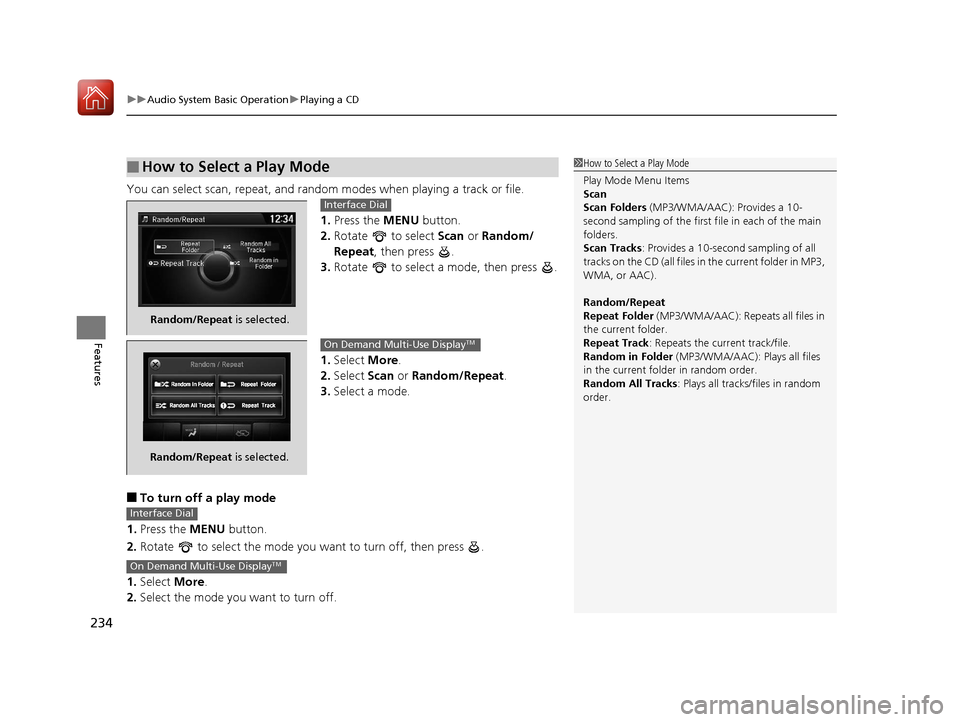
You can select scan, repeat, and random modes when playing a track or file.
1. Press the MENU button.
2. Rotate to select Scan or Random/
Repeat, then press .
3. Rotate to select a mode, then press .
1. Select More.
2. Select Scan or Random/Repeat .
3. Select a mode.
■To turn off a play mode
1. Press the MENU button.
2. Rotate to select the mode you want to turn off, then press .
1. Select More.
2. Select the mode you want to turn off.
■How to Select a Play Mode1How to Select a Play Mode
Play Mode Menu Items
Scan
Scan Folders (MP3/WMA/AAC): Provides a 10-
second sampling of the first f ile in each of the main
folders.
Scan Tracks: Provides a 10-second sampling of all
tracks on the CD (all files in the current folder in MP3,
WMA, or AAC).
Random/Repeat
Repeat Folder (MP3/WMA/AAC): Repeats all files in
the current folder.
Repeat Track: Repeats the current track/file.
Random in Folder (MP3/WMA/AAC): Plays all files
in the current folder in random order.
Random All Tracks : Plays all tracks/files in random
order.
Random/Repeat is selected.
Interface Dial
Random/Repeat is selected.
On Demand Multi-Use DisplayTM
Interface Dial
On Demand Multi-Use DisplayTM
17 ACURA TLX-31TZ36200.book 234 ページ 2016年6月10日 金曜日 午後6時39分
Page 236 of 553
235
uuAudio System Basic Operation uPlaying an iPod
Continued
Features
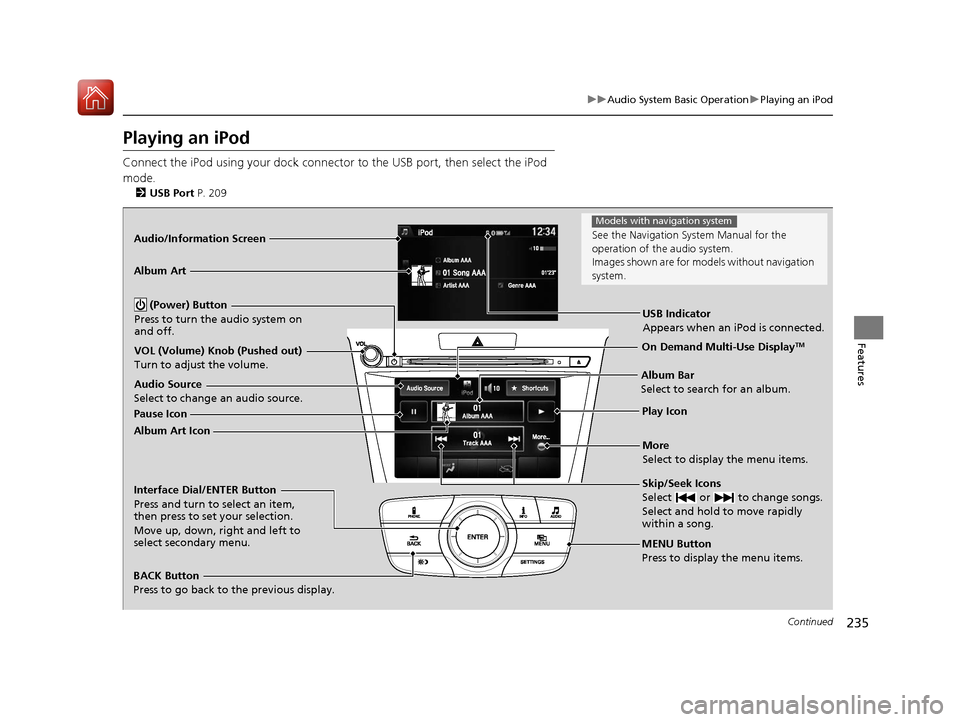
Playing an iPod
Connect the iPod using your dock connector to the USB port, then select the iPod
mode.
2 USB Port P. 209
Audio/Information Screen
MENU Button
Press to display the menu items.
Album Bar
Select to search for an album.
Audio Source
Select to change an audio source.
Skip/Seek Icons
Select or to change songs.
Select and hold to move rapidly
within a song.
More
Select to display the menu items.
(Power) Button
Press to turn the audio system on
and off.
BACK Button
Press to go back to the previous display.
Interface Dial/ENTER Button
Press and turn to select an item,
then press to set your selection.
Move up, down, right and left to
select secondary menu.
USB Indicator
Appears when an iPod is connected.
Album Art
On Demand Multi-Use DisplayTMVOL (Volume) Knob (Pushed out)
Turn to adjust the volume.
Album Art Icon Pause Icon
Play Icon
See the Navigation Sy
stem Manual for the
operation of the audio system.
Images shown are for mode ls without navigation
system.
Models with navigation system
17 ACURA TLX-31TZ36200.book 235 ページ 2016年6月10日 金曜日 午後6時39分
Page 237 of 553
uuAudio System Basic Operation uPlaying an iPod
236
Features1. Select the album bar.
u The image of the current album is displayed.
2. Select or icon to search for an album.
u When the album image you are looking for appears, select it to play.
■How to Select an Album1How to Select an Album
This function may not be available depending on
models or versions.
Select to go back to the previous screen.
X
Select an album
image.
Select the
album bar.
Album Bar
Album Image
17 ACURA TLX-31TZ36200.book 236 ページ 2016年6月10日 金曜日 午後6時39分
Page 238 of 553
Continued237
uuAudio System Basic Operation uPlaying an iPod
Features
1. Press the MENU button.
2. Rotate to select Music Search, then
press .
3. Rotate , move or , then press to
select a song from the Music Search list.
You can also select a song by the following
procedure.
1. Rotate or press to display the song
list.
2. Rotate , move or , then press to
select a song from the list.
■How to Select a Song from the Music Search List1How to Select a Song from the Music Search List
Available operating functi ons vary on models or
versions. Some functions ma y not be available on the
vehicle’s audio system.
If there is a problem, you may see an error message
on the audio/information screen. 2 iPod/USB Flash Drive P. 249
17 ACURA TLX-31TZ36200.book 237 ページ 2016年6月10日 金曜日 午後6時39分
Page 239 of 553
uuAudio System Basic Operation uPlaying an iPod
238
Features
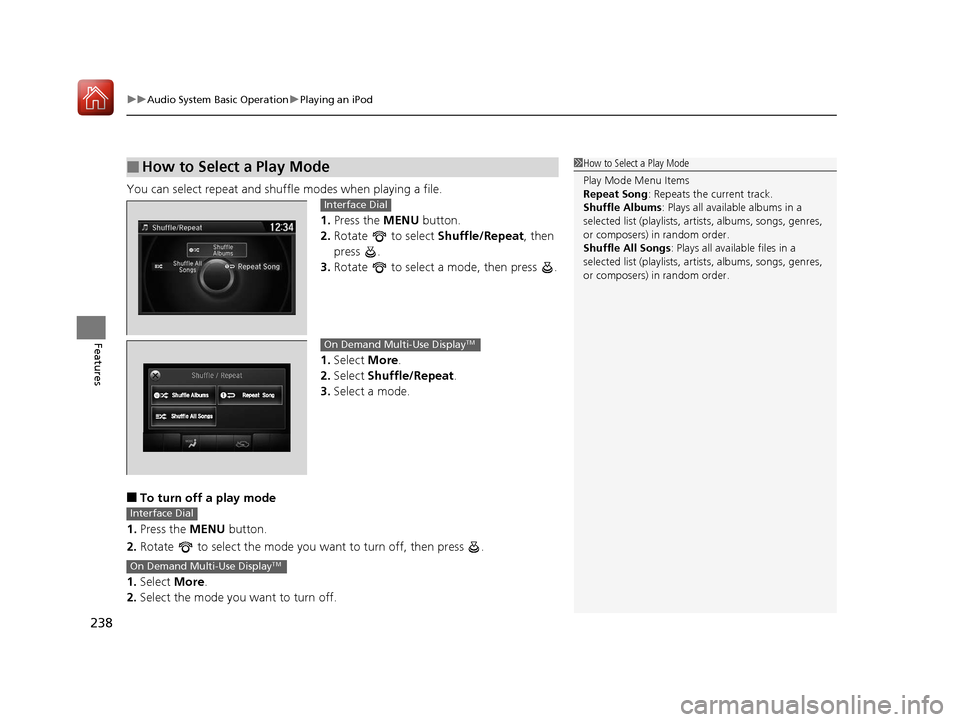
You can select repeat and shu ffle modes when playing a file.
1.Press the MENU button.
2. Rotate to select Shuffle/Repeat, then
press .
3. Rotate to select a mode, then press .
1. Select More.
2. Select Shuffle/Repeat .
3. Select a mode.
■To turn off a play mode
1. Press the MENU button.
2. Rotate to select the mode you want to turn off, then press .
1. Select More.
2. Select the mode you want to turn off.
■How to Select a Play Mode1How to Select a Play Mode
Play Mode Menu Items
Repeat Song : Repeats the current track.
Shuffle Albums : Plays all available albums in a
selected list (playlists, ar tists, albums, songs, genres,
or composers) in random order.
Shuffle All Songs : Plays all available files in a
selected list (playlists, ar tists, albums, songs, genres,
or composers) in random order.
Interface Dial
On Demand Multi-Use DisplayTM
Interface Dial
On Demand Multi-Use DisplayTM
17 ACURA TLX-31TZ36200.book 238 ページ 2016年6月10日 金曜日 午後6時39分

