Page 176 of 357
175
uuAudio System uUSB Port
Audio
USB Port
Install the iPod or iPhone dock
connector or the USB flash drive to
the USB port.1 USB Port
•Do not leave the iPod or USB flash drive in the
vehicle. Direct sunlight and high temperatures may
damage it.
•Do not connect the iPod or USB flash drive using a
hub.
•Do not use a device such as a card reader or hard
disc drive, as the device or your files may be
damaged.
•We recommend backing up yo ur data before using
the device in your vehicle.
•Displayed messages may vary depending on the
device model and software version.
If the audio system does not recognize the iPod, try
reconnecting it a few times or reboot the device. To
reboot, follow the manufac turer’s instructions
provided with the iPod or visit www.apple.com/ipod.
16 ACURA RDX NAVI-31TX48300.book 175 ページ 2015年8月5日 水曜日 午後4時12分
Page 181 of 357
uuAudio Remote Controls uSteering Wheel Controls
180
Audio
FM/AM, SiriusXM ®
• Press to select the next preset radio station.
• Press to select the previous preset radio station.
• Press and hold to scan to the next strong station.
• Press and hold to scan to the previous strong station.
CD, HDD, iPod, USB flash drive, or Bluetooth® Audio
• Press to skip to the next song.
• Press to go back to the beginning of the current or previous song.
• Press and hold to go to the group up. ( Bluetooth® Audio only)
• Press and hold to go to the group down. ( Bluetooth® Audio only)
CD (MP3/WMA/AAC), HDD or USB flash drive
• Press and hold to skip to the next folder.
• Press and hold to go back to the previous folder.
Pandora ®
* or AhaTM
• Press to skip to the next song.
• Press to go back the previous song. (AhaTM only)
• Press and hold to select the next station.
• Press and hold to select the previous station.
■ CH Button1
CH Button
*: Pandora ® is available on U.S. models only.
16 ACURA RDX NAVI-31TX48300.book 180 ページ 2015年8月5日 水曜日 午後4時12分
Page 213 of 357
212
Audio
Playing Hard Disc Drive (HDD) Audio
The Hard Disc Drive (HDD) Audio function plays tracks from music CDs that have
been recorded onto the built-in HDD. You can arrange the tracks in playlists or play
the tracks using various search methods.
Selecting HDD Mode
1. Press the MENU button. (in AUDIO mode)
2. Rotate to select Change Source. Press .
3. Rotate to select HDD. Press to play tracks stored on the HDD.
u Title information is displayed if found in the Gracenote ® Album Info
(Gracenote® Media Database) stored on the HDD.
u The HDD has two types of playlists: orig inal playlists and user playlists. An
original playlist is auto matically created for each album when a music CD is
recorded. You can customize up to six user playlists provided on the HDD by
adding tracks from your original playlists.
1. Select Audio Source.
2. Select the HDD icon to play tracks stored on the HDD.
1Playing Hard Disc Drive (HDD) Audio
You can control the HDD audio using voice
commands. 2 HDD Commands P. 349
2 Song By Voice
TM (SBV) P. 231
Music tracks recorded on HDD cannot be recorded
onto CDs or other devices.
Tracks are recorded at four times the playback speed
using ultra-efficient compression technology;
therefore, sound quality ma y vary slightly from the
original.
If the HDD is ever replaced, all music data is lost and
cannot be recovered.
If there is a problem, you may see an error message
on the display. 2 Hard Disc Drive (HDD) Audio P. 325
Interface Dial
On Demand Multi-Use DisplayTM
16 ACURA RDX NAVI-31TX48300.book 212 ページ 2015年8月5日 水曜日 午後4時12分
Page 214 of 357
213
uuPlaying Hard Disc Drive (HDD) Audio uRecording a Music CD to HDD
Audio
Recording a Music CD to HDD
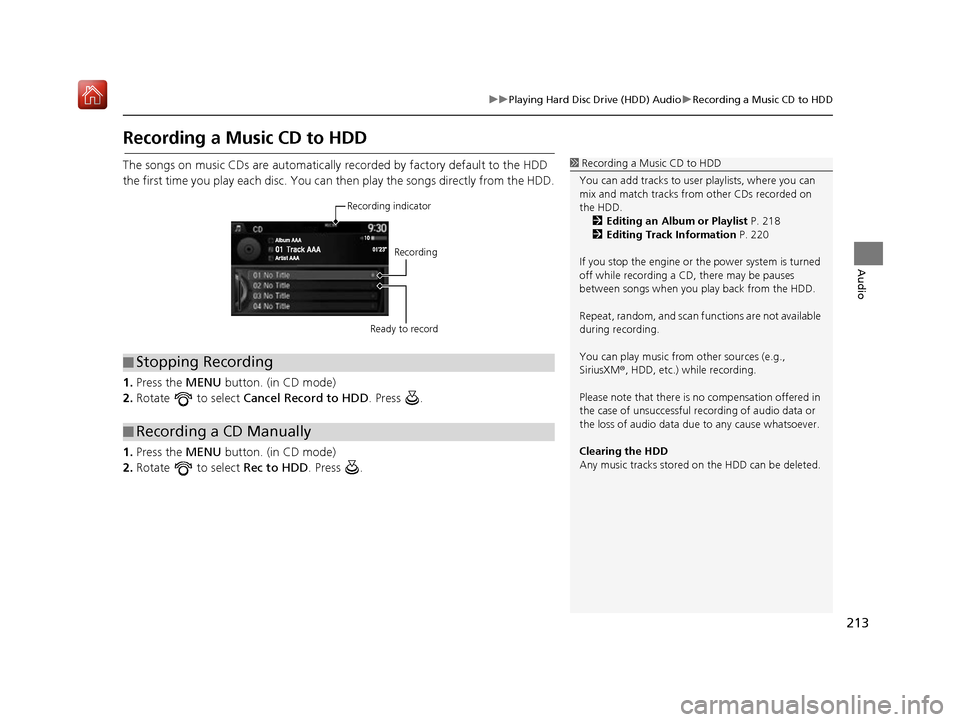
The songs on music CDs are automatically recorded by factory default to the HDD
the first time you play each disc. You ca n then play the songs directly from the HDD.
1. Press the MENU button. (in CD mode)
2. Rotate to select Cancel Record to HDD . Press .
1. Press the MENU button. (in CD mode)
2. Rotate to select Rec to HDD. Press .1Recording a Music CD to HDD
You can add tracks to user playlists, where you can
mix and match tracks from other CDs recorded on
the HDD. 2 Editing an Album or Playlist P. 218
2 Editing Track Information P. 220
If you stop the engine or th e power system is turned
off while recording a CD, there may be pauses
between songs when you play back from the HDD.
Repeat, random, and scan f unctions are not available
during recording.
You can play music from other sources (e.g.,
SiriusXM ®, HDD, etc.) while recording.
Please note that there is no compensation offered in
the case of unsuccessful re cording of audio data or
the loss of audio data due to any cause whatsoever.
Clearing the HDD
Any music tracks stored on the HDD can be deleted.
■ Stopping Recording
■Recording a CD Manually
Recording indicator
Recording
Ready to record
16 ACURA RDX NAVI-31TX48300.book 213 ページ 2015年8月5日 水曜日 午後4時12分
Page 216 of 357
215
uuPlaying Hard Disc Drive (HDD) Audio uAudio Menu
Continued
Audio
Audio Menu
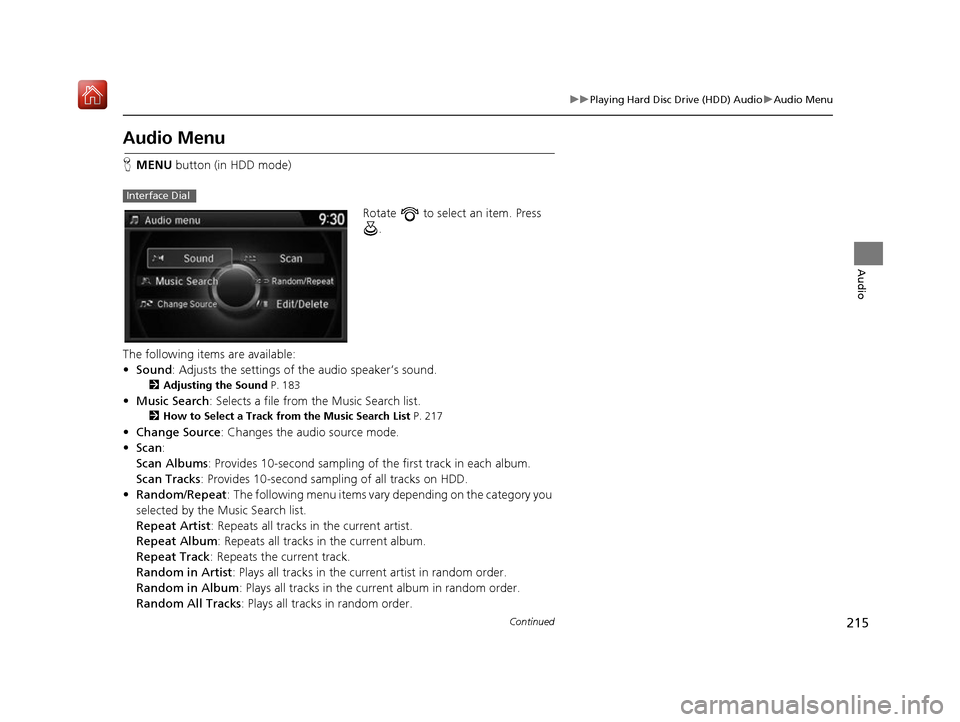
H MENU button (in HDD mode)
Rotate to select an item. Press .
The following items are available:
• Sound : Adjusts the settings of the audio speaker’s sound.
2Adjusting the Sound P. 183
•Music Search : Selects a file from the Music Search list.
2How to Select a Track from the Music Search List P. 217
•Change Source : Changes the audio source mode.
• Scan :
Scan Albums : Provides 10-second sampling of the first track in each album.
Scan Tracks : Provides 10-second sampling of all tracks on HDD.
• Random/Repeat : The following menu items vary depending on the category you
selected by the Music Search list.
Repeat Artist: Repeats all tracks in the current artist.
Repeat Album : Repeats all tracks in the current album.
Repeat Track : Repeats the current track.
Random in Artist : Plays all tracks in the current artist in random order.
Random in Album : Plays all tracks in the curr ent album in random order.
Random All Tracks : Plays all tracks in random order.
Interface Dial
16 ACURA RDX NAVI-31TX48300.book 215 ページ 2015年8月5日 水曜日 午後4時12分
Page 218 of 357
217
uuPlaying Hard Disc Drive (HDD) Audio uAudio Menu
Continued
Audio
H MENU button (in HDD mode) uMusic Search
1.Move or to select a search
category. Press .
2. Rotate to select a track from
the Music Search list. Press .
■How to Select a Track from the Music Search List
16 ACURA RDX NAVI-31TX48300.book 217 ページ 2015年8月5日 水曜日 午後4時12分
Page 219 of 357

uuPlaying Hard Disc Drive (HDD) Audio uAudio Menu
218
Audio
H MENU button (in HDD mode) uEdit/Delete
1.Rotate to select Albums or
Playlist . Press .
2. Rotate to select an album or
playlist that you want edit or
delete. Press .
u The pop-up menu appears on
the screen.
3. Rotate to select an item. Press
.
The following items are available:
• Edit Name: Enter a new name using the interface dial or the On Demand Multi-
Use Display
TM.
• Delete: Deletes the selected album or playlist.
• List Tracks : Change the track title, artist name, genre and composer. You can
also delete tracks.
■ Editing an Album or Playlist1
Editing an Album or Playlist
The maximum number of original playlists is 50 with
a maximum of 99 songs in each playlist.
Each album CD counts as an original playlist. Adding
a track from a user playlist into the same user playlist
will cause the track to appear twice in the playlist.
Deleting an album (original playlist) also deletes the
album tracks you have stor ed in any user playlists.
Deleting a user playlist or deleting all tracks from a
user playlist does not remove the playlist folder.
The folder retains the playlist name and artist
information.
16 ACURA RDX NAVI-31TX48300.book 218 ページ 2015年8月5日 水曜日 午後4時12分
Page 220 of 357
219
uuPlaying Hard Disc Drive (HDD) Audio uAudio Menu
Continued
Audio
H MENU button (in HDD mode) uEdit/Delete uPlaylists uCreate New
Playlist
1.Enter the playlist name using the
interface dial or the On Demand
Multi-Use Display
TM.
2. Select tracks from the music
search list.
■Creating a New Playlist
16 ACURA RDX NAVI-31TX48300.book 219 ページ 2015年8月5日 水曜日 午後4時12分


